Yes! You can use AI to fill out Irrevocable Stock, Bond, or Mutual Fund Power and Authorization to Remove All Stops

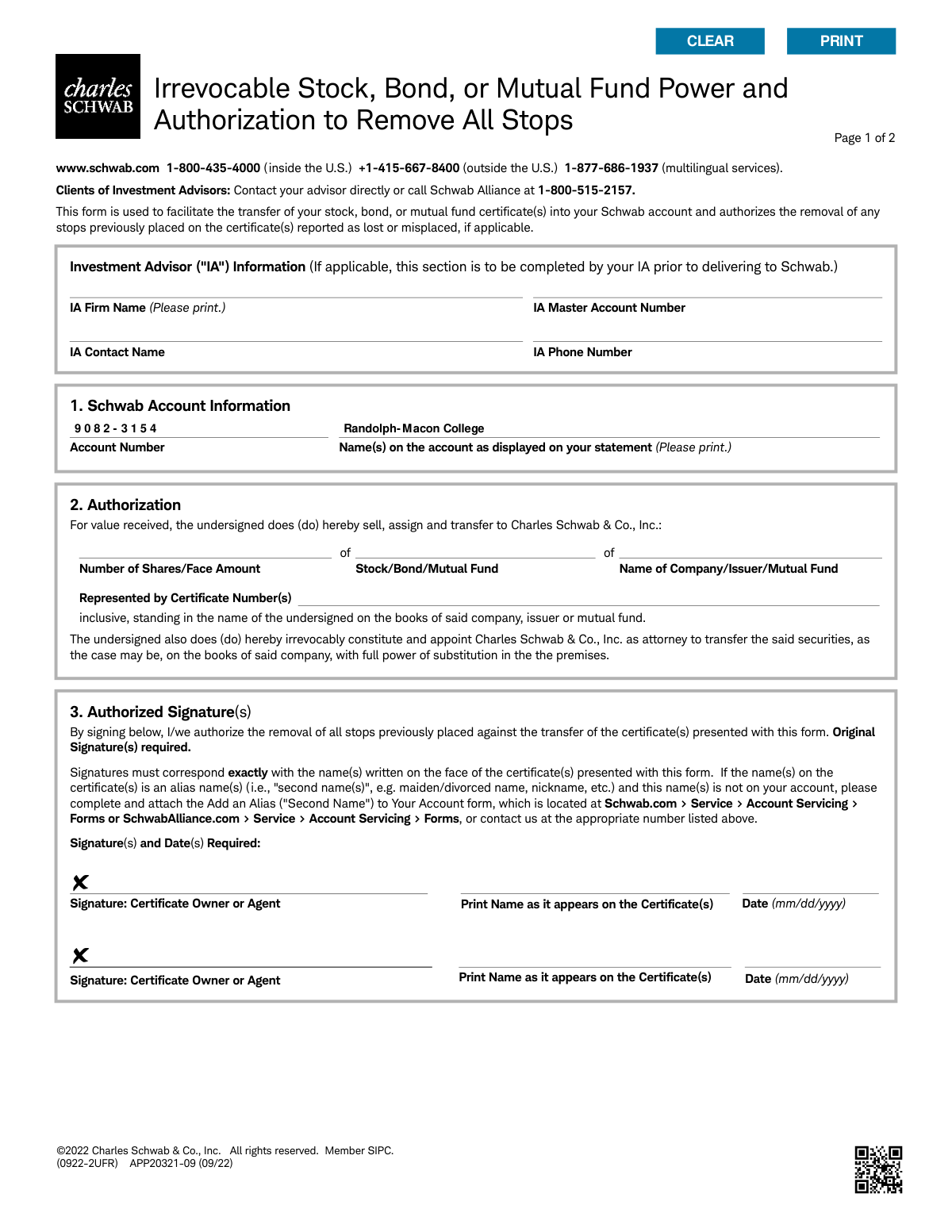
The Irrevocable Stock, Bond, or Mutual Fund Power and Authorization form is a legal document for Charles Schwab clients to grant the company authority to transfer securities into their Schwab account. It also authorizes the removal of any stops on certificates previously reported as lost, which is crucial for consolidating investments. Today, this form can be filled out quickly and accurately using AI-powered services like Instafill.ai, which can also convert non-fillable PDF versions into interactive fillable forms.
Our AI automatically handles information lookup, data retrieval, formatting, and form filling.
It takes less than a minute to fill out APP20321-09 using our AI form filling.
Securely upload your data. Information is encrypted in transit and deleted immediately after the form is filled out.

Form specifications

Form name: Irrevocable Stock, Bond, or Mutual Fund Power and Authorization to Remove All Stops
Number of pages: 1
Language: English
main-image

Instafill Demo: How to fill out PDF forms in seconds with AI

How to Fill Out APP20321-09 Online for Free in 2026

Are you looking to fill out a APP20321-09 form online quickly and accurately? Instafill.ai offers the #1 AI-powered PDF filling software of 2026, allowing you to complete your APP20321-09 form in just 37 seconds or less.
Follow these steps to fill out your APP20321-09 form online using Instafill.ai:
  1. 1 Navigate to Instafill.ai and upload the 'Irrevocable Stock, Bond, or Mutual Fund Power' form or select it from the template library.
  2. 2 Provide your Schwab account number and the name(s) exactly as they appear on your account statement.
  3. 3 Enter the details of the securities being transferred, including the number of shares, the name of the company/issuer, and the certificate numbers.
  4. 4 If an Investment Advisor is involved, ensure their information section is completed with the firm name and master account number.
  5. 5 Review all the information auto-filled by the AI for accuracy, ensuring it matches your account details and the physical certificates.
  6. 6 Sign and date the authorization section. The signature must exactly match the name printed on the security certificates.
  7. 7 Download the completed form and submit it to Charles Schwab according to the provided mail or branch return instructions.

Our AI-powered system ensures each field is filled out correctly, reducing errors and saving you time.

Why Choose Instafill.ai for Your Fillable APP20321-09 Form?

Speed

Complete your APP20321-09 in as little as 37 seconds.

Up-to-Date

Always use the latest 2026 APP20321-09 form version.

Cost-effective

No need to hire expensive lawyers.

Accuracy

Our AI performs 10 compliance checks to ensure your form is error-free.

Security

Your personal information is protected with bank-level encryption.

Frequently Asked Questions About Form APP20321-09

This form authorizes Charles Schwab to transfer ownership of physical stock, bond, or mutual fund certificates from your name into your Schwab account. It also allows Schwab to remove any transfer stops on certificates you might have previously reported as lost.

You need to complete this form if you hold physical stock, bond, or mutual fund certificates and wish to deposit them into your Charles Schwab account.

In this section, you must provide the number of shares or face amount, the name of the company or issuer, and the specific certificate number(s). This information can be found on the physical certificate you are transferring.

Your original, physical signature must exactly match the name as it is written on the face of the stock or bond certificate. Be sure to also print your name as it appears on the certificate and date your signature.

If the name on the certificate is an alias, such as a maiden name, you must also complete and attach the 'Add an Alias ('Second Name') to Your Account' form. This form is available on the Schwab website or by contacting customer service.

This grants Schwab permission to remove any transfer restrictions (stops) that were placed on a certificate, typically because it was previously reported as lost or misplaced. This is necessary to make the certificate transferable.

Yes, this form acts as a power of attorney and must accompany the physical certificate(s) to authorize their transfer. You should submit the completed form and the certificates together.

You can either bring the documents to your nearest Schwab branch or mail them to one of the addresses listed in Section 4 of the form. There are separate addresses for regular and overnight mail.

Irrevocable means that once you sign and submit this form, your instruction to transfer the securities to Charles Schwab & Co., Inc. cannot be canceled or reversed.

Yes, if you work with an Investment Advisor, they should complete the 'IA Information' section at the top of the form before you sign and submit it.

Processing times can vary depending on the security and transfer agent. For an estimated timeframe, it is best to contact Charles Schwab directly after you have submitted your documents.

Yes, services like Instafill.ai use AI to accurately auto-fill form fields with your information, which can save you time and help reduce errors.

You can use a service like Instafill.ai, which can convert flat, non-fillable PDFs into interactive forms that you can easily complete on your computer before printing.

Simply upload the PDF form to the Instafill.ai platform. The AI will identify the fields, allowing you to quickly provide your information and generate a completed form ready for printing and signing.

Compliance APP20321-09
Validation Checks by Instafill.ai

1
Schwab Account Number Validity
This check verifies that the Schwab Account Number provided in Section 1 exists and is active within the Schwab system. It is crucial for ensuring the assets are transferred to the correct destination account. A failed validation will halt the process, as the target account cannot be identified or may be incorrect.
2
Account Holder Name Match
This validation confirms that the name(s) printed in the 'Name(s) on the account' field in Section 1 exactly match the registered owner(s) of the specified Schwab account number. This prevents fraudulent or erroneous transfers to accounts not owned by the client. A mismatch will require correction or clarification before the transfer can proceed.
3
Mandatory Signature Presence
This check ensures that at least one signature field in Section 3 has been signed by a certificate owner or agent. A signature is legally required to authorize the transfer of securities and the removal of any stops. Forms submitted without a signature are invalid and will be rejected immediately.
4
Signature Date Format and Logic
This validation verifies that the date provided next to each signature is in a valid MM/DD/YYYY format, represents a real calendar date, and is not a future date. The date establishes when the authorization was granted and is a critical component of the legal document. An invalid, missing, or future date will cause the form to be rejected for correction.
5
Security Identification Completeness
This check ensures that all fields identifying the security in Section 2 ('Number of Shares/Face Amount', 'Name of Company/Issuer/Mutual Fund', and 'Certificate Number(s)') are filled out. Incomplete information makes it impossible to identify the specific asset to be transferred. The form will be returned to the client if any of these critical details are missing.
6
Positive Share or Face Amount
This validation ensures the 'Number of Shares/Face Amount' is a positive, non-zero number. A zero, negative, or non-numeric value is illogical for a security transfer and indicates a data entry error. The submission will be flagged for correction as it's impossible to transfer a non-positive quantity of assets.
7
Certificate Owner Name Consistency
This check compares the 'Print Name as it appears on the Certificate(s)' in Section 3 with the 'Name(s) on the account' in Section 1. The form explicitly states that an 'Add an Alias' form is needed if these names differ, such as due to a maiden name. A mismatch without an accompanying alias form will trigger a manual review or rejection to prevent unauthorized transfers.
8
Signature and Printed Name Correspondence
This validation confirms that the printed name under a signature line in Section 3 corresponds to the individual who signed. This is a crucial step to verify that the person signing is the person they claim to be, as named on the certificate. A discrepancy could indicate a potential forgery or error and will require further verification.
9
Certificate Number Presence
This check verifies that the 'Certificate Number(s)' field in Section 2 is not left blank. The certificate number is the unique identifier for the security and is absolutely essential for the transfer agent to locate and process the asset. A missing certificate number will result in an immediate rejection of the form.
10
Issuer Name Presence
This validation ensures the 'Name of Company/Issuer/Mutual Fund' field in Section 2 is completed. This information is necessary to identify the entity that issued the stock, bond, or mutual fund being transferred. Without the issuer's name, the security cannot be properly identified, and the transfer request will fail.
11
Conditional IA Information Completeness
This check is triggered if any field in the 'Investment Advisor (IA) Information' section is filled. It then verifies that all other fields within that section are also complete. This ensures that if an advisor is involved, Schwab has all the necessary information to coordinate with them, preventing processing delays caused by incomplete contact data.
12
Form Version Verification
This validation checks the form's revision code, such as '(0922-2UFR) APP20321-09 (09/22)', against the current required version. Financial forms are updated periodically to comply with new regulations or internal process changes. Submitting an outdated form can lead to legal non-compliance or processing failures, requiring the client to resubmit on the correct version.

Common Mistakes in Completing APP20321-09

Signature Does Not Match Certificate Name

The most common error is signing with a current legal name that differs from the name printed on the stock certificate, often due to a marriage or divorce. The form will be rejected because the signature must exactly match the registered owner's name on the certificate for the transfer to be legally valid. To avoid this, carefully examine the name on the physical certificate and sign exactly as it appears; if the name is an alias not on your Schwab account, you must also submit the 'Add an Alias' form as instructed.

Incorrect or Incomplete Certificate Details

Applicants often enter the wrong number of shares, misspell the issuer's full legal name, or provide an incorrect certificate number in Section 2. These errors happen due to misreading the physical certificate or making a data entry typo, causing the transfer agent to reject the transaction and leading to significant delays. Always double-check the share amount, full company name, and certificate number directly from the source document before submitting.

Forgetting Signatures of All Joint Owners

When a stock certificate is owned jointly by multiple people, a single signature is insufficient. Financial institutions require the signature of all registered owners to authorize the transfer of assets. Failing to secure all necessary signatures will result in an immediate rejection of the form, halting the transfer process until a correctly signed form is received. Ensure all individuals listed as owners on the certificate sign and date the form.

Mismatching Schwab Account Information

In Section 1, people may enter an incorrect account number or a name that does not exactly match their Schwab account statement, such as using a nickname or omitting a middle initial. This discrepancy can cause processing delays as Schwab's systems may fail to automatically match the form to the correct account. To prevent this, refer to a recent Schwab statement and copy the account title and number precisely as they appear.

Using a Digital or Copied Signature

The form instructions explicitly state 'Original Signature(s) required,' meaning a physical 'wet ink' signature. Applicants may mistakenly believe a digital signature or a signature on a photocopy is acceptable, especially since the PDF is not fillable. Submitting a form without a physical, handwritten signature will render it invalid for this type of legal transfer, causing it to be returned. The form must be printed and signed by hand.

Failing to Enclose the Physical Stock Certificate

This form is a 'Stock Power,' which legally authorizes the transfer; it is not the security itself. A critical error is sending this form to Schwab without also including the original, physical stock certificate(s) it corresponds to. Without the actual certificate, Schwab cannot complete the deposit into your account. Always ensure the physical certificate is securely enclosed with the completed and signed Stock Power form when mailing it.

Ignoring the 'Alias Name' Form Requirement

The form clearly instructs users to complete a separate 'Add an Alias to Your Account' form if the name on the certificate is not already associated with their Schwab account. Many people overlook this instruction, assuming their signature is sufficient. This will lead to rejection because Schwab cannot link the certificate's ownership to the account holder, forcing you to restart the process. Proactively file the necessary alias form to avoid this delay.

Using Abbreviations for the Issuer's Name

In Section 2, applicants may write a stock ticker symbol (e.g., 'CSCO') or a common abbreviation instead of the full, official name of the company (e.g., 'Cisco Systems, Inc.'). Transfer agents require the full legal name of the issuer as it appears on the certificate for verification. Using an abbreviation will likely result in a rejection, delaying the transfer. AI-powered tools like Instafill.ai can help prevent this by auto-completing official company names and validating data.

Leaving Critical Fields Blank

Applicants sometimes omit essential information such as the Schwab account number, the number of shares, or the certificate number, often because they are in a hurry or don't have the information handy. An incomplete form cannot be processed and will be returned, delaying the asset transfer. Since this is a non-fillable PDF, using a tool like Instafill.ai can convert it into a fillable version, making it easier to review and ensure all required fields are completed before printing.
Saved over 80 hours a year

“I was never sure if my IRS forms like W-9 were filled correctly. Now, I can complete the forms accurately without any external help.”

Kevin Martin Green

Your data stays secure with advanced protection from Instafill and our subprocessors

Robust compliance program

Transparent business model

You’re not the product. You always know where your data is and what it is processed for.

ISO 27001, HIPAA, and GDPR

Our subprocesses adhere to multiple compliance standards, including but not limited to ISO 27001, HIPAA, and GDPR.

Security & privacy by design

We consider security and privacy from the initial design phase of any new service or functionality. It’s not an afterthought, it’s built-in, including support for two-factor authentication (2FA) to further protect your account.

Fill out APP20321-09 with Instafill.ai

Worried about filling PDFs wrong? Instafill securely fills irrevocable-stock-bond-or-mutual-fund-power-and-authorization-to-remove-all-stops forms, ensuring each field is accurate.