Yes! You can use AI to fill out UTMA Beneficiary Designation (Uniform Transfers to Minor Act)

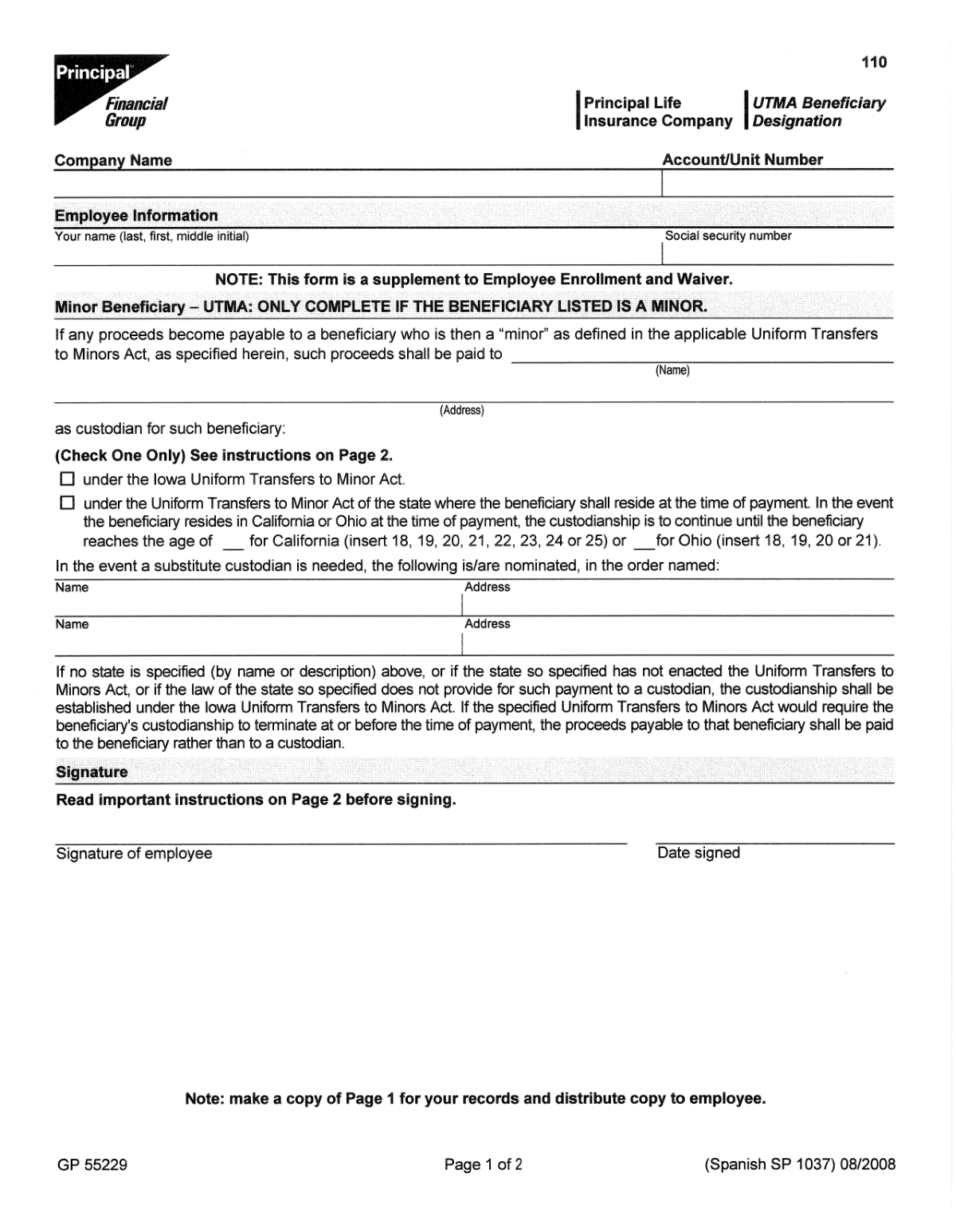
A UTMA Beneficiary Designation form is a legal document used to transfer assets, such as life insurance proceeds or investment account funds, to a custodian for the benefit of a minor. This arrangement avoids the complexities of setting up a formal trust, allowing the custodian to manage the funds until the minor reaches the age of majority as defined by state law. Today, this form can be filled out quickly and accurately using AI-powered services like Instafill.ai, which can also convert non-fillable PDF versions into interactive fillable forms.
Our AI automatically handles information lookup, data retrieval, formatting, and form filling.
It takes less than a minute to fill out UTMA Beneficiary Designation using our AI form filling.
Securely upload your data. Information is encrypted in transit and deleted immediately after the form is filled out.

Form specifications

Form name: UTMA Beneficiary Designation (Uniform Transfers to Minor Act)
Number of pages: 1
Language: English
main-image

Instafill Demo: How to fill out PDF forms in seconds with AI

How to Fill Out UTMA Beneficiary Designation Online for Free in 2026

Are you looking to fill out a UTMA BENEFICIARY DESIGNATION form online quickly and accurately? Instafill.ai offers the #1 AI-powered PDF filling software of 2026, allowing you to complete your UTMA BENEFICIARY DESIGNATION form in just 37 seconds or less.
Follow these steps to fill out your UTMA BENEFICIARY DESIGNATION form online using Instafill.ai:
  1. 1 Navigate to Instafill.ai and upload or select the UTMA Beneficiary Designation form.
  2. 2 Provide your personal information as the account owner, including your name and policy or account number.
  3. 3 Enter the full legal name, date of birth, and Social Security Number for each minor beneficiary.
  4. 4 Designate a custodian by providing their full name, address, and relationship to the minor. You may also name a successor custodian.
  5. 5 Specify the state whose UTMA laws will govern the custodianship, as this determines the age at which the minor receives the assets.
  6. 6 Use the AI-powered review feature to check all entered information for accuracy, then electronically sign and date the form.
  7. 7 Download, print, or submit the completed form to the financial institution, such as Principal Life Insurance Company, as instructed.

Our AI-powered system ensures each field is filled out correctly, reducing errors and saving you time.

Why Choose Instafill.ai for Your Fillable UTMA Beneficiary Designation Form?

Speed

Complete your UTMA Beneficiary Designation in as little as 37 seconds.

Up-to-Date

Always use the latest 2026 UTMA Beneficiary Designation form version.

Cost-effective

No need to hire expensive lawyers.

Accuracy

Our AI performs 10 compliance checks to ensure your form is error-free.

Security

Your personal information is protected with bank-level encryption.

Frequently Asked Questions About Form UTMA Beneficiary Designation

This form allows you to designate a custodian to manage funds or assets from your Principal Life Insurance Company policy for a minor beneficiary. It provides a legal framework for transferring assets to a child without the complexity and expense of a formal trust.

Any policyholder with Principal Life Insurance Company who wants to name a person under the age of legal majority as a beneficiary should complete this form. It ensures the assets are properly managed on their behalf.

UTMA stands for the Uniform Transfers to Minors Act. It is a law that allows an adult to transfer assets to a minor by appointing a custodian to manage those assets until the minor reaches the age of majority.

You can typically appoint any responsible adult, such as a family member, friend, or legal guardian, as the custodian. This individual will have a legal duty to manage the funds in the minor's best interest.

No. The form specifies that Principal can transfer funds to a custodian in any state for the benefit of a minor residing in any state, making it flexible regardless of location.

You will need your personal and policy information, as well as the full legal name, date of birth, and Social Security Number for both the minor beneficiary and the designated custodian.

Yes, you can typically name multiple minor beneficiaries. You will need to clearly specify the percentage of the proceeds each minor should receive and designate a custodian for each one.

The form should have a section to name a 'successor' or 'contingent' custodian. This person will assume the custodial duties if your primary choice is unwilling or unable to act.

Once completed and signed, the form must be submitted to Principal Life Insurance Company. Refer to the form's instructions for the correct mailing address, fax number, or online submission portal.

Processing times can vary, but you should receive a confirmation from Principal once your new designation is on file. It's wise to keep a copy of the submitted form for your records.

Yes, services like Instafill.ai use AI to auto-fill form fields accurately and save time. This can help reduce errors and make the process of filling out detailed forms much faster.

You can use a service like Instafill.ai to complete the form digitally. Simply upload the PDF, and the tool will make it an interactive, fillable form that you can type into directly from your computer.

If you have a non-fillable or 'flat' PDF, Instafill.ai can convert it into an interactive, fillable form. This allows you to easily type your information instead of having to print and complete it by hand.

To change your beneficiary or custodian, you must complete and submit a new UTMA Beneficiary Designation form to Principal. The most recently dated and accepted form on file will replace all previous designations.

Compliance UTMA Beneficiary Designation
Validation Checks by Instafill.ai

1
Verifies Minor's Age Status
This check validates that the date of birth provided for the minor beneficiary confirms they are legally a minor at the time of form submission. The Uniform Transfers to Minors Act (UTMA) is specifically for individuals who have not reached the age of majority, so designating an adult would be invalid. If the individual is an adult, the form should be rejected and the user instructed to use a standard beneficiary designation form.
2
Ensures Custodian is a Legal Adult
This validation confirms that the designated custodian's date of birth indicates they are of legal age to serve in a fiduciary capacity. A minor cannot legally act as a custodian for another minor's assets. Failure to provide a valid adult custodian would render the entire UTMA designation legally unenforceable, potentially leading to court intervention to appoint a guardian.
3
Prevents Minor from Being Their Own Custodian
This check ensures that the individual named as the minor beneficiary is not also named as the custodian. This is a fundamental logical and legal impossibility, as a minor cannot manage their own trust. If the same person is listed in both roles, the submission must be flagged as an error to be corrected before processing.
4
Validates Social Security Number Format
This check verifies that the Social Security Numbers (SSNs) for the minor, custodian, and successor custodian (if any) are entered in a valid 9-digit format (e.g., XXX-XX-XXXX or XXXXXXXXX). Correct SSNs are critical for tax reporting purposes and for uniquely identifying all parties involved in the financial transfer. An invalid format will prevent proper record-keeping and could cause significant tax compliance issues.
5
Confirms Presence of Owner's Signature and Date
This validation ensures that the owner/participant has signed the form and provided a signature date. An unsigned or undated beneficiary designation is not a legally binding document and would be rejected by the financial institution. This signature is the legal authorization for the transfer, and its absence makes the entire designation void.
6
Checks for Logical Signature Date
This check validates that the signature date is a real, plausible date that is not in the future. The date establishes the legal moment the designation becomes effective. A future date is invalid, and a date far in the past may trigger a review; failure to provide a valid, current date will result in the form being returned for correction.
7
Requires Completion of Custodian Information
This validation ensures all required fields for the primary custodian—including full legal name, address, and Social Security Number—are fully completed. A UTMA designation is invalid without a clearly identified custodian to manage the assets. Incomplete information would leave the minor's assets without a legal guardian, forcing the matter into probate court.
8
Requires Completion of Minor Beneficiary Information
This check verifies that all essential information for the minor beneficiary, such as full legal name, address, date of birth, and SSN, is provided. Missing information can create ambiguity, making it difficult or impossible to correctly identify the intended beneficiary and transfer the assets. This could lead to significant delays or legal challenges in the future.
9
Ensures Successor Custodian is Not the Primary Custodian
If a successor custodian is named, this validation confirms they are not the same individual as the primary custodian. The purpose of a successor is to have a backup in case the primary custodian is unable or unwilling to serve. Naming the same person for both roles defeats this purpose and indicates a user error that must be corrected.
10
Validates Selection of Governing State
This check ensures that a state has been selected to govern the UTMA custodianship. UTMA laws, particularly the age at which the minor gains control of the assets (e.g., 18, 21, or 25), vary by state. Failing to specify the governing state creates legal ambiguity and prevents the correct application of rules, requiring clarification before the designation can be accepted.
11
Requires Full Legal Names
This validation ensures that the name fields for the owner, minor, and custodian contain full legal names rather than nicknames, initials, or abbreviations. Legal documents require precise identification to be enforceable and to avoid any confusion when transferring financial assets. Using incomplete names can lead to rejection of the form or future legal disputes over the identity of the parties.
12
Verifies Address Field Completeness
This check ensures that all address fields for the minor and custodian include a street address, city, state, and ZIP code. A complete mailing address is required for official communication, legal notices, and maintaining accurate records for all parties. Incomplete addresses can halt processing and prevent the company from contacting the custodian when necessary.

Common Mistakes in Completing UTMA Beneficiary Designation

Failing to Designate a Successor Custodian

People often only fill out the primary custodian section, overlooking the importance of a backup. If the primary custodian is unable to serve due to death or incapacitation, the court may need to appoint a guardian for the funds, a costly and time-consuming process that may not align with the owner's wishes. To avoid this, always name a qualified successor custodian to ensure a smooth transition and protect the minor's assets.

Providing Inaccurate Minor Beneficiary Details

Simple typos in the minor's legal name, date of birth, or Social Security Number are common, often due to haste or not having official documents on hand. Inaccurate information can cause significant delays in processing claims and may require legal corrections to verify the beneficiary's identity. Always double-check all details against official records; AI-powered form filling tools like Instafill.ai can also help by validating data formats to catch potential errors.

Incorrectly Specifying the Governing UTMA State

The form requires specifying a state to govern the custodianship, which determines the age the minor receives the assets (e.g., 18, 21, or 25). People often default to their own state of residence without understanding the implications of different age-of-majority laws. This can result in the minor receiving a large sum of money at an age the policy owner might have deemed too early, so it's crucial to research the UTMA laws for the intended state.

Using Informal Names Instead of Full Legal Names

Applicants frequently write a minor's or custodian's nickname (e.g., 'Jenny' instead of 'Jennifer') instead of their full legal name as it appears on government-issued documents. This creates an identity mismatch that can invalidate the designation or require additional legal paperwork to prove identity during a claim. To prevent processing delays, always use the full, legal first, middle, and last names for all individuals listed.

Appointing an Unsuitable or Unwilling Custodian

A policy owner might appoint someone as a custodian without fully discussing the significant legal and financial responsibilities involved. The chosen individual may be unwilling, unprepared, or legally ineligible to manage the assets for the minor's benefit, leading to potential mismanagement of funds. Always have a detailed conversation with your proposed custodian and successor to ensure they understand and accept the fiduciary role.

Submitting an Incomplete Form

Rushing through the form can lead to accidentally skipping critical fields like the custodian's address, the minor's Social Security Number, or the policy number itself. An incomplete form is invalid and will be rejected by the financial institution, leaving the policy without a valid UTMA designation until the corrected form is received. Using a tool like Instafill.ai can help ensure all mandatory fields are completed before submission.

Providing Illegible Information on a Paper Form

When filling out a printed PDF by hand, poor handwriting can make names, addresses, and numbers impossible to decipher accurately, leading to data entry errors or form rejection. Since this is a legally binding document, clarity is paramount to avoid issues identifying the correct beneficiary or custodian. If the form is a non-fillable PDF, tools like Instafill.ai can convert it into a fillable version, allowing you to type information clearly.

Invalid Signature or Incorrect Dating

The form must be signed and dated by the policy or account owner, not the designated custodian or another party. People sometimes sign in the wrong place, use a digital signature when a wet signature is required, or forget to date the document, which can call its legal validity into question. An incorrectly executed form will be rejected, so always review the signature block carefully.

Failing to Update Designations After Life Events

Owners often forget to review their UTMA designation after major life events, such as the death of a custodian, the birth of another child, or a change in state residency. An outdated form can lead to unintended consequences, like assets being managed by a deceased custodian's estate or a new child being unintentionally omitted. It's crucial to review beneficiary forms every few years or after any significant family change.

Transposing Numbers in Critical Fields

A common data entry error is transposing digits in a Social Security Number, date of birth, or policy number. This simple mistake can lead to a failed identity verification, rejection of the form, or a link to the wrong account. Carefully proofreading all numerical data before submission is essential. AI-powered tools like Instafill.ai can help prevent this by auto-filling from verified sources and validating formats, reducing the risk of manual error.
Saved over 80 hours a year

“I was never sure if my IRS forms like W-9 were filled correctly. Now, I can complete the forms accurately without any external help.”

Kevin Martin Green

Your data stays secure with advanced protection from Instafill and our subprocessors

Robust compliance program

Transparent business model

You’re not the product. You always know where your data is and what it is processed for.

ISO 27001, HIPAA, and GDPR

Our subprocesses adhere to multiple compliance standards, including but not limited to ISO 27001, HIPAA, and GDPR.

Security & privacy by design

We consider security and privacy from the initial design phase of any new service or functionality. It’s not an afterthought, it’s built-in, including support for two-factor authentication (2FA) to further protect your account.

Fill out UTMA Beneficiary Designation with Instafill.ai

Worried about filling PDFs wrong? Instafill securely fills utma-beneficiary-designation-uniform-transfers-to-minor-act forms, ensuring each field is accurate.