Yes! You can use AI to fill out Empower SRIP II Beneficiary Designation Form
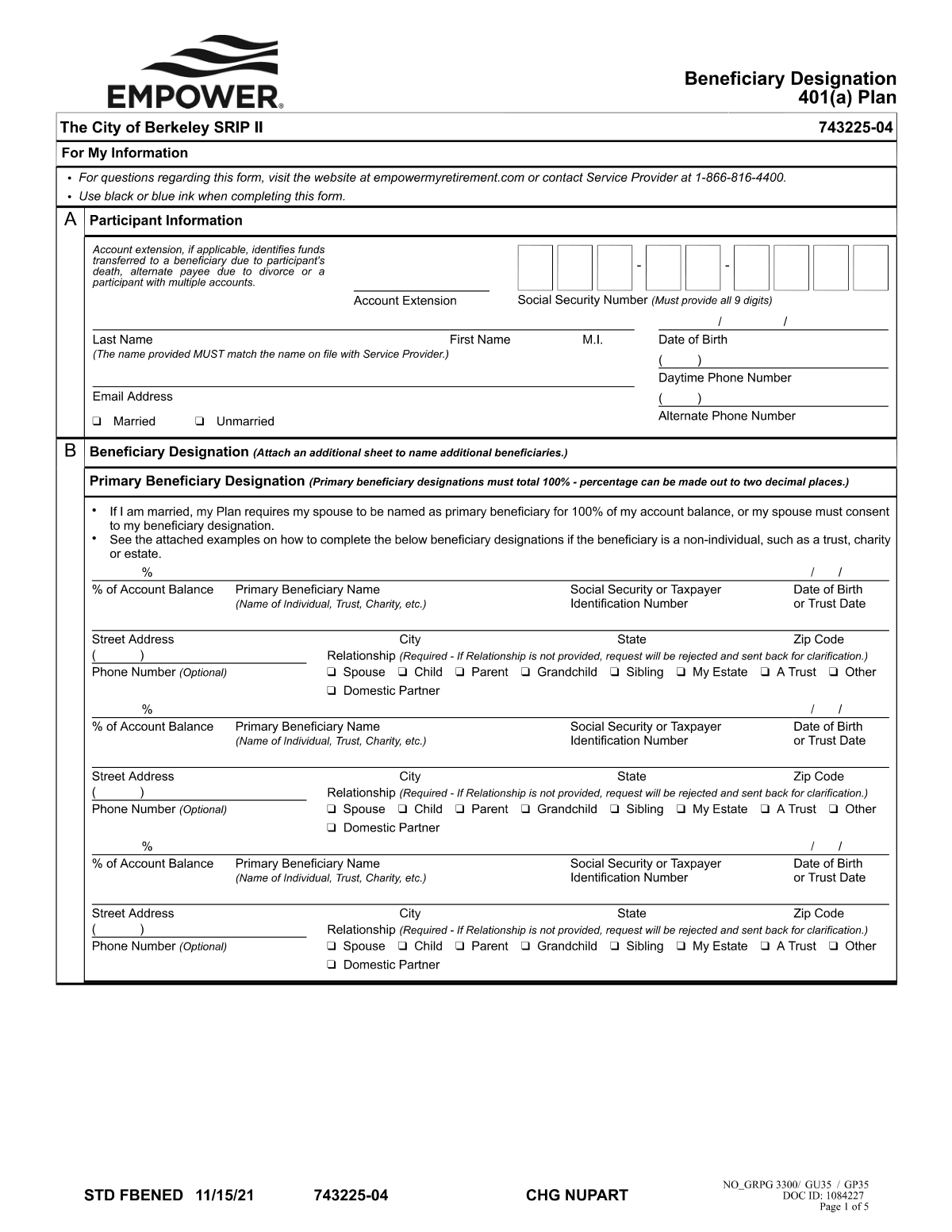
This form is a legal document for participants in the Empower SRIP II plan to officially designate their beneficiaries. It is a critical part of estate planning, ensuring that your retirement assets are distributed according to your wishes. The form includes specific provisions for married participants, often requiring spousal consent if the spouse is not named as the sole primary beneficiary. Today, this form can be filled out quickly and accurately using AI-powered services like Instafill.ai, which can also convert non-fillable PDF versions into interactive fillable forms.
SRIP II Beneficiary Designation Form is part of the
beneficiary forms, Empower forms and beneficiary designation forms categories on Instafill.
Rather not fill this in by hand? Instafill is an online form filler that completes PDF forms automatically — upload the blank form, answer a few questions, and the AI fills every field.
Form specifications
| Form name: | Empower SRIP II Beneficiary Designation Form |
| Number of pages: | 1 |
| Language: | English |
Our AI automatically handles information lookup, data retrieval, formatting, and form filling.
It takes less than a minute to fill out SRIP II Beneficiary Designation Form using our AI form filling.
Securely upload your data. Information is encrypted in transit and deleted immediately after the form is filled out.
Instafill Demo: How to fill out PDF forms in seconds with AI
How to Fill Out SRIP II Beneficiary Designation Form Online for Free in 2026
Are you looking to fill out a SRIP II BENEFICIARY DESIGNATION FORM form online quickly and accurately? Instafill.ai offers the #1 AI-powered PDF filling software of 2026, allowing you to complete your SRIP II BENEFICIARY DESIGNATION FORM form in just 37 seconds or less.
Follow these steps to fill out your SRIP II BENEFICIARY DESIGNATION FORM form online using Instafill.ai:
- 1 Navigate to Instafill.ai and upload or select the Empower SRIP II Beneficiary Designation Form.
- 2 Enter your personal information, such as your full name, Social Security Number, and contact details.
- 3 Designate your primary beneficiary or beneficiaries, specifying their name, relationship, and the percentage of the benefit they will receive.
- 4 Optionally, designate contingent beneficiaries who will inherit if the primary beneficiaries are unable to.
- 5 If you are married and not naming your spouse as the 100% primary beneficiary, complete the spousal consent section. This requires your spouse's signature, which must be witnessed by a notary or plan representative.
- 6 Carefully review all the information you've entered for accuracy, then sign and date the form.
- 7 Download the completed, signed form to submit to your plan administrator.
Our AI-powered system ensures each field is filled out correctly, reducing errors and saving you time.
Why Choose Instafill.ai for Your Fillable SRIP II Beneficiary Designation Form Form?
Speed
Complete your SRIP II Beneficiary Designation Form in as little as 37 seconds.
Up-to-Date
Always use the latest 2026 SRIP II Beneficiary Designation Form form version.
Cost-effective
No need to hire expensive lawyers.
Accuracy
Our AI performs 10 compliance checks to ensure your form is error-free.
Security
Your personal information is protected with bank-level encryption.
Frequently Asked Questions About SRIP II Beneficiary Designation Form
This form is used to officially name the person(s) or entity(ies) who will receive the assets in your SRIP II account upon your death. It ensures your assets are distributed according to your wishes.
Yes, the plan requires that if you are married, you must name your spouse as the 100% primary beneficiary. To name someone else, your spouse must provide formal written consent on the form.
Spousal consent is a required signature from your spouse agreeing to waive their right to be the sole primary beneficiary. This is typically done by having your spouse sign a specific section of the form, often in the presence of a notary or plan representative.
A primary beneficiary is the first in line to receive your account assets. A contingent beneficiary only inherits the assets if all primary beneficiaries have passed away before you.
You will need each beneficiary's full legal name, Social Security Number, date of birth, and relationship to you. Ensure all information is accurate to avoid delays in the future.
You can only name your children as primary beneficiaries if your spouse formally consents by signing the spousal consent section of the form. Otherwise, your spouse must be the 100% primary beneficiary.
You must assign a specific percentage to each beneficiary you list. The total percentage for all primary beneficiaries must equal 100%, and the total for all contingent beneficiaries must also equal 100%.
You should update this form after any major life event, such as marriage, divorce, the birth of a child, or the death of a current beneficiary. It is also good practice to review it annually.
Follow the submission instructions on the form, which typically direct you to send the completed and signed document to your employer's HR or benefits department, or the plan administrator.
If you do not have a valid form on file, your account assets will be distributed according to the plan's default rules or probate court, which may not align with your personal wishes.
Yes, services like Instafill.ai use AI to help you accurately auto-fill form fields with your information. This can save you time and help prevent common errors.
You can use a service like Instafill.ai to upload the PDF form and fill it out on your computer. This allows you to type your information, save your progress, and easily print the completed form for signature.
If you have a non-fillable PDF, you can use a tool like Instafill.ai to convert it into an interactive, fillable form. Simply upload the document, and the platform will make the fields editable online.
Compliance SRIP II Beneficiary Designation Form
Validation Checks by Instafill.ai
1
Spousal Consent Requirement for Married Participants
If the participant's marital status is 'Married' and their spouse is not designated as the 100% primary beneficiary, this validation ensures the 'Spousal Consent' section is fully completed, signed by the spouse, and properly witnessed or notarized. This is a critical legal requirement under many retirement plans to protect spousal rights. Failure to obtain valid consent will render the beneficiary designation invalid, causing the form to be rejected and potentially leading to legal disputes over the account balance.
2
Primary Beneficiary Percentage Summation
This check verifies that the percentages allocated to all listed primary beneficiaries add up to exactly 100%. This is essential to ensure the entire account balance is distributed according to the participant's wishes without ambiguity. If the total is more or less than 100%, the form is considered incomplete and will be rejected, requiring the participant to correct the allocations before the designation can be processed.
3
Participant SSN Format and Validity
Validates that the participant's Social Security Number (SSN) is provided and follows the standard XXX-XX-XXXX format. The number is crucial for uniquely identifying the participant within the plan's system and for all tax-related reporting. An incorrect, missing, or improperly formatted SSN will prevent the form from being processed until a valid number is supplied.
4
Marital Status Declaration Completeness
Ensures that the participant has selected a marital status (e.g., 'Single', 'Married'). This field is mandatory because it is the primary trigger for the spousal consent rule. Without this information, the system cannot determine if spousal consent is required, forcing the form to be returned to the participant for completion.
5
Contingent Beneficiary Percentage Summation
If any contingent beneficiaries are listed, this check verifies that their allocated percentages sum to exactly 100%. This ensures a clear and complete distribution plan in the event that all primary beneficiaries predecease the participant. An incorrect total creates ambiguity for the secondary distribution of assets and will result in the form being rejected.
6
Beneficiary Information Completeness
This check confirms that every listed beneficiary, both primary and contingent, has a complete legal name, relationship to the participant, and date of birth. This data is essential for correctly identifying and locating beneficiaries when a distribution is necessary. Incomplete beneficiary information can cause significant delays and complications in the payment process, and the form will be returned for correction.
7
Participant Signature and Date Presence
Confirms that the participant has signed the form and that the signature is accompanied by a valid, non-future date. A signature legally validates the participant's designations, making the document a binding instruction. A form lacking a signature or date is legally invalid and will be rejected, leaving any prior beneficiary designation in effect.
8
Beneficiary SSN/TIN Format Validation
Validates that the Social Security Number (SSN) or Taxpayer Identification Number (TIN) for each designated beneficiary is present and correctly formatted. This information is required for tax reporting when a distribution is made from the account. Failure to provide a valid number for a beneficiary will result in processing holds and potential tax withholding complications for that individual.
9
Distinct Primary and Contingent Beneficiaries
This validation ensures that the same individual is not listed as both a primary and a contingent beneficiary. Such a designation is logically inconsistent, as a person cannot be both a primary recipient and a backup recipient simultaneously. This ambiguity would require clarification, so the form will be rejected to ensure the participant's intent is clearly documented.
10
Signature Date Logical Order
Verifies that the signature dates on the form are logical and not set in the future. Specifically, the participant's signature date must be on or before any spousal consent and notary signature dates. An illogical date sequence, such as a notary date preceding the participant's signature, compromises the integrity of the document and will cause the form to be rejected for correction.
11
Allocation for All Listed Beneficiaries
Ensures that every beneficiary listed on the form has a specific percentage of the benefit allocated to them. A beneficiary listed with a name but no corresponding percentage creates an ambiguous instruction for distribution. The form will be considered incomplete and returned to the participant to either assign a percentage or remove the beneficiary.
12
Exclusion of Participant as Beneficiary
This check ensures the participant has not named themselves as a primary or contingent beneficiary. The purpose of the form is to designate who receives the assets upon the participant's death, making self-designation a logical contradiction. Such an entry will be flagged as an error and the form will be rejected.
Common Mistakes in Completing SRIP II Beneficiary Designation Form
A married participant names someone other than their spouse as the 100% primary beneficiary without obtaining the spouse's signed and notarized consent. This often happens when filers don't read the instructions, which explicitly state that federal or plan rules require spousal consent. The consequence is that the designation will be rejected or deemed invalid, and upon death, the plan assets may be legally required to go to the spouse, regardless of the participant's wishes.
Filers often leave critical fields blank, such as a beneficiary's Social Security Number (SSN), date of birth, or full address. This occurs when the information isn't readily available, but it can cause major delays and difficulties for the plan administrator in locating and verifying the beneficiary. In a worst-case scenario, if the beneficiary cannot be found, the assets may default to the estate, triggering probate and unintended tax consequences.
A frequent mistake is when the percentages assigned to all primary beneficiaries or all contingent beneficiaries do not add up to exactly 100%. This is usually due to a simple calculation error or a misunderstanding of the requirement. An incorrect total will cause the form to be rejected, delaying the process until a corrected form is submitted. To avoid this, double-check that the sum for each beneficiary group (primary and contingent) is precisely 100%.
Many people meticulously name their primary beneficiaries but neglect to designate any contingent (secondary) beneficiaries. They may not consider the possibility that their primary beneficiary could predecease them or disclaim the assets. If this happens with no contingent beneficiary named, the retirement funds are typically paid to the participant's estate, forcing them through the lengthy and public probate process.
A common error is listing a minor child as a direct beneficiary without establishing a trust or naming a custodian under the Uniform Transfers to Minors Act (UTMA). Minors cannot legally own financial assets, so this action forces the court to appoint a guardian to manage the funds, a costly and time-consuming legal process. To avoid this, you should name a trust for the minor's benefit or designate an adult as a custodian on the form, for example, 'Jane Smith as custodian for John Smith Jr. under [State] UTMA'.
Filers sometimes use vague collective terms like 'my children' or 'my issue' instead of listing each beneficiary by their full legal name. This creates ambiguity about who is included (e.g., stepchildren, adopted children) and can lead to legal disputes among family members. Always list each beneficiary's full, legal name and their specific percentage share to ensure your wishes are carried out without confusion.
A simple but critical mistake is forgetting to sign and date the form, or if applicable, failing to have the spouse sign the consent section. An unsigned or undated form is legally invalid and will be rejected by the plan administrator. This means your previous beneficiary designation (or the plan's default rules) will remain in effect until a properly executed form is received, which could have devastating consequences if your intentions have changed.
When spousal consent is required, the spouse's signature must typically be witnessed by a notary public or a plan representative. People often make the mistake of signing the form at home without the required witness present, which invalidates the consent. This will cause the entire form to be rejected if the spouse was not named the sole primary beneficiary, leaving the old designation in place.
This form is a snapshot in time, and a major mistake is failing to submit a new form after significant life events like marriage, divorce, the birth of a child, or the death of a named beneficiary. People often set it and forget it, which can lead to assets unintentionally going to an ex-spouse or the estate of a deceased beneficiary. It is crucial to review and update your beneficiary designations every few years and immediately following any major life change.
Some individuals mistakenly name their own estate as the beneficiary, thinking it simplifies distribution according to their will. However, this is usually a poor strategy as it forces the retirement assets through probate, a public, costly, and slow court process. It also eliminates valuable tax advantages, such as the ability for beneficiaries to 'stretch' distributions over their lifetimes, potentially leading to a larger and faster tax bill.
Saved over 80 hours a year
“I was never sure if my IRS forms like W-9 were filled correctly. Now, I can complete the forms accurately without any external help.”
Kevin Martin Green
Your data stays secure with advanced protection from Instafill and our subprocessors




Robust compliance program
Transparent business model
You’re not the product. You always know where your data is and what it is processed for.
ISO 27001, HIPAA, and GDPR
Our subprocesses adhere to multiple compliance standards, including but not limited to ISO 27001, HIPAA, and GDPR.
Security & privacy by design
We consider security and privacy from the initial design phase of any new service or functionality. It’s not an afterthought, it’s built-in, including support for two-factor authentication (2FA) to further protect your account.
Fill out SRIP II Beneficiary Designation Form with Instafill.ai
Worried about filling PDFs wrong? Instafill securely fills empower-srip-ii-beneficiary-designation-form forms, ensuring each field is accurate.
