Yes! You can use AI to fill out Beneficiary Designation for Seafarers International Union AGLIW 401(k) Plan
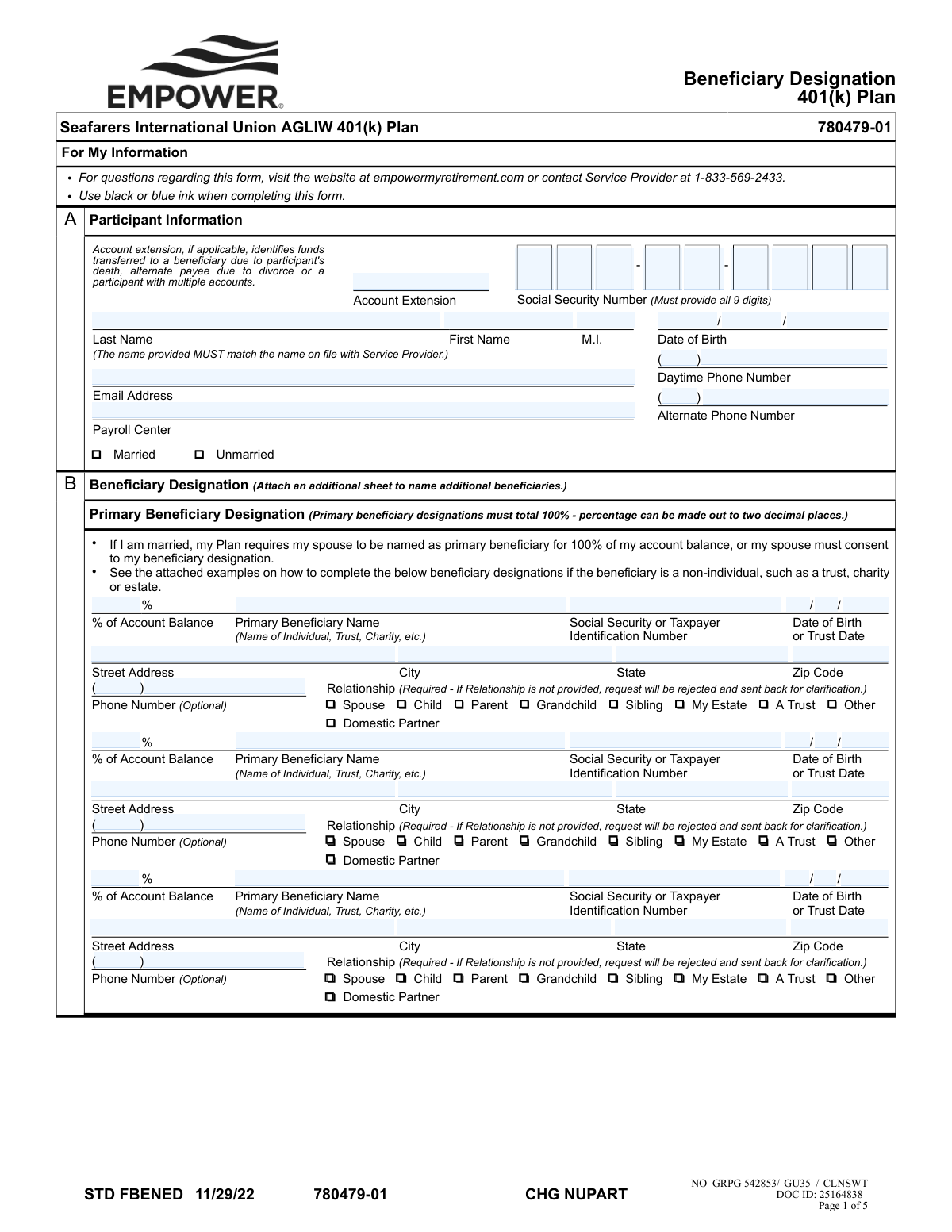
The Seafarers International Union 401(k) Plan Beneficiary Designation form is a legal document used by plan participants to specify the individuals, trusts, or other entities who will inherit their retirement account balance. Properly completing this form is crucial to ensure your assets are distributed according to your wishes, and it includes sections for both primary and contingent beneficiaries. Today, this form can be filled out quickly and accurately using AI-powered services like Instafill.ai, which can also convert non-fillable PDF versions into interactive fillable forms.
STD FBENED is part of the
beneficiary forms, seafarer forms, union forms, beneficiary designation forms and Seafarers Union forms categories on Instafill.
Rather not fill this in by hand? Instafill is an online form filler that completes PDF forms automatically — upload the blank form, answer a few questions, and the AI fills every field.
Form specifications
| Form name: | Beneficiary Designation for Seafarers International Union AGLIW 401(k) Plan |
| Number of pages: | 1 |
| Language: | English |
Our AI automatically handles information lookup, data retrieval, formatting, and form filling.
It takes less than a minute to fill out STD FBENED using our AI form filling.
Securely upload your data. Information is encrypted in transit and deleted immediately after the form is filled out.
Instafill Demo: How to fill out PDF forms in seconds with AI
How to Fill Out STD FBENED Online for Free in 2026
Are you looking to fill out a STD FBENED form online quickly and accurately? Instafill.ai offers the #1 AI-powered PDF filling software of 2026, allowing you to complete your STD FBENED form in just 37 seconds or less.
Follow these steps to fill out your STD FBENED form online using Instafill.ai:
- 1 Navigate to Instafill.ai and upload the Beneficiary Designation form or select it from their template library.
- 2 Use the AI assistant to accurately fill in your personal participant information in Section A, including your name, Social Security Number, and date of birth.
- 3 In Section B, designate your primary beneficiaries, providing their names, relationship, and the percentage of the account balance each should receive, ensuring the total equals 100%.
- 4 Complete the contingent beneficiary section to name who should receive the assets if all primary beneficiaries predecease you.
- 5 Review all entered information for accuracy, then provide your handwritten signature and the date in Section C.
- 6 If you are married and have designated someone other than your spouse as a 100% primary beneficiary, your spouse must sign the Spousal Consent section, and their signature must be notarized.
- 7 Download the completed form and submit it to your Plan Administrator as per the delivery instructions.
Our AI-powered system ensures each field is filled out correctly, reducing errors and saving you time.
Why Choose Instafill.ai for Your Fillable STD FBENED Form?
Speed
Complete your STD FBENED in as little as 37 seconds.
Up-to-Date
Always use the latest 2026 STD FBENED form version.
Cost-effective
No need to hire expensive lawyers.
Accuracy
Our AI performs 10 compliance checks to ensure your form is error-free.
Security
Your personal information is protected with bank-level encryption.
Frequently Asked Questions About STD FBENED
This form allows you to officially name the person(s), trust, or entity that will receive your Seafarers International Union 401(k) account balance upon your death. Completing it ensures your assets are distributed according to your wishes and supersedes any prior designations.
Any participant in the Seafarers International Union AGLIW 401(k) Plan should use this form to designate or update their beneficiaries. It is important to keep this information current, especially after life events like marriage, divorce, or the death of a beneficiary.
A primary beneficiary is the first person or entity in line to receive your account balance. Contingent beneficiaries will only receive the funds if all of your designated primary beneficiaries are no longer living at the time of your death.
Yes, the plan requires you to name your spouse as the 100% primary beneficiary. If you wish to name someone else or add other beneficiaries, your spouse must provide formal, notarized consent by signing the 'Spousal Consent' section of this form.
You must provide the beneficiary's full name, Social Security Number (or TIN for an entity), date of birth (or trust date), address, and relationship to you. Failure to provide the relationship is a common reason for the form to be rejected.
The total percentage for all your primary beneficiaries must equal 100%, and the total for all contingent beneficiaries must also separately equal 100%. If you do not assign percentages, the funds will be divided equally among the listed beneficiaries in that category.
After completing and signing the form, you must forward it to your Plan Administrator. Do not send the form to the Service Provider (Empower); the Plan Administrator will retain it for their records.
You must provide a handwritten signature using blue or black ink. The form explicitly states that electronic signatures will not be accepted and will result in significant processing delays.
This section is required if you are married and designate someone other than your spouse as your 100% primary beneficiary. Your spouse must sign this section in the presence of a Notary Public to validate your beneficiary choice.
If you do not have a valid beneficiary designation on file, your 401(k) account balance will be distributed according to the default rules of the plan document and applicable law. This may not align with your personal wishes for who should inherit the funds.
Yes, services like Instafill.ai use AI to help you accurately auto-fill your personal information onto the form, which can save time and reduce errors. However, you must still print the completed form to provide the required handwritten signatures.
You can upload the PDF of the Beneficiary Designation form to the Instafill.ai platform. The service will make the form fillable online, allowing you to type in your information and your beneficiaries' details before downloading the completed document for printing and signing.
If you have a flat, non-fillable PDF, you can use a service like Instafill.ai to instantly convert it into an interactive, fillable form. This allows you to easily type your information instead of filling it out by hand.
Yes, you can designate a non-individual entity like a trust, charity, or your estate as a beneficiary. You will need to provide the entity's full legal name, Taxpayer Identification Number (TIN), and the date the trust was established.
Compliance STD FBENED
Validation Checks by Instafill.ai
1
Primary Beneficiary Percentage Summation
This check verifies that the sum of the percentages assigned to all primary beneficiaries equals exactly 100%. This is critical to ensure the entire account balance is allocated as intended upon the participant's death. If the total is not 100%, the form will be rejected, as it would create ambiguity in how to distribute the assets.
2
Contingent Beneficiary Percentage Summation
This validation ensures that the percentages assigned to all contingent beneficiaries sum to exactly 100%. Contingent beneficiaries only inherit if all primary beneficiaries are deceased, and their allocation must also be complete. A failure to total 100% will result in form rejection to prevent disputes and ensure a clear line of inheritance.
3
Spousal Consent Requirement Logic
This check enforces the plan rule that if a participant's marital status is 'Married' and they designate a primary beneficiary other than their spouse for 100% of the account, the 'Spousal Consent for Beneficiary Designation' section must be fully completed, signed, and notarized. This is a legal requirement under ERISA to protect spousal rights. Failure to provide consent when required will invalidate the beneficiary designation.
4
Participant Social Security Number Format
Validates that the participant's Social Security Number is provided and consists of exactly 9 digits. This number is the primary unique identifier for the participant's account. An incorrect or missing SSN will prevent the system from matching the form to the correct account, leading to rejection and processing delays.
5
Beneficiary Relationship Completeness
This check confirms that the 'Relationship' field has been selected for every listed primary and contingent beneficiary. The form explicitly states this field is required and that the request will be rejected if it is not provided. This information is essential for identity verification and for applying specific plan rules that may pertain to certain relationship types.
6
Participant Signature Presence and Date
Verifies that the participant has signed the form and that the signature date field is completed. A signature indicates the participant's understanding and agreement with the designations made. The form will be considered incomplete and rejected without a valid signature and date, as it lacks legal attestation.
7
Spousal and Notary Date Consistency
If spousal consent is provided, this validation ensures the date entered next to the spouse's signature is identical to the date of notarization recorded by the Notary Public. This confirms the signature was witnessed on the specified date. A mismatch in dates can invalidate the notarization and, consequently, the spousal consent, leading to rejection of the form.
8
Notary Commission Expiration
This check verifies that the notary's commission is valid and not expired at the time of signing. The 'My commission expires' date must be on or after the date the document was notarized. An expired commission invalidates the notary's authority and the legal standing of the spousal consent, which will cause the form to be rejected.
9
Marital Status Selection
Ensures that the participant has selected either 'Married' or 'Unmarried' for their marital status. This is a mandatory field that dictates whether spousal consent rules apply. Leaving this field blank makes it impossible to process the form correctly, resulting in its rejection for clarification.
10
Spouse as Beneficiary Consistency Check
This validation checks that if any beneficiary's relationship is designated as 'Spouse', the participant's marital status is marked as 'Married'. Designating a spouse while being 'Unmarried' is a logical contradiction. This inconsistency would cause the form to be flagged for review and likely rejected until the discrepancy is resolved.
11
Beneficiary Percentage Decimal Precision
This check ensures that any percentage entered for a beneficiary does not exceed two decimal places (e.g., 33.33%). The form specifies this limit to maintain calculation consistency and prevent rounding errors during asset distribution. Percentages with more than two decimal places will be flagged as invalid and require correction.
12
Participant Date of Birth Validity
Validates that the participant's Date of Birth is a complete and logical date (e.g., MM is 1-12, DD is 1-31). It also serves to confirm the participant is of legal age to hold a 401(k) account. An invalid or nonsensical date will cause the form to be rejected for correction, as it is a key piece of identifying information.
13
Beneficiary Identification Number Format
This check validates that the 'Social Security or Taxpayer Identification Number' for each individual or trust beneficiary is a valid 9-digit number. This information is crucial for accurately identifying the beneficiary and for tax reporting purposes when a distribution occurs. An invalid or missing number will result in rejection until correct information is provided.
Common Mistakes in Completing STD FBENED
Participants often make mathematical errors when assigning percentages to multiple beneficiaries, resulting in totals that are not exactly 100%. The form requires both the primary and contingent beneficiary groups to each total 100%, and any deviation, even by a fraction of a percent, will cause the form to be rejected. To avoid this, carefully double-check all calculations before submission; AI-powered tools like Instafill.ai can automatically validate these totals to ensure accuracy.
A married participant naming a primary beneficiary other than their spouse for 100% of the account must obtain notarized spousal consent. This is a frequently misunderstood requirement, leading to participants naming children or others as primary beneficiaries without getting their spouse's signature. This invalidates the entire beneficiary designation, causing the form to be rejected and potentially defaulting to plan rules upon death, which may not reflect the participant's wishes.
The spousal consent section has several strict notarization rules that are easily missed. Common errors include the spouse's signature date not matching the notary's signature date, the notary using the on-form section when their state requires a separate certificate, or the notary seal being illegible. An improper notarization will lead to immediate rejection of the form and significant processing delays, requiring the entire signature and notary process to be repeated.
The form explicitly states that the 'Relationship' field is required for each beneficiary, yet people often overlook this series of checkboxes. Participants tend to focus on filling in the name and address, missing the simple but mandatory step of checking 'Spouse,' 'Child,' 'Trust,' etc. Failure to provide this information will result in the request being rejected and sent back for clarification, delaying the update of these critical records.
This form explicitly rejects electronic signatures and requires a physical, handwritten signature in ink for the participant, spouse, and notary. In an increasingly digital world, users may be tempted to type their name or use a digital signature tool out of habit. This will result in an automatic rejection and what the form calls a 'significant delay,' as a new, physically signed copy will be required.
Participants frequently leave critical beneficiary information blank, such as a full Social Security Number (SSN), Taxpayer Identification Number (TIN), or a complete date of birth. This often happens when the filer doesn't have the information readily available and forgets to add it later. Missing data can delay the initial processing and, more critically, can create major obstacles and legal challenges for the plan administrator when trying to locate and verify the beneficiary in the future.
The form requires the participant's name to exactly match the name on file with the service provider, but people may use a nickname, a maiden name, or a recently changed married name that isn't updated in the system. This mismatch can cause the form to be rejected or fail to be associated with the correct 401(k) account. Always use the full legal name as it appears on your official plan statements to prevent this issue.
Since this form is a non-fillable PDF, it must be printed and completed by hand, which introduces the risk of illegible handwriting. Numbers in an SSN or percentage field can be easily misread if not written clearly, leading to data entry errors or outright rejection. To prevent this, write slowly and clearly in block letters. Alternatively, an intelligent form-filler like Instafill.ai can convert the flat PDF into a fillable version, allowing you to type all information for maximum clarity before printing for the required handwritten signatures.
When designating a non-individual entity like a trust, participants often mistakenly provide incorrect information. Common errors include listing their own SSN instead of the trust's official Taxpayer Identification Number (TIN) or entering the wrong date in the 'Date of Birth or Trust Date' field. These mistakes can create significant legal and administrative complications, potentially invalidating the designation. It is crucial to consult the official trust or estate documents to ensure the correct legal name, TIN, and date are used.
It is a surprisingly common mistake for participants to complete all the detailed beneficiary information but forget to sign and date the form in Section C. A missing signature or date renders the entire document legally invalid. This oversight results in immediate rejection and requires the participant to resubmit a fully completed and signed form, delaying the entire process.
Saved over 80 hours a year
“I was never sure if my IRS forms like W-9 were filled correctly. Now, I can complete the forms accurately without any external help.”
Kevin Martin Green
Your data stays secure with advanced protection from Instafill and our subprocessors




Robust compliance program
Transparent business model
You’re not the product. You always know where your data is and what it is processed for.
ISO 27001, HIPAA, and GDPR
Our subprocesses adhere to multiple compliance standards, including but not limited to ISO 27001, HIPAA, and GDPR.
Security & privacy by design
We consider security and privacy from the initial design phase of any new service or functionality. It’s not an afterthought, it’s built-in, including support for two-factor authentication (2FA) to further protect your account.
Fill out STD FBENED with Instafill.ai
Worried about filling PDFs wrong? Instafill securely fills beneficiary-designation-for-seafarers-international-union-agliw-401k-plan forms, ensuring each field is accurate.
