
Yes! You can use AI to fill out Beneficiary Designation/Change - Principal Life Insurance Company
Don't type 195 fields by hand. Tell our AI about yourself, or upload a document you already have, and it fills every field in seconds. You check it, then download, print or sign.
The AI does the filling. You just check it.
No typing into boxes, nothing to install.
What this form asks for
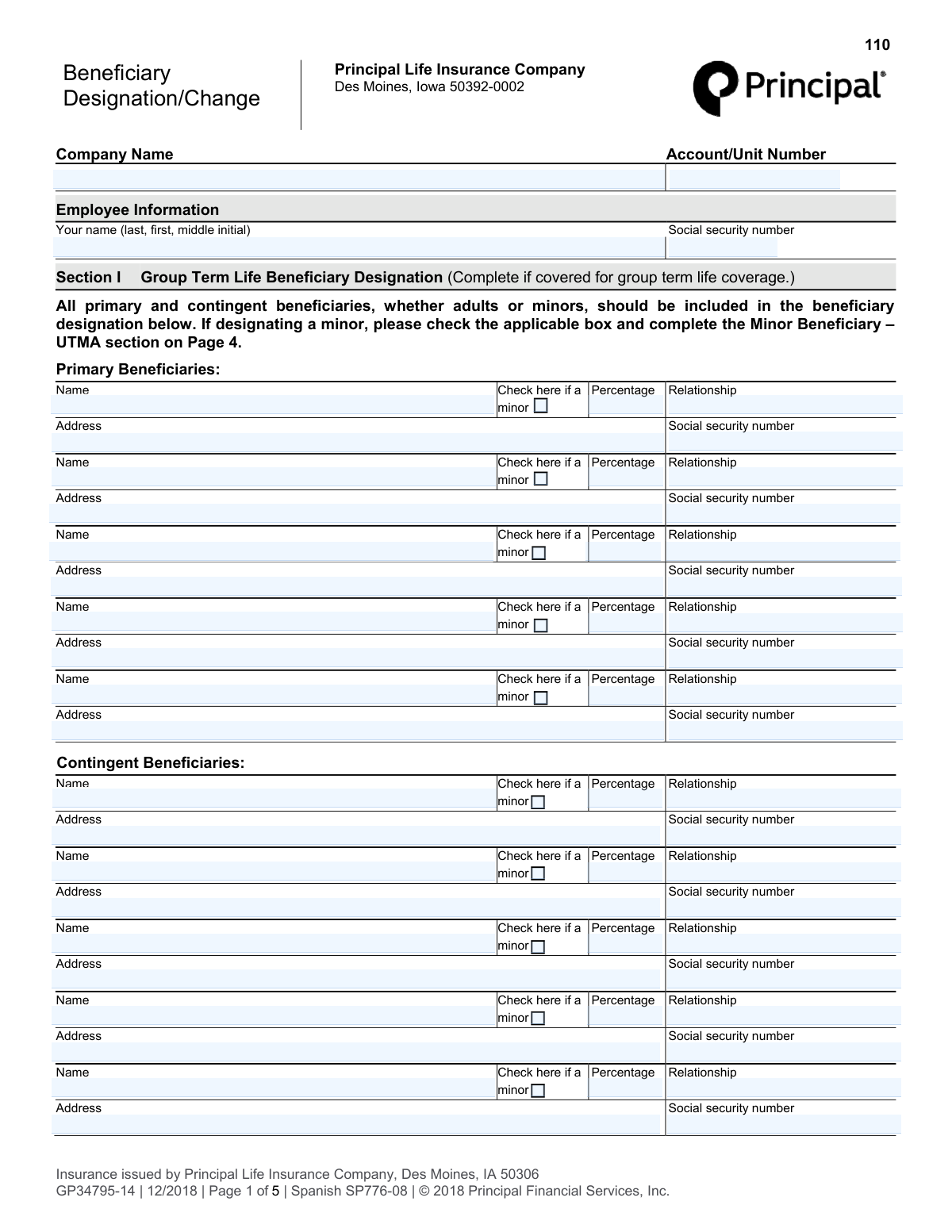
The AI fills all of it, from your answers or your documents.
The AI checks your answers before you download
12 checks built for this form, so a wrong date or a missing answer is caught before anyone else sees it.
This check verifies that the employee's Social Security Number is provided and follows the valid 9-digit format (XXX-XX-XXXX or XXXXXXXXX). This is a critical piece of information for uniquely identifying the employee and linking the form to the correct insurance policy. An invalid or missing SSN will prevent the system from processing the beneficiary change, requiring manual correction.
This validation ensures that the sum of the percentages assigned to all primary beneficiaries within a single section (e.g., Section I) equals exactly 100%. This is crucial for ensuring the full death benefit is allocated without ambiguity. If the total is not 100%, the designation is legally invalid and will be rejected, as it would be impossible to determine the employee's true intent for distribution.
This check confirms that the percentages assigned to all contingent beneficiaries in a single section sum to exactly 100%. Contingent beneficiaries only receive proceeds if all primary beneficiaries are deceased, and this rule ensures the benefit is fully distributed in that scenario. A failure in this validation creates legal ambiguity and would cause the form to be rejected for correction.
This validation confirms that the employee's signature and the date of signing are both present on the form. The signature provides the legal authorization for the beneficiary change, while the date establishes the effective date of the designation. A form missing either of these elements is legally non-binding and will be rejected immediately.
This check ensures that if the 'minor' checkbox is selected for any beneficiary, the corresponding 'Minor Beneficiary - UTMA' section on Page 4 is filled out. This is a critical logical check to ensure a legal custodian is named for any minor, as required by law. Failure to complete the UTMA section for a named minor will render the designation for that beneficiary incomplete and legally problematic, halting the form's processing.
If the 'Minor Beneficiary - UTMA' section is used, this check verifies that the custodian's full name and address have been provided. This information is legally required to establish the custodianship and ensure the funds can be properly transferred for the minor's benefit. Missing custodian details make the designation for the minor invalid and will cause the form to be rejected.
And 6 more checks
- At Least One Primary Beneficiary Designated
- Valid 'Same as Section I' Reference
- Beneficiary Information Completeness
- UTMA State Law Selection
- California/Ohio UTMA Age Range
- Trust Designation Details
Let AI fill out your GP34795-14
No typing. Every field filled in seconds, checked, ready to sign.
How to Fill Out GP34795-14 Online for Free in 2026
What the AI walks you through.
- Navigate to Instafill.ai and upload the Beneficiary Designation/Change form or select it from their template library.
- Provide your personal employee information, such as your full name and Social Security number.
- Complete Section I by entering the full names, addresses, relationship, and percentage share for your primary and contingent beneficiaries for Group Term Life coverage.
- Fill out Section II (Voluntary Term Life) and Section III (Accident Insurance) with beneficiary details, or simply write "same as Section I" if the designations are identical.
- If any beneficiary is a minor, complete the 'Minor Beneficiary - UTMA' section on Page 4, specifying a custodian and their details.
- Review all the information pre-filled by the AI for accuracy, making any necessary corrections to names, percentages, and addresses.
- Sign and date the form in the signature section to finalize your beneficiary designations before submitting it to your employer or Principal Financial.
Common Mistakes in Completing GP34795-14
The ones the AI is built to catch.
Incorrect Percentage Allocation
Leaving Voluntary or Accident Sections Blank
Incomplete Minor Beneficiary Designation
Forgetting to Name Contingent Beneficiaries
Using Vague or Informal Beneficiary Names
Omitting Beneficiary Contact Details or SSN
Illegible Handwriting or Misaligned Digital Text
Incorrect UTMA Custodian Information
Missing Signature or Date
Improperly Designating a Trust
Frequently Asked Questions About GP34795-14
Is it really free for 7 days?
Can I fill other forms too?
How do I cancel?
How does the AI fill out GP34795-14?
What happens to my information?
How complex is GP34795-14 to fill out?
What is the purpose of this Beneficiary Designation form?
What is the difference between a primary and a contingent beneficiary?
Do I have to fill out all three sections for my different coverages?
How do I name a minor as a beneficiary?
What information do I need to provide for each beneficiary?
What happens if I don't specify percentages for my beneficiaries?
Can I name a trust as my beneficiary?
What is a custodian under the UTMA section?
Where should I submit this form after I complete it?
Can an AI tool help me fill out this form?
How can I fill out this Principal beneficiary form online?
My PDF copy of the form is not fillable. What should I do?
Get your GP34795-14 filled out by AI
$0 today. Cancel before Nov 1 and you pay nothing.
Other forms like this one
insurance forms: Form 1095-A, Health Insurance Marketplace Statement, Form SSA-4-BK, Application for Child's Insurance Benefits, Form SSA-10, Application for Widow's or Widower's Insurance Benefits, Form 1095-C, Employer-Provided Health Insurance Offer and Coverage, National Integrity Life Insurance Company Ownership Change Request Form (NI-77-0039-2505), Record of Advice and Needs Analysis (Non-Life Insurance — Personal and Commercial Lines), Form 7206 (2025), Self-Employed Health Insurance Deduction, Continental American Insurance Company (CAIC) / Aflac Group Critical Illness Claim Form (with Attending Physician’s Statement, HIPAA Authorization to Obtain Information, and Electronic Funds Transaction Authorization), Prudential Group Disability Insurance – Education and Employment History Form (GL.2009.009, Ed. 06/2017), acord-25-201603-certificate-of-liability-insurance-1, Brotherhood Mutual Insurance Company Ministry Driver Screening Form (A99), Assurity Life Insurance Company Disability Claim Form — Attending Physician’s Statement, Amateur Sports / Activities Accident Insurance Quote Request Form (Philadelphia Insurance Companies), Martial Arts Studio General Liability and Property Application (Fitness and Wellness Insurance / Philadelphia Insurance Companies) (03/2011), The Prudential Insurance Company of America Group Disability Insurance – Education and Employment History Form (GL.2009.009, Ed. 06/2017), VA Form 29-357, Claim for Disability Insurance Benefits (Government Life Insurance), CMS-1500 (02-12), Health Insurance Claim Form (NUCC Approved) (OMB 0938-1197), Prudential Group Disability Insurance – Education and Employment History Form (GL.2009.009, Ed. 06/2017), HDFC ERGO General Insurance Company Limited – Request for Cashless Hospitalisation for Health Insurance (Policy Part – C), Principal Life Insurance Company UCTIE INTERNATIONAL UNION 401(K) SAVINGS PLAN Enrollment Form
beneficiary forms: Form I-130A, Supplemental Info for Spouse Beneficiary, Affidavit and Representations Regarding Next of Kin (Preference Beneficiary Affidavit) (The Hartford) – Form LC-7086-17, VA Form 21-0788, Information Regarding Apportionment of Beneficiary's Award, California Schedule K-1 (541) (2025), Beneficiary’s Share of Income, Deductions, Credits, etc., Form I-130A, Supplemental Information for Spouse Beneficiary, Fidelity Investments® Beneficiary Distribution Form, Fidelity Investments 403(b) Beneficiary Designation, Fidelity Advisor IRA Beneficiary Designation, Fidelity Investments Qualified Plan Beneficiary Designation, Fidelity Investments 403(b)/401(a) Beneficiary Designation, The Church of the Nazarene 403(b) Retirement Savings Plan Beneficiary Designation Form, Fidelity Investments Qualified Plan Beneficiary Designation, IRA/HSA Beneficiary Designation, Fidelity IRA Beneficiary Distribution — Charity, Foundation, or a University, Designated Beneficiary Plan Agreement, Designated Beneficiary Plan Agreement, Beneficiary Designation Form For IRA and 403(b)(7) Accounts, Designated Beneficiary Plan Agreement, IRA Beneficiary Designation Form, Stock Power Form For transferring shares, changing names, or adding a beneficiary
life insurance forms: National Integrity Life Insurance Company Ownership Change Request Form (NI-77-0039-2505), Record of Advice and Needs Analysis (Non-Life Insurance — Personal and Commercial Lines), Assurity Life Insurance Company Disability Claim Form — Attending Physician’s Statement, VA Form 29-357, Claim for Disability Insurance Benefits (Government Life Insurance), Principal Life Insurance Company UCTIE INTERNATIONAL UNION 401(K) SAVINGS PLAN Enrollment Form, Principal Life Insurance Company Death Notification Form, Principal Life Insurance Company Form PG4701, In-Plan Roth Conversion – No Spousal Consent Needed, Principal Life Insurance Company Administration Guide, Principal Life Insurance Company Small Amounts Benefit Election, Transamerica Life Insurance Company - New Business Cover Sheet, Transamerica Life Insurance Company Individual Whole Life Insurance Application, Transamerica Life Insurance Company Beneficiary Designation Form (TOB 306M-0809), Beneficiary Designation Form For Life Insurance Policies, Transamerica Life Insurance Company Beneficiary Designation Form, TIAA Life Insurance Beneficiary Designation Form, Fidelity Investments Beneficiaries — Term Life Insurance, American Fidelity Change of Beneficiary Form, PruLife Private Placement VUL and Private Placement Variable Annuity Purchaser Questionnaire and Agreement, Discovery Life Personal Life Insurance Application for the Classic, Essential and Purple Life Plans on Adviser 360, Assignment of Life Insurance Policy as Collateral
Principal forms: Additional Investment Form - Principal Brand Asset System, Rollover Form (Principal Financial Group), Principal Life Insurance Company UCTIE INTERNATIONAL UNION 401(K) SAVINGS PLAN Enrollment Form, Principal Rollover Form, The Principal Pension Plan Summary Plan Description: Cash Balance Formula for Employees and Individual Field, Principal Pre-Migration Guide Defined Benefit, The Principal Pension Plan Summary Plan Description: Traditional and Cash Balance Formulas for Employees and Individual Field, Principal Life Insurance Company Death Notification Form, Principal Financial 401(k) Withdrawal Form, Principal Life Insurance Company Form PG4701, In-Plan Roth Conversion – No Spousal Consent Needed, Principal Life Insurance Company Administration Guide, Principal Group Disability Insurance Options (Forms GC 3000-2, GC 4000-2, GP53705-05), Principal Financial Group Pre-Approved Basic Savings Plan - Plus, Principal Financial Group Notice of Data Breach, Principal Life Insurance Company Small Amounts Benefit Election, Principal Retirement Plan Beneficiary Designation, Principal Financial Group Beneficiary Designation Form, Principal Beneficiary Designation Form (PT383B-06)
beneficiary designation forms: Beneficiary Designation for Seafarers International Union AGLIW 401(k) Plan, Fidelity Investments 403(b) Beneficiary Designation, Fidelity Advisor IRA Beneficiary Designation, Fidelity Investments Qualified Plan Beneficiary Designation, Fidelity Investments 403(b)/401(a) Beneficiary Designation, The Church of the Nazarene 403(b) Retirement Savings Plan Beneficiary Designation Form, Fidelity Investments Qualified Plan Beneficiary Designation, IRA/HSA Beneficiary Designation, Beneficiary Designation Form For IRA and 403(b)(7) Accounts, IRA Beneficiary Designation Form, Vanguard Retirement Plan Beneficiary Designation - Phillips 66 Savings Plan, Empower Beneficiary Designation Governmental 457(b) Plan, Beneficiary Designation 401(a) Plan, Form RS115, Beneficiary Designation, Beneficiary Designation 401(k) Plan, Empower Beneficiary Designation Form for WoodmenLife 401(k) Plan, Empower SRIP II Beneficiary Designation Form, UTMA Beneficiary Designation (Uniform Transfers to Minor Act), Principal Retirement Plan Beneficiary Designation, Principal Financial Group Beneficiary Designation Form
company forms: Form S-1, Surety Company Annual Report, National Integrity Life Insurance Company Ownership Change Request Form (NI-77-0039-2505), QBCC Licence Application Form – Company (Application made under section 33, Queensland Building and Construction Commission Act 1991), California Form 568 (2024), Limited Liability Company Return of Income, Continental American Insurance Company (CAIC) / Aflac Group Critical Illness Claim Form (with Attending Physician’s Statement, HIPAA Authorization to Obtain Information, and Electronic Funds Transaction Authorization), Brotherhood Mutual Insurance Company Ministry Driver Screening Form (A99), Assurity Life Insurance Company Disability Claim Form — Attending Physician’s Statement, Due Diligence Form (Australian Company) – The Perth Mint, The Prudential Insurance Company of America Group Disability Insurance – Education and Employment History Form (GL.2009.009, Ed. 06/2017), Pennsylvania Department of State — Certificate of Termination (Domestic Limited Liability Company) (15 Pa.C.S. § 8872(f)) (DSCB:15-8872(f)), Louisiana Secretary of State – Notice of Change of Registered Office and/or Change of Registered Agent (Domestic Limited Liability Company) (R.S. 12:1308) (Form SS983, Rev. 01/24), Form LLC1050, Articles of Cancellation of a Virginia Limited Liability Company, HDFC ERGO General Insurance Company Limited – Request for Cashless Hospitalisation for Health Insurance (Policy Part – C), Anmeldung zum R+V-Firmenportal Vorsorge (Registration for the R+V Company Portal for Pensions), Principal Life Insurance Company UCTIE INTERNATIONAL UNION 401(K) SAVINGS PLAN Enrollment Form, Principal Life Insurance Company Death Notification Form, Principal Life Insurance Company Form PG4701, In-Plan Roth Conversion – No Spousal Consent Needed, Principal Life Insurance Company Administration Guide, Principal Life Insurance Company Small Amounts Benefit Election, SEC Application for an Order under Section 17(b) of the Investment Company Act of 1940 (File No. 812-11000)
Principal Life forms: Principal Life Insurance Company Administration Guide, Principal Life Insurance Company UCTIE INTERNATIONAL UNION 401(K) SAVINGS PLAN Enrollment Form, Principal Life Insurance Company Death Notification Form, Principal Life Insurance Company Form PG4701, In-Plan Roth Conversion – No Spousal Consent Needed, Principal Life Insurance Company Small Amounts Benefit Election
beneficiary change forms: 529 College Savings Plan Beneficiary Change Form, Form DD 638-28, Beneficiary Change, Transamerica Beneficiary Change Form, The Housing Agency Retirement Trust 457b Deferred Compensation Plan Change of Beneficiary Designation Form, 403(b) Custodial Account Beneficiary Designation Change Form, Change of Beneficiary Form, Fidelity Institutional 529 College Savings Plan Beneficiary Change, American Fidelity Change of Beneficiary Form, Bright Directions 529 Beneficiary Change Form, CollegeAdvantage Direct 529 Savings Plan Beneficiary Change Form, Nest 529 Beneficiary Change Form
insurance designation forms: Fidelity Investments Beneficiaries — Term Life Insurance, Transamerica Life Insurance Company Beneficiary Designation Form (TOB 306M-0809), Beneficiary Designation Form For Life Insurance Policies, Transamerica Life Insurance Company Beneficiary Designation Form, TIAA Life Insurance Beneficiary Designation Form
insurance beneficiary forms: TIAA Life Insurance Beneficiary Designation Form, Transamerica Life Insurance Company Beneficiary Designation Form (TOB 306M-0809), Beneficiary Designation Form For Life Insurance Policies, Transamerica Life Insurance Company Beneficiary Designation Form
Let AI fill out your GP34795-14
Your trial starts once a card is added. You pay nothing before Nov 1.
Our AI already knows this form, all 195 fields of it. Skip the typing: tell it about yourself, or upload what you have, and it fills the whole form in seconds.
- AI fills every field on all 4 pages, checkboxes included
- No typing into boxes: answer a few questions, or upload a document you already have, an old copy of this form, a photo of a document
- The AI checks the answers; you review and change anything before you download
- Download the finished PDF, print it, or sign it online
- Encrypted, and never used to train AI
Cancel before Nov 1 and you pay nothing.
A card is needed to start the trial. Cancel in two clicks from your account.
Terms · Privacy