Yes! You can use AI to fill out Application Form: JPMorgan Liquidity Funds
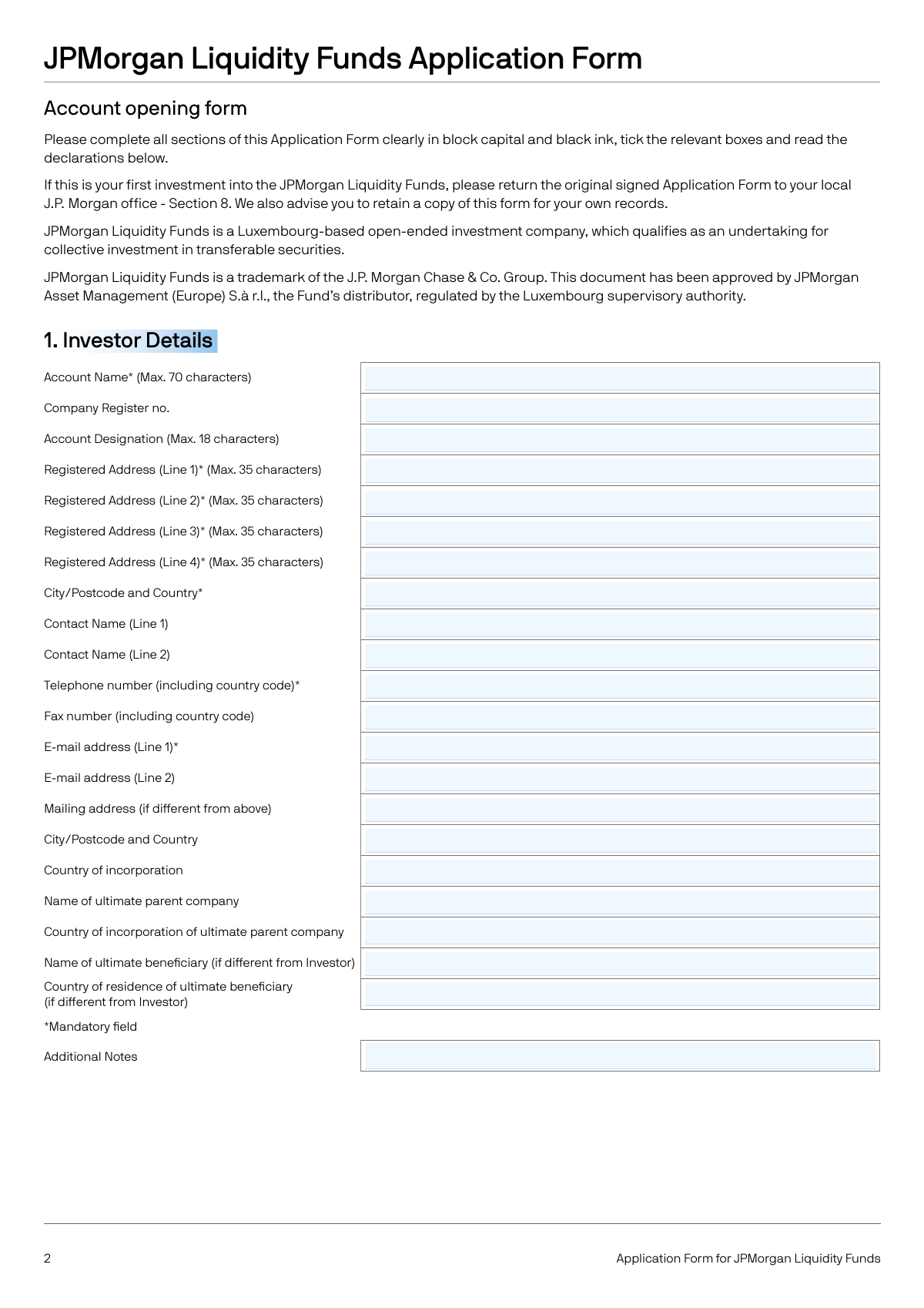
This form is an application for institutional investors to open an account and invest in the JPMorgan Liquidity Funds, a Luxembourg-based open-ended investment company (SICAV). It gathers essential information about the investing entity, including contact details, investment choices, banking information for transactions, and tax residency status for regulatory compliance under FATCA and CRS. Today, this form can be filled out quickly and accurately using AI-powered services like Instafill.ai, which can also convert non-fillable PDF versions into interactive fillable forms.
Our AI automatically handles information lookup, data retrieval, formatting, and form filling.
It takes less than a minute to fill out JPM56791 using our AI form filling.
Securely upload your data. Information is encrypted in transit and deleted immediately after the form is filled out.
Form specifications
| Form name: | Application Form: JPMorgan Liquidity Funds |
| Number of pages: | 1 |
| Language: | English |
| Categories: | investment forms, mutual fund forms |
Instafill Demo: How to fill out PDF forms in seconds with AI
How to Fill Out JPM56791 Online for Free in 2026
Are you looking to fill out a JPM56791 form online quickly and accurately? Instafill.ai offers the #1 AI-powered PDF filling software of 2026, allowing you to complete your JPM56791 form in just 37 seconds or less.
Follow these steps to fill out your JPM56791 form online using Instafill.ai:
- 1 Navigate to Instafill.ai and upload or select the JPMorgan Liquidity Funds Application Form.
- 2 Use the AI assistant to automatically fill in Section 1: Investor Details, including your company's registered name, address, contact information, and parent company details.
- 3 In Section 2: Your investment choice, select the desired Sub-Funds, Share Classes, and specify how distributions should be handled (reinvested or paid out).
- 4 Complete Section 3: Bank Details of the Investor, by providing account information for each currency you plan to use for subscriptions and redemptions.
- 5 Fill out Section 6: Entity Self-Certification, providing your organization's tax residency, FATCA classification, and CRS classification. If you are a Passive NFFE/NFE, provide details for all Controlling Persons.
- 6 Provide authorization in Section 5 and list authorized personnel to manage the account. Review all sections for accuracy.
- 7 Electronically sign the form and download the completed document to submit the original copy to the designated J.P. Morgan office as per the instructions in Section 8.
Our AI-powered system ensures each field is filled out correctly, reducing errors and saving you time.
Why Choose Instafill.ai for Your Fillable JPM56791 Form?
Speed
Complete your JPM56791 in as little as 37 seconds.
Up-to-Date
Always use the latest 2026 JPM56791 form version.
Cost-effective
No need to hire expensive lawyers.
Accuracy
Our AI performs 10 compliance checks to ensure your form is error-free.
Security
Your personal information is protected with bank-level encryption.
Frequently Asked Questions About Form JPM56791
This form is used by institutional investors to apply for an account and invest in the JPMorgan Liquidity Funds, which are Luxembourg-based open-ended investment companies (SICAVs).
This form is intended for institutional investors, such as banks, insurance companies, pension funds, and certain financial groups as detailed in the 'Declaration of Eligibility' in Section 5. Individuals and non-institutional entities are generally not eligible.
Section 1 requires you to provide key details about your organization, including the legal name, company registration number, registered address, and primary contact information. Fields marked with an asterisk (*) are mandatory.
In Section 2, you must select the specific Sub-Fund and Share Class you wish to invest in from the provided tables. You also need to indicate whether you want any distributions to be reinvested or paid out to your bank account.
No, you cannot use a third-party bank account. Section 3 clearly states that the bank account used for subscriptions and redemptions must be in the name of the investor, as third-party payments are not permitted.
This section is mandatory for tax compliance under FATCA and CRS regulations. You must provide your organization's country of tax residency, Tax Identification Number (TIN), and classify your entity's status to determine tax reporting obligations.
If your entity is classified as a Passive Non-Financial Entity (Passive NFE), you are required to complete Section 4 of the self-certification. This involves providing the personal and tax details of all 'Controlling Persons' of the entity.
For your first investment, you must submit the original signed application form. You may also be required to provide certified true copies of identification documents, and if an agent is signing, a power of attorney or discretionary agreement is needed.
The original, signed application form must be sent to the appropriate J.P. Morgan office for your region (EMEA, APAC, or Americas). The addresses and contact details are listed in Section 8, 'Submitting your Application'.
Upon receipt of a correctly completed application and payment, J.P. Morgan will dispatch a contract note, typically on the following business day. You should review this note for accuracy and report any errors within seven business days.
If the PDF is not interactive, you can use a service like Instafill.ai to convert it into a fillable form. This allows you to easily type your information into the fields instead of printing and filling it out by hand.
Simply upload the JPMorgan Liquidity Funds application form to the Instafill.ai platform. The service will make the form interactive, and you can use its AI-powered features to accurately auto-fill your information, saving time and reducing errors.
Yes, services like Instafill.ai use AI to help you complete forms like this one more efficiently. The AI can accurately auto-fill fields with your saved information, which helps save time and minimize potential mistakes.
ERISA refers to the United States Employee Retirement Income Security Act. If your entity or the assets used for investment are subject to ERISA, you must declare it in Section 5, as this may affect your eligibility to invest or require further documentation.
Compliance JPM56791
Validation Checks by Instafill.ai
1
Mandatory Investor Details Completion
This check ensures that all fields marked with an asterisk (*) in Section 1 'Investor Details' are filled out. These fields, such as Account Name, Registered Address, and Telephone Number, are critical for account creation and regulatory compliance. Failure to complete these fields will prevent the form from being submitted, as this information is fundamental for identifying the investor.
2
Investor and Bank Account Name Consistency
This validation compares the 'Account Name' in Section 1 with the 'Bank Account Name' provided in Section 3 for each currency. This is a crucial anti-money laundering (AML) control to ensure redemption proceeds are not sent to a third party. A mismatch will flag the application for manual review or rejection to prevent fraudulent transactions.
3
Conditional IBAN Requirement and Format
This check verifies that if bank details for EUR or GBP are provided in Section 3, the 'IBAN or Account Number' field contains a structurally valid International Bank Account Number (IBAN). The validation includes checking the country code, length, and checksum. This is important for ensuring payment processing for these currencies is successful and avoids transaction failures or delays.
4
Investment Choice Validity
This validation ensures that at least one investment choice is made in Section 2 and that the selected Share Class is a valid option for the chosen Sub-Fund and category (e.g., Distributing T+0). An invalid combination, such as selecting a share class not offered for a specific fund, would be an error. This prevents investment into non-existent or incorrect fund structures, ensuring the investor's funds are allocated as intended.
5
ERISA Status Declaration
This check confirms that a selection ('Yes' or 'No') has been made for the ERISA status question in Section 5. This declaration is a legal requirement to ensure the investor is not an ERISA-subject plan, which is restricted from this investment. If 'Yes' is selected, the application should be flagged for mandatory review or rejection, as it may indicate ineligibility.
6
FATCA/CRS Passive Entity Logic
This is a conditional logic check that verifies if the investor self-certifies as a 'Passive NFFE' (FATCA, box 2.8) or a 'Passive NFE' (CRS, box 3.1 or 3.7) in Section 6, then Section 4 'Controlling Persons of Passive NFFEs/NFEs' must be completed. This is required by tax regulations to identify the ultimate beneficial owners for reporting purposes. If Section 4 is not completed when required, the application is incomplete and cannot be processed.
7
Controlling Person Details Completeness
If Section 4 is triggered by the FATCA/CRS classification, this validation ensures that all required fields for at least one Controlling Person are filled, including Name, Address, Date of Birth, Country of Tax Residency, and TIN (or a reason for its absence). Incomplete data for controlling persons prevents compliance with global tax transparency laws. The application will be rejected until all necessary information is provided.
8
Date Field Format and Validity
This check validates that all date fields on the form, such as 'Date of Birth' in Section 6 and the signature dates in Section 5 and 8, are in the correct format (Day/Month/Year) and represent a valid, non-future date. This ensures data integrity and the legal validity of the signed declarations. An invalid date would render the certification or signature void.
9
Tax Identification Number (TIN) Provision Logic
This validation confirms that for each 'Country of Tax Residency' listed in Section 6, a corresponding 'Tax Identification Number (TIN)' is provided. If a TIN is not available, the system must check that a reason has been entered in the designated field. This is a core requirement of CRS and FATCA regulations, and failure to provide either a TIN or a valid reason will result in a non-compliant application.
10
Mutually Exclusive Beneficiary Declaration
This check ensures that in Section 5, the investor has ticked exactly one of the two checkboxes declaring their status as either the ultimate economic beneficiary or not. These options are mutually exclusive, and selecting both or neither creates ambiguity. This validation prevents logical errors in a critical AML/KYC declaration, and an invalid selection would require correction before proceeding.
11
Final Confirmation Prerequisite
This validation confirms that the final checkbox in Section 8, confirming the investor has made 'all prudent and diligent investigations', has been ticked. The form explicitly states the application cannot be processed without this confirmation. This check acts as a final gatekeeper to ensure the investor formally acknowledges their due diligence responsibilities before submission.
12
SWIFT BIC Code Format Validation
This check applies if the investor opts for SWIFT trading or reporting in Section 4. It validates that any provided BIC codes are either 8 or 11 characters long and conform to the standard alphanumeric format. Incorrect BIC codes would lead to the failure of trade instructions or reporting delivery, disrupting the investor's operations. This check prevents such communication errors.
13
Investor Eligibility Declaration Check
This validation ensures the applicant has selected an appropriate investor type from the list of 'Institutional Investors' in Section 5. This declaration is essential to prove eligibility for the institutional share class, which has specific regulatory requirements. If no category is selected, the investor's eligibility cannot be confirmed, and the application must be halted.
14
Character Limit Enforcement
This check verifies that data entered into fields with specified character limits (e.g., 'Account Name (Max. 70 characters)', 'Registered Address (Max. 35 characters)') does not exceed the stated maximum. This is important for ensuring data fits into downstream systems and databases without truncation, which could lead to incorrect account details or mailings. Exceeding the limit would trigger an error requiring the user to shorten the input.
Common Mistakes in Completing JPM56791
Section 6 requires applicants to self-classify their entity under complex FATCA and CRS tax regulations, with definitions spanning multiple pages. Applicants often guess or choose the wrong category (e.g., Active NFFE vs. Passive NFE), which can lead to incorrect tax reporting, potential penalties, and significant processing delays. To avoid this, it is crucial to consult a tax advisor to determine the correct status before filling out the form.
If an entity is classified as a 'Passive NFE' or 'Passive NFFE' in Section 6, the form requires detailed personal and tax information for all 'Controlling Persons' in Section 4. A very common mistake is to either miss this requirement entirely or provide incomplete information, such as omitting a person or their Tax Identification Number (TIN). This is a major compliance failure that will halt the application until all required information is provided and verified.
Section 3 requires bank details for each currency, and the account must be in the investor's name, as third-party payments are prohibited. Applicants sometimes provide an account belonging to a parent company or a director, which will cause rejection of redemption payments. Additionally, failing to provide an IBAN for EUR and GBP payments as specified will lead to payment failures and significant delays in receiving funds.
The grid in Section 2 for selecting Sub-Funds and Share Classes is complex and prone to error. A common mistake is ticking a Sub-Fund without selecting a corresponding Share Class, or ticking multiple incompatible options. This ambiguity forces the asset manager to seek clarification, delaying the investment. Applicants must carefully trace the row and column to ensure they select exactly one valid Share Class for their chosen Sub-Fund.
Applicants often overlook mandatory fields marked with an asterisk (*), such as 'Account Name' or 'Telephone number' in Section 1, due to haste. An incomplete application will be rejected or delayed, requiring follow-up and resubmission, which slows down the entire account opening process. To avoid this, carefully double-check that all fields marked with an asterisk are filled correctly before submission.
At the very end of the form in Section 8, there is a mandatory checkbox confirming that the applicant has performed all necessary due diligence. The form explicitly states the application cannot be processed if this box is not ticked. This is a final, crucial step that is easily missed, and its absence will cause an automatic rejection of the application.
The form specifies character limits for fields like address lines (35 characters) and instructs applicants to use 'block capital and black ink'. Ignoring these rules can lead to data entry errors, truncated information in the system, and unreadable scanned documents, causing issues with mail delivery and account identification. Since the form is a non-fillable PDF, AI-powered tools like Instafill.ai can convert it into a fillable version and enforce these character limits to prevent errors.
The form allows applicants to reference external documents by ticking a box, such as for 'standard payment instructions' (Section 3) or a 'List of Authorised Signers'. A frequent mistake is ticking the box but forgetting to attach the corresponding company-headed paper. This creates a discrepancy that leads to processing delays and requests for the missing documentation.
Section 5 requires applicants to declare their eligibility by selecting their specific institutional investor type (e.g., 'Insurance company,' 'Holding company'). Choosing the wrong category or being ineligible can have severe consequences, including the compulsory redemption of shares. This mistake often stems from a misunderstanding of the strict definitions used for regulatory purposes, so applicants must carefully review the categories to ensure they qualify.
The application requires signatures in multiple places, including the final declaration and the authorised personnel section. Common errors include forgetting to sign, not having the required number of signatories, or having an individual sign who is not on the list of authorised personnel. An invalid signature invalidates the entire application, requiring it to be corrected and resubmitted, causing significant delays.
Saved over 80 hours a year
“I was never sure if my IRS forms like W-9 were filled correctly. Now, I can complete the forms accurately without any external help.”
Kevin Martin Green
Your data stays secure with advanced protection from Instafill and our subprocessors

Robust compliance program
Transparent business model
You’re not the product. You always know where your data is and what it is processed for.
ISO 27001, HIPAA, and GDPR
Our subprocesses adhere to multiple compliance standards, including but not limited to ISO 27001, HIPAA, and GDPR.
Security & privacy by design
We consider security and privacy from the initial design phase of any new service or functionality. It’s not an afterthought, it’s built-in, including support for two-factor authentication (2FA) to further protect your account.
Fill out JPM56791 with Instafill.ai
Worried about filling PDFs wrong? Instafill securely fills application-form-jpmorgan-liquidity-funds forms, ensuring each field is accurate.