Yes! You can use AI to fill out Application Form: Legal Entities | Retail Hedge Fund - Fundrock

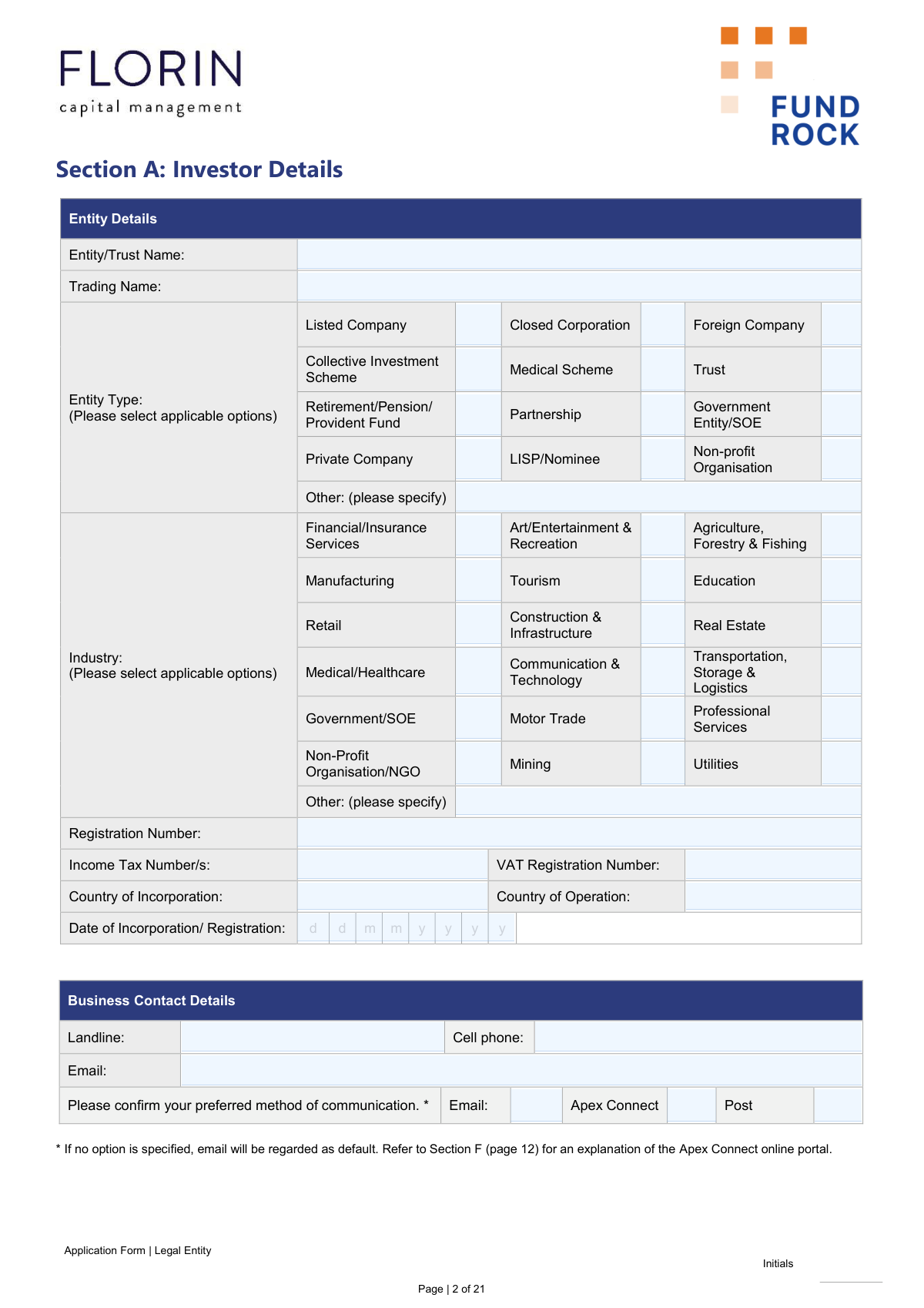
This is an application form for legal entities wishing to invest in the Fundrock Retail Hedge Fund. It gathers essential information about the investing entity, including registration details, tax status, and beneficial ownership, to comply with financial regulations like FICA, FATCA, and CRS. Completing this multi-section form is a crucial step for a legal entity to establish an investment relationship with Fundrock. Today, this form can be filled out quickly and accurately using AI-powered services like Instafill.ai, which can also convert non-fillable PDF versions into interactive fillable forms.
Our AI automatically handles information lookup, data retrieval, formatting, and form filling.
It takes less than a minute to fill out Fundrock Legal Entity Application Form using our AI form filling.
Securely upload your data. Information is encrypted in transit and deleted immediately after the form is filled out.

Form specifications

Form name: Application Form: Legal Entities | Retail Hedge Fund - Fundrock
Number of pages: 1
Language: English
Categories: NY legal forms, legal application forms, legal forms
main-image

Instafill Demo: How to fill out PDF forms in seconds with AI

How to Fill Out Fundrock Legal Entity Application Form Online for Free in 2026

Are you looking to fill out a FUNDROCK LEGAL ENTITY APPLICATION FORM form online quickly and accurately? Instafill.ai offers the #1 AI-powered PDF filling software of 2026, allowing you to complete your FUNDROCK LEGAL ENTITY APPLICATION FORM form in just 37 seconds or less.
Follow these steps to fill out your FUNDROCK LEGAL ENTITY APPLICATION FORM form online using Instafill.ai:
  1. 1 Navigate to Instafill.ai and upload the Fundrock Legal Entity Application Form.
  2. 2 Use the AI assistant to provide your entity's details, including name, type, registration numbers, and contact information as required in Section A.
  3. 3 Specify your investment choices, payment method, and any regular withdrawal instructions in Section B.
  4. 4 Complete the necessary tax declarations, including the Dividend Withholding Tax (DWT) in Section D and the FATCA/CRS Tax Residency Self-Certification in Section E.
  5. 5 Provide details for all Ultimate Beneficial Owners (UBOs) and Controlling Persons as required in Sections E and G.
  6. 6 Carefully review all the information auto-populated by the AI, make any necessary edits, and then electronically sign the investor declaration in Section J.
  7. 7 Download the completed application and gather all necessary supporting documents as listed in Annexure A before submitting them to [email protected].

Our AI-powered system ensures each field is filled out correctly, reducing errors and saving you time.

Why Choose Instafill.ai for Your Fillable Fundrock Legal Entity Application Form Form?

Speed

Complete your Fundrock Legal Entity Application Form in as little as 37 seconds.

Up-to-Date

Always use the latest 2026 Fundrock Legal Entity Application Form form version.

Cost-effective

No need to hire expensive lawyers.

Accuracy

Our AI performs 10 compliance checks to ensure your form is error-free.

Security

Your personal information is protected with bank-level encryption.

Frequently Asked Questions About Form Fundrock Legal Entity Application Form

This form is an application for legal entities, such as companies, trusts, and partnerships, to invest in the FundRock Retail Hedge Fund. It must be completed by an authorized representative of the entity wishing to invest.

You must provide supporting documents as per FICA requirements, which are detailed in Annexure A of the form. The specific documents depend on your entity type, such as a Certificate of Incorporation for a company or a Trust Deed for a trust.

You should submit the completed and initialed application form, along with all required supporting documents and proof of payment, via email to [email protected].

The cut-off time for processing investment subscriptions is 10:00 am on the last business day of the prior month. Instructions received after this time will be processed for the first business day of the following month.

As a security measure under the FIC Act, FundRock does not publish fund banking details on the form. You will receive the bank account details via email after your application has been verified and approved by the KYC team.

No, Section C is only required if you are receiving advice from a Financial Advisor for this investment. If you are investing directly without an advisor, you can leave this section blank.

These sections (D and E) are mandatory for tax compliance. They help FundRock determine your entity's tax residency and status to ensure the correct application of dividend withholding tax and to comply with international tax reporting standards like FATCA and CRS.

You must complete this section for each natural person who owns 5% or more of the entity's shares with voting rights, or who otherwise exercises control over the legal entity. A group structure/organogram is also required.

First, the KYC team will verify your application and documents, and may contact you for more information. Your investment instruction will be actioned once you are FICA compliant, all valid documents are submitted, and proof of payment is received before the cut-off time.

You must initial any amendments or changes made on the form. For significant changes after submission, such as new banking details, you must notify FundRock immediately using the prescribed forms.

Yes, you can use services like Instafill.ai, which leverage AI to accurately auto-fill form fields. This can save you significant time and help reduce the chance of errors on a long and complex form like this one.

Simply upload the FundRock application PDF to the Instafill.ai platform. The AI will automatically detect and fill in the required fields, which you can then review, edit if necessary, and finalize before submission.

If you have a non-fillable PDF, you can use a service like Instafill.ai to convert it into an interactive, fillable form. This allows you to easily type your information directly into the fields online.

You can request access by completing Section F of the application form. The Apex Connect portal allows you to view your investor holdings, transaction history, and statements online.

Compliance Fundrock Legal Entity Application Form
Validation Checks by Instafill.ai

1
Investor Bank Account Holder Name Verification
This check ensures the 'Name of Account Holder' in the investor's banking details (Section A, Page 4) is an exact match to the 'Entity/Trust Name' provided in the investor details (Section A, Page 2). This is a critical anti-fraud and anti-money laundering (AML) measure, as payments are only allowed to accounts in the name of the registered investor. A mismatch will halt the application process until the names are aligned or proper documentation is provided.
2
Date of Incorporation Chronological Check
Validates that the 'Date of Incorporation/Registration' in Section A is a valid date in DDMMYYYY format and occurs before the application submission date. This confirms the legal entity existed prior to applying for the investment. An invalid or future date would indicate a data entry error and prevent the form from being processed until corrected.
3
Conditional 'Other' Field Completion
This validation checks that if the 'Other' checkbox is selected in the 'Entity Type' or 'Industry' sections (Section A), the corresponding text field for specification is not empty. This ensures that the application captures complete and specific data for classification and reporting purposes. Failure to provide the specification will result in a validation error prompting the user to complete the required information.
4
FATCA/CRS Controlling Persons Trigger
Ensures that the 'Controlling Persons' section (Page 13) is completed if the entity is classified as a 'Passive NFFE', 'Passive NFE', or a 'Trust' in the FATCA/CRS section (Section E). This is a mandatory requirement under global tax transparency regulations to identify the ultimate beneficial owners. If the condition is met but the section is empty, the submission will be blocked until the controlling person details are provided.
5
Politically Exposed Person (PEP) Declaration Detail
This check verifies that if an applicant declares themselves a Politically Exposed Person (PEP) by selecting 'Yes' in Section J, the adjacent text field for details is filled out. This information is crucial for enhanced due diligence and risk assessment as required by FICA. An empty details field after a 'Yes' declaration will prevent submission until the required explanation is provided.
6
UBO Shareholding Percentage Validation
In Section G (Ultimate Beneficial Owner), if the role 'Owner of 5% or more shares' is selected, this check validates that the 'Percentage of shareholding' field contains a numeric value greater than or equal to 5 and less than or equal to 100. This ensures the data is logical and meets the specified threshold for UBO reporting. An invalid or out-of-range entry will trigger an error.
7
Dynamic Document Upload Verification (Annexure A)
This validation cross-references the 'Entity Type' selected in Section A with the required documents listed in Annexure A. It confirms that all mandatory documents for that specific entity type (e.g., 'Certificate of incorporation' for an Unlisted Company) have been uploaded. This is essential for FICA compliance and prevents the application from proceeding to the KYC team without the necessary supporting evidence.
8
Financial Advisor Section Integrity
Validates that Section C (Financial Advisor) is either entirely blank or fully completed with all mandatory information, including FSP Licence Number, fees, and signatures. This prevents partial or incomplete advisor data from being submitted, which could lead to processing delays or incorrect fee calculations. If any part of the section is filled, the system will require all other mandatory fields within it to be completed.
9
Investment and Distribution Linkage
For each fund selected in Section B, this check ensures that both an 'Investment Amount' (as a positive number) and an 'Income Distribution' choice ('Re-invest' or 'Pay-out') have been specified. This prevents ambiguous instructions and ensures the investment can be processed correctly from the start. An incomplete fund entry will be flagged, requiring the user to complete all associated fields for that investment.
10
Foreign Tax Residency (TIN) Completeness
In Section E, if the applicant answers 'Yes' to being a tax resident in another country, this check ensures that for each country listed, either a Tax Identification Number (TIN) is provided or a valid reason (A, B, or C) is selected for its absence. This is a core requirement for CRS reporting to foreign tax authorities. Incomplete rows in this table will block submission until the required TIN or reason code is supplied.
11
Source of Funds/Wealth 'Other' Explanation
This validation ensures that if the 'Other' option is selected for either 'Source of Funds' or 'Source of Wealth' in Section A, the accompanying text field is filled in. This is a critical AML check that provides clarity on the origin of the investor's money beyond standard categories. Failure to provide an explanation will result in an error, as this information is mandatory for due diligence.
12
Mandatory Declaration and Signature Completion
Verifies that all mandatory declaration sections (e.g., Section J Investor Declaration) have been acknowledged via the required checkbox and that the 'Authorised Signature', 'Name of Signatory', 'Capacity', and 'Date' fields are all completed. These elements are legally required to form a binding agreement and confirm the applicant's consent to the terms. The application cannot be submitted until all mandatory signature blocks are filled.

Common Mistakes in Completing Fundrock Legal Entity Application Form

Submitting Incomplete or Incorrect FICA Documentation

Applicants often fail to provide all the necessary supporting documents listed in Annexure A for their specific entity type. This happens because the requirements are extensive and vary significantly for trusts, companies, and partnerships. Missing a single document, like a board resolution or proof of address for a director, will halt the entire application process until all FICA requirements are met, causing significant delays.

Forgetting to Initial Each Page

The form explicitly requires the applicant to initial every page, but with a 21-page document, it's easy to miss one. This oversight can lead to the form being returned for completion, delaying the investment. To avoid this, carefully review each page before submission, or use a tool that can apply initials across all required pages automatically.

Incorrect FATCA/CRS Tax Classification

In Section E, entities often misclassify their FATCA/CRS status (e.g., as an 'Active NFE' when they are a 'Passive NFE'). This is a high-risk error due to the complexity of tax regulations. An incorrect classification can lead to improper tax reporting to authorities like the SARS, potentially resulting in financial penalties. If unsure, consulting a tax advisor is critical.

Failing to Disclose 'Controlling Persons'

When an entity is classified as a 'Passive NFE/NFFE' or a Trust in Section E, the applicant must provide detailed information for all 'Controlling Persons' on page 13. Applicants frequently overlook this conditional requirement, leaving the section blank. This omission renders the tax declaration incomplete and will prevent the application from being approved until the information is provided.

Incomplete Ultimate Beneficial Owner (UBO) Information

In Section G, applicants must identify all natural persons who ultimately own or control 5% or more of the entity. A common mistake is listing a holding company as the owner instead of tracing ownership to the final individual. Failing to provide this information, along with the required ownership structure diagram, is a major compliance failure that will stop the application.

Confusing 'Source of Funds' with 'Source of Wealth'

Section A asks for both 'Source of Funds' and 'Source of Wealth,' and applicants often provide the same answer for both. 'Source of Funds' refers to the origin of the money for this specific investment, while 'Source of Wealth' describes how the entity's total net worth was generated. Providing vague or identical answers can trigger requests for additional clarification and proof, delaying the investment.

Missing Signatures in Multiple Sections

This form requires multiple signatures, including for investor banking details (Page 4), financial advisor fees (Page 7), and the final declaration (Page 19). It is common for an authorized signatory to miss one of these signature fields. An incomplete form cannot be processed, so it's crucial to double-check every page for required signatures before submission.

Using a Trading Name Instead of the Full Registered Name

In Section A, applicants sometimes enter the entity's common trading name instead of its full, official registered name as it appears on incorporation documents. This discrepancy will cause a mismatch during the FICA verification process, leading to rejection or delays. Always use the exact legal name to ensure a smooth verification.

Forgetting to Specify the Fund 'Class'

When selecting an investment in Section B (Page 5), the form notes that 'Class selection on your investment is deemed mandatory'. Applicants often indicate the fund name and investment amount but forget to specify the fund class. This missing detail will prevent the instruction from being processed, as fees and terms can vary between classes.

Submitting Unacceptable Proof of Address Documents

Annexure A (Page 7) details very specific requirements for acceptable proof of address documents, such as being less than 3 months old and excluding items like TV licenses or clothing accounts. Submitting an outdated or invalid document is a frequent error that fails the FICA verification. Using an AI-powered form filler like Instafill.ai can help by validating document types and dates before submission.

Failing to Complete the Financial Advisor Fee Declaration

If a financial advisor is involved, the fee percentages in Section C (Page 7) must be completed and signed by the investor. If this section is left blank, the fees default to zero, which can cause payment disputes and relationship issues with the advisor. Both the investor and advisor should ensure this section is accurately filled out and signed.
Saved over 80 hours a year

“I was never sure if my IRS forms like W-9 were filled correctly. Now, I can complete the forms accurately without any external help.”

Kevin Martin Green

Your data stays secure with advanced protection from Instafill and our subprocessors

Robust compliance program

Transparent business model

You’re not the product. You always know where your data is and what it is processed for.

ISO 27001, HIPAA, and GDPR

Our subprocesses adhere to multiple compliance standards, including but not limited to ISO 27001, HIPAA, and GDPR.

Security & privacy by design

We consider security and privacy from the initial design phase of any new service or functionality. It’s not an afterthought, it’s built-in, including support for two-factor authentication (2FA) to further protect your account.

Fill out Fundrock Legal Entity Application Form with Instafill.ai

Worried about filling PDFs wrong? Instafill securely fills application-form-legal-entities-retail-hedge-fund-fundrock forms, ensuring each field is accurate.