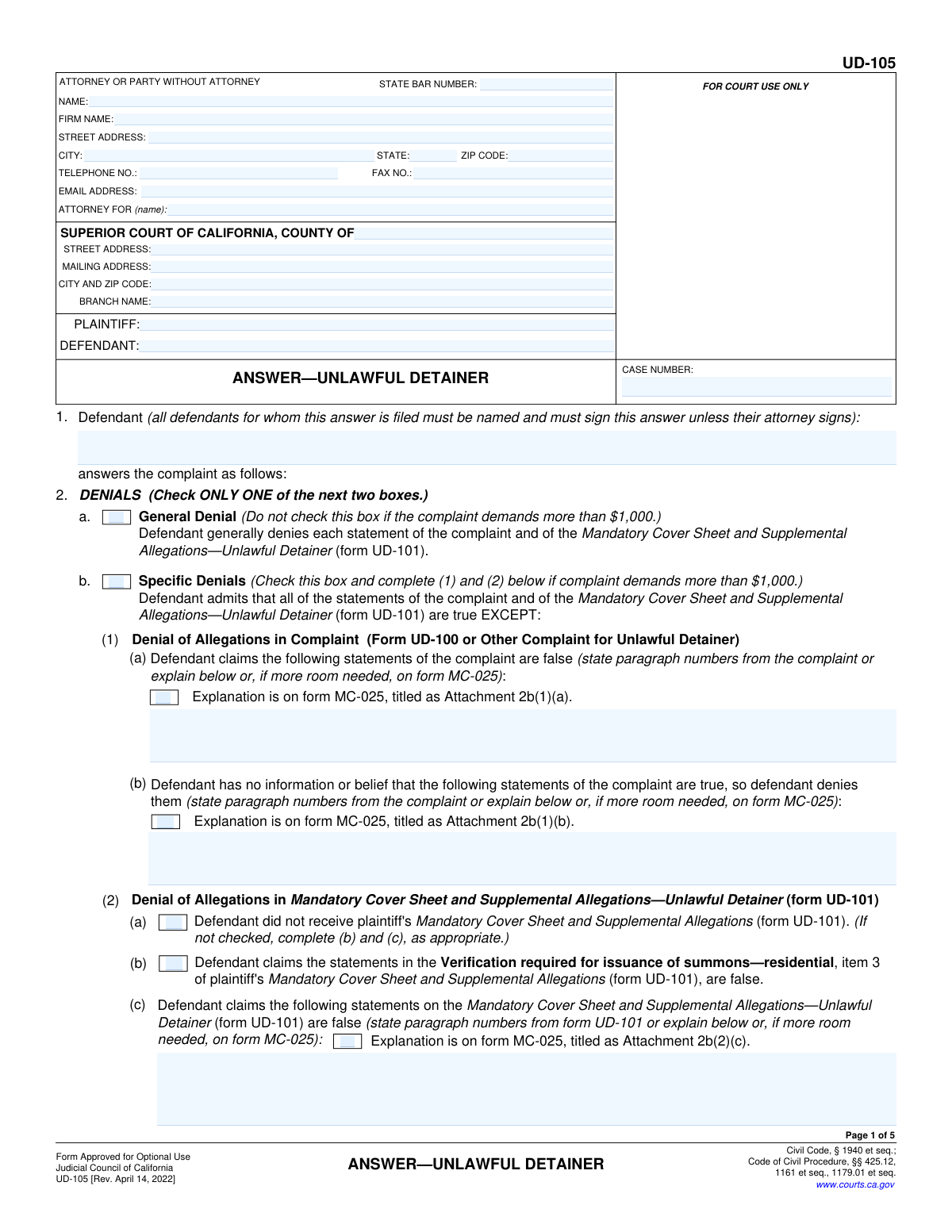
Yes! You can use AI to fill out Judicial Council of California Form UD-105, Answer—Unlawful Detainer
Form UD-105 (AnswerâUnlawful Detainer) is the official California Judicial Council pleading a tenant/defendant files to respond to an unlawful detainer complaint. It lets the defendant choose a general or specific denial, assert defenses and objections (including habitability, retaliation, rent control, Tenant Protection Act, and certain COVID-19 and CARES Act-related defenses), add other statements, and request relief such as costs or attorney fees. Filing a complete and accurate Answer is important because it preserves defenses and positions the defendant to contest the eviction in court. Today, this form can be filled out quickly and accurately using AI-powered services like Instafill.ai, which can also convert non-fillable PDF versions into interactive fillable forms.
Our AI automatically handles information lookup, data retrieval, formatting, and form filling.
It takes less than a minute to fill out UD-105 using our AI form filling.
Securely upload your data. Information is encrypted in transit and deleted immediately after the form is filled out.
Form specifications
| Form name: | Judicial Council of California Form UD-105, Answer—Unlawful Detainer |
| Number of pages: | 5 |
| Language: | English |
| Categories: | California court forms, Judicial Council forms, California judicial forms, eviction forms, landlord tenant forms, unlawful detainer forms |
Instafill Demo: filling out a legal form in seconds
How to Fill Out UD-105 Online for Free in 2026
Are you looking to fill out a UD-105 form online quickly and accurately? Instafill.ai offers the #1 AI-powered PDF filling software of 2026, allowing you to complete your UD-105 form in just 37 seconds or less.
Follow these steps to fill out your UD-105 form online using Instafill.ai:
- 1 Go to Instafill.ai and upload/select the California Judicial Council form UD-105 (Answer—Unlawful Detainer).
- 2 Enter case and court details (case number, county, court address/branch) and identify the parties (plaintiff and defendant names).
- 3 Complete the attorney/party contact section (name, address, phone/email, and State Bar number if applicable).
- 4 Choose the denial type (general denial if eligible, or specific denials) and, if specific, list paragraph numbers/explanations for disputed allegations and any UD-101 cover sheet denials; attach MC-025 where needed.
- 5 Select applicable defenses and objections (item 3) and provide supporting facts in item 3w or via MC-025 attachments, ensuring each checked defense has a brief factual basis.
- 6 Fill out other statements and requests (items 4–6), including whether the premises were vacated, any fair rental value issues, requested relief, and the number of pages attached.
- 7 Complete the unlawful detainer assistant section (item 7) if applicable, then add signatures and verification dates; have Instafill.ai generate a final, court-ready PDF for printing/e-filing and saving.
Our AI-powered system ensures each field is filled out correctly, reducing errors and saving you time.
Why Choose Instafill.ai for Your Fillable UD-105 Form?
Speed
Complete your UD-105 in as little as 37 seconds.
Up-to-Date
Always use the latest 2026 UD-105 form version.
Cost-effective
No need to hire expensive lawyers.
Accuracy
Our AI performs 10 compliance checks to ensure your form is error-free.
Security
Your personal information is protected with bank-level encryption.
Frequently Asked Questions About Form UD-105
UD-105 is the defendantâs written response to an unlawful detainer (eviction) complaint in California. It tells the court whether you deny the allegations and what defenses or objections you are raising.
Any tenant/defendant who has been served with an unlawful detainer complaint and wants to respond should file UD-105 (unless using another permitted responsive pleading). Each defendant who is responding must be listed in item 1 and must sign (unless an attorney signs for them).
Check only one box. Use General Denial only if the complaint demands $1,000 or less; if the complaint demands more than $1,000, you generally must use Specific Denials and identify what you dispute.
In 2b(1), list the paragraph numbers from the complaint (UD-100 or other) you claim are false or that you deny due to lack of information. In 2b(2), address the plaintiffâs UD-101 (Mandatory Cover Sheet/Supplemental Allegations) by checking boxes and listing the paragraph numbers you dispute.
MC-025 is an attachment sheet used when you need more space to explain denials, defenses, or other statements/requests. If you use it, label it exactly as the form instructs (for example, âAttachment 3wâ or âAttachment 2b(1)(a)â) and include the total number of pages attached in item 6.
Yes. For every defense box you check in item 3, you must briefly state supporting facts in item 3w (page 4) or on an attached MC-025 labeled âAttachment 3w.â
Some defenses are marked â(Nonpayment of rent only),â such as breach of the warranty of habitability, repair-and-deduct, or that you offered the rent before the notice expired and the landlord refused. Only check those if the eviction is based on nonpayment of rent and the facts fit your situation.
UD-105 includes specific defenses for rent/fees due in certain COVID-19 time periods and for required notices/declarations and rental assistance application issues. Check the boxes that match your dates and circumstances and explain the details in item 3w (or MC-025).
That defense requires either (1) a temporary restraining order/protective order or a police report not more than 180 days old, or (2) a signed statement from a qualified third party (such as a doctor or counselor). Keep copies ready to provide if the court requests them.
If you vacated, check item 4a and write the date you moved out. You can still file an answer to address money claims or other issues, but moving out may affect what the court orders.
Item 7 must be completed in all cases. If you paid an unlawful detainer assistant (a registered non-attorney service) for help, check âdidâ and provide their registration details; otherwise check âdid not.â
Yesâeach defendant for whom the answer is filed must sign the answer unless an attorney signs for them, and the verification is signed under penalty of perjury. If there are multiple defendants responding, each should sign in the signature and verification areas provided (or attach additional signature pages if needed).
You generally file UD-105 with the Superior Court listed on the complaint (often by e-filing, in person, or by drop box/mail depending on the county) and serve a copy on the plaintiff/attorney. Processing and hearing timelines vary by county, but unlawful detainer cases move quicklyâcheck your summons/complaint and local court rules for deadlines.
Yes. AI form-filling services like Instafill.ai can help auto-fill form fields from your information and documents, reducing manual typing and missed fieldsâthough you still must review everything for accuracy and truthfulness before signing.
Upload the UD-105 PDF to Instafill.ai, answer the guided questions (case number, parties, denials, defenses, and attachments), and let the AI map your responses into the correct fields for download and filing. If your copy is a flat/non-fillable PDF, Instafill.ai can convert it into an interactive fillable form first, then auto-fill it.
Compliance UD-105
Validation Checks by Instafill.ai
1
Case Number present and matches court case-number format
Validates that the Case Number field is not blank and conforms to the expected Superior Court case numbering pattern for the county (e.g., allowed characters, separators, and length). This is critical to ensure the answer is filed into the correct case and can be matched to the complaint. If the case number is missing or malformed, the submission should be rejected or routed to manual review with an error prompting the filer to correct it.
2
Court venue fields complete and internally consistent (County/Branch/Address)
Checks that Court County is provided and that at least one court address (street or mailing) plus Court City/ZIP and Branch Name are present when required by the filing workflow. It also validates that the city/ZIP appear plausible for the stated county (basic cross-check against a CA ZIP/county table if available). If inconsistent or incomplete, the system should flag the filing because it may be directed to the wrong courthouse or rejected by the clerk.
3
Plaintiff and Defendant names are provided and not identical
Ensures Plaintiff and Defendant fields are populated with full names (not placeholders like "N/A" or "unknown") and that the names are not the same string after normalization. This prevents party-role confusion and mis-indexing in case management systems. If the check fails, the submission should be blocked until corrected or sent to manual review if the names legitimately match (rare).
4
Answering Defendant(s) list includes at least one name and aligns with Defendant field
Validates that item 1 (Defendant(s) for whom the answer is filed) contains at least one defendant name and that it reasonably matches the Defendant name shown in the caption (allowing for multiple defendants, middle initials, and ordering). This is important because the form requires all defendants for whom the answer is filed to be named and to sign unless an attorney signs. If missing or mismatched, the system should require correction or prompt the filer to add all answering defendants.
5
Denials selection is mutually exclusive (General vs. Specific)
Checks that exactly one of the two denial types is selected: General Denial (2a) or Specific Denials (2b). The form explicitly instructs to check ONLY ONE, and selecting both (or neither) creates an ambiguous pleading. If the validation fails, the submission should be rejected with a clear message to select one denial type.
6
General Denial allowed only when complaint demand is ≤ $1,000 (if amount captured)
If the system captures the complaint demand amount from the case/complaint metadata, validate that General Denial is not selected when the demand exceeds $1,000, consistent with the form instruction. This prevents an improper response type that could be challenged procedurally. If the amount is > $1,000 and General Denial is selected, the system should block submission or require the filer to switch to Specific Denials.
7
Specific Denials require completion of allegation-denial details or MC-025 attachment indicators
When Specific Denials (2b) is selected, validates that at least one of the denial detail sections is completed: paragraph numbers/explanations for (1)(a) and/or (1)(b), and the UD-101 denial portion (2)(a)-(d) as applicable, or that the corresponding "Explanation is on form MC-025" attachment checkbox is selected. This ensures the pleading actually identifies what is being denied, as required for a specific denial. If missing, the system should prompt for paragraph numbers/explanations or require the MC-025 attachment reference to be properly indicated.
8
Paragraph-number fields contain valid references (numeric/structured) when used
Validates that fields requesting paragraph numbers (e.g., false allegations in complaint or UD-101) contain plausible paragraph references (e.g., digits, ranges like "3-5", comma-separated lists like "2, 4, 7") and are not free-form unrelated text unless the user is using the explanation option. This improves downstream readability and reduces clerk/court confusion. If invalid, the system should request correction or move the content to an explanation field.
9
Defense checkboxes require supporting facts in item 3w or MC-025 reference
For any checked defense/objection in item 3 (including sub-items like Tenant Protection Act or COVID-19 defenses), validates that item 3w contains supporting facts OR that the "Description of facts or defenses are on form MC-025" indicator is selected. The form explicitly requires brief facts for each checked box, and missing facts can render defenses ineffective or subject to being stricken. If the check fails, the system should block submission and list which checked defenses lack supporting facts.
10
Nonpayment-of-rent-only defenses cannot be selected without nonpayment context (if basis captured)
If the system has the complaint basis (e.g., nonpayment vs. other unlawful detainer grounds) from case metadata, validate that defenses labeled "(Nonpayment of rent only)" (3a, 3b, 3c) are not selected unless the case basis is nonpayment. This prevents logically inconsistent pleadings and reduces the chance of court rejection or confusion. If metadata is unavailable, the system should at least warn the filer and allow confirmation.
11
Rent offer defense requires a valid Offer Date when selected
When the "rent offered but refused" defense (3c) is checked, validates that Offer Date is provided and is a valid date. This date is essential to evaluate timeliness (offered before the notice expired) and to support the defense. If missing or invalid, the system should require a corrected date or additional explanation in 3w/MC-025.
12
Vacated premises statement requires a valid vacate date and logical timing
If the defendant indicates they vacated the premises (4a), validates that the Date Vacated Premises is present, is a valid date, and is not in the future. If the system has the filing date, it should also flag vacate dates after the answer filing date as potentially inconsistent (allowing override with explanation). Failures should trigger an error or a manual-review flag because vacate timing can affect possession issues and damages.
13
Unlawful Detainer Assistant section is complete when 'did assist' is selected
Validates that exactly one of "did" or "did not" is selected in item 7, and if "did" is selected, then assistant name, telephone, address, county of registration, registration number, and expiration date are all provided. This is required by statute and helps ensure transparency about paid assistance. If incomplete, the system should block submission and identify the missing assistant fields.
14
Assistant registration expiration date is a valid date and not expired (relative to signing date)
When an unlawful detainer assistant is disclosed, validates that the expiration date is a valid date and (if the system has the answer signing/verification date) is not earlier than the signing date. This helps detect potentially invalid or noncompliant assistant registrations. If expired or invalid, the system should flag for manual review and prompt the filer to verify the assistant information.
15
Contact information format validation (phone, fax, email, ZIP, state)
Validates that Telephone Number and Fax Number (if provided) match acceptable North American formats, Email Address matches standard email syntax, ZIP Code is 5 digits (or ZIP+4), and State is a valid two-letter code (typically "CA" for California addresses, unless out-of-state counsel/party). Correct formatting is important for service, court communications, and avoiding bounced notices. If invalid, the system should require correction before submission.
16
Signature and verification completeness for each answering defendant (or attorney signature)
Checks that each defendant listed in item 1 has a corresponding signature line completed, unless an attorney signs on their behalf, and that at least one verification block includes a date, printed name, and defendant signature. This is critical because the form states each defendant must sign unless their attorney signs, and the verification is under penalty of perjury. If signatures/verification are missing or incomplete, the system should reject the filing or route to manual review depending on court e-filing rules.
Common Mistakes in Completing UD-105
People often copy the case number from the wrong document (e.g., a different eviction, small claims, or a prior filing) or leave it blank because they donât see it on the summons/complaint. A missing or incorrect case number can cause the clerk to reject the filing or misfile it, which can jeopardize deadlines in an unlawful detainer. Always copy the case number exactly as it appears on the Summons/Complaint and repeat it consistently on every page that asks for it. AI-powered tools like Instafill.ai can help by pulling the case number from your source documents and validating that itâs present everywhere itâs required.
A very common error is listing only one tenant/occupant in Item 1 even though multiple defendants are named on the complaint, or having only one defendant sign when multiple defendants are answering without an attorney. This can result in an incomplete answer, leaving non-signing defendants at risk of default or limiting who the defenses apply to. Make sure every defendant for whom the answer is filed is listed in Item 1 and that each of those defendants signs (unless an attorney signs on their behalf). Instafill.ai can flag missing co-defendant names and missing signature lines before you file.
Because the form says âCheck ONLY ONE,â people still check both, or they choose General Denial even when the complaint seeks more than $1,000. This can make the answer internally inconsistent and may lead to rejection, confusion, or weakened credibility in court. Verify the amount demanded in the complaint and select only the correct denial type: General Denial only if the complaint demands $1,000 or less; otherwise use Specific Denials and complete the required subparts. Instafill.ai can guide the selection by prompting for the demand amount and preventing mutually exclusive boxes from being selected together.
When using Specific Denials, many filers write vague statements like âI deny everythingâ without identifying paragraph numbers from UD-100 (or the complaint) and UD-101, or they check âExplanation is on MC-025â but forget to attach MC-025 or title it as the form instructs (e.g., âAttachment 2b(1)(a)â). The consequence is an incomplete or unclear denial that may not properly put allegations in dispute. To avoid this, cite the exact paragraph numbers you dispute and, if you need more space, attach MC-025 and label it exactly as the referenced attachment title on the form. Instafill.ai can help format attachments, ensure the correct attachment titles, and confirm that required references and pages are included.
Defendants often overlook the UD-101-related denials (Item 2(b)(2)) or check âdid not receive UD-101â without considering whether they actually received it, or they fail to complete (b), (c), and (d) when required. This can create inconsistencies and may weaken defenses tied to notice/verification requirements. Carefully review whether UD-101 was served and, if it was, complete the appropriate sub-items with paragraph numbers or explanations (and MC-025 if needed). Instafill.ai can prompt you through conditional sections so you donât miss required follow-up fields.
The form explicitly requires brief facts for each checked defense, but many people check multiple boxes and leave Item 3w blank or provide only conclusions (e.g., âretaliationâ with no dates/events). Without supporting facts, defenses may be disregarded or carry less weight, and you may lose the chance to clearly present your side early in the case. For every defense you check, add 2â6 key facts: dates, what happened, who did what, and any documents you have (notices, photos, texts, receipts). Instafill.ai can help by generating a structured fact summary and ensuring Item 3w/MC-025 is completed whenever any defense box is selected.
Boxes like habitability breach, repair-and-deduct, and tender of rent are marked â(Nonpayment of rent only),â but people still check them in holdover, breach-of-lease, nuisance, or no-fault cases. This can distract from stronger defenses and may confuse the court about what is actually being disputed. Confirm the stated cause of action and notice type in the complaint (e.g., 3-day pay or quit vs. 3-day perform or quit vs. 30/60-day notice) before selecting defenses. Instafill.ai can reduce this mistake by asking the eviction basis and warning when a selected defense doesnât match the case type.
Fields like the rent offer date (Item 3c) and the vacated date (Item 4a) are often left blank, filled with approximations (âaround Juneâ), or written in unclear formats (e.g., 6/7/24 without clarity). Missing or unclear dates can undermine time-sensitive defenses (like tender before notice expiration) and create credibility issues. Use a clear, complete date format (e.g., âFebruary 17, 2026â) and only include dates you can support with records when possible. Instafill.ai can standardize date formatting and flag missing date fields when a related checkbox is selected.
Item 7 must be completed in all cases, but many filers skip it or misunderstand what counts as an âunlawful detainer assistantâ (paid non-attorney help). An incomplete Item 7 can lead to filing issues, and incorrect disclosures can create legal complications. Always check either âdid notâ or âdid,â and if you paid an unlawful detainer assistant, fill in all requested registration details. Instafill.ai can ensure this mandatory section is not left blank and can prompt for the required assistant information when âdidâ is selected.
People frequently sign the answer but forget to complete the verification section, omit the date, or have someone other than a defendant sign the verification without using the correct alternative verification form. A missing or improper verification can cause rejection or require refiling, risking tight unlawful detainer deadlines. Ensure each verifying defendant prints their name, signs, and dates the verification under penalty of perjury, and use a different verification form if an attorney verifies or if the defendant is a corporation/partnership. Instafill.ai can highlight missing verification elements and prevent submission when required signature/date fields are incomplete.
When using MC-025 attachments, filers often forget to include them, fail to label them with the exact attachment titles referenced (e.g., âAttachment 3wâ), or enter the wrong number of pages attached in Item 6. This can result in the court missing key facts/defenses or the filing being considered incomplete. Before filing, assemble the packet in order, label each MC-025 attachment exactly as instructed, and count every added page (including exhibits if attached) for Item 6. If youâre working from a flat, non-fillable PDF, Instafill.ai can convert it into a fillable version and help track attachments and page counts accurately.
Saved over 80 hours a year
âI was never sure if my IRS forms like W-9 were filled correctly. Now, I can complete the forms accurately without any external help.â
Kevin Martin Green
Your data stays secure with advanced protection from Instafill and our subprocessors

Robust compliance program
Transparent business model
Youâre not the product. You always know where your data is and what it is processed for.
ISO 27001, HIPAA, and GDPR
Our subprocesses adhere to multiple compliance standards, including but not limited to ISO 27001, HIPAA, and GDPR.
Security & privacy by design
We consider security and privacy from the initial design phase of any new service or functionality. Itâs not an afterthought, itâs built-in, including support for two-factor authentication (2FA) to further protect your account.
Fill out UD-105 with Instafill.ai
Worried about filling PDFs wrong? Instafill securely fills judicial-council-of-california-form-ud-105-answerunlawful-detainer-1 forms, ensuring each field is accurate.