Yes! You can use AI to fill out Fundrock Application Form: Legal Entities | Monthly Liquidity – Retail Hedge Fund

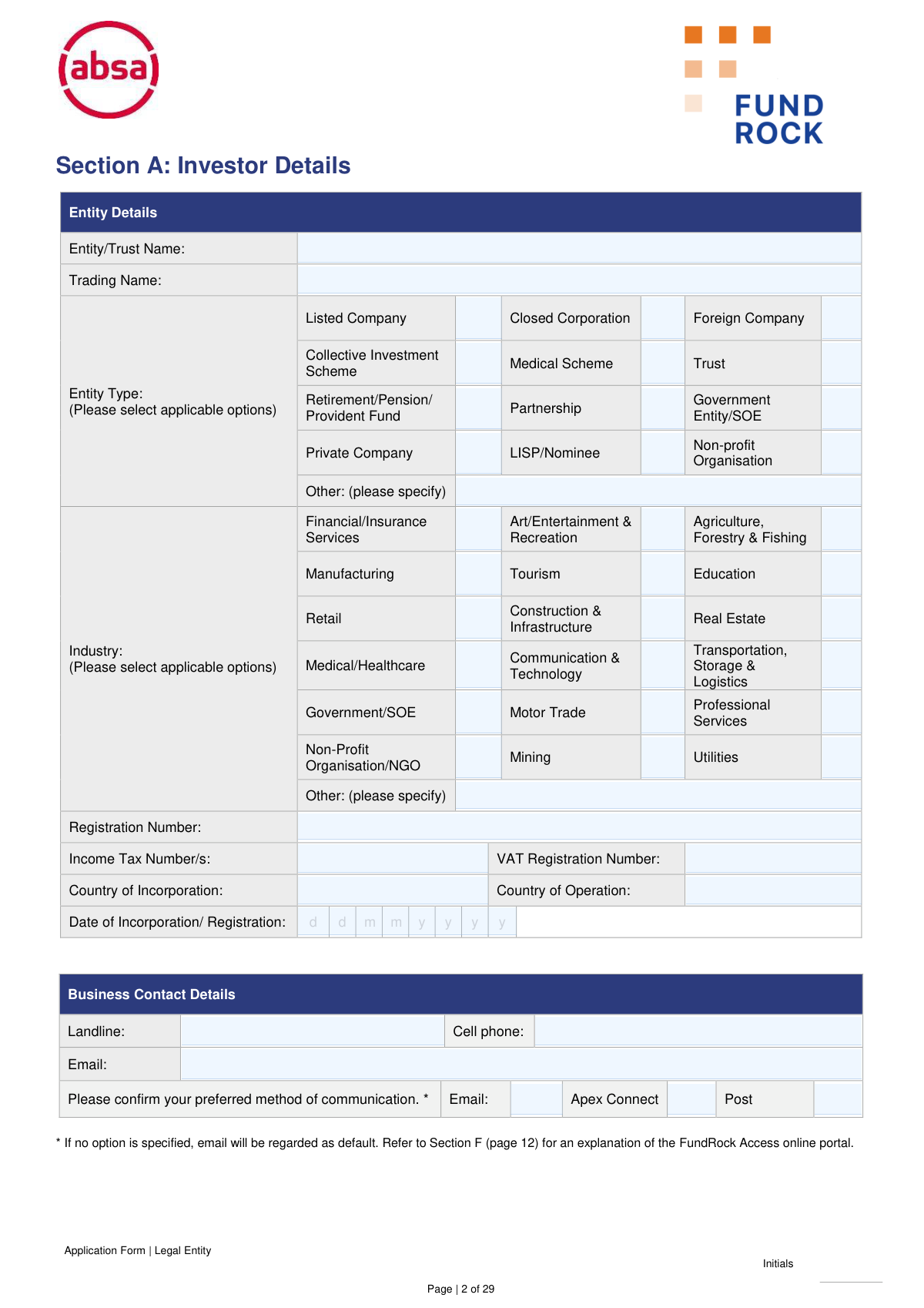
The Fundrock Application Form for Legal Entities is a comprehensive document used by companies, trusts, and other legal entities to apply for investment in Fundrock's retail hedge fund. It gathers essential information about the entity, its financial standing, tax residency (for FATCA/CRS), and ultimate beneficial owners to comply with FICA and other regulatory requirements. Today, this form can be filled out quickly and accurately using AI-powered services like Instafill.ai, which can also convert non-fillable PDF versions into interactive fillable forms.
Our AI automatically handles information lookup, data retrieval, formatting, and form filling.
It takes less than a minute to fill out Fundrock Legal Entity Application Form using our AI form filling.
Securely upload your data. Information is encrypted in transit and deleted immediately after the form is filled out.

Form specifications

Form name: Fundrock Application Form: Legal Entities | Monthly Liquidity – Retail Hedge Fund
Number of pages: 1
Language: English
Categories: NY legal forms, legal application forms, legal forms
main-image

Instafill Demo: How to fill out PDF forms in seconds with AI

How to Fill Out Fundrock Legal Entity Application Form Online for Free in 2026

Are you looking to fill out a FUNDROCK LEGAL ENTITY APPLICATION FORM form online quickly and accurately? Instafill.ai offers the #1 AI-powered PDF filling software of 2026, allowing you to complete your FUNDROCK LEGAL ENTITY APPLICATION FORM form in just 37 seconds or less.
Follow these steps to fill out your FUNDROCK LEGAL ENTITY APPLICATION FORM form online using Instafill.ai:
  1. 1 Navigate to Instafill.ai and upload or select the Fundrock Legal Entity Application Form.
  2. 2 Use the AI assistant to complete Section A with your entity's details, including name, type, registration number, and contact information.
  3. 3 In Section B, specify your investment choices, payment method, and any regular withdrawal instructions.
  4. 4 Complete the tax residency self-certifications for Dividend Withholding Tax (DWT), FATCA, and CRS in Sections D and E.
  5. 5 Provide detailed information for all Ultimate Beneficial Owners (UBOs) and controlling persons as required in Section G and other relevant sections.
  6. 6 Carefully review all entered information, sign the investor declaration in Section J, and gather all necessary supporting documents listed in the Section K checklist.
  7. 7 Download the completed application and submit it along with all required FICA documentation to the email address provided.

Our AI-powered system ensures each field is filled out correctly, reducing errors and saving you time.

Why Choose Instafill.ai for Your Fillable Fundrock Legal Entity Application Form Form?

Speed

Complete your Fundrock Legal Entity Application Form in as little as 37 seconds.

Up-to-Date

Always use the latest 2026 Fundrock Legal Entity Application Form form version.

Cost-effective

No need to hire expensive lawyers.

Accuracy

Our AI performs 10 compliance checks to ensure your form is error-free.

Security

Your personal information is protected with bank-level encryption.

Frequently Asked Questions About Form Fundrock Legal Entity Application Form

This form is for legal entities, such as companies, trusts, or partnerships, to apply for an investment in Fundrock's Monthly Liquidity Retail Hedge Fund. It must be completed by an authorized representative of the entity wishing to invest.

You must submit the completed and initialed application form, along with all required supporting documents, via email to [email protected].

The cut-off time for processing investment subscriptions is 10:00 am on the last business day of the prior month. Any instructions received after this time will be processed for the following month.

You must provide all necessary supporting documents as per the FICA requirements detailed in Section K. The specific documents depend on your entity type but generally include registration certificates, proof of address, proof of bank details, and ID documents for directors and beneficial owners.

For security and compliance reasons, the fund's banking details are not publicly disclosed on the form. Upon approval of your application, you will receive an email containing the bank account details for the portfolio you wish to invest in.

No, it is not mandatory, but it is recommended if you are unsure which funds suit your needs. If you do use an advisor, you must complete their details in Section C and agree to the specified fees.

An Ultimate Beneficial Owner (UBO) is a natural person who owns or controls 25% or more of the legal entity. This information, required in Section G, is essential for compliance with the Financial Intelligence Centre Act (FICA) to prevent money laundering.

Section D (DWT) is to determine if your entity is exempt from Dividend Withholding Tax in South Africa. Section E (FATCA/CRS) is a mandatory self-certification to establish your entity's tax residency status for international tax reporting standards.

The Apex Connect Portal is an online platform that gives you access to view your investment holdings, transaction history, and investor statements. You can request access for your entity's representatives by completing Section F.

If your application and proof of payment are received after the 10:00 am cut-off on the last business day of the prior month, your instruction will be processed on the first business day of the following month.

Yes, in the Investor Declaration (Section J), you must indicate if you are a Politically Exposed Person (PEP), which includes senior executives of state-owned corporations. This is a mandatory declaration for regulatory due diligence.

Yes, services like Instafill.ai use AI to auto-fill form fields accurately and save time. This can be particularly helpful for a long and detailed application like this one.

Simply upload the form's PDF to the Instafill.ai platform. The AI will make the document fillable online, allowing you to enter your information once and have it populated across all relevant fields automatically.

If you have a non-fillable PDF, you can use a service like Instafill.ai. It can convert flat PDFs into interactive, fillable forms that you can easily complete, sign, and download online.

Compliance Fundrock Legal Entity Application Form
Validation Checks by Instafill.ai

1
Ensures Entity and Industry 'Other' fields are specified
This check verifies that if the 'Other' checkbox is selected in either the 'Entity Type' or 'Industry' sections, the corresponding text field for specification is not empty. This is important for accurate client classification and reporting. Failure to provide this detail would result in an incomplete profile and may require manual follow-up, delaying the application process.
2
Validates Date of Incorporation format and logic
This validation ensures the 'Date of Incorporation/Registration' is entered in the correct 'ddmmyyyy' format and represents a valid, logical date that is not in the future. Correct date formatting is crucial for system processing and maintaining accurate entity records. An invalid or future date would be rejected, as it indicates a data entry error or an impossible scenario.
3
Verifies Investor Banking Details are complete
This check confirms that all mandatory fields within the 'Banking Details of the Investor' section (Name of Account Holder, Bank, Branch Code, Account Number, Account Type) are filled. Complete and accurate banking information is critical for processing distributions and disinvestments. An incomplete section would prevent the system from making payments to the investor, halting the application until corrected.
4
Cross-references Bank Account Holder with Entity Name
This validation compares the 'Name of Account Holder' in the banking details section with the 'Entity/Trust Name' from the investor details section. The form explicitly states no third-party payments are allowed, so these names must match to ensure compliance and prevent fraud. A mismatch would flag the application for review and require correction to align with anti-money laundering policies.
5
Confirms Investment Amount and Distribution Choice are selected
This check ensures that for the selected fund in Section B, an 'Investment Amount' (either Monthly or Once-off Lump Sum) is specified and a corresponding 'Income Distribution' option (Re-invest or Pay-out) is chosen. This information forms the core of the investment instruction. Without a clear amount and distribution preference, the transaction cannot be processed.
6
Validates Conditional Financial Advisor Fee Section
This check ensures that if any part of the 'Financial Advisor Fees' section is completed (e.g., an initial or ongoing fee percentage is entered), the investor's signature and date are also present in that section. This confirms the investor's agreement to the specified fees. An incomplete fee agreement would be legally ambiguous and would default to zero, potentially causing payment disputes.
7
Ensures FATCA/CRS Passive Entity classification triggers Controlling Persons details
This validation enforces the rule that if the entity is classified as a 'Passive NFFE' (for FATCA) or a 'Passive NFE' (for CRS), the 'Controlling Persons' section must be completed. This is a mandatory requirement under international tax reporting standards to identify the ultimate beneficial owners. Failure to provide this information for a passive entity would make the tax declaration non-compliant.
8
Verifies Foreign Tax Residency details are provided if applicable
This check confirms that if the applicant answers 'Yes' to being a tax resident in a country other than South Africa, the subsequent table must contain at least one entry detailing the country and its Tax Identification Number (TIN). This is a key component of the Common Reporting Standard (CRS) for automatic exchange of information. Answering 'Yes' without providing details would result in an incomplete and non-compliant tax certification.
9
Validates Ultimate Beneficial Owner (UBO) shareholding percentage
This check verifies that if the 'Owner of 25% or more shares' option is selected in Section G, the 'Percentage of shareholding' field must contain a numerical value that is 25 or greater. This ensures logical consistency between the declared role and the provided data. An entry below 25% would contradict the selection and require clarification for AML/KYC purposes.
10
Ensures Politically Exposed Person (PEP) declaration is complete
This validation confirms that the PEP question in Section J is answered ('Yes' or 'No') and that if the answer is 'Yes', the details field is filled out. Identifying PEPs is a critical regulatory requirement for enhanced due diligence in anti-money laundering efforts. An unanswered question or a 'Yes' with no details would halt the application pending further investigation.
11
Verifies Mandatory Investor Declaration Agreement
This check ensures the mandatory checkbox in Section J, confirming the investor has read and agrees to the declaration, is ticked. This action serves as a digital signature of consent to the terms and conditions of the entire application. Without this explicit agreement, the application is considered incomplete and legally cannot be processed.
12
Validates Contact Person at Entity details are fully provided
This check ensures all fields for the primary contact person at the entity (Title, First name, Surname, ID/Passport Number, Capacity, and contact details) are completed in Section A. This individual is the main point of contact for all queries, including KYC verification. Incomplete information would impede communication and delay the onboarding process.
13
Checks for presence of Signature and Date on all required declarations
This validation scans all mandatory signature sections (e.g., Investor Banking Details, DWT Declaration, FATCA/CRS Declaration, Investor Declaration) to ensure both a signature and a valid date are present. Signatures and dates are legally required to execute the declarations and attest to the accuracy of the information provided at a specific point in time. Missing signatures or dates render the declarations invalid.
14
Validates email address format across all email fields
This check applies a standard format validation (e.g., `[email protected]`) to all email address fields throughout the form, such as in Business Contact Details, Contact Person, and Financial Advisor sections. This ensures that the provided email addresses are syntactically correct, which is crucial for successful delivery of communications, statements, and verification requests. An invalid format would cause communication failures and processing delays.

Common Mistakes in Completing Fundrock Legal Entity Application Form

Forgetting to Initial Every Page

The form is 29 pages long and explicitly requires initials on every single page to confirm it has been reviewed. Applicants often overlook this repetitive task, especially when rushing. An application with missing initials is considered incomplete and will be returned for correction, delaying the entire investment process.

Submitting Incomplete FICA Documentation

Section K outlines an extensive and complex list of required FICA documents that vary by entity type (e.g., Unlisted Company, Trust, Partnership). Applicants frequently miss one or more specific documents, such as a board resolution, an ownership structure diagram, or proof of address for all directors. This is the most common reason for processing delays, as the application cannot proceed until all KYC/AML requirements are met.

Incorrectly Classifying the Entity for FATCA/CRS

Section E requires the entity to self-certify its status under FATCA and CRS rules, using technical terms like 'Active NFFE' or 'Passive NFE'. Many applicants, particularly those without tax expertise, choose the wrong classification. This can lead to incorrect tax reporting to international authorities, potential penalties, and will almost certainly trigger follow-up questions from the compliance team, halting the application.

Failing to Fully Disclose Ultimate Beneficial Owners (UBOs)

Section G and K require the identification of all natural persons who own or control 25% or more of the entity, including providing their ID and proof of address. Applicants may fail to trace ownership through complex corporate structures or misunderstand the definition of 'control', leading to incomplete disclosure. This is a critical compliance failure that results in the immediate rejection of the application until full ownership details are provided.

Confusing 'Source of Funds' with 'Source of Wealth'

In Section A, the form asks for both the 'Source of Funds' for the specific transaction and the 'Source of Wealth' for the entity's total net worth. Applicants often provide the same generic answer (e.g., 'Savings') for both. This lack of distinction raises red flags for the anti-money laundering team, who will require more detailed explanations and proof, thereby delaying verification.

Using an Unauthorized Signatory

The application requires signatures from an authorized representative in multiple sections. A common error is having a person sign who is not explicitly granted authority in the company's board resolution, which must also be submitted. This invalidates the legal declarations and agreements within the form, causing the application to be rejected until it is re-signed by a duly authorized individual.

Submitting Expired or Unacceptable Verification Documents

The checklist in Section K and the guidelines on page 26 specify strict requirements for supporting documents, such as utility bills or bank statements being less than 3 months old. Applicants often submit outdated documents or unacceptable proofs like retail store accounts or TV licenses. This leads to a failed verification, requiring the applicant to find and resubmit valid documents, which can significantly delay the investment.

Leaving the Dividend Withholding Tax (DWT) Section Incomplete

Section D allows the entity to declare its status for exemption from Dividend Withholding Tax. If this section is skipped or filled out incorrectly, the firm is obligated to deduct DWT at the default rate. This results in a direct financial loss for the investor, as their dividend payouts will be lower than they might be entitled to.

Omitting Financial Advisor Fee Percentages

When a financial advisor is involved, Section C requires the applicant to specify the exact initial and ongoing advice fee percentages. Advisors or their clients sometimes leave these fields blank, assuming a standard fee will be applied. However, the form states that incomplete fields will default to zero, which can lead to the advisor not being compensated for their services.

Providing Inconsistent Information Across the Form and Documents

An applicant might enter a 'Trading Name' in Section A that does not match the legal 'Entity Name' on the submitted incorporation documents, or provide an address that differs from the proof of address utility bill. These discrepancies create uncertainty for the KYC team and require clarification. To avoid this, all data must be entered precisely as it appears on the official supporting documents. AI-powered tools like Instafill.ai can help prevent these errors by cross-validating data across the form.
Saved over 80 hours a year

“I was never sure if my IRS forms like W-9 were filled correctly. Now, I can complete the forms accurately without any external help.”

Kevin Martin Green

Your data stays secure with advanced protection from Instafill and our subprocessors

Robust compliance program

Transparent business model

You’re not the product. You always know where your data is and what it is processed for.

ISO 27001, HIPAA, and GDPR

Our subprocesses adhere to multiple compliance standards, including but not limited to ISO 27001, HIPAA, and GDPR.

Security & privacy by design

We consider security and privacy from the initial design phase of any new service or functionality. It’s not an afterthought, it’s built-in, including support for two-factor authentication (2FA) to further protect your account.

Fill out Fundrock Legal Entity Application Form with Instafill.ai

Worried about filling PDFs wrong? Instafill securely fills fundrock-application-form-legal-entities-monthly-liquidity-retail-hedge-fund forms, ensuring each field is accurate.