Yes! You can use AI to fill out ETA Form 9061, Work Opportunity Tax Credit Individual Characteristics Form (ICF)

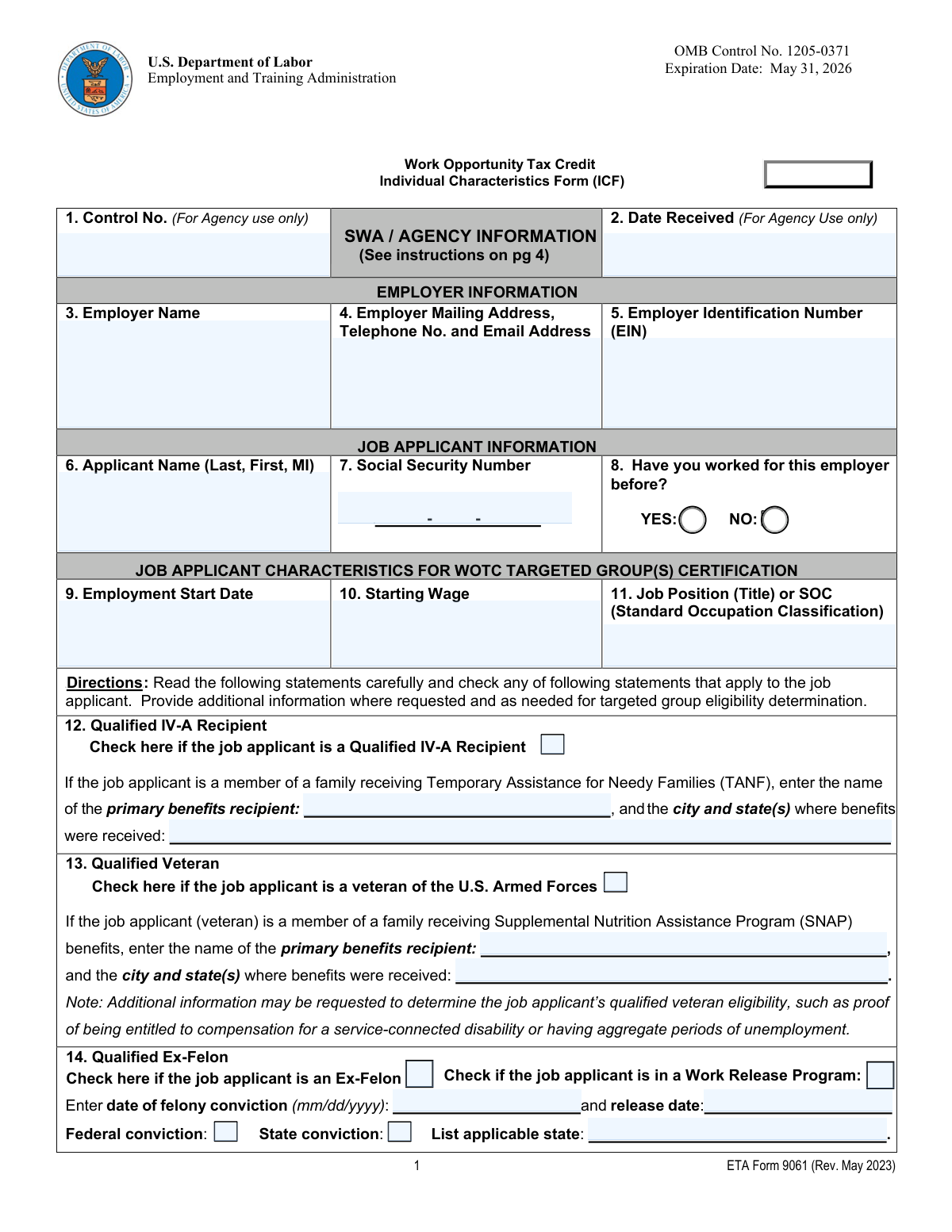
ETA Form 9061, also known as the Individual Characteristics Form (ICF), is a U.S. Department of Labor document used by employers to pre-screen job applicants and establish their eligibility for the Work Opportunity Tax Credit (WOTC). The form collects information about an applicant's background, such as veteran status, receipt of public assistance, or past felony convictions, to certify them as a member of a WOTC targeted group. Today, this form can be filled out quickly and accurately using AI-powered services like Instafill.ai, which can also convert non-fillable PDF versions into interactive fillable forms.
Our AI automatically handles information lookup, data retrieval, formatting, and form filling.
It takes less than a minute to fill out ETA Form 9061 using our AI form filling.
Securely upload your data. Information is encrypted in transit and deleted immediately after the form is filled out.

Form specifications

Form name: ETA Form 9061, Work Opportunity Tax Credit Individual Characteristics Form (ICF)
Number of pages: 2
Language: English
Categories: tax forms, individual tax forms, credit forms
main-image

Instafill Demo: How to fill out PDF forms in seconds with AI

How to Fill Out ETA Form 9061 Online for Free in 2026

Are you looking to fill out a ETA FORM 9061 form online quickly and accurately? Instafill.ai offers the #1 AI-powered PDF filling software of 2026, allowing you to complete your ETA FORM 9061 form in just 37 seconds or less.
Follow these steps to fill out your ETA FORM 9061 form online using Instafill.ai:
  1. 1 Navigate to Instafill.ai and upload or select the ETA Form 9061.
  2. 2 Use the AI assistant to automatically populate the Employer Information section, including the business name, address, and Employer Identification Number (EIN).
  3. 3 Enter the Job Applicant's personal details, such as their name, Social Security Number, and employment start date.
  4. 4 Answer the series of questions in the 'Job Applicant Characteristics' section (Boxes 12-21) by checking the boxes that apply to the applicant and providing any required additional information.
  5. 5 List all supporting documents used to verify eligibility in Box 22, indicating whether they are attached or forthcoming.
  6. 6 Review all the information entered by the AI for accuracy, then e-sign the form in Box 23(a) and check the box in 23(b) to indicate who signed.
  7. 7 Download, print, or submit the completed form as required by your State Workforce Agency (SWA).

Our AI-powered system ensures each field is filled out correctly, reducing errors and saving you time.

Why Choose Instafill.ai for Your Fillable ETA Form 9061 Form?

Speed

Complete your ETA Form 9061 in as little as 37 seconds.

Up-to-Date

Always use the latest 2026 ETA Form 9061 form version.

Cost-effective

No need to hire expensive lawyers.

Accuracy

Our AI performs 10 compliance checks to ensure your form is error-free.

Security

Your personal information is protected with bank-level encryption.

Frequently Asked Questions About Form ETA Form 9061

This form, the Individual Characteristics Form (ICF), is used to collect information about a new hire to determine if they belong to a targeted group for the Work Opportunity Tax Credit (WOTC). It helps employers apply for a federal tax credit for hiring individuals from specific groups facing employment barriers.

The form can be completed by the employer, the employer's representative, the job applicant, or a participating agency. The individual who fills out the form is the one who should sign it in Box 23(a).

Yes, Form ETA 9061 must be submitted along with IRS Form 8850, Pre-Screening Notice and Certification Request for the Work Opportunity Credit. Both are required to be sent to your State Workforce Agency (SWA) for certification.

You must provide documents that prove the applicant's eligibility for the targeted group(s) you check. Examples include a DD-214 for veterans, court records for ex-felons, or a benefit history letter for SNAP or TANF recipients.

In this box, you must list all supporting documents submitted to the State Workforce Agency (SWA). Indicate next to each document whether it is attached (A) or will be sent later (F).

This question helps the SWA determine if the applicant is a qualifying new hire, as the Work Opportunity Tax Credit is generally not available for rehires. This information is crucial for establishing eligibility.

You must enter the applicant's date of felony conviction and their release date from prison. You also need to specify whether the conviction was at the federal or state level.

If the job applicant is a minor, their parent or legal guardian must sign the form in Box 23(a) and check the 'Parent/Guardian' box in 23(b).

The information is required for your employer to receive the federal tax credit and will be disclosed to the State Workforce Agency for verification purposes. Provision of this information is voluntary, as stated in the Privacy Act Statement on the form.

A DCR must live in either a Rural Renewal County (RRC) or an Empowerment Zone (EZ). These are geographically distinct areas designated by the government, and you can use tools on the USPS and DOL websites to verify an applicant's address.

Yes, services like Instafill.ai use AI to accurately auto-fill form fields from your saved information. This can save you significant time and help reduce errors when completing the form.

You can easily complete this form online using a service like Instafill.ai. Simply upload the form, and the platform will make it fillable, allowing you to type your answers, add a digital signature, and download the completed document.

If you have a non-fillable or 'flat' PDF, you can use a tool like Instafill.ai to instantly convert it into an interactive, fillable form. This allows you to complete it on your computer without needing to print and write by hand.

The EIN is a unique nine-digit number assigned by the IRS to business entities. It should be the tax-identification number registered with the state where the business is located, not the ID of an employer's representative.

Compliance ETA Form 9061
Validation Checks by Instafill.ai

1
Validates Employer Identification Number (EIN) Format
This check ensures that the Employer Identification Number (EIN) in Box 5 is entered in the correct XX-XXXXXXX format. The EIN is a unique nine-digit number assigned by the IRS to business entities, and its correct format is essential for matching the employer to tax records. If the format is incorrect, the form cannot be processed, and the tax credit application will be rejected.
2
Validates Social Security Number (SSN) Format
This validation verifies that the applicant's Social Security Number in Box 7 follows the standard XXX-XX-XXXX format. A valid and correctly formatted SSN is critical for uniquely identifying the job applicant and verifying their eligibility for WOTC target groups. An invalid format will lead to data rejection and halt the certification process until corrected.
3
Ensures Previous Employment Status is Indicated
This check confirms that one of the two options in Box 8 ('YES' or 'NO') has been selected to indicate if the applicant has worked for the employer before. This information is critical for determining if the applicant is a qualifying new hire, as WOTC generally does not apply to rehires. Failure to complete this field results in an incomplete application and requires clarification before eligibility can be determined.
4
Verifies Conditional Fields for Qualified IV-A Recipient
This validation ensures that if the 'Qualified IV-A Recipient' checkbox (Box 12) is checked, the associated fields for the primary benefits recipient's name and the city/state where benefits were received are also filled out. These details are mandatory for the State Workforce Agency (SWA) to verify the applicant's participation in TANF. An omission of this information will render the claim for this target group unverifiable and likely denied.
5
Checks Logical Consistency of Ex-Felon Dates
This check validates that the 'Release Date' entered in Box 14 is on or after the 'Date of felony conviction'. It is logically impossible for an individual to be released from incarceration before they have been convicted. This check prevents data entry errors and ensures the timeline of events is plausible for eligibility verification.
6
Verifies Age Requirement for Designated Community Resident (DCR)
This validation calculates the applicant's age using their birthday (Box 15) and the 'Employment Start Date' (Box 9) to confirm they are at least 18 but not yet 40. This is a specific eligibility requirement for the DCR category as stated on the form. If the applicant's age falls outside this range on the hiring date, they are not eligible for this specific WOTC category, and the submission would be incorrect.
7
Validates Employment Window for Summer Youth Employee
This check ensures that if 'Qualified Summer Youth Employee' (Box 17) is checked, the 'Employment Start Date' (Box 9) falls between May 1 and September 15 of any given year. This is a core requirement of the Summer Youth category, which is designed to encourage hiring during a specific seasonal window. A start date outside this period makes the applicant ineligible for this category, regardless of their age.
8
Verifies Age Requirement for SNAP Recipient
This validation uses the applicant's birthday (Box 18) and the 'Employment Start Date' (Box 9) to confirm their age is between 18 and 39. This age bracket is a key eligibility criterion for the WOTC SNAP (Food Stamps) Recipient category. If the applicant's age is outside this range, the certification for this category will be denied.
9
Ensures at Least One Target Group is Selected
This is a high-level validation to confirm that at least one of the applicant characteristic checkboxes (Boxes 12 through 21) has been selected. The entire purpose of the form is to certify an applicant's eligibility for one or more WOTC target groups. A form submitted with no selected categories is incomplete and cannot be processed, as there is no basis for a certification.
10
Validates Signature Date is Logical
This check ensures the 'Signature Date' (Box 24) is a valid date and is not in the future. It also compares it to the 'Employment Start Date' (Box 9) and 'Date Received' (Box 2) to ensure a logical sequence. The form should be signed on or before the date it is received by the agency, and typically around the time of hiring, not months after the fact.
11
Requires Signer Identification
This validation confirms that exactly one checkbox is selected in Box 23(b) to identify the person who signed the form (e.g., Employer, Job Applicant, etc.). This is crucial for establishing accountability and the authority of the signature. If no box is checked or multiple boxes are checked, the validity of the signature is questionable and the form may be rejected.
12
Validates Starting Wage Format
This check ensures that the 'Starting Wage' entered in Box 10 is a valid positive number, potentially in a currency format. It should not be zero, negative, or contain non-numeric text like 'TBD' or 'Varies'. A valid wage is necessary for economic analysis and to confirm a bona fide job offer, and incorrect data can cause processing delays.
13
Verifies Conditional Fields for State Conviction
This validation ensures that if the 'State conviction' checkbox is checked in Box 14, the 'List applicable state' field is not empty. Knowing the state of conviction is essential for the SWA to verify the felony record through the correct jurisdiction's database. Failure to provide the state makes verification impossible and will result in the denial of certification for the ex-felon category.
14
Ensures Referral Source for Vocational Rehabilitation
This check verifies that if 'Vocational Rehabilitation Referral' (Box 16) is checked, one of the three specific referral source checkboxes at the bottom of the form is also selected. The form requires specifying whether the referral came from a state-approved agency, an Employment Network, or the Department of Veterans Affairs. Omitting the specific source makes the referral claim incomplete and difficult to verify.

Common Mistakes in Completing ETA Form 9061

Entering an Invalid Employer Identification Number (EIN)

This mistake occurs when the filer enters a state tax ID, a representative's EIN, or simply mistypes the number in Box 5. The form requires the specific federal EIN under which the employee's wages are reported, and an incorrect number will cause a mismatch with tax records, leading to automatic rejection of the WOTC application. To avoid this, double-check the EIN against official company tax documents and ensure it is the correct 9-digit federal number.

Checking a Category Box Without Providing Required Details

Filers often check a box in sections 12-21 (e.g., 'Qualified IV-A Recipient') but fail to fill in the mandatory follow-up information, such as the primary recipient's name and the city/state where benefits were received. State agencies cannot verify eligibility without these specific details, resulting in processing delays or denial of the tax credit. To prevent this, carefully read all instructions for any box you check and ensure all associated fields are completed.

Incorrectly Listing the Applicant as the Primary Benefits Recipient

In sections for TANF (Box 12) or SNAP (Box 18), the job applicant may not be the primary name on the benefits case (e.g., they are a child in a household). Filers mistakenly enter the applicant's name instead of the head of household's, which leads to a verification failure when the agency checks state records. Always refer to the official benefits award letter to identify and enter the correct primary recipient's name to ensure accuracy.

Failing to Verify Designated Community Resident (DCR) Status

In Box 15, filers may check the DCR box assuming the applicant's address is in an Empowerment Zone (EZ) or Rural Renewal County (RRC) without performing the required verification. Eligibility is strictly based on official government-designated zones, and submitting without verification will likely lead to denial. To avoid this, always use the official lookup tools mentioned in the form instructions to confirm the address qualifies before checking this box.

Omitting Documentation Status in Box 22

When listing supporting documents in Box 22, filers often forget to indicate whether the document is 'Attached (A)' or 'Forthcoming (F)'. This small omission creates uncertainty for the processing agency, slowing down the review as they may wait for documents that were never intended to be sent separately. To ensure smooth processing, always list each document and clearly mark its status with (A) or (F) next to it.

Mismatched Signature and Signer Identification

The form requires the person who signs in Box 23(a) to be identified by checking the corresponding box in 23(b) (e.g., Employer, Job Applicant). A common error is for one person to sign, but another box to be checked, or for no box to be checked at all, which invalidates the certification. Ensure the signature in 23(a) directly corresponds to the role selected in 23(b) to prevent rejection.

Incorrectly Answering the 'Rehire' Question

Box 8 asks if the applicant has worked for the employer before, which is critical for WOTC eligibility as the credit is generally for new hires. Applicants or employers may forget a previous short-term or seasonal employment and incorrectly check 'NO'. This can be discovered during an audit, leading to the tax credit being revoked. Always confirm the applicant's entire work history with the company before answering.

Providing Incomplete Information for Qualified Ex-Felons

When checking Box 14 for a Qualified Ex-Felon, filers frequently omit one or more of the required data points: the date of conviction, the date of release, or whether the conviction was federal or state. All of these details are necessary for the state agency to verify eligibility under the program's specific rules. Leaving any of these fields blank will halt the application until the missing information is provided.

Using Inconsistent or Incorrect Date Formats

Several fields require dates (e.g., Boxes 14, 15, 17, 18, 24) and specify a mm/dd/yyyy format. Filers often use different formats like m/d/yy or dd-mm-yyyy, which can cause data entry errors or lead to misinterpretation of age-sensitive eligibility criteria. To avoid this, always use the two-digit month, two-digit day, and four-digit year format as requested. AI-powered tools like Instafill.ai can automatically format dates correctly to prevent these errors.

Entering Representative's Information in Employer Fields

When a third-party consultant fills out the form, they sometimes mistakenly enter their own company's name or address in the Employer Information section (Boxes 3-4). The instructions explicitly state to enter the information for the employer requesting the credit, not their representative, an error which delays the certification process. If the form is a non-fillable PDF, tools like Instafill.ai can convert it to a smart, fillable version and use stored profiles to populate the correct employer data automatically.
Saved over 80 hours a year

“I was never sure if my IRS forms like W-9 were filled correctly. Now, I can complete the forms accurately without any external help.”

Kevin Martin Green

Your data stays secure with advanced protection from Instafill and our subprocessors

Robust compliance program

Transparent business model

You’re not the product. You always know where your data is and what it is processed for.

ISO 27001, HIPAA, and GDPR

Our subprocesses adhere to multiple compliance standards, including but not limited to ISO 27001, HIPAA, and GDPR.

Security & privacy by design

We consider security and privacy from the initial design phase of any new service or functionality. It’s not an afterthought, it’s built-in, including support for two-factor authentication (2FA) to further protect your account.

Fill out ETA Form 9061 with Instafill.ai

Worried about filling PDFs wrong? Instafill securely fills eta-form-9061-work-opportunity-tax-credit-individual-characteristics-form-icf forms, ensuring each field is accurate.