Yes! You can use AI to fill out Application for Financial Assistance (YMCA)
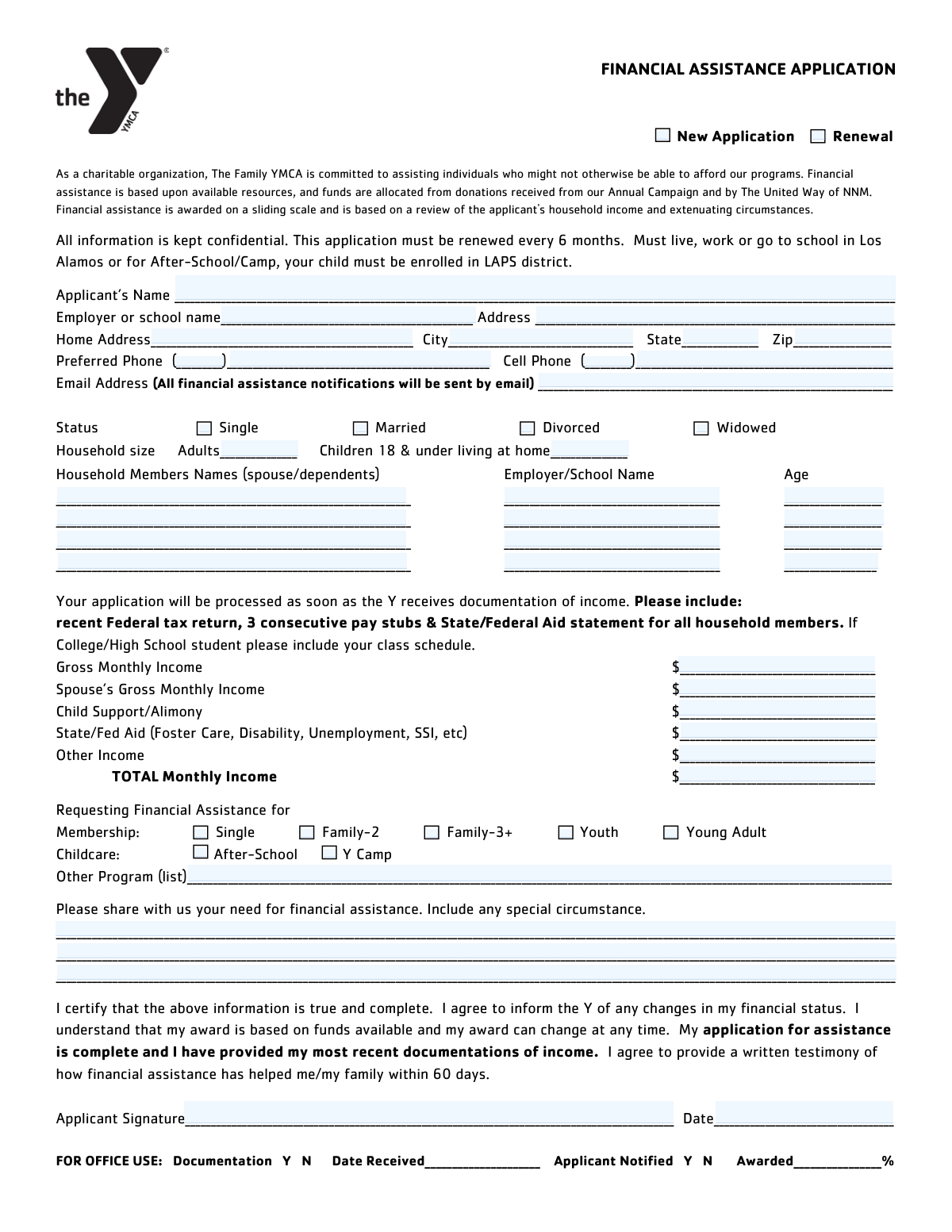
This form is an application for individuals and families seeking financial assistance from the YMCA to help cover the costs of memberships, childcare services like after-school programs, and Y Camp. Applicants provide detailed personal, household, and income information, along with an explanation of their financial need, to help the YMCA determine eligibility and the level of support to provide. Today, this form can be filled out quickly and accurately using AI-powered services like Instafill.ai, which can also convert non-fillable PDF versions into interactive fillable forms.
Our AI automatically handles information lookup, data retrieval, formatting, and form filling.
It takes less than a minute to fill out YMCA Financial Assistance Application using our AI form filling.
Securely upload your data. Information is encrypted in transit and deleted immediately after the form is filled out.
Form specifications
| Form name: | Application for Financial Assistance (YMCA) |
| Number of fields: | 52 |
| Number of pages: | 1 |
| Language: | English |
| Categories: | financial assistance forms, financial forms |
Instafill Demo: How to fill out PDF forms in seconds with AI
How to Fill Out YMCA Financial Assistance Application Online for Free in 2026
Are you looking to fill out a YMCA FINANCIAL ASSISTANCE APPLICATION form online quickly and accurately? Instafill.ai offers the #1 AI-powered PDF filling software of 2026, allowing you to complete your YMCA FINANCIAL ASSISTANCE APPLICATION form in just 37 seconds or less.
Follow these steps to fill out your YMCA FINANCIAL ASSISTANCE APPLICATION form online using Instafill.ai:
- 1 Navigate to Instafill.ai and upload your YMCA Financial Assistance Application, or select it from their template library.
- 2 Provide your personal contact information, including your name, address, phone number, and email.
- 3 Complete the household information section, listing all members of your household, their ages, and their employer or school.
- 4 Enter detailed monthly income for all household members from all sources, such as employment, child support, and government aid.
- 5 Indicate the type of assistance you are applying for (e.g., family membership, after-school care, Y Camp) and explain your need for financial assistance in the space provided.
- 6 Review all the information you've entered for accuracy, then use the AI tool to e-sign and date the application.
- 7 Securely download, print, or submit your completed application as instructed by your local YMCA.
Our AI-powered system ensures each field is filled out correctly, reducing errors and saving you time.
Why Choose Instafill.ai for Your Fillable YMCA Financial Assistance Application Form?
Speed
Complete your YMCA Financial Assistance Application in as little as 37 seconds.
Up-to-Date
Always use the latest 2026 YMCA Financial Assistance Application form version.
Cost-effective
No need to hire expensive lawyers.
Accuracy
Our AI performs 10 compliance checks to ensure your form is error-free.
Security
Your personal information is protected with bank-level encryption.
Frequently Asked Questions About Form YMCA Financial Assistance Application
This form is an application for financial assistance. It is used to determine your eligibility for reduced rates on memberships and programs based on your household size and income.
You should list all adults (age 19+) and children (18 and under) who live in your household. This includes the primary applicant, a spouse or partner, and any dependents under your care.
'Gross Monthly Income' is your total earnings from all sources before any taxes or deductions are taken out. This form specifically asks for the gross amount, not your net (take-home) pay.
Briefly describe your current financial situation and why you need assistance. You can mention circumstances like a recent job loss, unexpected medical expenses, or other challenges affecting your ability to pay.
Check 'New Application' if this is your first time applying for financial assistance with this organization. Check 'Renewal' if you have received assistance in the past and are reapplying to continue it.
Fill out the information for the first four members and then attach a separate sheet with the names, ages, and employer/school information for any additional household members.
Report any monthly income your household receives from government programs. This includes unemployment benefits, disability payments (SSI), foster care stipends, and other similar public assistance.
While not listed, financial assistance applications typically require proof of income. Be prepared to submit recent pay stubs, tax returns, or benefit letters to verify the income you reported.
Yes, AI-powered services like Instafill.ai can help you complete this form quickly and accurately. The AI can auto-fill your personal information, reducing the time you spend on repetitive data entry.
You can use a service like Instafill.ai to complete this form on your computer. Simply upload the form, type your information directly into the fields, and then download or print the finished document.
If you have a non-fillable PDF, you can use a tool like Instafill.ai to make it interactive. Upload the flat PDF, and the service will convert it into a fillable form that you can complete online.
If you are single, divorced, or widowed and do not have a spouse or partner contributing to the household income, you should enter '0' or leave the field blank.
For this form, an adult is anyone aged 19 or older living in the household. Anyone aged 18 or younger should be counted in the 'Number of Children' field.
The 'Membership' section is for requesting assistance for general access (e.g., Family, Youth). The 'Childcare' section is for aid with specific programs like 'After-School' care or 'Y Camp'.
After you sign and submit your application, it will be reviewed to determine your eligibility and the level of assistance you may receive. You will be notified of the decision via the email address you provided.
Compliance YMCA Financial Assistance Application
Validation Checks by Instafill.ai
1
Marital Status Single Selection
This validation ensures that the applicant selects only one option from the Marital Status checkboxes (Single, Married, Divorced, Widowed). It is important because marital status can affect eligibility and household composition calculations. If more than one box is checked, the form submission should be blocked, and the user prompted to select only one option.
2
Total Monthly Income Calculation Verification
This check verifies that the value entered in the 'Total Monthly Income' field is the correct sum of all individual income sources listed (Gross Monthly Income, Spouse's Income, Child Support, etc.). This is critical for accurately assessing financial need and preventing data entry errors. If the user-entered total does not match the calculated sum, an alert should prompt the user to review and correct the income fields.
3
Household Size and Member List Consistency
This validation cross-references the 'Number of Adults in Household' and 'Number of Children' fields with the number of household members for whom detailed information is provided. The total count from the household size fields must equal the number of members listed. This ensures a complete and accurate representation of the household for determining assistance levels. A mismatch should trigger an error asking the user to align the counts with the detailed member list.
4
Membership Type and Household Size Alignment
This check ensures the requested 'Membership' type is logically consistent with the declared household size. For example, if 'Family-3+' is selected, the total household size must be three or more, and if 'Single' is selected, the household size must be one. This prevents incorrect membership assignments and billing issues. If there is a mismatch, the user should be prompted to select a membership type that matches their household size.
5
Age Classification Consistency
This validation confirms that the ages entered for each household member align with the counts in the 'Number of Adults (age 19 and over)' and 'Number of Children (18 & under)' fields. For instance, the number of listed members with an age of 19 or greater must match the 'Number of Adults' count. This check ensures data integrity and correct classification for program eligibility. An inconsistency should flag the fields for user review.
6
Application Type Exclusivity
This validation ensures that the applicant selects only one application type: either 'New Application' or 'Renewal'. Selecting both would create ambiguity in processing the request. The system should enforce a radio button-like behavior, allowing only one choice. If the raw data shows both are selected, it should be flagged as an error requiring clarification.
7
Spouse Income for Married Applicants
This is a conditional validation that checks the 'Spouse's Gross Monthly Income' field if the applicant's 'Marital Status' is 'Married'. While the income can be zero, the field should not be left blank, as this may indicate an omission rather than a deliberate entry of zero. If the applicant is married and the spouse's income field is empty, a warning should appear prompting the user to enter a value, even if it is '0'.
8
Phone Number Structure and Completeness
This check validates that the phone number fields are correctly formatted. It ensures the 'Area Code' fields contain exactly three digits and the main 'Phone Number' fields contain seven digits. It also verifies that if a phone number is provided, both its area code and main number parts are filled. This prevents incomplete or invalid contact information, which is crucial for communication. An error should be shown if the format is incorrect.
9
Email Address Format Validation
This check verifies that the entry in the 'Email Address' field conforms to a standard email format (e.g., '[email protected]'). A valid email is essential for sending notifications about the application status and other important communications. If the format is invalid, the system should reject the entry and prompt the user to provide a correctly formatted email address.
10
ZIP Code Format Validation
This validation ensures the 'ZIP Code' field contains either a 5-digit or 9-digit (ZIP+4) numeric value. Correct and standardized postal codes are necessary for accurate address records, mailings, and demographic analysis. The system should reject any entries that contain non-numeric characters or have an incorrect length, prompting the user for a valid ZIP code.
11
Signature Date Validity
This check ensures the 'Signature Date' is a valid, correctly formatted date that is not in the future. The signature date legally attests to the accuracy of the information on that day and is a critical part of the official record. A future date is logically impossible and would invalidate the application's timestamp. The system should display an error if the date is invalid or set after the current date.
12
Explanation of Need Minimum Content
This validation checks that the 'Explanation of financial need' text area contains a minimum number of characters or words. This field is critical for the review committee to understand the applicant's circumstances beyond the raw numbers. A check for minimum content helps ensure the applicant provides a thoughtful response rather than leaving it blank or with a trivial entry. If the minimum is not met, a message should encourage the user to provide more detail.
Common Mistakes in Completing YMCA Financial Assistance Application
Applicants often enter their take-home pay (net income) instead of their gross income as requested. This happens because people are more familiar with their net pay. This mistake leads to an inaccurate assessment of financial need, potentially causing the application to be incorrectly denied or delayed for clarification. To avoid this, carefully check your pay stubs for the 'gross pay' amount before any taxes or deductions are taken out.
An applicant might state there are 3 people in the household in the 'Household Size' section but only list 2 people in the detailed household member list. This discrepancy occurs from miscounting or forgetting to include the applicant themselves in the detailed list. This forces reviewers to guess the household composition, leading to processing delays or requests for more information. Always ensure the total number of adults and children matches the number of individuals detailed in the household member section.
The form separates the area code from the main phone number, which is a common point of error. Applicants frequently enter the full 10-digit number in the 'Preferred Phone Number' field, leaving the area code field blank, or vice-versa. This can make the contact number invalid in the system and prevent the organization from being able to reach the applicant. Double-check to ensure the three-digit area code is in its designated field and the remaining seven digits are in the other.
The 'Total Monthly Income' field requires the applicant to manually add up several different income sources. Simple arithmetic errors are common, resulting in a total that doesn't match the sum of the individual income fields. An incorrect total can trigger a manual review, cause delays, or lead to a wrong eligibility decision. It is crucial to use a calculator to double-check the sum of all income sources before entering the final number.
When a spouse or partner has no income, applicants often leave the 'Spouse's Gross Monthly Income' field blank. However, a blank field can be interpreted as missing information, whereas the instructions imply a numerical value is expected. This ambiguity can halt automated processing and require a staff member to follow up for clarification. To avoid this, always enter '0' in any income field that does not apply.
In the free-text section for explaining financial need, applicants may provide very brief or emotional statements without the necessary details. The review committee needs specific information about the circumstances (e.g., recent job loss, unexpected medical bills, reduced hours) and the expected duration of the need. A vague explanation may not be compelling enough, potentially leading to a denial. Be specific, concise, and provide concrete facts that support your request for assistance.
The form has a dedicated section for the applicant's information and a separate section for household members. A common mistake is for the applicant to re-enter their own name, age, and employer in the 'First Household Member' slot. This is redundant and can cause confusion about the total number of unique individuals in the household. The household member section should be used for other people living in the home, such as a spouse or children.
Applicants sometimes focus only on employment income and forget to report other sources like child support, alimony, or state/federal aid. The form specifically asks for these, and omitting them results in an incomplete financial picture and can be considered misrepresentation. This can lead to immediate rejection or a revocation of aid if discovered later. Carefully review all potential income sources listed on the form and include all amounts received monthly.
Applicants may accidentally check multiple, mutually exclusive boxes, such as selecting both 'New Application' and 'Renewal', or checking 'Single' for marital status while also applying for a 'Family-3+' membership. This indicates confusion and requires the organization to contact the applicant for clarification, delaying the review process. To prevent this, read each option carefully and select only one choice per category. AI-powered form fillers like Instafill.ai can help by enforcing rules that prevent such conflicting selections.
Forgetting to provide a signature and date is one of the most common and critical errors, especially on paper forms or non-fillable PDFs. An unsigned application is legally invalid and cannot be processed, leading to an automatic rejection or significant delay. Always perform a final review of the entire form before submission, paying special attention to the signature and date fields. If the form is a flat PDF, a tool like Instafill.ai can convert it into a fillable version where you can easily add a digital signature and date.
Saved over 80 hours a year
“I was never sure if my IRS forms like W-9 were filled correctly. Now, I can complete the forms accurately without any external help.”
Kevin Martin Green
Your data stays secure with advanced protection from Instafill and our subprocessors

Robust compliance program
Transparent business model
You’re not the product. You always know where your data is and what it is processed for.
ISO 27001, HIPAA, and GDPR
Our subprocesses adhere to multiple compliance standards, including but not limited to ISO 27001, HIPAA, and GDPR.
Security & privacy by design
We consider security and privacy from the initial design phase of any new service or functionality. It’s not an afterthought, it’s built-in, including support for two-factor authentication (2FA) to further protect your account.
Fill out YMCA Financial Assistance Application with Instafill.ai
Worried about filling PDFs wrong? Instafill securely fills application-for-financial-assistance-ymca forms, ensuring each field is accurate.