
Yes! You can use AI to fill out Vanguard Super Apply for a financial hardship payment
Don't type 98 fields by hand. Tell our AI about yourself, or upload a document you already have, and it fills every field in seconds. You check it, then download, print or sign.
The AI does the filling. You just check it.
No typing into boxes, nothing to install.
What this form asks for
The AI fills all of it, from your answers or your documents.
The AI checks your answers before you download
14 checks built for this form, so a wrong date or a missing answer is caught before anyone else sees it.
This check validates that the provided 'Member number' exists within the Vanguard Super database and corresponds to an active account. It is a fundamental step to ensure the application is from a legitimate member. If the number is not found or the account is inactive/closed, the form submission will be rejected, and the user will be prompted to correct the number or contact customer service.
This validation cross-references the applicant's 'Date of birth' with the preservation age table provided in the form to determine if they fall under Claim Type A (below preservation age) or Claim Type B (at or over preservation age). This is critical for applying the correct withdrawal rules, such as amount limits and income support duration requirements. A mismatch will flag the application for manual review or rejection.
For applicants identified as being under their preservation age (Claim Type A), this check ensures the 'Requested amount' in Section 5 does not exceed the maximum single payment limit of $10,000 before tax. This enforces a key legislative rule for this type of hardship claim. If the requested amount is over the limit, the application will be rejected with an error message explaining the maximum allowable amount.
This validation ensures that the specified 'Requested amount' is $1,000 or more, as stated in the form's instructions. The only exception is if the member's total account balance is less than $1,000 and they have requested the 'full balance'. This prevents processing of trivial amounts that are not aligned with policy. An amount below the threshold will trigger an error, asking the user to adjust the amount or select the full balance option.
In Section 5, the applicant can either enter a specific dollar amount or select the 'Maximum amount or full balance' checkbox. This check ensures that only one of these two options is selected, not both or neither. This prevents ambiguity in the payment instruction. If both are selected, or neither is, the form will prompt the user to make a single, clear choice.
This check verifies that the 'Centrelink Reference Number (CRN)' provided in Section 2 adheres to the standard format (typically 9 digits followed by a letter). This is a preliminary format check before the number is used for electronic verification with Centrelink's Confirmation eService (CCeS). An invalid format will prevent submission and ask the user to re-enter the CRN correctly, reducing failures in the subsequent government verification step.
And 8 more checks
- Bank Account Holder Name Match
- Australian BSB Number Format
- Electronic Identity Verification Completeness
- Partial Withdrawal Investment Allocation Sum
- Declaration and Signature Completion
- Evidence Attachment Confirmation
- Total Debts Calculation
- Driver's Licence Expiry Date Validity
Let AI fill out your VSFORM16
No typing. Every field filled in seconds, checked, ready to sign.
How to Fill Out VSFORM16 Online for Free in 2026
What the AI walks you through.
- Navigate to Instafill.ai and upload or select the 'Vanguard Super Apply for a financial hardship payment' form.
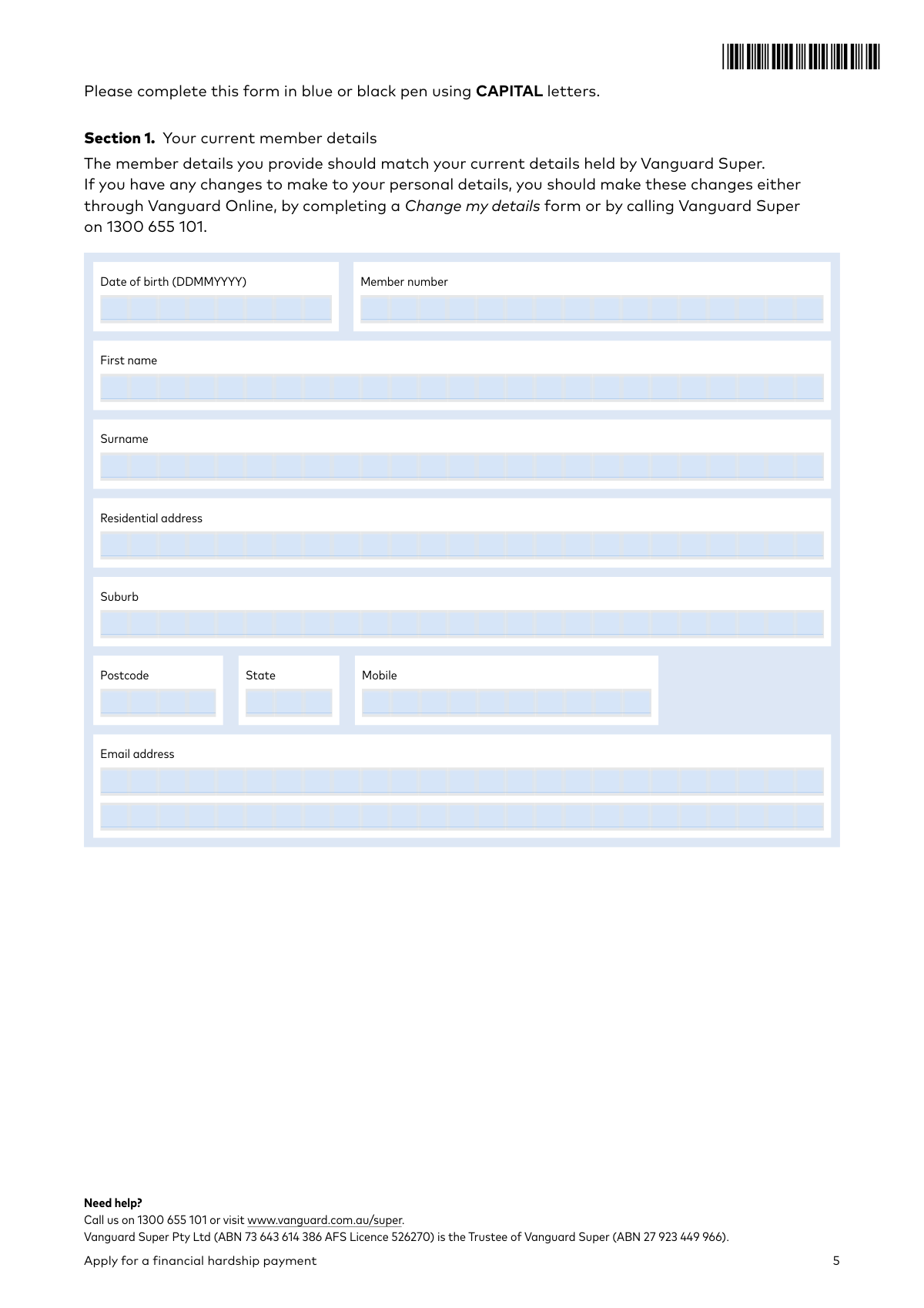
- Use the AI-assisted tool to accurately fill in your personal and Vanguard Super member details in Section 1.
- Enter your Centrelink Reference Number (CRN) in Section 2 and provide a detailed breakdown of your outstanding debts, income, and expenses in Section 3.
- Specify the withdrawal amount in Section 5 and provide your bank account details for the Electronic Funds Transfer (EFT) in Section 6.
- Complete the identity verification in Section 8 by providing details for electronic ID check or confirming you will attach certified copies of your documents.
- Upload all required supporting evidence, such as overdue bills, bank statements, and proof of identity, as prompted by the platform.
- Review all entered information and the declaration in Section 9, then digitally sign and submit your completed application securely.
Common Mistakes in Completing VSFORM16
The ones the AI is built to catch.
Submitting outdated or insufficient supporting evidence
Incorrectly providing identity verification details
Applying without meeting the strict eligibility criteria
Entering mismatched personal or bank account details
Forgetting to sign and date the declaration
Using the wrong form for the withdrawal reason
Failing to attach required bank statements
Illegible handwriting on a paper form
Inconsistent or incomplete financial information
Frequently Asked Questions About VSFORM16
Is it really free for 7 days?
Can I fill other forms too?
How do I cancel?
How does the AI fill out VSFORM16?
What happens to my information?
How complex is VSFORM16 to fill out?
What is the purpose of this form?
Who is eligible to apply for a financial hardship payment?
How much money can I withdraw from my super for financial hardship?
What documents do I need to submit with my application?
How do I prove my identity for this application?
What kind of evidence do I need for my outstanding debts in Section 3?
How long will it take to process my application?
How can I submit the completed form?
Will this withdrawal affect my insurance cover with Vanguard Super?
Will the payment I receive be taxed?
I don't have a Centrelink Reference Number (CRN). Can I still apply?
Can AI tools help me fill out this financial hardship form?
The PDF I downloaded from the website isn't fillable. What can I do?
How can I fill out this form online instead of by hand?
Get your VSFORM16 filled out by AI
$0 today. Cancel before Nov 1 and you pay nothing.
Other forms like this one
financial forms: Form 8938, Statement of Specified Foreign Financial Assets, Form 12.902(b), Family Law Financial Affidavit (Short Form), Form I-361, Affidavit of Financial Support, Form CJA-23, Financial Affidavit, Form 107, Statement of Financial Affairs, SBA Form 413, Personal Financial Statement, Personal Financial Statement (REV 06/2018) – Northwest Federal Credit Union, NSFAS Consent Form (National Student Financial Aid Scheme) – APP2026, International Student Application for Financial Aid 2026-2027 (International Student Application for Financial Assistance 2026-2027), State of Hawaii Department of Commerce and Consumer Affairs (DCCA) Contractors License Board – Application for Contractor's License (Sole Proprietor) (CT-36) with supporting forms (Experience Certificate CT-03, Contractors Financial Statement CT-02, and Chronological History of Projects/Project List), Colorado Judicial Department Form JDF 1111SC (Form 35.2), Sworn Financial Statement, Northwestern University Office of Undergraduate Financial Aid International Applicant Document Upload Cover Sheet, Selbstauskunft/ Vermögensaufstellung (Financial Self-Disclosure/Statement of Assets), Selbstauskunft - vertraulich - (Financial Self-Disclosure), Empower Financial Services, Inc. (EFSI) and Empower Advisory Group, LLC (EAG) Form CRS Customer Relationship Summary, Rollover Form (Principal Financial Group), Principal Financial 401(k) Withdrawal Form, Principal Financial Group Pre-Approved Basic Savings Plan - Plus, DoD 7000.14-R, Department of Defense Financial Management Regulation, Volume 12: Special Accounts, Funds and Programs, Principal Financial Group Notice of Data Breach
payment forms: Form 5405, Repayment of First-Time Homebuyer Credit, Form 1127, Application for Extension of Time for Payment of Tax Due to Undue Hardship, Form 1099-G, Certain Government Payments, Form 1099-K, Payment Card and Third Party Network Transactions, Form 1099-Q, Payments From Qualified Education Programs, Form SSA-8, Application for Lump-Sum Death Payment, Form 1845-0163, Borrower Defense to Repayment Application, application-and-contract-for-electric-facilities-w, Carer Payment and Carer Allowance – Medical Report (SA431) for a child under 16 years, Income-Driven Repayment (IDR) Plan Request (PAYE, IBR, and ICR) — William D. Ford Federal Direct Loan (Direct Loan) Program and Federal Family Education Loan (FFEL) Programs (OMB No. 1845-0102), Fidelity NetBenefits Distribution - Recurring Payments, Electronic Dividend and Interest Payment Authorization Form, Special Tax Notice Regarding Plan Payments, Empower Loan Payment Change Request Form, Empower Retirement Payment Request Form, Empower 401(k) Loan Prepayment Request Form, Special Tax Notice Regarding Plan Payments, Transamerica Automatic Payment Authorization, Excess Withdrawal Request and Form W-4R, Withholding Certificate for Nonperiodic Payments and Eligible Rollover Distributions, Form F6776, Authorization of Interest-Only Payments (ERISA)
hardship forms: Explanation of Hardship and Supporting Documentation, Form 1127, Application for Extension of Time for Payment of Tax Due to Undue Hardship, Hardship Withdrawal Request - Empower, Empower Hardship Distribution Request Form, Hardship Withdrawal Request 401(a) Plan, MassMutual Application for Hardship Withdrawal, Equitable Hardship Withdrawal Request (Form E13770), Streamlined Hardship Withdrawal Service Letter of Instruction, Form 2938, Hardship Withdrawal Request, TIAA Form F11270, Request for Hardship Withdrawal, Request for Hardship Withdrawal
Vanguard forms: Gift of Nonretirement Assets to Existing Vanguard Account Form, Vanguard VRPA Transfer Request Form, Vanguard Personal Investor – Transfer form, Vanguard Asset Transfer Authorization Form for the Emory University Retirement Plan, Retirement Transfer Between Existing Vanguard Accounts, Vanguard Personal Investor – Transfer initiation form – Transfer out, Vanguard Asset Transfer Authorization, Moving your Vanguard funds to a Vanguard Brokerage Account Disclosure statement, Make a contribution - Vanguard Charitable, Vanguard Transfer Form, Vanguard Full Agent Authorization, Vanguard Transfer on Death Plan Form, The Vanguard 529 College Savings Plan: Power of Attorney, Vanguard Direct Rollover IRA Adoption Agreement, Vanguard Limited Agent Authorization, The Vanguard 529 College Savings Plan Agent Authorization/Limited Power of Attorney, The Vanguard 529 College Savings Plan Direct Rollover Out to Roth IRA Form, The Vanguard 529 College Savings Plan Transfer Due to Death of Account Owner Form, Your guide to completing a rollover - Vanguard, Vanguard IRA Distribution Kit (including IRA Distribution Form RRDFT and Form W-4R)
financial hardship forms: Certification in Support of Request to be Excused from Jury Service Due to Severe Financial Hardship
Let AI fill out your VSFORM16
Your trial starts once a card is added. You pay nothing before Nov 1.
Our AI already knows this form, all 98 fields of it. Skip the typing: tell it about yourself, or upload what you have, and it fills the whole form in seconds.
- AI fills every field on all 12 pages, checkboxes included
- No typing into boxes: answer a few questions, or upload a document you already have, an old copy of this form, a photo of a document
- The AI checks the answers; you review and change anything before you download
- Download the finished PDF, print it, or sign it online
- Encrypted, and never used to train AI
Cancel before Nov 1 and you pay nothing.
A card is needed to start the trial. Cancel in two clicks from your account.
Terms · Privacy