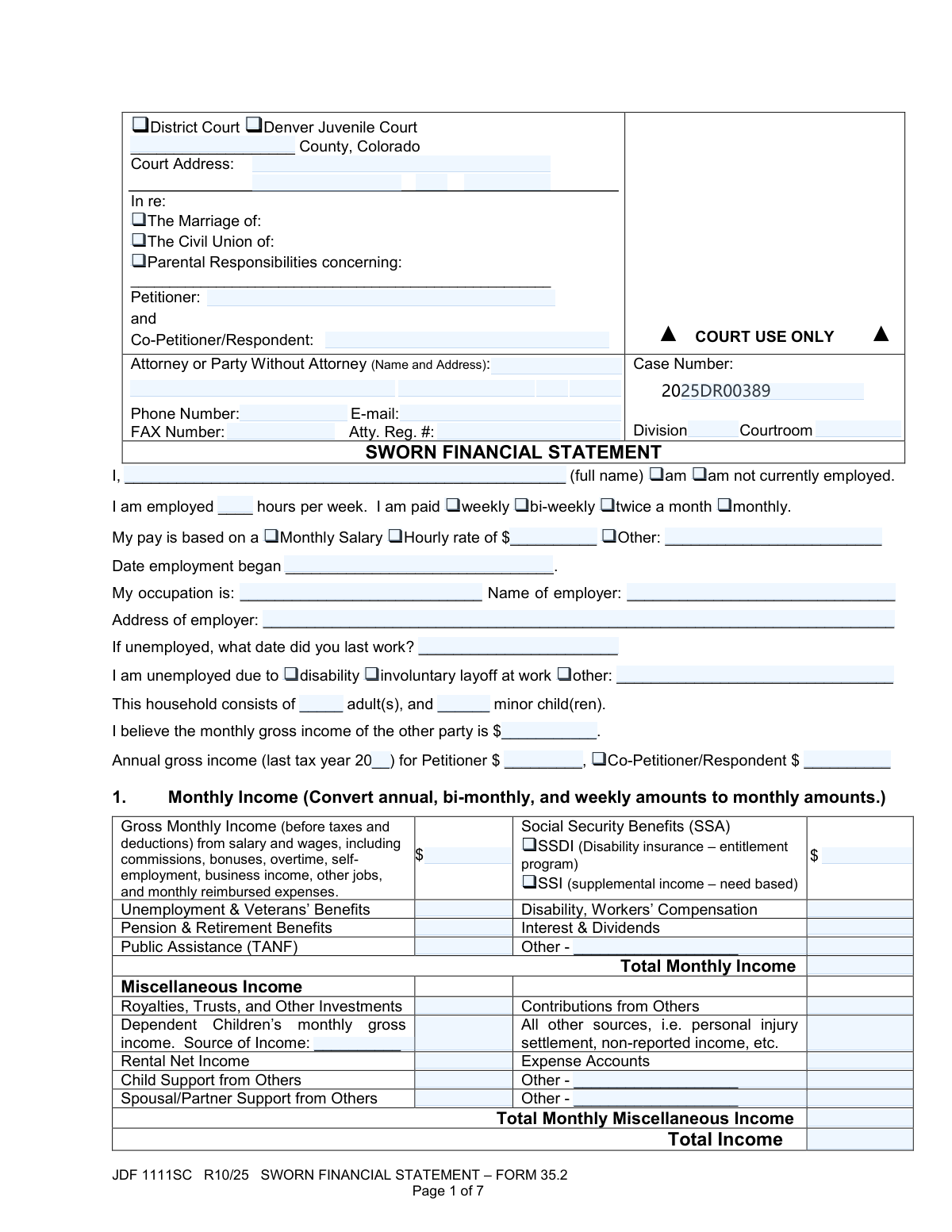
Yes! You can use AI to fill out Colorado Judicial Department Form JDF 1111SC (Form 35.2), Sworn Financial Statement
The Colorado Sworn Financial Statement (JDF 1111SC / Form 35.2) is a sworn, penalty-of-perjury financial disclosure filed in Colorado District Court (and related jurisdictions) in matters such as divorce, civil union dissolution, and parental responsibilities/child support. It captures detailed monthly income, payroll deductions, living expenses, unsecured debts, and a full inventory of assets so the court and parties can evaluate support, maintenance, and equitable division issues. Because it is sworn, accuracy and completeness are critical, and updates may be required if circumstances change before final orders enter. Today, this form can be filled out quickly and accurately using AI-powered services like Instafill.ai, which can also convert non-fillable PDF versions into interactive fillable forms.
Our AI automatically handles information lookup, data retrieval, formatting, and form filling.
It takes less than a minute to fill out JDF 1111SC (Form 35.2) using our AI form filling.
Securely upload your data. Information is encrypted in transit and deleted immediately after the form is filled out.
Form specifications
| Form name: | Colorado Judicial Department Form JDF 1111SC (Form 35.2), Sworn Financial Statement |
| Number of pages: | 7 |
| Language: | English |
| Categories: | family law forms, divorce forms, Colorado court forms, Colorado judicial forms |
Instafill Demo: filling out a legal form in seconds
How to Fill Out JDF 1111SC (Form 35.2) Online for Free in 2026
Are you looking to fill out a JDF 1111SC (FORM 35.2) form online quickly and accurately? Instafill.ai offers the #1 AI-powered PDF filling software of 2026, allowing you to complete your JDF 1111SC (FORM 35.2) form in just 37 seconds or less.
Follow these steps to fill out your JDF 1111SC (FORM 35.2) form online using Instafill.ai:
- 1 Go to Instafill.ai and upload the PDF for JDF 1111SC (Form 35.2) or select it from the form library.
- 2 Enter case and court details (county, court address, case number, division/courtroom) and identify the parties (petitioner and co-petitioner/respondent) and case type (marriage, civil union, or parental responsibilities).
- 3 Provide employment and household information, then input all income sources and amounts (wages, benefits, Social Security, and any miscellaneous income) so the service can calculate totals.
- 4 Add monthly deductions (mandatory and voluntary), including taxes, FICA/Medicare, insurance premiums, retirement, and any other payroll deductions.
- 5 Complete monthly expenses by category (housing, utilities, food, health care, transportation, children’s expenses, education, support paid, and miscellaneous) and review the generated expense totals.
- 6 List unsecured debts (creditors, balances, minimum payments, and reasons) and disclose all assets (real estate, vehicles, bank accounts, personal property, and other assets), attaching any required supplemental schedules (e.g., JDF 1111-SS) if applicable.
- 7 Review the summary calculations, complete the verification (date/location and printed name), choose a service method for the Certificate of Service, then e-sign or download/print to file with the court.
Our AI-powered system ensures each field is filled out correctly, reducing errors and saving you time.
Why Choose Instafill.ai for Your Fillable JDF 1111SC (Form 35.2) Form?
Speed
Complete your JDF 1111SC (Form 35.2) in as little as 37 seconds.
Up-to-Date
Always use the latest 2026 JDF 1111SC (Form 35.2) form version.
Cost-effective
No need to hire expensive lawyers.
Accuracy
Our AI performs 10 compliance checks to ensure your form is error-free.
Security
Your personal information is protected with bank-level encryption.
Frequently Asked Questions About Form JDF 1111SC (Form 35.2)
This form tells the court and the other party your income, expenses, debts, and assets. It is commonly required in Colorado family law cases to help determine child support, maintenance (spousal/partner support), and financial issues in a divorce, civil union, or parental responsibilities case.
Each party (Petitioner and Co-Petitioner/Respondent) typically must complete their own statement and sign it under penalty of perjury. If you are self-represented, you still complete and sign the same form.
Yes—Page 1 specifically includes commissions, bonuses, overtime, self-employment/business income, other jobs, and monthly reimbursed expenses. Convert non-monthly amounts to a monthly figure as the form instructs.
Use a consistent conversion method, such as weekly × 52 ÷ 12, or bi-weekly × 26 ÷ 12, to estimate a monthly amount. Keep your math and supporting pay stubs available in case the court or the other party asks.
Check “am not currently employed,” provide the date you last worked, and select the reason (disability, involuntary layoff, or other). You should still complete the income section for any benefits (unemployment, disability, Social Security, etc.) and complete expenses, debts, and assets.
Commonly helpful documents include recent pay stubs, last year’s tax return, benefit award letters (SSA/SSDI/SSI, unemployment, VA), bank statements, loan/credit card statements, and account balances for assets and retirement. The form requires accurate current amounts, so use the most recent statements you have.
Mandatory deductions are items like federal/state income tax, Social Security, and Medicare (and PERA/civil service if applicable). Voluntary deductions include insurance premiums, retirement/deferred compensation, cafeteria plans, and other optional withholdings.
No—Page 4 is for unsecured debts like credit cards, personal loans, family loans, and back taxes. Mortgages and car loans are typically reflected in the expense section and the asset sections (real estate/motor vehicles) where value and amount owed are listed.
List the regular monthly expenses that you pay on an ongoing basis. If a bill is split, enter the portion you actually pay, and be consistent with how you report contributions from others (if any) in the income/miscellaneous income section.
Checking “None” is an affirmative statement that you (and/or the other party, depending on the category instructions) do not have assets in that category. Only check “None” if it is truly accurate, because the form requires full disclosure of all assets.
Yes, if you own certain assets listed in the form (such as stocks/investment accounts, retirement funds, or miscellaneous assets that require valuation), the form instructs you to attach JDF 1111-SS. Attach extra copies of Pages 5–6 if you need more space to list assets.
The Verification is your sworn statement that the information is true and correct under penalty of perjury in Colorado. Sign and date it only after reviewing the entire form for completeness and accuracy.
You must provide a true and accurate copy to the other party using one of the listed methods (hand delivery, e-filed, fax, or U.S. mail). In the Certificate of Service, enter the service date, select the method, and provide the address/fax details if required, then sign.
Processing time varies by county, case type, and whether you e-file or file in person, and the court may not “approve” it immediately like an application. Practically, it is used by the court and parties during disclosures, negotiations, and hearings, so submit it by your deadline and keep proof of filing/service.
Yes—AI tools can help organize your financial information and auto-fill form fields to save time. For example, Instafill.ai can extract data from documents (like pay stubs and statements) and populate the PDF fields more accurately than manual retyping.
Upload the JDF 1111SC PDF to Instafill.ai, then upload or connect your supporting documents (pay stubs, tax return, bank statements, debt statements). Instafill.ai can map the extracted information to the correct fields, let you review/edit entries, and then export a completed form for filing and service.
If the PDF is “flat” (non-fillable), you can still complete it using a tool that converts it into an interactive form. Instafill.ai can convert non-fillable PDFs into fillable versions and then auto-fill the fields so you can review, sign, and submit.
Compliance JDF 1111SC (Form 35.2)
Validation Checks by Instafill.ai
1
Court jurisdiction selection is valid and exclusive
Validate that exactly one court type is selected (e.g., District Court vs. Denver Juvenile Court) and that the selection is consistent with the case being filed. This prevents filings from being routed to the wrong court workflow and avoids rejected submissions. If validation fails, block submission and prompt the filer to select the correct single jurisdiction option.
2
Court location fields are complete and properly formatted
Require County, Court Street Address, City, State, and ZIP Code to be present and formatted correctly (State must be a 2-letter code; ZIP must be 5 digits or ZIP+4). Correct court address data is essential for service, venue, and court record matching. If validation fails, flag missing/invalid fields and require correction before acceptance.
3
Case type checkbox selection is present and not contradictory
Ensure at least one case type is checked (Marriage, Civil Union, or Parental Responsibilities) and prevent mutually incompatible combinations if your business rules require exclusivity. This drives downstream requirements (e.g., child-related sections) and correct docket categorization. If validation fails, require the user to select the appropriate case type(s) per court rules.
4
Party names are present, non-placeholder, and distinct
Validate that Petitioner Name and Co-Petitioner/Respondent Name are provided as full legal names (not blank, not initials-only, not placeholders like 'N/A') and are not identical. Accurate party identification is required for court indexing and to avoid mis-association of financial data. If validation fails, reject submission and request corrected legal names.
5
Case number format and required court identifiers
Validate Case Number is present and matches expected Colorado case number patterns (e.g., numeric/alpha structure such as '2025DR00389'), and require Division/Courtroom if mandated by the court or filing channel. Correct identifiers are critical for matching the filing to the correct docket. If validation fails, prevent submission and prompt for a corrected case number and any missing identifiers.
6
Attorney/party contact information format validation
Validate Phone Number is a valid 10-digit US number (allow punctuation), E-mail is RFC-like valid, and FAX Number (if provided) is a valid 10-digit US number. Reliable contact data is necessary for notices, deficiency letters, and service coordination. If validation fails, highlight the invalid contact fields and require correction (or allow blank only where optional).
7
Employment status logic and dependent field requirements
Enforce that exactly one of 'am employed' or 'am not currently employed' is selected, and then require the appropriate dependent fields. If employed, require hours/week, pay frequency, pay basis (salary/hourly/other), employment start date, occupation, employer name, and employer address; if unemployed, require date last worked and an unemployment reason selection (and explanation if 'Other'). If validation fails, block submission and list the missing fields based on the selected status.
8
Employment dates are valid and chronologically reasonable
Validate 'Date employment began' and 'Date last worked' are valid dates and not in the future, and ensure they are consistent with employment status (e.g., an unemployed filer should not have a future 'last worked' date). Date integrity supports credibility and can affect income calculations and imputation decisions. If validation fails, require corrected dates and show the specific inconsistency.
9
Household composition fields are non-negative integers and consistent with child-income fields
Validate Household adults and Household minor children are integers >= 0, and if minor children > 0 then dependent children income fields (if filled) must include a source; if minor children = 0 then dependent children income amount/source should be blank or zero. Household counts are used in support calculations and benefit eligibility context. If validation fails, require corrected counts and/or clear inconsistent child-income entries.
10
Tax year and annual income fields are complete and numeric
Validate the tax year is a valid year (2-digit or 4-digit per system rule) and not in the future, and that annual gross income amounts are numeric and >= 0 for the party indicated by the checkbox. This ensures annual-to-monthly conversions and historical income comparisons are meaningful. If validation fails, require a valid tax year and properly formatted income amounts.
11
Currency fields are valid monetary amounts (including handling of negatives where allowed)
Validate all money fields accept only valid currency formats (digits with optional commas and up to 2 decimals) and are within reasonable bounds (e.g., not exceeding system maximums). Additionally, restrict negative values to only fields where they are logically possible (e.g., bank account balance may be negative; wages, deductions, and expenses generally should not be negative). If validation fails, reject the specific field(s) and explain whether the issue is formatting, sign, or range.
12
Income totals equal the sum of line items (monthly income and miscellaneous income)
Recalculate Total Monthly Income and Total Monthly Miscellaneous Income from the entered line items and compare to the provided totals (within a small rounding tolerance). This prevents arithmetic errors that can materially change net income and support outcomes. If validation fails, either auto-correct totals (if permitted) or require the filer to correct the totals before submission.
13
Deductions totals equal the sum of mandatory and voluntary deductions
Validate Total Mandatory Deductions equals the sum of mandatory rows, Total Voluntary Deductions equals the sum of voluntary rows, and Total Monthly Deductions equals mandatory + voluntary (with rounding tolerance). Accurate deductions are required to compute net income and evaluate affordability. If validation fails, flag the mismatched totals and require correction or auto-recompute based on policy.
14
Expense section totals match itemized entries and summary fields reconcile
Validate each section total (Housing, Utilities, Food, Health Care, Transportation, Children, Education, Maintenance/Child Support, Miscellaneous) equals the sum of its line items, and that the overall Total Monthly Expenses equals the sum of sections A–I. Then validate the summary math: Net Income = Total Income − Total Monthly Deductions; Expenses and Payments = Expenses + Unsecured Debt Minimum Payments; Net Excess/Shortfall = Net Income − Expenses and Payments. If validation fails, identify the exact section(s) and summary calculation(s) that do not reconcile and require correction.
15
Unsecured debt entries completeness and account-number masking
For each unsecured debt row with any data, require creditor name, last 4 digits of account number (exactly 4 numeric digits), ownership selection (P/C/R/J), date of balance (valid date), balance, minimum monthly payment, and reason. This ensures debts are identifiable while protecting sensitive account information and supports accurate monthly obligation calculations. If validation fails, prevent submission and highlight incomplete rows or improperly formatted last-4/account/date fields.
16
Assets section 'None' selections vs. entered asset data and equity math
Validate that if an asset category is marked 'None', no entries/values are provided in that category; if not marked 'None', at least one asset entry must be present. For real estate and vehicles, validate Net Value/Equity equals Estimated Value − Amount Owed (and totals equal the sum of entries), and for bank accounts validate last-4 digits format and allow negative balances only where appropriate. If validation fails, require the filer to either remove the 'None' selection or clear the entered data, and correct any equity/total mismatches.
17
Verification and signature block completeness and date consistency
Require the verification execution date (day/month/year) and location (city/state or country), printed name, and signature (wet signature or valid e-signature format such as '/s/ Full Name'). Also validate the execution date is a real calendar date and not in the future. This is essential because the statement is sworn under penalty of perjury and unsigned/undated forms are typically rejected. If validation fails, block submission until the verification block is complete and valid.
18
Certificate of service method and dependent address/fax requirements
Validate that a service date is provided and a single service method is selected; if 'Faxed' is selected, require a valid fax number; if 'U.S. mail' is selected, require addressee name and a complete mailing address (street, city, state, ZIP). Proper service information is required for due process and to avoid service-related delays or disputes. If validation fails, require completion of the dependent fields tied to the chosen service method.
Common Mistakes in Completing JDF 1111SC (Form 35.2)
People often check multiple case-type boxes or the wrong one because the form lists several similar options at the top. This can cause the clerk/court to treat the filing as inconsistent with the underlying case, leading to rejection, delays, or requests to refile. Check only the box that matches your case caption and prior pleadings (e.g., divorce vs. allocation of parental responsibilities). AI-powered tools like Instafill.ai can help by mapping your case type to the correct checkbox and preventing conflicting selections.
A very common error is entering names that don’t exactly match the case caption (missing middle names, nicknames, swapped parties, or inconsistent spelling). This creates confusion about whose financials are being sworn to and can trigger court questions or require corrected filings. Copy names exactly as they appear on the Petition/Summons and the court’s case management header. Instafill.ai can reuse the same standardized party names across all fields to avoid inconsistencies.
Filers sometimes check “not currently employed” but still fill in hours, pay frequency, and hourly rate (or the reverse), usually because they’re rushing or unsure what counts as employment. Contradictions undermine credibility and can lead to follow-up hearings, requests for paystubs, or amended statements. If you are employed in any capacity, check “am” employed and complete the pay details; if unemployed, complete only the unemployment section (last worked date and reason). Instafill.ai can flag incompatible combinations and prompt you to correct them before submission.
This form requires converting all income to monthly amounts, and people frequently use the wrong multiplier (e.g., bi-weekly ×2 instead of ×26/12, weekly ×4 instead of ×52/12). The consequence is an inaccurate gross monthly income, which can materially change child support/maintenance calculations and lead to disputes or court-ordered corrections. Use standard conversions: weekly × 52/12, bi-weekly × 26/12, semi-monthly × 2, annual ÷ 12. Instafill.ai can automatically convert pay frequencies into correct monthly figures and keep totals consistent.
Many people accidentally enter take-home pay (net) in the “Gross Monthly Income” line because that’s what they see deposited in their bank account. This understates income and can result in incorrect guideline calculations, potential sanctions, or credibility issues if paystubs/tax returns don’t match. The income section is gross (before taxes/deductions); taxes and benefits belong in the deductions section. Instafill.ai can help by extracting gross pay from paystubs and placing net amounts only where appropriate.
The form instructs that expenses listed as payroll deductions should not be listed again as monthly expenses, but people often duplicate them (e.g., health premiums, retirement contributions, childcare withheld from pay). Double-counting inflates expenses and can distort the net excess/shortfall, inviting objections and court scrutiny. If it comes out of your paycheck and you list it on Page 2, do not list it again on Page 3 unless you pay an additional out-of-pocket amount not deducted from wages. Instafill.ai can detect duplicates and warn you when the same cost appears in multiple sections.
Filers frequently enter line-item numbers but forget to complete totals (Total Monthly Income, Total Deductions, Total Expenses, Summary A–D) or the totals don’t match because of arithmetic errors. Inconsistent totals can cause the court to question the accuracy of the entire statement and may require resubmission. Recalculate totals carefully and ensure the summary matches the referenced pages. Instafill.ai can auto-calculate totals and keep the summary synchronized with the underlying entries.
A common misunderstanding is listing car loans/mortgages as “unsecured” debts, or failing to provide the last 4 digits, date of balance, minimum payment, and reason incurred. This can misstate liabilities and duplicate payments already captured in expenses, leading to inaccurate financial pictures and disputes. Only list unsecured debts (credit cards, personal loans, back taxes, family loans) and include all requested fields for each account. Instafill.ai can guide categorization (secured vs. unsecured) and enforce completion of required debt details.
People sometimes check “None” to move quickly, or they assume small balances don’t count, then later list a vehicle or bank account elsewhere (or omit retirement entirely). Because the form states you MUST disclose all assets, incorrect “None” selections can be treated as a serious omission and may lead to court orders to correct, reopen issues, or impose sanctions. Do an inventory: vehicles, bank accounts (even negative balances), retirement, accrued paid leave, refunds due, and personal property. Instafill.ai can prompt for commonly missed asset categories and ensure “None” is only selected when truly applicable.
For assets like vehicles and property, filers often enter what they paid originally rather than what they could sell it for today, or they enter an outdated loan balance. This skews equity calculations and can affect property division and support determinations. Use current fair market value (e.g., comparable sales/KBB) and the most recent statement for amount owed as of a specific date. Instafill.ai can standardize “as of today” dating and help keep value/owed/equity fields logically consistent.
The last page is frequently incomplete: missing executed date, city/state, printed name, signature, or leaving the Certificate of Service method/address blank. An unsigned or improperly served sworn statement may be rejected or treated as not filed/served, causing hearing delays and potential court orders to cure service. Complete the verification exactly (day/month/year and location) and document how and when you served the other party, including address if mailed. If the form is a flat non-fillable PDF, Instafill.ai can convert it into a fillable version and ensure signature/service fields aren’t overlooked.
Saved over 80 hours a year
“I was never sure if my IRS forms like W-9 were filled correctly. Now, I can complete the forms accurately without any external help.”
Kevin Martin Green
Your data stays secure with advanced protection from Instafill and our subprocessors

Robust compliance program
Transparent business model
You’re not the product. You always know where your data is and what it is processed for.
ISO 27001, HIPAA, and GDPR
Our subprocesses adhere to multiple compliance standards, including but not limited to ISO 27001, HIPAA, and GDPR.
Security & privacy by design
We consider security and privacy from the initial design phase of any new service or functionality. It’s not an afterthought, it’s built-in, including support for two-factor authentication (2FA) to further protect your account.
Fill out JDF 1111SC (Form 35.2) with Instafill.ai
Worried about filling PDFs wrong? Instafill securely fills colorado-judicial-department-form-jdf-1111sc-form-352-sworn-financial-statement forms, ensuring each field is accurate.