
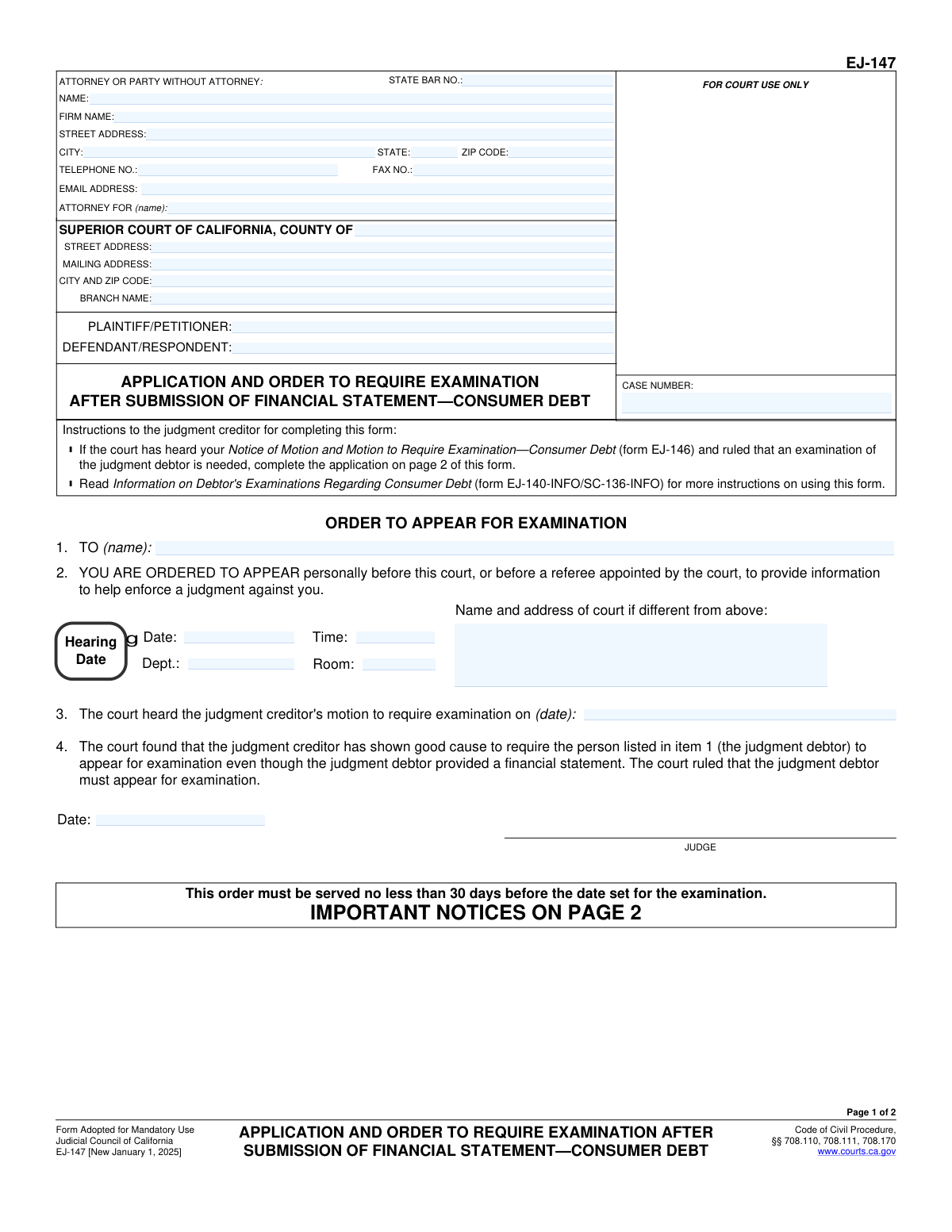
Yes! You can use AI to fill out Form EJ-147, Application and Order to Require Examination After Submission of Financial Statement—Consumer Debt
Don't type 46 fields by hand. Tell our AI about yourself, or upload a document you already have, and it fills every field in seconds. You check it, then download, print or sign.
The AI does the filling. You just check it.
No typing into boxes, nothing to install.
What this form asks for
The AI fills all of it, from your answers or your documents.
The AI checks your answers before you download
14 checks built for this form, so a wrong date or a missing answer is caught before anyone else sees it.
This check verifies that the 'CASE NUMBER' field on page 1 matches the 'CASE NUMBER' field on page 2. This is a critical data integrity check to ensure that both pages of the document are correctly associated with the same legal case file. A mismatch could lead to the document being rejected by the court clerk or filed incorrectly, causing significant processing delays.
This validation confirms that the 'PLAINTIFF/PETITIONER' and 'DEFENDANT/RESPONDENT' names are identical on both page 1 and page 2. Consistent party names are essential for the document's validity and to prevent any ambiguity about who the legal action involves. Discrepancies would likely result in the form's rejection and require correction and refiling.
This check ensures that in item 5, exactly one of the two checkboxes ('Original judgment creditor' or 'Assignee of record') is selected. The applicant must clearly state their legal standing to make the request. The application is considered incomplete if neither or both boxes are checked, and it will be returned for correction.
This check validates that the date the motion was heard (item 11) is on or after the date the motion was filed (item 10). A court hearing cannot logically take place before the corresponding motion has been officially filed. An error in this sequence indicates a data entry mistake that undermines the document's credibility and must be corrected.
This validation confirms that the dates follow a logical progression: the motion filing date (item 10) must be after the financial statement filing date (item 7), which should be after the original examination order date (item 6). This sequence establishes the factual and legal basis for the application. An illogical timeline would invalidate the reason for the request and lead to its denial.
This check verifies that the declaration date on page 2 is on or after all other event dates listed in the application (items 6, 7, 10, and 11). The declarant is attesting under penalty of perjury that the foregoing facts are true; they cannot attest to events that have not yet occurred. A declaration dated prior to the events it describes is invalid.
And 8 more checks
- Validates State Bar Number Format
- Requires Judgment Debtor Name in Application
- Validates Examination Hearing Date is in the Future
- Ensures Sufficient Time for Service of Order
- Cross-references Motion Hearing Dates
- Verifies Completeness of Filer's Contact Information
- Validates All Date Fields for Correct Format
- Ensures Consistency of Judgment Debtor Name
Let AI fill out your EJ-147
No typing. Every field filled in seconds, checked, ready to sign.
How to Fill Out EJ-147 Online for Free in 2026
What the AI walks you through.
- Navigate to Instafill.ai and upload or select the EJ-147 form.
- Provide the case information, including the court name, branch, case number, and the names of the plaintiff and defendant.
- Enter your information as the attorney or party without an attorney, including your name, address, and contact details.
- Complete the 'Application for Order to Require Examination' section by identifying the judgment debtor and entering the relevant dates for the previous order, financial statement filing, and motion hearing.
- Review all the information automatically populated by the AI for accuracy and completeness.
- Digitally sign and date the declaration under penalty of perjury.
- Download the completed form to be served on the judgment debtor and filed with the court.
Common Mistakes in Completing EJ-147
The ones the AI is built to catch.
Inconsistent Case Number and Party Names
Incorrectly Filling Out the 'Order' Section
Providing Incorrect or Inconsistent Dates
Missing Signature or Date on Declaration
Confusion in the Attorney/Party Information Section
Failing to Specify Creditor Status
Using the Wrong Court Address or Branch Name
Entering an Inaccurate Judgment Debtor Name
Submitting an Incomplete Application
Mismatch Between Printed Name and Signature
Frequently Asked Questions About EJ-147
Is it really free for 7 days?
Can I fill other forms too?
How do I cancel?
How does the AI fill out EJ-147?
What happens to my information?
How complex is EJ-147 to fill out?
What is the purpose of Form EJ-147?
Who needs to fill out this form?
Can I use this form as the first step to request a debtor examination?
What information is required for the 'Application for Order to Require Examination' on page 2?
How do I serve this order on the judgment debtor?
What happens if the judgment debtor receives this order but fails to appear for the examination?
What is the difference between the 'Application' and the 'Order' sections of the form?
Who fills in the examination date and time on page 1?
I am the judgment debtor and I received this form. What does it mean?
Can I use an AI tool to help me fill out Form EJ-147?
How do I use Instafill.ai to complete this form online?
The PDF of Form EJ-147 I downloaded isn't fillable. What should I do?
Who signs the declaration on page 2 of the application?
Get your EJ-147 filled out by AI
$0 today. Cancel before Nov 1 and you pay nothing.
Other forms like this one
California state forms: Judicial Council of California Form DE-111, Petition for Probate (Probate—Decedents Estates), DS 1891, Applicant/Vendor Disclosure Statement (State of California Department of Developmental Services), Judicial Council of California Form DE-120, Notice of Hearing—Decedent's Estate or Trust, Judicial Council of California Form DE-120, Notice of Hearing—Decedent's Estate or Trust, Murrieta Police Department Citizen Complaint Form (California Penal Code § 148.6 Advisory Statement), California Department of Social Services, Sworn Statement, State of California Department of Transportation California Civil Rights Laws Certification, State of California Department of Transportation Darfur Contracting Act Certification, Form DOT ADM-0077, State of California Department of Transportation, Contract Requirements, State of California Department of Transportation Subcontractor List, State of California Department of Transportation, Certified DVBE Summary, Bidder Declaration GSPD-05-105, State of California Level of Care Rate Determination Protocol Matrix, State of California Accessible Form, State of California Form SOC 321, Request for Order and Consent - Paramedical Services, State of California Darfur Contracting Act Certification, State of California Department of Veterans Affairs COMMERCIALLY USEFUL FUNCTION (CUF) CERTIFICATION FORM, Form ADR-100, Statement of Agreement or Nonagreement, Civil Appeal Case Information Statement, Form APP-014, Appellant's Proposed Statement on Appeal (Unlimited Civil Case)
California court forms: Judicial Council of California Form SC-105, Request for Court Order and Answer (Small Claims), Judicial Council of California Form SC-120, Defendant’s Claim and ORDER to Go to Small Claims Court (Small Claims), Judicial Council of California Form SER-001, Request for Sheriff to Serve Court Papers, Judicial Council of California Form SER-001, Request for Sheriff to Serve Court Papers, Affidavit for Collection of Personal Property California Probate Code Section 13100, Form POS-040, Proof of Service—Civil, Declaration of Facts of Death (California Superior Court), declaration-of-marriage-for-court-proceeding-california-family-law, ADOPT-200, Adoption Request, ADOPT-200, Stepparent Adoption Request, ADOPT-210, Adoption Agreement, ADOPT-310, Contact After Adoption Agreement, Judicial Council of California Form ADOPT-200, Adoption Request, Form ADR-107, Mediation Attendance Sheet, Form ADR-110, Order Appointing Referee, Form ADR-109, Stipulation or Motion for Order Appointing Referee, Form ADR-102, Request for Trial De Novo After Judicial Arbitration, Form ADR-108, Referee's Report (Code Civ. Proc., §§ 638, 639), Form ADR-106, Petition to Confirm, Correct, or Vacate Contractual Arbitration Award, Form ADR-104, Rejection of Award and Request for Trial After Attorney-Client Fee Arbitration
judgment enforcement forms: Form AT-180/EJ-185, Notice of Lien (Attachment—Enforcement of Judgment), Form WG-017/EJ-137, Application to Stay Levy or Garnishment (Wage Garnishment—Enforcement of Judgment), Form EJ-141, Application and Order to Appear for Examination—Consumer Debt, Form EJ-150, Notice of Levy (Enforcement of Judgment), Form EJ-158, Declaration Regarding Notice and Service for Ex Parte Application for Order on Deposit Account Exemption, Form EJ-190, Application for and Renewal of Judgment, Form EJ-100, Acknowledgment of Satisfaction of Judgment, Form EJ-105, Application for Entry of Judgment on Sister-State Judgment, Form EJ-146, Notice of Motion and Motion to Require Examination—Consumer Debt, Form EJ-160, Claim of Exemption (Enforcement of Judgment), Form EJ-180, Notice of Hearing on Right to Homestead Exemption (Enforcement of Judgment), Form EJ-182, Declaration for Rehearing on Homestead Exemption (Enforcement of Judgment), Form EJ-001, Abstract of Judgment—Civil and Small Claims, Declaration of Address Verification (Wage Garnishment—Enforcement of Judgment), Form WG-010/EJ-175, Notice of Hearing on Claim of Exemption (Wage Garnishment—Enforcement of Judgment), Form EJ-195, Notice of Renewal of Judgment, Form WG-007/EJ-165, Financial Statement (Wage Garnishment—Enforcement of Judgment)
consumer debt forms: Form EJ-141, Application and Order to Appear for Examination—Consumer Debt, Form EJ-146, Notice of Motion and Motion to Require Examination—Consumer Debt, Application and Order to Produce Financial Statement or Appear for Examination—Consumer Debt (Small Claims)
financial application forms: Account Application for Merrill West Virginia Residents - The Hartford SMART529, International Student Application for Financial Aid 2026-2027 (International Student Application for Financial Assistance 2026-2027), State of Hawaii Department of Commerce and Consumer Affairs (DCCA) Contractors License Board – Application for Contractor's License (Sole Proprietor) (CT-36) with supporting forms (Experience Certificate CT-03, Contractors Financial Statement CT-02, and Chronological History of Projects/Project List), Application Form: Individual Investor | Monthly Liquidity – Retail Hedge Fund, Application Form: Individual Investor | Retail Hedge Fund, Application Form: JPMorgan Liquidity Funds, Application Form: Legal Entities | Qualified Investor Hedge Fund, Application Form: Legal Entities | Retail Hedge Fund - Fundrock, Application form for Trust investment, BlackRock Private Investments Fund Subscription Agreement and Application, Corestone® Electronic Only Account Application, Fundrock Application Form: Legal Entities | Monthly Liquidity – Retail Hedge Fund, Vanguard Wholesale Funds - Application Form – Associations, Form A, Notice of [intention to proceed with] an application for a financial provision to which the standard procedure applies, Application for Financial Assistance (YMCA), Application and Order to Produce Financial Statement or Appear for Examination—Consumer Debt (Small Claims)
Let AI fill out your EJ-147
Your trial starts once a card is added. You pay nothing before Nov 1.
Our AI already knows this form, all 46 fields of it. Skip the typing: tell it about yourself, or upload what you have, and it fills the whole form in seconds.
- AI fills every field on both pages, checkboxes included
- No typing into boxes: answer a few questions, or upload a document you already have, an old copy of this form, a photo of a document
- The AI checks the answers; you review and change anything before you download
- Download the finished PDF, print it, or sign it online
- Encrypted, and never used to train AI
Cancel before Nov 1 and you pay nothing.
A card is needed to start the trial. Cancel in two clicks from your account.
Terms · Privacy