Yes! You can use AI to fill out Form EJ-150, Notice of Levy (Enforcement of Judgment)

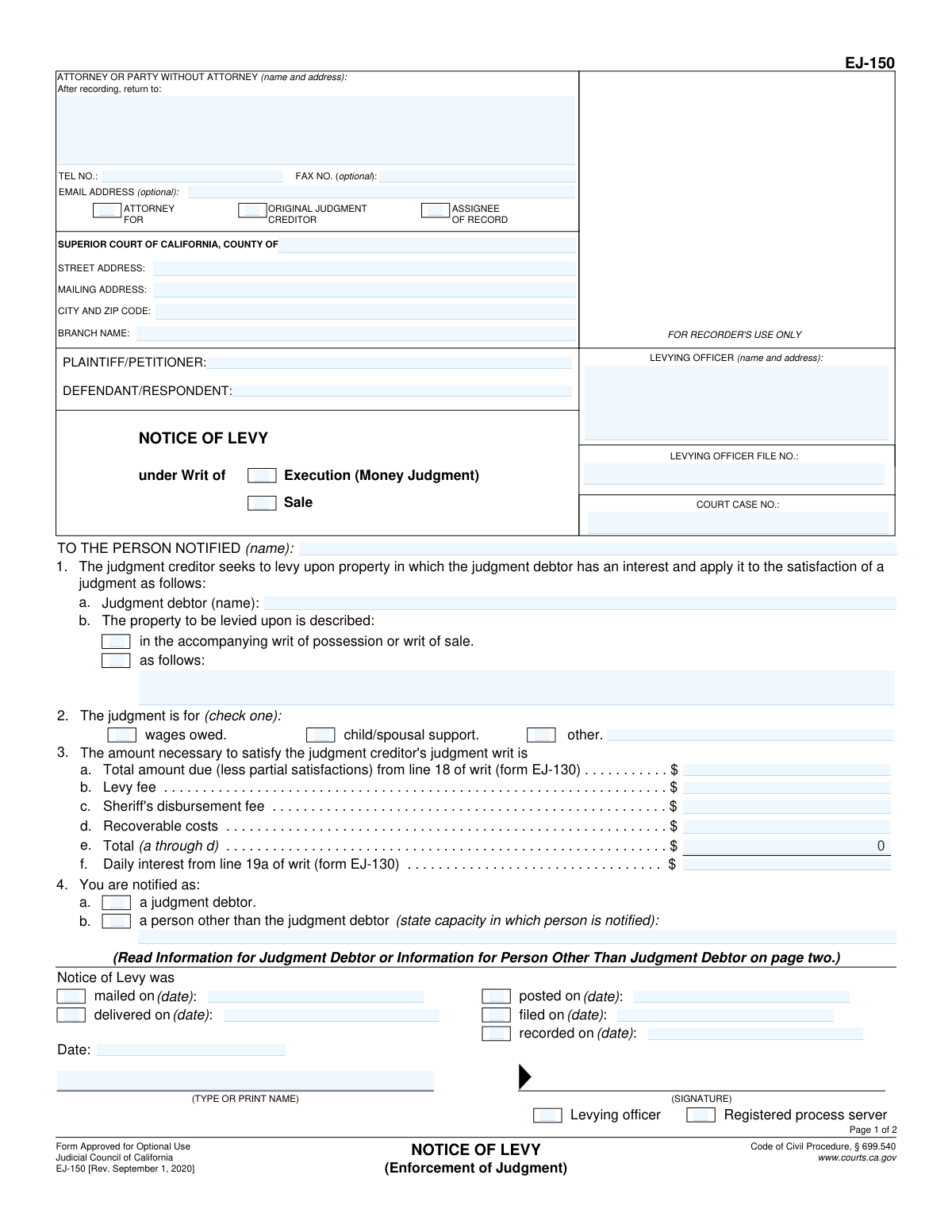
California Judicial Council Form EJ-150, Notice of Levy, is a legal document used in the enforcement of a money judgment. It serves as an official notice from a judgment creditor to a judgment debtor and third parties that specific property of the debtor is being levied upon (seized) to satisfy the debt. This form is a critical step in the collection process, legally authorizing a levying officer to take control of assets. Today, this form can be filled out quickly and accurately using AI-powered services like Instafill.ai, which can also convert non-fillable PDF versions into interactive fillable forms.
EJ-150 is part of the California court forms and judgment enforcement forms categories on Instafill.
Our AI automatically handles information lookup, data retrieval, formatting, and form filling.
It takes less than a minute to fill out EJ-150 using our AI form filling.
Securely upload your data. Information is encrypted in transit and deleted immediately after the form is filled out.

Form specifications

Form name: Form EJ-150, Notice of Levy (Enforcement of Judgment)
Number of fields: 57
Number of pages: 1
Language: English
main-image

Instafill Demo: How to fill out PDF forms in seconds with AI

How to Fill Out EJ-150 Online for Free in 2026

Are you looking to fill out a EJ-150 form online quickly and accurately? Instafill.ai offers the #1 AI-powered PDF filling software of 2026, allowing you to complete your EJ-150 form in just 37 seconds or less.
Follow these steps to fill out your EJ-150 form online using Instafill.ai:
  1. 1 Navigate to Instafill.ai and upload or select Form EJ-150, Notice of Levy.
  2. 2 Provide the court and case information, including the county, court address, case number, and names of the plaintiff and defendant.
  3. 3 Enter the details of the levying officer and the attorney or party representing the judgment creditor.
  4. 4 Identify the person being notified (the judgment debtor) and provide a clear description of the property to be levied upon.
  5. 5 Fill in the financial details in section 3, specifying the total amount due, levy fees, and other costs necessary to satisfy the judgment.
  6. 6 Indicate how the notice was served (e.g., mailed, posted, delivered) and the date of service.
  7. 7 Use the AI assistant to review all entered information for completeness and accuracy before signing and downloading the form for filing with the court and service.

Our AI-powered system ensures each field is filled out correctly, reducing errors and saving you time.

Why Choose Instafill.ai for Your Fillable EJ-150 Form?

Speed

Complete your EJ-150 in as little as 37 seconds.

Up-to-Date

Always use the latest 2026 EJ-150 form version.

Cost-effective

No need to hire expensive lawyers.

Accuracy

Our AI performs 10 compliance checks to ensure your form is error-free.

Security

Your personal information is protected with bank-level encryption.

Frequently Asked Questions About Form EJ-150

A Notice of Levy is a legal document informing you that a judgment creditor is seizing (levying) your property, money, or wages to satisfy a court-ordered debt. It is prepared by the creditor and served by a levying officer, like a sheriff.

You received this notice because you are either the judgment debtor who owes the money, or you are a third party (such as a bank or employer) that has possession of the debtor's assets.

The levying officer is a sheriff, marshal, or registered process server who is legally authorized to enforce the judgment by taking possession of the property described in the notice.

You should immediately review the 'Information for Judgment Debtor' on page two. If you believe your property is protected by law, you must file a 'Claim of Exemption' within 15-20 days, depending on how you received the notice.

Exemptions are legal protections that prevent creditors from taking certain types or amounts of property, like social security benefits or a portion of your wages. To claim an exemption, you must file a claim of exemption form with the levying officer within the time limit.

You must turn over the debtor's property or funds to the levying officer as instructed and complete the accompanying 'Memorandum of Garnishee' within 10 days. Do not give the property directly to the debtor or creditor.

Not always. Financial institutions are required to automatically exempt a certain amount of money in a deposit account, especially if it contains directly deposited social security or other public benefits.

This is the total amount you must pay to stop the levy. It includes the original judgment amount, plus accrued interest, and any fees or costs associated with the collection process.

If you are the debtor, you may lose your right to claim exemptions, and your property may be sold to pay the debt. If you are a third party holding property, you could face legal penalties for not complying.

You can stop the levy by paying the full amount owed to the levying officer, or by reaching a different agreement with the judgment creditor. You may also be able to stop it by successfully claiming an exemption for the property.

Yes, services like Instafill.ai use AI to help legal professionals accurately auto-fill form fields with case, party, and judgment information, which saves time and helps prevent errors.

A creditor or their attorney can upload Form EJ-150 to Instafill.ai. The platform's AI identifies all the fields, allowing them to quickly input the required information and generate a completed, servable document.

If your PDF is not interactive, you can use a service like Instafill.ai. It can convert flat, non-fillable PDFs into interactive forms that you can easily complete online.

Compliance EJ-150
Validation Checks by Instafill.ai

1
Financial Calculation Accuracy for Item 3e
This check verifies that the value in field 3e ('Total (a through d)') is the exact sum of the values in fields 3a, 3b, 3c, and 3d. This is crucial for ensuring the financial calculations are correct and the levy amount is accurate. If the sum is incorrect, the form processing should be halted, and the user prompted to correct the values, as it could lead to legal and financial disputes.
2
Conditional Property Description for Item 1b
Validates that if the checkbox 'as follows' is selected in item 1b, the corresponding text area for describing the property is not empty. This ensures that when a specific description is indicated, one is actually provided, preventing an incomplete and unenforceable levy notice. A failure would trigger an error message requiring the user to either describe the property or select the other option.
3
Case and File Number Consistency Across Pages
This validation ensures that the 'COURT CASE NO.' and 'LEVYING OFFICER FILE NO.' fields on page 2 are identical to the corresponding fields on page 1. This is critical for maintaining document integrity and ensuring all pages of the notice are correctly associated with the same legal case. A mismatch would indicate a potential document assembly error and should prevent submission.
4
Exclusive Selection for Judgment Type in Item 2
Verifies that exactly one checkbox is selected in item 2, which specifies the type of judgment ('wages owed', 'child/spousal support', or 'other'). A judgment must fall into a single category for clarity and proper processing. If zero or more than one box is checked, the form is ambiguous and should be rejected until a single, valid selection is made.
5
Conditional Explanation for 'Other' Judgment Type
If the 'other' checkbox is selected in item 2, this check ensures the adjacent text field is filled out with an explanation. This provides necessary context that is missing from the predefined options. Without this explanation, the reason for the judgment is unknown, making the notice incomplete and potentially invalid.
6
Conditional Capacity for 'Person Other Than Judgment Debtor'
This check ensures that if 'a person other than the judgment debtor' is selected in item 4, the text field specifying their capacity is filled in. This information is legally required to define the relationship of the notified party to the case (e.g., 'Garnishee Bank', 'Employer'). Failure to provide this would result in an incomplete notice and require the user to specify the capacity.
7
Service Method and Date Correlation
Validates that for each service method checkbox that is checked (e.g., 'mailed on', 'posted on'), the corresponding date field is filled with a valid date. This creates a legally sound record of when and how the notice was served. If a box is checked but the date is missing, the form is incomplete and the user must provide the date or uncheck the box.
8
Signature Date Validity
Ensures the 'Date' field in the signature block is a valid, non-future date. The signature date authenticates when the document was executed and must be logically sound. A future date is impossible and would invalidate the document, so the system should flag this as an error and require correction.
9
Monetary Field Format Validation
This check confirms that all financial fields in item 3 (3a through 3f) contain valid numerical data formatted as currency. This prevents non-numeric characters or invalid formats from being entered, ensuring data integrity for all financial calculations. Any field failing this validation should be highlighted for user correction.
10
Required Signer Role Designation
Verifies that one of the two checkboxes, 'Levying officer' or 'Registered process server', is selected in the signature block. This designation is essential to establish the authority of the person signing the notice. The form should be considered incomplete and rejected if neither role is selected.
11
Completeness of Party Information
Ensures that both the 'PLAINTIFF/PETITIONER' and 'DEFENDANT/RESPONDENT' fields are filled out. These fields identify the primary parties in the judgment and are fundamental to the document's legal standing. An empty field would make the notice legally deficient, so the system must require both to be completed.
12
Court Case Number Format
This validation checks that the 'COURT CASE NO.' field contains a value that conforms to the expected format for California court cases. While formats can vary, the check can look for common patterns (e.g., presence of letters and numbers, specific lengths). This helps catch typos and ensures the case can be correctly identified in the court system.
13
Telephone Number Format
Validates that the 'TEL NO.' field, if filled, adheres to a standard North American phone number format (e.g., 10 digits, optional parentheses and hyphens). This ensures the contact information is usable and correctly formatted for any subsequent communication needs. An invalid format should prompt the user to correct the entry.
14
At Least One Service Method Selected
This check ensures that at least one method of service (mailed, posted, delivered, filed, or recorded) is selected and has a corresponding date. The notice is not legally effective until it has been properly served on the relevant parties. If no service method is indicated, the form is incomplete and cannot be processed, as there is no record of its delivery.

Common Mistakes in Completing EJ-150

Inconsistent Information Across Pages

Users often fill out the header information, such as the Short Title, Levy Officer File No., and Court Case No., on the first page but forget to repeat it on the second. This can lead to the pages being separated and misfiled, potentially invalidating the notice or causing significant processing delays. To avoid this, meticulously check that all header fields on every page are filled out identically. AI-powered tools like Instafill.ai can automatically populate this repetitive data across all pages, ensuring consistency and completeness.

Vague or Incomplete Property Description

In section 1b, filers frequently provide a generic description of the property to be levied, such as 'bank account' or 'wages'. This is insufficient and will likely cause the levy to be rejected by the garnishee (e.g., the bank or employer). The description must be specific enough for the third party to identify the exact asset, including account numbers, financial institution names, or the debtor's place of employment. Failing to provide this detail makes the notice unenforceable.

Incorrectly Identifying the 'Person Notified'

A critical error is addressing the notice 'TO THE PERSON NOTIFIED' to the judgment debtor when it should be addressed to the third party holding the debtor's assets. For example, if levying a bank account, the notice must be addressed to the financial institution, not the individual debtor. This mistake happens due to a misunderstanding of the form's purpose and results in a completely ineffective levy, as the entity holding the assets is never properly served.

Mathematical Errors in Financial Calculations

Section 3 requires calculating the total amount needed to satisfy the judgment by summing up the base judgment, fees, and costs. People often make simple arithmetic errors or incorrectly transcribe figures from the referenced Writ of Execution (Form EJ-130). An incorrect total can lead to disputes, delays, and either under-collection or over-collection of the debt, creating legal complications. Double-checking all calculations and source numbers is essential to prevent this.

Mismatched Judgment Debtor Name

The name of the 'Judgment debtor' in section 1a must exactly match the name on the court's judgment. Filers may use a nickname, an abbreviation, or make a spelling error, which gives the garnishee (like a bank) a valid reason to refuse to honor the levy, claiming the name does not match their records. Always cross-reference the name with the official judgment document to ensure it is identical, including any middle initials or suffixes.

Omitting Capacity of Notified Person

When checking box 4b, 'a person other than the judgment debtor,' it is mandatory to state the capacity in which that person is being notified (e.g., 'Financial Institution,' 'Employer,' 'Garnishee'). Many filers check the box but leave the description line blank. This omission can cause confusion and may lead to the levying officer or the garnishee rejecting the form for being incomplete, thereby delaying the enforcement process.

Incorrect Court Branch Identification

In the court information section, filers may list only the county, such as 'Superior Court of Los Angeles County,' without specifying the exact street address and branch name where the judgment was issued. California's large counties have numerous court branches, and failing to specify the correct one can lead to the notice being misdirected, lost, or rejected. This delays the process and requires re-filing with the correct information.

Failure to Specify Judgment Type

In section 2, filers must check a box to indicate if the judgment is for 'wages owed,' 'child/spousal support,' or 'other.' This selection is not trivial; it dictates which exemptions and rules apply, particularly for bank account levies. Forgetting to check a box or selecting the wrong one can cause the financial institution to apply the incorrect exemption amount, leading to legal challenges from the debtor and delaying the creditor's recovery.

Incorrectly Transcribing from Form EJ-130

Section 3 explicitly requires pulling the 'Total amount due' (line 3a) and 'Daily interest' (line 3f) from the Writ of Execution (Form EJ-130). A common data entry error is to transpose numbers or copy figures from the wrong lines on the source document. This invalidates the financial claim on the Notice of Levy and will almost certainly cause it to be returned for correction, halting the enforcement action. Using a tool like Instafill.ai can help by pulling data from related forms automatically, reducing the risk of manual transcription errors.

Forgetting to Designate Attorney/Creditor Status

In the top-left 'ATTORNEY FOR' section, the filer must check the appropriate box to identify themselves as the 'ORIGINAL JUDGMENT CREDITOR' or 'ASSIGNEE OF RECORD.' It is a small but crucial detail that is often overlooked. Leaving these boxes unchecked creates ambiguity about the filer's standing to enforce the judgment, which can be grounds for rejection by the court clerk or levying officer.
Saved over 80 hours a year

“I was never sure if my IRS forms like W-9 were filled correctly. Now, I can complete the forms accurately without any external help.”

Kevin Martin Green

Your data stays secure with advanced protection from Instafill and our subprocessors

Robust compliance program

Transparent business model

You’re not the product. You always know where your data is and what it is processed for.

ISO 27001, HIPAA, and GDPR

Our subprocesses adhere to multiple compliance standards, including but not limited to ISO 27001, HIPAA, and GDPR.

Security & privacy by design

We consider security and privacy from the initial design phase of any new service or functionality. It’s not an afterthought, it’s built-in, including support for two-factor authentication (2FA) to further protect your account.

Fill out EJ-150 with Instafill.ai

Worried about filling PDFs wrong? Instafill securely fills form-ej-150-notice-of-levy-enforcement-of-judgment forms, ensuring each field is accurate.

Related forms by category

California court forms Judicial Council of California Form SC-105, Request for Court Order and Answer (Small Claims), Judicial Council of California Form SC-120, Defendant’s Claim and ORDER to Go to Small Claims Court (Small Claims), Judicial Council of California Form SER-001, Request for Sheriff to Serve Court Papers, Judicial Council of California Form SER-001, Request for Sheriff to Serve Court Papers, Affidavit for Collection of Personal Property California Probate Code Section 13100, Form POS-040, Proof of Service—Civil, Declaration of Facts of Death (California Superior Court), declaration-of-marriage-for-court-proceeding-california-family-law, ADOPT-200, Adoption Request, ADOPT-200, Stepparent Adoption Request, ADOPT-210, Adoption Agreement, ADOPT-310, Contact After Adoption Agreement, Judicial Council of California Form ADOPT-200, Adoption Request, Form ADR-107, Mediation Attendance Sheet, Form ADR-110, Order Appointing Referee, Form ADR-109, Stipulation or Motion for Order Appointing Referee, Form ADR-102, Request for Trial De Novo After Judicial Arbitration, Form ADR-108, Referee's Report (Code Civ. Proc., §§ 638, 639), Form ADR-106, Petition to Confirm, Correct, or Vacate Contractual Arbitration Award, Form ADR-104, Rejection of Award and Request for Trial After Attorney-Client Fee Arbitration · + 268 more →
judgment enforcement forms Form AT-180/EJ-185, Notice of Lien (Attachment—Enforcement of Judgment), Form WG-017/EJ-137, Application to Stay Levy or Garnishment (Wage Garnishment—Enforcement of Judgment), Form EJ-141, Application and Order to Appear for Examination—Consumer Debt, Form EJ-158, Declaration Regarding Notice and Service for Ex Parte Application for Order on Deposit Account Exemption, Form EJ-190, Application for and Renewal of Judgment, form-ej-100-acknowledgment-of-satisfaction-of-judgment, form-ej-105-application-for-entry-of-judgment-on-sister-state-judgment, form-ej-146-notice-of-motion-and-motion-to-require-examinationconsumer-debt, form-ej-147-application-and-order-to-require-examination-after-submission-of-financial-statementconsumer-debt, form-ej-160-claim-of-exemption-enforcement-of-judgment, form-ej-180-notice-of-hearing-on-right-to-homestead-exemption-enforcement-of-judgment, form-ej-182-declaration-for-rehearing-on-homestead-exemption-enforcement-of-judgment