
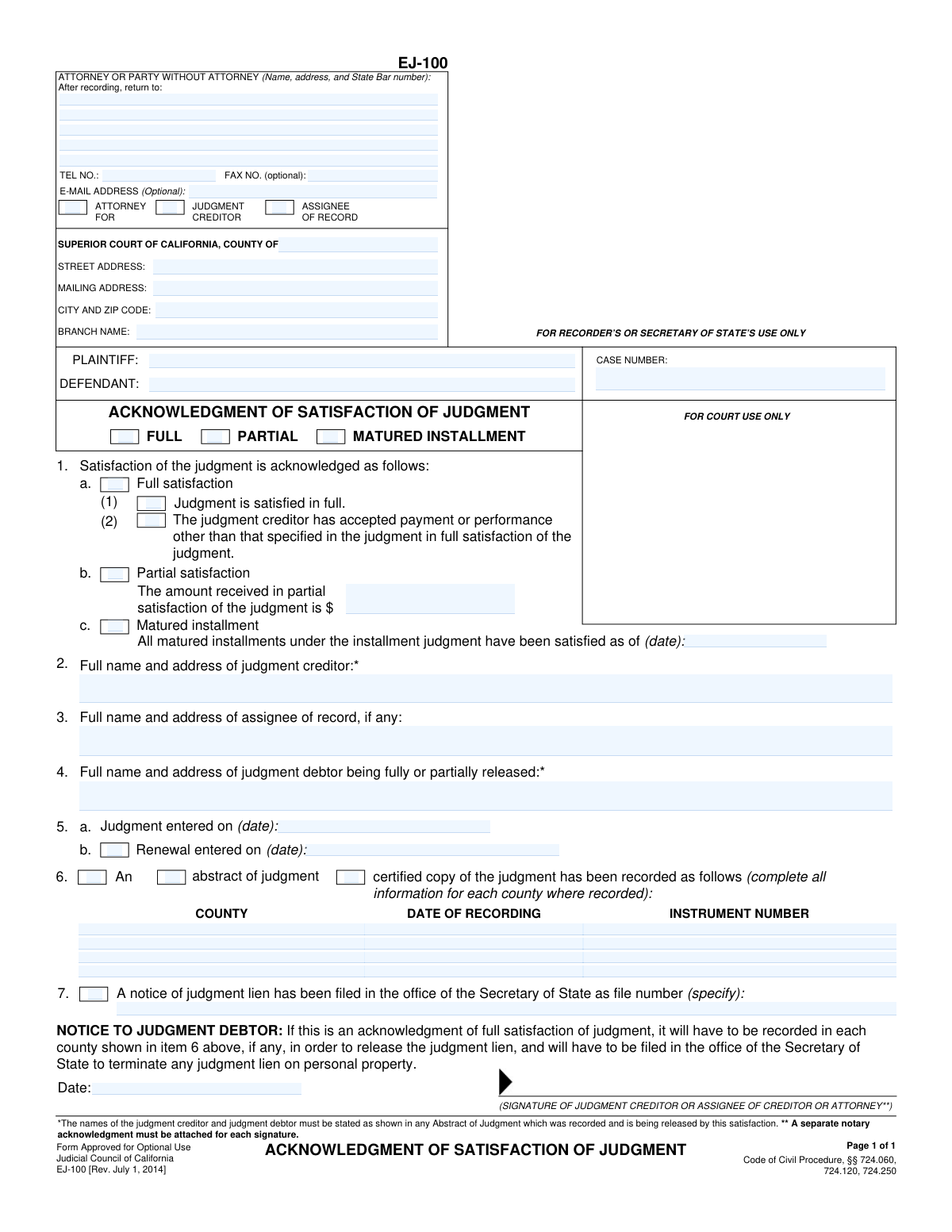
Yes! You can use AI to fill out Form EJ-100, Acknowledgment of Satisfaction of Judgment
Don't type 53 fields by hand. Tell our AI about yourself, or upload a document you already have, and it fills every field in seconds. You check it, then download, print or sign.
The AI does the filling. You just check it.
No typing into boxes, nothing to install.
What this form asks for
The AI fills all of it, from your answers or your documents.
The AI checks your answers before you download
14 checks built for this form, so a wrong date or a missing answer is caught before anyone else sees it.
Validates that only one of the main satisfaction types ('FULL', 'PARTIAL', 'MATURED INSTALLMENT') is selected at the top of the form. This is crucial for clarity and legal certainty, as the type of satisfaction dictates the legal effect of the document. A failure would mean the form is ambiguous and cannot be processed correctly by the court or recording office.
Checks that if the 'PARTIAL' satisfaction checkbox is selected, the corresponding amount field (item 1b) is filled with a valid, positive currency value. This ensures that a partial satisfaction acknowledgment clearly states the amount received, which is essential for calculating the remaining judgment balance. If the amount is missing or invalid, the acknowledgment is incomplete and legally deficient.
Ensures that if the 'MATURED INSTALLMENT' checkbox is selected, the corresponding date field (item 1c) is populated with a valid date. This date specifies the point in time up to which all due payments have been made. Without a valid date, the acknowledgment is meaningless and fails to provide the necessary information about the status of the installment judgment.
Verifies that the 'CASE NUMBER' field is not empty and, if possible, matches the standard format for the specified court. The case number is the primary identifier linking this document to the correct legal case file. An absent or incorrect case number would cause the document to be rejected or misfiled, rendering it ineffective.
Confirms that the full names for the Plaintiff, Defendant, Judgment Creditor (item 2), and Judgment Debtor (item 4) are all provided. These names must match the original judgment to be valid. Missing party information would create ambiguity about who is satisfying the judgment and who is being released, potentially invalidating the entire document.
Validates that the 'Judgment entered on' date (item 5a) is a required field and contains a valid, non-future date. This date establishes the origin of the judgment being satisfied and is a fundamental piece of information for the legal record. An invalid or missing date makes it impossible to identify the specific judgment this acknowledgment applies to.
And 8 more checks
- Logical Date Sequence
- Recorded Judgment Data Integrity
- Email Address Format
- Court Information Presence
- Full Satisfaction Sub-Option Selection
- Assignee of Record Consistency
- Renewal Date Chronology
- Secretary of State Lien Conditional Requirement
Let AI fill out your EJ-100
No typing. Every field filled in seconds, checked, ready to sign.
How to Fill Out EJ-100 Online for Free in 2026
What the AI walks you through.
- Navigate to Instafill.ai and upload or select the Form EJ-100, Acknowledgment of Satisfaction of Judgment.
- Use the AI assistant to fill in the court information, party details (plaintiff/creditor and defendant/debtor), and the case number.
- Specify the type of satisfaction: 'Full', 'Partial' (including the amount received), or 'Matured Installment' (including the date).
- Enter the full names and addresses of the judgment creditor, any assignee of record, and the judgment debtor being released.
- Provide the date the judgment was entered and the date of any renewals.
- If an abstract of judgment was recorded or a notice of judgment lien was filed, input the required details such as county, recording date, instrument number, or file number.
- Review all entered information for accuracy, then have the judgment creditor, assignee, or their attorney sign and date the form. Note that a separate notary acknowledgment is required for each signature.
Common Mistakes in Completing EJ-100
The ones the AI is built to catch.
Incorrect or Inconsistent Party Names
Forgetting the Required Notary Acknowledgment
Incomplete Lien Release Information (Section 6 & 7)
Selecting the Incorrect Type of Satisfaction
Omitting Details for Partial or Installment Satisfaction
Failing to List the Assignee of Record
Using Incorrect or Incomplete Court Information
Data Entry Errors in Case Number or Judgment Dates
Signature by an Unauthorized Person
Leaving the Filer's Information Blank
Frequently Asked Questions About EJ-100
Is it really free for 7 days?
Can I fill other forms too?
How do I cancel?
How does the AI fill out EJ-100?
What happens to my information?
How complex is EJ-100 to fill out?
What is the purpose of Form EJ-100, Acknowledgment of Satisfaction of Judgment?
Who is responsible for filling out and signing this form?
What is the difference between 'Full,' 'Partial,' and 'Matured Installment' satisfaction in item 1?
What information do I need before I start filling out this form?
What do I put in item 6 regarding the 'abstract of judgment'?
What is the 'notice of judgment lien' mentioned in item 7?
What do I do with the form after it's signed?
Does Form EJ-100 need to be notarized?
Why is it important that the names in items 2 and 4 match the original judgment?
Can an AI tool help me fill out this form?
How can I use Instafill.ai to complete Form EJ-100 online?
The PDF version of the form I have isn't fillable. What can I do?
What happens if the judgment creditor refuses to sign this form after I've paid?
I made a partial payment. Should I still get this form?
Get your EJ-100 filled out by AI
$0 today. Cancel before Oct 31 and you pay nothing.
Other forms like this one
California court forms: Judicial Council of California Form SC-105, Request for Court Order and Answer (Small Claims), Judicial Council of California Form SC-120, Defendant’s Claim and ORDER to Go to Small Claims Court (Small Claims), Judicial Council of California Form SER-001, Request for Sheriff to Serve Court Papers, Judicial Council of California Form SER-001, Request for Sheriff to Serve Court Papers, Affidavit for Collection of Personal Property California Probate Code Section 13100, Form POS-040, Proof of Service—Civil, Declaration of Facts of Death (California Superior Court), declaration-of-marriage-for-court-proceeding-california-family-law, ADOPT-200, Adoption Request, ADOPT-200, Stepparent Adoption Request, ADOPT-210, Adoption Agreement, ADOPT-310, Contact After Adoption Agreement, Judicial Council of California Form ADOPT-200, Adoption Request, Form ADR-107, Mediation Attendance Sheet, Form ADR-110, Order Appointing Referee, Form ADR-109, Stipulation or Motion for Order Appointing Referee, Form ADR-102, Request for Trial De Novo After Judicial Arbitration, Form ADR-108, Referee's Report (Code Civ. Proc., §§ 638, 639), Form ADR-106, Petition to Confirm, Correct, or Vacate Contractual Arbitration Award, Form ADR-104, Rejection of Award and Request for Trial After Attorney-Client Fee Arbitration
judgment enforcement forms: Form AT-180/EJ-185, Notice of Lien (Attachment—Enforcement of Judgment), Form WG-017/EJ-137, Application to Stay Levy or Garnishment (Wage Garnishment—Enforcement of Judgment), Form EJ-141, Application and Order to Appear for Examination—Consumer Debt, Form EJ-150, Notice of Levy (Enforcement of Judgment), Form EJ-158, Declaration Regarding Notice and Service for Ex Parte Application for Order on Deposit Account Exemption, Form EJ-190, Application for and Renewal of Judgment, Form EJ-105, Application for Entry of Judgment on Sister-State Judgment, Form EJ-146, Notice of Motion and Motion to Require Examination—Consumer Debt, Form EJ-147, Application and Order to Require Examination After Submission of Financial Statement—Consumer Debt, Form EJ-160, Claim of Exemption (Enforcement of Judgment), Form EJ-180, Notice of Hearing on Right to Homestead Exemption (Enforcement of Judgment), Form EJ-182, Declaration for Rehearing on Homestead Exemption (Enforcement of Judgment), Form EJ-001, Abstract of Judgment—Civil and Small Claims, Declaration of Address Verification (Wage Garnishment—Enforcement of Judgment), Form WG-010/EJ-175, Notice of Hearing on Claim of Exemption (Wage Garnishment—Enforcement of Judgment), Form EJ-195, Notice of Renewal of Judgment, Form WG-007/EJ-165, Financial Statement (Wage Garnishment—Enforcement of Judgment)
Let AI fill out your EJ-100
Your trial starts once a card is added. You pay nothing before Oct 31.
Our AI already knows this form, all 53 fields of it. Skip the typing: tell it about yourself, or upload what you have, and it fills the whole form in seconds.
- AI fills every field on the form, checkboxes included
- No typing into boxes: answer a few questions, or upload a document you already have, an old copy of this form, a photo of a document
- The AI checks the answers; you review and change anything before you download
- Download the finished PDF, print it, or sign it online
- Encrypted, and never used to train AI
Cancel before Oct 31 and you pay nothing.
A card is needed to start the trial. Cancel in two clicks from your account.
Terms · Privacy