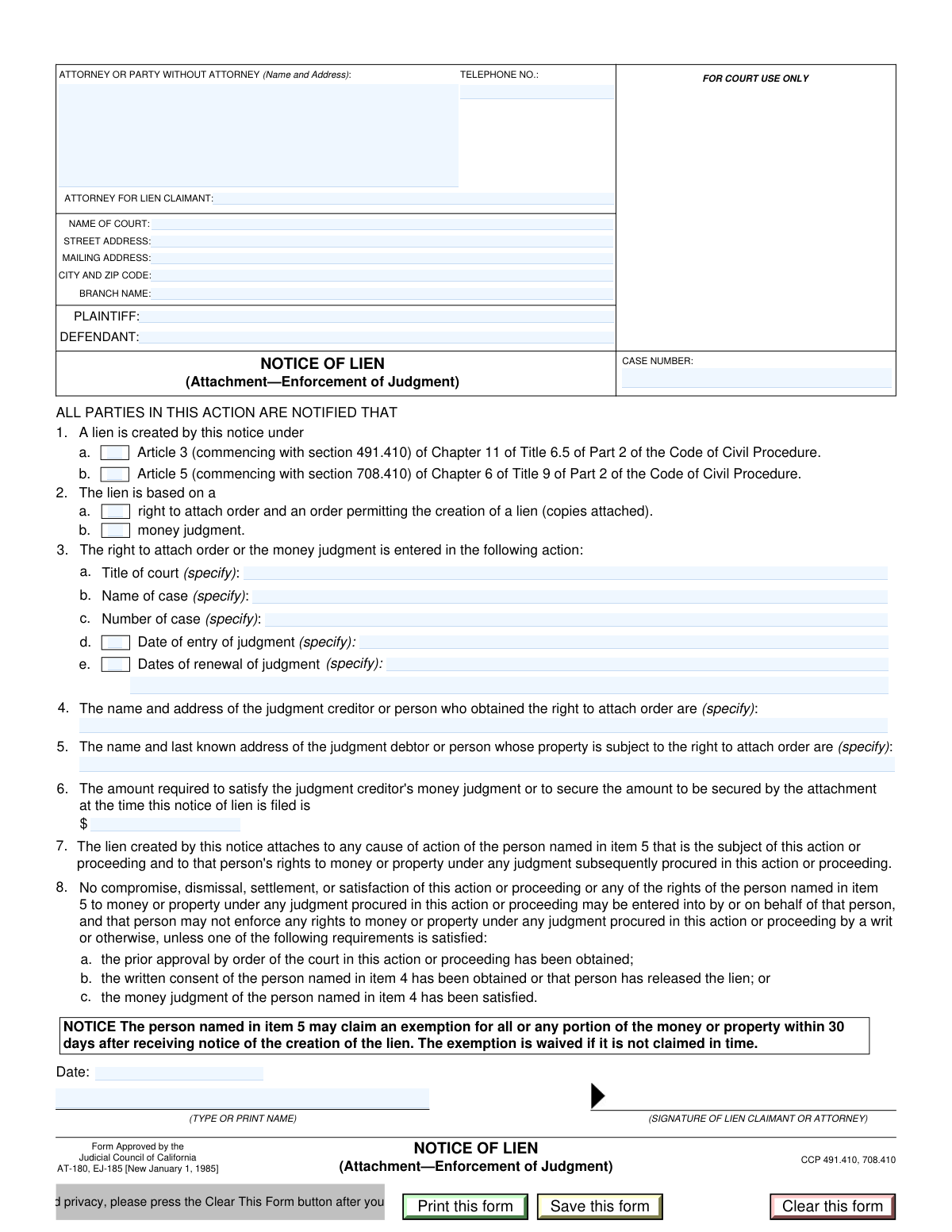
Yes! You can use AI to fill out Form AT-180/EJ-185, Notice of Lien (Attachment—Enforcement of Judgment)

Form AT-180/EJ-185, the Notice of Lien, is a California Judicial Council form used by a creditor to place a legal claim (a lien) on any potential money or property that a debtor might receive from a pending court case. This action is critical for enforcing a money judgment or a right to attach order, as it formally notifies all parties of the creditor's interest and helps secure their right to payment from the lawsuit's proceeds. Today, this form can be filled out quickly and accurately using AI-powered services like Instafill.ai, which can also convert non-fillable PDF versions into interactive fillable forms.
Our AI automatically handles information lookup, data retrieval, formatting, and form filling.
It takes less than a minute to fill out AT-180 / EJ-185 using our AI form filling.
Securely upload your data. Information is encrypted in transit and deleted immediately after the form is filled out.

Form specifications

Form name: Form AT-180/EJ-185, Notice of Lien (Attachment—Enforcement of Judgment)
Number of fields: 32
Number of pages: 1
Language: English
Categories: ACH forms, judgment enforcement forms
main-image

Instafill Demo: How to fill out PDF forms in seconds with AI

How to Fill Out AT-180 / EJ-185 Online for Free in 2026

Are you looking to fill out a AT-180 / EJ-185 form online quickly and accurately? Instafill.ai offers the #1 AI-powered PDF filling software of 2026, allowing you to complete your AT-180 / EJ-185 form in just 37 seconds or less.
Follow these steps to fill out your AT-180 / EJ-185 form online using Instafill.ai:
  1. 1 Navigate to Instafill.ai and upload the AT-180/EJ-185 form or select it from the template library.
  2. 2 Enter the court information, including the court name, address, and branch, along with the case number and the names of the plaintiff and defendant.
  3. 3 Provide your information as the attorney or party filing the lien, including your name, address, and telephone number.
  4. 4 Specify the legal basis for the lien by checking the appropriate box under the Code of Civil Procedure and indicating if it's based on a right to attach order or a money judgment.
  5. 5 If the lien is based on a prior judgment, fill in the details of that action, such as the case name, number, and date of judgment entry or renewal.
  6. 6 Identify the judgment creditor and judgment debtor, providing their names and addresses, and state the total amount required to satisfy the lien.
  7. 7 Enter the filing date, type the filer's name, and then use the platform to review, save, or print the completed form for filing with the court.

Our AI-powered system ensures each field is filled out correctly, reducing errors and saving you time.

Why Choose Instafill.ai for Your Fillable AT-180 / EJ-185 Form?

Speed

Complete your AT-180 / EJ-185 in as little as 37 seconds.

Up-to-Date

Always use the latest 2026 AT-180 / EJ-185 form version.

Cost-effective

No need to hire expensive lawyers.

Accuracy

Our AI performs 10 compliance checks to ensure your form is error-free.

Security

Your personal information is protected with bank-level encryption.

Frequently Asked Questions About Form AT-180 / EJ-185

This form is used to officially notify a court and the parties in a lawsuit that you have a legal claim (a lien) on any money or property that the plaintiff might recover from the defendant.

This form should be completed by a judgment creditor, or a person who has obtained a right to attach order, who wishes to claim a portion of a potential legal settlement or judgment in a separate, ongoing case.

You will need the court and case information for the lawsuit you are filing the lien in, as well as the details of your own money judgment or right to attach order, including case number, dates, and amounts.

The 'Case Number' at the top refers to the ongoing lawsuit where you are filing the lien. The 'Case Number' in the 'Judgment Action Details' section refers to the original case where you were awarded your money judgment.

You only need to complete the 'Judgment Action Details' section if your lien is based on a previously obtained 'Money Judgment' or a 'Right to Attach Order'. If not, you can leave this section blank.

The 'Judgment Creditor' is the person or entity who is owed money from a judgment (likely you, the filer). The 'Judgment Debtor' is the person who owes that money according to the judgment.

These refer to specific articles in the California Code of Civil Procedure that provide the legal basis for creating a lien. You must select the one that applies to your specific legal situation; consult an attorney if you are unsure which to choose.

The 'Required Amount' is the total sum needed to satisfy your judgment or secure the attachment at the time of filing. This typically includes the original judgment amount plus any accrued interest and allowable costs.

You must file this completed form with the clerk of the court where the lawsuit is pending, as identified in the 'Court and Party Information' section of the form.

For your protection and privacy, pressing the 'Clear This Form' button erases all the personal and sensitive information you entered after you have printed the document.

Yes, services like Instafill.ai use AI to accurately auto-fill form fields from your saved data, which can save you significant time and help prevent errors.

Simply upload the form to the Instafill.ai platform. It will make the document interactive, allowing you to use AI-powered tools to quickly populate the fields before downloading or printing the completed form.

If you have a non-fillable or 'flat' PDF, you can use a service like Instafill.ai. It can convert the document into an interactive, fillable form that you can complete easily online.

Compliance AT-180 / EJ-185
Validation Checks by Instafill.ai

1
Ensures Lien Creation Basis is Selected
This check verifies that at least one of the checkboxes for 'Lien Creation Basis' (either 'Article 3 CCP' or 'Article 5 CCP') has been selected. This is a mandatory selection to establish the legal grounds for the lien. If neither is selected, the form submission should be rejected with an error message indicating the field is required.
2
Conditional Requirement for Judgment Action Details
This validation ensures that if either the 'Right to Attach Order' or 'Money Judgment' checkbox is selected, then the 'Court Title', 'Case Name', and 'Case Number' fields under 'Judgment Action Details' must be filled out. These details are essential for identifying the underlying legal action that supports the lien. Failure to provide this information when required would make the lien notice incomplete and invalid.
3
Validates Required Amount is a Positive Number
This check confirms that the 'Required Amount' field contains a valid, positive numeric value greater than zero. The amount cannot be negative, zero, or contain text, as it represents the financial claim of the lien. An invalid entry would prevent the system from processing the financial aspect of the lien, so the submission should be blocked until a valid amount is entered.
4
Validates Judgment Entry Date Logic
This check is triggered if the 'Date of entry of judgment' checkbox is selected. It verifies that the 'Judgment Entry Date' field is not empty and contains a date in a valid format (e.g., MM/DD/YYYY) that is not in the future. This ensures the provided judgment date is historically accurate and logically sound. An invalid or future date would be rejected.
5
Ensures Logical Order of Judgment and Renewal Dates
This validation compares the 'Judgment Entry Date' with 'Renewal Date 1'. If both dates are provided, it ensures that the renewal date is on or after the judgment entry date. A renewal cannot logically occur before the original judgment was entered, so this check prevents clerical errors. If the renewal date is earlier, an error should be displayed.
6
Enforces Money Judgment Prerequisite for Date Fields
This rule validates that the 'Date of entry of judgment' and 'Dates of renewal of judgment' checkboxes can only be selected if the 'Money Judgment' checkbox is also selected. This enforces the form's explicit instructions, preventing users from providing judgment dates for a lien that is not based on a money judgment. An attempt to check these boxes without the prerequisite will result in a validation error.
7
Validates Filing Date is Not in the Future
This check ensures that the 'Filing Date' field contains a valid date that is not set to a future date. The filing date should represent the day the document is actually submitted or was prepared for submission. Allowing a future date could cause legal and procedural confusion, so the system should reject any date that is after the current date.
8
Completeness Check for Court Information
This validation verifies that the primary court identification fields ('Name of Court', 'Court Street Address', 'Court City and Zip Code') are all filled out. Complete and accurate court information is critical for the document to be filed in the correct jurisdiction and location. If any of these fields are empty, the submission should be blocked until the information is provided.
9
Validates Court Zip Code Format
This check ensures the zip code provided in the 'Court City and Zip Code' field follows a standard U.S. format, either 5 digits (e.g., '90210') or 9 digits with a hyphen (e.g., '90210-1234'). This helps ensure mailability and data consistency for the court's address. An incorrectly formatted zip code would trigger an error message prompting the user to correct it.
10
Validates Attorney Telephone Number Format
This validation checks that the 'Telephone Number' field for the attorney or party is in a recognizable U.S. phone number format (e.g., (XXX) XXX-XXXX, XXX-XXX-XXXX). Proper formatting ensures the contact information is valid and can be used reliably for communication. The system should flag any entry that does not match a standard phone number pattern.
11
Completeness Check for All Party Names
This check verifies that the name fields for all involved parties ('Plaintiff Name', 'Defendant Name', 'Judgment Creditor Name', and 'Judgment Debtor Name') are not empty. Identifying all parties is fundamental to the legal validity of the notice. Missing any of these names would render the document incomplete and legally deficient, so the form cannot be submitted without them.
12
Validates Case Number Presence
This validation ensures that the primary 'Case Number' field at the top of the form is not left empty. The case number is the primary identifier for the legal proceeding and is essential for associating the lien with the correct court file. A missing case number would make the filing ambiguous and likely to be rejected by the court clerk.
13
Conditional Requirement for Renewal Date
This rule ensures that if the 'Dates of renewal of judgment' checkbox is selected, the 'Renewal Date 1' field must be filled with a valid date. It is illogical to indicate that renewal dates exist without providing at least the first one. This check prevents incomplete data entry and ensures the form is internally consistent.
14
Ensures Filer Name is Provided
This validation confirms that the 'Name of Filer' field is filled out. This field identifies the individual (lien claimant or attorney) who is submitting the document, which is a requirement for accountability and contact purposes. An empty filer name field would result in an anonymous submission, which is not permissible, so the form should be rejected.

Common Mistakes in Completing AT-180 / EJ-185

Incorrect or Incomplete Court Information

Filers often enter an abbreviated court name, the wrong branch, or an incorrect address, leading to the notice being filed in the wrong venue. This can invalidate the lien and cause significant delays, requiring a complete refiling. To avoid this, verify the full, official name of the court and the specific branch handling the case from official court documents or the court's website. AI-powered tools like Instafill.ai can help by auto-populating and validating court addresses to ensure accuracy.

Confusing the Main Case Number with the Judgment Case Number

This form has two fields for 'Case Number': one at the top for the current action and another under 'Judgment Action Details'. People frequently enter the judgment case number in the top field by mistake. This error can cause the clerk to reject the filing or misfile the document, disconnecting the lien from the correct case. Always ensure the case number at the top pertains to the action where the lien is being filed, not the underlying judgment.

Failing to Complete Conditional Judgment Details

The form requires details about the judgment (case name, number, date) only if 'Right to Attach Order' or 'Money Judgment' is checked. A very common error is checking one of these boxes but then failing to provide the corresponding mandatory information. This omission makes the lien notice incomplete and can lead to its rejection by the court clerk. Carefully review the form's logic and ensure all dependent fields are filled when their trigger condition is met.

Incorrectly Selecting the Legal Basis for the Lien

The checkboxes for 'Article 3 CCP' vs. 'Article 5 CCP' and 'Right to Attach Order' vs. 'Money Judgment' represent specific legal grounds. Filers without legal expertise may misunderstand these options and select the wrong one, which can render the lien legally defective. This mistake can be challenged and may invalidate your claim. It is crucial to consult the relevant Code of Civil Procedure sections or an attorney to ensure the correct basis for the lien is selected.

Using Nicknames or Abbreviations for Plaintiff/Defendant

Parties often use informal names, initials, or abbreviations instead of the full legal names for the plaintiff and defendant as they appear on official court documents. This can create ambiguity and potential legal challenges to the validity of the lien, as it may not be clear who the parties are. Always use the complete and exact legal names as stated in the original complaint or judgment to prevent any identification issues.

Errors in Entering Judgment Dates

Users may confuse the 'Date of entry of judgment' with the date a trial ended or a verdict was given, or they may enter dates in an incorrect format. Furthermore, they might forget to check the box for 'Date of entry of judgment' or 'Dates of renewal' before filling in the actual dates. Such errors can lead to filing rejections or questions about the lien's timeliness. Use the exact date stamped on the official judgment document, and ensure all related checkboxes are marked correctly.

Inaccurate Calculation of the 'Required Amount'

Calculating the total amount to satisfy the judgment can be complex, involving principal, accrued interest, and costs. People often make mathematical errors or misinterpret what costs can be included, leading to an incorrect lien amount. An inaccurate amount can be challenged by the debtor and may require amendment, delaying payment. Double-check all calculations and review the judgment details to confirm the correct figures for principal, interest, and allowable costs.

Providing an Incomplete or Incorrect Debtor Address

The form asks for the 'last known address' of the judgment debtor, which is critical for providing proper notice. Filers may enter an old, incomplete, or incorrect address, which can lead to the notice not being served correctly. Failure to provide proper notice can be grounds for dissolving the lien. Diligently verify the debtor's most recent address of record before filling out this section.

Forgetting to Type or Print the Filer's Name

After filling out the entire form, it's easy to overlook the final step of typing or printing the filer's name in the designated 'Name of Filer' field. A missing filer name can lead to the document being rejected by the court clerk as it lacks proper identification of the submitting party. Always perform a final review of the form to ensure all fields, including the filer's name and filing date, are completed before printing and filing.

Using a Non-Fillable PDF without Proper Tools

The instruction to 'Print this form' suggests it may be a static, non-fillable PDF, forcing users to fill it out by hand. This often results in illegible handwriting, misaligned text, and data entry mistakes that can cause the filing to be rejected. To avoid this, use a tool like Instafill.ai, which can convert any flat PDF into an interactive, fillable form, ensuring all entries are clean, legible, and correctly formatted.
Saved over 80 hours a year

“I was never sure if my IRS forms like W-9 were filled correctly. Now, I can complete the forms accurately without any external help.”

Kevin Martin Green

Your data stays secure with advanced protection from Instafill and our subprocessors

Robust compliance program

Transparent business model

You’re not the product. You always know where your data is and what it is processed for.

ISO 27001, HIPAA, and GDPR

Our subprocesses adhere to multiple compliance standards, including but not limited to ISO 27001, HIPAA, and GDPR.

Security & privacy by design

We consider security and privacy from the initial design phase of any new service or functionality. It’s not an afterthought, it’s built-in, including support for two-factor authentication (2FA) to further protect your account.

Fill out AT-180 / EJ-185 with Instafill.ai

Worried about filling PDFs wrong? Instafill securely fills form-at-180ej-185-notice-of-lien-attachmentenforcement-of-judgment forms, ensuring each field is accurate.