Yes! You can use AI to fill out Inventory and Appraisal Attachment (Judicial Council of California Form DE-161, GC-041)

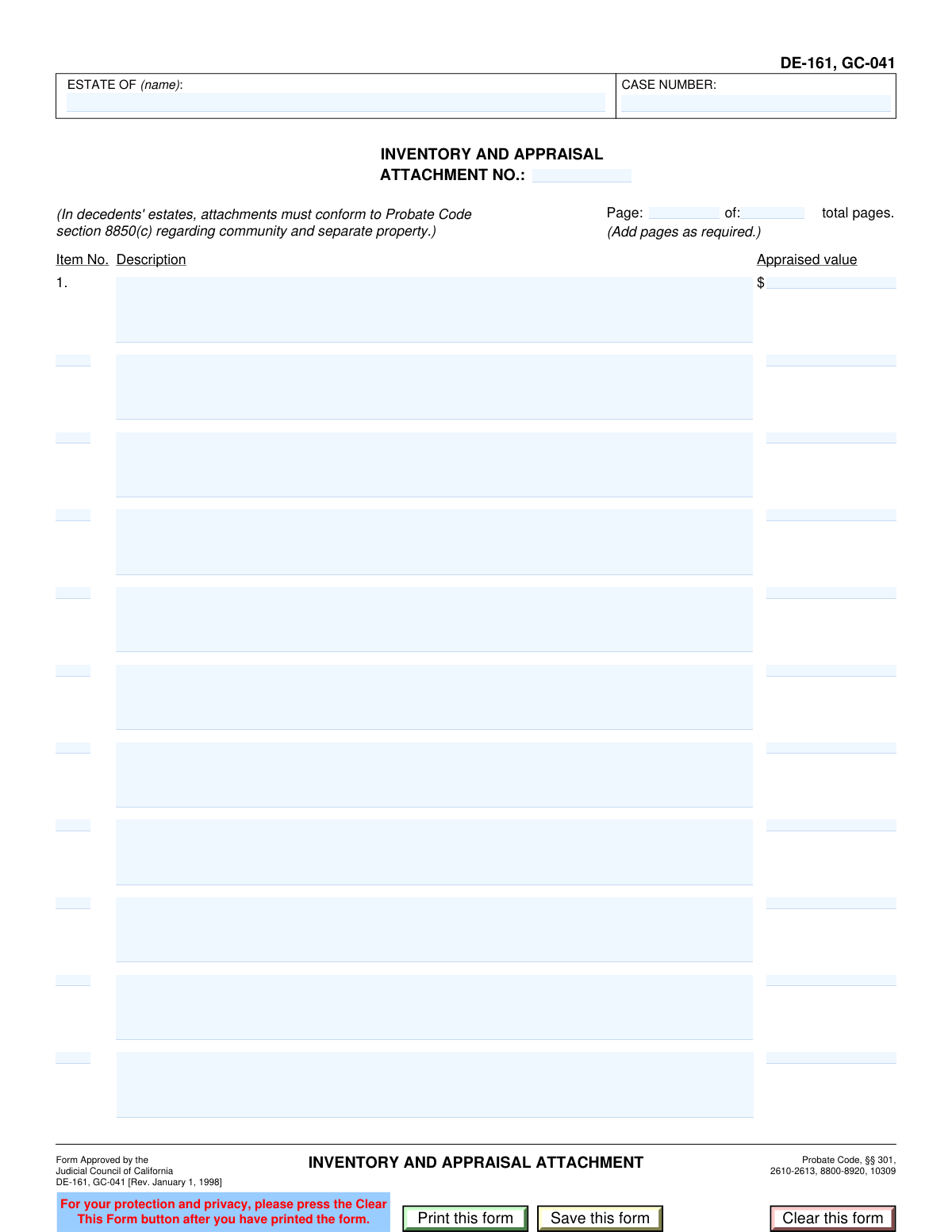
The Inventory and Appraisal Attachment (Forms DE-161 and GC-041) is a California Judicial Council attachment used to itemize property in a decedent’s estate (and related probate matters) and record the appraised value for each listed item. It is typically filed as part of the court-required inventory and appraisal process, with page numbering, attachment numbering, and case identifiers to keep multi-page asset schedules organized. Accurate completion is important for court compliance and for establishing values used in administration, reporting, and distribution. Today, this form can be filled out quickly and accurately using AI-powered services like Instafill.ai, which can also convert non-fillable PDF versions into interactive fillable forms.
Our AI automatically handles information lookup, data retrieval, formatting, and form filling.
It takes less than a minute to fill out DE-161/GC-041 using our AI form filling.
Securely upload your data. Information is encrypted in transit and deleted immediately after the form is filled out.

Form specifications

Form name: Inventory and Appraisal Attachment (Judicial Council of California Form DE-161, GC-041)
Number of pages: 1
Filled form examples: Form DE-161/GC-041 Examples
Language: English
Categories: court forms
main-image

Instafill Demo: filling out a legal form in seconds

How to Fill Out DE-161/GC-041 Online for Free in 2026

Are you looking to fill out a DE-161/GC-041 form online quickly and accurately? Instafill.ai offers the #1 AI-powered PDF filling software of 2026, allowing you to complete your DE-161/GC-041 form in just 37 seconds or less.
Follow these steps to fill out your DE-161/GC-041 form online using Instafill.ai:
  1. 1 Go to Instafill.ai and upload the DE-161/GC-041 PDF (or select it from the form library).
  2. 2 Let the AI detect and map the form fields (case number, estate name, page numbering, attachment number, and inventory rows).
  3. 3 Enter the case information: CASE NUMBER, ESTATE OF (name), and the ATTACHMENT NO. for this page.
  4. 4 Complete the page numbering fields (current page and total pages) to match your full set of attachments.
  5. 5 Add each inventory line item by entering the item number, a clear description (identifying details like make/model/serial number/location), and the appraised value for each row used on the page.
  6. 6 Review the AI validation checks for missing values, numbering sequence, and formatting (e.g., currency), then generate a final clean PDF for printing/saving and filing.

Our AI-powered system ensures each field is filled out correctly, reducing errors and saving you time.

Why Choose Instafill.ai for Your Fillable DE-161/GC-041 Form?

Speed

Complete your DE-161/GC-041 in as little as 37 seconds.

Up-to-Date

Always use the latest 2026 DE-161/GC-041 form version.

Cost-effective

No need to hire expensive lawyers.

Accuracy

Our AI performs 10 compliance checks to ensure your form is error-free.

Security

Your personal information is protected with bank-level encryption.

Frequently Asked Questions About Form DE-161/GC-041

This attachment is used to list estate assets and their appraised values in a California probate or guardianship/conservatorship matter. It provides item-by-item descriptions and values as part of the court’s required inventory and appraisal.

Typically, the personal representative (executor/administrator) of a decedent’s estate or the guardian/conservator uses this attachment to report assets. It is filed as part of the Inventory and Appraisal package required by the court.

You’ll need the case number, the decedent’s name (“Estate of”), and a detailed list of assets to be inventoried. You should also have appraised values (or the information needed for appraisal) for each listed item.

Include identifying details such as make/model, serial number, account last four digits, property address, or location of the item. The goal is that someone reading the inventory can clearly identify exactly what asset is being listed.

Enter the value in the “Appraised value” field on the same row as the item description. Use a dollar amount (numbers) and include cents if applicable.

Use sequential item numbers that match your overall inventory list (e.g., 1, 2, 3
). Continue numbering across additional attachment pages rather than restarting at 1 on each page, unless your court instructions say otherwise.

Enter the current page number for that attachment page and the total number of attachment pages you are submitting (for example, “Page 1 of 3”). Update the total if you add or remove pages.

The Attachment No. is a numeric identifier for this specific attachment page in your filing set. Use the next attachment number in your packet or the number required by your local court or your main Inventory and Appraisal form.

The form notes that attachments must conform to Probate Code section 8850(c), which addresses how community and separate property should be shown. If you’re unsure how to label or split an asset, consider getting legal guidance or following your court’s local probate instructions.

Add additional attachment pages as required and keep item numbering consistent across pages. Make sure the “Page ___ of ___” fields reflect the full set of pages you are submitting.

This attachment itself is for listing and valuing items, but you may need supporting documentation for appraisal or for your records (e.g., account statements, deeds, vehicle titles). Check your court’s filing requirements and any instructions from the probate referee or appraiser.

Processing times vary by county and court workload, and may also depend on whether a probate referee/appraiser is involved. For the most accurate estimate, check your local superior court probate division’s current timelines.

Yes—AI form-filling services like Instafill.ai can help auto-fill fields (case number, page numbering, item descriptions, and values) based on the information you provide, saving time and reducing typos. You should still review everything for accuracy before filing.

Upload the PDF to Instafill.ai, provide the case details and your asset list (descriptions and values), and let the AI map your information into the correct fields (e.g., item rows, page totals, attachment number). Then download the completed form and review it before printing or e-filing.

If the PDF is flat/non-fillable, Instafill.ai can convert it into an interactive fillable form so you can type directly into the fields. After conversion, you can auto-fill and export a clean, completed PDF for submission.

Compliance DE-161/GC-041
Validation Checks by Instafill.ai

1
Validates Case Number is present and matches court formatting rules
Checks that the Case Number field is not blank and conforms to the expected format used by the relevant California court (e.g., allowed characters, separators, and length). This is important because the case number is the primary identifier used to file and retrieve the attachment in the correct probate matter. If validation fails, the submission should be rejected or flagged for correction because misformatted or missing case numbers can cause misfiling and processing delays.
2
Ensures 'Estate of (name)' contains the decedent’s full legal name
Verifies that the Estate of (name) field is completed with a plausible full name (at minimum, non-empty and not just initials or placeholders like 'N/A' or 'Unknown'). This matters because the attachment must clearly identify the estate to which the inventory belongs, especially when case numbers are similar or when documents are separated. If validation fails, the system should require correction before acceptance to prevent ambiguity and misassociation with the wrong estate.
3
Validates Attachment Number is numeric and within an acceptable range
Checks that the Attachment number is provided, contains only digits (no letters/symbols), and is within a reasonable range (e.g., positive integer). Attachment numbering is used to keep multi-page inventories organized and referenced correctly in the court file. If validation fails, the system should block submission or prompt the user to enter a valid attachment number to avoid pagination and referencing errors.
4
Validates Page Numbering fields are present, numeric, and logically consistent
Ensures both Page (current) and Page (total) are filled in with positive integers. It also checks that current page is less than or equal to total pages and that total pages is not zero. If validation fails, the system should require correction because incorrect page numbering can lead to missing pages, improper ordering, and court rejection or requests for clarification.
5
Ensures Page Numbering is consistent with the attachment number (if business rules require it)
If the implementation expects a relationship (e.g., attachment number increments with pages or is unique per attachment set), validate that the attachment number does not conflict with the page sequence for the same case. This helps prevent duplicate attachment identifiers and confusion when multiple attachments are filed. If validation fails, the system should warn or block submission depending on policy, prompting the filer to reconcile numbering.
6
Validates each inventory row has a complete pair: description and appraised value (when the row is used)
For each row (e.g., rows 1–11), checks that if any part of the row is filled (item number, description, or value), then the required components for that row are also present—at minimum a description and an appraised value (unless the form allows value to be blank for notes, in which case enforce the configured rule). This is important because partial rows create ambiguity about what asset is being reported and its valuation. If validation fails, the system should flag the specific row and require completion or clearing of the row.
7
Validates Item Numbers are positive integers and sequential without duplicates on the page
Checks that each provided Item No. is a positive integer (no decimals, no negative values) and that item numbers do not repeat within the same page. Optionally, it can enforce sequential ordering (e.g., increasing top-to-bottom) if required by the filing workflow. If validation fails, the system should flag duplicates or out-of-order numbering because it can cause referencing errors and confusion when reconciling the inventory across multiple pages.
8
Validates Item Descriptions are sufficiently specific and not placeholder text
Ensures each item description is not empty and meets minimum specificity rules (e.g., minimum character count and not equal to generic placeholders like 'see attached', 'misc', or repeated 'Description'). This matters because probate inventory items must be identifiable (e.g., make/model/serial number/location) to support appraisal and later distribution. If validation fails, the system should require the user to expand the description to reduce the risk of court questions, disputes, or inability to match assets to appraisals.
9
Validates Appraised Values are valid currency amounts
Checks that each appraised value is a numeric currency value (allowing commas and optional cents), with no invalid characters, and conforms to configured precision (typically two decimal places). This is important for accurate estate valuation and downstream calculations (totals, fees, reporting). If validation fails, the system should reject the value and prompt for a properly formatted dollar amount.
10
Ensures Appraised Values are non-negative and within reasonable bounds
Verifies that appraised values are not negative and do not exceed a configured maximum threshold that would indicate likely data entry error (e.g., accidental extra zeros). This protects against incorrect estate valuations that could affect court fees, tax reporting, and beneficiary distributions. If validation fails, the system should block submission or require confirmation/correction, especially for outlier values.
11
Validates that at least one inventory item is provided on the attachment
Checks that the attachment is not submitted with all inventory rows blank (no item numbers, descriptions, or values). This is important because an empty inventory attachment provides no substantive filing content and may be rejected or considered incomplete. If validation fails, the system should prevent submission and instruct the user to add at least one item or remove the unnecessary attachment page.
12
Detects conflicting or duplicated content in the freeform 'Item description and appraised value area'
If the form includes a general text area for item descriptions/values in addition to structured rows, validate that the user is not duplicating the same items in both places or entering values that conflict with the structured fields. This matters because inconsistent entries can create uncertainty about the official inventory and appraisal amounts. If validation fails, the system should flag the conflict and require the filer to consolidate entries into the intended section or reconcile discrepancies.
13
Validates required header fields are completed before allowing row-level submission
Ensures that key header identifiers (Case number, Estate of name, Attachment number, and page numbering) are completed before accepting any inventory line items. This is important because line items without proper header context can become detached from the correct case and estate in document management systems. If validation fails, the system should prompt the user to complete header fields first to prevent orphaned or misfiled inventory data.

Common Mistakes in Completing DE-161/GC-041

Leaving page numbering blank or inconsistent ("Page __ of __")

People often forget to fill in the current page number and total pages, especially when they add attachments later or print pages separately. Missing or inconsistent page counts can cause the court or examiner to think pages are missing, leading to rejection or requests for clarification. Number pages only after you finalize the full attachment set, and make sure every page shows the correct "Page X of Y". AI-powered form filling tools like Instafill.ai can help keep page numbering consistent across multi-page attachments.

Incorrect or missing attachment number

Filers frequently skip the attachment number or reuse the same number on multiple pages because they are unsure how many attachments they will have. This creates confusion when the inventory is reviewed and can result in misfiled pages or delays in processing. Assign a unique, sequential attachment number and keep it consistent with any referenced schedules or additional pages. Instafill.ai can automatically track and validate sequential attachment numbering to prevent duplicates.

Case number entered incorrectly or not matching the court’s format

A common error is transposing digits, omitting leading characters, or using a different case number from a related filing. An incorrect case number can cause the document to be filed in the wrong matter or rejected by the clerk. Copy the case number exactly as it appears on the court’s notices and prior filings, including any dashes or prefixes. Instafill.ai can reduce these errors by reusing verified case data and formatting it consistently.

Using an incomplete or inconsistent decedent name in “ESTATE OF (name)”

People sometimes enter nicknames, omit middle names/initials, or use a spouse’s surname inconsistently with the petition/letters. Name mismatches can trigger questions about identity and may require corrective filings. Use the decedent’s full legal name exactly as it appears on the petition and death certificate (and keep it identical across all probate forms). Instafill.ai can standardize the decedent name across documents to avoid subtle inconsistencies.

Non-specific item descriptions (e.g., “jewelry,” “bank account,” “car”)

Filers often provide vague descriptions because they are trying to keep the list short or don’t realize the court needs identifying details. Vague entries make it hard to verify assets, can lead to objections, and may require amended inventories. Include identifying information such as institution name and last 4 digits for accounts, VIN for vehicles, property address/APN for real property, and make/model/serial number/location for personal property. Instafill.ai can prompt for missing identifiers and help format descriptions consistently.

Item numbers not sequential or duplicated across rows/pages

When multiple pages are added, people frequently restart numbering at 1 or skip numbers, especially if they insert items later. Non-sequential or duplicated item numbers make cross-referencing difficult and can cause confusion when appraisals or supporting documents refer to “Item No.”. Maintain a single continuous sequence across the entire inventory attachment set and update numbering if you insert new items. Instafill.ai can automatically renumber items and flag duplicates before you file.

Appraised values entered in the wrong format or with non-numeric text

Common issues include writing “TBD,” using ranges, including commas/notes in a way that breaks numeric fields, or forgetting the dollar amount entirely. Improperly formatted values can cause the form to be rejected or require follow-up because the court needs clear, numeric appraised values. Enter a single numeric dollar amount per item (use dollars and cents if applicable) and put explanatory notes in the description area rather than inside the value field. Instafill.ai can validate currency formatting and prevent non-numeric entries in value fields.

Mixing description text into the appraised value field (or vice versa)

Because the form has repeated “Description” areas and separate value boxes, people sometimes type long notes into the value field or place the dollar amount in the description line. This can make the inventory unreadable and may lead to misinterpretation of the asset’s value. Double-check each row so the narrative details stay in the description column and only the dollar amount goes in the appraised value column. Instafill.ai can map data to the correct fields and reduce misplacement errors.

Not following Probate Code 8850(c) requirements for community vs. separate property attachments

Filers often overlook the instruction that, in decedents’ estates, attachments must conform to Probate Code section 8850(c) regarding characterization of property. If community and separate property are not properly identified or organized, the court may require corrections or additional documentation, delaying administration. Review the code requirements and clearly indicate characterization where required (and keep the organization consistent across pages). Instafill.ai can help by prompting for required classification details and ensuring consistent labeling across the attachment.

Forgetting to add pages as required or failing to update total pages after adding them

People frequently add an extra page for more items but forget to update the “total pages” field on earlier pages, leaving the set internally inconsistent. This can look like missing pages and may cause the clerk or examiner to request a corrected submission. Finalize the full list of items first, then confirm every page shows the same total page count and that all pages are included in the filing packet. If the form is only available as a flat non-fillable PDF, Instafill.ai can convert it into a fillable version and help keep multi-page sets consistent.

Clearing the form before saving/printing (losing entered data)

The form warns users to press “Clear This Form” after printing, but many people click it too early or close the PDF without saving. This results in lost data and rework, and can increase the chance of typos when re-entering information. Save a copy before printing, print only after reviewing all fields, and use “Clear” only when you are completely done. Instafill.ai can help preserve and reuse validated data so you don’t have to retype information if something is cleared accidentally.
Saved over 80 hours a year

“I was never sure if my IRS forms like W-9 were filled correctly. Now, I can complete the forms accurately without any external help.”

Kevin Martin Green

Your data stays secure with advanced protection from Instafill and our subprocessors

Robust compliance program

Transparent business model

You’re not the product. You always know where your data is and what it is processed for.

ISO 27001, HIPAA, and GDPR

Our subprocesses adhere to multiple compliance standards, including but not limited to ISO 27001, HIPAA, and GDPR.

Security & privacy by design

We consider security and privacy from the initial design phase of any new service or functionality. It’s not an afterthought, it’s built-in, including support for two-factor authentication (2FA) to further protect your account.

Fill out DE-161/GC-041 with Instafill.ai

Worried about filling PDFs wrong? Instafill securely fills inventory-and-appraisal-attachment-judicial-council-of-california-form-de-161-gc-041 forms, ensuring each field is accurate.