Yes! You can use AI to fill out Massachusetts Collaborative — CT/CTA/MRI/MRA Prior Authorization Form

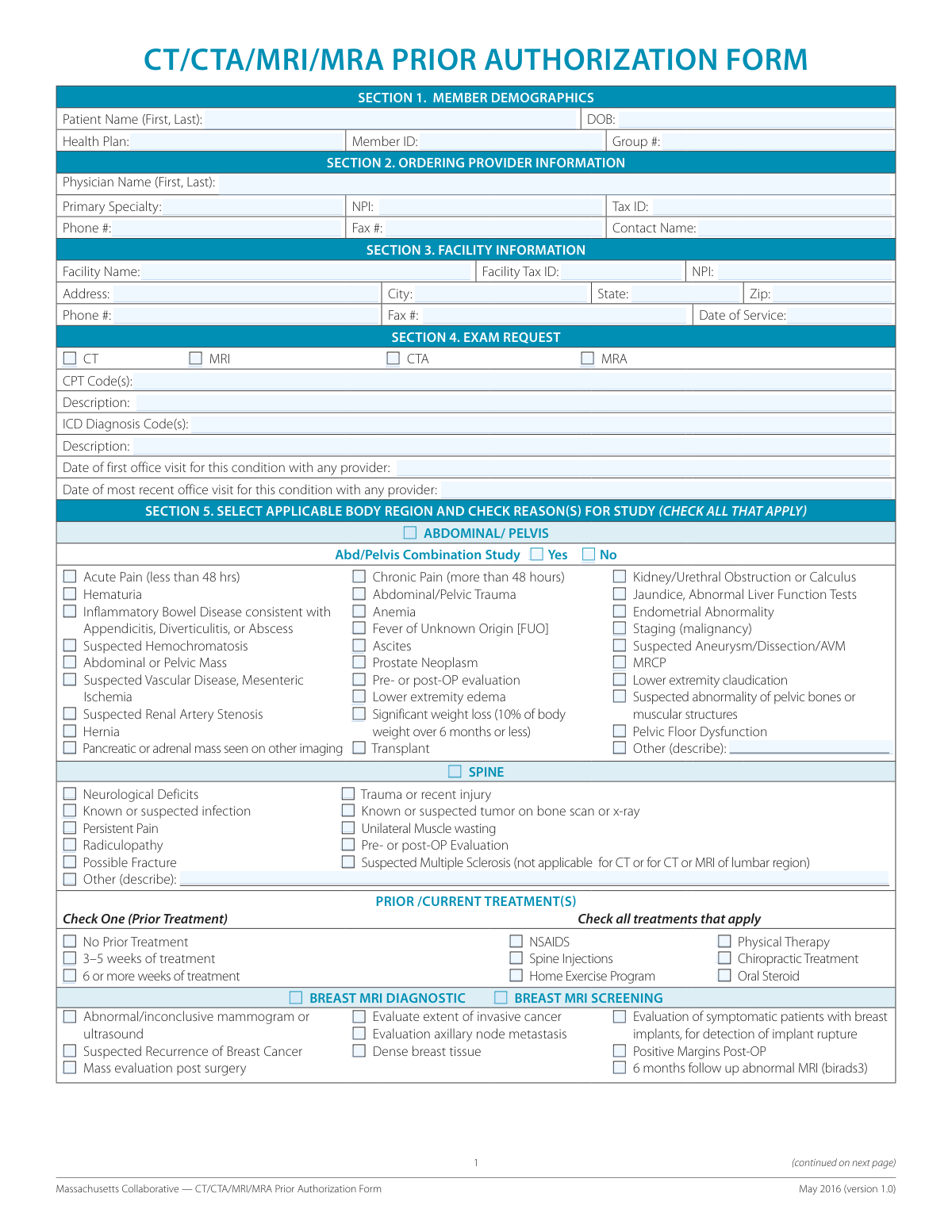
This form is a medical prior authorization request used in Massachusetts for advanced imaging studies such as CT scans, MRIs, CTAs, and MRAs. Healthcare providers complete it to demonstrate medical necessity to a patient's health plan, ensuring the procedure will be covered by insurance. Completing this detailed form is crucial for avoiding claim denials and patient billing issues. Today, this form can be filled out quickly and accurately using AI-powered services like Instafill.ai, which can also convert non-fillable PDF versions into interactive fillable forms.
Our AI automatically handles information lookup, data retrieval, formatting, and form filling.
It takes less than a minute to fill out CT/CTA/MRI/MRA Prior Authorization Form using our AI form filling.
Securely upload your data. Information is encrypted in transit and deleted immediately after the form is filled out.

Form specifications

Form name: Massachusetts Collaborative — CT/CTA/MRI/MRA Prior Authorization Form
Number of pages: 2
Language: English
Categories: prior authorization forms, Massachusetts labor forms, labor forms, SSA forms, authorization forms, ACH forms, ACH authorization forms
main-image

Instafill Demo: How to fill out PDF forms in seconds with AI

How to Fill Out CT/CTA/MRI/MRA Prior Authorization Form Online for Free in 2026

Are you looking to fill out a CT/CTA/MRI/MRA PRIOR AUTHORIZATION FORM form online quickly and accurately? Instafill.ai offers the #1 AI-powered PDF filling software of 2026, allowing you to complete your CT/CTA/MRI/MRA PRIOR AUTHORIZATION FORM form in just 37 seconds or less.
Follow these steps to fill out your CT/CTA/MRI/MRA PRIOR AUTHORIZATION FORM form online using Instafill.ai:
  1. 1 Navigate to Instafill.ai and upload or select the Massachusetts CT/CTA/MRI/MRA Prior Authorization Form.
  2. 2 Use the AI assistant to accurately input patient demographics and health plan information from your records.
  3. 3 Enter the details for the ordering provider and the facility where the service will be performed, including NPI and Tax ID numbers.
  4. 4 Specify the exam being requested, along with the corresponding CPT and ICD diagnosis codes.
  5. 5 Select the applicable body region and check all relevant clinical reasons, symptoms, and prior treatments to justify the study.
  6. 6 Provide a detailed narrative in Section 6, documenting exam findings, prior test results, treatment history, and other relevant medical data.
  7. 7 Review all AI-populated fields for accuracy, make any final adjustments, and then download, print, or electronically submit the completed form.

Our AI-powered system ensures each field is filled out correctly, reducing errors and saving you time.

Why Choose Instafill.ai for Your Fillable CT/CTA/MRI/MRA Prior Authorization Form Form?

Speed

Complete your CT/CTA/MRI/MRA Prior Authorization Form in as little as 37 seconds.

Up-to-Date

Always use the latest 2026 CT/CTA/MRI/MRA Prior Authorization Form form version.

Cost-effective

No need to hire expensive lawyers.

Accuracy

Our AI performs 10 compliance checks to ensure your form is error-free.

Security

Your personal information is protected with bank-level encryption.

Frequently Asked Questions About Form CT/CTA/MRI/MRA Prior Authorization Form

This form is used by healthcare providers to request prior authorization from a patient's health plan for advanced imaging studies like CT, CTA, MRI, or MRA. It helps demonstrate the medical necessity of the requested exam to ensure it will be covered by insurance.

The ordering provider's office, such as the physician or their administrative staff, is responsible for completing this form. They have the necessary clinical information to justify the request for the imaging study.

You will need the patient's demographic and insurance details, the ordering provider's information (NPI, Tax ID), and the facility's information. Most importantly, you must provide specific clinical details, including CPT and ICD codes, and check all applicable reasons for the study.

If the patient's clinical indication is not listed, check the "Other (describe)" box within the relevant body region section. Be sure to provide a clear and concise description of the medical reason for the exam in the space provided.

In Section 6, you should provide a detailed clinical summary, including results from prior tests, dates and descriptions of conservative treatments tried, and any relevant trauma history. This section is crucial for justifying the medical necessity of the requested imaging.

Yes, the form states that providers may attach any additional data relevant to medical necessity. This can include office visit notes, results of prior imaging, and letters of medical necessity to support your request.

For sections like 'Spine' or 'Upper/Lower Extremities,' there is a 'No Prior Treatment' checkbox. If this applies, select it, but be prepared to justify in Section 6 why imaging is necessary without a trial of conservative therapy.

You should enter the proposed or requested date for the imaging exam. This date is necessary for the health plan to process the prior authorization for a future service.

Typically, this form is faxed to the patient's health plan's prior authorization department. Always confirm the correct submission method and fax number with the specific insurance plan.

Yes, services like Instafill.ai use AI to accurately auto-fill form fields, which can save significant time and reduce errors. This is especially helpful for repetitive information like provider and facility details.

Simply upload the form to the Instafill.ai platform. The AI will identify the fields, allowing you to quickly type in your information, save, and print the completed document.

If you have a non-fillable PDF, you can use a service like Instafill.ai to convert it into an interactive, fillable form. This allows you to easily type information into the fields instead of printing and filling it out by hand.

A diagnostic MRI is used to investigate a specific problem, like an abnormal mammogram or a lump. A screening MRI is performed annually for high-risk patients without current symptoms to detect cancer early.

Compliance CT/CTA/MRI/MRA Prior Authorization Form
Validation Checks by Instafill.ai

1
Validate NPI Number Format
This check ensures that the National Provider Identifier (NPI) fields for both the Ordering Provider and the Facility are exactly 10 digits long and contain only numbers. The NPI is a standard, unique identifier for health care providers, and an incorrect format can lead to claim rejections and processing delays. If the NPI is not a valid 10-digit number, the form submission should be blocked with an error message prompting the user to correct the entry.
2
Ensure Chronological Order of Dates
This validation verifies the logical sequence of dates provided on the form. Specifically, it checks that the 'Date of first office visit' is on or before the 'Date of most recent office visit', and that the 'Most recent office visit' is on or before the 'Date of Service'. This is crucial for establishing a clear timeline of care for medical necessity review. A failure would indicate a data entry error, and the user should be prompted to review and correct the dates.
3
Mandatory Exam and Body Region Selection
This check confirms that at least one exam type (CT, MRI, CTA, or MRA in Section 4) and at least one body region (e.g., Abdominal/Pelvis, Spine in Section 5) have been selected. A prior authorization request is incomplete and cannot be reviewed without knowing what procedure is being requested and for which part of the body. If either an exam type or a body region is missing, the form cannot be submitted.
4
Conditional Requirement for 'Other' Description
This validation ensures that if any checkbox labeled 'Other (describe)' is selected within a body region section, the corresponding text field for the description is not empty. This is important because selecting 'Other' implies the reason is not standard and requires a specific clinical justification for the reviewer to assess medical necessity. If 'Other' is checked but the description is blank, an error should prevent submission until the justification is provided.
5
Validate Date of Birth Format and Plausibility
This check verifies that the 'DOB' (Date of Birth) field is a valid date in MM/DD/YYYY format and that the date is in the past, not the future. This confirms the patient's identity and is used to calculate age, which can be a critical factor in determining medical necessity for certain procedures. An invalid or future date would block submission and require correction.
6
Link Body Region to Clinical Reason
This validation ensures that if a main body region checkbox is selected (e.g., 'CHEST'), at least one of the corresponding clinical reasons or indications within that specific section is also checked. A request for a scan on a body part without a clinical reason is unjustified. This check prevents incomplete submissions and ensures the reviewer has the minimum information needed to begin an assessment.
7
Mutually Exclusive Selection for Treatment Duration
This check applies to the 'Prior Treatment' sections for 'SPINE' and 'PERSISTENT PAIN'. It ensures that only one of the radio-button-like options ('No Prior Treatment', '3–5 weeks of treatment', '6 or more weeks of treatment') is selected. These options are mutually exclusive, and selecting more than one would create a logical contradiction. The system should enforce the selection of only one option.
8
Enforce Multiple Sclerosis (MS) Imaging Restrictions
This check enforces specific clinical rules noted on the form. If 'Suspected Multiple Sclerosis' is checked in the 'BRAIN/HEAD' section, it validates that the requested exam type is not 'CT'. Similarly, if 'Suspected Multiple Sclerosis' is checked for the 'SPINE', it validates the request is not for a CT or an MRI of the lumbar region. This prevents requests for clinically inappropriate studies from being submitted.
9
Validate CPT and ICD Code Formats
This check verifies that the 'CPT Code(s)' and 'ICD Diagnosis Code(s)' fields follow their standard formats (e.g., CPT codes are typically 5 characters). While a full database lookup is ideal, a basic format check prevents simple typos. Accurate codes are essential for determining coverage, medical necessity, and billing, and incorrect codes will lead to automatic rejection.
10
Completeness of Patient Demographic Information
This validation ensures that all fields in Section 1 (Patient Name, DOB, Health Plan, Member ID) are filled out. This information is fundamental for identifying the correct patient and their insurance coverage. Missing any of these details would make it impossible to process the prior authorization request, so the form should not be submittable without them.
11
Breast Screening Justification Requirement
This logical check ensures that if the 'REQUEST FOR ANNUAL SCREENING FOR BREAST CANCER' box is checked, at least one of the subsequent risk factor reasons (e.g., 'BRCA1 and BRCA2 mutation', 'Lifetime risk 20% or greater') is also selected. An annual screening request requires specific justification based on high-risk criteria. Without a selected reason, the request lacks the necessary support for approval.
12
Validate Phone and Fax Number Formats
This check ensures that all phone and fax number fields in Sections 2 and 3 adhere to a standard format (e.g., (XXX) XXX-XXXX or XXXXXXXXXX). Correct contact information is critical for the health plan to communicate with the provider or facility regarding the status of the request or to ask for additional information. An invalid format could lead to communication failures and delays in patient care.
13
Completeness of Provider and Facility Identifiers
This check verifies that the NPI and Tax ID fields are completed for both the Ordering Provider (Section 2) and the Facility (Section 3). These identifiers are crucial for regulatory compliance, network verification, and correct claims processing. Submitting a form without these key identifiers would result in an administrative denial and require resubmission.
14
Sinusitis Type and Treatment Logic
This validation ensures that if 'Sinusitis' is checked as a reason in the 'SINUS, FACE, NECK, ORBIT' section, at least one type (Acute, Chronic, Recurrent) and one treatment history option (No treatment, Failure single course, etc.) are also selected. This level of detail is required to assess whether imaging is medically necessary according to clinical guidelines for sinusitis. An incomplete selection would prevent a proper review.

Common Mistakes in Completing CT/CTA/MRI/MRA Prior Authorization Form

Incomplete or Vague Clinical Justification

Staff may rush through the form and only check a few boxes in Section 5, while leaving the crucial narrative portion in Section 6 blank. This happens when the filler assumes the checked boxes are self-explanatory. This often leads to an immediate denial for 'not meeting medical necessity,' as the reviewer lacks the full clinical story, such as the severity of symptoms or failure of prior treatments, which delays patient care. To avoid this, always complete Section 6 with a concise summary of the patient's history, prior imaging results, and the specific clinical question the requested exam will answer.

Mismatch Between Codes and Clinical Indications

An administrator might enter a CPT code for one body part (e.g., lumbar spine) in Section 4 but then check clinical indication boxes for a different body part (e.g., brain/head) in Section 5. This error occurs due to a lack of clinical oversight during form completion. Payers' automated systems will flag this inconsistency, resulting in an automatic rejection and requiring the form to be corrected and resubmitted. Always ensure the CPT/ICD codes align logically with the body region and the specific reasons selected in Section 5.

Failure to Document Conservative Therapy

For conditions like spine or extremity pain, the form explicitly asks for the duration and type of prior treatments. It is common for this section to be skipped or for 'No Prior Treatment' to be checked incorrectly. Since most insurance plans mandate a trial of conservative therapy (e.g., 6+ weeks of physical therapy, NSAIDs) before approving advanced imaging, failing to document this history is a primary reason for denial. To prevent this, carefully review the patient's chart and accurately document all prior therapies and their durations.

Incorrect or Mismatched Provider and Facility Identifiers

Users frequently confuse the Ordering Provider (Section 2) with the Facility (Section 3), entering the provider's NPI or Tax ID in the facility's fields, or vice versa. This simple data entry error can cause the authorization to be sent to the wrong entity or the final claim to be rejected. To avoid this, carefully differentiate between the doctor ordering the test and the location where the test will be performed, double-checking that each NPI and Tax ID is in the correct section. AI-powered tools like Instafill.ai can store and correctly auto-populate profiles for providers and facilities to prevent this mix-up.

Using Incorrect Patient Demographics or Insurance IDs

Transcribing the Member ID, Group Number, or Date of Birth incorrectly from the patient's records is a frequent and critical error. A single transposed digit in the Member ID can make it impossible for the health plan to identify the patient. This results in an immediate rejection of the submission, halting the prior authorization process before it even begins. Always verify patient information directly from their insurance card and records for every submission to ensure accuracy.

Leaving 'Other' Description Fields Blank or Vague

When a patient's condition doesn't fit a standard checkbox, the 'Other (describe)' field must be used. However, these fields are often filled with vague, one-word answers like 'Pain' or 'Follow-up.' Such descriptions lack the necessary detail for a reviewer to determine medical necessity, leading to a pended request for more information or an outright denial. When using an 'Other' field, provide a specific and concise clinical reason, such as 'Chronic right shoulder pain, status post failed rotator cuff repair'.

Inconsistent or Missing Dates

The form requires multiple dates, including Date of Service, date of first office visit, and date of most recent office visit. Users may leave these blank, use inconsistent formatting (e.g., MM/DD/YY vs. MM-DD-YYYY), or enter dates that don't make sense chronologically. Missing or incorrect dates can lead to processing delays or denials, as they are used to establish the timeline of the condition and the validity of the authorization. AI form-filling tools like Instafill.ai can help by enforcing a standard date format and flagging missing date fields.

Illegible Handwriting on a Non-Fillable PDF

This form is a flat, non-fillable PDF, meaning it must be printed and filled out by hand or edited with basic PDF software, often leading to illegible entries. Poor handwriting for critical information like names, diagnosis codes, or clinical notes in Section 6 can be misinterpreted by the reviewer. This can lead to incorrect data entry on the payer's end or a denial due to an inability to read the justification. Using a tool like Instafill.ai can convert the non-fillable PDF into an interactive, fillable form, ensuring all entries are typed and perfectly legible.

Ignoring Conditional Checkboxes and Follow-Up Questions

The form contains dependent questions, such as asking for Chest X-ray results if the 'Chest' body region is selected, or requiring a 'Yes/No' answer for an 'Abd/Pelvis Combination Study'. Fillers often check the main category but forget to answer these secondary, conditional questions. This incomplete information forces the reviewer to pend the request and ask for clarification, delaying the authorization. Ensure that after checking a primary box, you review the surrounding area for any related questions that must also be answered.
Saved over 80 hours a year

“I was never sure if my IRS forms like W-9 were filled correctly. Now, I can complete the forms accurately without any external help.”

Kevin Martin Green

Your data stays secure with advanced protection from Instafill and our subprocessors

Robust compliance program

Transparent business model

You’re not the product. You always know where your data is and what it is processed for.

ISO 27001, HIPAA, and GDPR

Our subprocesses adhere to multiple compliance standards, including but not limited to ISO 27001, HIPAA, and GDPR.

Security & privacy by design

We consider security and privacy from the initial design phase of any new service or functionality. It’s not an afterthought, it’s built-in, including support for two-factor authentication (2FA) to further protect your account.

Fill out CT/CTA/MRI/MRA Prior Authorization Form with Instafill.ai

Worried about filling PDFs wrong? Instafill securely fills massachusetts-collaborative-ctctamrimra-prior-authorization-form forms, ensuring each field is accurate.