Yes! You can use AI to fill out Pershing Advisor Solutions LLC ACH Authorization Agreement
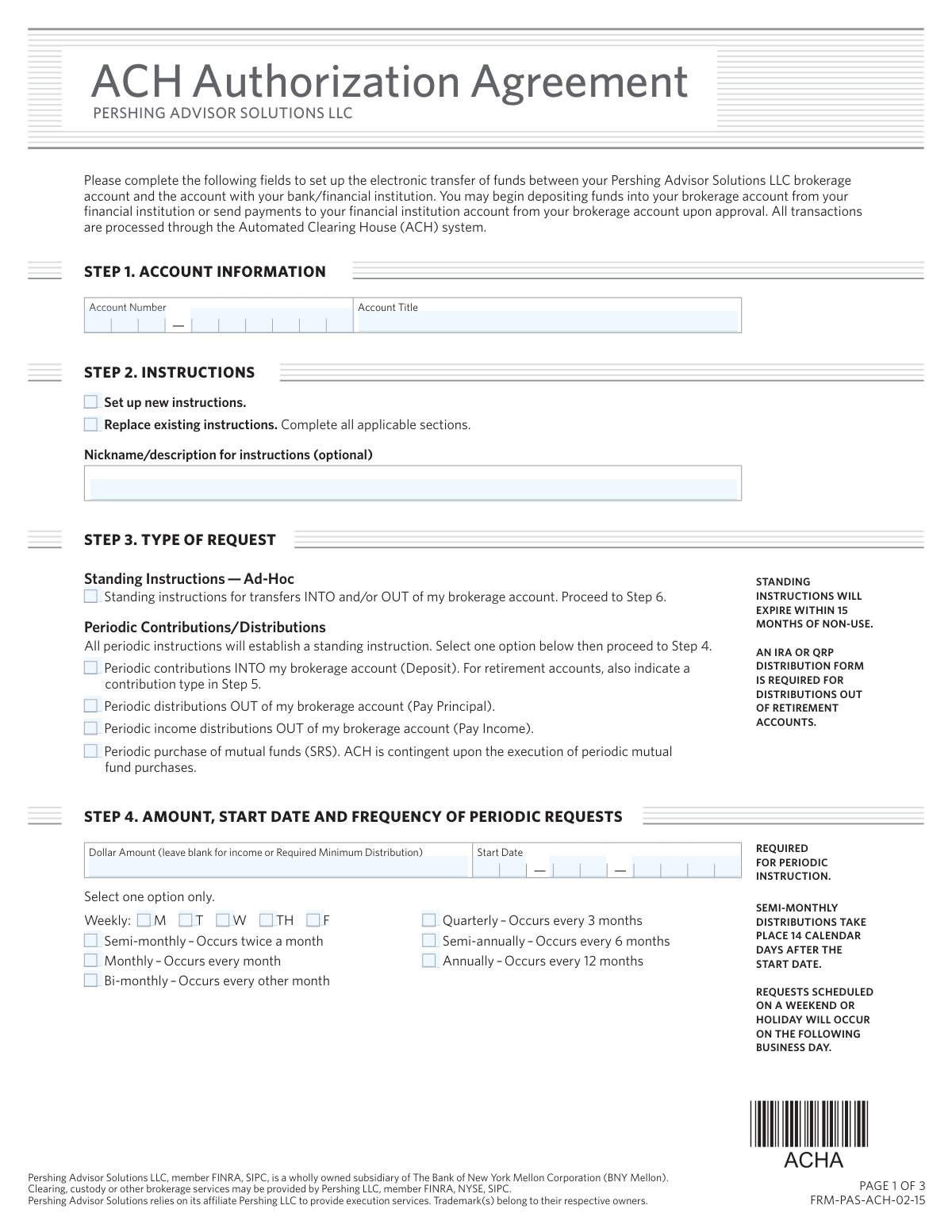
This form authorizes Pershing Advisor Solutions LLC to initiate credit and debit entries to your bank or financial institution account via the Automated Clearing House (ACH) system. It is essential for establishing a link to transfer funds into or out of your brokerage account for contributions, distributions, or periodic investments. Today, this form can be filled out quickly and accurately using AI-powered services like Instafill.ai, which can also convert non-fillable PDF versions into interactive fillable forms.
FRM-PAS-ACH-02-15 is part of the
LLC forms, authorization forms, investment account forms, ACH forms, ACH authorization forms and Pershing forms categories on Instafill.
Rather not fill this in by hand? Instafill is an online form filler that completes PDF forms automatically — upload the blank form, answer a few questions, and the AI fills every field.
Form specifications
| Form name: | Pershing Advisor Solutions LLC ACH Authorization Agreement |
| Number of pages: | 1 |
| Language: | English |
Our AI automatically handles information lookup, data retrieval, formatting, and form filling.
It takes less than a minute to fill out FRM-PAS-ACH-02-15 using our AI form filling.
Securely upload your data. Information is encrypted in transit and deleted immediately after the form is filled out.
Instafill Demo: How to fill out PDF forms in seconds with AI
How to Fill Out FRM-PAS-ACH-02-15 Online for Free in 2026
Are you looking to fill out a FRM-PAS-ACH-02-15 form online quickly and accurately? Instafill.ai offers the #1 AI-powered PDF filling software of 2026, allowing you to complete your FRM-PAS-ACH-02-15 form in just 37 seconds or less.
Follow these steps to fill out your FRM-PAS-ACH-02-15 form online using Instafill.ai:
- 1 Navigate to Instafill.ai and upload the ACH Authorization Agreement form.
- 2 Provide your Pershing brokerage account information, including the account number and title.
- 3 Specify the type of request, such as setting up new standing instructions or periodic transfers, and provide details like amount, start date, and frequency.
- 4 Enter your bank account details, including the financial institution's name, ABA routing number, and your account number and type.
- 5 Attach a digital copy of a voided check or a signed bank letter as required for verification.
- 6 Review all the information auto-filled by the AI for accuracy and make any necessary corrections.
- 7 Electronically sign and date the form in the signature section to finalize the authorization.
Our AI-powered system ensures each field is filled out correctly, reducing errors and saving you time.
Why Choose Instafill.ai for Your Fillable FRM-PAS-ACH-02-15 Form?
Speed
Complete your FRM-PAS-ACH-02-15 in as little as 37 seconds.
Up-to-Date
Always use the latest 2026 FRM-PAS-ACH-02-15 form version.
Cost-effective
No need to hire expensive lawyers.
Accuracy
Our AI performs 10 compliance checks to ensure your form is error-free.
Security
Your personal information is protected with bank-level encryption.
Frequently Asked Questions About FRM-PAS-ACH-02-15
This form is used to authorize Pershing Advisor Solutions LLC to set up electronic fund transfers (ACH) between your brokerage account and your personal bank account for deposits or withdrawals.
Anyone who wants to enable the electronic transfer of funds to or from their Pershing brokerage account should complete this form. This allows for convenient deposits and distributions without using checks or wires.
Standing Instructions are for ad-hoc, one-time transfers that you initiate as needed. Periodic requests establish automatic, recurring transfers on a set schedule, such as monthly contributions.
You must attach an original voided check for a checking account. If linking a savings account, you must provide a bank statement or a signed letter from your bank on their official letterhead.
No, the form explicitly states that starter checks, or any check with a number below 100, cannot be accepted. You must use a permanent, pre-printed check from your checkbook.
You must complete the 'One and the Same Letter' attached to the form if the names do not match exactly. This section requires your signature to be notarized to certify you are the same person.
All registered owners of both the Pershing brokerage account and the linked bank account must sign the form. For business accounts, you must also provide documentation confirming signature authority.
Yes, for periodic contributions to a retirement account, you must select a contribution type in Step 5. For any distributions out of a retirement account, a separate IRA or QRP Distribution Form is also required.
If a scheduled transfer date lands on a weekend or holiday, the transaction will be processed on the following business day.
Yes, standing instructions for ad-hoc transfers will expire if they are not used for a period of 15 months. Periodic, scheduled transfers will remain active as long as they continue to occur.
Yes, services like Instafill.ai use AI to accurately auto-fill form fields, which can save you time and help prevent common errors. This is especially helpful for forms with multiple detailed sections.
You can use a service like Instafill.ai to complete the form digitally. Simply upload the PDF, and the tool will make the fields interactive for you to fill out, save, and print.
If you have a non-fillable or 'flat' PDF, you can upload it to a service like Instafill.ai. The platform can convert it into an interactive, fillable form, allowing you to type your information directly into the fields.
Compliance FRM-PAS-ACH-02-15
Validation Checks by Instafill.ai
1
ABA Routing Number Format and Validity
This check validates that the ABA Number provided in Step 6 is exactly 9 digits long and conforms to the ABA routing number checksum algorithm. This is critical for ensuring the funds are routed to the correct financial institution. A failure in this validation would prevent the form submission, as an incorrect ABA number guarantees a failed transaction and potential fees.
2
Conditional Requirement for Periodic Request Details
This validation ensures that if any 'Periodic' option is selected in Step 3, then the fields in Step 4 (Amount, Start Date, Frequency) must be completed. Conversely, if 'Standing Instructions — Ad-Hoc' is selected, these fields should be empty or ignored. This prevents incomplete periodic setups and ensures all necessary data is captured for scheduled transfers.
3
Future-Dated Start Date for Periodic Requests
This check verifies that the 'Start Date' provided in Step 4 for periodic requests is a valid date set in the future. The system cannot schedule a transfer for a past date, and processing requires lead time. If a past or current date is entered, the submission should be rejected with an error message prompting the user to select a future date.
4
Conditional Bank Verification Attachment
This validation checks for the presence of a required attachment based on the 'Account Type' selected in Step 6. If 'Checking' is selected, an image of a voided check must be attached. If 'Savings' is selected, an image of a bank statement or a signed letter from the bank is required. Failure to provide the correct corresponding document will halt the authorization process.
5
Prohibition of Starter Checks
Based on the form's instructions, this check analyzes the attached voided check image to ensure it is not a starter check. The validation rule flags any check with a number below 100 as invalid. This policy is in place to reduce fraud and ensure the account is well-established, so a failure would require the user to provide a different check.
6
Signature and Date Completeness
This check ensures that at least one signature, corresponding printed name, and date are provided in Step 7. As a legal agreement, the form is invalid without a signature and date from an authorized account owner. A more advanced version of this check would verify that the number of signatures matches the number of registered owners on the brokerage account.
7
One and the Same Letter Trigger
This validation compares the account owner name(s) on the attached voided check or bank statement with the 'Account Title' on the brokerage account in Step 1. If a significant mismatch is detected (e.g., different last names), it triggers a requirement for the 'One and the Same Letter' page to be completed and notarized. This is crucial for compliance and preventing unauthorized third-party transfers.
8
Notary Commission Expiration Date Validity
If the 'One and the Same Letter' is required and completed, this check validates that the notary's commission expiration date is a valid date in the future. An expired commission invalidates the notarization, making the legal certification void. The form would be rejected until a valid notarization is provided.
9
Conditional Retirement Contribution Type
This check enforces the rule that if 'Periodic contributions INTO my brokerage account' is selected in Step 3 for a known retirement account, then a 'Retirement Contribution Type' must be selected in Step 5. This ensures proper tax reporting and allocation of funds within the retirement account. A missing selection would lead to processing ambiguity and rejection of the form.
10
Exclusive Instruction Type Selection
This validation ensures that in Step 2, the user has selected exactly one of the two available options: 'Set up new instructions' or 'Replace existing instructions'. Selecting neither or both would create ambiguity in how to process the request. The form should not be submittable until a single, clear choice is made.
11
Account Number Consistency Across Pages
This check verifies that the 'Account Number' entered at the top of each page of the form is identical. Inconsistent account numbers could lead to confusion and the possibility of applying the authorization to the wrong account. This simple cross-reference ensures data integrity throughout the document.
12
Weekly Frequency Day-of-Week Selection
This validation is specific to the 'Frequency' field in Step 4. If the user selects 'Weekly' as the frequency, this check ensures that at least one day of the week (Monday through Friday) is also selected. Without a specified day, a weekly transfer cannot be scheduled, so the form would be considered incomplete.
Common Mistakes in Completing FRM-PAS-ACH-02-15
This critical error often happens due to simple typos or transposing digits when manually entering the 9-digit ABA routing number or the bank account number from a check. An incorrect number will cause the entire ACH setup to fail, leading to rejected transfers, payment delays, and potential bank fees. To prevent this, carefully cross-reference the numbers with your voided check; AI-powered form fillers like Instafill.ai can automatically and accurately extract this information from an uploaded check image, eliminating manual data entry mistakes.
The form explicitly states that all registered owners on both the brokerage and bank accounts must sign in Step 7. Applicants with joint accounts often forget to obtain the signature of the second owner, assuming one is sufficient. This omission will lead to an immediate rejection of the form, requiring it to be re-submitted with all required signatures, thereby delaying the setup of fund transfers. Always verify the ownership of both accounts and ensure every individual listed signs the form.
In Step 6, if 'Savings' is selected as the account type, the form requires a bank statement or a signed letter from the bank on official letterhead. People frequently check the 'Savings' box but neglect to attach this required proof, assuming a voided check is sufficient for all account types. This results in an incomplete application and rejection, as the financial institution cannot verify the savings account details without the specified documentation. Always attach the correct proof when setting up ACH with a savings account.
The instructions require an original voided check and specifically prohibit 'starter checks' (those with numbers below 100). Applicants may inadvertently use a starter check or a deposit slip, which do not contain all the necessary machine-readable information. This mistake leads to processing delays or rejection, as the firm cannot reliably verify the account details. To avoid this, ensure you use a standard, numbered check from your checkbook and write 'VOID' across it.
Applicants often overlook small differences between the name on their brokerage account (e.g., 'John Fitzgerald Doe') and their bank account (e.g., 'John F. Doe'). The form requires the separate, notarized 'One and the Same Letter' to be completed for any such variance. Failing to submit this letter will cause the application to be rejected for a name mismatch, delaying the authorization process until the corrected, notarized document is provided. Carefully compare account titles and complete the letter if any difference exists.
In Step 3, users must choose between setting up 'Standing Instructions' for ad-hoc transfers or 'Periodic' scheduled transfers. A common mistake is selecting 'Standing Instructions' but then proceeding to fill out the amount and frequency details in Step 4, which are only for periodic requests. This contradiction makes the applicant's intent unclear and can lead to the form being rejected or set up incorrectly. Carefully read the descriptions to ensure you select the single correct option that matches your transfer needs.
When establishing periodic contributions into a retirement account, Step 5 must be completed to specify the contribution type (e.g., 'Participant current year', 'Employer matching'). Applicants often miss this step, assuming the transfer type alone is sufficient information. This omission can cause tax reporting errors or misallocation of funds within the retirement plan, requiring manual correction later. Always complete Step 5 if you are making periodic deposits into an IRA or other retirement account.
The frequency options in Step 4 include potentially confusing terms like 'Semi-monthly' (twice a month) and 'Bi-monthly' (every other month). An individual wanting two transfers per month might incorrectly select 'Bi-monthly,' resulting in transfers occurring only six times a year instead of the desired twenty-four. This can disrupt financial planning and savings goals. Read the definitions provided on the form carefully to ensure your transfers are scheduled at the correct interval.
The brokerage account number field appears at the top of all three pages of the main agreement. It's common for people to fill it out on the first page but forget to repeat it on pages 2 and 3. If the pages become separated during processing, the lack of an account number can cause significant delays or lead to the pages being misfiled. Advanced form-filling tools like Instafill.ai can prevent this by automatically populating recurring fields across all pages of a document after a single entry.
When an applicant chooses 'Replace existing instructions' in Step 2, they are required to complete all applicable sections of the form as if it were a new setup. A frequent error is to only fill out the parts that are changing, leaving other critical information like bank details or amount blank. This results in an incomplete form that cannot be processed, as the old instructions are meant to be entirely superseded by the new submission. When replacing instructions, treat the form as a brand new application and fill it out completely.
Saved over 80 hours a year
“I was never sure if my IRS forms like W-9 were filled correctly. Now, I can complete the forms accurately without any external help.”
Kevin Martin Green
Your data stays secure with advanced protection from Instafill and our subprocessors




Robust compliance program
Transparent business model
You’re not the product. You always know where your data is and what it is processed for.
ISO 27001, HIPAA, and GDPR
Our subprocesses adhere to multiple compliance standards, including but not limited to ISO 27001, HIPAA, and GDPR.
Security & privacy by design
We consider security and privacy from the initial design phase of any new service or functionality. It’s not an afterthought, it’s built-in, including support for two-factor authentication (2FA) to further protect your account.
Fill out FRM-PAS-ACH-02-15 with Instafill.ai
Worried about filling PDFs wrong? Instafill securely fills pershing-advisor-solutions-llc-ach-authorization-agreement forms, ensuring each field is accurate.
