
Yes! You can use AI to fill out Form LLC1050, Articles of Cancellation of a Virginia Limited Liability Company
Don't type 22 fields by hand. Tell our AI about yourself, or upload a document you already have, and it fills every field in seconds. You check it, then download, print or sign.
The AI does the filling. You just check it.
No typing into boxes, nothing to install.
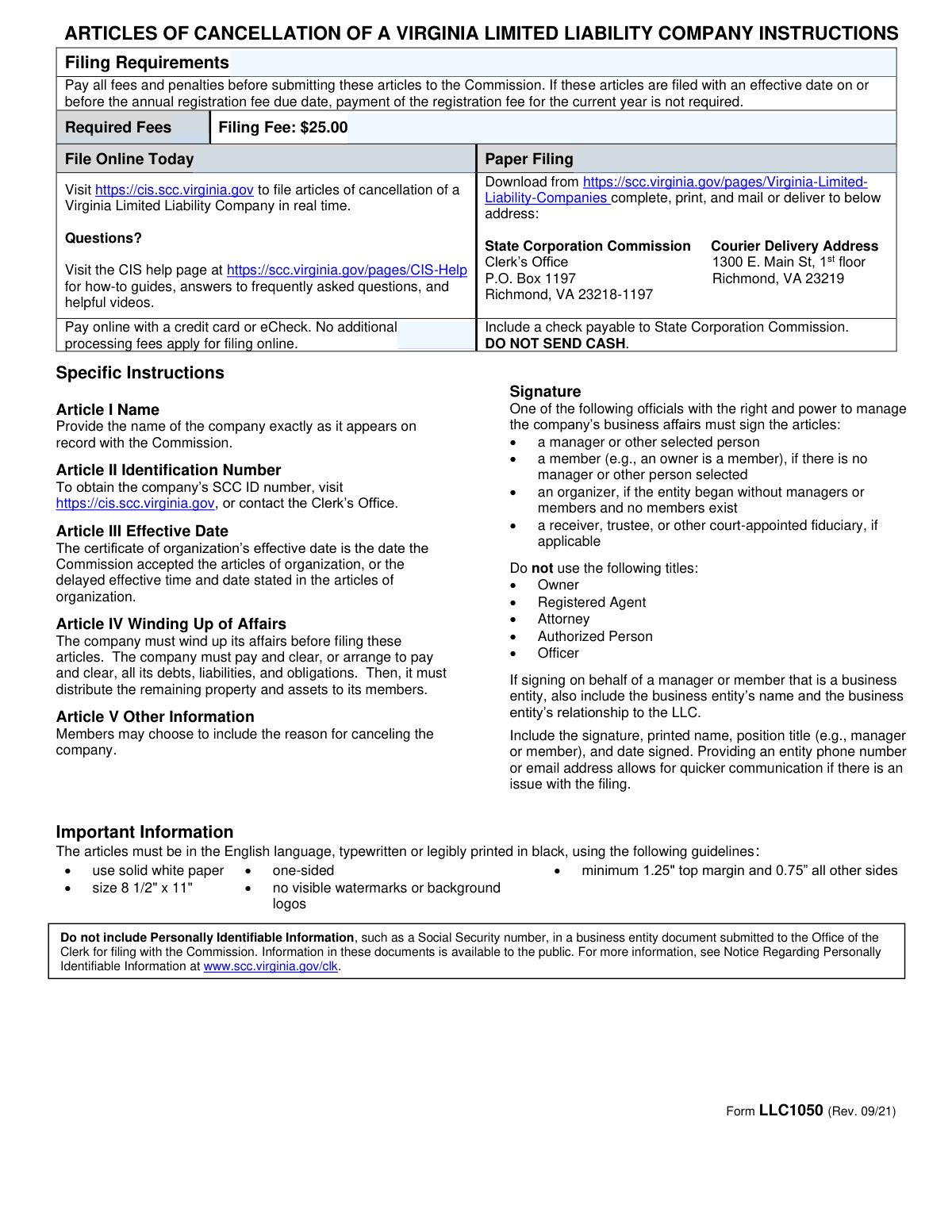
What this form asks for
The AI fills all of it, from your answers or your documents.
The AI checks your answers before you download
17 checks built for this form, so a wrong date or a missing answer is caught before anyone else sees it.
Checks that the filer has indicated the required filing fee is included/paid and that the entered fee amount matches the statutory filing fee of 25.00. This prevents underpayment/overpayment issues that can delay acceptance or require follow-up. If the amount is missing, non-numeric, or not exactly $25.00 (unless the system explicitly supports fee overrides), the submission should be rejected or routed to an exception workflow.
If 'File Online Today' is marked 'Yes', the system should require an online payment amount and validate it equals $25.00; if 'No', the online payment amount must be blank. This avoids contradictory submissions (e.g., claiming online filing but providing no payment, or providing an online payment amount while selecting paper filing). If inconsistent, the system should prompt the user to correct the selection or clear the conflicting payment field.
Checks that the 'Paper Filing Selection' indicator is not simultaneously selected in a way that conflicts with 'File Online Today'. The form instructions present online vs. paper as alternative channels, and conflicting selections can cause misrouting and processing delays. If both are selected (or both are blank when one is required by the workflow), the submission should be flagged for correction before acceptance.
Ensures the LLC name field is not blank and contains a plausible legal name (e.g., not only punctuation/whitespace, and within reasonable length limits). This is critical because the cancellation must be applied to the correct entity and the name is a primary identifier used by staff and systems. If missing or clearly invalid, the filing should be rejected as incomplete.
When an SCC ID number is provided, validate that the entered LLC name matches the name on record exactly (including punctuation such as commas, periods, and 'LLC' designator). The instructions explicitly require the name exactly as it appears on record, and mismatches can lead to cancellation of the wrong entity or rejection by the clerk. If the name does not match SCC records, the system should block submission and instruct the filer to correct the name or SCC ID.
Checks that the SCC ID number is provided (required) and conforms to the expected SCC ID format (typically digits only, with a defined length if applicable in the system). This identifier is essential for unambiguous entity identification and automated record matching. If missing, contains letters/special characters, or fails length/format rules, the submission should be rejected or returned for correction.
And 11 more checks
- Validates Article III certificate effective date is a valid date and not in the future
- Cross-validates certificate effective date against SCC record for the provided SCC ID
- Requires affirmative confirmation of Article IV winding up completion
- Validates signature is present and not a placeholder value
- Validates date signed is present, valid, and not after submission date
- Validates printed name is present and appears to be a person’s name
- Validates title is present and restricted to allowed signer roles (and disallows prohibited titles)
- Validates optional phone numbers use acceptable US phone format
- Validates optional email addresses are syntactically valid and not obviously malformed
- Validates correspondence contact name/address completeness when any correspondence field is entered
- Detects and blocks inclusion of personally identifiable information (PII) in free-text fields
Let AI fill out your LLC1050
No typing. Every field filled in seconds, checked, ready to sign.
How to Fill Out LLC1050 Online for Free in 2026
What the AI walks you through.
- Go to Instafill.ai and upload the Form LLC1050 PDF (or select it from the form library) to start an AI-guided fill session.
- Enter the LLC’s exact legal name (as shown on SCC records) and the LLC’s SCC ID number; have SCC records available to avoid mismatches.
- Provide the certificate of organization effective date (the date the SCC accepted the articles of organization, unless a delayed effective date/time applied).
- Confirm the winding up statement is true (debts/liabilities addressed and remaining assets distributed) and add any optional “Other information” the members want to include.
- Complete the signature block: authorized signer’s printed name, title (e.g., manager/member/organizer/receiver as applicable), signature, and date; add optional phone/email for faster SCC contact.
- Add the correspondence name and mailing address (or leave blank to default to the registered agent/registered office) and confirm the required $25 filing fee payment method (online or check for paper filing).
- Use Instafill.ai to validate required fields, export the finalized form, then file online via the SCC CIS portal or print and mail/deliver to the SCC Clerk’s Office with the $25 fee as instructed.
Common Mistakes in Completing LLC1050
The ones the AI is built to catch.
Using an LLC name that doesn’t exactly match SCC records
Entering the wrong SCC ID number (or leaving it blank)
Misstating the certificate of organization effective date
Filing before completing winding up (Article IV misunderstanding)
Unauthorized signer or using a prohibited title in the signature block
Not including entity details when signing on behalf of a business-entity manager/member
Missing signature-block essentials (printed name, date signed, or title)
Fee/payment mistakes (wrong amount, wrong method, or forgetting to include payment)
Filling optional payment/online fields inconsistently (online vs paper confusion)
Including personally identifiable information (PII) in Article V or contact fields
Leaving correspondence name/address blank or providing an incomplete mailing address
Frequently Asked Questions About LLC1050
Is it really free for 7 days?
Can I fill other forms too?
How do I cancel?
How does the AI fill out LLC1050?
What happens to my information?
How complex is LLC1050 to fill out?
What is Form LLC1050 (Articles of Cancellation) used for?
Who should file these Articles of Cancellation for a Virginia LLC?
What fees are required to file the Articles of Cancellation?
Do I need to pay the annual registration fee when canceling my LLC?
What does “winding up of affairs” mean in Article IV, and do I have to complete it before filing?
How do I fill out Article I (LLC Name) correctly?
Where can I find my LLC’s SCC ID number for Article II?
What date should I enter for Article III (certificate effective date)?
Is Article V (Other information) required, and what can I put there?
Who is allowed to sign the form, and what titles are not acceptable?
What if the manager or member signing is a business entity (not an individual)?
How do I submit the Articles of Cancellation—online or by mail?
Where will the SCC send correspondence about my filing?
Can I include my Social Security number or other personal data on the form?
Can AI tools help me fill out this cancellation form, and what if my PDF isn’t fillable?
Get your LLC1050 filled out by AI
$0 today. Cancel before Oct 30 and you pay nothing.
Other forms like this one
LLC forms: Form 568, LLC Income Return, Inland Residential Real Estate Services LLC Application for Lease (Form 4301, Rev. 11/14), ENVIRONMENTAL MONITORING LABORATORY, LLC Employment Application, Empower Financial Services, Inc. (EFSI) and Empower Advisory Group, LLC (EAG) Form CRS Customer Relationship Summary, Mid America Pet Food Settlement Claim Form, Filardi v. Mid-America Pet Food, LLC, Case No. 23-cv-11170-NSR, Pershing LLC Account Transfer Form, Pershing Advisor Solutions LLC ACH Authorization Agreement, Pershing LLC IRA Designation of Beneficiary, J.P. Morgan Securities LLC Account Transfer Request, First Republic Securities Company, LLC Entity Account Application (FRSC 778 E 7/19), New York Life Investments Funds Individual Retirement Account Application and NYLIFE Securities LLC Investor Profile, Form S-320, Supplemental Application: LLC Ownership
company forms: Form S-1, Surety Company Annual Report, National Integrity Life Insurance Company Ownership Change Request Form (NI-77-0039-2505), QBCC Licence Application Form – Company (Application made under section 33, Queensland Building and Construction Commission Act 1991), California Form 568 (2024), Limited Liability Company Return of Income, Continental American Insurance Company (CAIC) / Aflac Group Critical Illness Claim Form (with Attending Physician’s Statement, HIPAA Authorization to Obtain Information, and Electronic Funds Transaction Authorization), Brotherhood Mutual Insurance Company Ministry Driver Screening Form (A99), Assurity Life Insurance Company Disability Claim Form — Attending Physician’s Statement, Due Diligence Form (Australian Company) – The Perth Mint, The Prudential Insurance Company of America Group Disability Insurance – Education and Employment History Form (GL.2009.009, Ed. 06/2017), Pennsylvania Department of State — Certificate of Termination (Domestic Limited Liability Company) (15 Pa.C.S. § 8872(f)) (DSCB:15-8872(f)), Louisiana Secretary of State – Notice of Change of Registered Office and/or Change of Registered Agent (Domestic Limited Liability Company) (R.S. 12:1308) (Form SS983, Rev. 01/24), HDFC ERGO General Insurance Company Limited – Request for Cashless Hospitalisation for Health Insurance (Policy Part – C), Anmeldung zum R+V-Firmenportal Vorsorge (Registration for the R+V Company Portal for Pensions), Beneficiary Designation/Change - Principal Life Insurance Company, Principal Life Insurance Company UCTIE INTERNATIONAL UNION 401(K) SAVINGS PLAN Enrollment Form, Principal Life Insurance Company Death Notification Form, Principal Life Insurance Company Form PG4701, In-Plan Roth Conversion – No Spousal Consent Needed, Principal Life Insurance Company Administration Guide, Principal Life Insurance Company Small Amounts Benefit Election, SEC Application for an Order under Section 17(b) of the Investment Company Act of 1940 (File No. 812-11000)
Let AI fill out your LLC1050
Your trial starts once a card is added. You pay nothing before Oct 30.
Our AI already knows this form, all 22 fields of it. Skip the typing: tell it about yourself, or upload what you have, and it fills the whole form in seconds.
- AI fills every field on both pages, tables and checkboxes included
- No typing into boxes: answer a few questions, or upload a document you already have, an old copy of this form, a photo of a document
- The AI checks the answers; you review and change anything before you download
- Download the finished PDF, print it, or sign it online
- Encrypted, and never used to train AI
Cancel before Oct 30 and you pay nothing.
A card is needed to start the trial. Cancel in two clicks from your account.
Terms · Privacy