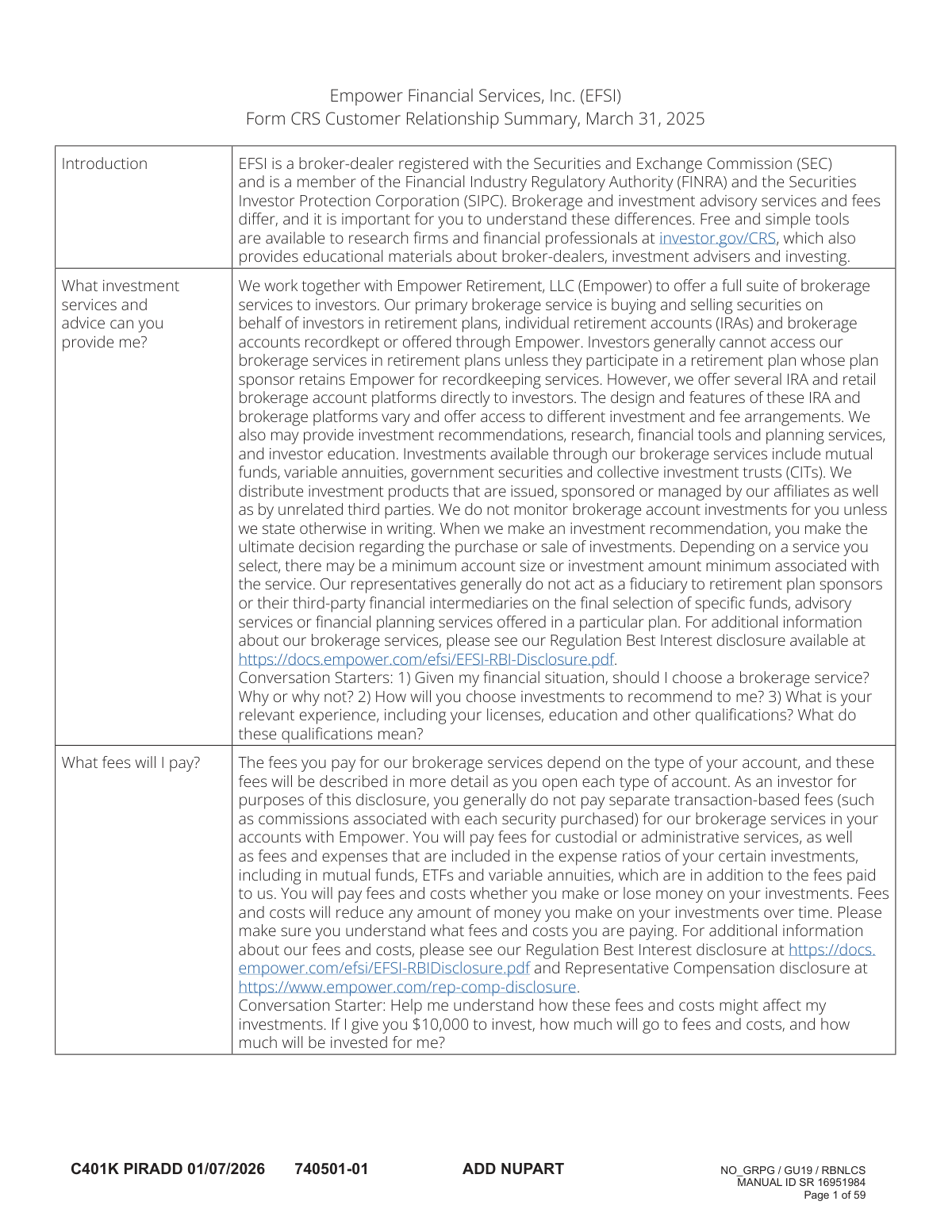
Yes! You can use AI to fill out Empower Financial Services, Inc. (EFSI) and Empower Advisory Group, LLC (EAG) Form CRS Customer Relationship Summary
Form CRS (Customer Relationship Summary) is a disclosure document required by the SEC that provides retail investors with a simple, easy-to-read summary of the nature of their relationship with an investment adviser or broker-dealer. It outlines the types of services offered, the fees and costs you will pay, the firm's legal obligations, and any conflicts of interest. Today, the application forms that accompany this disclosure can be filled out quickly and accurately using AI-powered services like Instafill.ai, which can also convert non-fillable PDF versions into interactive fillable forms.
Form CRS is part of the
financial forms, LLC forms, Empower forms, financial services forms, financial advisor forms and financial service forms categories on Instafill.
Rather not fill this in by hand? Instafill is an online form filler that completes PDF forms automatically — upload the blank form, answer a few questions, and the AI fills every field.
Form specifications
| Form name: | Empower Financial Services, Inc. (EFSI) and Empower Advisory Group, LLC (EAG) Form CRS Customer Relationship Summary |
| Number of pages: | 1 |
| Language: | English |
Our AI automatically handles information lookup, data retrieval, formatting, and form filling.
It takes less than a minute to fill out Form CRS using our AI form filling.
Securely upload your data. Information is encrypted in transit and deleted immediately after the form is filled out.
Instafill Demo: How to fill out PDF forms in seconds with AI
How to Fill Out Form CRS Online for Free in 2026
Are you looking to fill out a FORM CRS form online quickly and accurately? Instafill.ai offers the #1 AI-powered PDF filling software of 2026, allowing you to complete your FORM CRS form in just 37 seconds or less.
Follow these steps to fill out your FORM CRS form online using Instafill.ai:
- 1 Navigate to Instafill.ai and upload or select the Empower account application package, which includes the Form CRS for review.
- 2 Use the AI tool to automatically populate your personal details, such as full name, address, date of birth, and Social Security Number, across all required fields in the application forms.
- 3 Review the pre-filled information for accuracy and provide any additional details needed for the account, such as your investment objectives and risk tolerance.
- 4 Carefully read the Form CRS disclosure to understand the services, fees, legal obligations, and conflicts of interest associated with Empower's offerings.
- 5 Complete the beneficiary designation section, providing names, relationships, and allocation percentages for your primary and contingent beneficiaries.
- 6 Electronically sign the completed application and agreement documents to finalize the account setup process.
- 7 Download and securely save a copy of all signed documents, including the Form CRS, for your personal records.
Our AI-powered system ensures each field is filled out correctly, reducing errors and saving you time.
Why Choose Instafill.ai for Your Fillable Form CRS Form?
Speed
Complete your Form CRS in as little as 37 seconds.
Up-to-Date
Always use the latest 2026 Form CRS form version.
Cost-effective
No need to hire expensive lawyers.
Accuracy
Our AI performs 10 compliance checks to ensure your form is error-free.
Security
Your personal information is protected with bank-level encryption.
Frequently Asked Questions About Form CRS
The Form CRS summarizes the investment services, fees, conflicts of interest, and legal obligations for Empower's brokerage (EFSI) and advisory (EAG) arms. It is designed to help you understand the differences between these services and make informed decisions about your investments.
These documents are for investors who are considering or currently using Empower's services for retirement plans, IRAs, and brokerage accounts. They provide essential information about your relationship with Empower, the services offered, and the fees you will pay.
The Empower Premier IRA has no setup, annual administration, or transaction fees. However, if you enroll in the 'My Total Retirement' managed account service, you will pay an asset-based annual fee, and all underlying investment options have their own separate operating expenses.
Empower earns additional revenue through conflicts of interest, such as receiving higher compensation when you invest in their proprietary products like affiliated mutual funds. They also receive payments from third-party fund managers for selling or recommending certain products on the Empower platform.
Provide your personal information in Section A, then list your primary and contingent beneficiaries in Section B with their name, Social Security Number, date of birth, and relationship. Ensure the percentage allocations for both primary and contingent beneficiaries each total 100%.
Yes, if you are married, your plan likely requires you to name your spouse as the 100% primary beneficiary. If you wish to name someone else, your spouse must provide written consent, which may need to be notarized.
If you fund your Empower Premier IRA but do not make an investment election, your assets will be automatically invested in the Empower Guaranteed Income Fund. This is the plan's designated default investment option.
Yes, the disclosure documents state that both the firm (EAG) and some of its financial professionals have a disciplinary history. You can research the firm and its professionals for free using the search tool at Investor.gov/CRS.
If you are enrolled in a discretionary managed account service like 'My Total Retirement,' your advisory assets are monitored and may be rebalanced periodically by Empower or its subadviser. You will receive an account update statement at least annually.
'My Total Retirement' is a discretionary managed account service where professionals make investment decisions for you for an asset-based fee. 'Online Advice' is a non-discretionary service that provides investment recommendations at no fee, but you make the final decisions and manage the account yourself.
You can cancel your participation in the 'My Total Retirement' service at any time online or by calling the IRA’s toll-free customer service number. After cancellation, you will be responsible for managing your own account allocations.
Yes, services like Instafill.ai use AI to accurately auto-fill form fields, which can save you time and help avoid errors. This is especially useful for repetitive information across multiple documents in the application packet.
You can use a service like Instafill.ai to fill out these forms online. Simply upload the PDF, and the AI will identify the fields for you to fill, save, and download the completed document.
If you have a non-fillable PDF, you can use a tool like Instafill.ai to convert it into an interactive, fillable form. This allows you to type your information directly into the fields instead of printing and filling it out by hand.
Compliance Form CRS
Validation Checks by Instafill.ai
1
Ensures Participant Name Matches System of Record
This check verifies that the First Name, Last Name, and Middle Initial provided in the 'Participant Information' section exactly match the legal name on file with the service provider. This is critical for identity verification and to prevent processing errors or fraud. If the names do not match, the form submission will be rejected and returned to the user for correction.
2
Validates Participant Social Security Number Format and Completeness
This validation ensures the Social Security Number (SSN) field contains exactly nine digits and is formatted correctly (e.g., XXX-XX-XXXX or XXXXXXXXX). It is a mandatory field for tax reporting and account identification purposes as required by law. A submission with an incomplete, incorrectly formatted, or missing SSN will fail validation and cannot be processed.
3
Verifies Total of Primary Beneficiary Percentages Equals 100%
This check calculates the sum of the percentages assigned to all listed primary beneficiaries. The total must equal exactly 100% to ensure the entire account balance is allocated. If the sum is less than or greater than 100%, the form is considered incomplete and will be rejected, requiring the user to adjust the percentages.
4
Verifies Total of Contingent Beneficiary Percentages Equals 100%
Similar to the primary beneficiary check, this validation ensures the percentages assigned to all contingent beneficiaries sum to exactly 100%. This is important for ensuring a clear and complete line of succession for the account assets if no primary beneficiaries are able to inherit. A mismatch will cause the form to be flagged as invalid until the percentages are corrected.
5
Confirms Beneficiary Relationship is a Required Selection
This validation confirms that a 'Relationship' has been selected for every listed primary and contingent beneficiary, as this is a required field. This information is crucial for determining distribution rules, especially for spousal beneficiaries, and for identity confirmation. A submission lacking a relationship for any beneficiary will be rejected and sent back for clarification.
6
Enforces Spousal Beneficiary Rule for Married Participants
This is a conditional logic check that activates if the participant's marital status is 'Married'. It verifies if the spouse is designated as the sole 100% primary beneficiary. If another individual is named, the system flags the submission to require an accompanying spousal consent waiver, as mandated by plan rules, before the designation can be accepted.
7
Validates Date of Birth and Trust Date Format
This check ensures that any date entered, whether for the participant's Date of Birth or a beneficiary's Date of Birth/Trust Date, follows a valid MM/DD/YYYY format. Correct date formatting is essential for age-related calculations, such as for Required Minimum Distributions (RMDs) and catch-up contributions. An invalid date format will prevent the form from being submitted.
8
Validates Beneficiary Percentage Decimal Places
This check verifies that the percentage entered for each beneficiary does not exceed two decimal places (e.g., 33.33%). This rule ensures consistency and prevents calculation errors or disputes arising from overly precise or repeating decimal allocations. Any percentage with more than two decimal places will be flagged as an error.
9
Verifies USA Patriot Act Information Completeness
For new account applications, this check ensures that the applicant has provided their full legal name, physical address, date of birth, and a valid government identification number (like SSN). This information is legally required under the USA Patriot Act for all financial institutions to verify the identity of their customers. Failure to provide this complete set of information will delay or prevent the account from being opened.
10
Checks for Minimum Distribution Amount
This validation applies to withdrawal or distribution request forms, ensuring the requested amount is at least the minimum of $50. This rule helps manage administrative costs and ensures transactions are for meaningful amounts. A request for less than the minimum will be rejected, and the user will be prompted to enter a valid amount.
11
Validates Annual IRA Contribution Limits
This check verifies that a proposed contribution to an IRA does not exceed the annual maximum limit set by the IRS for the given tax year, including any applicable age-based catch-up amounts. This is crucial for maintaining the tax-advantaged status of the account and preventing the client from incurring excess contribution penalties. If a contribution exceeds the limit, the transaction will be blocked.
12
Validates Owner Email Address Format
This check ensures that the provided email address follows the standard '[email protected]' format. A valid email is necessary for delivering electronic documents, account notices, and other important communications as agreed upon by the account holder. An invalid format will trigger an error message, requiring the user to correct the entry before proceeding.
13
Applies Early Account Closure Fee Logic
This is a time-based logical check for full withdrawal requests from a Premier IRA. It verifies if the account was opened within the last 120 days. If so, and the effective date of the rule (June 15, 2026) has passed, the system will notify the user that a $95 closure fee will apply, ensuring transparency before the transaction is finalized.
14
Validates Beneficiary Identification Number Format
This check ensures the 'Social Security or Taxpayer Identification Number' provided for a beneficiary is in a valid SSN (9 digits) or TIN format. This identifier is critical for accurately identifying the beneficiary and for tax reporting purposes when a distribution is made. An invalid number format will result in a validation error.
Common Mistakes in Completing Form CRS
Users often fail to assign percentages to their beneficiaries or make calculation errors, causing the total for primary or contingent beneficiaries not to equal 100%. This ambiguity can delay the processing of the form or, in a worst-case scenario, lead to disputes and legal challenges among heirs during the distribution of assets. To avoid this, carefully double-check that the percentages for each beneficiary group (Primary and Contingent) sum exactly to 100% before submitting the form. AI-powered tools like Instafill.ai can prevent this by automatically validating percentage totals as you fill out the form.
A married participant might name a child or another individual as the 100% primary beneficiary, overlooking the plan rule that requires the spouse to be the primary beneficiary unless they provide written consent. This is a critical error, as federal law (ERISA) and plan documents often grant spouses automatic rights to these assets. Without proper spousal consent, the designation can be legally voided, and the assets will be paid to the spouse, regardless of the participant's wishes. Always review plan rules and obtain notarized spousal consent if you are married and naming someone else as your primary beneficiary.
The Beneficiary Designation form explicitly marks the 'Relationship' field as required, but it is a commonly skipped checkbox. Failing to specify the beneficiary's relationship (e.g., Spouse, Child, Parent) will cause the form to be rejected and returned for clarification, as stated in the instructions. This delays the processing of your designation, leaving your account without an updated beneficiary on file until the correction is made. To prevent this, ensure you check the appropriate relationship box for every beneficiary you list.
Applicants frequently omit crucial identifying information for their beneficiaries, such as their full legal name, Social Security Number (SSN) or Taxpayer Identification Number (TIN), and date of birth. This information is vital for the financial institution to locate and positively identify the correct individual upon the account holder's death. Missing details can create significant delays and administrative burdens for your heirs, potentially requiring them to provide extensive documentation to prove their identity and claim the assets. Always gather and enter this complete information for each beneficiary.
When designating a trust, people often use an informal name like 'The Smith Family Trust' instead of the precise legal name and creation date as specified in the trust documents. This can create legal ambiguity and complications, as the designation may not be specific enough to be legally binding. The consequences can include delays in asset distribution or even litigation to determine the correct recipient. To avoid this, refer to your official trust documents and enter the full, formal name of the trust and the exact date it was established, as prompted by the form.
The IRA disclosure documents detail strict annual contribution limits set by the IRS, but individuals with multiple IRAs or those making contributions near the deadline can easily contribute more than the allowed amount. This mistake results in a 6% excise tax on the excess amount for every year it remains in the account. To avoid this penalty, track all contributions across all your IRAs and ensure you do not exceed the annual maximum. If an excess contribution occurs, it should be withdrawn, along with any earnings, before the tax filing deadline.
Retirees often forget or miscalculate their Required Minimum Distributions (RMDs), which must begin at a specific age as outlined in the IRA Custodial Agreement. The consequence of this oversight is severe: the IRS imposes a penalty tax of 25% (reducible to 10% if corrected promptly) on the amount that was not withdrawn. To prevent this costly error, set calendar reminders, calculate the RMD amount carefully each year, and consider setting up automatic withdrawals with your financial institution.
The participant information section requires the name to 'match the name on file with Service Provider,' but individuals may inadvertently use a nickname, a maiden name, or a recently changed married name that hasn't been updated in the system. This mismatch can cause the form to be rejected or create significant processing delays, as the system cannot verify the participant's identity. Always use your full legal name as it appears on your account statements and other official documents from Empower. AI-powered form fillers like Instafill.ai can help by populating fields with verified data, ensuring consistency.
The IRA disclosure statement outlines several complex rollover rules, such as the 60-day completion window and the limit of one IRA-to-IRA rollover per 12-month period. Misunderstanding or violating these rules can cause the entire distributed amount to become a taxable event, and it may also be subject to a 10% early withdrawal penalty. To avoid this, opt for a direct trustee-to-trustee transfer whenever possible, as it is not subject to these limitations. If performing an indirect rollover, be meticulous about the deadlines and rules.
The agreements state that the account holder is responsible for keeping their mailing and email addresses current, but this is often neglected after a move. Failure to update this information means you will not receive critical documents like account statements, tax forms (e.g., 1099-R), and legal notices about fees or policy changes. This can lead to missed tax reporting and unawareness of account issues. Since the provided form is a flat PDF, a tool like Instafill.ai can not only make it fillable but also help manage and update your personal information across different forms to maintain consistency.
Saved over 80 hours a year
“I was never sure if my IRS forms like W-9 were filled correctly. Now, I can complete the forms accurately without any external help.”
Kevin Martin Green
Your data stays secure with advanced protection from Instafill and our subprocessors




Robust compliance program
Transparent business model
You’re not the product. You always know where your data is and what it is processed for.
ISO 27001, HIPAA, and GDPR
Our subprocesses adhere to multiple compliance standards, including but not limited to ISO 27001, HIPAA, and GDPR.
Security & privacy by design
We consider security and privacy from the initial design phase of any new service or functionality. It’s not an afterthought, it’s built-in, including support for two-factor authentication (2FA) to further protect your account.
Fill out Form CRS with Instafill.ai
Worried about filling PDFs wrong? Instafill securely fills empower-financial-services-inc-efsi-and-empower-advisory-group-llc-eag-form-crs-customer-relationship-summary forms, ensuring each field is accurate.
