
Yes! You can use AI to fill out Inland Residential Real Estate Services LLC Application for Lease (Form 4301, Rev. 11/14)
Don't type 140 fields by hand. Tell our AI about yourself, or upload a document you already have, and it fills every field in seconds. You check it, then download, print or sign.
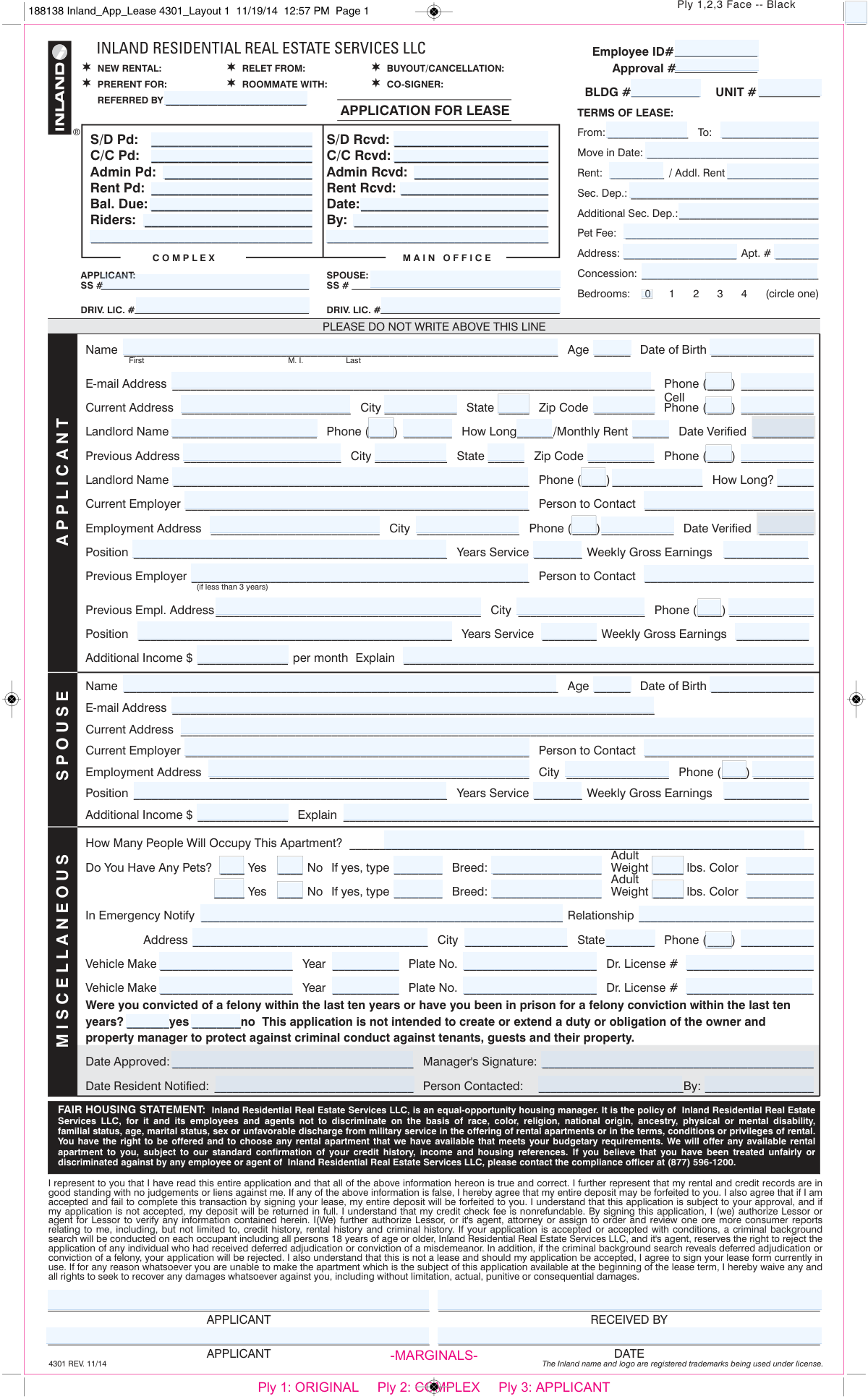
The AI does the filling. You just check it.
No typing into boxes, nothing to install.
What this form asks for
The AI fills all of it, from your answers or your documents.
The AI checks your answers before you download
16 checks built for this form, so a wrong date or a missing answer is caught before anyone else sees it.
Checks that exactly one application type checkbox is selected and that it matches the workflow being processed (e.g., co-signer vs. primary applicant). This is important because downstream required fields and approval rules can differ by application type. If none or multiple are selected, the submission should be flagged as ambiguous and routed back for correction before processing.
Validates that both lease term dates are provided, are valid calendar dates, and that the 'To' date is after the 'From' date. This prevents invalid lease contracts and billing schedules. If validation fails, the system should block submission or mark the lease term section incomplete.
Checks that the Move-in Date is a valid date and falls on or after the lease 'From' date (and not after the lease 'To' date). This is important for unit availability, prorations, and occupancy compliance. If inconsistent, the form should be rejected or require manager override with documented reason.
Ensures Rent, Additional Rent, Security Deposit, Additional Security Deposit, Pet Fee, Concession, and any paid/received amounts are valid currency values (e.g., digits with optional decimals) and not negative. This prevents accounting errors and incorrect ledger postings. If any value is non-numeric or negative, the system should flag the specific field and prevent financial posting.
Validates that the property Address and Apt # are present, and that Unit #/Complex/BLDG # (where used by the organization) are provided in the expected format (e.g., alphanumeric). Correct unit identification is critical to avoid assigning the applicant to the wrong unit and misrouting payments. If missing or malformed, the submission should be held until corrected.
Checks that the bedrooms field has exactly one selection and that it is within the allowed set {0,1,2,3,4}. This supports occupancy rules, pricing, and unit matching. If multiple or invalid values are detected, the system should require correction before approval.
And 10 more checks
- Validates applicant identity fields completeness (Full name, DOB, age)
- Validates SSN format and presence for applicant (and spouse if provided)
- Validates driver’s license number presence and state consistency
- Validates email address format for applicant (and co-applicant if provided)
- Validates phone number formats across all phone fields
- Checks current and previous address completeness and state/ZIP validity
- Validates landlord/rental history fields and 'How Long' numeric logic
- Validates employment history requirements (current employer and prior employer if < 3 years)
- Validates income fields and additional income explanation dependency
- Validates occupancy count and adult/occupant screening consistency
Let AI fill out your Application for Lease 4301
No typing. Every field filled in seconds, checked, ready to sign.
How to Fill Out Application for Lease 4301 Online for Free in 2026
What the AI walks you through.
- Select the application type (new rental, relet from, buyout/cancellation, prerent for, roommate with, co-signer) and enter referral information, if any.
- Complete the lease terms section: property address/complex, unit/apartment number, lease start and end dates, move-in date, rent/additional rent, deposits, pet fee, concessions, and bedroom count.
- Enter applicant (and spouse/other occupant, if applicable) personal details: full legal name, date of birth, SSN, driver’s license number, email, phone, and current address.
- Provide rental history: current and previous addresses, landlord names and phone numbers, length of tenancy, monthly rent, and any verification dates if requested.
- Provide employment and income details for each applicant: current/previous employer, contact person, work address/phone, position, years of service, weekly gross earnings, and any additional monthly income with explanation.
- List household and other required details: number of occupants, pets (type/breed/weight/color), emergency contact information, and vehicle information (make/year/plate/driver’s license).
- Review the fair housing statement and applicant certifications/authorizations (credit and background checks), answer the felony conviction question, then sign and date where indicated (leave office-only sections blank).
Common Mistakes in Completing Application for Lease 4301
The ones the AI is built to catch.
Not selecting the correct application type at the top (New Rental/Transfer/Buyout/Prerent/Roommate/Co-signer)
Leaving lease term and move-in dates blank or inconsistent
Incorrect rent-related entries (Rent vs. Addl. Rent vs. deposits/fees)
Not circling the correct number of bedrooms or leaving unit/address fields incomplete
Providing incomplete identity information (SSN, driver’s license, DOB) or mixing applicant vs. spouse fields
Using nicknames or inconsistent names across sections and documents
Incomplete rental history (missing landlord contact, dates, monthly rent, or verification date)
Employment and income entered in the wrong format (weekly gross vs. monthly) or not meeting the 3-year history prompt
Leaving “Additional Income” blank or failing to explain the source
Occupancy and pet information incomplete (number of occupants, pet type/breed/weight/color)
Missing emergency contact and vehicle details or mixing them with driver’s license fields
Not answering the felony conviction question or misunderstanding the lookback period
Frequently Asked Questions About Application for Lease 4301
Is it really free for 7 days?
Can I fill other forms too?
How do I cancel?
How does the AI fill out Application for Lease 4301?
What happens to my information?
How complex is Application for Lease 4301 to fill out?
What is this “Application for Lease” form used for?
Who needs to fill out this application—just the main applicant or everyone moving in?
What do the checkboxes at the top (New Rental, Relet From, Buyout/Cancellation, Prerent For, Roommate With, Co-signer) mean?
What information do I need to provide for the “Terms of Lease” section?
Why does the form ask for Social Security number and driver’s license number?
What rental history details are required for my current and previous addresses?
What employment information do I need to include?
How do I report additional income on the application?
What should I put for “How Many People Will Occupy This Apartment?”
How do I complete the pet section if I have more than one pet?
Why does the application ask for emergency contact and vehicle information?
Does this application authorize credit and background checks?
What is the felony question asking, and will a conviction affect my application?
Is the application fee or credit check fee refundable if I’m not approved?
What happens if I’m approved but decide not to sign the lease?
Get your Application for Lease 4301 filled out by AI
$0 today. Cancel before Nov 1 and you pay nothing.
Other forms like this one
real estate forms: Form 593, Real Estate Withholding, Form 1099-S, Proceeds From Real Estate Transactions, New licence application – Form 1–1 (IND), Application for an individual’s licence (Real estate agent, property auctioneer, resident letting agent, motor dealer, chattel auctioneer, field agent), Texas Real Estate Commission (TREC) One to Four Family Residential Contract (Resale) (TREC No. 20-18), City of Harvey Real Estate Transfer Declaration & Application (with Certificate for Exemption), Alaska Residential Real Estate Purchase Agreement, Form 21, Residential Purchase and Sale Agreement, Form L-4260, Property Transfer Affidavit, Form TC201, Income and Expense Schedule for Rent Producing Properties, Memorandum of Contract, Notice of Transfer Forms Packet, Oklahoma Real Estate Commission Tenancy Guidelines (01-01-2026), Oklahoma Real Estate Commission Residential Property Condition Disclosure Exemption Form (RPCD EXEMPTION FORM), Oklahoma Real Estate Commission Residential Lease, Oklahoma Real Estate Commission Tenant Flood Notice (01-01-2026), Oklahoma Real Estate Commission Property Data Form (Residential), Oklahoma Real Estate Commission Pet Addendum, Oklahoma Real Estate Commission Lease Application, Oklahoma Real Estate Commission Keys and Re-Keying Addendum, Oklahoma Real Estate Commission, Disclosure of Broker Duties & Responsibilities
residential lease forms: California Association of REALTORS® (C.A.R.) Form LR, Residential Lease or Month-to-Month Rental Agreement (Revised 12/19), Chicago Residential Lease for Apartments, Condominiums, Single Family Homes, and Townhomes (Chicago Association of REALTORS®) (V13.0 2026), Arizona Department of Transportation Rental Application (Residential Lease), Oklahoma Real Estate Commission Residential Lease, Oklahoma Real Estate Commission Residential Lease Supplement (01-01-2026), Form 420, Amendment to Agreement to Lease - Residential
estate forms: Form 593, Real Estate Withholding, Form 1099-S, Proceeds From Real Estate Transactions, New licence application – Form 1–1 (IND), Application for an individual’s licence (Real estate agent, property auctioneer, resident letting agent, motor dealer, chattel auctioneer, field agent), Judicial Council of California Form DE-111, Petition for Probate (Probate—Decedents Estates), Texas Real Estate Commission (TREC) One to Four Family Residential Contract (Resale) (TREC No. 20-18), City of Harvey Real Estate Transfer Declaration & Application (with Certificate for Exemption), Judicial Council of California Form DE-120, Notice of Hearing—Decedent's Estate or Trust, Form DE-160/GC-040, Inventory and Appraisal (Declaration of Representative/Guardian/Conservator or Small Estate Claimant and Declaration of Probate Referee), Judicial Council of California Form DE-120, Notice of Hearing—Decedent's Estate or Trust, Fidelity Change of Account Ownership — Mutual Fund Only Accounts (Changing to a Trust, Estate, Guardian, or Conservator Account), Fidelity Change of Account Registration — Changing to a Trust, Estate, Guardian, or Conservator Brokerage Account, Valuing Your Estate Worksheet (from Vanguard's 'Understanding the basics of estate planning' guide), Alaska Residential Real Estate Purchase Agreement, Merrill Edge Self-Directed Trust and Estate Cash Management Account (CMA Account) Account Application Booklet and Agreements, Affidavit for Collection of Personal Property California Probate Code Section 13100, Oklahoma Real Estate Commission Tenancy Guidelines (01-01-2026), Oklahoma Real Estate Commission Residential Property Condition Disclosure Exemption Form (RPCD EXEMPTION FORM), Oklahoma Real Estate Commission Residential Lease, Oklahoma Real Estate Commission Tenant Flood Notice (01-01-2026), Oklahoma Real Estate Commission Property Data Form (Residential)
LLC forms: Form 568, LLC Income Return, Form LLC1050, Articles of Cancellation of a Virginia Limited Liability Company, ENVIRONMENTAL MONITORING LABORATORY, LLC Employment Application, Empower Financial Services, Inc. (EFSI) and Empower Advisory Group, LLC (EAG) Form CRS Customer Relationship Summary, Mid America Pet Food Settlement Claim Form, Filardi v. Mid-America Pet Food, LLC, Case No. 23-cv-11170-NSR, Pershing LLC Account Transfer Form, Pershing Advisor Solutions LLC ACH Authorization Agreement, Pershing LLC IRA Designation of Beneficiary, J.P. Morgan Securities LLC Account Transfer Request, First Republic Securities Company, LLC Entity Account Application (FRSC 778 E 7/19), New York Life Investments Funds Individual Retirement Account Application and NYLIFE Securities LLC Investor Profile, Form S-320, Supplemental Application: LLC Ownership
PA state forms: Form 1095-A, Health Insurance Marketplace Statement, Form W-2, Wage and Tax Statement, Form 593, Real Estate Withholding, Form 8938, Statement of Specified Foreign Financial Assets, Form CMS-2567, Statement of Deficiencies, Form 1098, Mortgage Interest Statement, Form 1098-T, Tuition Statement, Form 1099-S, Proceeds From Real Estate Transactions, Form 1098-E, Student Loan Interest Statement, Form DS-3053, Statement of Consent, Form DS-86, Statement of Non-Receipt of a U.S. Passport, Form DS-86, Statement of Non-Receipt of a U.S. Passport, Form 108, Statement of Intention, Form 107, Statement of Financial Affairs, Form 121, Statement About Your SSNs, Form 122A-1, Chapter 7 Statement of Current Monthly Income, Center for Infertility & Reproductive Surgery – New Patient Questionnaire and Patient/Guarantor Statement (Brigham and Women’s Hospital, Department of Obstetrics and Gynecology), Adult Travel Document Application for Stateless and Protected Persons in Canada (16 years of age or over) (PPTC 190), Form W-8IMY (Rev. October 2021), Certificate of Foreign Intermediary, Foreign Flow-Through Entity, or Certain U.S. Branches for United States Tax Withholding and Reporting, Form W-2, Wage and Tax Statement (2025)
lease application forms: Commercial and Lease Application (Commercial Credit Application) (Rev. 02/2023), Arizona Department of Transportation Rental Application (Residential Lease), Oklahoma Real Estate Commission Lease Application, Form 236, Application for Release and/or Substitution of Security, Form AT-170, Application and Notice of Hearing for Order to Set Aside Right to Attach Order, Quash Writ of Attachment, and Release Attached Property, Form AT-175, Order on Application for Order to Set Aside Right to Attach Order, Quash Writ of Attachment, and Release Property Levied Upon
NJ state forms: Form 1095-A, Health Insurance Marketplace Statement, Form W-2, Wage and Tax Statement, Form 593, Real Estate Withholding, Form 8938, Statement of Specified Foreign Financial Assets, Form CMS-2567, Statement of Deficiencies, Form 1098, Mortgage Interest Statement, Form 1098-T, Tuition Statement, Form 1099-S, Proceeds From Real Estate Transactions, Form 1098-E, Student Loan Interest Statement, Form DS-3053, Statement of Consent, Form DS-86, Statement of Non-Receipt of a U.S. Passport, Form DS-86, Statement of Non-Receipt of a U.S. Passport, Form 108, Statement of Intention, Form 107, Statement of Financial Affairs, Form 121, Statement About Your SSNs, Form 122A-1, Chapter 7 Statement of Current Monthly Income, Center for Infertility & Reproductive Surgery – New Patient Questionnaire and Patient/Guarantor Statement (Brigham and Women’s Hospital, Department of Obstetrics and Gynecology), Adult Travel Document Application for Stateless and Protected Persons in Canada (16 years of age or over) (PPTC 190), Form W-8IMY (Rev. October 2021), Certificate of Foreign Intermediary, Foreign Flow-Through Entity, or Certain U.S. Branches for United States Tax Withholding and Reporting, Form W-2, Wage and Tax Statement (2025)
state ID forms: Application for Renewal or Duplicate of Alabama Driver License or ID card, Form 1095-A, Health Insurance Marketplace Statement, Form W-2, Wage and Tax Statement, Form 593, Real Estate Withholding, Form 8938, Statement of Specified Foreign Financial Assets, Form CMS-2567, Statement of Deficiencies, Form 1098, Mortgage Interest Statement, Form 1098-T, Tuition Statement, Form 1099-S, Proceeds From Real Estate Transactions, Form 1098-E, Student Loan Interest Statement, Form DS-3053, Statement of Consent, Form DS-86, Statement of Non-Receipt of a U.S. Passport, Form 108, Statement of Intention, Form 107, Statement of Financial Affairs, Form 121, Statement About Your SSNs, Form 122A-1, Chapter 7 Statement of Current Monthly Income, Center for Infertility & Reproductive Surgery – New Patient Questionnaire and Patient/Guarantor Statement (Brigham and Women’s Hospital, Department of Obstetrics and Gynecology), Adult Travel Document Application for Stateless and Protected Persons in Canada (16 years of age or over) (PPTC 190), Form W-8IMY (Rev. October 2021), Certificate of Foreign Intermediary, Foreign Flow-Through Entity, or Certain U.S. Branches for United States Tax Withholding and Reporting, Form W-2, Wage and Tax Statement (2025)
Let AI fill out your Application for Lease 4301
Your trial starts once a card is added. You pay nothing before Nov 1.
Our AI already knows this form, all 140 fields of it. Skip the typing: tell it about yourself, or upload what you have, and it fills the whole form in seconds.
- AI fills every field on the form, tables and checkboxes included
- No typing into boxes: answer a few questions, or upload a document you already have, an old copy of this form, a photo of a document
- The AI checks the answers; you review and change anything before you download
- Download the finished PDF, print it, or sign it online
- Encrypted, and never used to train AI
Cancel before Nov 1 and you pay nothing.
A card is needed to start the trial. Cancel in two clicks from your account.
Terms · Privacy