Yes! You can use AI to fill out Confirmation of Teaching Evidence
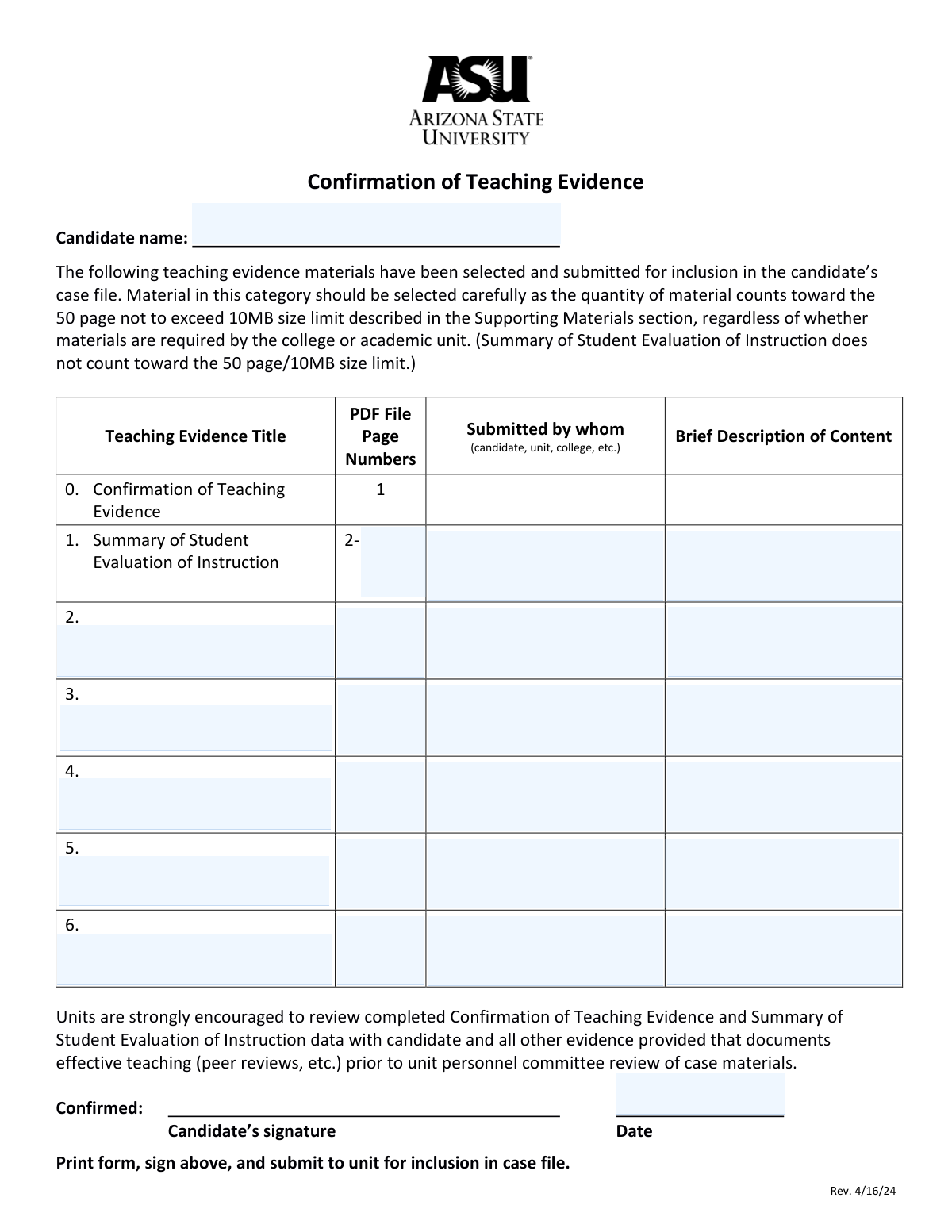
This form serves as an official record and checklist for teaching evidence materials included in a candidate's case file for academic review, such as for tenure or promotion. It ensures that both the candidate and the reviewing unit have a clear, agreed-upon inventory of the submitted documents, like student evaluations and peer reviews. Today, this form can be filled out quickly and accurately using AI-powered services like Instafill.ai, which can also convert non-fillable PDF versions into interactive fillable forms.
Our AI automatically handles information lookup, data retrieval, formatting, and form filling.
It takes less than a minute to fill out Confirmation of Teaching Evidence using our AI form filling.
Securely upload your data. Information is encrypted in transit and deleted immediately after the form is filled out.
Form specifications
| Form name: | Confirmation of Teaching Evidence |
| Number of pages: | 1 |
| Language: | English |
| Categories: | ACH forms |
Instafill Demo: How to fill out PDF forms in seconds with AI
How to Fill Out Confirmation of Teaching Evidence Online for Free in 2026
Are you looking to fill out a CONFIRMATION OF TEACHING EVIDENCE form online quickly and accurately? Instafill.ai offers the #1 AI-powered PDF filling software of 2026, allowing you to complete your CONFIRMATION OF TEACHING EVIDENCE form in just 37 seconds or less.
Follow these steps to fill out your CONFIRMATION OF TEACHING EVIDENCE form online using Instafill.ai:
- 1 Navigate to Instafill.ai and upload or select the Confirmation of Teaching Evidence form.
- 2 Use the AI assistant to automatically fill in your full name as the candidate.
- 3 For each piece of teaching evidence you are submitting, enter its title, the corresponding PDF file page numbers, the submitting party (e.g., candidate, unit), and a brief description of the content.
- 4 Carefully review all the listed evidence to ensure the details are accurate and complete, paying attention to the page and size limits mentioned on the form.
- 5 Once all information is verified, download the completed form.
- 6 Print the form, provide your signature, and write the current date in the designated fields.
- 7 Submit the signed document to your unit for inclusion in your official case file as instructed.
Our AI-powered system ensures each field is filled out correctly, reducing errors and saving you time.
Why Choose Instafill.ai for Your Fillable Confirmation of Teaching Evidence Form?
Speed
Complete your Confirmation of Teaching Evidence in as little as 37 seconds.
Up-to-Date
Always use the latest 2026 Confirmation of Teaching Evidence form version.
Cost-effective
No need to hire expensive lawyers.
Accuracy
Our AI performs 10 compliance checks to ensure your form is error-free.
Security
Your personal information is protected with bank-level encryption.
Frequently Asked Questions About Form Confirmation of Teaching Evidence
This form acts as a table of contents to officially document the teaching evidence you are submitting for your case file review, such as for promotion or tenure.
This form must be completed by the 'candidate,' who is typically a faculty member or instructor undergoing a formal review of their teaching performance by their academic unit.
Yes, your supporting materials are limited to 50 pages and a file size of 10MB. However, the 'Summary of Student Evaluation of Instruction' does not count toward this limit.
After completing the form, you must print it, provide a physical signature, and submit it to your academic unit for inclusion in your official case file.
No, the form explicitly states that the 'Summary of Student Evaluation of Instruction' is exempt from the 50-page and 10MB size limit.
Provide a short, clear summary of the evidence, such as 'Peer review of course XYZ from Fall 2023' or 'Syllabus and sample assignments for course ABC.'
This indicates the source of the document. In most cases, you will enter 'candidate,' but if your department or college provides a document for your file, you would list 'unit' or 'college.'
The form allows for five additional pieces of evidence, so you must carefully select your most impactful materials to fit within the provided space and the overall page limit.
Your signature confirms that you have reviewed the list and agree that it accurately represents the teaching evidence being submitted for review in your case file.
Yes, services like Instafill.ai use AI to accurately auto-fill form fields from your existing data, which can save you time and help prevent errors.
You can use a service like Instafill.ai to complete the form online. Simply upload the PDF, and the platform will allow you to type directly into the fields and save your completed document.
If your PDF is not interactive, you can use a tool like Instafill.ai to convert it into a fillable form. This allows you to easily type your information into the fields before printing it for your signature.
You can include materials that document effective teaching, such as peer reviews, syllabi, sample assignments, or other evidence as required or recommended by your college or academic unit.
Compliance Confirmation of Teaching Evidence
Validation Checks by Instafill.ai
1
Candidate Name Completeness
This check ensures that the 'Candidate Name' field is not empty. The candidate's name is a primary identifier for the form and is essential for associating the submitted evidence with the correct individual. If this field is left blank, the submission will be rejected, and the user will be prompted to provide the candidate's full name.
2
Confirmation Date Format and Validity
This validation verifies that the 'Confirmation Date' is entered in a valid format (e.g., MM/DD/YYYY) and represents an actual calendar date. It prevents the entry of nonsensical dates like '02/30/2024' or improperly formatted text. A failed validation will require the user to correct the date to a standard format to ensure accurate record-keeping.
3
Confirmation Date is Not in the Future
This check ensures the 'Confirmation Date' is not a date in the future. A confirmation is an action that has already occurred, so the date must be the current date or a past date. This prevents logical errors in the documentation. If a future date is entered, an error message will be displayed, asking the user to provide a valid date.
4
Required Page Numbers for Student Evaluation Summary
This validation confirms that the 'PDF File Page Numbers' field for the 'Summary of Student Evaluation of Instruction' is filled out. Since this is a mandatory, pre-listed item, its location in the PDF must be specified for the file to be considered complete. Failure to provide page numbers will block submission until the information is entered.
5
Page Number Field Format
This check validates that all 'Page Numbers' fields follow an accepted format, such as a single number (e.g., '5'), a range (e.g., '8-12'), or a comma-separated list (e.g., '5, 8, 12'). It prevents invalid characters or formats, ensuring the data is machine-readable and clear. An invalid format will trigger an error, requiring the user to correct the entry.
6
Logical Page Number Range
For any 'Page Numbers' field entered as a range (e.g., '10-15'), this validation ensures the starting page number is not greater than the ending page number. An entry like '15-10' is illogical and likely a typo. If this validation fails, the user will be prompted to correct the page range to ensure accuracy.
7
Evidence Row Completeness
This check ensures that for any evidence row (from 2 to 6) where a 'Title' is provided, the corresponding 'PDF File Page Numbers', 'Submitted by whom', and 'Brief Description' fields are also filled. This rule enforces the submission of complete records for each piece of evidence listed. An incomplete row will be flagged, and the user must either complete the missing fields or clear the entire row.
8
Sequential Evidence Row Entry
This validation verifies that the teaching evidence rows are filled in sequential order without gaps. For example, if Row 4 is filled out, Row 3 must also be filled out. This maintains a clean, ordered list and prevents accidental skipping of rows. If a gap is detected, the system will alert the user to fill the preceding empty row first.
9
Total Page Count Limit
This validation calculates the total number of pages from the evidence listed in rows 2 through 6 and checks if it exceeds the 50-page limit mentioned in the form instructions. The 'Summary of Student Evaluation of Instruction' is correctly excluded from this count. This check helps the candidate adhere to submission guidelines. If the count exceeds 50, a warning will be displayed.
10
Submitted By Field Content Check
This validation ensures that if a 'Submitted by whom' field is filled, it contains meaningful text and is not just whitespace. This is important for attribution and understanding the origin of the evidence. While it allows free text, it prevents empty or useless entries. A failed check would prompt the user to enter a valid submitter like 'candidate', 'unit', or 'college'.
11
Description Field Minimum Length
This check verifies that any provided 'Brief Description of Content' meets a minimum character threshold (e.g., 10 characters). This encourages users to provide a meaningful and useful description rather than a single, uninformative word. If a description is too short, the user will be prompted to provide more detail.
12
No Overlapping Page Numbers
This validation checks for and flags any overlapping page numbers between different teaching evidence entries. For instance, if one entry lists pages '5-10' and another lists '8-12', it indicates a potential conflict or error in documenting the evidence. The system would highlight the conflicting entries for the user to review and correct.
Common Mistakes in Completing Confirmation of Teaching Evidence
Candidates often overlook the explicit instruction that teaching evidence materials (excluding the Student Evaluation Summary) must not exceed 50 pages or 10MB. This happens when they focus on including all possible evidence rather than carefully selecting the most impactful items. Submitting oversized files can lead to automatic rejection by the system or require the review committee to manually truncate the submission, potentially removing crucial evidence.
The form explicitly states to 'Print form, sign above, and submit'. A common mistake is to fill out the form digitally and submit it without a signature, assuming a digital submission is sufficient. An unsigned form is considered incomplete and invalid, which will halt the case file review process until a properly signed copy is provided, causing significant delays.
A frequent error is including the 'Summary of Student Evaluation of Instruction' in the 50-page limit calculation. The instructions clearly state this summary does not count toward the limit. This misunderstanding causes candidates to unnecessarily omit other valuable evidence to stay within what they believe is the page limit, weakening their overall case file.
In the 'PDF File Page Numbers' column, users often enter incorrect page numbers, use inconsistent formats (e.g., 'p. 5' vs '5-7'), or fail to provide a range for multi-page documents. This forces reviewers to waste time searching for the correct evidence and can lead to materials being overlooked entirely. To avoid this, double-check all page numbers against the final PDF and use a consistent format like '12-15' for ranges.
The 'Brief Description of Content' field is often filled with generic, uninformative text like 'Syllabus' or 'Peer Review'. This provides no context for the reviewer. A strong description should be concise yet specific, such as 'Syllabus for graduate seminar PSYC 550, Fall 2023' to help the committee quickly understand the evidence's relevance. AI-powered tools like Instafill.ai can help generate concise, relevant descriptions based on document titles.
Candidates sometimes enter a nickname, a shortened name, or omit their middle initial in the 'Candidate name' field. For an official academic case file, it is critical to use the full, legal name as it appears in university records. Using an incorrect name can cause administrative confusion, filing errors, and delays in processing the case file.
The instruction to print and sign suggests this form may be a non-fillable PDF. A common mistake is to attempt to type directly onto the flat PDF, resulting in misaligned, unprofessional-looking text. This can be avoided by using a tool like Instafill.ai, which can convert non-fillable PDFs into interactive, fillable forms, ensuring a clean and professional submission.
The form pre-populates the 'Summary of Student Evaluation of Instruction' title, but candidates must still fill in the corresponding page numbers, submitter, and description. It's a common oversight to leave these adjacent fields blank, assuming the pre-filled title is sufficient. This results in an incomplete record and may require the form to be returned for correction.
In the 'Submitted by whom' column, candidates may enter inconsistent values like 'Me,' their own name, or the department name interchangeably. The form expects a consistent role, such as 'candidate,' 'unit,' or 'college.' This lack of standardization can create confusion about the provenance of the evidence and should be avoided by using the suggested role-based terms for every entry.
A critical error occurs when the information on the form (titles, page numbers) does not perfectly match the submitted PDF file. This often happens after last-minute changes to the evidence packet without updating this confirmation form. This discrepancy undermines the credibility of the submission and can cause reviewers to disregard evidence they cannot locate, significantly weakening the candidate's case.
Saved over 80 hours a year
“I was never sure if my IRS forms like W-9 were filled correctly. Now, I can complete the forms accurately without any external help.”
Kevin Martin Green
Your data stays secure with advanced protection from Instafill and our subprocessors

Robust compliance program
Transparent business model
You’re not the product. You always know where your data is and what it is processed for.
ISO 27001, HIPAA, and GDPR
Our subprocesses adhere to multiple compliance standards, including but not limited to ISO 27001, HIPAA, and GDPR.
Security & privacy by design
We consider security and privacy from the initial design phase of any new service or functionality. It’s not an afterthought, it’s built-in, including support for two-factor authentication (2FA) to further protect your account.
Fill out Confirmation of Teaching Evidence with Instafill.ai
Worried about filling PDFs wrong? Instafill securely fills confirmation-of-teaching-evidence forms, ensuring each field is accurate.