
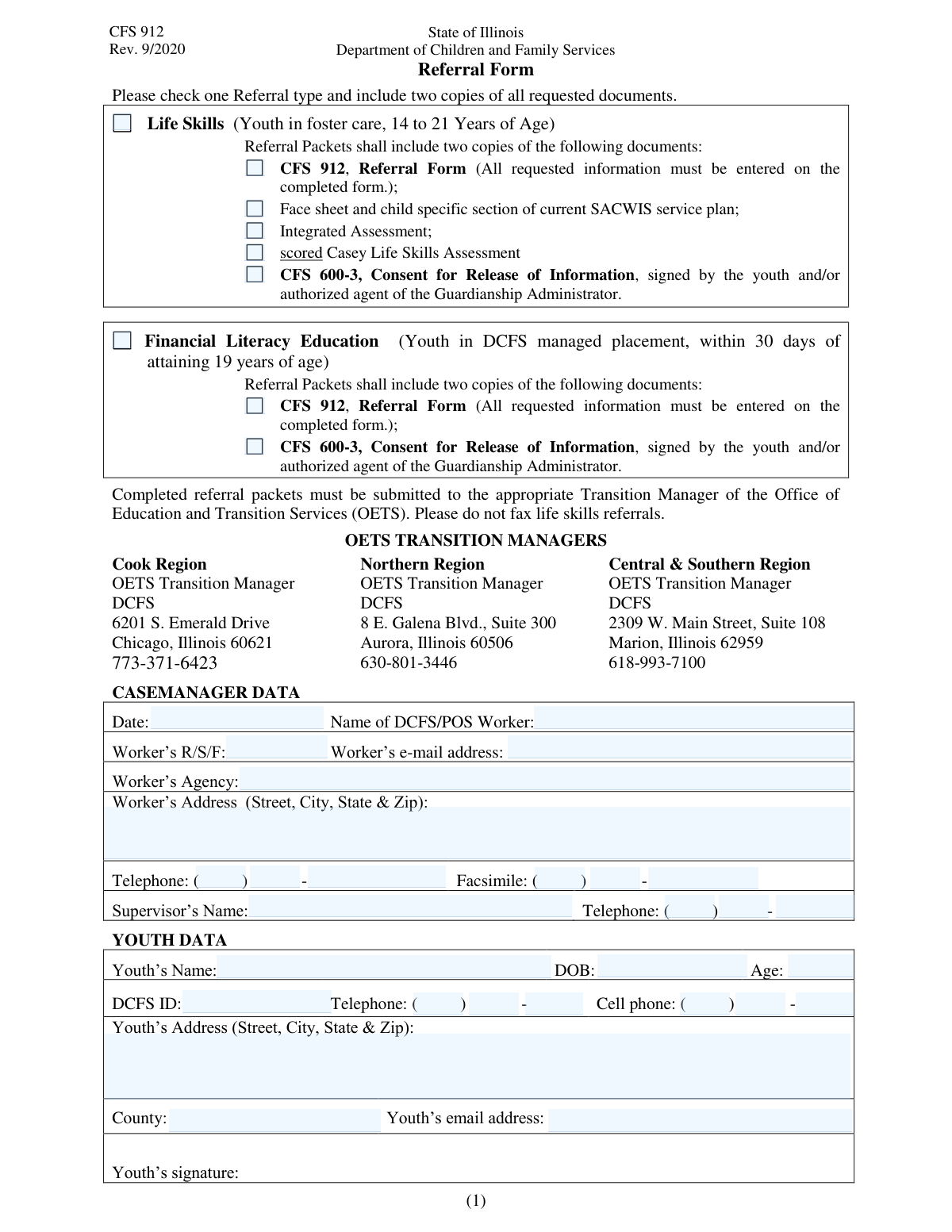
Yes! You can use AI to fill out CFS 912, Referral Form for Life Skills/Financial Literacy Education
Don't type 58 fields by hand. Tell our AI about yourself, or upload a document you already have, and it fills every field in seconds. You check it, then download, print or sign.
The AI does the filling. You just check it.
No typing into boxes, nothing to install.
What this form asks for
The AI fills all of it, from your answers or your documents.
The AI checks your answers before you download
12 checks built for this form, so a wrong date or a missing answer is caught before anyone else sees it.
This check ensures that at least one of the main referral type checkboxes ('Life Skills' or 'Financial Literacy Education') is selected. A form submitted without a referral type is incomplete and cannot be processed. If validation fails, the user should be prompted to select a referral type before the form can be submitted.
Validates that if 'Life Skills' is selected as the referral type, the youth's age is between 14 and 21, inclusive. This is a programmatic requirement for Life Skills services. If the youth's age, calculated from their Date of Birth, falls outside this range, the submission should be flagged with an error explaining the age criteria.
Validates that if 'Financial Literacy Education' is selected, the youth is within 30 days of attaining 19 years of age, based on their Date of Birth and the form submission date. This rule ensures referrals meet the strict timing requirements for this specific program. A failure would indicate the referral is either too early or too late and should be rejected or reviewed.
This check compares the entered 'Youth's Age' with the age calculated from the 'Date of Birth' field. This ensures data accuracy and consistency across related fields. If the entered age does not match the calculated age, an error message should prompt the user to correct either the age or the date of birth.
Ensures that the document checklist sections for 'Life Skills' and 'Financial Literacy Education' are only active and available if their corresponding referral type is selected. This prevents irrelevant information from being entered and reduces user confusion. If a referral type is unchecked, its associated document fields should be disabled or hidden.
This validation ensures that the 'Type of Disability' text field is required and must be filled out if the 'Yes' checkbox for 'Physical Disability Information' is selected. It is crucial to capture the specific disability to arrange for necessary accommodations. If 'Yes' is checked and the description is empty, the form submission should be blocked until the information is provided.
And 6 more checks
- Mutually Exclusive Disability Status
- Email Address Format Validation
- Phone Number Component Validation
- Mandatory Youth and Worker Identification
- DCFS ID Format Validation
- Address Field Completeness
Let AI fill out your CFS 912
No typing. Every field filled in seconds, checked, ready to sign.
How to Fill Out CFS 912 Online for Free in 2026
What the AI walks you through.
- Navigate to Instafill.ai and upload or select the CFS 912 form.
- Indicate the referral type by checking 'Life Skills' or 'Financial Literacy Education' and attach the corresponding required documents.
- Enter the referring DCFS/POS worker's details, including name, agency, contact information, and supervisor's name.
- Provide the youth's complete personal information, such as name, date of birth, DCFS ID, address, and contact details.
- Fill in the sections regarding safety concerns, transportation needs, class availability, and any behavioral or emotional problems.
- Describe the youth's learning style and note any physical disabilities to ensure proper accommodations.
- Review all the information for accuracy, sign where necessary, and submit the completed referral packet as instructed.
Common Mistakes in Completing CFS 912
The ones the AI is built to catch.
Incomplete Document Checklist for Referral Type
Fragmented Phone Number Entry Error
Vague Descriptions in Critical Narrative Fields
Inconsistent Age and Date of Birth
Overlooking Multiple Copy Requirements
Submitting the Cover Sheet Without Attached Documents
Illegible Handwriting on a Printed Form
Lingering Data in Conditional Fields
Mixing Up Contact Information Sections
Frequently Asked Questions About CFS 912
Is it really free for 7 days?
Can I fill other forms too?
How do I cancel?
How does the AI fill out CFS 912?
What happens to my information?
How complex is CFS 912 to fill out?
What is the purpose of this referral form?
Who is eligible for a Life Skills referral?
Who is eligible for the Financial Literacy Education program?
What documents do I need to include for a Life Skills referral?
What documents are required for a Financial Literacy Education referral?
What kind of information should I put in the 'Safety Related Concerns' section?
The form asks about transportation. What information is needed?
What should I do if I don't have all the required information, like the youth's email address?
How do I indicate the youth's learning style?
Where do I send the completed form and its attachments?
Can I use an AI tool to help me fill out this form?
How can I fill out this form online using Instafill.ai?
What should I do if the PDF version of this form I have isn't fillable?
Can I refer a youth to both programs at the same time with one form?
Get your CFS 912 filled out by AI
$0 today. Cancel before Nov 10 and you pay nothing.
Other forms like this one
financial forms: Form 8938, Statement of Specified Foreign Financial Assets, Form 12.902(b), Family Law Financial Affidavit (Short Form), Form I-361, Affidavit of Financial Support, Form CJA-23, Financial Affidavit, Form 107, Statement of Financial Affairs, SBA Form 413, Personal Financial Statement, Personal Financial Statement (REV 06/2018) – Northwest Federal Credit Union, NSFAS Consent Form (National Student Financial Aid Scheme) – APP2026, International Student Application for Financial Aid 2026-2027 (International Student Application for Financial Assistance 2026-2027), State of Hawaii Department of Commerce and Consumer Affairs (DCCA) Contractors License Board – Application for Contractor's License (Sole Proprietor) (CT-36) with supporting forms (Experience Certificate CT-03, Contractors Financial Statement CT-02, and Chronological History of Projects/Project List), Colorado Judicial Department Form JDF 1111SC (Form 35.2), Sworn Financial Statement, Northwestern University Office of Undergraduate Financial Aid International Applicant Document Upload Cover Sheet, Vanguard Super Apply for a financial hardship payment, Selbstauskunft/ Vermögensaufstellung (Financial Self-Disclosure/Statement of Assets), Selbstauskunft - vertraulich - (Financial Self-Disclosure), Empower Financial Services, Inc. (EFSI) and Empower Advisory Group, LLC (EAG) Form CRS Customer Relationship Summary, Rollover Form (Principal Financial Group), Principal Financial 401(k) Withdrawal Form, Principal Financial Group Pre-Approved Basic Savings Plan - Plus, DoD 7000.14-R, Department of Defense Financial Management Regulation, Volume 12: Special Accounts, Funds and Programs
education forms: Form 1099-Q, Payments From Qualified Education Programs, Illinois State Board of Education (ISBE) Application for Employment (ISBE 61-08), Prudential Group Disability Insurance – Education and Employment History Form (GL.2009.009, Ed. 06/2017), Income-Driven Repayment (IDR) Plan Request (PAYE, IBR, and ICR) — William D. Ford Federal Direct Loan (Direct Loan) Program and Federal Family Education Loan (FFEL) Programs (OMB No. 1845-0102), The Prudential Insurance Company of America Group Disability Insurance – Education and Employment History Form (GL.2009.009, Ed. 06/2017), Prudential Group Disability Insurance – Education and Employment History Form (GL.2009.009, Ed. 06/2017), Melbourne City College Australia Education Agent Application Form, Leaders Institute of Training and Education (LITE) Application for Enrolment, Loan Rehabilitation: Income and Expense Information, William D. Ford Federal Direct Loan (Direct Loan) Program/Federal Family Education Loan (FFEL) Program, Confirmation of Teaching Evidence, Form K-908-2085-E, Designation of Education Decision-Maker, Blue Shield of California Promise Health Plan Health Education Referral Form, Form 2, Certification of Professional Education, Form SY029 - Claim for Pensioner Education Supplement, Claim for Pensioner Education Supplement, Education Course Costs and Student Details Claim Form, CFS 431-1, Summary of the Child's Educational and Developmental Status
LITE forms: Leaders Institute of Training and Education (LITE) Application for Enrolment
referral forms: Cigna Out-of-Network Referral Disclosure Form, Form 3949-A, Information Referral, Pacific Gastroenterology Associates Referral Form, Health Net Applied Behavioral Analysis (ABA) Recommendation and Referral Form (24-989), Community-Based Adult Services (CBAS) Referral/Request for CDET Assessment, Applied Behavioral Analysis (ABA) Referral Form, Blue Shield of California Promise Health Plan Referral Form, Case Management Referral Form, Potential Quality Issue (PQI) Referral Form, Community Resource Referral Form, Blue Shield of California Promise Health Plan Health Education Referral Form, Form 13I-15a, Building Department Referral Form, Generation Health Clinic Virtual English Program Referral Form, Medical Genetics Clinic General Referral Form, BCCH Dentistry Referral Form, DCFS Suspected Child Abuse/Neglect Referral Information Request, Intact Family Services Child Care Referral Form, Intensive Placement Stabilization (IPS) Referral Form
Let AI fill out your CFS 912
Your trial starts once a card is added. You pay nothing before Nov 10.
Our AI already knows this form, all 58 fields of it. Skip the typing: tell it about yourself, or upload what you have, and it fills the whole form in seconds.
- AI fills every field on both pages, checkboxes included
- No typing into boxes: answer a few questions, or upload a document you already have, an old copy of this form, a photo of a document
- The AI checks the answers; you review and change anything before you download
- Download the finished PDF, print it, or sign it online
- Encrypted, and never used to train AI
Cancel before Nov 10 and you pay nothing.
A card is needed to start the trial. Cancel in two clicks from your account.
Terms · Privacy