Yes! You can use AI to fill out Intensive Placement Stabilization (IPS) Referral Form

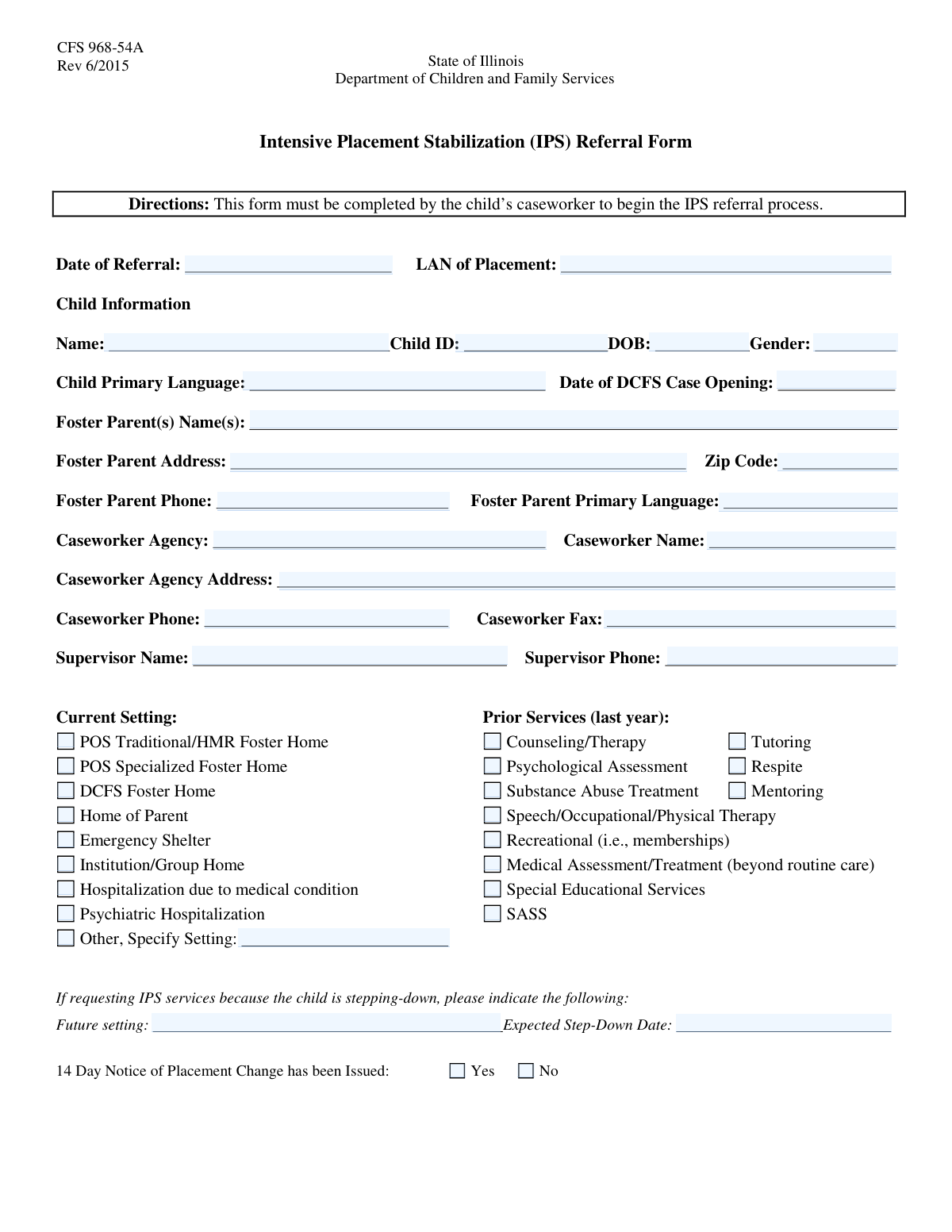
The Intensive Placement Stabilization (IPS) Referral Form is a comprehensive document used by child welfare caseworkers to refer a child for specialized services aimed at preventing a foster care placement disruption. It gathers detailed information about the child, their history, current placement, and the specific challenges leading to the referral. Today, this form can be filled out quickly and accurately using AI-powered services like Instafill.ai, which can also convert non-fillable PDF versions into interactive fillable forms.
IPS Referral Form is part of the referral forms category on Instafill.
Our AI automatically handles information lookup, data retrieval, formatting, and form filling.
It takes less than a minute to fill out IPS Referral Form using our AI form filling.
Securely upload your data. Information is encrypted in transit and deleted immediately after the form is filled out.

Form specifications

Form name: Intensive Placement Stabilization (IPS) Referral Form
Number of fields: 120
Number of pages: 3
Filled form examples: Form IPS Referral Form Examples
Language: English
main-image

Instafill Demo: How to fill out PDF forms in seconds with AI

How to Fill Out IPS Referral Form Online for Free in 2026

Are you looking to fill out a IPS REFERRAL FORM form online quickly and accurately? Instafill.ai offers the #1 AI-powered PDF filling software of 2026, allowing you to complete your IPS REFERRAL FORM form in just 37 seconds or less.
Follow these steps to fill out your IPS REFERRAL FORM form online using Instafill.ai:
  1. 1 Navigate to Instafill.ai and upload or select the IPS Referral Form from the template library.
  2. 2 Use the AI assistant to pre-fill your caseworker and agency information, such as name, agency, address, and contact details.
  3. 3 Enter the child's complete information, including their name, ID, date of birth, and DCFS case opening date.
  4. 4 Provide detailed information about the foster parent(s), their address, and contact preferences.
  5. 5 Check the appropriate boxes to indicate the child's current setting, prior services received, and any requested collateral information.
  6. 6 Carefully complete the 'Referral Description' section, outlining the presenting issues and the specific assistance sought from IPS.
  7. 7 Review all sections for accuracy, then use the platform to securely sign and submit the completed referral form to the designated IPS program.

Our AI-powered system ensures each field is filled out correctly, reducing errors and saving you time.

Why Choose Instafill.ai for Your Fillable IPS Referral Form Form?

Speed

Complete your IPS Referral Form in as little as 37 seconds.

Up-to-Date

Always use the latest 2026 IPS Referral Form form version.

Cost-effective

No need to hire expensive lawyers.

Accuracy

Our AI performs 10 compliance checks to ensure your form is error-free.

Security

Your personal information is protected with bank-level encryption.

Frequently Asked Questions About Form IPS Referral Form

This form is used to refer a child within the DCFS or foster care system for specialized assistance, likely from an Intensive Placement Services (IPS) provider. It gathers comprehensive information about the child's background, current situation, and service history to determine eligibility and needs.

The child's primary caseworker or a representative from the foster care agency is typically responsible for completing and submitting this referral form.

LAN stands for Local Area Number. It is a specific identifier for the geographic or administrative region of the child's placement location.

In this section, you should clearly describe the presenting issues that necessitate the referral, specify what services or outcomes you are seeking, and explain why the referral is being made at this particular time.

SASS stands for Screening, Assessment, and Support Services. It is a crisis mental health service program for children, and you should check this box if the child has received these services within the last year.

If a step-down date for a future placement is not yet confirmed, you can leave it blank or write 'To Be Determined'. It is important to provide the most accurate information available at the time of submission.

After submission, the referral is reviewed to determine if it will be accepted. If not accepted, the case may be referred back to DCFS or the foster care agency with specific recommendations for other services.

Yes, you may need to provide additional documents like psychological assessments, counseling reports, or a DCFS Client Service Plan. Use the request sections on the form to indicate what you are providing or requesting.

Yes, services like Instafill.ai use AI to accurately auto-fill form fields from your existing records, which can save you significant time and help reduce data entry errors.

You can use a service like Instafill.ai to complete this form online. Simply upload the form, and the platform allows you to fill it out, save your progress, and download the completed document.

If you have a non-fillable or 'flat' PDF, you can use a tool like Instafill.ai to convert it into an interactive, fillable form. This allows you to type your answers directly into the fields.

'Current Setting' refers to where the child is living at the time of the referral, such as a foster home or group home. 'Future Setting' is the anticipated placement for the child after the current intervention or placement period ends.

This detailed contact information is crucial for ensuring that the new service provider can efficiently reach the foster parents and caseworker to coordinate care and schedule appointments without delay.

Compliance IPS Referral Form
Validation Checks by Instafill.ai

1
Date of Birth vs. Referral Date Logic
This check ensures the child's 'Date of Birth' is chronologically before the 'Date of Referral'. This is a critical logical validation to ensure the child existed at the time of the referral. If the Date of Birth is on or after the Date of Referral, the form submission should be blocked with an error message prompting the user to correct the dates.
2
DCFS Case Opening Date Chronology
This validation verifies that the 'DCFS Case Opening Date' occurs after the child's 'Date of Birth' and on or before the 'Date of Referral'. This maintains a logical timeline of events, ensuring the case was opened for a living child and before the current referral was made. An invalid date sequence would indicate a significant data entry error and must be corrected.
3
Phone Number Formatting
This check validates that all phone number fields (Foster Parent, Caseworker, Supervisor, Work, Home, Other) adhere to a standard 10-digit format, such as (XXX) XXX-XXXX or XXX-XXX-XXXX. Proper formatting is essential for ensuring the numbers are usable for communication and can be correctly parsed by automated systems like dialers or contact databases. An invalid format would prevent submission until corrected.
4
Foster Parent Zip Code Format
This validation ensures the 'Foster Parent Zip Code' field contains a valid 5-digit or 9-digit (ZIP+4) US postal code. Correct zip codes are crucial for mail delivery, location-based service mapping, and data accuracy. The system should reject any entry that does not match the numeric 5-digit or 5-digit-4-digit pattern.
5
Exclusive Current Setting Selection
This check ensures that only one checkbox from the 'Current Setting' group can be selected at a time. A child can only have one primary placement setting, so allowing multiple selections would create ambiguous and inaccurate data. If a user tries to select a second option, the system should either deselect the first or show an error message.
6
Conditional 'Other Setting' Description
This validation rule requires the 'Other Setting Description' text field to be filled out if the 'Other, Specify Setting' checkbox is checked. It is important to capture the details of non-standard placements for proper case understanding. If the checkbox is selected but the description is empty, the form should not be submittable.
7
Mutually Exclusive 14-Day Notice
This check ensures that the user can only select one of the two options: 'Yes, 14 Day Notice Issued' or 'No, 14 Day Notice Issued'. These two states are mutually exclusive, and selecting both would be a logical contradiction. The form should enforce a radio button-like behavior for these checkboxes to prevent invalid data.
8
Conditional 'Reason for Referral Back'
This validation requires the 'Reason for Referral Back to Agency' field to be completed if the 'Refer back to DCFS or foster care agency' checkbox is selected. This reason is critical for administrative tracking and ensuring the referring agency understands why the case was not accepted. The submission should fail if the box is checked but the reason is not provided.
9
Required Child Information Completeness
This check verifies that the 'Child's Name', 'Child ID', and 'Date of Birth' fields are all filled in. These fields represent the minimum essential information needed to uniquely identify the child and process the referral. Submitting the form without this core data would render the record incomplete and unusable.
10
Contact Time Window Logic
This validation ensures that for any contact time provided (Work, Home, Other), the specified 'End Time' is after the 'Start Time'. An end time that is before the start time is a logical impossibility and indicates a data entry error. This check prevents the storage of nonsensical availability windows, ensuring the contact information is reliable.
11
Conditional Contact Availability
This rule ensures that if a phone number is provided in the 'Work Phone Number', 'Home Phone Number', or 'Other Phone Number' fields, the corresponding 'Best Time To Call' start and end times must also be filled out. Providing a number without availability information makes it less useful. This validation prompts the user to supply complete contact details.
12
Conditional Request Specificity
This validation applies to several request sections, such as 'Psychological Assessments' or 'Counseling Reports'. It mandates that if a user checks a box to request a type of document (e.g., 'Psychological Assessments'), the corresponding 'Type' field (e.g., 'Psychological Assessment Type') must be filled in. This ensures that requests are specific and actionable, avoiding vague submissions that require follow-up.
13
Referral Description Presence
This check ensures the 'Referral Description' text area is not empty. This field contains the core justification for the referral, explaining the presenting issues and the specific assistance being sought. Without this narrative, the receiving party cannot properly evaluate or act on the referral, making it a critical required field.
14
Mutually Exclusive Referral Outcome
This validation ensures that the checkboxes for 'Acceptance of the referral' and 'Refer back to DCFS or foster care agency' are mutually exclusive. A referral can either be accepted or referred back, but not both. This check prevents contradictory data entry on the outcome of the referral processing.

Common Mistakes in Completing IPS Referral Form

Providing an Incomplete or Vague Referral Description

The 'Referral Description' field is critical for triage, yet it is often filled out with vague or incomplete information. Users may fail to address all parts of the prompt, such as the specific assistance being sought or the reason for the referral's timing. This leads to processing delays, rejection of the referral, or misallocation of resources. To avoid this, carefully structure your response to answer each question posed in the prompt, providing specific and actionable details.

Using Nicknames Instead of Full Legal Names

For fields like 'Child's Name' and 'Foster Parent Name(s)', users sometimes enter nicknames or shortened names out of habit. This creates significant problems for official record-matching, background checks, and linking to existing case files, potentially delaying services. Always use the full, legal name as it appears on official documents like birth certificates or social security cards to ensure accuracy.

Failing to Complete Conditional 'Specify' Fields

A very common error is checking a box like 'Other, Specify Setting' or selecting 'Psychological Assessments' but then failing to provide the required details in the corresponding text field. This leaves critical information missing and requires a follow-up call, delaying the entire process. To prevent this, always double-check that when you select an option that requires more detail, you fill in the associated description box completely.

Omitting or Transposing Critical ID Numbers

The 'Child ID' is the primary key for linking the referral to the correct case file. Users may forget to include it, not have it readily available, or accidentally transpose digits when typing. An incorrect or missing ID can make it impossible to process the referral or lead to the creation of a duplicate record, causing significant delays. Always verify this number carefully before entry. AI-powered form fillers like Instafill.ai can help by saving and accurately auto-filling such critical information.

Using Inconsistent or Incorrect Date Formats

Fields like 'Date of Birth', 'Date of Referral', and 'DCFS Case Opening Date' are often filled with incorrect formats (e.g., DD-MM-YY instead of MM/DD/YYYY) or simple typos. This causes data validation errors and can lead to incorrect age calculations or case timelines. To avoid this, use the standard MM/DD/YYYY format and double-check all dates for accuracy. AI-powered tools like Instafill.ai can help prevent this by automatically formatting dates correctly as you type.

Providing an Incomplete Foster Parent Address

When entering the 'Foster Parent Address', people often forget to include essential details like an apartment number, suite, or the correct nine-digit zip code. This can lead to returned mail, failed home visit attempts, and delays in service delivery. Always provide the full, complete address as recognized by the postal service to ensure reliable communication. If the form is a non-fillable PDF, tools like Instafill.ai can convert it into a fillable version, making it easier to enter and review information.

Incomplete Contact Availability Information

A frequent mistake is to provide a phone number but leave the 'Best Time To Call' or 'Available Days' fields blank. This forces caseworkers to play phone tag, leading to inefficient communication and delays in connecting with the family. To ensure you can be reached promptly, always specify the exact days and time windows you are available for each phone number provided.

Misinterpreting Technical Acronyms and Jargon

The form uses agency-specific acronyms like 'LAN of Placement' and 'SASS'. Applicants who are unfamiliar with this jargon may leave the field blank, guess, or enter incorrect information. This can result in the referral being misrouted, delayed, or processed based on faulty data. If an acronym is unclear, it's best to contact the agency for clarification before submitting the form.

Making Ambiguous Selections on Checklists

The 'Home Available Days' checklist has two 'T's (for Tuesday/Thursday) and two 'S's (for Sunday/Saturday), which can easily cause confusion and lead to incorrect data entry. A user might intend to select Thursday but accidentally check the box for Tuesday, resulting in failed contact attempts. When faced with ambiguous options, be extra careful or even add a clarifying note in a relevant text field if possible.

Inaccurately Reporting Prior Services History

The 'Prior Services' section requires checking boxes for a wide range of services the child may have received in the last year. Users may forget a service, misremember the timeline, or misinterpret a category, leading to an inaccurate history. This can negatively impact the assessment of the child's needs and the type of new services offered. It is crucial to review the child's records carefully to ensure all prior services are reported accurately.
Saved over 80 hours a year

“I was never sure if my IRS forms like W-9 were filled correctly. Now, I can complete the forms accurately without any external help.”

Kevin Martin Green

Your data stays secure with advanced protection from Instafill and our subprocessors

Robust compliance program

Transparent business model

You’re not the product. You always know where your data is and what it is processed for.

ISO 27001, HIPAA, and GDPR

Our subprocesses adhere to multiple compliance standards, including but not limited to ISO 27001, HIPAA, and GDPR.

Security & privacy by design

We consider security and privacy from the initial design phase of any new service or functionality. It’s not an afterthought, it’s built-in, including support for two-factor authentication (2FA) to further protect your account.

Fill out IPS Referral Form with Instafill.ai

Worried about filling PDFs wrong? Instafill securely fills intensive-placement-stabilization-ips-referral-form forms, ensuring each field is accurate.