Yes! You can use AI to fill out Blue Shield of California Promise Health Plan Referral Form

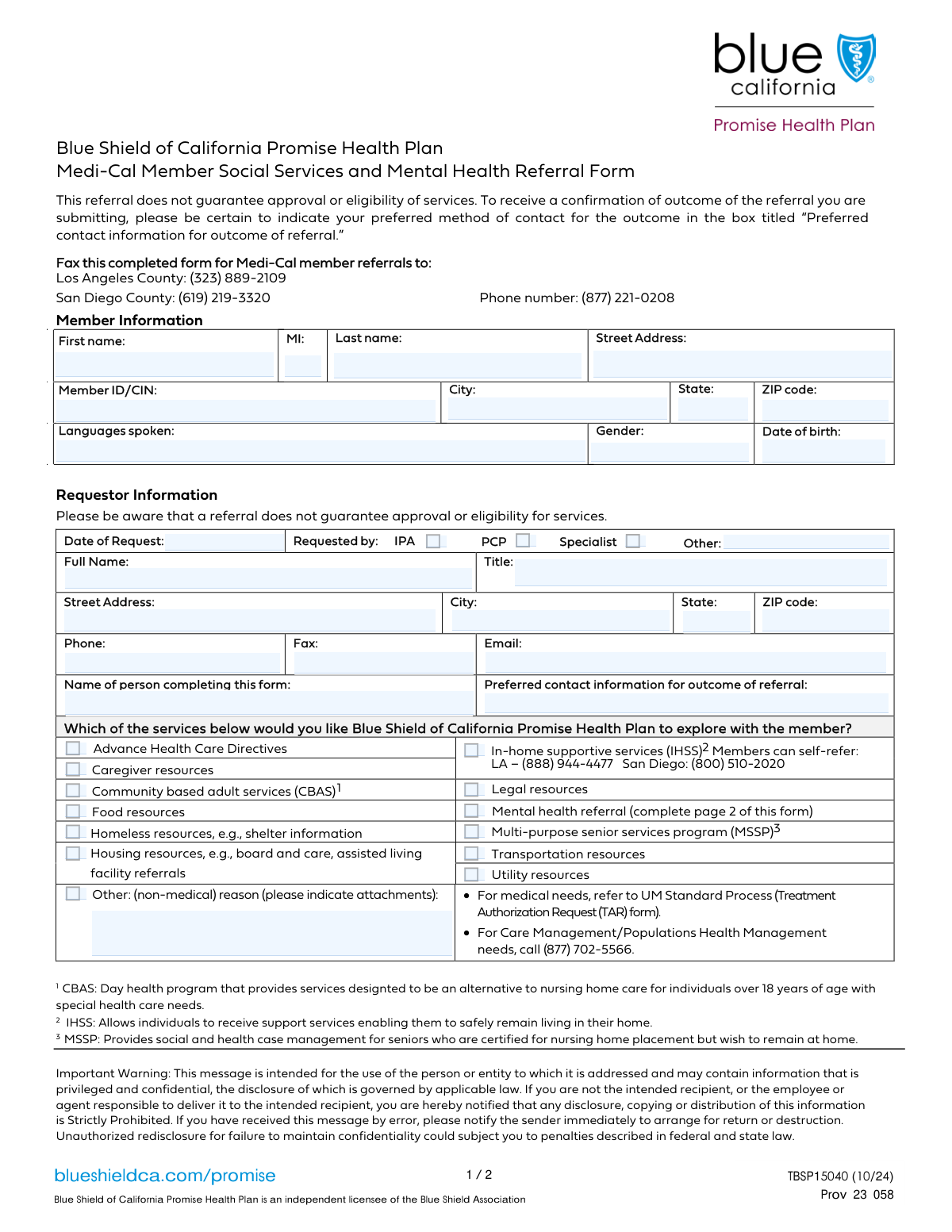
The Blue Shield of California Promise Health Plan Referral Form is a document used by healthcare professionals to refer members to a wide range of supportive services. It facilitates access to community resources, mental health care, in-home support, and other non-medical assistance, ensuring comprehensive care that addresses social determinants of health. Completing this form accurately is vital for connecting patients with the necessary resources to improve their overall well-being, and today this form can be filled out quickly and accurately using AI-powered services like Instafill.ai, which can also convert non-fillable PDF versions into interactive fillable forms.
Our AI automatically handles information lookup, data retrieval, formatting, and form filling.
It takes less than a minute to fill out CBAS/MSSP Referral Form using our AI form filling.
Securely upload your data. Information is encrypted in transit and deleted immediately after the form is filled out.

Form specifications

Form name: Blue Shield of California Promise Health Plan Referral Form
Number of fields: 63
Number of pages: 2
Language: English
Categories: Blue Shield of California forms, health forms
main-image

Instafill Demo: How to fill out PDF forms in seconds with AI

How to Fill Out CBAS/MSSP Referral Form Online for Free in 2026

Are you looking to fill out a CBAS/MSSP REFERRAL FORM form online quickly and accurately? Instafill.ai offers the #1 AI-powered PDF filling software of 2026, allowing you to complete your CBAS/MSSP REFERRAL FORM form in just 37 seconds or less.
Follow these steps to fill out your CBAS/MSSP REFERRAL FORM form online using Instafill.ai:
  1. 1 Navigate to Instafill.ai and upload or select the Blue Shield of California Promise Health Plan Referral Form.
  2. 2 Use the AI assistant to automatically fill in the member's personal details, including name, address, date of birth, and Member ID/CIN.
  3. 3 Provide the information for the requesting provider or organization, such as name, title, and complete contact details.
  4. 4 Check the boxes corresponding to the specific services being requested for the member, such as CBAS, MSSP, mental health, housing, or food resources.
  5. 5 If making a mental health referral, complete the detailed second page covering behavioral symptoms, impairments, and current medications.
  6. 6 Review all the information populated by the AI for accuracy, make any necessary edits, and then securely sign and date the form.
  7. 7 Download, print, or submit the completed referral form directly as instructed by Blue Shield of California Promise Health Plan.

Our AI-powered system ensures each field is filled out correctly, reducing errors and saving you time.

Why Choose Instafill.ai for Your Fillable CBAS/MSSP Referral Form Form?

Speed

Complete your CBAS/MSSP Referral Form in as little as 37 seconds.

Up-to-Date

Always use the latest 2026 CBAS/MSSP Referral Form form version.

Cost-effective

No need to hire expensive lawyers.

Accuracy

Our AI performs 10 compliance checks to ensure your form is error-free.

Security

Your personal information is protected with bank-level encryption.

Frequently Asked Questions About Form CBAS/MSSP Referral Form

This form is used to request referrals for a Blue Shield of California Promise Health Plan member to various non-medical and behavioral health services, such as housing resources, food assistance, or mental health support.

This form is typically completed by a healthcare provider, such as a Primary Care Physician (PCP), specialist, or an Independent Practice Association (IPA), on behalf of a member. The form has a specific field to note who is completing it if they are different from the person requesting the services.

The member information section is for the patient for whom services are being requested. The requestor section is for the healthcare provider or professional who is making the referral on the member's behalf.

You will need the member's full name, address, date of birth, and their Member ID or CIN. You will also need the requestor's professional details, including name, title, and contact information.

If you are requesting a mental health referral, you must check the 'Mental health referral' box on page 1. You are then required to complete the detailed behavioral health section on page 2 of the form.

This means your practice must confirm that the member is eligible for Medi-Cal mental health services before submitting the referral. You must check this box to attest that this verification has been completed.

If the specific service you are requesting is not listed, check the 'Other: (non-medical) reason' box. You must then provide a detailed description in the 'Other Non-Medical Reason' field and indicate if you are including any supporting attachments.

The 'Requestor' is the healthcare professional officially making the referral, such as the doctor. The 'Person Completing Form' might be an administrative assistant or office staff member filling out the paperwork on the requestor's behalf.

No, the 'Current Medications' field is only required if you are making a mental health referral. This information is part of the behavioral health assessment on page 2 of the form.

The form does not specify submission instructions or processing times. Please refer to the Blue Shield of California Promise Health Plan provider portal or contact their provider services for submission details and turnaround estimates.

Yes, you can use AI-powered services like Instafill.ai to help fill out this form. These tools can accurately auto-fill fields from your records, which helps save time and reduce errors.

To fill this form online, you can upload it to the Instafill.ai platform. The AI will identify the fields, allowing you to fill them interactively and save or print the completed document.

If your PDF is not fillable, you can use a service like Instafill.ai. It can convert flat, non-interactive PDFs into fillable forms that you can easily complete on your computer.

Compliance CBAS/MSSP Referral Form
Validation Checks by Instafill.ai

1
Validates Member ID/CIN is present and correctly formatted
This check ensures the 'Member ID/CIN' field is not empty, as it is the primary key for identifying the member within the health plan's system. It can also be configured to verify that the ID conforms to a specific format (e.g., a certain number of digits or alphanumeric pattern). A missing or invalid ID prevents the system from locating the member's records, which would halt the referral process entirely.
2
Ensures Member Date of Birth is a valid past date
This validation confirms that the 'Member Date of Birth' is a real, properly formatted date that occurs before the current date. This check is crucial for preventing data entry errors, such as typos or future dates, which would make the member's age and eligibility calculations incorrect. An invalid birth date can lead to incorrect clinical assessments and service denials.
3
Validates the Date of Request is not in the future
This check ensures the 'Date of Request' is today's date or a date in the recent past, but not a future date. Submitting a request for a future date is illogical and almost always indicates a user error. This validation maintains data integrity and prevents the processing of chronologically impossible requests.
4
Ensures at least one Requestor Role is specified
This validation verifies that at least one of the requestor type checkboxes ('IPA', 'PCP', 'Specialist') is selected or the 'Requestor Other Role' text field is filled. This information is critical for understanding the origin of the referral and for routing communication and follow-up tasks. If no role is provided, the context of the request is lost, and it cannot be properly processed.
5
Validates Requestor Phone Number format
This check verifies that the 'Requestor Phone Number' field, if filled, adheres to a standard 10-digit format (e.g., (XXX) XXX-XXXX or XXXXXXXXXX). Correctly formatted numbers are essential for system processing and ensuring successful communication with the requestor. An invalid format would cause automated dialing or contact record systems to fail.
6
Validates the Requestor Email Address format
This validation ensures that the value entered in the 'Requestor Email Address' field follows the standard '[email protected]' format. A valid email is crucial for sending automated confirmations and communicating the outcome of the referral electronically. An invalid email address would lead to communication failures and significant delays in the referral lifecycle.
7
Requires description if 'Other (non-medical) reason' is selected
This check enforces a rule that if the 'Other: (non-medical) reason' checkbox is selected, the corresponding 'Other Non-Medical Reason' text field must not be empty. This provides necessary context for a generic 'Other' category, which is otherwise meaningless for the reviewing team. Failure to provide a description would require manual follow-up to understand the member's needs, delaying care.
8
Enforces required fields when 'Mental health referral' is checked
This is a critical logical check that activates if the 'Mental health referral' box is checked. It validates that the 'Confirm Eligibility Verification' box is also checked and that at least one 'Behavioral Health Symptoms' checkbox is selected. This ensures that the necessary prerequisites and justifications for a specialized mental health referral are provided upfront, preventing incomplete submissions.
9
Ensures 'Type of Substance' is specified if a substance use disorder is indicated
This validation triggers if the 'Substance use disorder - Yes' checkbox is selected, requiring that the 'Type of Substance' text field be filled out. Knowing the specific substance(s) is vital for the clinical team to assess the situation and arrange the most appropriate treatment and resources. A referral without this detail is clinically incomplete and less effective.
10
Prevents contradictory selections for Substance Use Disorder
This check verifies that the user has not selected both 'Substance use disorder - Yes' and 'Substance use disorder - No' simultaneously. These options are mutually exclusive, and selecting both indicates a user error that creates ambiguity. Enforcing this rule maintains data integrity and prevents confusion in the patient's clinical information.
11
Ensures Member's full address is provided
This validation checks that the 'Member Street Address', 'Member City', 'Member State', and 'Member ZIP Code' fields are all filled out. A complete address is fundamental for member identification, service eligibility verification (which can be location-based), and mailing important correspondence. An incomplete address can halt the entire referral process until the information is corrected.
12
Validates Member and Requestor ZIP Code format
This check ensures that both 'Member ZIP Code' and 'Requestor ZIP Code' fields contain a valid 5-digit or 9-digit (ZIP+4) numeric format. Correct ZIP codes are essential for address validation, mail delivery, and geographic-based service routing. An invalid format would cause address lookups to fail and could result in misrouted information.
13
Validates that at least one service or resource has been requested
This check verifies that at least one checkbox from the list of available services (e.g., 'Caregiver resources', 'Food resources', 'Mental health referral') has been selected. A form submitted with no services requested is an empty request and serves no purpose. This validation prevents the submission of blank or incomplete forms that would waste administrative time.
14
Ensures essential Requestor contact details are present
This validation confirms that the 'Requestor Full Name' and 'Requestor Phone Number' fields are not empty. This information is the primary means of contacting the person who initiated the referral for clarifications or to provide an outcome. Without this data, follow-up communication is impossible, potentially jeopardizing the member's care coordination.

Common Mistakes in Completing CBAS/MSSP Referral Form

Entering an Incorrect or Incomplete Member ID/CIN

Users often mistype the Member ID or CIN, confuse it with another number, or leave it partially filled. This is a critical error as the ID is the primary patient identifier, and any mistake will lead to an immediate rejection or significant processing delays. To avoid this, carefully double-check the member's insurance card for the exact ID and format before entry. AI-powered form filling tools like Instafill.ai can help prevent these errors by validating the number format against known patterns.

Confusing 'Requestor' with 'Person Completing Form'

The form distinguishes between the 'Requestor Full Name' (the clinician making the referral) and the 'Name of Person Completing Form' (e.g., an admin). A common mistake is entering the same name in both fields, which can cause confusion about who to contact for clinical versus administrative questions. To prevent this, ensure the correct individual's name is entered in each field based on their specific role in the referral process.

Incomplete Mental Health Referral Section

A frequent error is checking the 'Mental health referral' box but then failing to complete the required conditional fields on page 2, such as 'Behavioral Health Symptoms' and 'Current Medications'. This makes the referral incomplete and forces the processing team to request the missing information, delaying care. To avoid this, treat the mental health checkbox as a trigger to meticulously fill out all subsequent related sections. If the form is a non-fillable PDF, tools like Instafill.ai can convert it into an interactive version with clear sections to prevent omissions.

Providing Vague Preferred Contact Information

In the 'Preferred Contact Information for Outcome of Referral' field, users often write generic instructions like 'call the office' or provide only a general phone number. This is inefficient and can lead to the outcome notification not reaching the correct person in a timely manner. To avoid this, specify a direct contact method, such as a direct phone line with an extension, a specific email address, or a secure fax number dedicated to receiving referral outcomes.

Incorrect Date Formatting or Usage

Users may enter the 'Member Date of Birth' and 'Date of Request' in inconsistent formats (e.g., MM-DD-YY vs. MM/DD/YYYY) or accidentally enter the current date in the DOB field. These errors cause data validation failures and can delay the verification of member eligibility. Always use the standard MM/DD/YYYY format and double-check that the correct date is entered in its corresponding field. Smart tools like Instafill.ai can automatically format dates correctly to prevent such issues.

Selecting 'Other' Without Providing an Explanation

The form includes several 'Other' options, such as 'Other: (non-medical) reason' and 'Other Behavioral Health Symptoms'. A common mistake is to check the 'Other' box but forget to fill in the corresponding text field with a required description. This leaves the reviewer with no information about the specific need, making the selection useless and requiring follow-up. Always provide a clear and concise explanation whenever an 'Other' category is selected.

Inconsistent Substance Use Disorder Information

In the behavioral health section, a user might check 'Substance use disorder - Yes' but then fail to specify the 'Type of Substance'. This contradictory or incomplete information requires follow-up to clarify the patient's actual condition, delaying the clinical review. To ensure accuracy, if a substance use disorder is present, you must check 'Yes' and always provide details in the 'Type of Substance' field.

Failing to Specify the Requestor's Role

The form requires identifying the requestor's role by checking 'IPA', 'PCP', or 'Specialist'. People sometimes overlook these checkboxes entirely, leaving the relationship between the requestor and the member unclear. This information is vital for understanding the context of the referral and for proper internal routing. Always check the box that accurately describes the professional role of the person initiating the referral.

Omitting the 'Current Medications' List for Mental Health Referrals

When submitting a mental health referral, the 'Current Medications' list is a critical component for clinical review, yet it is often left blank or marked as 'N/A' incorrectly. A complete medication list is essential for assessing potential drug interactions and understanding the member's full clinical picture. For every mental health referral, a comprehensive list of all current medications, including dosage if known, must be provided to avoid delays and requests for more information.

Missing Eligibility Confirmation for Mental Health Referrals

For mental health referrals, the form requires the user to check a box confirming that the member's Medi-Cal eligibility for mental health services has been verified. This step is frequently missed, creating an administrative hurdle and preventing the referral from being processed until eligibility is confirmed. To avoid this, always verify eligibility before completing the form and check the 'Confirm Eligibility Verification' box as required. AI-powered tools like Instafill.ai can help by highlighting mandatory conditional fields to ensure they are not missed.
Saved over 80 hours a year

“I was never sure if my IRS forms like W-9 were filled correctly. Now, I can complete the forms accurately without any external help.”

Kevin Martin Green

Your data stays secure with advanced protection from Instafill and our subprocessors

Robust compliance program

Transparent business model

You’re not the product. You always know where your data is and what it is processed for.

ISO 27001, HIPAA, and GDPR

Our subprocesses adhere to multiple compliance standards, including but not limited to ISO 27001, HIPAA, and GDPR.

Security & privacy by design

We consider security and privacy from the initial design phase of any new service or functionality. It’s not an afterthought, it’s built-in, including support for two-factor authentication (2FA) to further protect your account.

Fill out CBAS/MSSP Referral Form with Instafill.ai

Worried about filling PDFs wrong? Instafill securely fills blue-shield-of-california-promise-health-plan-referral-form forms, ensuring each field is accurate.