
Yes! You can use AI to fill out Intact Family Services Child Care Referral Form
Don't type 44 fields by hand. Tell our AI about yourself, or upload a document you already have, and it fills every field in seconds. You check it, then download, print or sign.
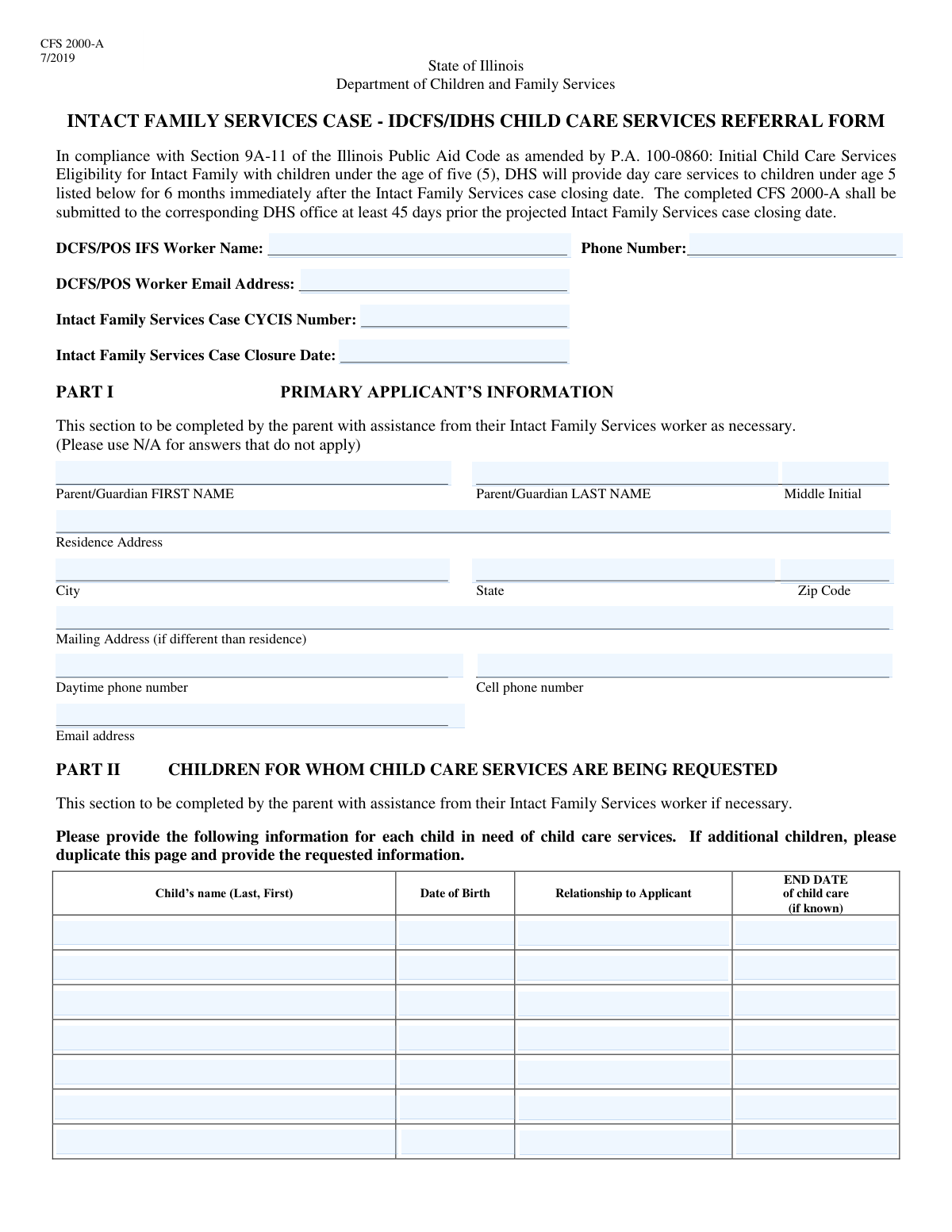
The AI does the filling. You just check it.
No typing into boxes, nothing to install.
What this form asks for
The AI fills all of it, from your answers or your documents.
The AI checks your answers before you download
14 checks built for this form, so a wrong date or a missing answer is caught before anyone else sees it.
This check verifies that the 'Worker Phone Number' field contains a valid 10-digit US phone number. It should accept common formats like (XXX) XXX-XXXX, XXX-XXX-XXXX, or XXXXXXXXXX. This is crucial for ensuring the referral worker can be contacted. A failed validation would prevent form submission and prompt the user to correct the number.
This validation ensures the 'Worker Email Address' conforms to the standard email format, such as '[email protected]'. It checks for the presence of an '@' symbol and a valid domain structure. Correct email formatting is essential for digital communication and sending case updates or confirmations. If the format is invalid, the system will reject the entry and ask for a correction.
This check validates that the 'Case Closure Date' is a valid date and occurs after the current date of form submission. Since this is a projected closure date, it cannot logically be in the past. This ensures logical consistency in case planning. An invalid or past date would trigger an error, requiring the user to enter a valid future date.
This validation confirms that both the 'Primary Applicant First Name' and 'Primary Applicant Last Name' fields are filled out. These fields are fundamental for identifying the individual applying for services. Leaving either blank would result in an incomplete and unusable record, so the form submission will be blocked until both are provided.
This check ensures the 'Residence Zip Code' field contains a valid 5-digit or 9-digit (ZIP+4) numeric code. A valid zip code is critical for address verification, mail delivery, and determining service eligibility based on location. An incorrect format would cause an error, prompting the user to enter a valid US zip code.
This validation rule checks that at least one of the phone number fields for the primary applicant—'Daytime Phone Number' or 'Cell Phone Number'—is filled in. Having a reliable contact number is essential for communication regarding the application. If both fields are left empty, the form cannot be submitted, and the user will be prompted to provide at least one number.
And 8 more checks
- Child Name 'Last, First' Format Validation
- Child's Date of Birth Logical Check
- Child Information Section Completeness
- Requires Information for at Least One Child
- Child Care End Date vs. Case Closure Date
- Child Care End Date Follows Child's Birth Date
- Primary Applicant Middle Initial Format
- Residence State Abbreviation Validation
Let AI fill out your IFS Child Care Referral
No typing. Every field filled in seconds, checked, ready to sign.
How to Fill Out IFS Child Care Referral Online for Free in 2026
What the AI walks you through.
- Navigate to Instafill.ai and upload or select the Intact Family Services Child Care Referral Form.
- Provide the DCFS/POS IFS worker's name, contact details, and the case CYCIS number in the designated fields.
- Enter the primary applicant's full name, residence and mailing addresses, and contact information.
- Complete the sections for each child requiring care, including their full name, date of birth, and relationship to the applicant.
- Carefully review all the information auto-filled and entered on the form for accuracy and completeness.
- Securely submit the completed referral form to the appropriate department or agency as instructed.
Common Mistakes in Completing IFS Child Care Referral
The ones the AI is built to catch.
Inconsistent Child Name Formatting
Entering Incorrect Case Information
Using Ambiguous or Incorrect Date Formats
Improperly Filling the Mailing Address Section
Omitting Apartment or Unit Numbers
Leaving 'If Known' Fields Blank
Transposing Applicant's First and Last Names
Missing or Incomplete Referral Worker Information
Illegible Handwriting on Printed Forms
Omitting the Middle Initial
Frequently Asked Questions About IFS Child Care Referral
Is it really free for 7 days?
Can I fill other forms too?
How do I cancel?
How does the AI fill out IFS Child Care Referral?
What happens to my information?
How complex is IFS Child Care Referral to fill out?
What is the purpose of this form?
Who needs to fill out this form?
What is the 'Case CYCIS Number' and where do I find it?
Do I need to fill out the 'Mailing Address' section if it's the same as my home address?
What if I don't know the 'Child Care End Date' for my child?
What should I do if I need to request services for more than seven children?
How should I enter my child's name in the form?
What documents do I need to provide with this form?
What happens after this form is submitted?
Can I use an AI tool to help me fill out this form?
How can I fill this form out online?
The PDF I have isn't fillable. What can I do?
Get your IFS Child Care Referral filled out by AI
$0 today. Cancel before Nov 10 and you pay nothing.
Other forms like this one
CAR forms: Form SSA-44, Medicare Income-Related Monthly Adjustment Amount - Life-Changing Event, Form I-90, Application to Replace Permanent Resident Card, Form 2441, Child and Dependent Care Expenses, Form WH-380-E, Certification of Health Care Provider, Form 4137, Social Security and Medicare Tax on Unreported Tip Income, Form 8959, Additional Medicare Tax, Form 8919, Uncollected Social Security and Medicare Tax, Form CMS-1763, Request for Termination of Medicare Coverage, Form CMS-855O, Medicare Enrollment Application, Form CMS-460, Medicare Participation Agreement, Form CMS-4040, Request for Enrollment in Medicare Part B, Form WH-380-F, Certification of Health Care Provider, Form W-10, Dependent Care Provider’s Identification, Form 1099-K, Payment Card and Third Party Network Transactions, Form CMS-40B, Application for Enrollment in Medicare Part B, Form SS-5-FS, Application for a Social Security Card, Form REG 195, Disabled Person Placard, Form AR-11, Alien's Change of Address Card, Form I-905, Application for Authorization to Issue Certification for Health Care Workers, Form I-131A, Application for Carrier Documentation
child care forms: Form 2441, Child and Dependent Care Expenses, California Department of Social Services (CDSS) Community Care Licensing Child Care Forms Packet (LIC 9150, LIC 282, LIC 627, LIC 700, LIC 995A, CDPH 286, LIC 9227), State of Illinois Department of Human Services (IDHS) – Bureau of Child Care and Development Child Care Application (Form IL444-3455), State of Illinois Department of Children and Family Services Medical Report on an Adult in a Child Care Facility (CFS 602), Carer Payment and Carer Allowance – Medical Report (SA431) for a child under 16 years, Pennsylvania Application for Subsidized Child Care (CY 868), Form OCFS-6001, Child Care Provider, Staff, Volunteer and Household Member Information, Form T-3, Children with Special Health Care Needs (CSHCN) Services Program Application, Physician's Report for Child Care, Relationship and Child Care Arrangement Details Form, Level of Care (LOC) Assessment for Children in Foster Care, Department of Children and Family Services (DCFS) Day Care Service Eligibility Application, Authorization for Background Check for Child Care, JFS 01443, Request for Payment for Special Services for Children in Out-of-Home Care, Form AD 838, Statement of Monies Paid for 24-Hour Care of Children, Superior Court of New Jersey Certification in Support of Request for Excuse from Jury Service: Personal Obligation to Provide Care for Minor Child(ren)
L.A. Care forms: Form SSA-44, Medicare Income-Related Monthly Adjustment Amount - Life-Changing Event, Form 2441, Child and Dependent Care Expenses, Form WH-380-E, Certification of Health Care Provider, Form 4137, Social Security and Medicare Tax on Unreported Tip Income, Form 8959, Additional Medicare Tax, Form 8919, Uncollected Social Security and Medicare Tax, Form CMS-1763, Request for Termination of Medicare Coverage, Form CMS-855O, Medicare Enrollment Application, Form CMS-460, Medicare Participation Agreement, Form CMS-4040, Request for Enrollment in Medicare Part B, Form WH-380-F, Certification of Health Care Provider, Form W-10, Dependent Care Provider’s Identification, Form CMS-40B, Application for Enrollment in Medicare Part B, Form I-905, Application for Authorization to Issue Certification for Health Care Workers, DHS-6696-ENG, Minnesota Health Care Programs Application (MNsure/DHS), California Department of Social Services (CDSS) Community Care Licensing Child Care Forms Packet (LIC 9150, LIC 282, LIC 627, LIC 700, LIC 995A, CDPH 286, LIC 9227), State of Illinois Department of Human Services (IDHS) – Bureau of Child Care and Development Child Care Application (Form IL444-3455), Form CH-006: PA-BH-Res-PCS, Oregon Behavioral Health Support Program Plan of Care Authorization (Plan of Care Request for Behavioral Health Residential or Personal Care Services), State of Illinois Department of Children and Family Services Medical Report on an Adult in a Child Care Facility (CFS 602), Carer Payment and Carer Allowance – Medical Report (SA431) for a child under 16 years
referral forms: Cigna Out-of-Network Referral Disclosure Form, Form 3949-A, Information Referral, Pacific Gastroenterology Associates Referral Form, Health Net Applied Behavioral Analysis (ABA) Recommendation and Referral Form (24-989), Community-Based Adult Services (CBAS) Referral/Request for CDET Assessment, Applied Behavioral Analysis (ABA) Referral Form, Blue Shield of California Promise Health Plan Referral Form, Case Management Referral Form, Potential Quality Issue (PQI) Referral Form, Community Resource Referral Form, Blue Shield of California Promise Health Plan Health Education Referral Form, Form 13I-15a, Building Department Referral Form, Generation Health Clinic Virtual English Program Referral Form, Medical Genetics Clinic General Referral Form, BCCH Dentistry Referral Form, DCFS Suspected Child Abuse/Neglect Referral Information Request, Intensive Placement Stabilization (IPS) Referral Form, CFS 912, Referral Form for Life Skills/Financial Literacy Education
Let AI fill out your IFS Child Care Referral
Your trial starts once a card is added. You pay nothing before Nov 10.
Our AI already knows this form, all 44 fields of it. Skip the typing: tell it about yourself, or upload what you have, and it fills the whole form in seconds.
- AI fills every field on the form, tables and checkboxes included
- No typing into boxes: answer a few questions, or upload a document you already have, an old copy of this form, a photo of a document
- The AI checks the answers; you review and change anything before you download
- Download the finished PDF, print it, or sign it online
- Encrypted, and never used to train AI
Cancel before Nov 10 and you pay nothing.
A card is needed to start the trial. Cancel in two clicks from your account.
Terms · Privacy