Yes! You can use AI to fill out Superior Court of New Jersey Certification in Support of Request for Excuse from Jury Service: Personal Obligation to Provide Care for Minor Child(ren)
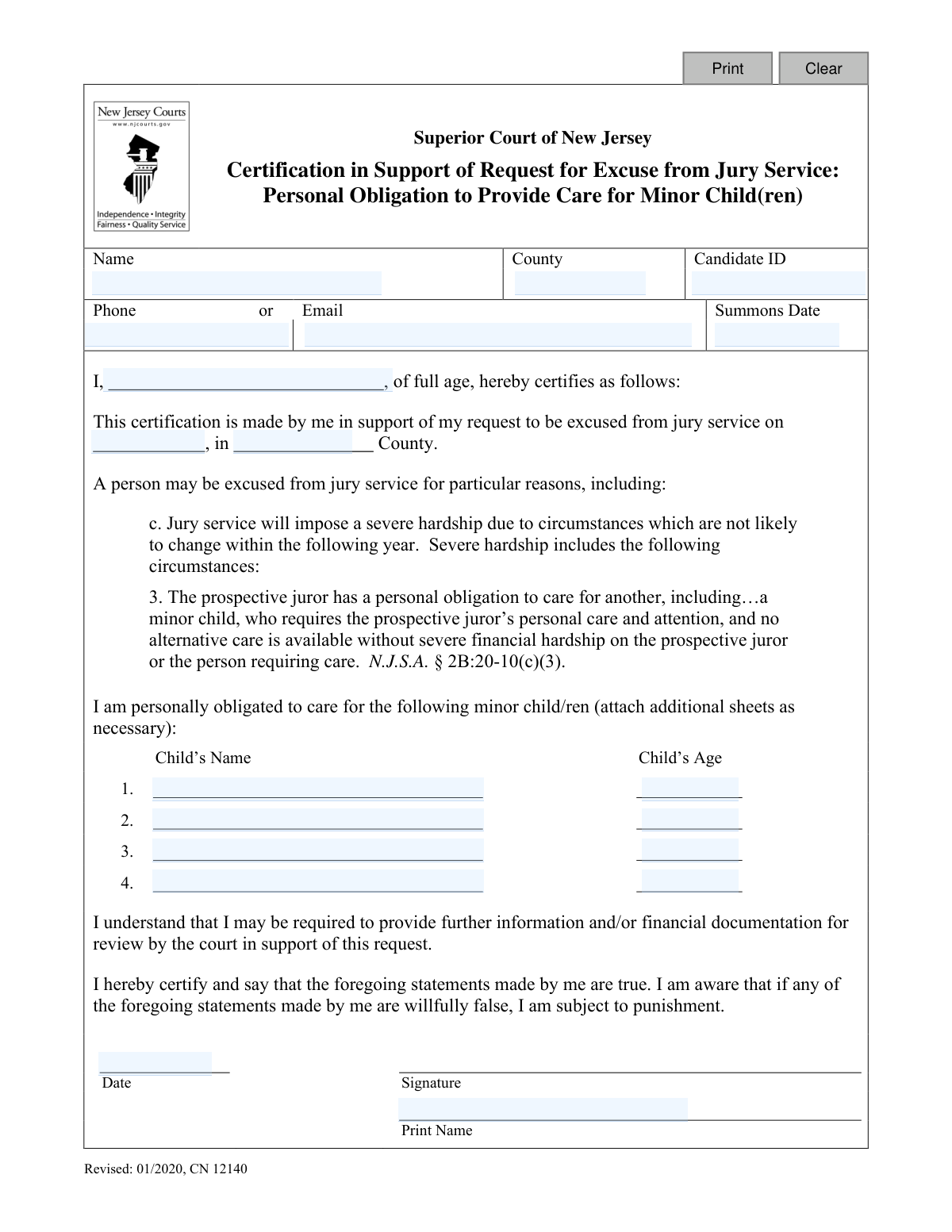
This form, CN 12140, is a legal certification submitted to the Superior Court of New Jersey by a prospective juror requesting to be excused from service. It is used when jury duty would impose a severe hardship because the individual has a personal obligation to care for a minor child and no alternative care is available without significant financial strain. By signing, the individual certifies under penalty of perjury that the information provided is true. Today, this form can be filled out quickly and accurately using AI-powered services like Instafill.ai, which can also convert non-fillable PDF versions into interactive fillable forms.
CN 12140 is part of the
child care forms, New Jersey forms and superior court forms categories on Instafill.
Our AI automatically handles information lookup, data retrieval, formatting, and form filling.
It takes less than a minute to fill out CN 12140 using our AI form filling.
Securely upload your data. Information is encrypted in transit and deleted immediately after the form is filled out.
Form specifications
| Form name: | Superior Court of New Jersey Certification in Support of Request for Excuse from Jury Service: Personal Obligation to Provide Care for Minor Child(ren) |
| Number of fields: | 21 |
| Number of pages: | 1 |
| Language: | English |
Instafill Demo: How to fill out PDF forms in seconds with AI
How to Fill Out CN 12140 Online for Free in 2026
Are you looking to fill out a CN 12140 form online quickly and accurately? Instafill.ai offers the #1 AI-powered PDF filling software of 2026, allowing you to complete your CN 12140 form in just 37 seconds or less.
Follow these steps to fill out your CN 12140 form online using Instafill.ai:
- 1 Navigate to Instafill.ai and upload or select the 'NJ Certification for Jury Excuse (Child Care)' form.
- 2 Provide your personal details, including your full name, Candidate ID, phone or email, and summons date as found on your jury summons.
- 3 Enter the county where you are summoned for jury service.
- 4 In the designated section, list the full name and age of each minor child you are personally obligated to care for.
- 5 Carefully review the certification statement, which affirms that your statements are true and that you understand the penalties for providing false information.
- 6 Use the AI tool to securely e-sign and date the certification, then type your printed name.
- 7 Download the completed form to print and mail, or submit it electronically according to the instructions provided by the county court.
Our AI-powered system ensures each field is filled out correctly, reducing errors and saving you time.
Why Choose Instafill.ai for Your Fillable CN 12140 Form?
Speed
Complete your CN 12140 in as little as 37 seconds.
Up-to-Date
Always use the latest 2026 CN 12140 form version.
Cost-effective
No need to hire expensive lawyers.
Accuracy
Our AI performs 10 compliance checks to ensure your form is error-free.
Security
Your personal information is protected with bank-level encryption.
Frequently Asked Questions About Form CN 12140
This form is used to request an excuse from jury service in the Superior Court of New Jersey because you have a personal obligation to care for a minor child and cannot find alternative care without severe financial hardship.
You are eligible if you are the primary caregiver for one or more minor children and arranging alternative care during your jury service would cause a severe financial hardship for you or your family.
You will need your jury summons to find your Candidate ID and Summons Date. You also need to provide your personal contact information and the names and ages of the minor children you care for.
Your Candidate ID is a unique identification number printed on the jury summons you received in the mail from the Superior Court of New Jersey.
This is determined on a case-by-case basis by the court, but it generally means the cost of alternative care would be a significant financial burden. Be prepared that the court may ask for financial documentation to support your claim.
Initially, you only need to submit the completed and signed form. However, the form notes that the court may contact you later to request further information or financial documents to verify your hardship.
The form has space to list four children. If you are the primary caregiver for more than four, you should list the first four on the form and attach an additional sheet with the names and ages of the other children.
You should submit the completed form to the Jury Management Office for the county in which you were summoned. The contact information and address should be available on your jury summons.
The Jury Management Office will review your certification and determine if you meet the criteria for an excuse. They will then notify you of their decision; until you are officially excused, you must follow all instructions on your summons.
By signing the form, you are certifying that the information is true. The form clearly states that if you make willfully false statements, you are subject to punishment.
Yes, services like Instafill.ai use AI to help you accurately auto-fill form fields with your information, which can save time and reduce the chance of errors.
You can use a service like Instafill.ai to upload the PDF form. The platform allows you to type your information directly into the fields, add a digital signature, and download the completed document for submission.
If you have a non-fillable or 'flat' PDF, you can use a tool like Instafill.ai. It can convert the document into an interactive, fillable form that you can easily complete on your computer or mobile device.
Compliance CN 12140
Validation Checks by Instafill.ai
1
Ensures Candidate ID is Provided
This check verifies that the 'Candidate ID' field (particNo) is not empty. The Candidate ID is a unique identifier used by the court system to track jurors and their summons. Without this ID, the form cannot be associated with the correct juror record, making it impossible to process the excuse request.
2
Requires at least one form of Contact Information
Validates that either the 'Phone' (jurorPh) or 'Email' (jurorEmail) field is filled out. It is crucial for the court to have a method of contacting the juror to confirm receipt of the request, ask for more information, or notify them of the decision. If neither is provided, the juror cannot be contacted, and the request may be denied by default.
3
Validates Summons Date Format and Presence
This check ensures the 'Summons Date' field (summonsDt) is not empty and contains a valid date in a recognized format, such as MM/DD/YYYY. The summons date is the specific date of service for which the excuse is being requested. An invalid or missing date makes the request ambiguous and unprocessable.
4
Verifies at least one Child Name and Age is entered
This validation confirms that the first 'Child’s Name' (childName) and 'Child’s Age' (childAge) fields are both completed. The entire basis for this excuse is the personal obligation to care for a minor child. If no child information is provided, there is no valid reason for the request under this specific certification.
5
Ensures Child's Age is less than 18
This check iterates through all provided child age fields (childAge, childAge2, etc.) and verifies that the value is less than 18. The legal definition of a minor child is used as the basis for this excuse. If an age of 18 or greater is entered, it does not qualify for this specific reason, and the form should be rejected to prevent invalid submissions.
6
Validates Child's Age is a Positive Integer
This check ensures that any value entered into a 'Child's Age' field is a positive integer (e.g., 0, 1, 5, 12). Non-numeric text, decimals, or negative numbers are invalid inputs for an age. This prevents data entry errors and ensures the data is clean and usable for processing the request.
7
Ensures Child Name and Age are provided as a pair
This validation checks that for each child entry (rows 2, 3, and 4), if a name is provided, an age must also be provided, and vice-versa. An incomplete entry for a child is not useful and may indicate a user error. This rule ensures that all listed dependents have complete, associated information.
8
Verifies Signature Date is on or before Summons Date
This check compares the 'Signature Date' (sigDt) with the 'Summons Date' (summonsDt) to ensure the signature date is not after the summons date. A person cannot legally certify a request for an excuse after the jury service has already passed. This maintains the logical and legal integrity of the certification.
9
Confirms Printed Signature Name matches Juror Name
This validation compares the 'Print Name' field in the signature section (sigName) with the 'Name' field at the top of the form (jurorName). The names should match to confirm that the person making the request is the same person certifying the document. A mismatch could indicate an error or that the form is being filled out by someone else, which may require additional scrutiny.
10
Validates Email Address Format
If an email address is provided in the 'Email' field (jurorEmail), this check verifies that it follows a standard email format (e.g., '[email protected]'). This is important to ensure that any electronic communication from the court will be successfully delivered. An invalid format would lead to bounced emails and a communication breakdown.
11
Ensures County is Specified
This check verifies that the 'County' field (typeCounty) has been filled out. Jury service is administered at the county level, so specifying the correct county is essential for routing the request to the appropriate court office. A missing county would make it impossible to direct the form to the right jurisdiction for processing.
12
Ensures Juror Name is Provided
This validation confirms that the main 'Name' field (jurorName) at the top of the form is not empty. This is the primary identifier for the individual submitting the request. Without the juror's name, the form is anonymous and cannot be processed or associated with any summons.
13
Validates Phone Number Format
If a phone number is provided in the 'Phone' field (jurorPh), this check verifies that it conforms to a standard US phone number format (e.g., 10 digits, with or without common separators like dashes or parentheses). This ensures the court has a reliable way to make contact via telephone. An improperly formatted number could prevent communication.
14
Signature Date Presence
This check ensures the 'Date' field in the signature block (sigDt) is filled out. The signature date is a critical component of a certified statement, attesting to when the declaration was made. A missing signature date can invalidate the legal standing of the certification.
Common Mistakes in Completing CN 12140
The Candidate ID is the court's primary identifier for your jury service record. Transposing numbers or omitting the ID can lead to your request being rejected or misfiled, potentially resulting in a failure-to-appear notice. To avoid this, carefully double-check the ID against your summons; AI-powered tools like Instafill.ai can also help by validating the format and ensuring this crucial field is not left blank.
The court uses the provided phone or email to ask follow-up questions or communicate their decision. An incorrect number or an email address that you rarely check could cause you to miss important communications, leading to a denial of your request. Always provide a primary contact method you monitor daily, and consider using a tool like Instafill.ai which can help auto-populate and validate the format of your contact details.
A signature and date are required to legally certify that the statements on the form are true under penalty of punishment. An unsigned or undated form is considered incomplete and will be automatically rejected by the court clerk, forcing you to resubmit and possibly miss the deadline. Always perform a final review to ensure you have physically signed and dated the bottom of the form before submission.
The court needs to verify that the children are minors to grant the excuse based on a personal obligation for care. Simply listing a first name or forgetting to include a child's age weakens the certification and may prompt the court to request more information or deny the excuse outright. Ensure you list the full name and current age for every child requiring your care to present a complete and credible request.
The form requires both a legal signature for attestation and a clearly printed name for legibility and identification. Accidentally printing your name on the signature line invalidates the legal certification, while an illegible signature can cause processing delays. To prevent this, provide a cursive signature on the 'Signature' line and legibly print your full name on the 'Print Name' line as requested.
The New Jersey Superior Court system is organized by county, and the form requests this information in two separate locations. Forgetting to specify the correct county can result in your request being sent to the wrong courthouse, causing significant delays or even getting lost in the system. Double-check that you have entered the correct county name in both the header and the body of the certification text.
This excuse is not granted simply for being a parent, but specifically for jurors who have no other care options available without facing 'severe financial hardship.' Many applicants overlook this critical detail, leading to a denial when the court determines the legal standard is not met. Before submitting, honestly assess if your situation meets this specific requirement, as you may be asked to provide supporting financial documentation.
Your name is required in the header, in the certification statement, and in the signature block. Using a nickname in one field and your full legal name elsewhere can create identity verification issues and slow down processing. To ensure clarity, use your full, consistent legal name as it appears on your jury summons in all designated fields; AI form-filling tools like Instafill.ai can help maintain this consistency automatically.
Many people print this form and fill it out by hand, but illegible handwriting can make it impossible for the court clerk to process. If your name, Candidate ID, or dates cannot be read, the form will be returned or rejected, and you risk being marked as a no-show for jury duty. To avoid this, print clearly in block letters or use a tool like Instafill.ai, which can convert the non-fillable PDF into a digital form you can type into for perfect legibility.
The form requires both the 'Summons Date' at the top and the date of jury service in the main text ('...excused from jury service on...'). Confusing these dates or entering them incorrectly can cause processing delays or rejection as the court may not be able to locate the correct service record. Carefully transcribe the exact date from the jury summons into the correct field, paying close attention to the context of each date.
Saved over 80 hours a year
“I was never sure if my IRS forms like W-9 were filled correctly. Now, I can complete the forms accurately without any external help.”
Kevin Martin Green
Your data stays secure with advanced protection from Instafill and our subprocessors

Robust compliance program
Transparent business model
You’re not the product. You always know where your data is and what it is processed for.
ISO 27001, HIPAA, and GDPR
Our subprocesses adhere to multiple compliance standards, including but not limited to ISO 27001, HIPAA, and GDPR.
Security & privacy by design
We consider security and privacy from the initial design phase of any new service or functionality. It’s not an afterthought, it’s built-in, including support for two-factor authentication (2FA) to further protect your account.
Fill out CN 12140 with Instafill.ai
Worried about filling PDFs wrong? Instafill securely fills superior-court-of-new-jersey-certification-in-support-of-request-for-excuse-from-jury-service-personal-obligation-to forms, ensuring each field is accurate.