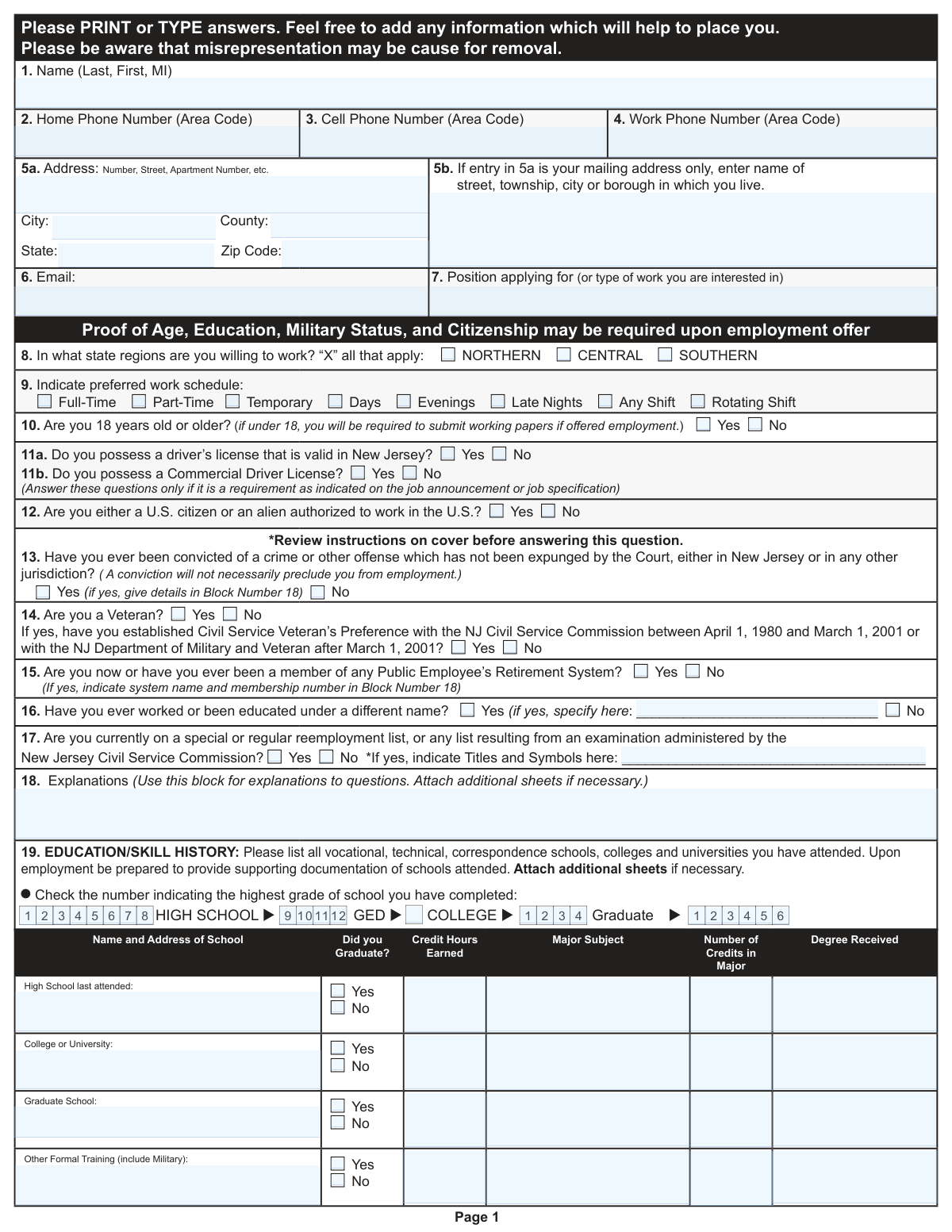
Yes! You can use AI to fill out State of New Jersey Application for Employment (Form DPF-663)

Form DPF-663 is the official Application for Employment used by the State of New Jersey to gather essential information from job candidates. Applicants provide details on their personal background, education, work history, skills, and qualifications to be considered for state government positions. Today, this form can be filled out quickly and accurately using AI-powered services like Instafill.ai, which can also convert non-fillable PDF versions into interactive fillable forms.
Our AI automatically handles information lookup, data retrieval, formatting, and form filling.
It takes less than a minute to fill out DPF-663 using our AI form filling.
Securely upload your data. Information is encrypted in transit and deleted immediately after the form is filled out.

Form specifications

Form name: State of New Jersey Application for Employment (Form DPF-663)
Number of fields: 198
Number of pages: 6
Language: English
main-image

Instafill Demo: How to fill out PDF forms in seconds with AI

How to Fill Out DPF-663 Online for Free in 2026

Are you looking to fill out a DPF-663 form online quickly and accurately? Instafill.ai offers the #1 AI-powered PDF filling software of 2026, allowing you to complete your DPF-663 form in just 37 seconds or less.
Follow these steps to fill out your DPF-663 form online using Instafill.ai:
  1. 1 Navigate to Instafill.ai and upload the DPF-663 form or select it from their template library.
  2. 2 Use the AI assistant to automatically fill in your personal information, including your name, address, and contact details.
  3. 3 Provide your education history, specifying schools attended, degrees earned, and major fields of study.
  4. 4 Detail your complete employment history, including employer names, job titles, responsibilities, and dates of employment for each position.
  5. 5 Answer all eligibility and qualification questions regarding work authorization, veteran status, and driver's license information.
  6. 6 List your professional references and add any supplementary information, such as special skills or certifications, in the designated sections.
  7. 7 Carefully review all the information you've provided for accuracy, then electronically sign and date the application to certify its contents.

Our AI-powered system ensures each field is filled out correctly, reducing errors and saving you time.

Why Choose Instafill.ai for Your Fillable DPF-663 Form?

Speed

Complete your DPF-663 in as little as 37 seconds.

Up-to-Date

Always use the latest 2026 DPF-663 form version.

Cost-effective

No need to hire expensive lawyers.

Accuracy

Our AI performs 10 compliance checks to ensure your form is error-free.

Security

Your personal information is protected with bank-level encryption.

Frequently Asked Questions About Form DPF-663

This is the official Application for Employment for individuals seeking a job with the State of New Jersey. It collects your personal information, qualifications, and work history to be considered for state positions.

Due to the 'Opportunity to Compete Act,' you should not answer Question #13 about criminal history during the initial application process. This question should only be answered after you have completed a first interview, unless specific exceptions apply to the job you are seeking.

No, providing information on the Affirmative Action form is completely voluntary. This form is kept separate from your application and is not used in any hiring decisions; it is for federal and state reporting purposes only.

You generally do not need to attach documents with the initial application, but you should be prepared to provide proof of age, education, military status, and citizenship upon an employment offer. If a specific license or certification is required for the position, you should attach a description of it as instructed in Section 23.

You must inform the prospective employer or HR representative if you need a reasonable accommodation for the interview process or the job itself. The State can only make accommodations when it is aware of a disability, and you may be asked for supporting documentation.

In Section 22, you can indicate whether the State may contact your listed employers. If you do not want them to contact a specific employer, such as your current one, check 'No' and write in the exception.

You should return the completed and signed application to the Personnel Office of the specific State of New Jersey department or agency where you are applying for a position.

Use Section 18 to provide more detailed information for questions you answered 'Yes' to, such as details about a criminal conviction, previous retirement system membership, or other required clarifications. If you run out of space, you can attach additional sheets.

This information is requested to ensure the employer can accurately verify your employment and education history. This is common for individuals who may have records under a maiden name or other previous legal names.

Yes, services like Instafill.ai use AI to help you accurately auto-fill form fields with your information. This can save you significant time and help prevent common errors.

To complete this form online, you can use a service like Instafill.ai. Simply upload the PDF to their platform, and it will become an interactive form that you can type into, sign, and download.

If your PDF is a 'flat' or non-fillable version, you can use a tool like Instafill.ai to convert it into an interactive, fillable form. This allows you to easily type your answers directly into the fields instead of printing and writing by hand.

Use this optional section to highlight qualifications not covered elsewhere in the application. This can include honors, relevant hobbies, publications, volunteer work, or public speaking experience that would help place you in a suitable position.

Compliance DPF-663
Validation Checks by Instafill.ai

1
Validate Phone Number Format
This check ensures that all phone number fields (Home, Cell, Work) are entered in a valid and consistent format, such as (XXX) XXX-XXXX or XXXXXXXXXX. It is important for ensuring that the hiring team can successfully contact the applicant. If the format is invalid, the system should prompt the user to correct the entry before submission.
2
Validate Email Address Format
This check verifies that the value entered in the Email field (Question 6) conforms to the standard email address format (e.g., [email protected]). An accurate email address is critical for sending application updates, interview invitations, and other official correspondence. An invalid format would prevent submission and require the user to enter a correctly formatted email address.
3
Conditional Requirement for Conviction Details
This validation checks if the applicant answered 'Yes' to Question 13 regarding criminal convictions. If 'Yes' is selected, the system must verify that an explanation has been provided in Block Number 18. This is crucial for the HR department to properly assess the applicant's history as it relates to the position. Failure to provide details will result in an error, preventing submission until Block 18 is completed.
4
Conditional Requirement for Retirement System Details
This check is triggered if the applicant answers 'Yes' to Question 15 about membership in a Public Employee's Retirement System. The system must then confirm that the system name and membership number are detailed in Block Number 18. This information is vital for managing benefits and retirement status for former or current public employees. If the details are missing, the application will be flagged as incomplete.
5
Conditional Requirement for Alternate Name
This validation ensures that if an applicant checks 'Yes' for Question 16 ('Have you ever worked or been educated under a different name?'), the corresponding text field for specifying the name(s) is not left empty. This is essential for conducting accurate background and reference checks. If the 'Yes' box is checked but the name field is blank, the user will be prompted to provide the name(s).
6
Employment History Date Chronology
For each employment entry in Section 22, this check verifies that the 'To' date is chronologically later than the 'From' date. This ensures the logical integrity and accuracy of the applicant's work history. An illogical date sequence (e.g., 'To' date before 'From' date) would trigger an error, requiring the applicant to correct the dates before proceeding.
7
Part-Time Hours Specification
In the employment history section (Question 22), this validation ensures that if an applicant checks 'Part Time' for a position, the corresponding 'number of hours per week' field is filled with a numerical value. This detail is important for understanding the applicant's level of experience and commitment in previous roles. If 'Part Time' is selected and the hours field is empty, a prompt will appear asking for the information.
8
Veteran Preference Question Dependency
This check enforces a logical dependency on Question 14. If the applicant answers 'Yes' to 'Are you a Veteran?', the system must then verify that the follow-up question regarding Civil Service Veteran's Preference has also been answered ('Yes' or 'No'). This ensures complete data collection for veteran applicants who may be eligible for preference points. If the first question is 'Yes' and the second is unanswered, the form will be considered incomplete.
9
Signature and Date Completeness
This is a critical check to verify that the applicant has provided a signature and a date at the end of the application. The signature and date certify that the provided information is true and complete, which is a legal requirement for the application to be valid. An application submitted without a signature or date would be rejected immediately as incomplete and legally non-binding.
10
Contact Permission Exception Requirement
This validation rule applies to the employer contact permission question at the end of Section 22. If the applicant selects 'No' to 'May we contact all employer/supervisors listed?', the system must verify that the 'Indicate exceptions' field has been filled out. This is important to respect the applicant's privacy and prevent premature contact with a current employer. If 'No' is checked and no exceptions are listed, an error should prevent submission.
11
Conditional Requirement for Civil Service List Details
This check is triggered if the applicant answers 'Yes' to Question 17, indicating they are on a Civil Service reemployment list. The system must then confirm that the 'Titles and Symbols' field is populated with the relevant information. This data is essential for the personnel office to verify the applicant's status and eligibility. If the field is empty after a 'Yes' response, the user will be prompted to provide the required details.
12
Age Under 18 Flag
This validation checks the response to Question 10 ('Are you 18 years old or older?'). If the applicant selects 'No', the system should flag the application for special review. This is important because employment of minors is subject to specific labor laws, including the requirement for working papers as noted on the form. The flag ensures that HR personnel are aware and can follow the required legal procedures if an offer is considered.
13
Single Selection for Highest Education Level
This check ensures that in Section 19, the applicant has selected only one checkbox to indicate their highest grade of school completed. Allowing multiple selections would create ambiguous data. This validation maintains data integrity and provides a clear understanding of the applicant's educational attainment. If more than one box is checked, the system should display an error and require the user to select only one.
14
Validate ZIP Code Format
This check ensures the ZIP Code field in the address section (Question 5a) contains a valid 5-digit or 9-digit (ZIP+4) numeric code. A correct ZIP code is essential for mailing correspondence and for internal reporting based on geographic location. If the entry does not match a valid format, the system will prompt the user for correction, preventing data entry errors.

Common Mistakes in Completing DPF-663

Prematurely Answering the Criminal History Question

Applicants often miss the large block of text explaining New Jersey's 'Opportunity to Compete Act' and answer Question 13 about criminal convictions before their first interview. The form explicitly states this question should not be answered during the initial application process unless specific exceptions apply. Answering it prematurely can show a failure to follow complex instructions and may lead to incorrect assumptions by the reviewer. To avoid this, carefully read all instructions preceding a question; AI-powered tools like Instafill.ai can be configured to hide or flag such questions based on the application stage.

Inconsistent or Incomplete Education History

In Question 19, applicants must both check a box for the 'highest grade completed' and fill out a detailed grid for each school. A common error is checking a box that contradicts the grid (e.g., checking 'College - 4 years' but listing a Master's degree) or leaving critical details like credit hours and major subjects blank. This inconsistency can cast doubt on the applicant's attention to detail and the accuracy of their qualifications. To prevent this, review the entire section before filling it out to ensure all parts align logically.

Failing to Provide Required Explanations in Block 18

Several questions, such as 13 (convictions), 15 (retirement system), and 16 (different names), instruct the applicant to provide details in Block 18 if they answer 'Yes'. Applicants frequently check 'Yes' but forget to add the corresponding explanation, rendering their application incomplete. An unexplained 'Yes' to a sensitive question can be interpreted negatively and may lead to the application being discarded. Always double-check if a 'Yes' answer requires a follow-up explanation elsewhere on the form.

Leaving Gaps or Vague Details in Employment History

In the employment history section (Question 22), applicants often provide incomplete dates (e.g., only years), which can create unintentional suspicion about employment gaps. Furthermore, writing a poor 'Reason for Leaving' like 'bad manager' or leaving it blank can be a red flag. To avoid this, use both the month and year for all dates and provide neutral, professional reasons for leaving, such as 'career advancement,' 'relocation,' or 'end of contract.' Using a tool like Instafill.ai can help maintain a consistent and properly formatted record of your work history across all applications.

Filling Out the 'Do Not Complete' Section

The very top of the application has a boxed-off section clearly marked 'APPLICANT -- DO NOT COMPLETE THIS SECTION'. In a rush, some applicants overlook this instruction and write their name or the position title in this area reserved for internal use. This is an immediate signal to the reviewer that the applicant does not read instructions carefully. To avoid this simple mistake, take a moment to scan the entire form for any sections specifically marked for office or personnel use only.

Forgetting the Signature and Date

The final page requires a physical or digital signature and date to certify the information is accurate and to authorize background checks. Omitting the signature is a critical error that invalidates the entire application, as it is a legal document. This often happens when applicants are focused on the content and forget the final step. Always perform a final review of the entire application, paying special attention to the signature line before submission.

Using Illegible Handwriting

The form states 'Please PRINT or TYPE,' but applicants who print the PDF and fill it out by hand may have illegible writing. If a reviewer cannot read your name, email, phone number, or other critical information, they cannot contact you, and your application will be set aside. Since this is a non-fillable PDF, the best way to avoid this is to use a service like Instafill.ai, which can convert the document into a fillable version, allowing you to type your answers clearly and professionally.

Mismanaging the 'Permission to Contact Employers' Question

When asked 'May we contact all employer/supervisors listed?', applicants sometimes check 'No' without specifying which employer to avoid contacting (e.g., their current one). A blanket 'No' without explanation can appear evasive and raise concerns for the hiring manager. The best practice is to check 'Yes' or, if necessary, check 'No' and clearly write '(Please do not contact current employer)' in the exceptions field.

Ignoring Conditional Field Instructions

The form contains several questions with conditional logic, such as Question 5b (for mailing addresses only) and Question 11 (for jobs requiring a driver's license). Applicants often either fill these out when they shouldn't or ignore them when they should. This demonstrates a lack of attention to detail. Carefully read the parenthetical instructions for each question to ensure you are only answering what is required of you.

Providing Inappropriate or Incomplete References

Question 26 asks for three people 'unrelated to you' as references. Common mistakes include listing family members, providing incomplete contact information (e.g., no phone number or occupation), or listing people without asking their permission first. This can delay the hiring process or reflect poorly on the applicant's professionalism. Always contact your references beforehand to confirm they are willing to speak on your behalf and to get their current contact details.
Saved over 80 hours a year

“I was never sure if my IRS forms like W-9 were filled correctly. Now, I can complete the forms accurately without any external help.”

Kevin Martin Green

Your data stays secure with advanced protection from Instafill and our subprocessors

Robust compliance program

Transparent business model

You’re not the product. You always know where your data is and what it is processed for.

ISO 27001, HIPAA, and GDPR

Our subprocesses adhere to multiple compliance standards, including but not limited to ISO 27001, HIPAA, and GDPR.

Security & privacy by design

We consider security and privacy from the initial design phase of any new service or functionality. It’s not an afterthought, it’s built-in, including support for two-factor authentication (2FA) to further protect your account.

Fill out DPF-663 with Instafill.ai

Worried about filling PDFs wrong? Instafill securely fills state-of-new-jersey-application-for-employment-form-dpf-663 forms, ensuring each field is accurate.