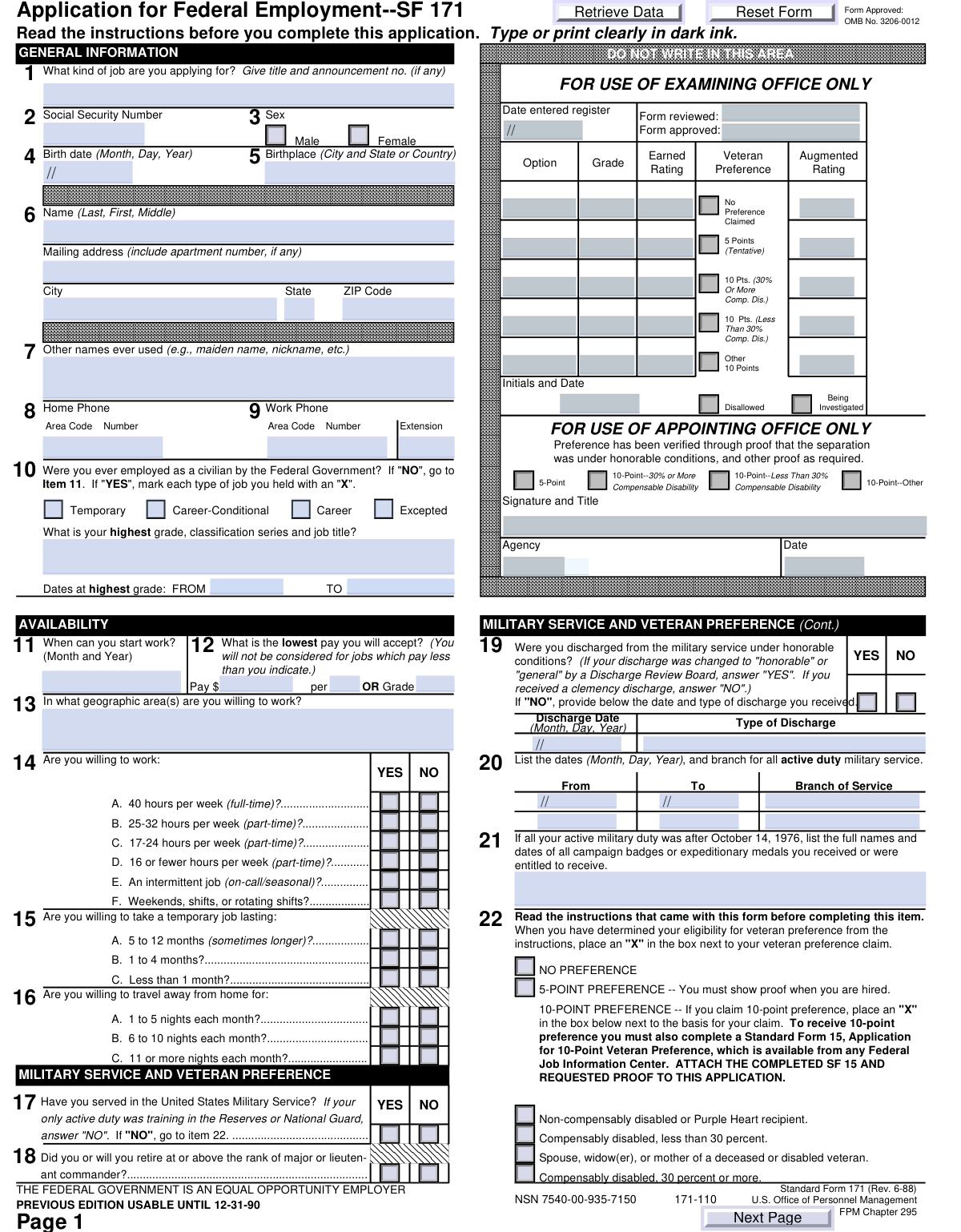
Yes! You can use AI to fill out Form OF-612, Optional Application for Federal Employment

Form OF-612 is an official document from the U.S. Office of Personnel Management (OPM) that provides a standardized format for individuals applying to federal government positions. It gathers comprehensive information about an applicant's personal details, work history, education, military service, and veteran's preference eligibility to ensure a fair and consistent evaluation. Today, this form can be filled out quickly and accurately using AI-powered services like Instafill.ai, which can also convert non-fillable PDF versions into interactive fillable forms.
Our AI automatically handles information lookup, data retrieval, formatting, and form filling.
It takes less than a minute to fill out OF-612 using our AI form filling.
Securely upload your data. Information is encrypted in transit and deleted immediately after the form is filled out.

Form specifications

Form name: Form OF-612, Optional Application for Federal Employment
Number of pages: 4
Language: English
Categories: employment forms, federal forms, federal employment forms, employment application forms
main-image

Instafill Demo: How to fill out PDF forms in seconds with AI

How to Fill Out OF-612 Online for Free in 2026

Are you looking to fill out a OF-612 form online quickly and accurately? Instafill.ai offers the #1 AI-powered PDF filling software of 2026, allowing you to complete your OF-612 form in just 37 seconds or less.
Follow these steps to fill out your OF-612 form online using Instafill.ai:
  1. 1 Navigate to Instafill.ai and upload your OF-612 form or select it from their template library.
  2. 2 Use the AI assistant to automatically populate your personal information, including your name, address, Social Security Number, and contact details.
  3. 3 Complete the sections on your availability, previous federal employment, and military service, ensuring you accurately claim any veteran's preference points.
  4. 4 Detail your work experience, providing comprehensive descriptions of your duties and accomplishments for each position held.
  5. 5 Enter your educational background, special skills, licenses, and professional references.
  6. 6 Carefully answer all background and suitability questions regarding citizenship, legal history, and potential conflicts of interest.
  7. 7 Review the entire completed application for accuracy, then digitally sign and date the form before submitting it as instructed in the job announcement.

Our AI-powered system ensures each field is filled out correctly, reducing errors and saving you time.

Why Choose Instafill.ai for Your Fillable OF-612 Form?

Speed

Complete your OF-612 in as little as 37 seconds.

Up-to-Date

Always use the latest 2026 OF-612 form version.

Cost-effective

No need to hire expensive lawyers.

Accuracy

Our AI performs 10 compliance checks to ensure your form is error-free.

Security

Your personal information is protected with bank-level encryption.

Frequently Asked Questions About Form OF-612

This form is a comprehensive application for civilian employment with the U.S. Federal Government. It collects your personal details, work history, education, and qualifications to assess your suitability for federal jobs.

Any individual applying for a federal government job may be required to complete this form. It is a standard application used by many agencies to screen and evaluate candidates.

You must enter the exact job title and announcement number as it appears on the official job posting. This ensures your application is correctly routed for the specific position you are interested in.

If you have no formal work experience, the form instructs you to write 'NONE' in the first work experience block. You can still detail relevant volunteer work or other unpaid experience in the description sections to highlight your skills.

The form has a dedicated section for military service where you can claim your preference status, such as 5-point or 10-point. Be prepared to submit required proof, like a DD-214, when the hiring agency requests it.

These sections should be left blank by the applicant. They are reserved for the examining and appointing offices to record your application's ratings, verify claims, and document the hiring process.

You can select 'No' to deny permission to contact your present employer. This is a common option for applicants who wish to maintain confidentiality during their job search.

If you have prior federal service, you must provide details like the type of appointment (e.g., Temporary, Career), your highest grade held, the job series, and dates of service. This information helps determine your eligibility for certain hiring paths.

These background questions are standard for determining your suitability and trustworthiness for federal employment. It is crucial to answer all questions truthfully, as false statements can result in your disqualification.

While you may not need to attach them initially, have documents like your Social Security card, college transcripts, professional licenses, and military service records (DD-214) available. This will ensure you can accurately provide dates and details.

Yes, services like Instafill.ai use AI to help you accurately auto-fill form fields with your personal information, work history, and education. This can save significant time and help prevent common errors.

Simply upload the PDF of the form to the Instafill.ai platform. The tool will make the document interactive and use your saved profile to automatically populate the fields, which you can then review, complete, and download.

If you have a non-fillable or 'flat' PDF, you can use a service like Instafill.ai to instantly convert it into an interactive, fillable form. This allows you to type your answers directly into the fields rather than printing and filling it out by hand.

Compliance OF-612
Validation Checks by Instafill.ai

1
Validates Social Security Number Format
This check ensures the Social Security Number is entered in a valid format, either as a 9-digit number (XXXXXXXXX) or with hyphens (XXX-XX-XXXX). This is critical for correct personal identification and integration with federal systems. If the format is incorrect, the form submission will be rejected, and the user will be prompted to correct the entry.
2
Ensures Mutually Exclusive Sex Selection
This validation confirms that the applicant has selected either 'Male' or 'Female' for the 'Sex' field, but not both. Selecting both options is a logical impossibility and indicates a data entry error. A failed validation would require the user to correct their selection to a single option before proceeding.
3
Validates Birth Date and Minimum Age
This check verifies that the 'Birth Date' is a real, valid calendar date and that it indicates the applicant is of a legal working age, typically 16 years or older. This prevents submission of nonsensical dates and ensures compliance with labor laws. If the date is invalid or the applicant is underage, an error message will be displayed.
4
Validates ZIP Code Format
This check ensures the 'ZIP Code' for the mailing address is in a valid 5-digit (NNNNN) or 9-digit ZIP+4 (NNNNN-NNNN) format. Correctly formatted postal codes are essential for mail delivery and location-based services. An invalid format will trigger an error, requiring the user to enter a standard U.S. ZIP code.
5
Requires Details for Prior Federal Employment
This validation checks if the applicant has indicated prior federal employment by checking 'Temporary', 'Career-Conditional', or 'Career'. If so, it ensures that the 'Highest Grade, Classification, and Job Title' field is not empty. This information is crucial for determining eligibility and status, and failure to provide it will halt submission until the required details are entered.
6
Ensures Chronological Work Experience Dates
For each work experience entry, this check verifies that the 'Dates Employed (From)' date is earlier than the 'Dates Employed (To)' date. This maintains the logical integrity of the applicant's work history timeline. An illogical date range would cause a validation error, prompting the user to review and correct the employment period.
7
Requires Explanation for Adverse Background Information
This check confirms that if an applicant answers 'YES' to sensitive background questions (e.g., 'FIRED_YES', 'FELONY_YES', 'DEBT_YES'), they must provide a corresponding explanation in the designated section. This is a mandatory requirement for background checks and suitability determinations. Failure to provide an explanation for a 'YES' answer will prevent form submission.
8
Requires Military Service Details if Claimed
If an applicant checks 'YES' for 'Have you served in the U.S. Military?', this validation ensures that at least one period of service (including branch, start date, and end date) is detailed. This information is necessary to verify service claims and veteran preference eligibility. The form will be considered incomplete if military service is claimed but no details are provided.
9
Ensures Chronological College Attendance Dates
For each college listed, this validation ensures the 'COLLEGEFROM' date is before the 'COLLEGETO' date. This maintains a logical timeline for the applicant's educational history. If the 'To' date is before the 'From' date, the system will flag it as an error and require correction.
10
Validates Degree Date Consistency
This check verifies that the 'CLGDEGREEDATE' for any listed degree is on or after the 'COLLEGETO' date for that same institution. It is illogical to earn a degree before completing the attendance period. A validation failure would require the applicant to correct the dates to reflect a logical sequence of events.
11
Requires Federal Relative Details if Claimed
If the applicant answers 'YES' to the 'RELATIVES_YES' question (indicating they have relatives working for the Federal Government), this check ensures that details for at least one relative are provided. This is required for nepotism and conflict of interest reviews. The form will be considered incomplete if 'YES' is checked but no relative information is entered.
12
Ensures Mutually Exclusive Preference Selections
This validation applies to all questions with mutually exclusive Yes/No checkbox pairs, such as work schedule or travel preferences (e.g., '16A. 1 to 5 nights each month — YES' and '16A. 1 to 5 nights each month — NO'). The check ensures that an applicant does not select both 'YES' and 'NO' for the same question. A validation failure would require the user to select only one option per question.
13
Validates Full Name Completeness
This check ensures that the 'Full Name (Last, First, Middle)' field contains, at a minimum, a last name and a first name. A full name is a fundamental requirement for identifying an applicant on all official documents and communications. The form cannot be processed without this basic information, and a failure will prompt the user to complete the field.
14
Verifies Signature Date is Present
This validation confirms that the 'EMPSIGNDATE' field is filled out upon final submission. The signature date serves as the applicant's certification that all information provided is true and complete as of that date. A missing signature date invalidates the application, so the system will prevent submission until the date is entered.

Common Mistakes in Completing OF-612

Missing or Incorrect Job Announcement Number

Applicants often focus on the job title and forget to include the specific announcement number listed on the job posting. This number is a primary identifier for the hiring agency, and its omission or incorrect entry can cause an application to be misrouted, delayed, or even rejected. To avoid this, carefully copy the full job title and announcement number exactly as they appear on the official posting.

Providing Vague Work Experience Descriptions

The form requires detailed descriptions of duties, accomplishments, and even the percentage of time spent on tasks, but applicants often submit generic summaries. This prevents reviewers from accurately assessing qualifications against the specific requirements of the federal position, potentially leading to a lower rating. To avoid this, describe your responsibilities in detail, use metrics to quantify your accomplishments, and estimate the time spent on each major duty as requested.

Incorrectly Stating Highest Federal Grade and Series

For applicants with prior federal service, accurately entering the highest grade (e.g., 'GS-09') and classification series is critical for determining eligibility and pay. Mistakes happen due to misremembering details or not having official records handy, which can lead to being incorrectly screened out. To prevent this, always refer to your most recent SF-50 (Notification of Personnel Action) form to ensure the information is precise.

Omitting Previous or Other Names Used

Applicants sometimes forget to list maiden names, previous married names, or legal name changes in the 'Other names ever used' field. This information is essential for conducting thorough background checks and verifying employment or education history. An omission can cause significant delays and raise red flags during the verification process, so it is crucial to list any name under which your records might be found.

Incorrectly Claiming or Documenting Veteran's Preference

The veteran's preference section is complex, with multiple categories that each require specific documentation. A common mistake is selecting a 10-point preference without attaching the required proof (e.g., a VA disability rating letter). This results in the preference being disallowed, which can significantly lower an applicant's position on the hiring list. Carefully read the requirements for each preference type and ensure all necessary documents are submitted with the application.

Failing to Explain 'Yes' Answers to Background Questions

The form contains several background questions regarding past employment, legal history, and financial standing. If an applicant answers 'Yes' to any of these, they must provide a detailed explanation in a separate section. Simply checking 'Yes' without providing the required context is considered an incomplete answer and can lead to automatic disqualification. Always be prepared to provide honest, thorough explanations for any affirmative answers in the designated fields.

Contradictory or Incomplete Availability Selections

The form has numerous checkboxes for work availability (part-time hours, temporary jobs, travel), and applicants can get confused, checking contradictory options or skipping them. This ambiguity prevents HR from matching the applicant to suitable openings, severely limiting their opportunities. To avoid this, read each option carefully and make a definitive 'Yes' or 'No' choice for every category to clearly define your work preferences.

Omitting Average Hours for Past Jobs

The 'Average Hours per Week' field is critical, especially for part-time work, as it is used to calculate the total amount of qualifying experience. Applicants often leave this blank, but without this information, HR cannot properly credit the work experience, which may result in the applicant being deemed unqualified. Always provide an accurate weekly hour count for every position listed. If the form is a non-fillable PDF, a tool like Instafill.ai can convert it to a fillable format, making it easier to ensure no fields are missed.

Inconsistent Salary and Pay Period Information

When listing work experience, applicants must enter both a salary amount and the corresponding pay period (e.g., 'hour', 'week', 'year'). A frequent error is mismatching these fields, such as entering an annual salary but selecting 'per hour' as the period. This creates confusion and can affect how your experience is evaluated. Always double-check that the salary figure and the pay period logically match for both starting and ending pay.

Entering an Incorrect Social Security Number

A simple typo or transposition of digits when entering the Social Security Number is a frequent and critical error. The SSN is the primary identifier for background checks and payroll, and an incorrect number will halt the entire process. This may lead to the application being discarded due to an inability to verify identity. Carefully proofread the number digit by digit before submitting. AI-powered form filling tools like Instafill.ai can help prevent these errors by validating data formats.

Incomplete or Unformatted Address Information

Applicants may forget to include an apartment number, or enter an incorrect ZIP code, especially when filling out the form quickly. This can cause important correspondence, such as interview invitations or job offers, to be returned as undeliverable. To prevent this, verify your full address, including any suite numbers and the correct ZIP code. AI-powered tools like Instafill.ai can help by auto-populating and validating address components to ensure accuracy.
Saved over 80 hours a year

“I was never sure if my IRS forms like W-9 were filled correctly. Now, I can complete the forms accurately without any external help.”

Kevin Martin Green

Your data stays secure with advanced protection from Instafill and our subprocessors

Robust compliance program

Transparent business model

You’re not the product. You always know where your data is and what it is processed for.

ISO 27001, HIPAA, and GDPR

Our subprocesses adhere to multiple compliance standards, including but not limited to ISO 27001, HIPAA, and GDPR.

Security & privacy by design

We consider security and privacy from the initial design phase of any new service or functionality. It’s not an afterthought, it’s built-in, including support for two-factor authentication (2FA) to further protect your account.

Fill out OF-612 with Instafill.ai

Worried about filling PDFs wrong? Instafill securely fills form-of-612-optional-application-for-federal-employment forms, ensuring each field is accurate.