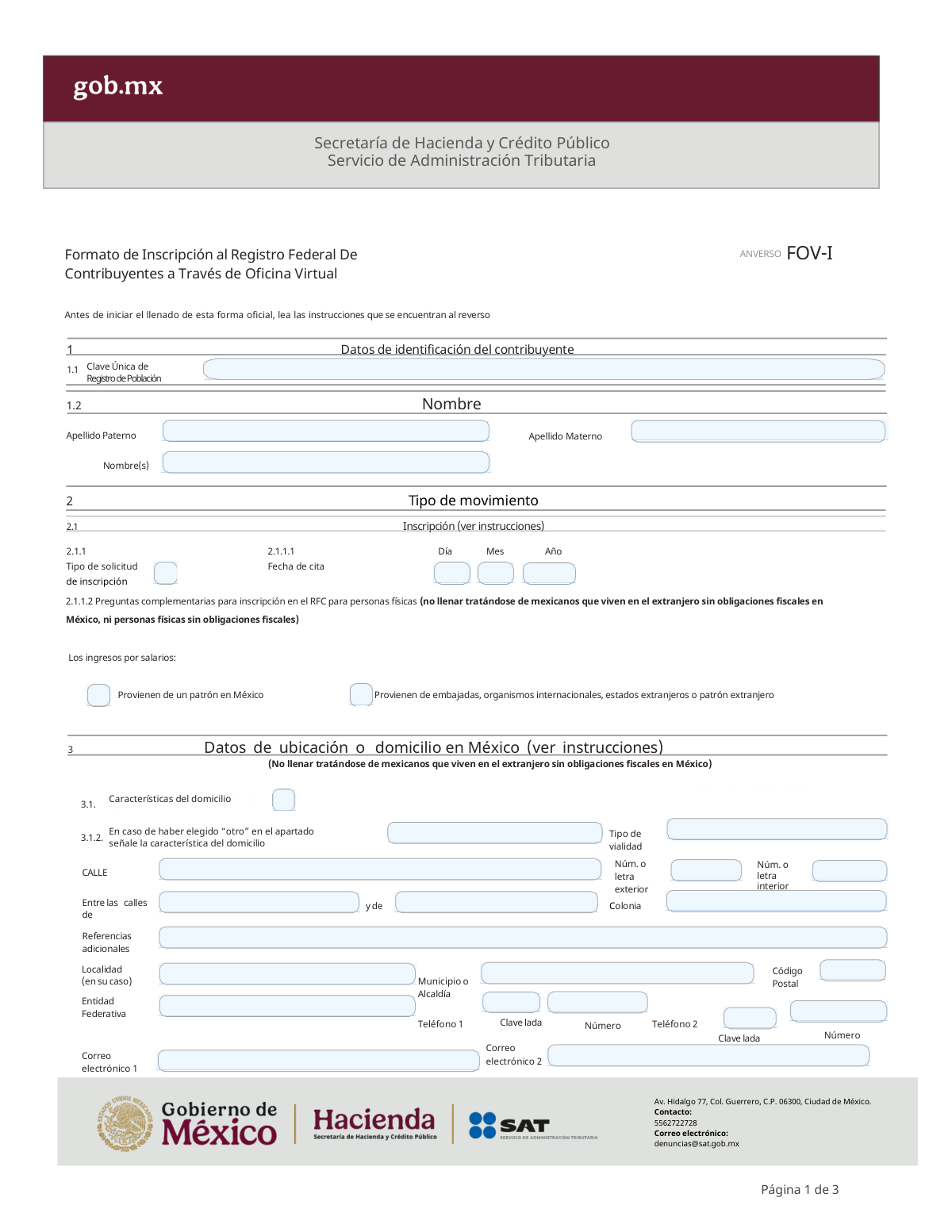
Yes! You can use AI to fill out Formato de Inscripción al Registro Federal De Contribuyentes a Través de Oficina Virtual

The FOV-I, or 'Formato de Inscripción al Registro Federal de Contribuyentes a través de Oficina Virtual,' is a Mexican government form issued by the Servicio de Administración Tributaria (SAT). It is used by individuals to apply for their Federal Taxpayer Registry (RFC) number through a virtual appointment, a crucial step for anyone needing to pay taxes, be formally employed, or conduct official business in Mexico. Today, this form can be filled out quickly and accurately using AI-powered services like Instafill.ai, which can also convert non-fillable PDF versions into interactive fillable forms.
Our AI automatically handles information lookup, data retrieval, formatting, and form filling.
It takes less than a minute to fill out FOV-I using our AI form filling.
Securely upload your data. Information is encrypted in transit and deleted immediately after the form is filled out.

Form specifications

Form name: Formato de Inscripción al Registro Federal De Contribuyentes a Través de Oficina Virtual
Number of pages: 2
Language: English
Categories: federal forms, ATO forms
main-image

Instafill Demo: How to fill out PDF forms in seconds with AI

How to Fill Out FOV-I Online for Free in 2026

Are you looking to fill out a FOV-I form online quickly and accurately? Instafill.ai offers the #1 AI-powered PDF filling software of 2026, allowing you to complete your FOV-I form in just 37 seconds or less.
Follow these steps to fill out your FOV-I form online using Instafill.ai:
  1. 1 Navigate to Instafill.ai and upload or select the FOV-I form.
  2. 2 Use the AI assistant to provide your personal identification details, such as your full name and CURP (Clave Única de Registro de Población).
  3. 3 Specify the type of registration you are requesting and the date of your virtual appointment with the SAT.
  4. 4 If applicable, answer the supplementary questions regarding the source of your salary income.
  5. 5 Enter your complete address details in Mexico, including street, city, state, postal code, and contact information.
  6. 6 Review all the information auto-filled by the AI for accuracy, then download the completed form.
  7. 7 Print the form, sign it as required (preferably in blue ink), and have the digital PDF ready for your virtual appointment with the SAT.

Our AI-powered system ensures each field is filled out correctly, reducing errors and saving you time.

Why Choose Instafill.ai for Your Fillable FOV-I Form?

Speed

Complete your FOV-I in as little as 37 seconds.

Up-to-Date

Always use the latest 2026 FOV-I form version.

Cost-effective

No need to hire expensive lawyers.

Accuracy

Our AI performs 10 compliance checks to ensure your form is error-free.

Security

Your personal information is protected with bank-level encryption.

Frequently Asked Questions About Form FOV-I

This form is used to apply for registration in the Registro Federal de Contribuyentes (RFC) through the SAT's Virtual Office. It is designed for individuals who are registering for the first time.

Individuals who need to register for the RFC should use this form, specifically those registering under the salary regime, those without tax obligations, or Mexicans living abroad without tax obligations in Mexico.

You will need your 18-digit CURP (Clave Única de Registro de Población), your full name as it appears on your birth certificate, your scheduled appointment date, and your address details if you live in Mexico.

You must enter the number that corresponds to your situation: '1' for Mexicans living abroad without tax obligations, '2' for registration in the salary regime, or '3' for registration without tax obligations.

No, the instructions state that Mexicans living abroad without tax obligations in Mexico should not fill out the address section on the form. You will provide this information directly during your virtual appointment.

You must print the completed form, sign it (preferably with blue ink), and then scan it to create a PDF file. This PDF will be required for your Virtual Office appointment.

The form indicates that the list of required documents can be found on the official SAT internet portal. It is important to check the portal for the current requirements before your appointment.

According to the instructions, the form will be considered as not submitted if it is not properly filled out, is missing the taxpayer's signature, or is not accompanied by the required documentation.

The instructions specify that if you only have one last name, you should write it in the field corresponding to 'Apellido Paterno' (paternal last name).

You should enter the date of your scheduled Virtual Office appointment. This date will be considered your official RFC registration date by the SAT.

Yes, services like Instafill.ai use AI to accurately auto-fill form fields, which can save you time and help reduce errors.

You can upload the FOV-I PDF to the Instafill.ai platform. Their service will make the document interactive, allowing you to type your information directly into the fields before printing for your signature.

If your PDF is not fillable, you can use a service like Instafill.ai. It can convert flat, non-fillable PDFs into interactive forms that you can easily complete online.

Compliance FOV-I
Validation Checks by Instafill.ai

1
Validates CURP Format and Structure
This check ensures the 'Clave Única de Registro de Población' (CURP) field contains exactly 18 alphanumeric characters and conforms to the official structure defined by the Mexican government. The CURP is a primary unique identifier, and an invalid format would prevent the system from correctly identifying the taxpayer or cross-referencing their information with other government records. A failure in this validation will result in an immediate rejection of the form.
2
Ensures Full Name is Provided
Verifies that the 'Apellido Paterno' and 'Nombre(s)' fields are not empty, as they are essential for legal identification. According to the instructions, if a person has only one last name, it must be entered in the 'Apellido Paterno' field. Incomplete name data makes it impossible to correctly issue the tax ID (RFC) and can lead to legal and administrative complications for the taxpayer.
3
Validates 'Tipo de solicitud de inscripción' Code
This check ensures that the value entered in the 'Tipo de solicitud de inscripción' field is one of the valid predefined codes (1, 2, or 3). This code is critical as it determines the taxpayer's registration category and dictates which subsequent sections of the form are required or should be left blank. An invalid code would make the application's logic ambiguous and result in an immediate processing error.
4
Validates 'Fecha de cita' is a Valid and Logical Date
Confirms that the 'Día', 'Mes', and 'Año' fields combine to form a valid calendar date that is not in the future. The validation should check for logical impossibilities, such as a 31st of April. Since this date is considered the official registration date with the SAT, an invalid entry would corrupt the taxpayer's official record from the very beginning and cause the submission to be rejected.
5
Conditional Requirement for Salary Source Questions
This validation enforces the rule that the salary source questions in section 2.1.1.2 must be answered if, and only if, the 'Tipo de solicitud de inscripción' is '2' (Inscripción en el Régimen de Sueldos y Salarios). If the registration type is 1 or 3, these fields must be empty. This check prevents the collection of irrelevant data and ensures the application follows the correct logical path based on the registration type.
6
Conditional Requirement for Domicilio Section
Verifies that the entire address section (Rubro 3) is left blank if the 'Tipo de solicitud de inscripción' is '1' (Mexicanos que viven en el extranjero) or '3' (Sin obligaciones fiscales). The form instructions explicitly state this information is not required for these categories. Enforcing this prevents the submission of unnecessary data and avoids processing conflicts that would arise from having an address for a non-domiciled taxpayer.
7
Ensures Address is Provided for Salaried Employees
This check ensures that if the 'Tipo de solicitud de inscripción' is '2', then key address fields (Calle, Número exterior, Colonia, Municipio, Entidad Federativa, Código Postal) are mandatory. A physical address in Mexico is a legal requirement for taxpayers with domestic fiscal obligations. Failure to provide a complete address will result in the rejection of the registration for being incomplete.
8
Validates 'Código Postal' Format and Consistency
Checks that the 'Código Postal' field contains exactly 5 numeric digits and that this code corresponds logically to the selected 'Entidad Federativa' and 'Municipio o Alcaldía'. This validation prevents common data entry errors and ensures the taxpayer's address is geographically accurate. An invalid format or a code that mismatches the state and municipality will cause the submission to be flagged for correction.
9
Validates Email Address Format
This validation ensures that the values entered in 'Correo electrónico 1' and 'Correo electrónico 2' (if provided) adhere to the standard email address format (e.g., [email protected]). The primary email is a critical channel for the SAT to send official notifications, so its validity is paramount. An invalid email format would prevent the taxpayer from receiving important fiscal information and cause the form to be rejected.
10
Ensures Primary Email is Provided and Unique
Verifies that the 'Correo electrónico 1' field is filled out, as it is the primary means of digital communication from the tax authority. The instructions also state the email should not have been provided by another taxpayer, implying a system-level check for uniqueness. A missing or already-used primary email would halt the registration process until a valid, unique email is provided.
11
Conditional Requirement for 'Otra característica' Domicilio
This check enforces that the free-text field for 'Otra característica' is filled in if, and only if, the 'Característica del domicilio' selection is '4' (Otro). If any other option (1, 2, 3) is chosen, this field should be empty. This ensures data integrity by preventing orphaned or contradictory information about the domicile type and avoids ambiguity in the address details.
12
Ensures Exclusive Selection of Salary Source
This validation ensures that for the salary questions in section 2.1.1.2, the taxpayer provides information for only one of the two possible sources: either a domestic employer or a foreign/international one. Providing details for both would be logically inconsistent and indicate a data entry error. The system should enforce that only one of these paths is chosen to correctly determine the taxpayer's declaration responsibilities.

Common Mistakes in Completing FOV-I

Using Text Instead of a Numeric Code for 'Tipo de solicitud'

Applicants often write out the description, such as 'Sueldos y Salarios', instead of entering the corresponding number '2' as required by the instructions. This happens due to overlooking the specific instruction on page 2. This error leads to automated processing failures and immediate rejection of the form. To avoid this, carefully find the numeric code in the instructions that matches your registration type and enter only that number.

Forgetting to Print, Sign, and Scan the Form

A frequent oversight is submitting the digitally filled form without a physical 'wet' signature. The instructions explicitly state the form is considered 'not presented' if it is not printed, signed by the taxpayer, and then digitized into a PDF. This mistake nullifies the entire submission. Always complete the print-sign-scan cycle before uploading the document to the Oficina Virtual.

Incorrectly Transcribing the CURP

The 18-character Clave Única de Registro de Población (CURP) is complex, making it easy to mistype a letter or number. An incorrect CURP is a critical error that prevents the SAT from matching the application to the correct individual in government records, leading to certain rejection. To prevent this, meticulously double-check each character against your official CURP document. AI-powered form filling tools like Instafill.ai can also help by validating the format and structure of the CURP as you enter it.

Name Does Not Exactly Match Official Documents

Applicants may use a common name, omit a second name, or arrange their surnames in a different order than what is on their official birth certificate ('acta de nacimiento'). The SAT's system validates this information against official databases, and any discrepancy will cause the application to be rejected, forcing the user to start over. Always enter your name and surnames exactly as they appear on your birth certificate, paying close attention to the 'Apellido Paterno' and 'Apellido Materno' fields.

Filling Out Inapplicable Sections of the Form

The form contains conditional fields, such as the salary questions (2.1.1.2) and the entire Mexican address section (Rubro 3), which should be skipped by certain applicants. For instance, 'Mexicanos que viven en el extranjero' should not fill out the address section. Filling these fields when not required creates contradictory data and can lead to processing delays or rejection. Carefully read the 'Nota' sections in the instructions to confirm which parts of the form you must skip based on your registration type.

Using a Shared or Previously Registered Email Address

The instructions specifically require a personal email that has not been used by another taxpayer for SAT purposes. People often use a shared family email or one already linked to a spouse or relative's account, which will be flagged and rejected by the system. This can delay your registration and prevent you from receiving critical notifications. Always use a unique, personal email address to which you have reliable access.

Submitting the Form in an Incorrect File Format

The instructions mandate that the final, signed document must be digitized and submitted as a single PDF file. Applicants sometimes mistakenly upload image files (like JPG or PNG) or other document types, which are not accepted by the submission portal. This results in an immediate failure to upload or an automatic rejection. Ensure your scanning device or software is configured to save the final document as a PDF. Note that tools like Instafill.ai can make flat PDFs fillable, simplifying the process before you print for signature.

Incorrectly Filling the 'Característica del domicilio' Field

This field requires a numeric code from 1 to 4 to indicate the domicile type (e.g., '1' for 'Casa habitación'), but applicants often write out the word itself. This happens when filers miss the numbered list in the instructions under Rubro 3. This data entry error will cause the form to be flagged as incorrectly filled and rejected by the processing system. Always refer to the instructions and enter only the corresponding number.

Incomplete Address Information

People often leave fields like 'Entre las calles' (between what streets) or 'Referencias adicionales' (additional references) blank, viewing them as optional. However, this information is used by the SAT to verify the physical address, and its omission can lead to delays or a formal request for more information. To ensure a smooth process, provide as much detail as possible to make the location easy to identify, including nearby landmarks or cross-streets.

Incorrect Date Format for 'Fecha de cita'

The instructions specify a DD/MM/YYYY format for dates, but applicants, especially those accustomed to other conventions, may enter it as MM/DD/YYYY. This can cause confusion and data entry errors, potentially misrepresenting the official registration date. Always use two digits for the day, two for the month, and four for the year as shown in the example (01 01 2024). AI-powered tools like Instafill.ai can help by enforcing the correct date format automatically.
Saved over 80 hours a year

“I was never sure if my IRS forms like W-9 were filled correctly. Now, I can complete the forms accurately without any external help.”

Kevin Martin Green

Your data stays secure with advanced protection from Instafill and our subprocessors

Robust compliance program

Transparent business model

You’re not the product. You always know where your data is and what it is processed for.

ISO 27001, HIPAA, and GDPR

Our subprocesses adhere to multiple compliance standards, including but not limited to ISO 27001, HIPAA, and GDPR.

Security & privacy by design

We consider security and privacy from the initial design phase of any new service or functionality. It’s not an afterthought, it’s built-in, including support for two-factor authentication (2FA) to further protect your account.

Fill out FOV-I with Instafill.ai

Worried about filling PDFs wrong? Instafill securely fills formato-de-inscripcin-al-registro-federal-de-contribuyentes-a-travs-de-oficina-virtual forms, ensuring each field is accurate.