Yes! You can use AI to fill out Direct Consolidation Loan Request to Add Loans (William D. Ford Federal Direct Loan Program) (OMB No. 1845-0007)

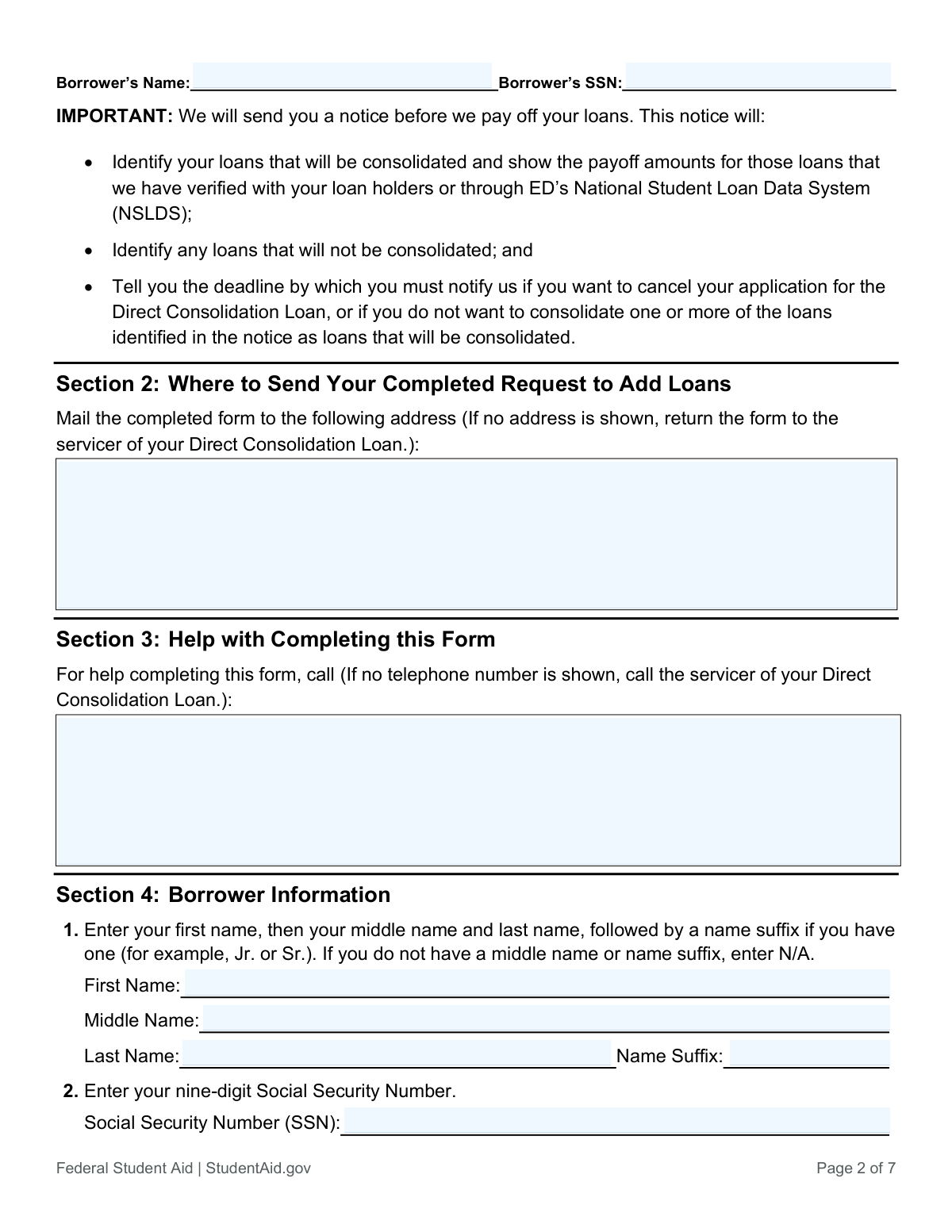
The Direct Consolidation Loan Request to Add Loans is a U.S. Department of Education form used by borrowers who want to include additional eligible federal student loans in a Direct Consolidation Loan that has already been made, or in a Direct Consolidation Loan Application and Promissory Note previously submitted. It collects borrower identification details and specific information about each loan to be added (loan type code, loan holder/servicer, account number, and estimated payoff amount) and requires the borrower’s certification and signature. If the consolidation loan has already been made, the request generally must be received within 180 days of the consolidation date, making timely and accurate submission important to avoid needing a new consolidation application. Today, this form can be filled out quickly and accurately using AI-powered services like Instafill.ai, which can also convert non-fillable PDF versions into interactive fillable forms.
Our AI automatically handles information lookup, data retrieval, formatting, and form filling.
It takes less than a minute to fill out Direct Consolidation Loan Request to Add Loans using our AI form filling.
Securely upload your data. Information is encrypted in transit and deleted immediately after the form is filled out.

Form specifications

Form name: Direct Consolidation Loan Request to Add Loans (William D. Ford Federal Direct Loan Program) (OMB No. 1845-0007)
Number of pages: 5
Language: English
Categories: student aid forms, financial aid forms, student loan forms, federal loan forms
main-image

Instafill Demo: filling out a legal form in seconds

How to Fill Out Direct Consolidation Loan Request to Add Loans Online for Free in 2026

Are you looking to fill out a DIRECT CONSOLIDATION LOAN REQUEST TO ADD LOANS form online quickly and accurately? Instafill.ai offers the #1 AI-powered PDF filling software of 2026, allowing you to complete your DIRECT CONSOLIDATION LOAN REQUEST TO ADD LOANS form in just 37 seconds or less.
Follow these steps to fill out your DIRECT CONSOLIDATION LOAN REQUEST TO ADD LOANS form online using Instafill.ai:
  1. 1 Go to Instafill.ai and upload the PDF (or select the “Direct Consolidation Loan Request to Add Loans” form from the form library).
  2. 2 Let the AI detect and map the form fields, then confirm the form version/details (e.g., OMB No. 1845-0007 and expiration date) to ensure you’re completing the correct document.
  3. 3 Enter borrower information (full legal name, SSN, and any required name parts such as middle name and suffix) and have Instafill.ai validate formatting (e.g., SSN and date format mm/dd/yyyy).
  4. 4 Add the loans you want to consolidate by entering each loan’s code, loan holder/servicer name and address (and phone/area code if requested), account number (if available), and estimated payoff amount; attach an additional loan list if needed.
  5. 5 Review the promissory note addendum/certifications and confirm key requirements (including the 180-day submission window if the consolidation loan is already made).
  6. 6 E-sign or apply a compliant signature (as allowed) and have Instafill.ai generate a final, clean copy; then download and save a copy for your records.
  7. 7 Use the mailing instructions on the form (Section 2) to send the completed request to your Direct Consolidation Loan servicer/ED address, and keep proof of submission.

Our AI-powered system ensures each field is filled out correctly, reducing errors and saving you time.

Why Choose Instafill.ai for Your Fillable Direct Consolidation Loan Request to Add Loans Form?

Speed

Complete your Direct Consolidation Loan Request to Add Loans in as little as 37 seconds.

Up-to-Date

Always use the latest 2026 Direct Consolidation Loan Request to Add Loans form version.

Cost-effective

No need to hire expensive lawyers.

Accuracy

Our AI performs 10 compliance checks to ensure your form is error-free.

Security

Your personal information is protected with bank-level encryption.

Frequently Asked Questions About Form Direct Consolidation Loan Request to Add Loans

This form is used to add one or more eligible federal student loans to a Direct Consolidation Loan that has already been made, or to a Direct Consolidation Loan Application and Promissory Note you previously submitted.

You should complete this form if you already have a Direct Consolidation Loan (or a pending consolidation application) and you want to include additional eligible federal education loans that were not included originally.

Yes. If your Direct Consolidation Loan has already been made, ED must receive this completed form within 180 days of the date the consolidation loan was made. After 180 days, you generally must apply for a new Direct Consolidation Loan to consolidate additional loans.

Mail the completed form to the address shown in Section 2. If no address is shown, return it to the servicer of your Direct Consolidation Loan.

If no address or phone number is shown, you should contact and send the form to the servicer of your Direct Consolidation Loan using the contact information on your loan statements or your StudentAid.gov account.

You must provide your full legal name (first, middle, last, and suffix if applicable) and your nine-digit Social Security Number. If you do not have a middle name or suffix, enter “N/A.”

For each loan, provide the loan code (if known), the loan holder/servicer name and mailing address (at least name, city, and state), the account number (if available), and the estimated payoff amount including interest and any fees.

You can use your most recent billing statement, interest statement, coupon book, or your loan holder/servicer’s website. You can also log in to StudentAid.gov to view your federal loan information.

If you’re unsure, you may leave the loan code blank. However, loans not included in the form’s loan-code list are not eligible for consolidation.

If you cannot find the account number, you may leave that field blank. Be sure to provide the loan holder/servicer information and other details to help identify the loan.

Yes. Adding loans may extend your repayment term, change your interest rate, and change your monthly payment amount. You will receive a revised disclosure statement and repayment schedule after the loans are added.

Yes. Continue making payments on any loans that currently require payment until you receive written notification that the loans have been successfully added to your Direct Consolidation Loan.

ED will send you a notice identifying which loans will be consolidated and their payoff amounts, which loans will not be consolidated, and the deadline to cancel the request or exclude specific loans.

In Section 6, you must sign your full legal name in blue or black ink and date the form using the mm/dd/yyyy format. Your signature confirms you understand and agree to the terms and that this is a loan you must repay.

Yes—AI tools like Instafill.ai can help by extracting your information from documents (like loan statements) and auto-filling the form fields accurately to save time. Typically, you upload the PDF to Instafill.ai, provide or verify your borrower and loan details, and the tool fills the fields for you to review before you download and sign.

If the PDF isn’t fillable, Instafill.ai can convert a flat, non-fillable PDF into an interactive fillable form so you can type into the fields. After conversion, you can auto-fill, review for accuracy, and then print/sign as required.

Compliance Direct Consolidation Loan Request to Add Loans
Validation Checks by Instafill.ai

1
Borrower Name Completeness and Legal-Name Structure
Validates that the borrower’s first and last name are present and contain plausible legal-name characters (letters, spaces, hyphens, apostrophes) rather than numbers or symbols. Ensures the middle name and suffix fields are not left blank—if the borrower has none, they must explicitly be entered as "N/A" per the form instructions. This is important for identity matching and servicing; if it fails, the submission should be rejected or routed for manual review with a request for corrected name fields.
2
SSN Format and Basic Validity Check
Checks that the SSN is exactly nine digits, allowing common formatting (e.g., "123-45-6789" or "123456789") and normalizing to digits for storage. Also flags obviously invalid SSNs (e.g., all zeros, 000-xx-xxxx, 666-xx-xxxx, or 9xx in the first three digits) to reduce fraud and processing errors. If validation fails, the form should not proceed because SSN is required for identity verification and loan matching.
3
Borrower Header Consistency Across Pages/Sections
Ensures the borrower name and SSN shown/entered in multiple places (e.g., page headers and Section 4 fields) match exactly after normalization (case, punctuation, whitespace). This prevents mixing pages from different borrowers or data-entry drift across sections. If mismatches are detected, the submission should be flagged as potentially corrupted and held for manual verification before any payoff requests are initiated.
4
Section 2 Mailing Address Completeness and USPS-Style Format
Validates that the mailing address includes recipient/servicer name, street address or P.O. Box, city, state, and ZIP code (5-digit or ZIP+4). Also checks that the state is a valid two-letter US state/territory code and that ZIP is numeric and properly formatted. If incomplete or malformed, the system should block submission or request correction because misdirected mail can cause missed deadlines and processing delays.
5
Section 3 Help Contact Phone/Address Format Validation
If a phone number is provided, validates it contains 10 digits (optionally with country code +1) and supports common separators, and confirms an area code is present as the form requests. If an address is provided instead of a phone, validates it meets minimum address components (city/state at minimum) to be actionable. If validation fails, the system should warn and require correction because borrowers need a reliable contact path for assistance and follow-up questions.
6
Signature Presence and Signature Name Match
Checks that the borrower signature field is present (not blank) and appears to be a full legal name rather than initials only, and compares it to the typed borrower name for reasonable match (allowing minor variations like middle name/initial). This is critical because Items 7–9 are certifications and authorizations that require borrower assent. If missing or clearly inconsistent, the request should be rejected as unsigned/unauthorized.
7
Today’s Date Format and Calendar Validity (mm/dd/yyyy)
Validates that the signature date is entered in mm/dd/yyyy using only numbers and separators, and that it is a real calendar date (e.g., not 02/30/2026). Also checks that the date is not in the far future relative to receipt/processing date (configurable tolerance) to prevent erroneous dating. If invalid, the form should be returned for correction because the signature date is used for timeliness and auditability.
8
At Least One Loan Row Provided
Ensures the borrower has listed at least one loan to add (i.e., at least one loan row has meaningful data such as a loan holder name or payoff amount). This prevents empty submissions that cannot be processed and reduces operational churn. If no loan rows are populated, the system should block submission and prompt the borrower to add loan details or confirm they intended to submit.
9
Loan Code Validity Against Allowed Code Table
Validates that each provided loan code is exactly one character and is one of the allowed codes shown on the form (A, B, C, D, E, F, G, H, I, J, K, L, M, N, O, P, Q, R, S, T, U, V, W, Y, Z, 0, 9). This is important because ineligible or mistyped codes can cause incorrect eligibility decisions and payoff requests. If a code is invalid, the system should reject that row (or the submission) and request correction; if blank, it may be allowed but should trigger a warning for manual verification.
10
Ineligible Loan Code ‘W’ Handling
If a loan row uses code 'W' (education loans ineligible for consolidation), the system should not treat it as a consolidatable loan and should require the borrower to correct the code or remove the row. This prevents initiating payoff workflows for loans that cannot legally be added to a Direct Consolidation Loan. If 'W' is present, validation should fail with a clear message explaining the loan is ineligible and cannot be processed as listed.
11
Loan Holder/Servicer Minimum Address Requirements Per Row
For each populated loan row, validates that the loan holder/servicer name is present and that at least city and state are provided, as explicitly required by the form. Also checks state format (two-letter code) and that the field is not filled with placeholders (e.g., "unknown", "N/A") when other loan details are present. If missing, the row should be rejected or flagged because ED needs a valid payee/servicer destination to verify payoff and send payments.
12
Loan Holder/Servicer Phone Number and Area Code Validation
When a phone number is provided in the loan holder/servicer field, validates it includes an area code and contains a valid 10-digit US number after normalization. This supports timely verification of payoff amounts and resolving discrepancies with the loan holder. If invalid, the system should warn and request correction (or route to manual review) because inability to contact the servicer can delay consolidation processing.
13
Loan Account Number Character Set and Length Reasonableness
If an account number is provided, validates it is not purely whitespace and contains only reasonable characters (letters, digits, hyphens) and falls within a configurable length range (e.g., 4–30 characters) to catch obvious entry errors. Because the form allows leaving it blank, the check should not fail the entire submission when missing, but should fail the row if the value is clearly malformed (e.g., special characters only). If validation fails, the system should prompt correction to improve matching accuracy with the loan holder.
14
Estimated Payoff Amount Numeric/Currency Validation
Validates that each estimated payoff amount is a positive number, allowing standard currency formatting (optional $ and commas) and at most two decimal places. Also flags zero or negative amounts and extremely large outliers (configurable threshold) for review to prevent data-entry mistakes that could distort the consolidation balance. If invalid, the affected row should be rejected and the borrower asked to re-enter the payoff amount.
15
Loan Row Completeness and Partial-Row Consistency
For each loan row, checks that if any of the key fields are present (loan code, holder/servicer, account number, payoff amount), then the row meets a minimum completeness standard—typically holder/servicer name + payoff amount, with code strongly recommended. This prevents ambiguous rows that cannot be verified or paid off. If a row is partially filled (e.g., payoff amount without servicer), validation should fail for that row and require completion or removal.
16
Duplicate Loan Detection Across Rows
Detects potential duplicates by comparing normalized combinations of loan code + loan holder/servicer name + account number (when present) and/or identical payoff amounts with identical servicer details. Duplicate entries can cause double counting, incorrect payoff requests, or processing delays while discrepancies are resolved. If duplicates are found, the system should block submission or require the borrower to confirm and de-duplicate before processing.

Common Mistakes in Completing Direct Consolidation Loan Request to Add Loans

Using a nickname or mismatched legal name

Borrowers often enter a preferred name (e.g., “Bill” instead of “William”) or a name that doesn’t match what’s on SSA/loan records, especially after marriage or a recent name change. This can cause identity-matching issues and slow down processing or trigger follow-up requests. Enter your full legal name exactly as it appears on official documents and your federal student aid records; if you have no middle name or suffix, write “N/A” as instructed. AI-powered form filling tools like Instafill.ai can help by standardizing name fields and flagging mismatches before submission.

Incorrect SSN format or transposed digits

A very common error is swapping digits, omitting a digit, or using an ITIN/other identifier instead of the nine-digit SSN. Even a single-digit mistake can prevent the servicer from locating your loans in NSLDS and may delay or derail the request. Carefully copy the SSN from an official source and confirm it is nine digits; follow the form’s stated formatting expectations for SSN entry. Instafill.ai can reduce these errors by validating SSN length/format and catching common transpositions.

Missing “N/A” in Middle Name or Name Suffix fields

People frequently leave the middle name or suffix blank when it doesn’t apply, but this form explicitly instructs borrowers to enter “N/A” if they have no middle name or suffix. Blank fields can be interpreted as incomplete and may lead to processing delays or requests for clarification. To avoid this, write “N/A” where required rather than leaving the field empty. Instafill.ai can automatically populate required non-applicable fields with “N/A” to keep the submission complete.

Mailing the request to the wrong address or leaving Section 2 blank

Borrowers often assume the Department of Education has a single universal address and mail the form to the wrong servicer or an outdated address, especially because Section 2 may show no address and instructs you to return it to your consolidation loan servicer. Sending it to the wrong place can cause long delays, missed deadlines, or the form never being processed. Use the exact address shown in Section 2; if none is shown, confirm your Direct Consolidation Loan servicer and use their correspondence address. Instafill.ai can help by prompting you to confirm the correct servicer address and ensuring the mailing block is complete and properly formatted.

Missing the 180-day deadline to add loans

Many borrowers don’t realize that if the Direct Consolidation Loan has already been made, ED must receive this request within 180 days of the consolidation disbursement date. Missing the window means you generally must submit a brand-new Direct Consolidation Loan application to include additional loans, which can change timelines and repayment planning. Verify the date your consolidation loan was made and mail the request early enough to be received within 180 days (not just postmarked). Tools like Instafill.ai can help by reminding you of deadline-sensitive fields and generating a complete, ready-to-send package faster.

Choosing the wrong loan code (or entering the loan name instead of the code)

The loan list requires a single-letter or numeric code from the table, but borrowers often write the loan’s marketing name (e.g., “Stafford”) or pick a similar-looking code (e.g., confusing Direct Subsidized vs. FFEL Subsidized). Incorrect codes can lead to misclassification, extra verification steps, or the loan not being added as intended. Use StudentAid.gov/NSLDS or your billing statement to confirm the exact loan type, and enter only the code shown on the form; if unsure, the form allows you to leave the code blank rather than guessing. Instafill.ai can help by mapping common loan names to the correct codes and flagging invalid entries.

Listing the wrong loan holder/servicer address (payment vs. general address)

Item 4 asks for the loan holder/servicer name and the mailing address where payments are sent, but borrowers often provide a corporate headquarters address, a website URL, or an incomplete address missing city/state. Incomplete or incorrect servicer information can delay payoff verification and slow consolidation processing. Copy the payment/correspondence address from your most recent statement and include at least the name, city, and state (and ideally full address plus phone with area code). Instafill.ai can help by enforcing minimum address components and consistent formatting.

Entering the wrong account number (or using a reference number)

Borrowers sometimes enter a billing statement reference number, a partial account number, or a masked number (e.g., last 4 digits) instead of the full loan account number. This can make it harder for the servicer to match the exact loan, causing follow-up requests or delays. Use the account number shown in your payment book/statement or your servicer portal; if you truly cannot find it, the form instructs you to leave it blank rather than guessing. Instafill.ai can help by validating typical account-number patterns and warning when an entry looks truncated.

Estimated payoff amount entered without interest/fees or in the wrong format

Item 6 requires the estimated payoff amount including unpaid interest, late fees, and collection costs, but many people enter only the principal balance or a monthly payment amount. Understating the payoff can lead to discrepancies during verification and may delay final payoff and addition of the loan. Use a current payoff quote or the most recent statement balance that reflects accrued interest/fees, and enter a clear dollar amount (not a range or monthly payment). Instafill.ai can help by formatting currency consistently and prompting you to confirm that interest/fees are included.

Signature/date problems (missing signature, wrong ink, or wrong date format)

Common issues include forgetting to sign, using an electronic signature when a wet signature is expected, signing with pencil, or writing the date in a non-mm/dd/yyyy format. Any of these can cause the form to be rejected or returned for correction, delaying the addition of loans. Sign your full legal name in blue or black ink and date it using numbers in mm/dd/yyyy (e.g., 06/01/2024). Instafill.ai can help by flagging missing signature/date fields and ensuring the date is formatted correctly before you print and sign.

Mailing pages 6–7 despite the instruction to omit them

Because pages 6–7 contain important notices, borrowers often assume they must be included and mail the entire packet, even though the form explicitly says to omit pages 6–7 when mailing or faxing back. While this may not always cause rejection, it can create unnecessary handling, scanning, or processing friction. Follow the instruction and send only the required pages/sections (plus any additional loan list sheets you attach). If you’re working from a flat, non-fillable PDF, Instafill.ai can convert it into a fillable version and help you generate a clean submission set with only the pages you should mail.
Saved over 80 hours a year

“I was never sure if my IRS forms like W-9 were filled correctly. Now, I can complete the forms accurately without any external help.”

Kevin Martin Green

Your data stays secure with advanced protection from Instafill and our subprocessors

Robust compliance program

Transparent business model

You’re not the product. You always know where your data is and what it is processed for.

ISO 27001, HIPAA, and GDPR

Our subprocesses adhere to multiple compliance standards, including but not limited to ISO 27001, HIPAA, and GDPR.

Security & privacy by design

We consider security and privacy from the initial design phase of any new service or functionality. It’s not an afterthought, it’s built-in, including support for two-factor authentication (2FA) to further protect your account.

Fill out Direct Consolidation Loan Request to Add Loans with Instafill.ai

Worried about filling PDFs wrong? Instafill securely fills direct-consolidation-loan-request-to-add-loans-william-d-ford-federal-direct-loan-program-omb-no-1845-0007 forms, ensuring each field is accurate.