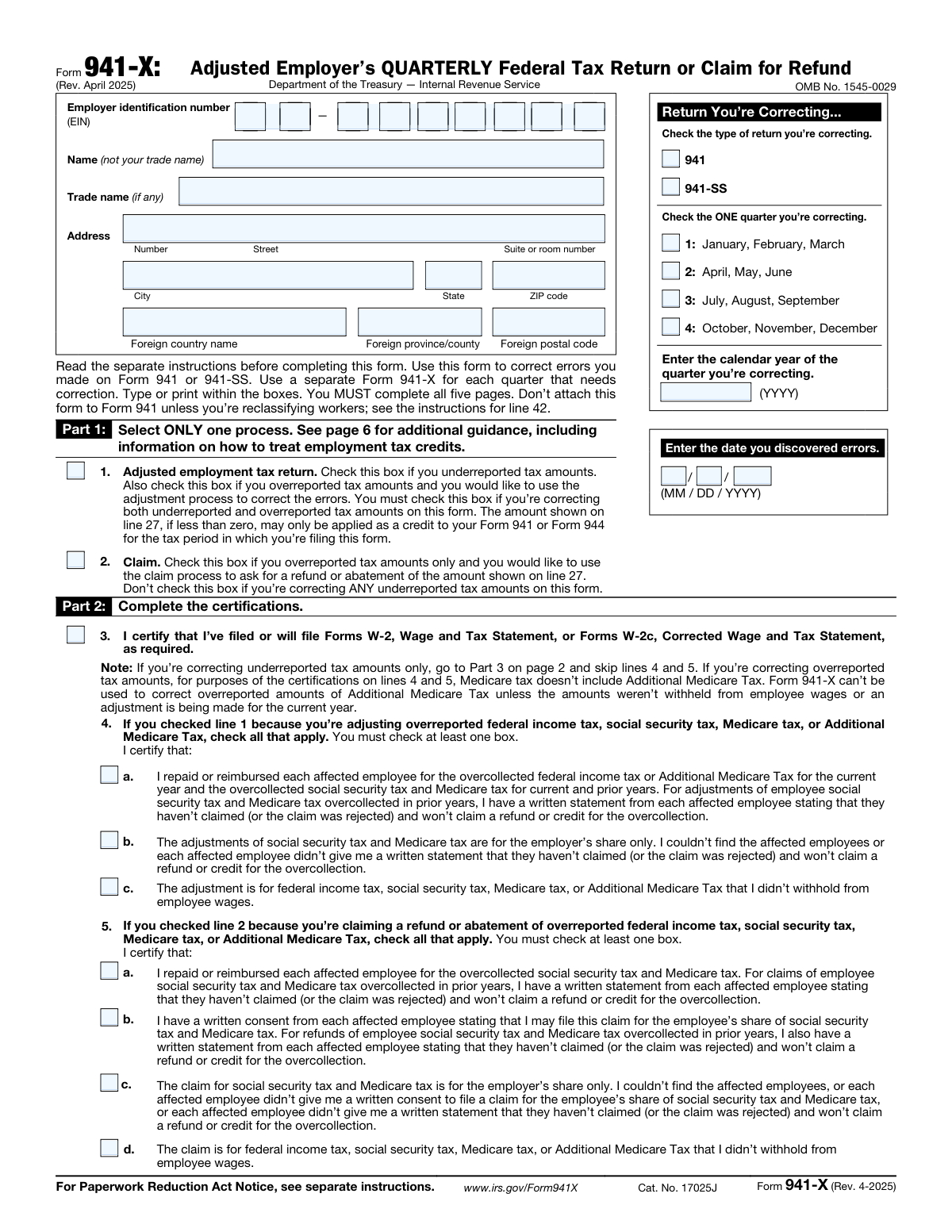
Yes! You can use AI to fill out Form 941-X, Adjusted Employer’s QUARTERLY Federal Tax Return or Claim for Refund
Form 941-X, Adjusted Employer’s QUARTERLY Federal Tax Return or Claim for Refund, is an essential IRS document for employers who need to correct errors on a previously submitted Form 941. It addresses both underpayments and overpayments of employment taxes, allowing businesses to either make an adjustment or claim a refund. Filing this form is critical for maintaining accurate payroll tax records and ensuring compliance. Today, this form can be filled out quickly and accurately using AI-powered services like Instafill.ai, which can also convert non-fillable PDF versions into interactive fillable forms.
941-X is part of the
employer forms, employer tax forms, federal forms, federal tax forms, quarterly tax forms, tax forms and VA claim forms categories on Instafill.
Our AI automatically handles information lookup, data retrieval, formatting, and form filling.
It takes less than a minute to fill out 941-X using our AI form filling.
Securely upload your data. Information is encrypted in transit and deleted immediately after the form is filled out.
Form specifications
| Form name: | Form 941-X, Adjusted Employer’s QUARTERLY Federal Tax Return or Claim for Refund |
| Number of fields: | 350 |
| Number of pages: | 5 |
| Language: | English |
More forms in Employer forms
Instafill Demo: How to fill out PDF forms in seconds with AI
How to Fill Out 941-X Online for Free in 2026
Are you looking to fill out a 941-X form online quickly and accurately? Instafill.ai offers the #1 AI-powered PDF filling software of 2026, allowing you to complete your 941-X form in just 37 seconds or less.
Follow these steps to fill out your 941-X form online using Instafill.ai:
- 1 Navigate to Instafill.ai and upload your Form 941-X, or select it from the platform's library of official documents.
- 2 Enter your business identification details, including EIN, name, and address, and specify the quarter and calendar year being corrected.
- 3 In Part 1, select the appropriate process (adjustment or claim) and complete the certifications in Part 2 regarding employee notifications and consents.
- 4 Use the AI-guided interface to complete Part 3, entering the total corrected amounts, the originally reported amounts, and letting the system calculate the differences and tax corrections.
- 5 Provide a clear and detailed explanation for the corrections in Part 4, as required by the IRS.
- 6 Review all the information you've entered for accuracy, then provide your digital signature and date in Part 5 to certify the return.
- 7 Download the completed form for your records and file it with the IRS according to their instructions, paying any amount due.
Our AI-powered system ensures each field is filled out correctly, reducing errors and saving you time.
Why Choose Instafill.ai for Your Fillable 941-X Form?
Speed
Complete your 941-X in as little as 37 seconds.
Up-to-Date
Always use the latest 2026 941-X form version.
Cost-effective
No need to hire expensive lawyers.
Accuracy
Our AI performs 10 compliance checks to ensure your form is error-free.
Security
Your personal information is protected with bank-level encryption.
Frequently Asked Questions About Form 941-X
Form 941-X is used by employers to correct errors on a previously filed Form 941 (Employer's QUARTERLY Federal Tax Return) or Form 941-SS. It allows you to report adjustments or claim refunds for overpaid employment taxes.
No, you must use a separate Form 941-X for each individual quarter that requires correction. Be sure to indicate the specific quarter and calendar year at the top of the form.
Check the 'Adjusted' box if you underreported taxes or if you overreported and want the amount applied as a credit to your next Form 941. Check the 'Claim' box only if you overreported taxes and want to request a refund or abatement.
If you have both underreported and overreported amounts to correct, you must check the box for an 'Adjusted employment tax return' on line 1. You cannot use the 'Claim' process in this situation.
You will need the figures you originally reported on Form 941 for the quarter you are correcting. These amounts are entered into Column 2 of Part 3 on Form 941-X to calculate the difference.
Yes, Part 4 (line 43) requires you to provide a detailed written explanation of how you determined your corrections. You must describe each error you are correcting.
If line 27 is a positive number, it is the amount you owe and must pay when you file the form. If it is a negative number, it is the amount you are owed as either a credit or a refund, depending on the process you selected in Part 1.
You must certify that you have repaid or reimbursed the employee. For prior year corrections, you must also obtain a written statement from the employee confirming they have not and will not claim a refund for the overcollection.
Yes, if the corrections affect employee wage and tax information, you must file Form W-2c, Corrected Wage and Tax Statement, for each affected employee. You certify that you will do this in Part 2 of Form 941-X.
The mailing address for Form 941-X is not on the form itself and varies based on your location and whether you are including a payment. You must refer to the separate instructions for Form 941-X on the IRS website to find the correct address.
Yes, services like Instafill.ai use AI to help you accurately auto-fill form fields from your records. This can save significant time and help prevent data entry errors.
You can use a service like Instafill.ai to make the process easier. Simply upload the Form 941-X PDF, and the platform will convert it into an interactive, fillable form you can complete online.
Tools like Instafill.ai are designed to solve this problem. They can convert non-fillable PDFs into interactive forms, allowing you to type your information directly into the fields before printing.
Compliance 941-X
Validation Checks by Instafill.ai
1
EIN Format Validation
This check ensures the Employer Identification Number (EIN) is entered in the correct XX-XXXXXXX format. The EIN is a critical identifier for the business entity, and an incorrect format can lead to processing delays or misidentification of the taxpayer. If the format is invalid, the submission should be rejected with an error message prompting the user to correct the entry.
2
Exclusive Process Selection in Part 1
Validates that exactly one checkbox is selected in Part 1, either line 1 (Adjusted return) or line 2 (Claim). These options are mutually exclusive and determine the entire processing path for the form. If neither or both boxes are checked, the form is ambiguous and cannot be processed correctly, requiring a rejection and user correction.
3
Correction Period and Year Completeness
This check verifies that one quarter is selected and a valid calendar year in YYYY format is entered in the 'Return You’re Correcting' section. This information is fundamental for identifying the specific tax period being amended. A missing quarter or year makes it impossible for the IRS to locate the original return, so the form must be considered incomplete.
4
Date of Error Discovery Validity
Ensures the 'date you discovered errors' is a valid date in MM/DD/YYYY format and is not a future date. This date is legally significant for determining timeliness and potential penalties. An invalid or future date would be a logical impossibility and must be flagged for correction before the form can be accepted.
5
Part 3 Column 3 Difference Calculation
For each row in Part 3 (lines 6 through 40), this validation confirms that the value in Column 3 equals the value in Column 1 minus the value in Column 2. This arithmetic check is the foundation of the entire correction, as Column 3 represents the change being reported. A mismatch indicates a calculation error by the filer, which would invalidate all subsequent tax calculations on the form.
6
Part 3 Column 4 Tax Correction Calculation (Multiplier)
Verifies the calculation for tax correction fields that use a multiplier, such as line 8 (Taxable social security wages). The check ensures that the value in Column 4 is the product of the value in Column 3 and the specified tax rate (e.g., 0.124). This is crucial for ensuring the corrected tax amount is calculated accurately according to tax law; an error here directly impacts the amount owed or refunded.
7
Part 3 Column 4 Tax Correction Calculation (Direct Copy)
For lines where the tax correction is a direct copy of the difference (e.g., line 7, Federal income tax withheld), this check ensures the value in Column 4 is identical to the value in Column 3. This validation prevents transcription errors when moving the difference amount to the tax calculation column. An incorrect value would lead to an erroneous total tax correction.
8
Line 23 Subtotal Calculation
This check validates that the amount on line 23 is the correct sum of the tax correction amounts in Column 4 for lines 7 through 22. Line 23 is a critical subtotal that aggregates most of the tax corrections before credits are applied. An incorrect sum would render the final total on line 27 invalid and must be flagged.
9
Line 27 Total Calculation
Ensures the amount on line 27 correctly combines the subtotal from line 23 with the credit corrections from lines 25 through 26c. Line 27 represents the final amount owed or to be refunded/abated, making its accuracy paramount. A miscalculation here would result in an incorrect payment or refund request, causing significant processing issues.
10
Mandatory Explanation in Part 4
Verifies that the explanation field on line 43 is not empty. The form instructions explicitly state, 'You must give us a detailed explanation of how you determined your corrections.' This narrative is essential for the IRS to understand and approve the adjustments or claim. A missing explanation will almost certainly lead to rejection or a follow-up inquiry from the IRS.
11
Conditional Certification for Overreported Adjustments
This check enforces the rule that if line 1 (Adjusted return) is checked and there is an overreported amount (e.g., a negative value in Column 3 of lines 7, 8, 11, 12, or 13), then at least one certification box on line 4 must be checked. This certification is a legal requirement for processing an adjustment that includes overpayments. Failure to provide the required certification will halt the processing of the overreported amounts.
12
Conditional Certification for Claims
Validates that if line 2 (Claim) is checked, at least one certification box on line 5 must also be checked. The claim process has specific legal certification requirements regarding employee reimbursements or consents. Without the appropriate certification, the claim is legally insufficient and cannot be processed by the IRS.
13
Signature and Date Presence
Confirms that the signature and date fields in Part 5 are completed by the taxpayer or authorized person. An unsigned tax form is not considered a valid return or claim under penalty of perjury. The submission is invalid without a signature and date, and it would be rejected outright.
14
Header Information Consistency Across Pages
This validation ensures that the Employer Name, EIN, Correcting Quarter, and Correcting Calendar Year are consistent on every page of the form where they appear (Pages 1-5). Inconsistent header information can cause confusion and processing errors, especially if pages are separated. This check maintains the integrity of the document as a single, cohesive submission.
Common Mistakes in Completing 941-X
Filers frequently confuse the 'Adjusted employment tax return' (Line 1) and 'Claim' (Line 2) processes. This often happens when correcting both underreported and overreported amounts, as the rules for which box to check can be complex and depend on the timing of the filing. Selecting the wrong process can lead to the IRS rejecting the form, delaying a refund, or incorrectly applying an overpayment as a credit instead of issuing a refund. To avoid this, carefully review the detailed chart on page 6 of the form and use it as a guide to select the correct process based on your specific situation.
A common error is attempting to correct errors for multiple tax quarters on a single Form 941-X. The form instructions explicitly state, 'Use a separate Form 941-X for each quarter that needs correction.' Submitting a consolidated form will result in its rejection by the IRS, significantly delaying the correction process. To prevent this, you must identify each specific quarter with an error and prepare and file a distinct Form 941-X for each one, ensuring the correct quarter and year are entered on every form.
Many filers provide a generic or insufficient explanation in Part 4, Line 43, such as simply writing 'clerical error' or 'corrected wages.' The IRS requires a detailed, specific narrative explaining exactly what was reported incorrectly and how the corrected figures were determined. A vague explanation will trigger correspondence from the IRS requesting more information, halting the processing of your form until a satisfactory explanation is provided. Be specific about the nature of the error (e.g., 'Wages for employee John Doe were omitted in the original filing') and show your work.
The grid in Part 3 requires precise calculations, and errors are common. Filers often make simple subtraction mistakes when calculating the 'Difference' in Column 3 (Column 1 minus Column 2). A critical error is forgetting to use a minus sign for negative numbers in Column 3 when an amount was overreported, which throws off all subsequent tax calculations. These errors lead to an incorrect total on Line 27, resulting in an improper payment or refund amount and subsequent notices from the IRS. Using an AI-powered tool like Instafill.ai can help prevent these mistakes by performing calculations automatically and ensuring data consistency.
Column 4 requires multiplying the difference from Column 3 by a specific tax rate, but filers often use the wrong one. For example, on Line 8 (Taxable social security wages), the rate is 0.124, but the instructions note to use 0.062 if you are correcting only the employer's share. Using the incorrect multiplier results in a wrong tax correction amount, which can lead to an incorrect balance due or refund and will require further correction. Always read the fine print and instructions for each line to ensure you are applying the correct tax rate for your situation.
The form requires the employer's name, EIN, correcting quarter, and calendar year to be filled out at the top of every page (Pages 2, 3, 4, and 5). Filers often complete this information only on the first page and leave it blank on the others. If the pages become separated during IRS processing, it can become difficult or impossible to associate them with the correct filing, leading to significant delays or rejection. To avoid this, ensure all header information is completed on every single page before submission. AI form-filling tools like Instafill.ai can automatically populate this repetitive data across all pages, eliminating the risk of this error.
The certifications on lines 4 and 5 are legally binding statements made under penalties of perjury, yet filers sometimes check boxes without meeting the strict requirements. For example, a filer might check box 5a, certifying they have repaid an employee for overcollected tax, before the repayment has actually occurred or without obtaining the required written statement from the employee. This can lead to the denial of the claim and expose the filer to significant legal penalties. You must perform the action (e.g., obtain written consent, repay an employee) before checking the corresponding certification box.
The form explicitly requests the 'Name (not your trade name)' alongside the EIN. Businesses often mistakenly enter their 'Doing Business As' (DBA) or trade name. The IRS's systems match the EIN to the legal entity name on file. A mismatch can cause the filing to be rejected or delayed while the IRS attempts to identify the correct taxpayer account. Always use the exact legal name that was used to apply for the EIN to ensure seamless processing.
Line 3 requires certification that you have filed or will file Forms W-2c (Corrected Wage and Tax Statement) if the corrections on the 941-X affect employee wage and tax data. Many filers overlook this crucial follow-up step, assuming the 941-X is the only form needed. Failure to file Forms W-2c with the Social Security Administration means your employees' official wage records will remain incorrect, which can cause problems for their future Social Security benefits and personal tax filings. This oversight can also lead to penalties from the IRS.
This form is often available as a non-fillable PDF, forcing users to print it and fill it out by hand. This manual process is prone to errors such as illegible handwriting, transposition of numbers, and calculation mistakes that can cause the form to be rejected or processed incorrectly. To avoid these issues, it is best to use a fillable version of the form. Tools like Instafill.ai can convert flat PDFs into fillable forms, allowing for typed entries, automatic calculations, and data validation to ensure accuracy and legibility.
Saved over 80 hours a year
“I was never sure if my IRS forms like W-9 were filled correctly. Now, I can complete the forms accurately without any external help.”
Kevin Martin Green
Your data stays secure with advanced protection from Instafill and our subprocessors

Robust compliance program
Transparent business model
You’re not the product. You always know where your data is and what it is processed for.
ISO 27001, HIPAA, and GDPR
Our subprocesses adhere to multiple compliance standards, including but not limited to ISO 27001, HIPAA, and GDPR.
Security & privacy by design
We consider security and privacy from the initial design phase of any new service or functionality. It’s not an afterthought, it’s built-in, including support for two-factor authentication (2FA) to further protect your account.
Fill out 941-X with Instafill.ai
Worried about filling PDFs wrong? Instafill securely fills form-941-x-adjusted-employers-quarterly-federal-tax-return-or-claim-for-refund forms, ensuring each field is accurate.