Yes! You can use AI to fill out CFS 431-1, Summary of the Child's Educational and Developmental Status

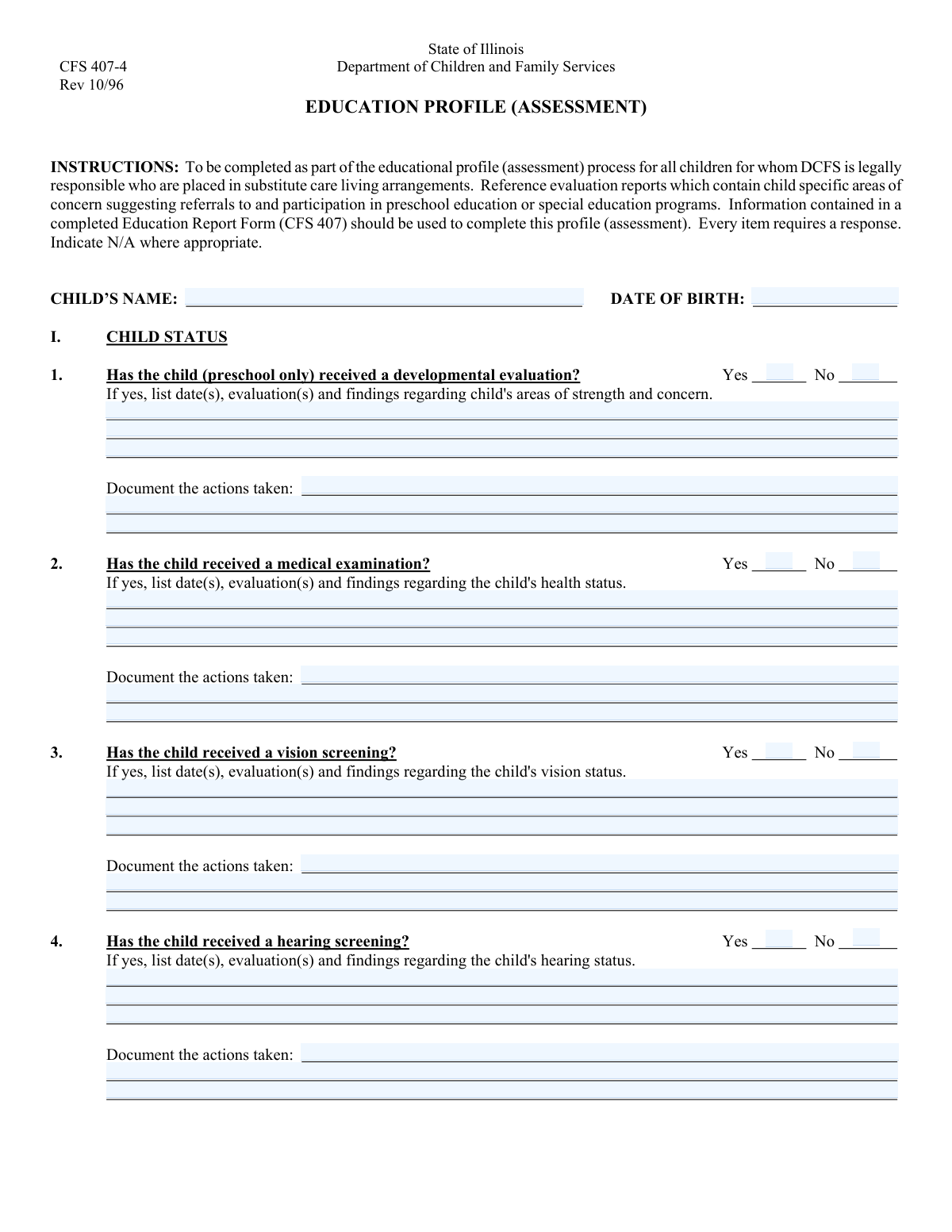
Form CFS 431-1, Summary of the Child's Educational and Developmental Status, is a detailed report used by caseworkers and child welfare agencies to document a holistic view of a child's well-being. It compiles information from medical screenings, school reports, and interviews with parents and the child to identify service needs and create a plan for educational support. Today, this form can be filled out quickly and accurately using AI-powered services like Instafill.ai, which can also convert non-fillable PDF versions into interactive fillable forms.
CFS 431-1 is part of the education forms, educational forms and OPM forms categories on Instafill.
Our AI automatically handles information lookup, data retrieval, formatting, and form filling.
It takes less than a minute to fill out CFS 431-1 using our AI form filling.
Securely upload your data. Information is encrypted in transit and deleted immediately after the form is filled out.

Form specifications

Form name: CFS 431-1, Summary of the Child's Educational and Developmental Status
Number of fields: 146
Number of pages: 3
Filled form examples: Form CFS 431-1 Examples
Language: English
main-image

Instafill Demo: How to fill out PDF forms in seconds with AI

How to Fill Out CFS 431-1 Online for Free in 2026

Are you looking to fill out a CFS 431-1 form online quickly and accurately? Instafill.ai offers the #1 AI-powered PDF filling software of 2026, allowing you to complete your CFS 431-1 form in just 37 seconds or less.
Follow these steps to fill out your CFS 431-1 form online using Instafill.ai:
  1. 1 Navigate to Instafill.ai and upload your CFS 431-1 form or select it from our template library.
  2. 2 Use the AI assistant to accurately enter the child's basic information, such as their full name and date of birth.
  3. 3 Complete the sections for developmental, medical, vision, and hearing screenings, detailing the findings and any actions taken.
  4. 4 Document the information gathered from interviews with school personnel, biological/foster parents, and the child regarding their abilities, concerns, and educational progress.
  5. 5 Fill in the details about the child's special education history, behavioral patterns, learning style, and any identified talents or limitations.
  6. 6 Write a comprehensive summary of the child's overall educational and developmental status, outlining service needs, current services, and plans to secure necessary support.
  7. 7 Review all entered information for completeness and accuracy, then enter the caseworker and supervisor signature dates to finalize the document.

Our AI-powered system ensures each field is filled out correctly, reducing errors and saving you time.

Why Choose Instafill.ai for Your Fillable CFS 431-1 Form?

Speed

Complete your CFS 431-1 in as little as 37 seconds.

Up-to-Date

Always use the latest 2026 CFS 431-1 form version.

Cost-effective

No need to hire expensive lawyers.

Accuracy

Our AI performs 10 compliance checks to ensure your form is error-free.

Security

Your personal information is protected with bank-level encryption.

Frequently Asked Questions About Form CFS 431-1

This form is designed to create a comprehensive summary of a child's educational and developmental status. It gathers information from evaluations, screenings, and interviews to identify needs, strengths, and required support services.

A caseworker typically gathers the necessary information and completes the form. It is then reviewed and signed by a supervisor to ensure accuracy and completeness.

You should gather the child's medical records, results from developmental, vision, or hearing screenings, and any reports from school personnel. It is also necessary to have notes from interviews with the child's parents (biological and/or foster) and the child, if appropriate.

For any section regarding an evaluation or screening (e.g., Medical, Vision, Hearing), simply check the 'No' box. You can then leave the corresponding 'Findings' and 'Actions Taken' fields for that section blank.

In the 'Actions Taken' field, document any follow-up steps that occurred as a result of the evaluation's findings. This could include referrals to specialists, implementing an educational plan, or obtaining corrective lenses.

You should interview the relevant parties based on the child's current situation and ability to communicate. The form has distinct sections to capture input from each party to provide a complete picture of the child's needs and strengths.

The 'Classification History' section is for documenting if the child has ever been found eligible for special education in the past. The 'Current Eligibility' section is to state whether the child is eligible for and/or receiving those services right now.

This section is for any diagnosed disabilities or other conditions that could impact the child's ability to learn. This can include learning disabilities, physical impairments, ADHD, or other health conditions that affect school performance.

This summary should be a comprehensive overview of all the information collected in the form. It needs to highlight the child's overall status, identified service needs, services already in place, and the plan to secure any additional necessary services.

Yes, services like Instafill.ai use AI to accurately auto-fill form fields from your records, which can save significant time and reduce errors. This is especially helpful for lengthy forms that require information from multiple sources.

You can upload the form to the Instafill.ai platform, which will make it an interactive, fillable document. You can then connect your data sources, and the AI will help you populate the fields quickly and accurately before you download the completed form.

If you have a non-fillable or 'flat' PDF, you can use a service like Instafill.ai. It can convert the static PDF into an interactive, fillable form that you can easily complete on your computer.

Use this section to document observations of advanced talents or academic behaviors that suggest the child might benefit from accelerated instruction or a gifted program. If you check 'Yes,' provide specific examples of these talents or behaviors.

The caseworker who completes the form must sign and date it in the 'Caseworker Signature Date' field. A supervisor must also review, sign, and date the form in the 'Supervisor Signature Date' field to finalize it.

Compliance CFS 431-1
Validation Checks by Instafill.ai

1
Child's Date of Birth Validity
Checks that the 'Child's Date of Birth' is a valid, correctly formatted date that occurs in the past. This is crucial for calculating the child's age accurately for service eligibility and developmental tracking. If the date is invalid, in the future, or improperly formatted, the form submission will be rejected, preventing inaccurate records.
2
Required Child Information
Ensures that the 'Child's Name' and 'Child's Date of Birth' fields are not empty. These fields are fundamental for identifying the child and creating a valid record. A failure in this check would prevent the form from being submitted until the core identifying information is provided.
3
Mutually Exclusive Yes/No Selections
Verifies that for every question with 'Yes' and 'No' options (e.g., 'Medical Examination'), only one option is selected. This prevents contradictory data entry which would make the child's status for that item ambiguous. If both are selected, an error message will prompt the user to choose only one.
4
Completeness of Yes/No Questions
Confirms that for every pair of 'Yes' and 'No' options, at least one has been selected. This ensures that each question is answered, preventing gaps in the child's profile. An incomplete form could lead to missed needs or services, so submission is blocked until all such questions are answered.
5
Conditional Field Requirement for 'Yes' Selections
Checks that if a 'Yes' box is checked, the corresponding detailed description field is filled out (e.g., if 'Medical Examination - Yes' is checked, 'Medical Examination Findings' must not be empty). This rule enforces the collection of necessary details that justify the 'Yes' answer. Failure to provide details will result in a validation error, prompting the user to elaborate.
6
Special Education Eligibility Logic
Ensures that if 'Current Special Education Eligibility' is marked as 'Yes', then 'Ever Classified Eligible for Special Education' must also be 'Yes'. It is logically impossible for a child to be currently eligible without ever having been classified as such. This check prevents contradictory reporting on the child's special education history.
7
Special Education Services Logic
Validates that if a child is marked as 'Currently receiving special education or early intervention services', they must also be marked as 'Currently eligible for special education/early intervention services'. A child cannot receive services for which they are not eligible. This check maintains the logical integrity of the special education status section.
8
Signature Date Chronology
Verifies that the 'Supervisor Signature Date' is on or after the 'Caseworker Signature Date'. The supervisor's signature confirms review of the caseworker's work, so it must occur at the same time or later. An invalid date sequence would suggest a procedural error and must be corrected before submission.
9
Event Date vs. Signature Date Logic
Checks that any dates mentioned within evaluation or screening findings fields (e.g., 'Medical Examination Findings') are on or before the 'Caseworker Signature Date'. The report cannot be signed before the events it describes have occurred. This validation ensures the timeline of events is logical and accurately reported.
10
Child's Age vs. Event Dates
Confirms that the 'Child's Date of Birth' is before any evaluation, screening, or signature date entered on the form. This fundamental check ensures the child existed before the reported events took place. It prevents data entry errors, such as transposing years, that would render the entire record nonsensical.
11
Required Summary Field
Ensures the 'Educational/Developmental Status Summary' field is not left blank. This field provides a crucial overview of the child's situation and the plan of action. Its completion is mandatory to ensure the primary purpose of the form—summarizing the child's status and needs—is fulfilled.
12
Past Special Education Classification Requirement
Validates that if 'Ever Classified Eligible - Yes' is checked, the 'Past Classification(s)' field must not be empty. This ensures that a claim of past eligibility is substantiated with information about the specific classification. Without this detail, the historical data is incomplete and less useful for future planning.
13
Behavioral Intervention Justification
Validates that if 'Behavioral Intervention Needs Assessment' is marked 'Yes, needs intervention', the 'Behavioral Patterns Description Line 1' field is not empty. This rule mandates that a need for intervention must be accompanied by a description of the specific behaviors. This ensures that any identified need is clearly documented, which is the first step toward creating an effective intervention plan.
14
Gifted Program Justification
Ensures that if 'Gifted Program Needs Assessment' is marked 'Yes', the 'Talents/Behavior Description Line 1' field must contain text. This requires the user to provide specific evidence or justification for a potential gifted placement. This prevents unsubstantiated recommendations and ensures that any such indication is backed by documented observations.

Common Mistakes in Completing CFS 431-1

Inconsistent Checkbox and Detail Field Entries

A frequent error is checking 'No' for an evaluation (e.g., 'No' for Vision Screening) but then entering details in the corresponding findings field, or checking 'Yes' and leaving the required details blank. This happens when users miss the conditional instruction 'Fill only if Yes is Yes' and creates confusion, requiring follow-up to clarify whether an evaluation occurred. To avoid this, carefully read all instructions and ensure that for every 'Yes' response, the corresponding detail section is completed. AI-powered form fillers like Instafill.ai can prevent this by automatically enabling or disabling detail fields based on the checkbox selection.

Providing Vague or Incomplete Narrative Details

In descriptive fields like 'Developmental Evaluation Details' or 'Limiting Conditions Summary', users often write vague phrases like 'See attached report' or 'Child has issues.' This makes the form an incomplete standalone document and forces the reviewer to hunt for information, delaying the process of getting services for the child. Always provide a concise but thorough summary of the key findings, dates, specific evaluations, and conclusions directly in the designated fields, even if other documents are attached.

Omitting 'Actions Taken' After Reporting Findings

Each evaluation section (Developmental, Medical, Vision, Hearing) has a field for 'Findings' and a separate field for 'Actions Taken.' A common mistake is to meticulously document the findings but leave the 'Actions Taken' field empty. This leaves reviewers uncertain about what follow-up occurred, creating ambiguity about whether the child's needs are being addressed. To prevent this, always document the specific steps taken in response to the findings, such as referrals made, appointments scheduled, or interventions started.

Ignoring Dependent Questions Triggered by a 'Yes' Answer

This form contains complex conditional logic, where answering 'Yes' to one question requires an answer to a subsequent question (e.g., interviewing parents). Users often answer the primary 'Yes/No' question but overlook the dependent fields that may appear later in the form. This results in an incomplete record and requires administrators to track down the missing information. Carefully review the entire form after making selections, or use a smart form-filling tool like Instafill.ai that can automatically highlight required fields based on your previous answers.

Confusing Past vs. Current Special Education Status

The form has separate questions for whether a child has 'Ever Classified Eligible' for special education and whether they are 'Currently eligible.' Users can easily confuse these, especially if the child's status has changed recently. This error can lead to incorrect assumptions about the child's current service plan and needs. To avoid this, carefully consult the child's official records to distinguish between their historical and present eligibility and service status.

Underutilizing Multi-Line Text Fields

The form uses multiple consecutive text fields (e.g., 'Behavioral Patterns Description Line 1', 'Line 2', 'Text103') to create space for a single, detailed answer. Users frequently try to cram their entire response into the first line or are unaware that the subsequent fields are for continuation. This leads to truncated, incomplete answers and lost information. Treat all designated lines as a single, continuous text area and ensure your full response is captured across all provided fields. If the form is a non-fillable PDF, a tool like Instafill.ai can convert it into a fillable version with appropriately sized text boxes.

Neglecting the Final Summary Section

The 'Educational/Developmental Status Summary' at the end of the form is arguably the most critical section, as it synthesizes all preceding data. It is often rushed or skipped, with the assumption that the reader will connect the dots from the detailed sections. This forces reviewers to re-read the entire document to grasp the overall situation, slowing down decision-making. Always take the time to write a comprehensive summary that integrates identified needs, current services, and planned actions.

Inconsistent or Ambiguous Date Formatting

Fields like 'Child's Date of Birth' and various signature and evaluation dates are prone to inconsistent formatting (e.g., MM/DD/YY vs. DD-MM-YYYY). This can create ambiguity, especially with formats like '02/03/24,' which can be interpreted differently depending on location. Such inconsistencies cause data entry problems and can lead to errors in the child's official record. Always use a clear, four-digit year (YYYY) and a consistent format throughout the document to avoid misinterpretation. Using a tool like Instafill.ai can help by automatically standardizing date formats.

Misinterpreting Section-Specific Qualifiers

A small but critical detail, like the '(preschool only)' qualifier on the 'Developmental Evaluation' section, is easily missed. This leads to two errors: filling out the section for a school-aged child (irrelevant data) or skipping it for a preschooler (missing data). This compromises the quality of the information collected and can impact service eligibility. Always read section titles and any accompanying parenthetical notes carefully to ensure you are providing the correct information for the child's specific circumstances.
Saved over 80 hours a year

“I was never sure if my IRS forms like W-9 were filled correctly. Now, I can complete the forms accurately without any external help.”

Kevin Martin Green

Your data stays secure with advanced protection from Instafill and our subprocessors

Robust compliance program

Transparent business model

You’re not the product. You always know where your data is and what it is processed for.

ISO 27001, HIPAA, and GDPR

Our subprocesses adhere to multiple compliance standards, including but not limited to ISO 27001, HIPAA, and GDPR.

Security & privacy by design

We consider security and privacy from the initial design phase of any new service or functionality. It’s not an afterthought, it’s built-in, including support for two-factor authentication (2FA) to further protect your account.

Fill out CFS 431-1 with Instafill.ai

Worried about filling PDFs wrong? Instafill securely fills cfs-431-1-summary-of-the-childs-educational-and-developmental-status forms, ensuring each field is accurate.