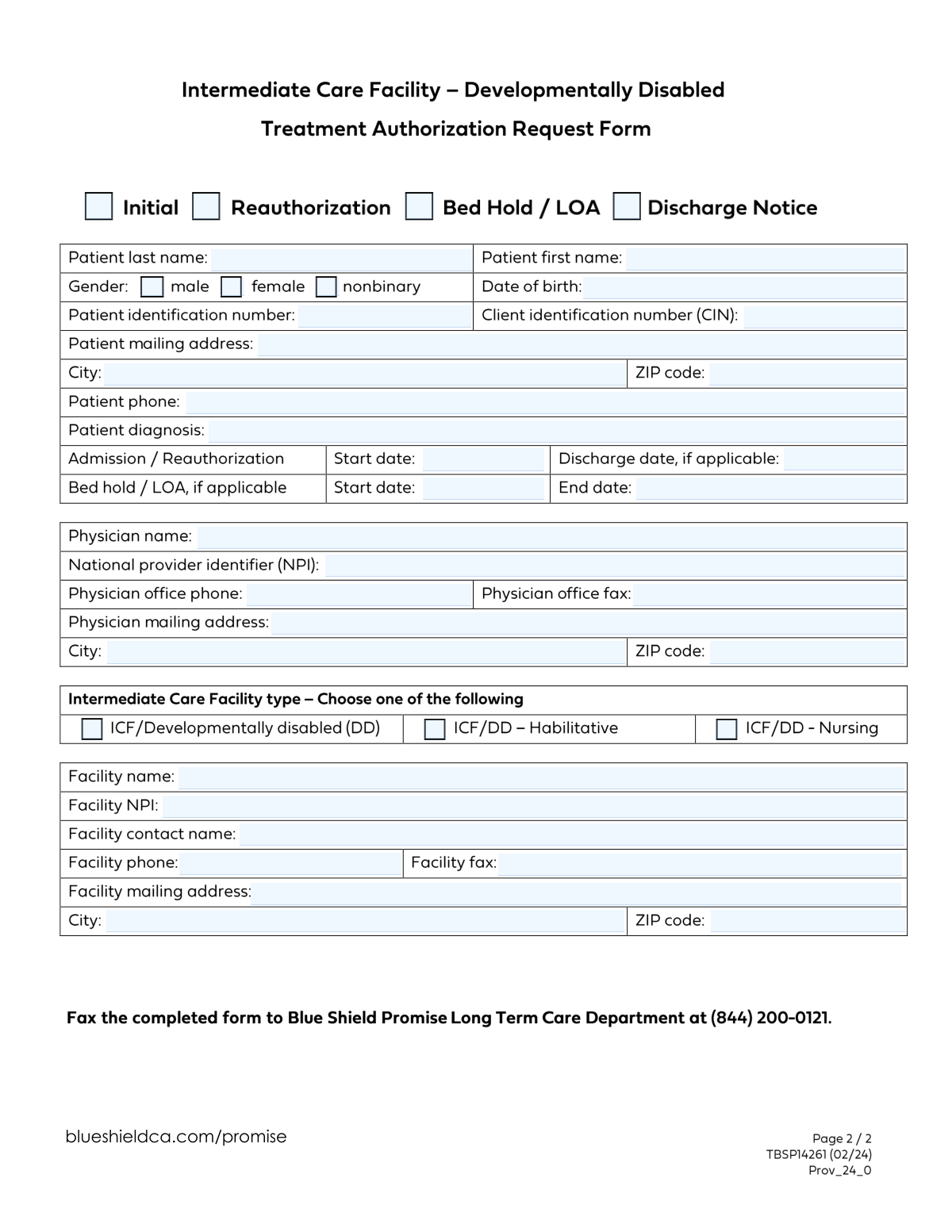
Yes! You can use AI to fill out Treatment Authorization Request for Intermediate Care Facility for the Developmentally Disabled (ICF/DD)
This form is a formal Treatment Authorization Request (TAR) submitted by healthcare providers to secure approval for a patient's admission, continued stay, or a leave of absence from an Intermediate Care Facility for the Developmentally Disabled (ICF/DD). It is a critical document for ensuring that the care provided is deemed medically necessary and for facilitating proper billing and reimbursement from payers. Today, this form can be filled out quickly and accurately using AI-powered services like Instafill.ai, which can also convert non-fillable PDF versions into interactive fillable forms.
Our AI automatically handles information lookup, data retrieval, formatting, and form filling.
It takes less than a minute to fill out ICF/DD TAR using our AI form filling.
Securely upload your data. Information is encrypted in transit and deleted immediately after the form is filled out.
Form specifications
| Form name: | Treatment Authorization Request for Intermediate Care Facility for the Developmentally Disabled (ICF/DD) |
| Number of fields: | 39 |
| Number of pages: | 2 |
| Language: | English |
| Categories: | authorization forms, CAR forms, OPM forms, L.A. Care forms |
Instafill Demo: How to fill out PDF forms in seconds with AI
How to Fill Out ICF/DD TAR Online for Free in 2026
Are you looking to fill out a ICF/DD TAR form online quickly and accurately? Instafill.ai offers the #1 AI-powered PDF filling software of 2026, allowing you to complete your ICF/DD TAR form in just 37 seconds or less.
Follow these steps to fill out your ICF/DD TAR form online using Instafill.ai:
- 1 Navigate to Instafill.ai and upload or select the ICF/DD Treatment Authorization Request form.
- 2 Indicate the type of request by checking the appropriate box: Initial, Reauthorization, Bed Hold/LOA, or Discharge Notice.
- 3 Use the AI assistant to accurately fill in all required Patient Information, including their name, date of birth, identification numbers, and diagnosis.
- 4 Enter the relevant dates for the admission, reauthorization, discharge, or bed hold period as prompted by the smart fields.
- 5 Provide the details for the attending physician and the facility, including names, addresses, and National Provider Identifier (NPI) numbers.
- 6 Review all the auto-filled information for accuracy, make any necessary corrections, and then proceed to complete any remaining fields.
- 7 Download, print, or securely submit the completed form directly to the appropriate authorizing agency or payer.
Our AI-powered system ensures each field is filled out correctly, reducing errors and saving you time.
Why Choose Instafill.ai for Your Fillable ICF/DD TAR Form?
Speed
Complete your ICF/DD TAR in as little as 37 seconds.
Up-to-Date
Always use the latest 2026 ICF/DD TAR form version.
Cost-effective
No need to hire expensive lawyers.
Accuracy
Our AI performs 10 compliance checks to ensure your form is error-free.
Security
Your personal information is protected with bank-level encryption.
Frequently Asked Questions About Form ICF/DD TAR
This form is a Treatment Authorization Request used to submit an initial request for treatment, a reauthorization, a bed hold/leave of absence (LOA), or a discharge notice for a patient.
This form should be completed by the physician's office or the staff at the care facility on behalf of the patient to request authorization or provide status updates.
Select 'Initial' if this is the first time you are requesting treatment authorization for this patient. Select 'Reauthorization' if you are requesting an extension for a previously approved treatment.
You should only complete the 'Bed Hold/LOA Start Date' and 'End Date' fields if you have checked the 'Bed Hold / LOA' box at the top of the form.
The NPI is a unique 10-digit identification number for healthcare providers. You must enter the NPI for both the physician and the facility, which can be found in their respective provider records.
Yes, if the patient has been assigned both a Patient ID number and a Client Identification Number (CIN), you should enter both to ensure accurate processing.
To submit a discharge notice, check the 'Discharge Notice' box at the top of the form and enter the patient's 'Discharge Date' in the appropriate field.
The form allows you to specify if the facility is an ICF for the developmentally disabled (DD), and further classify it as Habilitative (ICF/DD-H) or Nursing (ICF/DD-N).
The form implies you might select multiple types in certain situations, as the 'Discharge Date' field applies to both. Always follow the specific submission guidelines provided by the receiving authority.
You must provide the physician's full name, National Provider Identifier (NPI), office phone and fax numbers, and their complete mailing address.
Yes, services like Instafill.ai use AI to accurately auto-fill form fields from your saved data, which can save significant time and reduce errors.
Simply upload the form to the Instafill.ai platform. The AI will identify the fields, allowing you to quickly fill them out online, save your progress, and download the completed document.
You can use a service like Instafill.ai, which can convert flat, non-fillable PDFs into interactive, fillable forms that are easy to complete on your computer.
Compliance ICF/DD TAR
Validation Checks by Instafill.ai
1
Ensures Initial and Reauthorization Requests are Mutually Exclusive
This validation checks that the 'Initial' and 'Reauthorization' checkboxes are not selected at the same time. A treatment request can be one or the other, but not both, and selecting both creates a logical contradiction. If this validation fails, the user must deselect one of the two options to clarify the nature of the request.
2
Validates Single Gender Selection
This check ensures that exactly one gender option ('Male', 'Female', or 'Nonbinary') is selected for the patient. Selecting zero or more than one option leads to incomplete or ambiguous demographic data, which is crucial for patient identification and reporting. A failure requires the user to select one and only one gender option.
3
Validates Patient's Date of Birth is in the Past
This validation confirms that the entered 'Date of Birth' is a valid calendar date and occurs before the current submission date. This check prevents data entry errors, such as typos or future dates, which would make the patient record invalid. If the date is invalid or in the future, the submission will be rejected until a valid past date is entered.
4
Validates National Provider Identifier (NPI) Format
This check verifies that the 'Physician NPI' and 'Facility NPI' fields each contain a valid 10-digit number. The NPI is a standard, unique identifier for healthcare providers and facilities, and an incorrect format can lead to claim rejections and significant processing delays. A failed validation will require the user to correct the NPI to a 10-digit numeric value.
5
Ensures Discharge Date is Only Provided When Applicable
This validation rule checks that the 'Discharge Date' field is populated only if the 'Reauthorization' or 'Discharge Notice' checkbox is selected. This prevents extraneous data from being submitted and ensures the discharge date is contextually correct for the request type. If the date is filled without the corresponding checkbox, the user will be prompted to either clear the date or select the appropriate request type.
6
Validates Discharge Date Chronological Order
This check ensures that if a 'Discharge Date' is provided, it is not earlier than the 'Admission Reauthorization Start Date'. This maintains logical consistency in the treatment timeline and prevents nonsensical date ranges that would be impossible to process. A failed validation would require the user to correct one or both of the dates to reflect a valid timeline.
7
Requires Bed Hold/LOA Dates When Applicable
This validation ensures that if the 'Bed Hold / LOA' checkbox is selected, both the 'Bed Hold/LOA Start Date' and 'End Date' fields are filled. These dates are essential for processing a leave of absence request and calculating billing. If the box is checked but the dates are missing, the submission will be blocked until they are provided.
8
Ensures Bed Hold/LOA End Date is Not Before Start Date
This validation confirms that the 'Bed Hold/LOA End Date' is on or after the 'Bed Hold/LOA Start Date'. This logic check prevents invalid date ranges for a leave of absence, which could cause authorization and billing errors. If the end date precedes the start date, the user must correct the entry before proceeding.
9
Ensures Patient and Client Identification Numbers are Provided
This check verifies that both the 'Patient Identification Number' and 'Client Identification Number (CIN)' fields are filled out. These unique identifiers are critical for correctly identifying the patient across different systems and ensuring benefits are applied correctly. A missing identifier will halt the submission until the required information is entered.
10
Validates Standard Phone Number Format
This check ensures that all phone number fields, including 'Patient Phone', 'Physician Office Phone', and 'Facility Phone', adhere to a standard 10-digit format. Consistent formatting is essential for system parsing and for ensuring contact information is usable by staff and automated systems. An invalid format will trigger an error message prompting the user to correct the entry.
11
Validates ZIP Code Format
This validation confirms that all ZIP code fields ('Patient ZIP Code', 'Physician ZIP Code', 'Facility ZIP Code') contain a valid 5-digit or 9-digit (ZIP+4) format. Correct ZIP codes are essential for mail delivery, location verification, and linking to geographic service areas. An invalid entry will prevent submission until a correctly formatted ZIP code is provided.
12
Ensures an Intermediate Care Facility (ICF) Type is Selected
This validation checks that at least one of the ICF type checkboxes ('ICF/DD', 'ICF/DD - Habilitative', 'ICF/DD - Nursing') is selected. Specifying the facility type is mandatory for determining the correct level of care, reimbursement rates, and regulatory compliance. If no selection is made, the form cannot be submitted.
Common Mistakes in Completing ICF/DD TAR
Users often select multiple conflicting request types (e.g., both 'Initial' and 'Reauthorization') or forget to select any at all. This ambiguity forces reviewers to guess the form's purpose, leading to processing delays or outright rejection. To avoid this, carefully review the definitions of each request type and select only the one that applies. AI-powered form filling tools can prevent this by enforcing rules that only allow a single, valid selection.
A frequent error is filling out date fields that don't correspond to the selected request type, such as entering a 'Discharge Date' for an 'Initial' request. The form's conditional instructions are often overlooked, causing confusion and requiring clarification. Advanced form-filling tools like Instafill.ai can dynamically show or hide relevant date fields based on your request type selection, making it impossible to fill out incorrect sections.
Entering the 'Patient Identification Number', 'CIN', or 'NPI' with transposed digits or typos is a critical error. These numbers are the primary keys for linking the request to the correct records, and a mistake can lead to a failed submission or a serious data mismatch. To prevent this, double-check each digit before submitting. Tools like Instafill.ai can help by validating number formats and checksums in real-time.
The 'Patient Diagnosis' field is often filled with general terms or unapproved abbreviations instead of specific, coded diagnoses (e.g., ICD-10 codes). This lack of specificity makes it difficult for reviewers to assess medical necessity, often resulting in a request for more information and delaying authorization. Always use the full, official diagnostic terminology or code as provided by the treating physician.
The 10-digit NPI for both the physician and facility is essential for verification, but users may enter a different ID (like a Tax ID), leave it blank, or make a typo. An invalid NPI will cause the request to be rejected immediately. AI-powered tools can automatically validate the NPI format and structure, significantly reducing the chance of rejection. If the form is a flat PDF, Instafill.ai can make it fillable and apply these validations.
Submissions are often made with partial addresses, missing apartment or suite numbers, or incorrect ZIP codes for either the patient or the facility. This can delay or prevent important correspondence related to the authorization from being delivered. Always enter the full, USPS-verified mailing address. Form-filling software often includes address auto-completion and validation to ensure accuracy.
When filling out date ranges, such as for a 'Bed Hold/Leave of Absence', users sometimes enter an end date that occurs before the start date. This logical error makes the request invalid and requires correction, delaying the process. Intelligent form fillers like Instafill.ai can automatically validate date logic, alerting you immediately if an end date is entered that is earlier than the corresponding start date.
Users may be unsure of the specific facility designation and either select multiple types (e.g., 'ICF/DD' and 'ICF/DD - Habilitative') or the wrong one. This can route the request to the incorrect review department, leading to significant delays. It is crucial to confirm the exact facility type and select only the single, correct option. AI tools can enforce a single selection for this field to prevent ambiguity.
People sometimes enter a patient's nickname (e.g., 'Bill' for William) or use initials for the physician's name instead of the full legal name. This creates a mismatch with official records, making it difficult to verify identity and eligibility. Using a form-filling tool with saved profiles ensures that the correct, full legal name is used consistently across all documents.
Phone numbers are frequently entered without area codes, with extra characters like parentheses, or with typos. This simple mistake can prevent reviewers from contacting the patient, physician, or facility for crucial clarifications, halting the authorization process. Tools like Instafill.ai can automatically format phone numbers correctly and validate that a complete number has been entered, preventing contact issues.
Saved over 80 hours a year
“I was never sure if my IRS forms like W-9 were filled correctly. Now, I can complete the forms accurately without any external help.”
Kevin Martin Green
Your data stays secure with advanced protection from Instafill and our subprocessors

Robust compliance program
Transparent business model
You’re not the product. You always know where your data is and what it is processed for.
ISO 27001, HIPAA, and GDPR
Our subprocesses adhere to multiple compliance standards, including but not limited to ISO 27001, HIPAA, and GDPR.
Security & privacy by design
We consider security and privacy from the initial design phase of any new service or functionality. It’s not an afterthought, it’s built-in, including support for two-factor authentication (2FA) to further protect your account.
Fill out ICF/DD TAR with Instafill.ai
Worried about filling PDFs wrong? Instafill securely fills treatment-authorization-request-for-intermediate-care-facility-for-the-developmentally-disabled-icfdd forms, ensuring each field is accurate.