Yes! You can use AI to fill out Document Checklist for a Study Permit (IMM 5483)

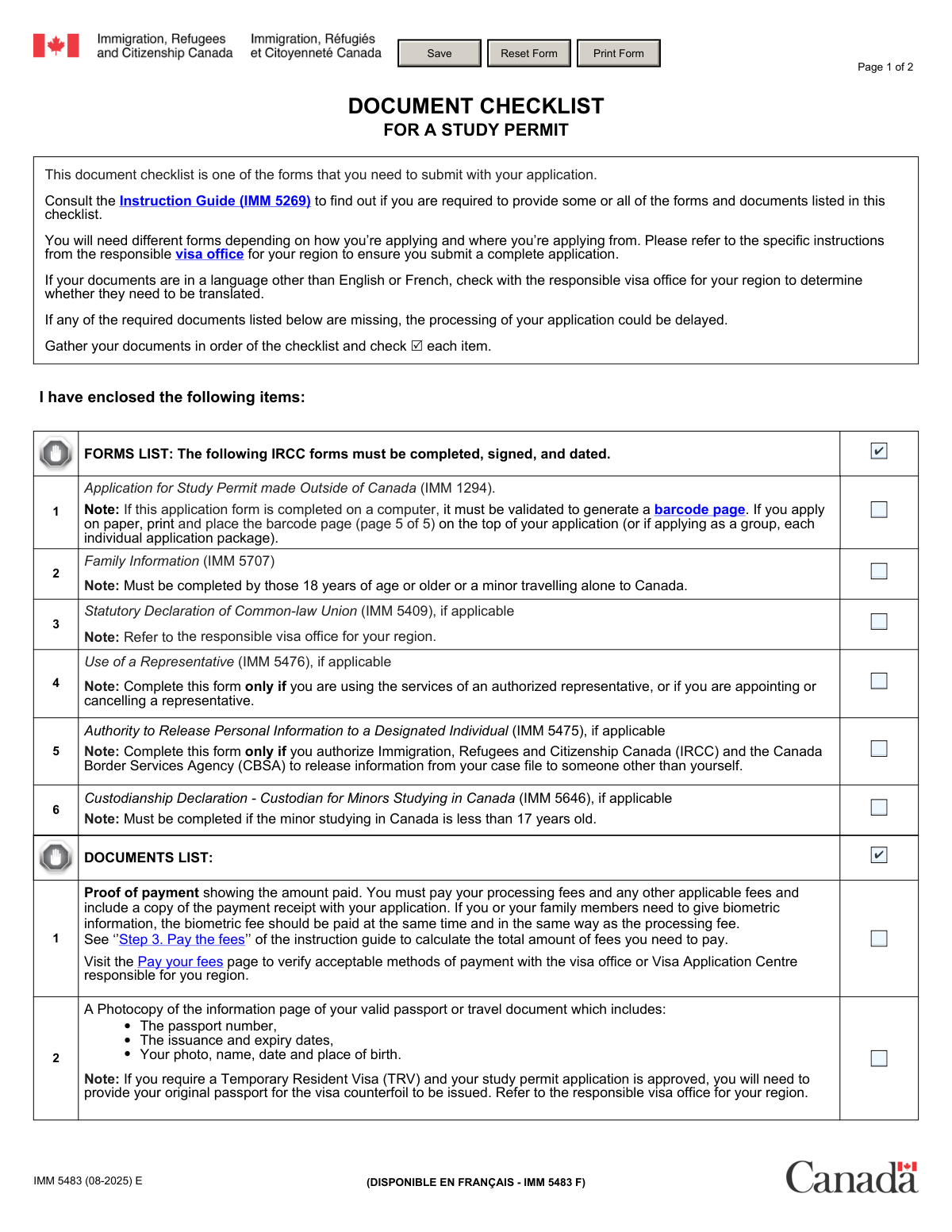
IMM 5483 is an official Immigration, Refugees and Citizenship Canada (IRCC) checklist that helps study permit applicants ensure they submit the correct application forms (e.g., IMM 1294, IMM 5707) and required supporting documents (e.g., passport copy, photos, letter of acceptance, PAL/TAL, proof of funds). It’s important because missing items can delay processing or result in an application not being accepted for processing, especially where a PAL/TAL or updated QuĂ©bec CAQ is required. The checklist is typically assembled in the same order as listed and each item is checked off to confirm inclusion. Today, this form can be filled out quickly and accurately using AI-powered services like Instafill.ai, which can also convert non-fillable PDF versions into interactive fillable forms.
Our AI automatically handles information lookup, data retrieval, formatting, and form filling.
It takes less than a minute to fill out IMM 5483 using our AI form filling.
Securely upload your data. Information is encrypted in transit and deleted immediately after the form is filled out.

Form specifications

Form name: Document Checklist for a Study Permit (IMM 5483)
Number of pages: 2
Language: English
Categories: IRCC forms, immigration forms, study permit forms, Canada visa forms
main-image

Instafill Demo: filling out a legal form in seconds

How to Fill Out IMM 5483 Online for Free in 2026

Are you looking to fill out a IMM 5483 form online quickly and accurately? Instafill.ai offers the #1 AI-powered PDF filling software of 2026, allowing you to complete your IMM 5483 form in just 37 seconds or less.
Follow these steps to fill out your IMM 5483 form online using Instafill.ai:
  1. 1 Go to Instafill.ai and upload/select the IRCC form “IMM 5483 – Document Checklist for a Study Permit.”
  2. 2 Let the AI detect the checklist fields and confirm the application context (study permit made outside Canada, destination province/territory, whether you’re a minor, using a representative, etc.).
  3. 3 Complete the FORMS LIST section by checking the boxes for each IRCC form you are including (e.g., IMM 1294, IMM 5707, and any applicable IMM 5409/5476/5475/5646).
  4. 4 Complete the DOCUMENTS LIST section by checking items you have prepared (payment receipt, passport information page, photos if required, letter of acceptance, PAL/TAL, CAQ for Québec, proof of funds, medical exam if applicable, marriage certificate if applicable, and any visa-office-specific documents).
  5. 5 Upload or attach supporting files in Instafill.ai (receipts, passport scan, acceptance letter, PAL/TAL or CAQ, financial documents, medical confirmation) and have the AI validate completeness and flag missing/conditional items.
  6. 6 Review the final checklist for accuracy, ensure conditional requirements are correctly handled (e.g., biometrics photo exemption, Québec CAQ, minor custodianship), then export/print the completed form for submission with your application package.

Our AI-powered system ensures each field is filled out correctly, reducing errors and saving you time.

Why Choose Instafill.ai for Your Fillable IMM 5483 Form?

Speed

Complete your IMM 5483 in as little as 37 seconds.

Up-to-Date

Always use the latest 2026 IMM 5483 form version.

Cost-effective

No need to hire expensive lawyers.

Accuracy

Our AI performs 10 compliance checks to ensure your form is error-free.

Security

Your personal information is protected with bank-level encryption.

Frequently Asked Questions About Form IMM 5483

IMM 5483 is a checklist you submit with your study permit application to confirm you included the required forms and supporting documents. It helps IRCC (and you) ensure your application package is complete and organized.

Anyone applying for a study permit using the document package that requires IMM 5483 should include it. Always confirm requirements in the Instruction Guide (IMM 5269) and your responsible visa office instructions, since requirements vary by location and application method.

No—some forms are only required “if applicable” (for example, common-law union, representative, or custodianship for minors). Use the Instruction Guide (IMM 5269) and your visa office instructions to determine which items apply to you.

You should check the box beside each form or document after you have included it in your application package. IRCC expects you to gather documents in the same order as the checklist to reduce delays.

If you complete IMM 1294 on a computer, you must validate it to generate a barcode page. For paper applications, print the barcode page and place it on top of your application (or on top of each person’s package if applying as a group).

IMM 5707 must be completed by applicants who are 18 years of age or older, or by a minor who is travelling alone to Canada. Make sure it is completed, signed, and dated as required.

You must include IMM 5646 if the student is a minor under 17 years old and the custodianship requirement applies. Follow the visa office instructions for how the custodianship documents must be completed and submitted.

Include a copy of the payment receipt showing the amount paid for processing fees and any other applicable fees. If biometrics are required, the biometric fee should be paid at the same time and included with the receipt.

You must include a photocopy of the information page of your valid passport or travel document showing your passport number, issue/expiry dates, photo, name, and date/place of birth. If a TRV is required and your study permit is approved, you may later need to submit your original passport for the visa counterfoil.

Usually no—if you are required to provide biometric fingerprints and a digital photo, you are not required to include paper photos. If paper photos are required, provide two that meet the visa photo specifications and write your name and date of birth on the back.

The letter must be issued by the Canadian institution on official letterhead and should include the exact tuition fees, anticipated start and finish dates, and the registration deadline. It should clearly identify where you intend to study (including Designated Learning Institutions, where applicable).

A Provincial Attestation Letter / Territorial Attestation Letter (PAL/TAL) is required for most study permit applications as of January 22, 2024, unless you meet an exception. If you don’t include a PAL/TAL (or proof you qualify for an exception), your application will not be accepted for processing.

If you plan to study in Québec, you must provide the attestation of issuance of your Québec Acceptance Certificate (CAQ) from MIFI. As of February 13, 2024, the CAQ was updated to include information about the provincial attestation letter, and applications without the updated CAQ (or proof of an exception) will not be accepted for processing.

You must provide documents showing you meet IRCC’s current financial requirements, which are updated each year. Check the IRCC website for the latest amounts and acceptable evidence for your situation.

Yes—AI tools can help reduce errors and save time; for example, Instafill.ai can auto-fill form fields accurately based on your information. If your PDF is flat/non-fillable, Instafill.ai can convert it into an interactive fillable form, then you can upload the checklist, map your details to the fields, review for accuracy, and export a completed version for submission.

Compliance IMM 5483
Validation Checks by Instafill.ai

1
Required core forms checklist completion (IMM 1294 and IMM 5707)
Validates that the applicant has checked the boxes for the mandatory forms: IMM 1294 (Application for Study Permit made Outside of Canada) and IMM 5707 (Family Information) when applicable. This is important because these forms are foundational to eligibility and identity/family composition assessment. If either required form is not indicated as included, the submission should be flagged as incomplete and prevented from being submitted (or routed to an “incomplete application” queue).
2
IMM 1294 barcode page requirement (computer-validated form)
Checks that when IMM 1294 is completed on a computer, the submission includes the validated barcode page (noted as page 5 of 5) and that the checklist item is marked accordingly. This matters because IRCC uses barcodes to speed data capture and reduce transcription errors. If barcode evidence is missing while the form is indicated as computer-completed, the system should fail validation and request the barcode page or require re-validation of the form.
3
Signature and date attestation for all required IRCC forms
Ensures the applicant has affirmed (via the Forms List header checkbox) that all required IRCC forms are completed, signed, and dated. Signatures and dates are legally significant and confirm the applicant’s declarations are current and binding. If the attestation is not checked, the submission should be blocked or marked as high-risk for return due to missing signatures/dates.
4
Age/minor-travelling-alone logic for IMM 5707 requirement
Validates that IMM 5707 is included when the applicant is 18 years of age or older, or when the applicant is a minor travelling alone, as stated on the checklist. This prevents missing family composition information that can affect admissibility and dependency determinations. If the applicant meets the condition but the IMM 5707 checkbox is not selected, the system should raise an error requiring the form.
5
Common-law union applicability check for IMM 5409
Checks that IMM 5409 is only selected when the applicant indicates a common-law relationship is applicable, and is not selected otherwise. This is important because submitting unnecessary statutory declarations can create inconsistencies with marital status evidence and complicate review. If selected without an applicable relationship status, the system should warn the user and require confirmation or deselection.
6
Representative usage consistency for IMM 5476
Validates that the Use of a Representative (IMM 5476) checkbox is selected only if the applicant is using, appointing, or cancelling an authorized representative. This matters because representative involvement changes who can communicate with IRCC and how consent is handled. If the applicant indicates a representative elsewhere in the application but does not include IMM 5476, validation should fail and request the form.
7
Designated individual consent consistency for IMM 5475
Ensures IMM 5475 is included only when the applicant authorizes IRCC/CBSA to release personal information to someone other than the applicant. This is critical for privacy compliance and prevents unauthorized disclosure. If the applicant provides a designated individual but does not check IMM 5475, the system should block submission until consent is properly documented.
8
Custodianship declaration requirement for minors under 17 (IMM 5646)
Checks that the custodianship declaration (IMM 5646) is included when the applicant is a minor under 17 years old, as required by the checklist. This is important for safeguarding minors and ensuring appropriate care arrangements in Canada. If the applicant is under 17 and the IMM 5646 checkbox is not selected, the submission should fail validation as incomplete.
9
Proof of payment presence and fee completeness (including biometrics when applicable)
Validates that the Proof of payment checkbox is selected and that the receipt reflects payment of the processing fee and, if biometrics are required, the biometric fee paid at the same time. This matters because applications without correct fees are typically not processed and can be returned or delayed. If payment is missing or incomplete, the system should reject submission and prompt for the correct receipt/amount.
10
Passport information page inclusion and minimum data visibility
Ensures the applicant has included a photocopy of the passport/travel document information page and that it contains the required elements: passport number, issue/expiry dates, photo, name, and date/place of birth. This is essential for identity verification and document validity checks. If the passport copy is not indicated or lacks required fields, validation should fail and request a clearer/complete copy.
11
Passport validity vs. intended study period plausibility
Checks logical consistency that the passport expiry date is not before the anticipated end date of studies (from the letter of acceptance) and is reasonably valid for the intended stay. This matters because permits/visas cannot generally be issued beyond passport validity, leading to shortened permits or refusal risk. If the passport expires too soon, the system should warn or require a renewed passport before submission.
12
Photo requirement conditional on biometrics requirement
Validates that the Two photos checkbox is selected only when paper photos are required, and is not required/expected when the applicant must provide biometric fingerprints and a digital photo. This prevents unnecessary document requests and reduces confusion about photo specifications. If biometrics are required but paper photos are marked as included (or vice versa), the system should display a conditional warning and require correction/confirmation.
13
Letter of acceptance completeness (official letterhead + required fields)
Ensures the Letter of acceptance checkbox is selected and that the letter includes the required content: issued by the Canadian institution on official letterhead, exact tuition fees, anticipated start and finish dates, and the registration deadline. This is critical because the LOA establishes program legitimacy, duration, and financial requirements. If any required LOA elements are missing, validation should fail and request an updated LOA.
14
PAL/TAL requirement enforcement or exception proof
Validates that a PAL/TAL is included (PAL/TAL checkbox selected) for most applications as of January 22, 2024, unless the applicant provides proof they meet an exception under the Ministerial Instructions. This is important because IRCC will not accept applications for processing without PAL/TAL or valid exception evidence. If neither PAL/TAL nor exception proof is present, the system should hard-stop submission as “not accepted for processing.”
15
Québec study pathway consistency (CAQ required when province is Québec)
Checks that if the intended province/territory of study is Québec (as indicated by the LOA), the applicant includes the updated CAQ attestation (CAQ checkbox selected) that contains PAL-related information per MIFI updates. This matters because Québec has additional provincial authorization requirements and missing/old CAQ versions can make the application non-acceptable. If Québec is selected but CAQ is not included (or is outdated), validation should fail and request the correct CAQ.
16
Medical exam requirement based on stay duration and risk factors
Validates that the Medical exam checkbox is selected when the applicant’s intended stay is more than 6 months (as implied by LOA dates) or when other stated triggers apply (recent time in certain countries or intended work in public-health-sensitive jobs). This is important to meet admissibility requirements and avoid later processing delays. If conditions indicate a medical exam is required but it is not included, the system should flag the submission and require medical exam documentation or an upfront medical reference.

Common Mistakes in Completing IMM 5483

Forgetting to validate IMM 1294 and include the barcode page

Applicants often complete IMM 1294 on a computer but forget to click “Validate,” which generates the barcode page required for paper submissions. Without the barcode page (and placing it on top of the application package), IRCC may treat the application as incomplete, causing delays or return. Always validate the form, print the barcode page, and place it as instructed; AI-powered tools like Instafill.ai can help ensure required validation steps and correct assembly order aren’t missed.

Missing signatures and dates on required IRCC forms

A very common error is submitting forms that are filled out but not signed and dated, especially when multiple forms are required (IMM 1294, IMM 5707, and any “if applicable” forms). Unsigned/undated forms can lead to the application being returned or delayed because IRCC considers them incomplete. Before submission, confirm every required form has the correct signature(s) and date(s) in the right places; Instafill.ai can flag missing signature/date fields and reduce last-minute omissions.

Not submitting IMM 5707 when required (18+ or minor traveling alone)

People frequently assume the Family Information form (IMM 5707) is optional, or they miss that it is required for applicants 18 years or older and for minors traveling alone. If it’s required and not included, the application can be delayed or returned for incompleteness. Check your age and travel situation carefully and include IMM 5707 whenever the checklist requires it; Instafill.ai can prompt the correct form set based on your profile.

Incorrectly skipping or wrongly including “if applicable” forms (IMM 5409/5476/5475/5646)

Applicants often misunderstand “if applicable” and either omit a form they actually need (e.g., common-law union declaration, custodianship for minors under 17) or include forms that don’t apply (creating confusion and inconsistencies). Missing an applicable form can stall processing, while unnecessary forms can trigger questions if the information conflicts with other documents. Use the instruction guide and your circumstances to decide applicability, and keep your answers consistent across the package; Instafill.ai can help determine applicability and prevent contradictory entries.

Paying the wrong fees or not including proof of payment (including biometrics)

Fee mistakes happen when applicants calculate totals incorrectly, pay using an unacceptable method for their region, or forget to include the receipt showing the amount paid. Another frequent issue is not paying the biometric fee at the same time when biometrics are required, which can cause delays and additional requests. Follow “Step 3. Pay the fees,” confirm the correct fee schedule for your situation, and attach the receipt; Instafill.ai can help validate fee completeness and ensure the receipt is included in the final package.

Submitting an incomplete passport copy (missing required data) or an invalid/near-expiry passport

Applicants sometimes upload/photocopy the wrong page (e.g., cover or visa pages) or provide a low-quality scan that doesn’t clearly show the passport number, issue/expiry dates, photo, and birth details. If the passport copy is incomplete or unclear, IRCC may request a new copy, delaying processing; if the passport is not valid long enough, it can affect visa issuance and permit validity. Provide a clear, full-color scan of the information page and verify the passport is valid; Instafill.ai can help check that required fields are visible and properly captured.

Photo submission errors (wrong specs, missing name/DOB on back, or sending photos when biometrics make them unnecessary)

People often submit photos that don’t meet the Visa application photograph specifications (size, background, head position), forget to write their name and date of birth on the back, or include paper photos even though they are providing biometrics (where paper photos may not be required). Non-compliant photos can lead to rework requests and delays. Use the official photo specification guide, label the photos correctly when required, and confirm whether biometrics exempt you from paper photos; Instafill.ai can help remind you of photo rules and reduce avoidable resubmissions.

Letter of acceptance missing required details (tuition, dates, registration deadline, official letterhead)

Applicants frequently submit an acceptance letter that lacks one or more required elements—official letterhead, exact tuition fees, anticipated start/finish dates, or the registration deadline. If the letter is incomplete, IRCC may question program legitimacy or request updated documentation, delaying the application. Request a compliant letter from the institution and verify it contains every required detail before submission; Instafill.ai can help checklist-validate the letter content against IRCC requirements.

Omitting the PAL/TAL or failing to prove an exception (application not accepted for processing)

Since January 22, 2024, most applicants must include a Provincial/Territorial Attestation Letter (PAL/TAL), but many submit only the letter of acceptance and assume that’s sufficient. The checklist explicitly states that applications without a PAL/TAL (or proof of meeting an exception under the Ministerial Instructions) will not be accepted for processing. Confirm whether you need a PAL/TAL for your province/territory and include it or clear exception evidence; Instafill.ai can help ensure the correct attestation document is attached and properly labeled.

Québec-specific mistake: missing the updated CAQ attestation (or submitting an outdated CAQ)

Applicants intending to study in QuĂ©bec sometimes forget the CAQ attestation entirely or submit an older CAQ that doesn’t reflect MIFI’s February 13, 2024 update (which includes PAL-related information). The checklist warns that without the updated CAQ (or proof of an exception), the application will not be accepted for processing. Obtain the correct, updated CAQ attestation from MIFI and include it with your study permit package; Instafill.ai can help verify you’re using the current version and that QuĂ©bec-specific requirements are met.

Weak or mismatched proof of financial support (not meeting current IRCC thresholds)

Applicants often provide financial documents that don’t meet the current IRCC requirements (which change annually), are missing key details (account holder name, balances, history), or don’t align with the stated tuition and living costs. Insufficient or inconsistent financial proof can lead to refusal or requests for additional documents, significantly slowing the process. Check the latest IRCC financial requirements, provide clear evidence covering tuition and living expenses, and ensure consistency across documents; Instafill.ai can help organize, validate, and format financial evidence to reduce gaps and inconsistencies.
Saved over 80 hours a year

“I was never sure if my IRS forms like W-9 were filled correctly. Now, I can complete the forms accurately without any external help.”

Kevin Martin Green

Your data stays secure with advanced protection from Instafill and our subprocessors

Robust compliance program

Transparent business model

You’re not the product. You always know where your data is and what it is processed for.

ISO 27001, HIPAA, and GDPR

Our subprocesses adhere to multiple compliance standards, including but not limited to ISO 27001, HIPAA, and GDPR.

Security & privacy by design

We consider security and privacy from the initial design phase of any new service or functionality. It’s not an afterthought, it’s built-in, including support for two-factor authentication (2FA) to further protect your account.

Fill out IMM 5483 with Instafill.ai

Worried about filling PDFs wrong? Instafill securely fills document-checklist-for-a-study-permit-imm-5483 forms, ensuring each field is accurate.