Yes! You can use AI to fill out International Driving Permit – IDP / Inter-American Driving Permit - IADP Application

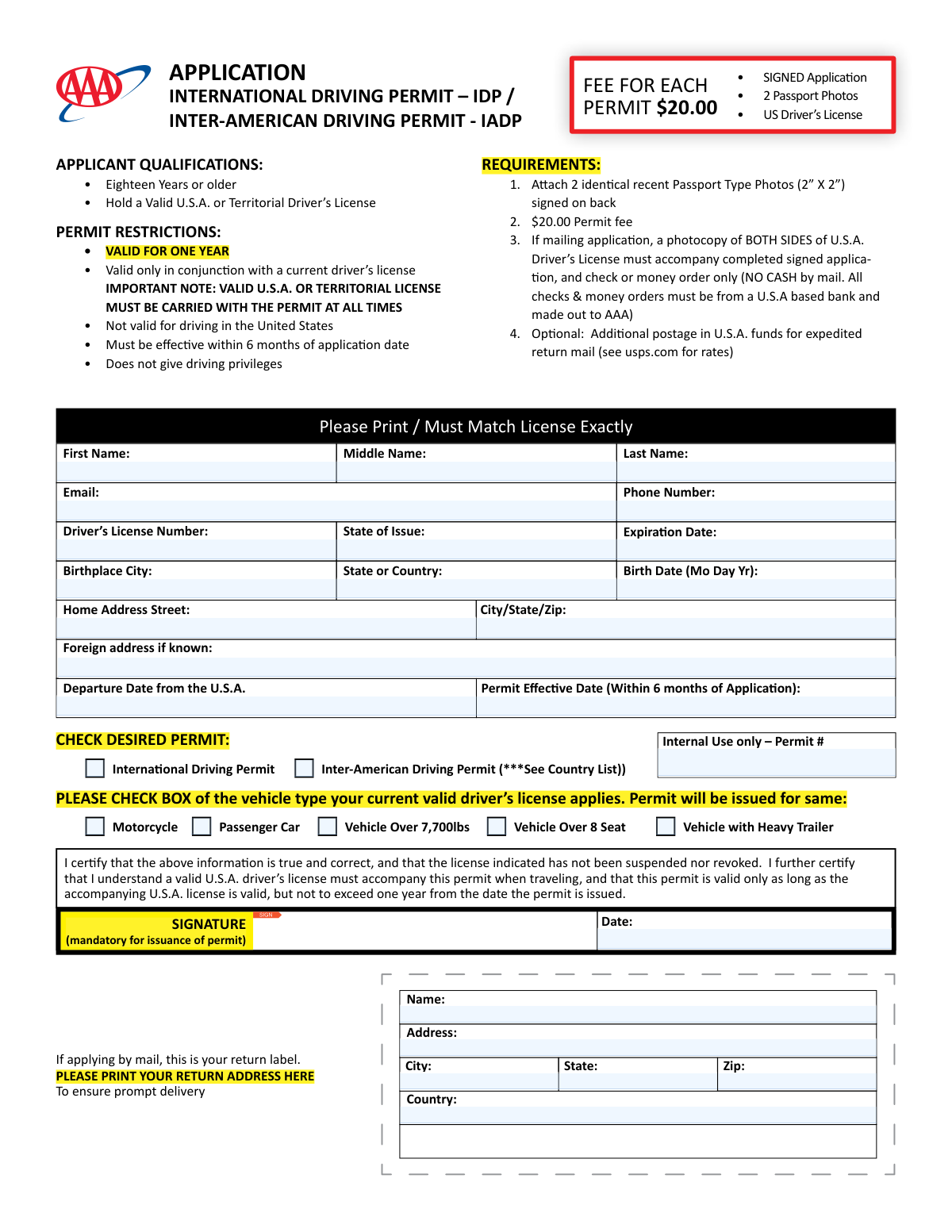
This form is an application for an International Driving Permit (IDP) or an Inter-American Driving Permit (IADP), which are official documents that translate a U.S. driver's license into multiple languages. These permits are essential for U.S. drivers who plan to operate a vehicle in many foreign countries, as they are often required by local law and car rental agencies. Today, this form can be filled out quickly and accurately using AI-powered services like Instafill.ai, which can also convert non-fillable PDF versions into interactive fillable forms.
Our AI automatically handles information lookup, data retrieval, formatting, and form filling.
It takes less than a minute to fill out IDP/IADP Application using our AI form filling.
Securely upload your data. Information is encrypted in transit and deleted immediately after the form is filled out.

Form specifications

Form name: International Driving Permit – IDP / Inter-American Driving Permit - IADP Application
Number of fields: 32
Number of pages: 1
Language: English
Categories: ADP forms, permit application forms, permit forms
main-image

Instafill Demo: How to fill out PDF forms in seconds with AI

How to Fill Out IDP/IADP Application Online for Free in 2026

Are you looking to fill out a IDP/IADP APPLICATION form online quickly and accurately? Instafill.ai offers the #1 AI-powered PDF filling software of 2026, allowing you to complete your IDP/IADP APPLICATION form in just 37 seconds or less.
Follow these steps to fill out your IDP/IADP APPLICATION form online using Instafill.ai:
  1. 1 Navigate to Instafill.ai and upload or select the International Driving Permit (IDP/IADP) Application form.
  2. 2 Provide your personal information, including your full name, home address, and birth details, ensuring they match your driver's license exactly.
  3. 3 Enter your complete driver's license details, such as the license number, state of issue, and expiration date.
  4. 4 Specify your travel plans by entering your departure date from the U.S. and the desired effective date for your permit.
  5. 5 Check the box for the desired permit type (International or Inter-American) and select the vehicle classes that apply to your current license.
  6. 6 Carefully review all entered information for accuracy, then digitally sign and date the application in the designated fields.
  7. 7 Download the completed form to print and submit it along with the required passport photos, payment, and a photocopy of your driver's license as per the application instructions.

Our AI-powered system ensures each field is filled out correctly, reducing errors and saving you time.

Why Choose Instafill.ai for Your Fillable IDP/IADP Application Form?

Speed

Complete your IDP/IADP Application in as little as 37 seconds.

Up-to-Date

Always use the latest 2026 IDP/IADP Application form version.

Cost-effective

No need to hire expensive lawyers.

Accuracy

Our AI performs 10 compliance checks to ensure your form is error-free.

Security

Your personal information is protected with bank-level encryption.

Frequently Asked Questions About Form IDP/IADP Application

This form is an application for an International Driving Permit (IDP) or an Inter-American Driving Permit (IADP), which translates your U.S. driver's license information for use when driving in foreign countries.

To be eligible, you must be eighteen years or older and hold a valid U.S.A. or Territorial Driver’s License.

You need to submit the signed application, two identical 2"x2" passport-style photos signed on the back, a $20 fee, and if mailing, a photocopy of both sides of your driver's license.

The permit is valid for one year from its effective date, but it is only valid when accompanied by your current U.S. driver's license.

No, the permit is not valid for driving in the United States. It is intended only for use in foreign countries and must be carried with your valid U.S. license.

If applying by mail, you must pay with a check or money order from a U.S. based bank, made payable to AAA. Do not send cash through the mail.

This is the date you want your permit to become active. It must be a date that is within six months of your application date.

They are recognized by different countries. The IADP is specifically required for driving in Brazil and Uruguay, while the IDP is honored in a much wider range of countries globally.

Yes, the form requires you to provide two identical, recent passport-type photos and you must sign your name on the back of both of them.

Yes, services like Instafill.ai use AI to accurately auto-fill form fields with your personal information, which can save time and help ensure the details exactly match your driver's license.

You can use a service like Instafill.ai to upload the form, which will make it an interactive, fillable document that you can complete and sign on your computer or mobile device.

If you have a non-fillable PDF, you can use a tool like Instafill.ai to convert it into an interactive, fillable form that you can easily complete online.

If you are applying by mail, you must print your complete return address on this label. This ensures that your completed permit can be mailed back to you promptly.

Compliance IDP/IADP Application
Validation Checks by Instafill.ai

1
Applicant Age Verification
This check validates that the applicant is at least eighteen years old by calculating the age from the provided 'Date of Birth'. This is a fundamental eligibility requirement as stated in the applicant qualifications. If the applicant is found to be under 18, the submission should be rejected, and an error message should inform the user they do not meet the minimum age criteria.
2
Driver's License Expiration Check
This validation ensures the date entered in the 'Driver’s License Expiration Date' field is in the future, relative to the application submission date. The permit is only valid in conjunction with a current driver's license, making this check critical for issuing a functional permit. An application with an expired or soon-to-expire license should be flagged or rejected, as the permit would be invalid.
3
Permit Effective Date Range
This check verifies that the 'Permit Effective Date' is within six months of the application date (the 'Date' field next to the signature). This rule is explicitly stated on the form to ensure the applicant's information is reasonably current when the permit becomes active. If the selected effective date is more than six months in the future, the system should prompt the user to select a new date within the allowed window.
4
Logical Consistency of Permit and Departure Dates
This validation compares the 'Permit Effective Date' with the 'Departure Date from the U.S.A.' to ensure the permit is active on or before the applicant's travel begins. An international driving permit that only becomes valid after the trip has started is not useful to the traveler. If the effective date is after the departure date, the system should display a warning and suggest the user align the dates for the permit to be valid upon departure.
5
Permit Validity vs. License Expiration
This check ensures the 'Driver’s License Expiration Date' is after the 'Permit Effective Date'. Since the permit is only valid for one year and requires a valid U.S. license, this confirms the underlying license will not be expired when the permit becomes active. If the license expires before the permit's effective date, the application is invalid and should be rejected.
6
Mandatory Field Completion Check
This validation ensures that all fields designated as required, such as the applicant's name, address, driver's license number, and birth date, are not left empty. Processing cannot begin without this core information, as it is needed to verify identity and issue the permit correctly. If any required fields are missing, the form submission should be blocked, and the user must be clearly notified which fields need to be completed.
7
Permit and Vehicle Type Selection
This check verifies that the applicant has selected at least one permit type (International or Inter-American) and at least one vehicle class checkbox (e.g., Passenger Car, Motorcycle). These selections are fundamental to defining the type and scope of the permit being issued. The form should not be submittable until both a permit type and a vehicle class are chosen.
8
Phone Number Format Validation
This check ensures the 'Phone Number' field strictly adheres to the specified (XXX) XXX-XXXX format. Enforcing a standard format maintains data consistency and ensures the number is correctly parsed and stored in the system for any necessary communication. Entries that do not match this exact format should trigger an inline error, guiding the user to correct it before submission.
9
Email Address Format Validation
This validation verifies that the value entered in the 'Email' field follows the standard '[email protected]' structure. A valid email address is crucial for sending the applicant confirmations, status updates, or digital copies of documents. If the format is invalid, the system cannot communicate with the applicant, so the entry should be rejected with a message explaining the correct format.
10
Date Format Validation
This check confirms that all date fields ('Birth Date', 'Expiration Date', 'Departure Date', 'Permit Effective Date', 'Date') are entered in their specified formats (MM DD YYYY or MM/DD/YYYY). Consistent and correct date formatting is essential for accurate record-keeping and logical date comparisons, such as age calculation or validity checks. A submission with incorrectly formatted dates should be prevented, with errors pointing to the specific fields that need correction.
11
Mandatory Signature Verification
This validation confirms that the 'SIGNATURE' field has been completed by the applicant. The signature is a legal certification that the provided information is true and that the applicant agrees to the terms of the permit. An application is legally incomplete without a signature and must be rejected until it is signed.
12
ZIP Code Format Validation
This check ensures the ZIP code in the 'City/State/Zip' and 'Return Address' fields conforms to a valid 5-digit (NNNNN) or 9-digit (NNNNN-NNNN) format. A correct ZIP code is critical for address verification and, in the case of mailed applications, for the successful delivery of the permit. An invalid format should trigger an error, preventing submission until a valid ZIP code is provided.

Common Mistakes in Completing IDP/IADP Application

Mismatched Applicant Name

Applicants often enter a nickname, an initial instead of a full middle name, or a version of their name that doesn't perfectly match their driver's license. This mistake leads to immediate application rejection, as the permit's validity is contingent on an exact match for verification purposes when abroad. To avoid this, carefully transcribe your name exactly as it appears on your U.S. driver's license, including any initials or hyphens.

Incorrect or Incomplete Photo Submission

A frequent error is submitting photos that do not meet the strict requirements: two identical, recent, 2ā€x2ā€ passport-type photos, signed on the back. People may send only one photo, an old one, a non-passport style picture, or forget to sign the back. This halts the application process until correct photos are provided, causing significant delays. Always double-check that your photos meet all specified criteria before submission.

Forgetting to Photocopy Both Sides of Driver's License

For mail-in applications, a photocopy of BOTH sides of the U.S. driver's license is mandatory. Many applicants forget to copy the back, which may contain crucial information like endorsements, restrictions, or a change of address. This omission results in an incomplete application and requires follow-up correspondence, delaying the issuance of the permit.

Incorrect Payment Method or Amount

Errors with the $20 permit fee are common, such as sending cash by mail (which is explicitly forbidden), writing the check to the wrong payee instead of 'AAA', or using a check from a non-U.S. bank. Any payment error will cause the application to be returned unprocessed. Always verify the correct payee, amount, and accepted payment types (check or money order from a U.S. bank) before mailing.

Inconsistent Date Formatting

The form requires different date formats for different fields, such as 'MM DD YYYY' for Date of Birth versus 'MM/DD/YYYY' for the Permit Effective Date. Applicants often use a single format throughout, leading to data entry errors that can cause processing issues or rejection. Carefully read the instructions for each date field to ensure you are using the correct format. AI-powered form fillers like Instafill.ai can help prevent this by automatically applying the correct format for each field.

Selecting the Wrong Permit Type

Applicants may not read the country list carefully and select the standard International Driving Permit (IDP) when they are traveling to a country like Brazil or Uruguay that requires an Inter-American Driving Permit (IADP). This can lead to carrying a permit that is not honored at their destination. Always consult the provided country list to confirm which permit is necessary for your specific travel plans.

Missing Signature or Date

It is very common for applicants to complete all the fields but overlook the mandatory signature and date fields in the certification section. An unsigned application is legally invalid and cannot be processed, causing significant delays and requiring the form to be sent back. Always perform a final review to ensure you have signed and dated the application before submitting it.

Invalid Permit Effective Date

The application requires that the permit's effective date must be within six months of the application date. Applicants planning trips far in the future sometimes enter a date beyond this six-month window, which automatically invalidates the application. To avoid rejection, ensure the effective date you choose is no more than six months from the day you submit the form.

Incomplete Return Address for Mail-in Applications

When submitting by mail, applicants sometimes forget to completely fill out the detachable return address label. Without a complete and legible return address, the issuing office cannot mail the permit back, potentially leading to a lost document and the need to start the process over. This section is just as critical as the main application for all mail-in submissions.

Splitting Address Information Incorrectly

The form separates the home address into a 'Home Address Street' field and a 'City/State/Zip' field. A common mistake is to write the entire address in the first field or to omit the apartment number. This can lead to data entry confusion and issues with mailing. To avoid this, enter only the street and unit number in the first field and the city, state, and zip code in the second, as instructed. If the form is a non-fillable PDF, a tool like Instafill.ai can convert it to a fillable version with clearly defined fields to prevent this error.
Saved over 80 hours a year

ā€œI was never sure if my IRS forms like W-9 were filled correctly. Now, I can complete the forms accurately without any external help.ā€

Kevin Martin Green

Your data stays secure with advanced protection from Instafill and our subprocessors

Robust compliance program

Transparent business model

You’re not the product. You always know where your data is and what it is processed for.

ISO 27001, HIPAA, and GDPR

Our subprocesses adhere to multiple compliance standards, including but not limited to ISO 27001, HIPAA, and GDPR.

Security & privacy by design

We consider security and privacy from the initial design phase of any new service or functionality. It’s not an afterthought, it’s built-in, including support for two-factor authentication (2FA) to further protect your account.

Fill out IDP/IADP Application with Instafill.ai

Worried about filling PDFs wrong? Instafill securely fills international-driving-permit-idp-inter-american-driving-permit-iadp-application forms, ensuring each field is accurate.