Yes! You can use AI to fill out Fauquier County Department of Community Development – Building Trades Permit or Amendment to Existing Permit Application (Residential or Commercial)
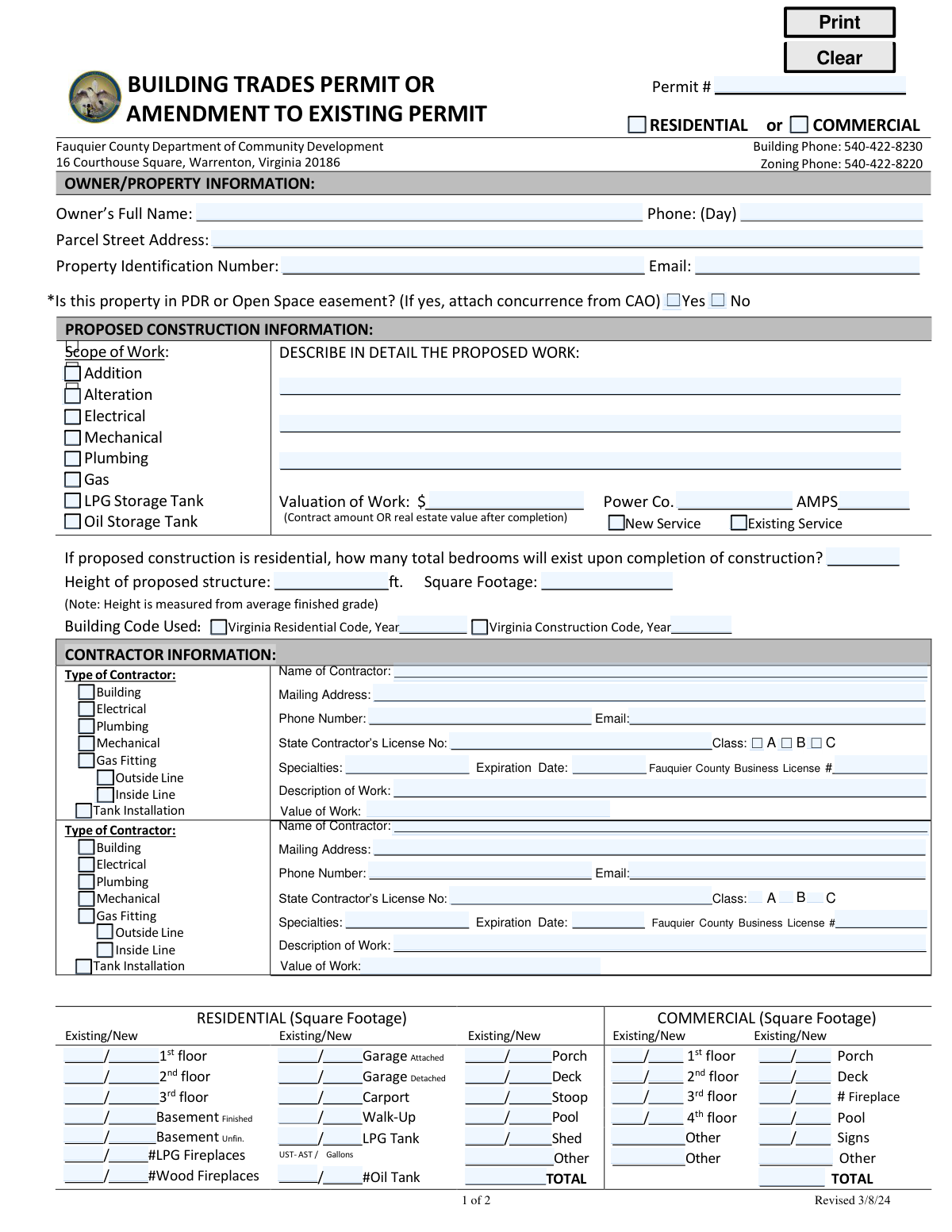
This is the official Fauquier County Department of Community Development application used to obtain a Building Trades Permit or to amend an existing permit for construction activity on a parcel in Fauquier County, Virginia. It documents the owner/property information, detailed scope of proposed work, valuation, code edition used, and square footage impacts, and it captures contractor credentials (state license and county business license). The form also includes the applicantâs certification and is reviewed by Zoning and Building staff to confirm compliance with setbacks, overlays/easements, and fee requirements before a permit can be issued or modified.
Our AI automatically handles information lookup, data retrieval, formatting, and form filling.
It takes less than a minute to fill out Fauquier County Building Trades Permit Application using our AI form filling.
Securely upload your data. Information is encrypted in transit and deleted immediately after the form is filled out.
Form specifications
| Form name: | Fauquier County Department of Community Development – Building Trades Permit or Amendment to Existing Permit Application (Residential or Commercial) |
| Number of pages: | 2 |
| Filled form examples: | Form Fauquier County Building Trades Permit Application Examples |
| Language: | English |
| Categories: | building permit forms, commercial building forms |
Instafill Demo: filling out a legal form in seconds
How to Fill Out Fauquier County Building Trades Permit Application Online for Free in 2026
Are you looking to fill out a FAUQUIER COUNTY BUILDING TRADES PERMIT APPLICATION form online quickly and accurately? Instafill.ai offers the #1 AI-powered PDF filling software of 2026, allowing you to complete your FAUQUIER COUNTY BUILDING TRADES PERMIT APPLICATION form in just 37 seconds or less.
Follow these steps to fill out your FAUQUIER COUNTY BUILDING TRADES PERMIT APPLICATION form online using Instafill.ai:
- 1 Enter owner/property details: owner’s full name, daytime phone, email, parcel street address, and property identification number; indicate whether the property is in a PDR or Open Space easement and attach required concurrence if applicable.
- 2 Select the permit request type (Building Trades Permit or Amendment to Existing Permit) and provide the existing permit number if you are amending a permit; indicate whether the project is residential or commercial.
- 3 Complete proposed construction information: choose the scope of work (e.g., addition, alteration, electrical, mechanical, plumbing, gas, LPG/UST/AST), describe the work in detail, provide valuation, and enter service details (power company/amps; new vs. existing service).
- 4 Provide project specifications: number of bedrooms upon completion (if residential), proposed structure height, total square footage, and the building code used (Virginia Residential Code or Virginia Construction Code and year).
- 5 List contractor information for each trade involved: contractor type, name, mailing address, phone/email, Virginia contractor license number/class and specialties/expiration, Fauquier County business license number, description of work, and value of work.
- 6 Fill out the residential/commercial square footage breakdown (existing vs. new) for relevant areas (floors, garage, porch/deck, basement, pool, fireplaces, tanks, sheds, signs, and other) and confirm totals.
- 7 Complete applicant certification: enter applicant name, role (owner/lessee/contractor/agent/other), contact information, sign and date; then submit for county zoning/building review and pay required submittal/tech/permit fees as assessed.
Our AI-powered system ensures each field is filled out correctly, reducing errors and saving you time.
Why Choose Instafill.ai for Your Fillable Fauquier County Building Trades Permit Application Form?
Speed
Complete your Fauquier County Building Trades Permit Application in as little as 37 seconds.
Up-to-Date
Always use the latest 2026 Fauquier County Building Trades Permit Application form version.
Cost-effective
No need to hire expensive lawyers.
Accuracy
Our AI performs 10 compliance checks to ensure your form is error-free.
Security
Your personal information is protected with bank-level encryption.
Frequently Asked Questions About Form Fauquier County Building Trades Permit Application
This is a Fauquier County Building Trades Permit application (or an amendment to an existing permit) used to request approval for construction work such as additions, alterations, and building trade work (electrical, plumbing, mechanical, gas, tanks). It provides the County with owner, property, scope, contractor, and code/size details needed for review and permitting.
The applicant can be the Owner, Lessee, Contractor, Agent, or Other, but the form certifies the work is authorized by the owner of record. If someone other than the owner applies, they must be authorized by the owner and include the agentâs initials where indicated.
You must provide the ownerâs full name, parcel street address, Property Identification Number (PIN), and contact information (phone/email). This information helps the County match the application to the correct parcel and records.
If the property is in a PDR (Purchase of Development Rights) or Open Space easement, you must check âYesâ and attach concurrence from the CAO. If it is not in an easement, check âNoâ and no concurrence attachment is required.
Check all boxes that apply to the work you are proposing (for example, an addition with new wiring would typically include âAdditionâ and âElectricalâ). If you are installing gas piping or tanks, select the gas/LPG/oil tank options that match your project.
Provide a clear description of what will be built or changed, where it will occur on the property, and what systems are involved (e.g., âfinish basement with one bedroom and one bathroom; add new circuits; install HVAC supply/returnâ). More detail generally reduces review questions and delays.
Enter the contract amount for the work, or the real estate value after completion as indicated on the form. This value is used for permit fee calculations and review purposes.
These fields relate to electrical service information, including the utility/power company and the service amperage. Complete them when your project includes electrical work or a new/changed electrical service.
Select âNew Serviceâ if you are installing a new electrical service (or upgrading/adding a new service connection as part of the project). Select âExisting Serviceâ if the project will use the current service without creating a new service connection.
The County uses the total number of bedrooms upon completion to evaluate residential capacity impacts and related requirements. Enter the final total bedroom count for the dwelling after the project is finished, not just the number being added.
Enter the proposed structure height in feet and the square footage requested in the appropriate residential/commercial sections. The form notes that height is measured from the average finished grade.
Indicate whether the project is under the Virginia Residential Code (VRC) or the Virginia Construction Code (VCC), and include the applicable year. Use VRC typically for one- and two-family dwellings and townhouses, and VCC for commercial and other structures, unless the County directs otherwise.
Yes, for each contractor listed you should provide the State Contractorâs License number, class (A/B/C), specialties, expiration date, and the Fauquier County Business License number. This helps confirm the contractor is properly credentialed for the work described.
List each contractor in the separate contractor sections and specify their trade type (building, electrical, plumbing, mechanical, gas fitting, tank installation, etc.). Include each contractorâs description and value of work so the County can track responsibilities and fees by trade.
The application can be considered abandoned if not pursued in good faith within six months of filing, and a permit can be revoked if work doesnât start within six months of issuance or is suspended for six months. The permit holder must call for an inspection within the first six months to show work has commenced, and inspections at six-month intervals help extend the permit; new detached single-family dwellings, additions, and residential accessory structures may have a three-year completion limit from permit issuance.
Compliance Fauquier County Building Trades Permit Application
Validation Checks by Instafill.ai
1
Owner identity completeness (Owner’s Full Name, phone, and contact method)
Validates that the Ownerâs Full Name is provided and that at least one reliable contact method is present (Day phone and/or email). This is required to confirm the responsible party and to allow the County to contact the owner for corrections, inspections, or enforcement issues. If missing or incomplete, the submission should be rejected or routed to an âincomplete applicationâ queue for follow-up.
2
Parcel location and identification validation (Street Address + Property Identification Number)
Checks that the Parcel Street Address and Property Identification Number (PIN) are both present and that the PIN matches the expected county format (e.g., numeric/alpha pattern and length used by the jurisdiction). This ensures the permit is tied to the correct parcel and prevents misapplication to the wrong property. If the PIN is missing/invalid or does not match the address record (when cross-checked), the application should fail validation and require correction.
3
PDR/Open Space easement selection and required concurrence attachment
Ensures the applicant selects exactly one option for âIs this property in PDR or Open Space easement? (Yes/No)â and, if âYes,â verifies that a concurrence document from the CAO is attached. This is important because easement restrictions can prohibit or limit construction and require formal concurrence before review. If âYesâ is selected without the attachment (or both/neither boxes are selected), the submission should be blocked until corrected.
4
Proposed construction scope selection (at least one trade/work type checked)
Validates that at least one scope item is selected (Addition, Alteration, Electrical, Mechanical, Plumbing, Gas, LPG Storage Tank, Oil Storage Tank). This drives routing, fee calculation, plan review requirements, and inspection types. If no scope is selected, the system should flag the application as incomplete and prevent submission.
5
Detailed description of proposed work required and consistent with scope
Checks that the âDESCRIBE IN DETAIL THE PROPOSED WORKâ field is not blank and contains sufficient detail (e.g., not just âremodelâ or âN/Aâ), and that it is logically consistent with the selected scope (e.g., LPG tank work should mention tank install/size/location). This reduces back-and-forth and ensures reviewers can determine code requirements and inspections. If the description is missing or clearly inconsistent with selected scope, the application should be returned for clarification.
6
Valuation of work currency/number validation and minimum reasonableness
Validates that âValuation of Workâ is a positive numeric amount (currency) with no invalid characters and within a reasonable range (e.g., not $0 for a major addition). Valuation is used for fee calculation and may affect review thresholds. If valuation is missing, non-numeric, negative, or implausible for the stated scope, the system should require correction or trigger a manual review flag.
7
Electrical service details validation (Power Co., AMPS, New vs Existing service)
If Electrical scope is selected, checks that Power Company is provided, AMPS is a valid positive integer (commonly 60â400+), and exactly one of âNew Serviceâ or âExisting Serviceâ is selected. These fields are needed to evaluate service changes and coordinate inspections/utility requirements. If Electrical is selected and these fields are missing/invalid or both/neither service options are selected, the application should fail validation.
8
Residential bedroom count required when residential work is indicated
When the project is marked/treated as residential (e.g., Residential selected or residential square footage fields are used), validates that the total number of bedrooms upon completion is provided and is a non-negative integer (typically 0â20). Bedroom count can affect septic/water approvals and occupancy assumptions. If residential indicators exist but bedroom count is missing or not an integer, the submission should be stopped pending correction.
9
Structure height and square footage numeric validation
Validates that âHeight of proposed structure (ft.)â and âSquare Footageâ are numeric, non-negative, and within plausible bounds, and that height is provided when a new structure/addition is proposed. These values are used for code compliance, zoning review, and plan review scoping. If values are missing where required, non-numeric, or clearly out of range, the system should require correction or route to manual review.
10
Building code selection and year validation (VRC/VCC year required and valid)
Checks that the applicant indicates the applicable code (Virginia Residential Code and/or Virginia Construction Code) and provides a valid year (e.g., 2018, 2021) in an allowed set configured by the jurisdiction. Code year determines design standards and review criteria. If the code year is missing, not a recognized year, or both code fields are left blank, the application should be rejected as incomplete.
11
Contractor section completeness per selected contractor type/trade
For each contractor entry included (Building/Electrical/Plumbing/Mechanical/Gas Fitting/Lines/Tank Installation), validates that Name, Mailing Address, Phone Number, Email (if required by policy), Description of Work, and Value of Work are provided. This ensures accountability and correct assignment of trade permits and inspections. If a contractor type is selected but required contractor details are missing, the system should block submission for that trade.
12
Contractor license number, class, specialties, and expiration date validation
Validates that the State Contractorâs License No. is present and matches expected formatting, that a license Class (A/B/C) is selected, and that the Expiration Date is a valid date not in the past. This is critical for legal authorization to perform work and for compliance with state licensing requirements. If the license is missing/invalid, class is not selected, or the license is expired, the application should fail validation or be routed for licensing verification.
13
Fauquier County business license number required when contractor is used
Checks that a Fauquier County Business License # is provided for each contractor listed (when required by local policy) and matches the expected format/length. This supports local business compliance and may be required before permit issuance. If missing or malformed, the system should prevent issuance and flag the record for follow-up.
14
Square footage breakdown totals and non-negative values (Residential/Commercial tables)
Validates that all entered square footage values are numeric and non-negative, and that the âTOTALâ equals the sum of the component line items for the relevant table (Residential and/or Commercial). This prevents fee and review errors caused by inconsistent area reporting. If totals do not reconcile or negative/invalid values are entered, the system should prompt the applicant to correct the breakdown before submission.
15
Fuel tank and fireplace counts validation (LPG/Oil/UST-AST/Gallons)
If LPG Storage Tank or Oil Storage Tank scope is selected (or related fields are filled), validates that tank type (UST/AST) is specified where applicable, gallons is a positive number, and counts (e.g., #LPG Fireplaces, #Wood Fireplaces, #Oil Tank) are non-negative integers. These details affect safety review, code requirements, and inspection planning. If tank-related scope is selected but capacity/type/counts are missing or invalid, the application should be rejected as incomplete.
16
Applicant certification completion (signature, date, applicant role, and agent initials when applicable)
Ensures the Applicant section includes Name (printed), Signature, Date, and a selected applicant role (Owner/Lessee/Contractor/Agent/Other). If the applicant is not the owner (e.g., Agent/Contractor/Lessee), validates that Agentâs Initials are provided to support the authorization statement. If certification fields are missing or role is not selected, the submission should be blocked because the application is not legally attested.
Common Mistakes in Completing Fauquier County Building Trades Permit Application
Applicants often provide an owner name but forget the day phone, email, or provide a phone/email that belongs to a contractor instead of the owner. This slows down review because staff canât quickly resolve questions about scope, valuation, or required attachments. Use the legal ownerâs full name as shown on property records and provide a reliable daytime phone and email that will be monitored during plan review.
A common error is entering a mailing address, a nearby road name, or a lot nickname instead of the parcel street address, and leaving the Property Identification Number blank. This can cause the application to be matched to the wrong parcel, delaying zoning checks (setbacks, floodplain, easements) and fee calculation. Copy the parcel street address and PIN directly from county GIS/tax records and double-check for transposed digits.
People frequently check âYesâ (or leave it blank) without attaching the required concurrence from the CAO, or they check âNoâ without verifying the propertyâs easement status. If the property is in PDR/Open Space, missing concurrence can stop the application from being processed. Confirm easement status before submitting and, if âYes,â include the concurrence document with the initial submittal.
Applicants often check only âBuildingâ for projects that clearly include electrical, plumbing, mechanical, gas fitting, or tank work, or they check multiple trades without describing them. This leads to incorrect routing, missing sub-permits, and re-submittal requests. Align the checkboxes with the actual work being performed and ensure the âDescribe in detail the proposed workâ section explicitly mentions each trade involved.
Many submissions use short phrases like âremodel,â âaddition,â or âfinish basementâ without specifying what is changing (walls, structural work, fixtures, equipment, new circuits, gas appliances, etc.). Reviewers need detail to determine code path, inspections, and whether plans are required. Describe the work in plain language with key specifics: areas affected, structural changes, new/relocated fixtures, equipment types, and whether any new service or tanks are included.
Applicants sometimes enter $0, only labor, or an unrealistically low number to reduce fees, or they confuse âcontract amountâ with âreal estate value after completion.â Incorrect valuation can trigger corrections, fee adjustments, and delays in permit issuance. Provide a realistic valuation based on the signed contract amount (or the required post-completion value if applicable) and include major materials, labor, and subcontracted work.
Electrical-related fields are often skipped, or applicants mark âNew Serviceâ when itâs only a panel change, or they omit the amperage and power company. This can delay electrical review and coordination with the utility and inspections. Confirm whether the project involves a new service, service upgrade, or existing service, and enter the correct utility provider and service size (AMPS).
For residential projects, people frequently leave the âhow many total bedrooms will exist upon completionâ blank or list current bedrooms instead of the final count. Bedroom count can affect code requirements and health department/water-sewer considerations. Enter the total number of bedrooms that will exist after the project is finished, even if the work is not directly in a bedroom.
Applicants often omit units (feet), guess height without using the âaverage finished gradeâ rule, or leave square footage sections partially filled without a clear total. In the residential/commercial square footage tables, âExisting/Newâ values are commonly swapped or totals donât match the line items (garage, porch, deck, basement finished/unfinished, etc.). Measure and report height in feet per the note provided, complete both existing and new areas where applicable, and ensure the TOTAL equals the sum of all listed components.
A frequent issue is listing a contractor name and phone but omitting the state contractor license number, class (A/B/C), specialties, expiration date, or Fauquier County business license number. Missing or mismatched licensing information can prevent permit issuance or require re-submittal for verification. Enter the contractorâs legal business name exactly as licensed, include the full license number, class, specialties, expiration date, and the county business license number for each trade contractor listed.
Applicants often forget to sign and date the certification, fail to check whether they are Owner/Lessee/Contractor/Agent/Other, or omit agent initials when applying on behalf of the owner. An unsigned or improperly certified application is typically considered incomplete and cannot be processed. Complete every line in the certification block: print name, sign, date, provide contact info, select the applicant role, and include agent initials when applicable.
Saved over 80 hours a year
âI was never sure if my IRS forms like W-9 were filled correctly. Now, I can complete the forms accurately without any external help.â
Kevin Martin Green
Your data stays secure with advanced protection from Instafill and our subprocessors

Robust compliance program
Transparent business model
Youâre not the product. You always know where your data is and what it is processed for.
ISO 27001, HIPAA, and GDPR
Our subprocesses adhere to multiple compliance standards, including but not limited to ISO 27001, HIPAA, and GDPR.
Security & privacy by design
We consider security and privacy from the initial design phase of any new service or functionality. Itâs not an afterthought, itâs built-in, including support for two-factor authentication (2FA) to further protect your account.
Fill out Fauquier County Building Trades Permit Application with Instafill.ai
Worried about filling PDFs wrong? Instafill securely fills fauquier-county-department-of-community-developmen forms, ensuring each field is accurate.



