Fill out building permit forms
with AI.
Building permit forms are the essential first step for nearly any construction, renovation, or demolition project. These documents serve as a formal request for authorization from local government agencies, ensuring that proposed work complies with zoning laws, safety codes, and environmental regulations. Whether you are planning a new non-residential facility or a minor residential upgrade, these forms provide officials with the technical specifications needed to verify that the project is safe for the community and the environment.
By continuing, you acknowledge Instafill's Privacy Policy and agree to get occasional product update and promotional emails.
About building permit forms
Homeowners, professional developers, and licensed contractors are the primary users of these permit application forms. For example, Toronto building forms often include specific schedules for designer information to establish legal accountability, while counties like Fauquier or Louisa require comprehensive trade permit applications to document contractor credentials and property setbacks. Navigating these requirements is a critical part of the pre-construction phase, as incomplete or inaccurate submissions can result in significant project delays, fines, or legal complications.
Managing the administrative side of construction can be a heavy lift, but modern tools like Instafill.ai use AI to fill these forms in under 30 seconds while handling your data accurately and securely. This allows project managers and homeowners to move through the permitting process more efficiently, ensuring that the focus remains on the build itself rather than the paperwork.
Every form on this page can be completed without typing. Instafill is form filling software that reads a PDF and fills it for you — including flat and scanned documents that carry no fillable fields at all.
Forms in This Category
The forms in this category have a median Form Complexity Index of 71/100 (Complex), measured across 4 forms by field count, input difficulty, length, conditional logic and structure. See how it is calculated.
- Enterprise-grade security & data encryption
- 99%+ accuracy powered by AI
- 1,000+ forms from all industries
- Complete forms in under 60 seconds
How to Choose the Right Form
Selecting the correct building permit form depends primarily on your project's location and the specific stage of your construction process. Building permit requirements are highly localized, so the first step is ensuring the form matches the jurisdiction where the work is occurring.
By Location and Jurisdiction
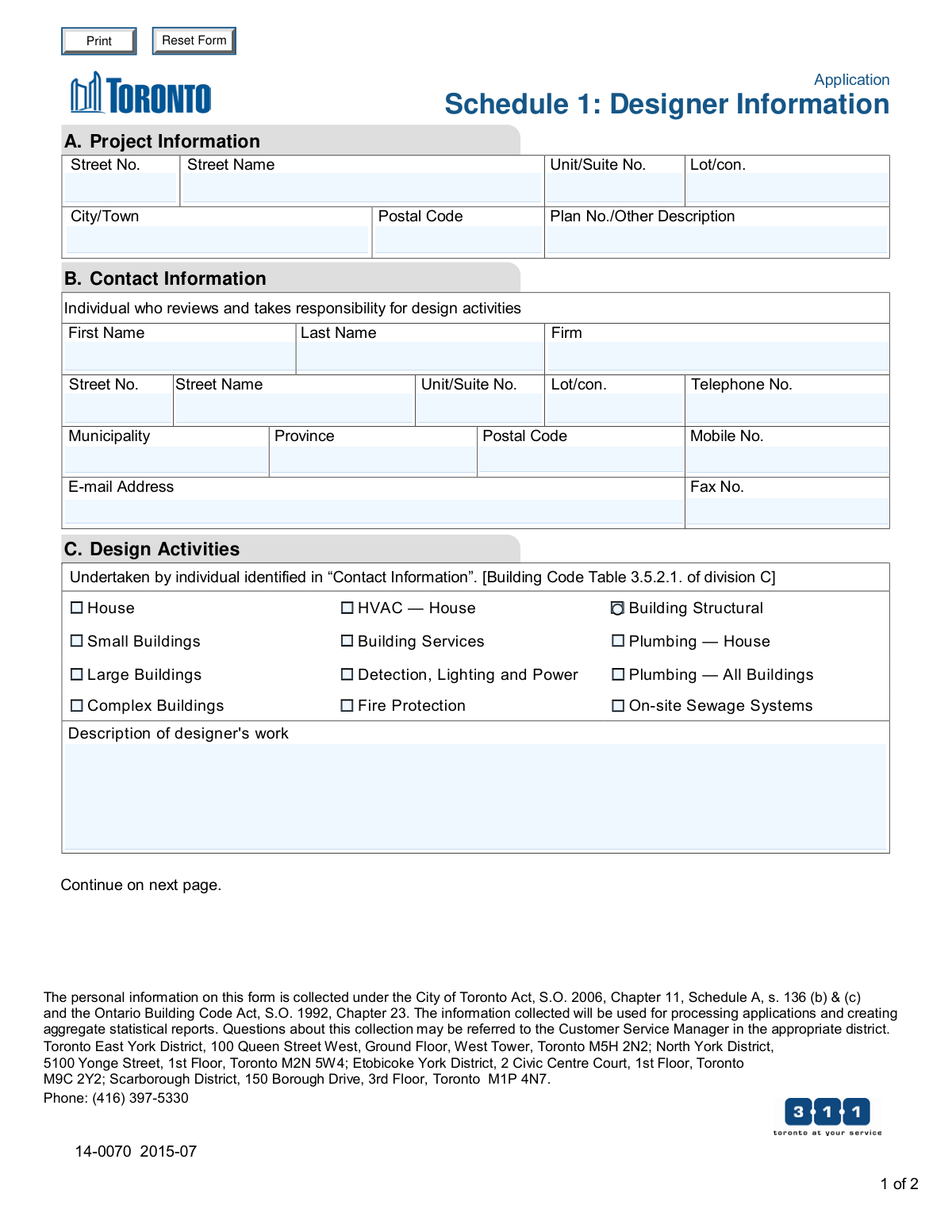
- Toronto, Canada: If you are applying for a permit within the City of Toronto and need to identify the professionals responsible for the design work, use Application Schedule 1: Designer Information (City of Toronto Building Permit Application). This is a supplemental form required to establish Ontario Building Code compliance and designer accountability.
- Louisa County, Virginia: For new commercial or industrial projects, the County of Louisa Department of Community Development – New Non-Residential Building Permit Package is the comprehensive set of documents needed for zoning review and construction authorization.
- Fauquier County, Virginia: If your project is located in Fauquier County, use the Building Trades Permit or Amendment to Existing Permit Application (Residential or Commercial) to authorize specific trade work or modify an active permit.
By Project Type and Scope
- New Non-Residential Structures: The New Non-Residential Building Permit Package for Louisa County is specifically designed for commercial developments, collecting data on setbacks, zoning districts, and site disturbance area.
- Trade Permits or Permit Modifications: For specific trade work (such as electrical or plumbing) or if you need to change the details of an existing permit in Fauquier County, the Building Trades Permit or Amendment to Existing Permit Application is the correct choice. It covers both residential and commercial scopes and requires contractor credentials.
- Design Certification: If your primary goal is to certify that a qualified designer has reviewed your plans and takes responsibility for code compliance, use the Application Schedule 1: Designer Information for Toronto submissions. This form is essential for capturing BCIN information and designer declarations.
Form Comparison
| Form | Project Scope | Jurisdiction | Key Requirement |
|---|---|---|---|
| County of Louisa Department of Community Development – New Non-Residential Building Permit Package | New non-residential building construction and site zoning compliance. | Louisa County, Virginia, United States. | Property tax maps, zoning district details, and construction specifications. |
| Application Schedule 1: Designer Information (City of Toronto Building Permit Application) | Design accountability and qualification declaration for permit submissions. | City of Toronto, Ontario, Canada. | Building Code Identification Number (BCIN) and formal designer declaration. |
| Fauquier County Department of Community Development – Building Trades Permit or Amendment to Existing Permit Application (Residential or Commercial) | Building trades work or modifications to existing construction permits. | Fauquier County, Virginia, United States. | Contractor state/county license credentials and detailed project valuation. |
Tips for building permit forms
Before starting your application, ensure you have the correct tax map number and zoning classification for the parcel. These identifiers are crucial for local departments to locate the property and verify that your project aligns with regional land-use regulations and setback requirements.
Many building permit forms, such as Toronto’s Schedule 1, require specific designer or contractor credentials like BCIN or state license numbers. Having these details ready prevents delays and ensures the person assuming design responsibility is properly documented according to local building codes.
Avoid vague descriptions when detailing the proposed work on permit applications. Providing specific measurements, materials, and the intended use of the space helps zoning and building staff review your application more efficiently without requesting additional clarification or site plan revisions.
Building permit applications often consist of a primary form and several required schedules or trade-specific amendments for electrical, plumbing, or mechanical work. Always review the full package to ensure you aren't missing supplemental documents like designer declarations or contractor authorization forms.
AI-powered tools like Instafill.ai can complete complex building permit forms in under 30 seconds with high accuracy. This is a significant time-saver for developers or homeowners dealing with multiple documents, and your sensitive property and contractor data stays secure during the process.
Most jurisdictions use the estimated cost of construction to calculate permit fees and verify project scale. Providing an accurate, realistic valuation based on current market rates helps avoid fee adjustments or administrative delays during the review and approval process.
Frequently Asked Questions
Building permit forms are essential tools for local governments to ensure that any proposed construction or renovation meets safety standards, zoning laws, and environmental regulations. By reviewing these documents, authorities can verify that projects comply with local building codes before work begins, protecting both the property owner and the public.
While the property owner is ultimately responsible for ensuring a permit is obtained, the application is often filled out by the general contractor or a design professional. In many jurisdictions, such as Fauquier County or the City of Toronto, the person performing the work or the lead designer must provide specific credentials and declarations on the forms.
Most building permit forms require the property's tax map or parcel ID, a detailed description of the scope of work, estimated construction costs, and contractor licensing information. For larger projects, you may also need to provide zoning district details, setback measurements, and site disturbance area calculations.
Yes, you can use AI tools like Instafill.ai to automate the process of filling out building permit forms. These tools can accurately extract data from your project plans or source documents and place it into the required fields in under 30 seconds, reducing the risk of manual entry errors.
Schedules like Toronto’s Application Schedule 1 are used to identify the individuals or firms taking responsibility for the architectural or structural design of a project. These forms verify that the designer is properly registered or exempt under local building codes and establish a clear line of accountability for the design's compliance.
Completing complex permit applications manually can take hours, but using an AI-powered platform like Instafill.ai can reduce that time to less than 30 seconds. The AI quickly parses information from your supporting documents and populates the form fields, allowing you to focus on the technical aspects of your project.
A trade permit is usually required for specific systems like electrical, plumbing, or mechanical work that may not be covered by a general building permit. Amendments are necessary if the scope of your project changes after the initial permit has been issued, ensuring the local building department has an updated record of the construction.
Yes, most jurisdictions provide separate forms or specific packages for residential and non-residential projects because they are governed by different sets of building codes and zoning requirements. For example, non-residential packages may require additional disclosures regarding business use, occupancy types, and specialized fire safety systems.
If your project involves various trades, you must ensure that each contractor’s state and local licensing information is accurately recorded on the permit forms. Some applications allow you to list multiple contractors, while others may require separate trade permit applications for each specialized part of the construction.
Completed forms are usually submitted to the local Department of Community Development, Building Department, or Zoning Office in the municipality where the property is located. Many modern jurisdictions now accept these submissions through online portals, though some may still require physical copies and original signatures.
Glossary
- Form Complexity Index
- Instafill’s 0–100 measure of how much effort a form takes to complete, calculated deterministically from the form’s own structure rather than estimated. It combines the number of fillable fields (the largest factor), how difficult those fields are to complete based on their type, the number of pages that contain fields, the amount of conditional “fill-only-if” logic, and how many sections the form is divided into, then adds modifiers for tables and repeating lists, bundled instruction pages, and dense page layouts. A higher score means the form is harder to fill out by hand. The forms in this category have a median Form Complexity Index of 71/100 (Complex). See exactly how it is calculated.
- Setback
- The minimum distance a building or structure must be placed from a property line, street, or other designated boundary as required by local zoning laws.
- Zoning District
- A classification assigned to a piece of land that regulates the types of buildings allowed and the specific purposes for which the property can be used.
- Valuation
- The estimated total cost of a construction project, including materials and labor, which municipalities use to calculate the cost of permit fees.
- Easement
- A legal right for another person or entity to use a portion of your land for a specific purpose, such as utility lines, which may restrict where you can build.
- Building Trades Permit
- A specialized permit required for specific technical work within a project, such as electrical, plumbing, or mechanical (HVAC) installations.
- BCIN (Building Code Identification Number)
- A unique identification number issued to designers in Ontario who have met the provincial qualification and registration requirements to submit building plans.
- Disturbance Area
- The total land surface area that will be cleared, graded, or excavated during construction, often used to determine environmental and erosion control requirements.
- Tax Map Number
- A unique series of numbers assigned to a parcel of land by the local assessor's office to identify it on official county or city maps.