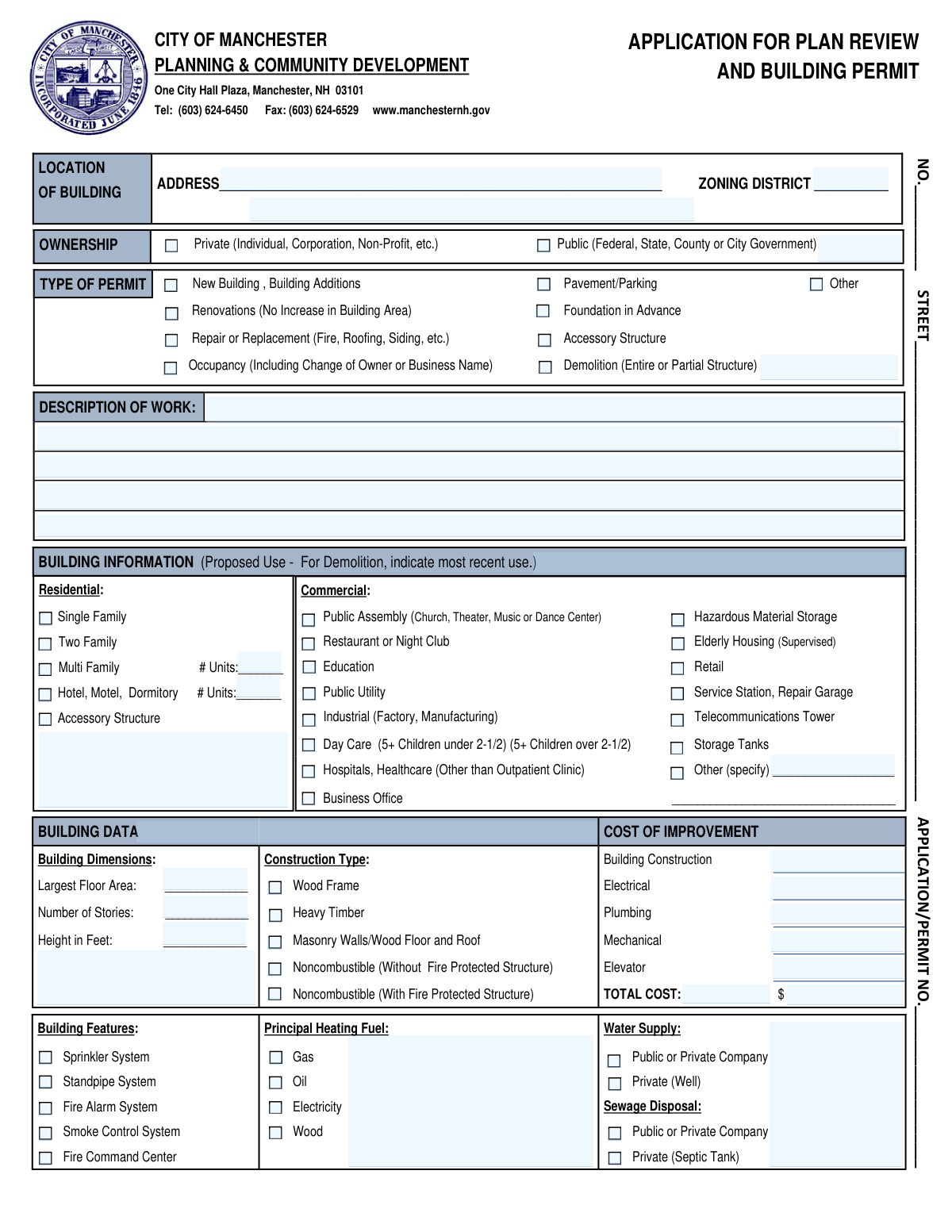
Yes! You can use AI to fill out City of Manchester Application for Plan Review and Building Permit
This is an official application submitted to the City of Manchester's Planning & Community Development department to obtain a building permit for various types of work, including new construction, additions, renovations, and demolition. It gathers essential details about the project's location, scope, cost, and involved parties to ensure compliance with local building codes and zoning regulations. Today, this form can be filled out quickly and accurately using AI-powered services like Instafill.ai, which can also convert non-fillable PDF versions into interactive fillable forms.
Our AI automatically handles information lookup, data retrieval, formatting, and form filling.
It takes less than a minute to fill out Manchester Building Permit Application using our AI form filling.
Securely upload your data. Information is encrypted in transit and deleted immediately after the form is filled out.
Form specifications
| Form name: | City of Manchester Application for Plan Review and Building Permit |
| Number of pages: | 2 |
| Language: | English |
| Categories: | building permit forms, permit application forms, permit forms |
Instafill Demo: How to fill out PDF forms in seconds with AI
How to Fill Out Manchester Building Permit Application Online for Free in 2026
Are you looking to fill out a MANCHESTER BUILDING PERMIT APPLICATION form online quickly and accurately? Instafill.ai offers the #1 AI-powered PDF filling software of 2026, allowing you to complete your MANCHESTER BUILDING PERMIT APPLICATION form in just 37 seconds or less.
Follow these steps to fill out your MANCHESTER BUILDING PERMIT APPLICATION form online using Instafill.ai:
- 1 Navigate to Instafill.ai and upload or select the Manchester Application for Plan Review and Building Permit.
- 2 Provide the building's location address, zoning district, and a detailed description of the proposed work.
- 3 Specify the building's use (residential or commercial), type of permit requested, and construction type.
- 4 Enter building data such as dimensions, number of stories, and the estimated costs for construction, electrical, plumbing, and mechanical work.
- 5 Input the contact information for all relevant parties, including the applicant, owner/lessee, contractor, and architect/engineer.
- 6 Answer the site restriction questions regarding easements, wetlands, and any conditions from Planning or Zoning Boards.
- 7 Review all the information populated by the AI for accuracy, digitally sign and date the application, and then download it for submission to the City of Manchester.
Our AI-powered system ensures each field is filled out correctly, reducing errors and saving you time.
Why Choose Instafill.ai for Your Fillable Manchester Building Permit Application Form?
Speed
Complete your Manchester Building Permit Application in as little as 37 seconds.
Up-to-Date
Always use the latest 2026 Manchester Building Permit Application form version.
Cost-effective
No need to hire expensive lawyers.
Accuracy
Our AI performs 10 compliance checks to ensure your form is error-free.
Security
Your personal information is protected with bank-level encryption.
Frequently Asked Questions About Form Manchester Building Permit Application
This form is used to apply for a building permit from the City of Manchester, NH, for various construction projects. It is required for new buildings, additions, renovations, demolitions, and changes in property use or occupancy.
Any property owner, lessee, contractor, or authorized agent planning to undertake construction, renovation, demolition, or change the occupancy of a building in Manchester must complete and submit this application.
In this section, you should provide a clear and concise summary of the proposed project. Include details like the type of work (e.g., interior renovation, new addition), the scope, and key dimensions or areas involved.
The total cost is the sum of all expenses for the project, including building construction, electrical, plumbing, mechanical, and elevator work. You must provide a cost breakdown for each category on the form.
Yes, a permit is required for a change of occupancy. You must check the 'Occupancy (Including Change of Owner or Business Name)' box and submit this application.
Yes, this type of work requires a permit. You should select the 'Repair or Replacement (Fire, Roofing, Siding, etc.)' option in the 'Type of Permit' section of the application.
You must provide the full name, contact name, address, phone number, and email for the applicant, the property owner/lessee, the contractor, and the architect or engineer involved in the project.
This section asks if the property has any restrictive easements, nearby wetlands, or conditions of approval from the Planning or Zoning Boards. Any such restrictions must be clearly indicated on the site plan submitted with your application.
The completed form should be submitted to the City of Manchester Planning & Community Development department at One City Hall Plaza, Manchester, NH 03101. It is advisable to call them at (603) 624-6450 for specific submission guidelines.
The form instructs that for demolition projects, you should indicate the building's most recent use in the 'Proposed Use' field. Be sure to also check the 'Demolition' box under 'Type of Permit'.
Yes, services like Instafill.ai use AI to auto-fill form fields accurately and save time. This can help reduce errors and speed up the process of completing complex forms like this one.
To fill this form out online, you can upload the PDF to the Instafill.ai platform. Their service will make the document interactive, allowing you to type your information directly into the fields and then download the completed form.
If you have a non-fillable or 'flat' PDF, you can use a service like Instafill.ai to convert it into an interactive, fillable form. This allows you to easily type in your information before printing and submitting it.
Compliance Manchester Building Permit Application
Validation Checks by Instafill.ai
1
Verifies Total Cost Calculation
This check ensures that the sum of the individual cost fields (Building Construction, Electrical, Plumbing, Mechanical, Elevator) correctly equals the value entered in the 'TOTAL COST' field. This is critical for accurate permit fee calculation and project valuation. If the sum does not match the total, the submission will be flagged for manual review to correct the discrepancy.
2
Ensures Location Address is Provided
This validation confirms that the 'LOCATION OF BUILDING ADDRESS' field is not empty. The full street address is the primary identifier for the property and is essential for site inspections, record keeping, and emergency services. An application without a complete address cannot be processed.
3
Requires At Least One Permit Type Selection
This check verifies that the applicant has selected at least one checkbox under the 'TYPE OF PERMIT' section. This information defines the fundamental purpose of the application (e.g., new construction, renovation, demolition). Failure to select a permit type makes it impossible to determine the scope of review required, and the application will be rejected as incomplete.
4
Conditional Requirement for 'Other' Permit Type Description
If the 'Other' checkbox under 'TYPE OF PERMIT' is selected, this validation ensures the adjacent text field contains a description. This is necessary to understand the nature of work not covered by the standard categories. An empty description for an 'Other' permit type will result in an error, as the scope of work is undefined.
5
Validates Unit Count for Multi-Unit Properties
This check is triggered if 'Multi Family' or 'Hotel, Motel, Dormitory' is selected under 'BUILDING INFORMATION'. It ensures the corresponding '# Units' field is filled with a positive integer greater than 1 for Multi-Family or 0 for Hotel/Motel. This data is crucial for assessing occupancy load, life safety requirements, and zoning compliance.
6
Requires At Least One Building Use Selection
This validation ensures that at least one checkbox is selected in either the 'Residential' or 'Commercial' sub-sections under 'BUILDING INFORMATION'. The proposed use of the building is a critical piece of data that dictates which building codes and zoning regulations apply. An application without a specified use cannot be reviewed for compliance.
7
Validates Applicant Contact Information Completeness
This check confirms that the Applicant's Name, Address, and Telephone number fields are all filled out. This contact information is mandatory for all official communication regarding the application's status, requests for more information, and scheduling inspections. Incomplete applicant information will prevent the application from being accepted.
8
Validates Email Address Format
This validation scans all email fields (for Applicant, Owner, Contractor, Architect/Engineer) to ensure they conform to a standard format (e.g., '[email protected]'). Correctly formatted email addresses are essential for reliable electronic communication and document delivery. An invalid format will trigger a warning to the user to correct the entry before submission.
9
Validates Telephone Number Format
This check ensures that all telephone number fields are entered in a recognizable and valid format, such as (XXX) XXX-XXXX or XXX-XXX-XXXX. Consistent and valid phone numbers are necessary for city staff to be able to contact the relevant parties. An entry that does not match a valid pattern will be rejected.
10
Ensures All Site Restriction Questions are Answered
This validation verifies that for each of the three questions in the 'SITE RESTRICTIONS' section (regarding easements, wetlands, and board conditions), either 'YES' or 'NO' has been selected. These answers are critical for identifying potential legal or environmental constraints on the property that require further review. An unanswered question will halt the submission process.
11
Verifies Positive Numerical Values for Building Dimensions
This check ensures that the 'Number of Stories', 'Height in Feet', and 'Largest Floor Area' fields contain valid, positive numerical values. These dimensions are fundamental to assessing compliance with zoning regulations like height limits and floor area ratios (FAR). Non-numerical or zero/negative values will cause a validation failure.
12
Requires Signature Date
This validation confirms that the date field next to the 'SIGNATURE OF APPLICANT' is filled out. The signature date legally establishes when the applicant certified the information and formally submitted the application. An application with a signature but no date is considered incomplete and will be returned.
13
Conditional Requirement for 'Other (specify)' Commercial Use
If the 'Other (specify)' checkbox is selected in the 'Commercial' use section, this validation ensures the corresponding description field is not empty. This is required to classify the business type for zoning and code compliance when it doesn't fit a standard category. The application will be considered incomplete if this field is blank when required.
14
Validates Demolition Use Description
This check is triggered when 'Demolition' is selected as the 'Type of Permit'. It verifies that the 'DESCRIPTION OF WORK' or 'OCCUPANCY' field is filled out, as the form instructs the applicant to indicate the 'most recent use' in this scenario. This information is important for historical records and assessing potential environmental hazards, and a blank field will result in a validation error.
Common Mistakes in Completing Manchester Building Permit Application
Applicants often provide a one or two-word description like 'Renovation' or 'Repair' without detailing the scope, location, or nature of the work. This happens when applicants assume the submitted plans are sufficient, but reviewers need a clear summary to properly route and assess the application. A vague description guarantees delays as the city will return the application for clarification, halting the entire review process until a detailed summary is provided.
A frequent error is entering only the building construction cost and omitting the costs for electrical, plumbing, mechanical, and other systems, leading to an incorrect total. Some may intentionally underestimate costs to reduce permit fees, which are often based on project valuation. This can lead to an incorrect fee assessment, application rejection, or even penalties if the discrepancy is discovered later during an inspection or audit.
It is common for the person filling out the form, such as a contractor, to list their own information in the 'Owner/Lessee' section by mistake. This occurs because they are the primary point of contact for the project. This misrepresentation can cause significant communication and legal issues, as official notices may be sent to the wrong party, and it obscures the legal owner who authorizes the work. Always ensure the correct legal entity is listed in each respective section.
Applicants frequently check a box but fail to provide the required accompanying information, such as selecting 'Multi Family' without specifying the number of units, or checking 'Other (specify)' without writing in the use. This is a simple oversight that renders the section incomplete. Without this data, the city cannot verify zoning compliance, occupancy loads, or necessary safety requirements, leading to the application being flagged as incomplete.
The 'Building Data' section contains technical terms that are easily misunderstood, such as entering the total square footage for all floors in the 'Largest Floor Area' field. This specific field requires the area of the largest single floor, not the total. Such errors lead to incorrect assessments for fire safety, structural requirements, and zoning compliance, and will likely result in the application being returned for correction.
Applicants often answer 'No' to the Yes/No questions regarding easements, wetlands, and board conditions without performing due diligence. This mistake happens when an applicant is unaware of these restrictions or assumes they don't exist without checking official property records. The consequences can be severe, including permit revocation, stop-work orders, and legal action if construction violates a previously unknown restriction.
An applicant might select 'Renovations' for a project that also includes a small addition, which requires the 'Building Additions' permit type. This confusion arises when a project spans multiple categories. Selecting the wrong type sends the application to the wrong review queue and applies the wrong set of regulations, causing significant delays when the error is inevitably discovered by staff.
Forgetting to sign and date the application is one of the most common and easily avoidable mistakes. It often happens in the rush to compile and submit the documents. An unsigned application is legally invalid because the signature certifies that the owner has authorized the work and that the information is truthful. The receiving department will not even begin to process an unsigned form, causing an immediate rejection and delay.
An application may state 'New Building' under 'Type of Permit' but then show 'Renovations' in the 'Description of Work'. These contradictions occur when the form is filled out hastily without a final review. Inconsistent information raises red flags for reviewers, forcing them to stop and seek clarification, which significantly delays the approval process.
Handwritten forms often suffer from illegible contact details for the applicant, owner, or contractor, and sometimes entire sections are left blank. If a reviewer has a simple question, but cannot read the email address or phone number, the entire project is put on hold. To avoid this, information must be printed clearly. AI-powered tools like Instafill.ai can prevent this by populating contact information in a clear, digital format and ensuring all required fields are complete before submission.
Saved over 80 hours a year
“I was never sure if my IRS forms like W-9 were filled correctly. Now, I can complete the forms accurately without any external help.”
Kevin Martin Green
Your data stays secure with advanced protection from Instafill and our subprocessors

Robust compliance program
Transparent business model
You’re not the product. You always know where your data is and what it is processed for.
ISO 27001, HIPAA, and GDPR
Our subprocesses adhere to multiple compliance standards, including but not limited to ISO 27001, HIPAA, and GDPR.
Security & privacy by design
We consider security and privacy from the initial design phase of any new service or functionality. It’s not an afterthought, it’s built-in, including support for two-factor authentication (2FA) to further protect your account.
Fill out Manchester Building Permit Application with Instafill.ai
Worried about filling PDFs wrong? Instafill securely fills city-of-manchester-application-for-plan-review-and-building-permit forms, ensuring each field is accurate.