Yes! You can use AI to fill out ROTC Cadet Academic Plan / Degree and Credit Hour Worksheet (Student Identification, Term-by-Term Courses, GPA Summary, and Completion Certification)
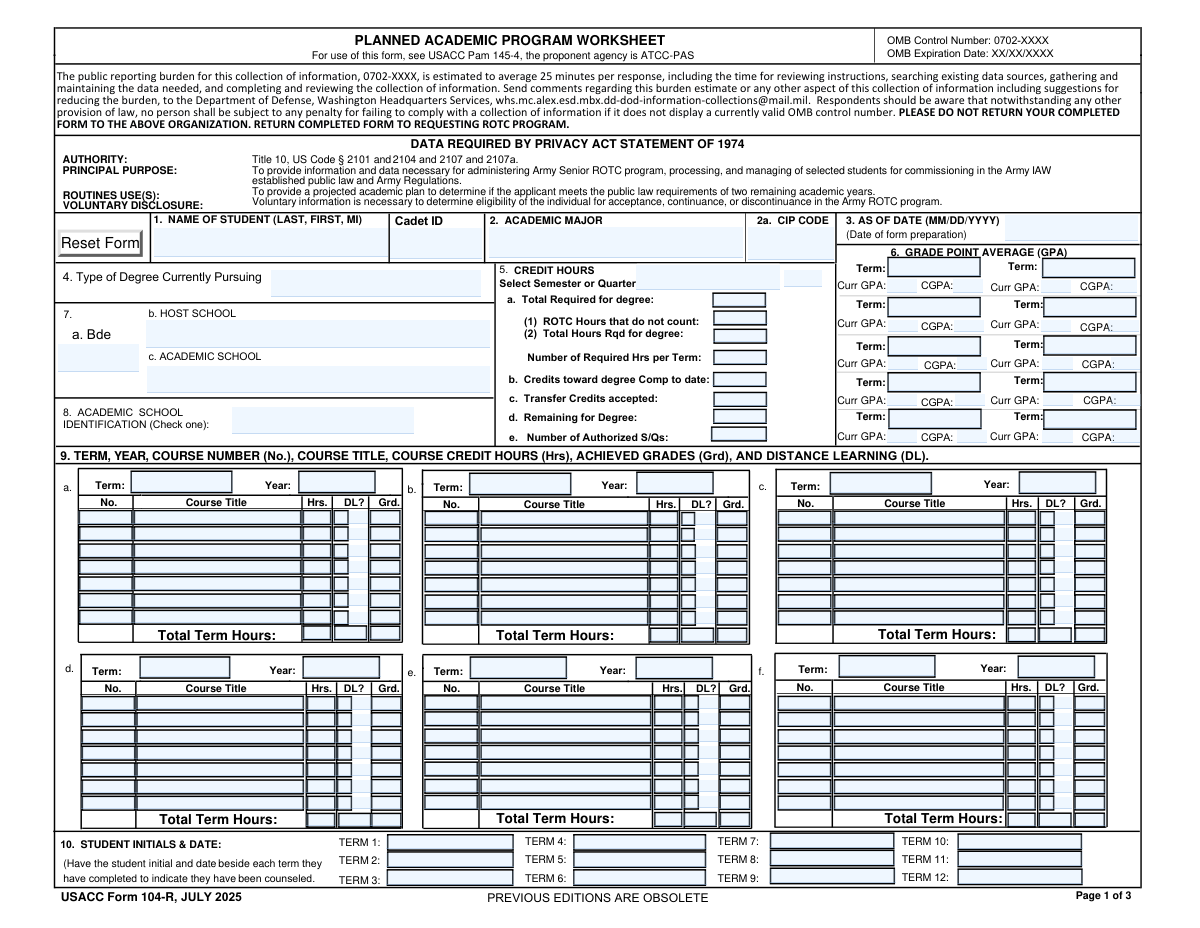
This form is an ROTC-focused academic plan and degree audit worksheet used to document a cadet’s program of study, credit-hour requirements, term-by-term course schedule, distance-learning indicators, and GPA/cumulative GPA by term. It helps ROTC staff and school officials verify that the cadet’s coursework aligns with degree requirements and that the cadet is on track to graduate within authorized terms. The form also includes counseling initials/dates and certification signatures (cadet and an approving official such as a registrar/advisor or Professor of Military Science). Today, this form can be filled out quickly and accurately using AI-powered services like Instafill.ai, which can also convert non-fillable PDF versions into interactive fillable forms.
Our AI automatically handles information lookup, data retrieval, formatting, and form filling.
It takes less than a minute to fill out ROTC Academic Plan Worksheet using our AI form filling.
Securely upload your data. Information is encrypted in transit and deleted immediately after the form is filled out.
Form specifications
| Form name: | ROTC Cadet Academic Plan / Degree and Credit Hour Worksheet (Student Identification, Term-by-Term Courses, GPA Summary, and Completion Certification) |
| Number of pages: | 3 |
| Language: | English |
| Categories: | identification forms, ROTC forms |
Instafill Demo: filling out a legal form in seconds
How to Fill Out ROTC Academic Plan Worksheet Online for Free in 2026
Are you looking to fill out a ROTC ACADEMIC PLAN WORKSHEET form online quickly and accurately? Instafill.ai offers the #1 AI-powered PDF filling software of 2026, allowing you to complete your ROTC ACADEMIC PLAN WORKSHEET form in just 37 seconds or less.
Follow these steps to fill out your ROTC ACADEMIC PLAN WORKSHEET form online using Instafill.ai:
- 1 Go to Instafill.ai and upload the PDF (or select the ROTC Academic Plan/Degree Worksheet template) to start an AI-guided fill session.
- 2 Enter student identification details: student name, cadet ID, major, CIP code, degree type currently pursuing, school/brigade identifiers, and the “as of” date.
- 3 Complete degree and credit-hour requirements: total required for degree, ROTC hours not counted, required hours per term, credits completed to date, transfer credits accepted, credits remaining, and authorized semesters/quarters.
- 4 Fill the term-by-term course plan and results: for each term, add course numbers, titles, credit hours, distance-learning (DL) indicators, and achieved grades; then enter each term’s total hours and DL totals where required.
- 5 Add GPA summary information by term (current GPA and cumulative GPA/CGPA) and ensure term labels/years match the course blocks.
- 6 Enter counseling documentation (student initials and counseling dates for each term/course block) and complete the completion section (academic discipline and expected completion date).
- 7 Apply required signatures and dates (cadet/student signature and certifying official/registrar/advisor/Professor of Military Science signature), then review the “REVIEW Yes/No” requirement check and export/download the completed form.
Our AI-powered system ensures each field is filled out correctly, reducing errors and saving you time.
Why Choose Instafill.ai for Your Fillable ROTC Academic Plan Worksheet Form?
Speed
Complete your ROTC Academic Plan Worksheet in as little as 37 seconds.
Up-to-Date
Always use the latest 2026 ROTC Academic Plan Worksheet form version.
Cost-effective
No need to hire expensive lawyers.
Accuracy
Our AI performs 10 compliance checks to ensure your form is error-free.
Security
Your personal information is protected with bank-level encryption.
Frequently Asked Questions About Form ROTC Academic Plan Worksheet
This form documents a cadet/student’s academic program details (major, degree type, CIP code), term-by-term courses/credit hours, and GPA history. It’s typically used by ROTC or an academic office to verify progress toward degree completion and counseling/approval by required officials.
The student/cadet usually completes the identification and course plan sections, then an advisor/registrar and ROTC official (e.g., Professor of Military Science) review and sign. Follow your ROTC battalion or school instructions for who enters each section.
Have your unofficial/official transcript, degree audit/program requirements (total credits required), your declared major and CIP code, and your ROTC cadet ID. You’ll also need term GPAs/CGPAs and planned or completed course lists with credit hours and grades.
The CIP code is often listed in your school’s program catalog, degree audit system, or registrar’s office resources. If you can’t locate it, ask your academic advisor or registrar to confirm the correct CIP code for your declared major.
Enter the code/identifier that matches the category your program uses, then fill in only the corresponding field (Brigade, Host School, or Academic School). If you’re unsure which one applies, use the option your ROTC unit or host institution instructs you to use.
Use your program requirements to enter the total credits required for the degree, then enter credits completed to date and transfer credits accepted. Credits remaining is typically: total hours required for degree (after any exclusions) minus (completed credits + accepted transfer credits).
This is the number of ROTC credit hours that your institution does not apply toward your degree requirements. Check your degree audit or ask your advisor which ROTC courses count toward the degree, then enter the ROTC hours that are excluded.
Enter whether your school uses semesters or quarters, or list the specific term label used for the credit-hour calculations (e.g., “Semester” or “Fall 2026”). Use the same term naming convention throughout the form for consistency.
For each term, list each course number, course title, and credit hours exactly as shown on your registration plan or transcript, and include the achieved grade if completed. Mark the DL (distance learning) checkbox/indicator only for courses taken online or via remote delivery.
Some versions of the form split the total into separate digit boxes for formatting. Add up the term’s credit hours, then enter each digit in the appropriate box (e.g., 015 for fifteen hours).
Term (current) GPA is the GPA earned for that specific term only, while CGPA is your overall cumulative GPA through the end of that term. Use the values shown on your transcript for each term label.
These fields document that the student was counseled/reviewed for that term and when it occurred. Enter the student’s initials and the counseling date in the format requested (often initials followed by the date).
Select “Yes” if all listed courses are required (at minimum) to complete the degree. Select “No” if any listed courses are not required, and list the exceptions on the reverse of the form (or as your program instructs).
Typically the student signs and dates first, then the registrar/advisor (or examiner of credentials/ROTC advisor) certifies and dates it, and an ROTC official may also sign (e.g., Professor of Military Science). Sign only after the course/credit/GPA information has been reviewed for accuracy.
Yes—tools like Instafill.ai can use AI to auto-fill form fields accurately from your provided information (e.g., transcript/degree audit) and save time. Upload the PDF to Instafill.ai, map or confirm key data (name, cadet ID, major, courses, credits, GPAs), let it populate the fields, then review and export the completed form for signatures/submission.
If the PDF is “flat” (non-fillable), Instafill.ai can convert it into an interactive fillable form and then auto-fill the fields. After conversion, you can complete it digitally, download it, and route it for signatures.
Compliance ROTC Academic Plan Worksheet
Validation Checks by Instafill.ai
1
Student Name format and completeness (Last, First, MI)
Validates that Student Name is present and follows the required order: Last, First, Middle Initial (MI). The MI should be a single alphabetic character (or blank if allowed), and the name should not contain numeric-only values or placeholder text (e.g., 'N/A', 'TBD'). If validation fails, the submission should be rejected or routed for correction because name mismatches can break record matching with school/ROTC systems.
2
Cadet ID required, format, and uniqueness
Ensures Cadet ID is provided and matches the ROTC program’s expected pattern (e.g., alphanumeric length constraints, no special characters beyond allowed hyphen). Also checks that the Cadet ID is not reused for a different student within the same batch/import to prevent cross-student contamination. If invalid, the form should be flagged because downstream systems may not be able to associate the plan with the correct cadet.
3
CIP Code format validation (both occurrences) and cross-field match
Validates that each CIP Code is in a recognized CIP format (commonly 6 digits with optional decimal, e.g., '52.0201' or '520201', depending on system rules). Also checks that the CIP Code in Student Identification matches the CIP Code in Degree and Credit Hour Details, since both represent the student’s program classification. If the codes are missing, malformed, or inconsistent, the submission should be stopped or sent to review because reporting and degree-program validation depend on accurate CIP coding.
4
As Of Date format and reasonable range
Checks that As Of Date is a valid date in the required format (MM/DD/YYYY if specified by the form) and is not an impossible or out-of-range value (e.g., far future or far past). This date anchors the plan and counseling timeline, so it should generally be on or before signature dates and near the current academic period. If it fails validation, the form should be flagged because it can invalidate term sequencing and audit trails.
5
Academic Major and Degree Type/Currently Pursuing consistency
Ensures Academic Major and Type of Degree Currently Pursuing are populated with meaningful text (not blank, not placeholders) and are consistent with Completion section fields (Academic Discipline and Degree Type). For example, if the student is pursuing a Bachelor of Science, the completion degree type should not indicate an unrelated credential like a certificate unless explicitly allowed. If inconsistent, route to manual review because it can cause incorrect degree requirement calculations and certification errors.
6
Academic School Identification conditional requirement (Bde vs Host School vs Academic School)
Validates that Academic School Identification is provided and that exactly the correct dependent field is filled based on its value: if it indicates 'Bde', Brigade must be filled; if 'HOST SCHOOL', Host School must be filled; if 'ACADEMIC SCHOOL', Academic School must be filled. Also checks that non-applicable fields are empty to avoid ambiguity. If the conditional logic fails, the submission should be rejected or corrected because the student’s organizational/school routing will be unclear.
7
Semester/Quarter Selection value validation and term-type alignment
Checks that Semester/Quarter Selection is present and matches an allowed set (e.g., 'Semester', 'Quarter', or an approved term label pattern like 'Fall 2026'). This selection should align with how Authorized Semesters/Quarters (S/Q) is interpreted and how term headers are labeled. If invalid, the form should be flagged because credit pacing and authorized term counts depend on the correct term system.
8
Credit hour fields numeric validation (non-negative, reasonable precision)
Validates that all credit-hour numeric fields (Total Required for Degree, ROTC Hours Not Counted, Total Hours Required for Degree, Required Hours Per Term, Credits Completed, Transfer Credits, Credits Remaining, Authorized S/Q) are numeric, non-negative, and within reasonable bounds (e.g., not 9999). Where decimals are allowed (noted in some term tables), enforce a consistent precision (e.g., increments of 0.5 or 0.1 per institutional rule). If validation fails, block submission because calculations and compliance checks will be unreliable.
9
Degree credit-hour arithmetic consistency (remaining hours calculation)
Checks that Credits Remaining for Degree equals the adjusted requirement minus credits already earned and accepted transfer credits, using the form’s intended logic (e.g., Total Hours Required for Degree - Credits Completed Toward Degree to Date - Transfer Credits Accepted). Also validates that Total Hours Required for Degree is consistent with Total Required for Degree (a) minus ROTC Hours Not Counted when that is the intended relationship. If mismatched, the form should be flagged because it indicates incorrect degree progress and can affect commissioning/eligibility decisions.
10
Per-term course row completeness (number/title/hours/grade coherence)
For each term’s course rows, validates that if any of Course Number, Course Title, Credit Hours, or Grade is provided, the other required components for that row are also provided (at minimum number/title/hours; grade may be optional for future terms). Prevents partial rows like a title with no hours or a grade with no course identifier. If incomplete, the submission should be rejected or the row ignored with an error because partial course entries break term-hour totals and auditability.
11
Credit Hours per course row range and type
Validates each course Credit Hours entry is numeric and within a plausible range (e.g., 0.5–6.0, or institution-defined), and disallows negative values or non-numeric text. This prevents data entry errors like '33' for a single course or 'three' as text. If invalid, the form should be flagged because term totals and degree progress will be materially incorrect.
12
Term total hours equals sum of course hours (including digit-box totals)
Checks that each term’s Total Term Hours field matches the sum of the listed course credit hours for that term. For terms where totals are split into digit boxes (hundreds/tens/ones or part 1/2/3), validates each box is a single digit and the combined number equals the computed sum. If the totals do not reconcile, the submission should be flagged because totals are used for pacing, eligibility, and reporting.
13
Distance Learning (DL) indicator consistency (checkbox vs Y/N fields vs totals)
Validates that DL checkboxes and any corresponding DL indicator text fields (e.g., 'Y'/'N') do not contradict each other for the same course row. Also checks that term-level Total Distance Learning Hours/Count equals the sum of credit hours for courses marked as DL (or the count, depending on the field definition—must be consistent with the form’s chosen interpretation). If inconsistent, route to review because DL reporting can be compliance-sensitive and affects term summaries.
14
GPA/CGPA numeric format and valid range by term
Ensures each Term Current GPA and Cumulative GPA (CGPA) is numeric and within an allowed range (commonly 0.00–4.00, or configurable for institutions using 5.00/4.33 scales). Enforces a consistent decimal precision (e.g., two decimals) and disallows impossible values (negative, > scale). If invalid, the submission should be flagged because GPA values are often used for eligibility and academic standing determinations.
15
GPA logical progression (CGPA should not be blank when term GPA is present; CGPA trend sanity)
Validates that if a term has a Current GPA entered, a CGPA is also entered for that term (unless explicitly allowed to be blank). Additionally checks basic sanity: CGPA should generally change gradually and remain within the same scale; large jumps (e.g., 1.0 to 4.0 in one term) can be flagged for review rather than hard-failed. If the rule fails, the form should be flagged because missing/erratic CGPA undermines academic progress tracking.
16
Signature and date validation (student and registrar/advisor) with chronological order
Validates that required signatures (Student Signature and Registrar/Advisor/Professor of Military Science signature fields) are present when the form is submitted as final, and that associated dates are valid MM/DD/YYYY dates. Also checks chronological consistency: As Of Date should be on/before signature dates, and Student Signature Date should be on/before Registrar/Advisor Date (unless policy allows same-day or reversed order). If missing or inconsistent, the submission should be rejected or marked incomplete because certification and audit requirements are not met.
Common Mistakes in Completing ROTC Academic Plan Worksheet
People often type their name in normal reading order (First Last) or use nicknames, omit the middle initial, or include suffixes in the wrong place. This can cause mismatches with transcripts/ROTC records and delays in verification or certification. Always copy the name exactly as it appears on official school records and format it as Last, First, MI (e.g., "Smith, Jordan A"). AI-powered tools like Instafill.ai can standardize name formatting and reduce record-matching errors.
A common issue is entering a student ID number instead of the ROTC Cadet ID, transposing digits, or adding spaces/dashes that aren’t used by the program. Incorrect IDs can route the form to the wrong person or prevent the ROTC office from validating the plan. Use the official Cadet ID exactly as assigned by the ROTC program and double-check each digit. Instafill.ai can help by validating expected ID patterns and flagging suspicious lengths/characters.
This form asks for CIP Code in more than one place, and people often leave one blank, use a department code instead of a CIP, or enter different CIP codes in different sections. The consequence is a mismatch between the declared major and the program classification, which can trigger rework by the registrar/advisor. Confirm the correct CIP code for the declared major (often a 6-digit code with a decimal, depending on the institution) and use the same value everywhere it’s requested. Instafill.ai can auto-fill repeated fields consistently and format the CIP code correctly.
Students frequently enter shorthand (e.g., "Bio" or "CompSci") or a concentration instead of the official major name shown on the transcript/catalog. This can create conflicts with the CIP code and degree requirements, leading to questions about eligibility or degree progress. Use the exact major/program title from the transcript or degree audit and ensure the degree type (BS/BA/AA, etc.) matches the program. Instafill.ai can help normalize program names and keep them aligned with CIP and degree type fields.
The form includes conditional instructions (e.g., fill Brigade only if Academic School Identification is 'Bde', fill Host School only if 'HOST SCHOOL'). People often fill all three fields or the wrong one, which creates conflicting school identification data. This can delay approval because the reviewer can’t tell which unit/school is authoritative. Follow the identification code first, then complete only the corresponding field; leave the others blank unless instructed. Instafill.ai can enforce conditional logic and prevent incompatible fields from being filled together.
There are multiple date fields (As Of Date, Student Signature Date, Registrar/Advisor Date, and MM/DD/YYYY signature dates), and users often mix formats (DD/MM/YYYY vs MM/DD/YYYY), omit leading zeros, or sign with a date earlier than the form’s 'As Of' date. Incorrect dates can invalidate the certification timeline or require re-signing. Use MM/DD/YYYY consistently and ensure the sequence makes sense (prepared date, then student signature date, then registrar/advisor date). Instafill.ai can auto-format dates and flag illogical date sequences.
Users commonly miscalculate totals (Total Required for Degree vs adjusted Total Hours Required for Degree), forget to subtract ROTC hours not counted, or compute Credits Remaining incorrectly after transfer credits. These errors can make the academic plan look noncompliant and may trigger counseling or rework. Recalculate using a degree audit: Remaining = (Adjusted total required) − (Credits completed toward degree) − (Transfer credits accepted), and ensure ROTC exclusions are applied consistently. Instafill.ai can automatically compute and cross-check totals to catch arithmetic inconsistencies.
People select 'Semester' but label terms like 'Quarter 1/2/3', or they enter term credit loads that don’t match the institution’s term system. This creates confusion when reviewers compare required hours per term and authorized semesters/quarters. Confirm whether the institution uses semesters or quarters and keep term labels consistent (e.g., Fall/Spring for semesters, or Quarter 1/2/3/4 for quarters). Instafill.ai can help enforce consistent term naming and validate term-type alignment.
The form requests both term (current) GPA and cumulative GPA for multiple terms, and users often swap them, repeat the same value in both fields, or enter percentages instead of GPA scale values. This can misrepresent academic standing and may affect ROTC counseling decisions. Use the transcript/official grade report: Current GPA is for that term only; CGPA is cumulative through that term, typically on a 4.0 scale with consistent decimals (e.g., 3.25). Instafill.ai can validate numeric ranges and standardize decimal formatting.
Many rows have both a DL checkbox and a DL indicator field (Y/N), plus term-level DL totals; people often check the box but leave the indicator blank, mark 'Y' but don’t check the box, or forget to update the DL hours/count totals. Inconsistencies can cause compliance questions about online coursework and require manual reconciliation. For each course, use one consistent method as required (checkbox and/or Y/N) and ensure the term DL total equals the sum of DL-marked course hours. Instafill.ai can keep checkbox/indicator fields synchronized and auto-sum DL hours.
Some terms require total hours split into separate digit boxes (hundreds, tens, ones), and users often type the full number in each box or shift digits (e.g., putting '12' in the tens box). This results in an incorrect total that doesn’t match the course-hour sum and can invalidate the term summary. Enter one digit per box (e.g., 015 for 15 hours: hundreds=0, tens=1, ones=5) and verify it matches the sum of listed course hours. Instafill.ai can automatically split totals into digit boxes correctly and prevent overflow/placement errors.
Users often skip the per-term counseling initials & dates, leave ambiguous initials, or forget one of the required signature lines (student and registrar/advisor/Professor of Military Science) and their dates. Missing or unclear attestations can cause the form to be rejected or returned for completion. Ensure each required term counseling entry includes initials plus a date, and confirm all signature blocks are signed and dated in MM/DD/YYYY. Instafill.ai can prompt for missing attestations and ensure required signature/date fields are not left blank.
Saved over 80 hours a year
“I was never sure if my IRS forms like W-9 were filled correctly. Now, I can complete the forms accurately without any external help.”
Kevin Martin Green
Your data stays secure with advanced protection from Instafill and our subprocessors

Robust compliance program
Transparent business model
You’re not the product. You always know where your data is and what it is processed for.
ISO 27001, HIPAA, and GDPR
Our subprocesses adhere to multiple compliance standards, including but not limited to ISO 27001, HIPAA, and GDPR.
Security & privacy by design
We consider security and privacy from the initial design phase of any new service or functionality. It’s not an afterthought, it’s built-in, including support for two-factor authentication (2FA) to further protect your account.
Fill out ROTC Academic Plan Worksheet with Instafill.ai
Worried about filling PDFs wrong? Instafill securely fills rotc-cadet-academic-plan-degree-and-credit-hour-worksheet-student-identification-term-by-term-courses-gpa-summary-and forms, ensuring each field is accurate.