Yes! You can use AI to fill out REQUEST FOR OWNERSHIP INFORMATION—ERM-14 FORM
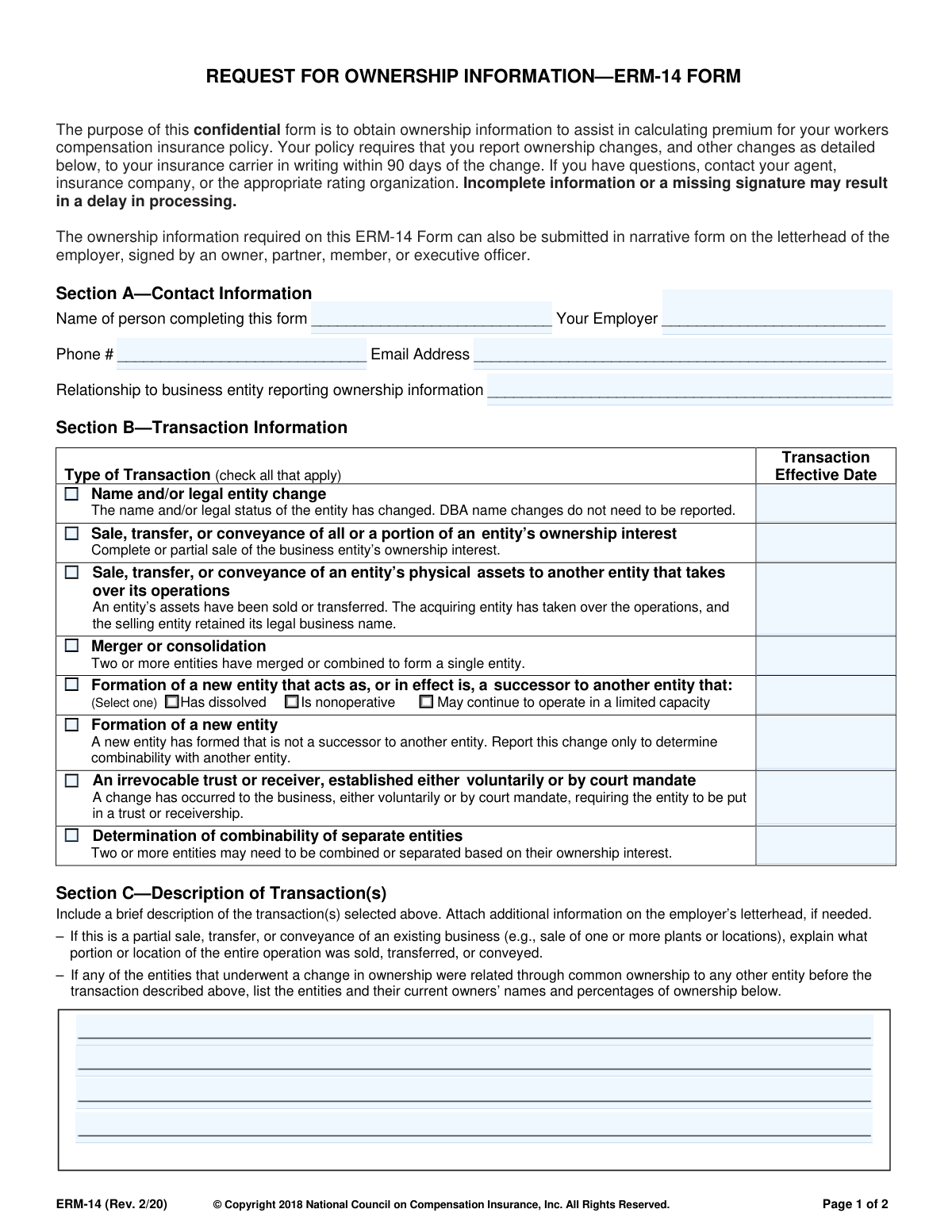
Form ERM-14 is a confidential document used by insurance carriers to gather detailed information about changes in a business's ownership structure. This includes events like sales, mergers, or the formation of new entities, which are crucial for accurately calculating workers' compensation insurance premiums. Today, this form can be filled out quickly and accurately using AI-powered services like Instafill.ai, which can also convert non-fillable PDF versions into interactive fillable forms.
ERM-14 is part of the
ownership information forms, insurance regulatory forms, ERM forms, risk management forms and NAIC forms categories on Instafill.
Rather not fill this in by hand? Instafill is an online form filler that completes PDF forms automatically — upload the blank form, answer a few questions, and the AI fills every field.
Form specifications
| Form name: | REQUEST FOR OWNERSHIP INFORMATION—ERM-14 FORM |
| Number of pages: | 1 |
| Language: | English |
Our AI automatically handles information lookup, data retrieval, formatting, and form filling.
It takes less than a minute to fill out ERM-14 using our AI form filling.
Securely upload your data. Information is encrypted in transit and deleted immediately after the form is filled out.
Instafill Demo: How to fill out PDF forms in seconds with AI
How to Fill Out ERM-14 Online for Free in 2026
Are you looking to fill out a ERM-14 form online quickly and accurately? Instafill.ai offers the #1 AI-powered PDF filling software of 2026, allowing you to complete your ERM-14 form in just 37 seconds or less.
Follow these steps to fill out your ERM-14 form online using Instafill.ai:
- 1 Navigate to Instafill.ai and upload or select the ERM-14 form to begin.
- 2 Use the AI assistant to complete Section A with the contact information of the person filling out the form.
- 3 In Section B, check the boxes that correspond to the type of ownership transaction that occurred and enter the effective date.
- 4 Provide a brief description of the transaction(s) in Section C, letting the AI help you draft a clear summary.
- 5 Complete Section D by providing detailed information for each business entity involved in the transaction, including legal names, addresses, ownership percentages, and FEINs.
- 6 Review all the information auto-filled by the AI across all sections to ensure accuracy and completeness.
- 7 Certify the form in Section E by providing your signature, title, and the date, then download or submit the completed document.
Our AI-powered system ensures each field is filled out correctly, reducing errors and saving you time.
Why Choose Instafill.ai for Your Fillable ERM-14 Form?
Speed
Complete your ERM-14 in as little as 37 seconds.
Up-to-Date
Always use the latest 2026 ERM-14 form version.
Cost-effective
No need to hire expensive lawyers.
Accuracy
Our AI performs 10 compliance checks to ensure your form is error-free.
Security
Your personal information is protected with bank-level encryption.
Frequently Asked Questions About ERM-14
The ERM-14 form is used to collect confidential ownership information about your business. This information helps your insurance carrier accurately calculate the premium for your workers' compensation insurance policy.
Any business entity with a workers' compensation policy that has undergone a change in ownership, legal structure, or other specified transaction must complete this form. This is necessary to ensure your policy premium is calculated correctly.
Your policy requires you to report ownership changes and other transactions listed on the form to your insurance carrier in writing within 90 days of the change.
Incomplete information or a missing signature may result in a delay in processing. This could impact the timely and accurate calculation of your workers' compensation premium.
No, the form explicitly states that DBA name changes do not need to be reported. You only need to report changes to the legal name and/or legal status of the entity.
The form must be signed by an owner, partner, member, or an executive officer of the business entity. This signature certifies that the information provided is complete and correct.
Section D provides space for three entities. If your transaction involves more, you can simply make copies of Page 2 of the form to submit the required information for all additional entities.
Yes, you can submit the required ownership information in a narrative format on your company's official letterhead. This letter must be signed by an owner, partner, member, or executive officer.
For each entity, you will need its legal name, address, legal status, and a list of all owners with their ownership percentages. You will also need the Federal Employer Identification Number (FEIN), Risk ID Number, and policy number.
If you have questions or need help completing the form, you should contact your insurance agent, your insurance company, or the appropriate rating organization.
This applies when two or more separate businesses have common ownership. Selecting this option prompts a review to determine if the entities should be combined for the purpose of calculating a single workers' compensation premium.
Yes, services like Instafill.ai use AI to help you accurately auto-fill form fields, which can save you time and reduce errors. These tools can extract information from your documents and place it in the correct fields.
You can upload the ERM-14 PDF to the Instafill.ai platform. The service will make the form fillable online, and its AI can help you populate the fields with your business information before you download, print, and sign it.
If you have a non-fillable or 'flat' PDF, you can use a service like Instafill.ai. It can convert the static PDF into an interactive, fillable form that you can complete on your computer.
Compliance ERM-14
Validation Checks by Instafill.ai
1
Requires at least one Transaction Type selection
This check ensures that at least one checkbox is selected in Section B, 'Type of Transaction'. The entire purpose of the form is to report a specific ownership change, so without a selected transaction type, the submission is incomplete and cannot be processed. If no transaction is selected, the form submission should be rejected with an error message prompting the user to choose the relevant transaction.
2
Ensures Transaction Effective Date is provided for selected transactions
This validation verifies that for every transaction type checked in Section B, the corresponding 'Transaction Effective Date' field is filled. This date is critical for determining when the ownership change legally took effect, which directly impacts the workers' compensation policy and premium calculation. A failure would prompt the user to enter the effective date for the specific transaction they selected.
3
Validates all date fields are in a proper format
This check confirms that all date fields on the form, including 'Transaction Effective Date', 'Policy Effective Date', and the 'Date' in the certification section, are entered in a valid and consistent format (e.g., MM/DD/YYYY). Incorrect or ambiguous date formats can lead to processing errors and incorrect application of the ownership changes. If validation fails, the user should be shown an example of the correct format.
4
Validates the format of the Federal Employer Identification Number (FEIN)
This check ensures that the FEIN entered in Section D for each business entity follows the standard 9-digit format (XX-XXXXXXX). The FEIN is a unique identifier for business entities used by the IRS, and it is essential for correctly identifying the entities involved in the transaction. An invalid format would prevent proper entity matching and record-keeping, so the submission should be blocked until a valid FEIN is provided.
5
Verifies Ownership Percentages Sum to 100%
For each entity listed in Section D, this validation calculates the sum of all ownership percentages provided in item 4, 'Ownership'. The form explicitly states that ownership should total 100%. This check is crucial for accurately assessing control and combinability for premium calculation. If the percentages do not sum to 100%, an error message should be displayed, requiring the user to correct the ownership distribution before submission.
6
Conditional Requirement for Entity Information
This check logically links the transaction type selected in Section B to the entity information required in Section D. For example, a 'Name and/or legal entity change' requires data for 'Entity 1' (before) and 'Entity 2' (after), while a 'Merger or consolidation' requires all three. This prevents incomplete submissions by ensuring all necessary parties to a transaction are fully described. Failure would result in a prompt to complete the information for the required entities.
7
Ensures Certification Section is fully completed
This validation confirms that the certification in Section E is complete, requiring a signature (or digital equivalent), the printed name of the signatory, their title, and the date. This section legally certifies the accuracy of the provided information. An incomplete certification section invalidates the submission from a legal standpoint and would delay processing until all required certification fields are filled.
8
Validates the format of all email address fields
This check verifies that the email addresses provided in Section A ('Email Address') and Section D ('Contact Phone/Email') adhere to a standard email format (e.g., '[email protected]'). Valid contact information is essential for communication regarding the submission, especially if questions or issues arise during processing. An invalid email format would trigger an error, preventing submission until a valid address is entered.
9
Requires selection of successor entity status
This is a conditional check for Section B. If the user selects 'Formation of a new entity that acts as, or in effect is, a successor to another entity', this validation ensures that one of the three sub-options ('Has dissolved', 'Is nonoperative', or 'May continue to operate in a limited capacity') is also selected. This detail is necessary to understand the status of the predecessor entity. Failure to select a sub-option would halt submission and prompt the user for the required clarification.
10
Requires description for partial sale or transfer
This validation checks if the transaction type 'Sale, transfer, or conveyance of all or a portion of an entity’s ownership interest' is selected. If it is, the system then checks if the description in Section C is populated, as the form instructions specifically ask for an explanation of what portion was sold. This narrative is critical for understanding the scope of the change. If the transaction is a partial sale and the description is empty, the user should be prompted to provide details.
11
Logical check on Certification Date
This validation ensures the 'Date' in the Section E certification block is not before any 'Transaction Effective Date' listed in Section B. A person cannot certify a transaction as having occurred before it has legally taken effect. This check prevents logical inconsistencies in the timeline of events. If the certification date is earlier than the transaction date, an error should be displayed.
12
Ensures Completeness of Contact Information in Section A
This check verifies that all fields in Section A ('Name of person completing this form', 'Your Employer', 'Phone #', 'Email Address', 'Relationship to business entity') are filled out. This information is fundamental for identifying the submitter and providing a point of contact for any follow-up questions. An incomplete Section A would result in a processing delay, so the form should not be accepted until all fields are complete.
Common Mistakes in Completing ERM-14
Users often confuse a 'Doing Business As' (DBA) name with a formal legal entity name change and incorrectly check the 'Name and/or legal entity change' box in Section B. The form explicitly states that DBA changes do not need to be reported, so this creates unnecessary paperwork and can cause confusion for the insurance carrier. To avoid this, only report changes to the official legal name registered with the state, not informal trade names.
In Section D, the form requires that ownership percentages for each entity total 100%. Filers often make calculation errors, omit minor owners, or misinterpret complex ownership structures, leading to totals that are over or under 100%. This is a critical data point for determining control, and an incorrect total will cause the form to be rejected, delaying the premium calculation. Always double-check all calculations to ensure every owner's stake is accounted for before submission.
Section E requires a signature from an 'Owner, Partner, Member, or Executive Officer.' Often, an administrative assistant or an external accountant who filled out the form signs it, but they may not hold the required title. An unauthorized signature invalidates the submission, leading to processing delays until a properly authorized individual re-signs the form. Always ensure the person signing holds one of the specified titles and has the legal authority to certify the information.
Section D has specific columns for 'Entity before the change' (Entity 1) and 'Entity after the change' (Entity 2). People frequently get confused and enter the new entity's information in the 'before' column or vice-versa. This completely misrepresents the transaction and will lead to incorrect premium calculations and experience modification ratings. Carefully read the column headers and map the pre-transaction entity to Column 1 and the post-transaction entity to Column 2.
Section C asks for a brief description of the transaction, but filers often provide a vague, one-line answer like 'business was sold.' For partial sales, they may forget to specify which locations or divisions were sold, as requested. This lack of detail forces the insurance carrier to request more information, delaying the entire process. Be specific, clearly outlining the nature of the change and attaching supplemental documents on company letterhead if the space is insufficient.
The 'Transaction Effective Date' in Section B is a crucial field. Filers sometimes enter the date they are filling out the form or an approximate date instead of the precise legal effective date of the transaction, such as the closing date of a sale. An incorrect date can lead to miscalculations of premium and experience mods for the policy periods involved. Always refer to official legal documents, like the bill of sale or merger agreement, to find the exact effective date.
The form specifies which individuals to list based on the entity's legal status (e.g., General Partners for a Limited Partnership, Members for an LLC). A common error is to list all partners (including limited ones) or all shareholders of a large corporation, which is incorrect and clutters the form. This can lead to confusion and requests for clarification. Carefully follow the examples provided in Section D, Item 4 to ensure you are listing the correct individuals for your business structure.
Section D requires several key identifiers like the Federal Employer Identification Number (FEIN), Risk ID, and Policy Number for each entity. These fields are often left blank or filled with transposed digits because the filer doesn't have the information readily available. Missing or incorrect numbers make it difficult for the rating organization to locate the correct records, causing significant processing delays. AI-powered form filling tools like Instafill.ai can help prevent these errors by validating number formats and auto-populating known information.
This form is often distributed as a flat, non-fillable PDF, forcing users to print it and fill it out by hand. This frequently results in illegible handwriting, especially in the detailed ownership and numerical fields, leading to data entry errors by the processor and inevitable delays. To prevent this, use a tool that can convert the document into a fillable format. For example, AI-powered tools like Instafill.ai can make any PDF fillable, ensuring all entries are clear, legible, and accurate.
A very common and easily avoidable error is leaving fields in Section E blank. Filers may sign the form but forget to print their name, add their title, or include the date. Any missing piece of information in this section can render the form incomplete and cause it to be returned. Before submitting, perform a final check of Section E to ensure the signature, printed name, title, business name, and date are all present and correct.
Saved over 80 hours a year
“I was never sure if my IRS forms like W-9 were filled correctly. Now, I can complete the forms accurately without any external help.”
Kevin Martin Green
Your data stays secure with advanced protection from Instafill and our subprocessors




Robust compliance program
Transparent business model
You’re not the product. You always know where your data is and what it is processed for.
ISO 27001, HIPAA, and GDPR
Our subprocesses adhere to multiple compliance standards, including but not limited to ISO 27001, HIPAA, and GDPR.
Security & privacy by design
We consider security and privacy from the initial design phase of any new service or functionality. It’s not an afterthought, it’s built-in, including support for two-factor authentication (2FA) to further protect your account.
Fill out ERM-14 with Instafill.ai
Worried about filling PDFs wrong? Instafill securely fills request-for-ownership-informationerm-14-form forms, ensuring each field is accurate.
