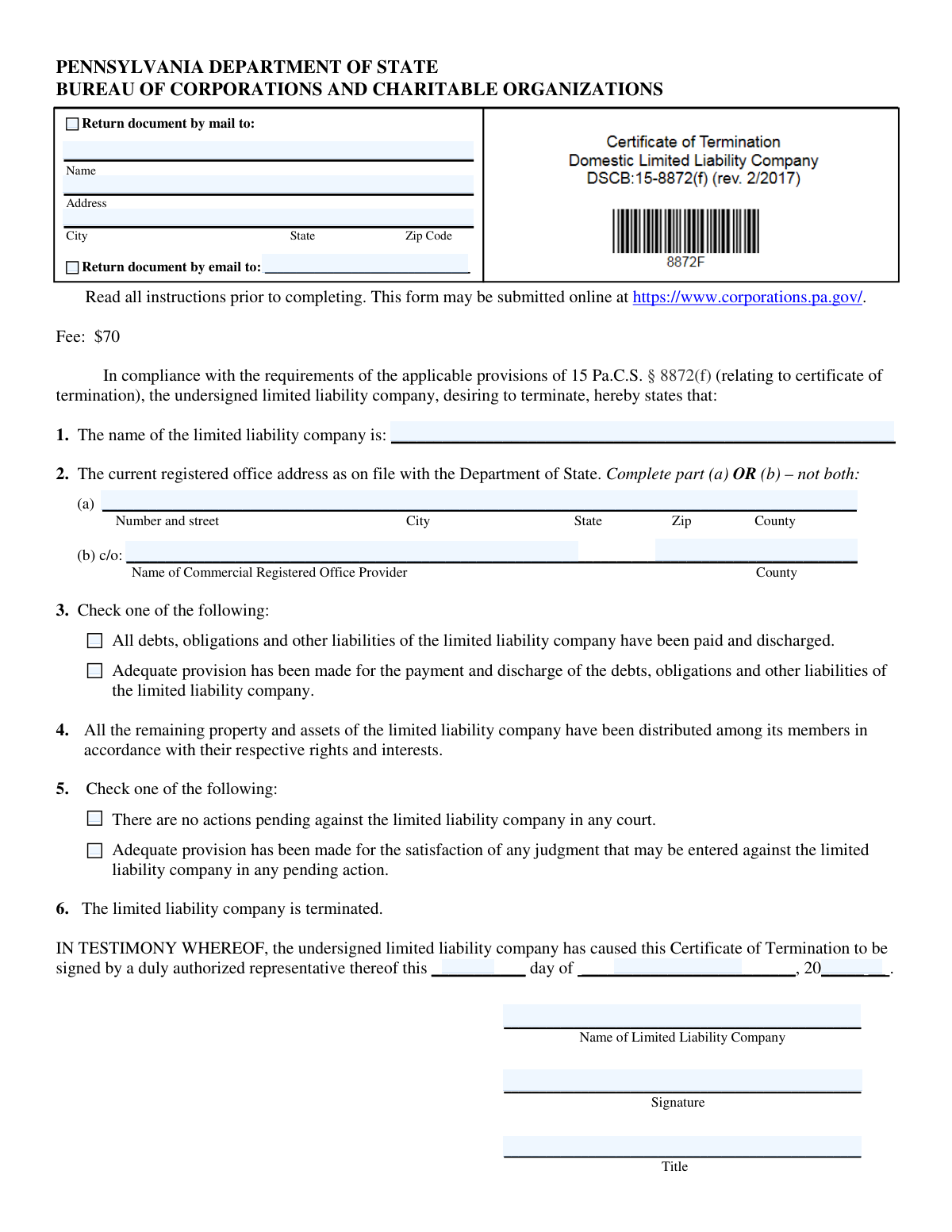
Yes! You can use AI to fill out Pennsylvania Department of State — Certificate of Termination (Domestic Limited Liability Company) (15 Pa.C.S. § 8872(f)) (DSCB:15-8872(f))
The Pennsylvania Certificate of Termination (DSCB:15-8872(f)) is an official filing submitted to the Bureau of Corporations and Charitable Organizations to remove a domestic LLC from the Commonwealthâs active records and legally end the companyâs existence (subject to limited purposes such as legal actions). The form requires the LLC to confirm that debts and liabilities have been paid or provided for, that remaining assets have been distributed to members, and that there are no pending court actions (or that provision has been made for any resulting judgments). It is important because it is the state-recognized step that finalizes termination and typically must be accompanied by required tax clearance certificates and any necessary governmental approvals. Today, this form can be filled out quickly and accurately using AI-powered services like Instafill.ai, which can also convert non-fillable PDF versions into interactive fillable forms.
Our AI automatically handles information lookup, data retrieval, formatting, and form filling.
It takes less than a minute to fill out DSCB:15-8872(f) using our AI form filling.
Securely upload your data. Information is encrypted in transit and deleted immediately after the form is filled out.
Form specifications
| Form name: | Pennsylvania Department of State — Certificate of Termination (Domestic Limited Liability Company) (15 Pa.C.S. § 8872(f)) (DSCB:15-8872(f)) |
| Number of pages: | 1 |
| Language: | English |
| Categories: | Pennsylvania business forms, PA state forms |
Instafill Demo: filling out a legal form in seconds
How to Fill Out DSCB:15-8872(f) Online for Free in 2026
Are you looking to fill out a DSCB:15-8872(F) form online quickly and accurately? Instafill.ai offers the #1 AI-powered PDF filling software of 2026, allowing you to complete your DSCB:15-8872(F) form in just 37 seconds or less.
Follow these steps to fill out your DSCB:15-8872(F) form online using Instafill.ai:
- 1 Go to Instafill.ai and upload the DSCB:15-8872(f) Certificate of Termination (or select it from the form library).
- 2 Enter the LLC’s exact legal name as registered with the Pennsylvania Department of State.
- 3 Provide the current registered office information on file by completing either (a) the registered office address or (b) the Commercial Registered Office Provider (CROP) name and county (not both).
- 4 Complete the required checkboxes for Item 3 (debts/liabilities paid or adequate provision made) and Item 5 (no pending actions or adequate provision for judgments).
- 5 Confirm the mandatory statements that remaining assets have been distributed (Item 4) and that the LLC is terminated (Item 6).
- 6 Add execution details (day, month, year) and complete the signature block with the authorized representative’s signature and title, ensuring the company name appears as required.
- 7 Choose the return method (mail or email), enter the appropriate return address or email, then review for accuracy and export/submit according to Pennsylvania filing instructions (including attaching required tax clearance certificates and any approvals).
Our AI-powered system ensures each field is filled out correctly, reducing errors and saving you time.
Why Choose Instafill.ai for Your Fillable DSCB:15-8872(f) Form?
Speed
Complete your DSCB:15-8872(f) in as little as 37 seconds.
Up-to-Date
Always use the latest 2026 DSCB:15-8872(f) form version.
Cost-effective
No need to hire expensive lawyers.
Accuracy
Our AI performs 10 compliance checks to ensure your form is error-free.
Security
Your personal information is protected with bank-level encryption.
Frequently Asked Questions About Form DSCB:15-8872(f)
This form is used to officially terminate (end) a Pennsylvania domestic limited liability company (LLC) with the Department of State. Once filed, the LLC is removed from the stateâs active records, except for limited purposes like legal actions as allowed by law.
A domestic Pennsylvania LLC should file this after it has wound up its affairsâmeaning debts are paid (or provided for) and remaining assets are distributed to members. The LLC must also obtain required tax clearance certificates before filing.
The filing fee is $70, and it is nonrefundable. If paying by check, it must be payable to the Department of State and include a commercially pre-printed name and address.
The form may be submitted online at https://www.corporations.pa.gov/. The instructions also provide a mailing address (P.O. Box 8722, Harrisburg, PA 17105-8722) for paper submissions.
You must include tax clearance certificates from the Pennsylvania Department of Revenue and the Department of Labor & Industry. Any necessary governmental approvals must also be attached if applicable.
You must complete Form REV-181 (Application for Tax Clearance Certificate) and submit it to both the Department of Revenue and the Department of Labor & Industry. The form and instructions are available at www.revenue.pa.gov or by calling 717-783-6052.
Complete either Part (a) or Part (b), not both. Use Part (a) if the LLC has a registered office address on file, or Part (b) if the LLC uses a Commercial Registered Office Provider (CROP) on file with the Department.
Item 3 asks whether the LLCâs debts and liabilities are fully paid or whether you have made adequate provision to pay them. Check only one box based on the LLCâs current situation at the time of termination.
It generally means the LLC has set aside funds or made arrangements to cover debts or potential judgments, even if they are not fully paid yet. The form requires you to certify that such provision exists if you select that option.
If an action is pending, you should check the box stating that adequate provision has been made to satisfy any judgment that may be entered. If no actions are pending, check the âno actions pendingâ box.
An authorized representative of the LLC must sign the form and provide their title (for example, Managing Member). By signing, they affirm the statements are true under penalties for unsworn falsification to authorities (18 Pa.C.S. § 4904).
Check the box for return by mail and provide the full mailing address, or check the box for return by email and provide an email address. The return contact information becomes part of the public record.
The form instructions do not list a specific processing time, and timing can vary based on submission method and state workload. If you need an update, you can contact the Bureau at (717) 787-1057 or check your online account if filed electronically.
YesâAI tools can help by extracting your LLC details and placing them into the correct fields, reducing errors and saving time. Services like Instafill.ai use AI to auto-fill form fields accurately based on the information you provide.
You can upload the form to Instafill.ai, answer a guided set of questions (LLC name, registered office/CROP info, selections for Items 3 and 5, execution date, and signer details), and then download a completed version for submission. If the PDF is flat/non-fillable, Instafill.ai can convert it into an interactive fillable form before auto-filling the fields.
Compliance DSCB:15-8872(f)
Validation Checks by Instafill.ai
1
LLC Name Required and Matches Department of State Record
Validates that the âLimited liability company nameâ field is present and not blank, and that it matches the exact legal name on file with the Pennsylvania Department of State (including punctuation, spacing, and required designators such as âLLCâ or âL.L.C.â). This is important because the Bureau files the termination against a specific entity record, and name mismatches can cause rejection or misfiling. If the name is missing or does not match the state record, the submission should be flagged for correction or cross-check before acceptance.
2
Registered Office Address Selection is Exclusive (Part 2a XOR 2b)
Ensures the filer completes either Part (a) Registered Office Address or Part (b) Commercial Registered Office Provider (CROP), but not both and not neither. The form instructions explicitly require one method of identifying the registered office on file, and providing both can create ambiguity. If both sections are filled or both are empty, validation fails and the submission should be returned for correction.
3
Part (a) Registered Office Address Completeness and Structure
When Part (a) is used, checks that Number/Street, City, State, ZIP, and County are all provided and appear in the correct format (e.g., street contains a number and street name; city is non-empty). This matters because the registered office must be identifiable and consistent with the stateâs records for proper filing and notice. If any component is missing or malformed, the form should be rejected or routed for manual review.
4
Part (a) State Must Be Pennsylvania (PA)
Validates that the State field in Part (a) is âPAâ (or âPennsylvaniaâ) because a Pennsylvania domestic LLCâs registered office address on file is expected to be within Pennsylvania. This prevents filings that reference an out-of-state address that would not match the Departmentâs registered office record. If the state is not PA, validation fails and the filer should be prompted to correct the registered office information or update the state record first.
5
Part (a) ZIP Code Format (5-digit or ZIP+4)
Checks that the ZIP code is either 5 digits (e.g., 17105) or ZIP+4 (e.g., 17105-8722) and contains only valid characters. Correct ZIP formatting supports mail delivery and helps confirm the address is plausible. If the ZIP is missing or not in an acceptable format, the submission should be flagged for correction.
6
County Field Validity (PA County List) for Address or CROP
Validates that any provided County (in Part 2a or Part 2b) is present and matches a recognized Pennsylvania county name (e.g., Dauphin, Allegheny). County is required on the form and is used for jurisdictional and record accuracy. If the county is blank, misspelled beyond recognition, or not a PA county, validation fails and the filer must correct it.
7
Part (b) Commercial Registered Office Provider (CROP) Name and County Required
When Part (b) is used, ensures the CROP name is provided (non-empty) and the CROP county is provided and valid. This is important because the âc/oâ provider must be clearly identified as the registered office provider on file. If either the provider name or county is missing, the filing should be rejected or held for completion.
8
Item 3 Debts/Obligations Selection: Exactly One Checkbox
Ensures exactly one of the Item 3 statements is selected: either all debts/liabilities are paid and discharged, or adequate provision has been made. The statute-based certification requires a clear representation of the companyâs status, and selecting both or neither undermines the certification. If validation fails, the submission must be returned for a single, unambiguous selection.
9
Item 5 Pending Actions Selection: Exactly One Checkbox
Ensures exactly one of the Item 5 statements is selected: either no actions are pending, or adequate provision has been made for satisfaction of any judgment in pending actions. This is critical because it affects the legal posture of termination and the companyâs representations to the Commonwealth. If both or neither are checked, the filing should be rejected for correction.
10
Mandatory Statement Acknowledgements for Items 4 and 6
Validates that the submission includes the required certifications that (4) remaining property/assets have been distributed and (6) the LLC is terminated, as these are mandatory statements on the form. In an online or data-capture context, this typically means requiring the user to affirm these statements (or ensuring the form version includes them without alteration). If the required affirmations are missing or altered, the filing should be blocked because it is not compliant with the formâs required content.
11
Execution Date Completeness and Valid Calendar Date
Checks that Execution day, month, and year are all provided and form a valid calendar date (e.g., no February 30, day range matches month, year is four digits). The execution date is part of the formal attestation and is needed for recordkeeping and legal effectiveness. If the date is incomplete or invalid, the submission should be rejected or the user prompted to correct it.
12
Execution Date Not in the Future
Validates that the execution date is not later than the submission date (or current date), since the document cannot be signed in the future. This prevents data entry errors and preserves the integrity of the attestation timeline. If the date is in the future, validation fails and the filer must correct the execution date.
13
Signatory Block Completeness (Company Name, Signature, Title)
Ensures the signatory section includes the SignatoryâCompany Name, the authorized representativeâs Signature, and the representativeâs Title. This is required because the Department needs a clear indication of who is signing and in what capacity, and the signature is an affirmation under penalty of unsworn falsification. If any element is missing, the filing should be rejected as unsigned or improperly executed.
14
Signatory Company Name Consistency with LLC Name
Checks that the âSignatory â Company Nameâ matches the âLimited liability company nameâ provided in Item 1 (allowing only minor formatting normalization if your system supports it). This prevents situations where a signatory block references a different entity than the one being terminated. If the names differ materially, the submission should be flagged for correction or manual review before filing.
15
Return Delivery Method Selection and Dependent Field Requirements
Validates that at least one return method is selected (mail and/or email) and enforces dependent fields: if âReturn document by mailâ is checked, the mail recipient name and address fields must be completed; if âReturn document by emailâ is checked, a valid email address must be provided. The Bureau instructions state a return address must be completed to return the filing, and email return requires an email address. If the selected methodâs required fields are missing or invalid, the submission should be blocked until corrected.
16
Email Address Format Validation for Email Return
When email return is selected, checks that the email address is syntactically valid (e.g., contains a single @, valid domain, no spaces) and within reasonable length limits. This is important because the Department will send a link and instructions to the provided address, and an invalid email prevents delivery. If validation fails, the user must provide a corrected email address or choose mail return.
Common Mistakes in Completing DSCB:15-8872(f)
People often enter a shortened name, omit âLLC/L.L.C.,â or use a trade name instead of the exact legal name on file. This can cause the filing to be rejected or delayed because the Bureau must be able to match the entity precisely. Copy the name exactly as it appears in the PA Department of State registry (including punctuation and designators). AI-powered tools like Instafill.ai can pull the registered name from your saved business profile and format it consistently to avoid mismatches.
The form requires you to complete Part (a) OR Part (b)ânot bothâyet filers frequently fill in a street address and also list a Commercial Registered Office Provider (CROP), or they skip the section entirely. This creates ambiguity about the official registered office on file and can lead to rejection. Confirm what is currently on record with the Department of State and complete only the matching option. Instafill.ai can enforce the âeither/orâ rule and prevent submitting the form with both sections populated.
Many filers mistakenly provide a principal business address, PO Box, or a memberâs home address rather than the registered office address currently on file with the Department. The instructions specify it must match the registered office address (or CROP) as on record at the time of submission, and a mismatch can trigger rejection or follow-up correspondence. Verify the registered office address in the stateâs online record before completing the form. Instafill.ai can help by validating address fields and reminding you to use the registered office address, not a mailing address.
County is required in both Part (a) and Part (b), but people often leave it blank or enter the wrong county (especially when the ZIP code spans multiple counties). Missing or incorrect county information can delay processing or require correction. Use the county associated with the registered office location (or the CROPâs location) as reflected in the state record. Instafill.ai can auto-suggest and validate county based on the address to reduce errors.
Item 3 requires exactly one selection, but filers sometimes check both because both statements sound âtrue enough,â or they skip it assuming termination implies debts are handled. This can invalidate the filing or prompt rejection because the Bureau needs a clear statutory statement. Choose only one: either everything is paid/discharged, or adequate provision has been made. Instafill.ai can enforce single-choice logic and flag missing required selections before submission.
Filers sometimes check âadequate provision has been madeâ without actually setting aside funds, arranging payment plans, or otherwise providing for liabilities or judgments. This can create legal exposure for members/managers and may lead to disputes or enforcement actions even after termination. Only select the âadequate provisionâ option if you have a documented plan/reserve/arrangement to satisfy obligations or potential judgments. If youâre unsure, consult counsel/accounting and use a checklist; Instafill.ai can prompt you with clarifying guidance to reduce accidental misstatements.
A very common rejection reason is submitting the Certificate of Termination without the required tax clearance certificates from the Department of Revenue and the Department of Labor & Industry. People assume paying taxes is enough, but the filing requires the actual clearance certificates evidencing payment of all taxes/charges due. Complete Form REV-181 and obtain both clearances before submitting the termination filing, and attach them with the $70 fee. Instafill.ai can help track required attachments and ensure you donât submit without the necessary supporting documents.
Filers often check âReturn document by mailâ but omit the recipient name/address, or check âReturn by emailâ but forget to provide an email address. The instructions state the return information must be completed for the Bureau to return the filing, and missing details can delay receipt of the filed document or correspondence. If you want a mailed return, complete all mailing lines; if you want email return, provide a valid email address and monitor for the link. Instafill.ai can require the dependent fields when a return method is selected and validate email formatting.
The signature block requires the day, month, and a four-digit year, but people frequently leave blanks, use an ambiguous numeric format (e.g., 2/3/24), or enter a two-digit year. An incomplete or unclear execution date can cause processing delays or questions about when the termination was authorized. Enter a clear day (1â31), month (name or unambiguous number), and four-digit year. Instafill.ai can standardize date formatting and prevent submission with missing date components.
The form must be signed by a duly authorized representative, yet filers sometimes have an unauthorized person sign, omit the signerâs title, or provide a typed name where a signature is expected. This can lead to rejection and may create legal risk because signing is an affirmation under penalties for unsworn falsification. Ensure the signer has authority (e.g., managing member/authorized manager) and include a clear title that matches the LLCâs governance. Instafill.ai can prompt for required signature metadata (name/title) and reduce omissions, though you still must ensure the signer is properly authorized.
Submissions are often delayed because the check is made out to the wrong payee, the amount is incorrect, or the check lacks a commercially pre-printed name and address as required. Since the fee is nonrefundable, mistakes can be costly and require resubmission with correct payment. Make the check payable to the âDepartment of State,â confirm the amount is $70, and use a check that meets the pre-printed information requirement. Instafill.ai can help by generating a payment checklist and flagging common payee/amount errors before you mail the packet.
Saved over 80 hours a year
âI was never sure if my IRS forms like W-9 were filled correctly. Now, I can complete the forms accurately without any external help.â
Kevin Martin Green
Your data stays secure with advanced protection from Instafill and our subprocessors

Robust compliance program
Transparent business model
Youâre not the product. You always know where your data is and what it is processed for.
ISO 27001, HIPAA, and GDPR
Our subprocesses adhere to multiple compliance standards, including but not limited to ISO 27001, HIPAA, and GDPR.
Security & privacy by design
We consider security and privacy from the initial design phase of any new service or functionality. Itâs not an afterthought, itâs built-in, including support for two-factor authentication (2FA) to further protect your account.
Fill out DSCB:15-8872(f) with Instafill.ai
Worried about filling PDFs wrong? Instafill securely fills pennsylvania-department-of-state-certificate-of-termination-domestic-limited-liability-company-15-pacs-8872f-dscb15 forms, ensuring each field is accurate.