Yes! You can use AI to fill out Health Assessment – Ontario Health atHome (Fixing Long-Term Care Act, 2021) (Form 4768-69E)
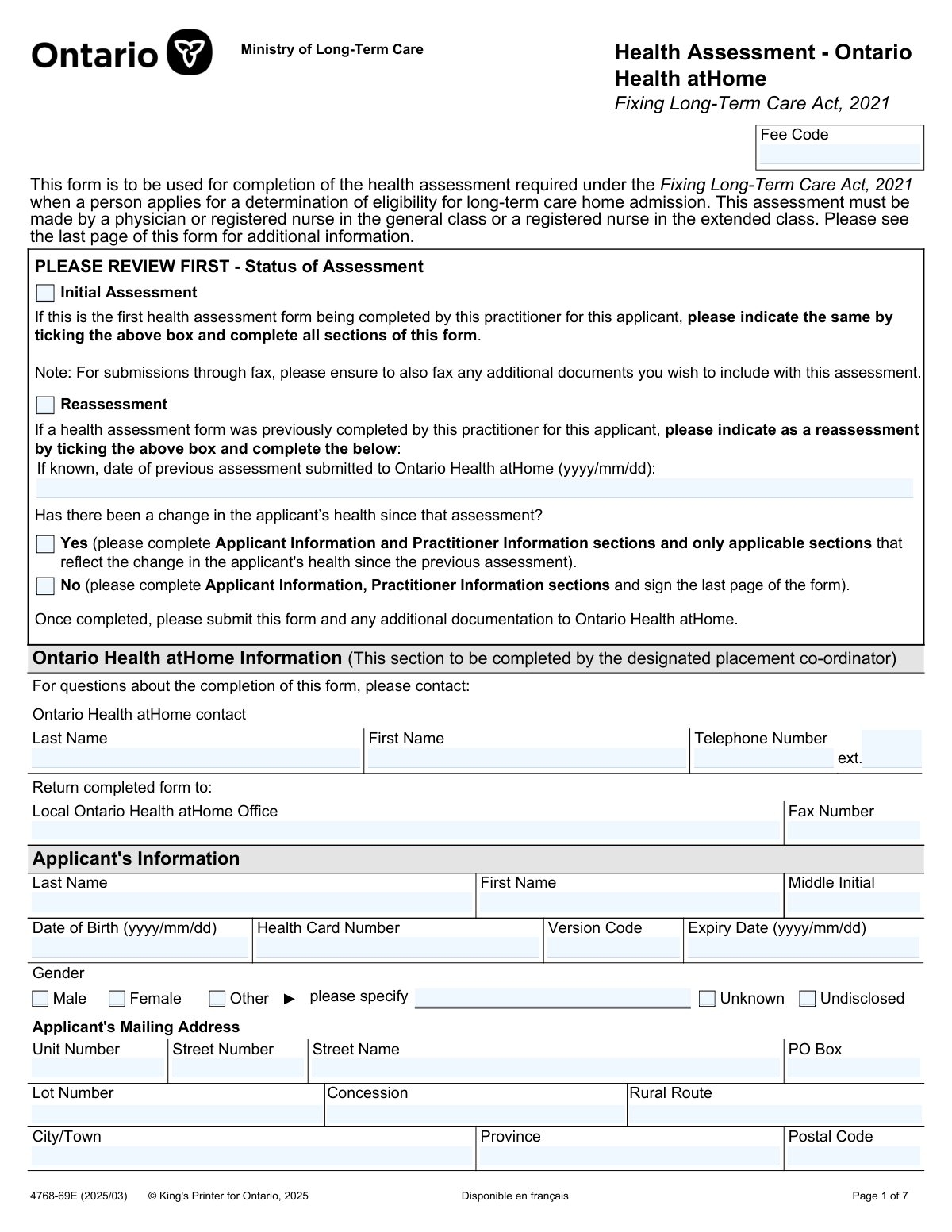
The Health Assessment â Ontario Health atHome (Form 4768-69E) is an official Ontario Ministry of Long-Term Care form required under the Fixing Long-Term Care Act, 2021 when someone applies for a determination of eligibility for admission to a long-term care home. It captures key clinical information (diagnoses, medications, allergies, vaccinations, responsive behaviours, wounds, TB/ARO screening, and medical devices) that Ontario Health atHome uses to assess eligibility and that long-term care homes use to determine whether they can safely meet the applicantâs care needs. The form must be completed and signed by an authorized practitioner (physician, RN in the general class, or RN in the extended class) and submitted to Ontario Health atHome, often with supporting documentation. Today, this form can be filled out quickly and accurately using AI-powered services like Instafill.ai, which can also convert non-fillable PDF versions into interactive fillable forms.
Our AI automatically handles information lookup, data retrieval, formatting, and form filling.
It takes less than a minute to fill out 4768-69E using our AI form filling.
Securely upload your data. Information is encrypted in transit and deleted immediately after the form is filled out.
Form specifications
| Form name: | Health Assessment – Ontario Health atHome (Fixing Long-Term Care Act, 2021) (Form 4768-69E) |
| Number of pages: | 7 |
| Filled form examples: | Form 4768-69E Examples |
| Language: | English |
| Categories: | CAR forms |
Instafill Demo: filling out a legal form in seconds
How to Fill Out 4768-69E Online for Free in 2026
Are you looking to fill out a 4768-69E form online quickly and accurately? Instafill.ai offers the #1 AI-powered PDF filling software of 2026, allowing you to complete your 4768-69E form in just 37 seconds or less.
Follow these steps to fill out your 4768-69E form online using Instafill.ai:
- 1 Go to Instafill.ai and upload the Health Assessment – Ontario Health atHome form (4768-69E) or select it from the form library.
- 2 Choose the assessment type (Initial Assessment or Reassessment) and, if reassessment, enter the prior assessment date and indicate whether there has been a change in health status.
- 3 Enter the applicant’s identification details (name, date of birth, Ontario health card number/version/expiry, gender) and mailing address.
- 4 Complete the clinical sections: medical diagnoses (or indicate a cumulative patient profile is attached), advance care planning details, current medications/oxygen use, and any recently discontinued drugs.
- 5 Fill in risk and care management sections including allergies, vaccination dates, substance use disorder details (and treatment/pharmacy contacts if applicable), responsive behaviours, and wounds/wound care specialist information.
- 6 Complete screening and equipment sections (TB symptom and risk factor screens, ARO screening results/actions, and medical/assistive devices with specifications), then enter practitioner information and e-sign/date the form.
- 7 Use Instafill.ai to validate required fields, attach supporting documents (e.g., cumulative patient profile, consult notes, x-ray/ARO results), and export for submission (fax or other method) to the local Ontario Health atHome office.
Our AI-powered system ensures each field is filled out correctly, reducing errors and saving you time.
Why Choose Instafill.ai for Your Fillable 4768-69E Form?
Speed
Complete your 4768-69E in as little as 37 seconds.
Up-to-Date
Always use the latest 2026 4768-69E form version.
Cost-effective
No need to hire expensive lawyers.
Accuracy
Our AI performs 10 compliance checks to ensure your form is error-free.
Security
Your personal information is protected with bank-level encryption.
Frequently Asked Questions About Form 4768-69E
This form documents the health assessment required under the Fixing Long-Term Care Act, 2021 when someone applies to be determined eligible for admission to a long-term care home. Ontario Health atHome uses it as part of the eligibility and placement process.
The assessment must be completed by a physician or a registered nurse in the general class, or a registered nurse in the extended class (RN(EC)). The practitioner must sign and date the last page.
Most clinical sections are completed by the practitioner, but the applicant (or family/substitute decision maker) may provide information such as medications, allergies, and advance care planning details. The applicantâs identifying information must be accurate and match health records.
Choose âInitial Assessmentâ if this is the first time this practitioner is completing the form for the applicant and complete all sections. Choose âReassessmentâ if the same practitioner previously submitted an assessment for the applicant and is updating it.
If the applicantâs health has changed, complete Applicant Information, Practitioner Information, and only the sections that reflect the change. If there is no change, complete Applicant Information and Practitioner Information and sign the last page.
Return the completed form to the local Ontario Health atHome office listed in the âReturn completed form toâ section (often by fax). If submitting by fax, include any additional documents you want considered with the assessment.
You must provide the applicantâs name, date of birth, Ontario health card number (including version code and expiry), gender selection, and mailing address. Enter details exactly as they appear on official/medical records to avoid delays.
Attaching a cumulative patient profile is strongly encouraged when available, but itâs not mandatory. If you donât attach it, you must list active and relevant historical medical diagnoses directly on the form.
You can attach items like geriatric/psychogeriatric assessments, specialist consult notes, test results, hospital discharge summaries, OT/PT notes, speech/swallowing reports, social work notes, GAIN assessments, and goals of care. The form notes it will be assumed consent was obtained where required to share attachments.
Provide a comprehensive list of all current medications, including prescriptions, non-prescription drugs, and supplements (where known). The form emphasizes priority medications (e.g., benzodiazepines, antipsychotics/psychotropics, opioids, diuretics/antiglycemics) and asks for name and purpose when prescribed.
Indicate whether the applicant uses oxygen, then specify the source (tank, concentrator, or unknown) and whether it is continuous or with exertion/as required. Include the flow rate in L/min for the applicable category.
For allergies, select Yes/No/Not known and provide reaction/severity details if âYes.â For vaccinations, enter dates where known or rely on an attached cumulative patient profile if it contains the information.
Noâthis form states the Ministry removed the requirement for a TB chest x-ray for all applicants and requires it only for symptomatic individuals. If symptoms are present, a chest x-ray is required and results should be attached; otherwise proceed to the risk factor screen.
YesâAI tools can help reduce manual entry and errors by auto-filling fields from provided information. Services like Instafill.ai use AI to accurately populate form fields, saving time for clinics and applicants.
Upload the PDF to Instafill.ai, provide the applicant/practitioner details and any supporting documents, and the AI will map and auto-fill the fields for review before you download and submit. If the PDF is flat/non-fillable, Instafill.ai can convert it into an interactive fillable form so you can complete it digitally.
Compliance 4768-69E
Validation Checks by Instafill.ai
1
Status of Assessment selection is mutually exclusive and required
Validates that exactly one of "Initial Assessment" or "Reassessment" is selected. This is critical because downstream required sections and conditional fields depend on the assessment type. If both or neither are selected, the submission should be rejected and the user prompted to choose one status before continuing.
2
Reassessment requires previous assessment date in YYYY/MM/DD and not in the future
When "Reassessment" is selected, checks that "Date of previous assessment" is provided, matches the required YYYY/MM/DD format, and is not a future date. This ensures the reassessment is anchored to a real prior submission and supports auditability. If invalid or missing, block submission and request a corrected date.
3
Change-since-previous-assessment response required for reassessments and must be single-choice
If "Reassessment" is selected, validates that exactly one of "Yes â Change since previous assessment" or "No â Change since previous assessment" is selected. This drives which clinical sections must be completed and prevents incomplete reassessments from being processed incorrectly. If both/neither are selected, fail validation and require a single clear answer.
4
Applicant identity fields complete and consistent across repeated headers
Validates that Applicant Last Name, Applicant First Name, and Health Card Number are present and that repeated occurrences of these fields across pages match exactly. This prevents record fragmentation and mis-association of clinical details to the wrong person. If mismatches are detected, reject submission and require reconciliation to a single consistent identity.
5
Applicant date of birth format and plausibility check
Checks that Date of Birth is in YYYY/MM/DD format and represents a plausible date (e.g., not in the future and not unreasonably old such as >120 years). This reduces data entry errors that can affect eligibility workflows and clinical risk calculations. If the date fails format or plausibility, require correction before acceptance.
6
Ontario Health Card Number and Version Code format validation
Validates that the Health Card Number contains the expected number of digits for Ontario (typically 10 digits) and that the Version Code, if provided, matches expected format (commonly two letters). This is important for accurate identification and to avoid claim/verification failures. If the number/version code is malformed, flag as an error and prevent submission until corrected.
7
Health card expiry date format and logical relationship to submission and DOB
Ensures Expiry Date is in YYYY/MM/DD format and is logically consistent (e.g., after Date of Birth and not an impossible historical date). While expired cards may still occur, the system should at minimum detect and warn on expiry prior to the signature date to prompt verification. If the expiry date is invalid format or illogical, block; if merely expired, allow with a warning per business rules.
8
Gender selection is single-choice; 'Other' requires specification
Validates that exactly one gender option is selected among Male/Female/Other/Unknown/Undisclosed. If "Other" is selected, the "Gender â Other (please specify)" field must be non-empty and not just whitespace. If multiple options are selected or required specification is missing, fail validation and request correction.
9
Applicant mailing address completeness and Canadian postal code format
Checks that the mailing address includes at minimum City/Town, Province, and Postal Code, and that Postal Code matches Canadian format (A1A 1A1, allowing optional space). This supports placement coordination, correspondence, and reduces returned mail. If required address components are missing or postal code format is invalid, reject submission and prompt for a corrected address.
10
Telephone and fax number formatting for contact and provider fields
Validates that all telephone/fax numbers (Ontario Health atHome contact, return fax, prescribing physician, pharmacy, practitioner) contain a valid North American numbering plan pattern (10 digits) with optional separators, and that extensions contain only digits (and are not embedded in the main number field). Correct formatting is essential for timely follow-up and reduces failed outreach. If invalid, flag the specific field and require correction.
11
Medical Diagnoses section requires either attachment indicator or entered diagnoses
Validates that either "Cumulative patient profile is attached" is checked or the "Medical Diagnoses â Detailed List" field contains meaningful content. This ensures long-term care homes receive sufficient clinical context to assess care needs and admission suitability. If neither is provided, fail validation and require an attachment indicator or diagnoses entry.
12
Current Medications section requires attachment indicator or medication list; attachment flags must not conflict
Checks that at least one of the medication sources is provided: "Information is included in the cumulative patient profile attached", "List of applicantâs current medications is attached", or a non-empty "Current Medications List". Also validates that contradictory states are not selected (e.g., claiming both that a list is attached and simultaneously leaving all medication sources empty). If missing, block submission; if conflicting, require the user to resolve the inconsistency.
13
Oxygen therapy logic: Yes/No required; if Yes then source and flow details must be coherent
Validates that exactly one of Oxygen Yes/No is selected. If Yes, requires at least one source selection (Tank/Concentrator/Unknown) and requires flow rate values to be numeric and within a reasonable clinical range (e.g., 0.5â20 L/min) when Continuous and/or With Exertion/As Required are selected. If oxygen is marked No, all oxygen detail fields must be blank; otherwise fail validation.
14
Allergies response required; if 'Yes' then allergy details must be provided
Ensures one of Yes/No/Not known is selected for severe allergies. If Yes is selected, "Allergy details" must include at least the allergen and reaction/severity (not just a single word like "penicillin" without context, per configurable minimum length/structure rules). If the response is missing or details are absent when required, reject submission and request completion.
15
Vaccination date fields must be valid dates and not in the future (when provided)
For each vaccination date entered (Td, Tdap, pneumococcal, COVID-19, flu, RSV), validates YYYY/MM/DD format and ensures the date is not in the future. This prevents common transposition errors and supports accurate infection prevention planning. If any provided date is invalid, fail validation for that field and require correction; blank dates are allowed if unknown unless business rules require otherwise.
16
TB screening workflow completeness and conditional chest x-ray documentation
When Initial Assessment is selected, or when Reassessment with "Change since previous assessment = Yes" is selected, validates that TB Symptom Screen status is selected and that the symptom outcome (YesâChest x-ray required vs NoâProceed) is consistent. If symptoms are marked Yes, "Chest X-ray Results and Actions" must be provided and/or an attachment indicator captured per system design; if missing, block submission because the form explicitly requires x-ray results for symptomatic individuals. Also validates that Risk Factor Screen status is selected (Completed vs Unknown/Not Completed) and that if TB risk factors are marked Yes, the "Specify" field is non-empty.
Common Mistakes in Completing 4768-69E
People often tick âInitial Assessmentâ out of habit, even when they previously submitted an assessment for the same applicant, or they choose âReassessmentâ without providing the required prior-date details. This can cause Ontario Health atHome to treat the submission incorrectly, leading to follow-up requests or delays in eligibility determination. To avoid this, confirm whether you (the current practitioner) have previously completed this form for the applicant and select the correct status; AI-powered tools like Instafill.ai can prompt the right branch and prevent incompatible selections.
On reassessments, submitters frequently forget the âdate of previous assessment submittedâ or fail to indicate whether there has been a change in health since the last assessment. The consequence is an unclear reassessment record and potential rejection or requests for clarification, especially if only partial sections are completed. Avoid this by always entering the prior submission date (yyyy/mm/dd) when known and explicitly selecting âYesâchangeâ or âNoâno change,â then completing only the sections required by that choice; Instafill.ai can enforce conditional completion rules.
A very common error is transposing digits in the Ontario health card number, omitting the version code letters, or entering the expiry date in the wrong format. These mistakes can prevent accurate matching to the applicantâs record and trigger administrative back-and-forth. Always copy directly from the card, double-check digit count and version code, and use the required yyyy/mm/dd date format; Instafill.ai can validate formats and flag mismatches before submission.
Applicants sometimes have more than one gender option checked, or âOtherâ is selected without completing the âplease specifyâ field. This creates ambiguity in the record and can lead to data quality issues or follow-up questions. Ensure exactly one option is selected, and if âOtherâ is chosen, provide a clear specification; Instafill.ai can prevent mutually exclusive selections and require the dependent âspecifyâ field.
People often put a full street address into the PO Box field, omit unit numbers, or enter a postal code in a non-Canadian format (or without the correct spacing). Incorrect addresses can cause missed correspondence and delays in coordinating placement. Use the correct field for the address type (street vs PO Box vs rural route/lot/concession) and enter the postal code in Canadian format (e.g., A1A 1A1); Instafill.ai can standardize and format addresses automatically.
A frequent issue is indicating that a cumulative patient profile or medication list is attached, but the attachment is missingâespecially when submitting by fax and forgetting to fax the supporting pages. This can leave key clinical details absent and may delay long-term care home review or require resubmission. Before sending, verify that every checked âattachedâ item is included in the same submission package; if the form is handled as a flat/non-fillable PDF in your workflow, Instafill.ai can convert it into a fillable version and help track required attachments.
Submitters often write broad terms (e.g., âdementia,â âheart diseaseâ) without specifying active conditions, severity, or relevant history when no cumulative profile is attached. This reduces the usefulness of the assessment for determining care needs and can lead to inappropriate placement decisions or additional information requests. Provide active diagnoses plus relevant historical diagnoses with context (severity, current status, key complications) or attach the cumulative patient profile; Instafill.ai can prompt for missing clinical context and ensure the âattached vs listedâ choice is consistent.
People commonly list only prescriptions and omit OTC medications, supplements, PRNs, or key details like dose, frequency, and route. Long-term care homes rely on this for continuity of care, and missing information can create medication reconciliation risks and delays at admission. Include all current meds (Rx/OTC/supplements where known) and clearly identify priority classes (benzodiazepines, antipsychotics, other psychotropics, opioids, diuretics/antiglycemics) with purpose; Instafill.ai can format medication entries consistently and flag incomplete fields.
A common mistake is checking âOxygenâYesâ but leaving the source (tank/concentrator/unknown) and flow rates blank, or entering rates without units. This can lead to unsafe assumptions about respiratory support needs and follow-up calls for clarification. If oxygen is used, specify source and whether continuous vs exertion/PRN, and enter flow rates in L/min; Instafill.ai can require the dependent fields and enforce unit-aware formatting.
Many forms indicate severe allergies but fail to describe the allergen, reaction type, severity, and whether an EpiPen is required. This can create safety risks and forces receiving teams to chase details. When âYes,â always document trigger(s), reaction, severity, and management; if truly unknown, use âNot knownâ rather than guessingâInstafill.ai can prompt for the required allergy detail fields when âYesâ is selected.
Submitters sometimes skip the symptom screen status, mark âYesâChest x-ray requiredâ without attaching results, or fail to proceed to the risk factor screen when symptoms are absent/negative. This can make the TB screening section non-compliant and delay processing. Follow the sequence: complete symptom screen, attach chest x-ray results only when symptomatic, then complete risk factor screening where possible; Instafill.ai can guide the conditional workflow and prevent incomplete TB sections.
Even when clinical sections are complete, forms are often submitted without selecting the practitioner designation (Physician/RN/RN(EC)), without a signature, or without the date in yyyy/mm/dd format. Unsigned or undated assessments may be considered invalid and can halt the eligibility determination process. Always complete practitioner identity, designation, contact details, then sign and date on the last page; Instafill.ai can highlight missing signature/date fields and validate date formatting before submission.
Saved over 80 hours a year
âI was never sure if my IRS forms like W-9 were filled correctly. Now, I can complete the forms accurately without any external help.â
Kevin Martin Green
Your data stays secure with advanced protection from Instafill and our subprocessors

Robust compliance program
Transparent business model
Youâre not the product. You always know where your data is and what it is processed for.
ISO 27001, HIPAA, and GDPR
Our subprocesses adhere to multiple compliance standards, including but not limited to ISO 27001, HIPAA, and GDPR.
Security & privacy by design
We consider security and privacy from the initial design phase of any new service or functionality. Itâs not an afterthought, itâs built-in, including support for two-factor authentication (2FA) to further protect your account.
Fill out 4768-69E with Instafill.ai
Worried about filling PDFs wrong? Instafill securely fills health-assessment-ontario-health-athome-fixing-long-term-care-act-2021-form-4768-69e forms, ensuring each field is accurate.



