Yes! You can use AI to fill out HR-Pol-Rec&Res-04 Employment Application Form (Recruitment of Permanent Employees)

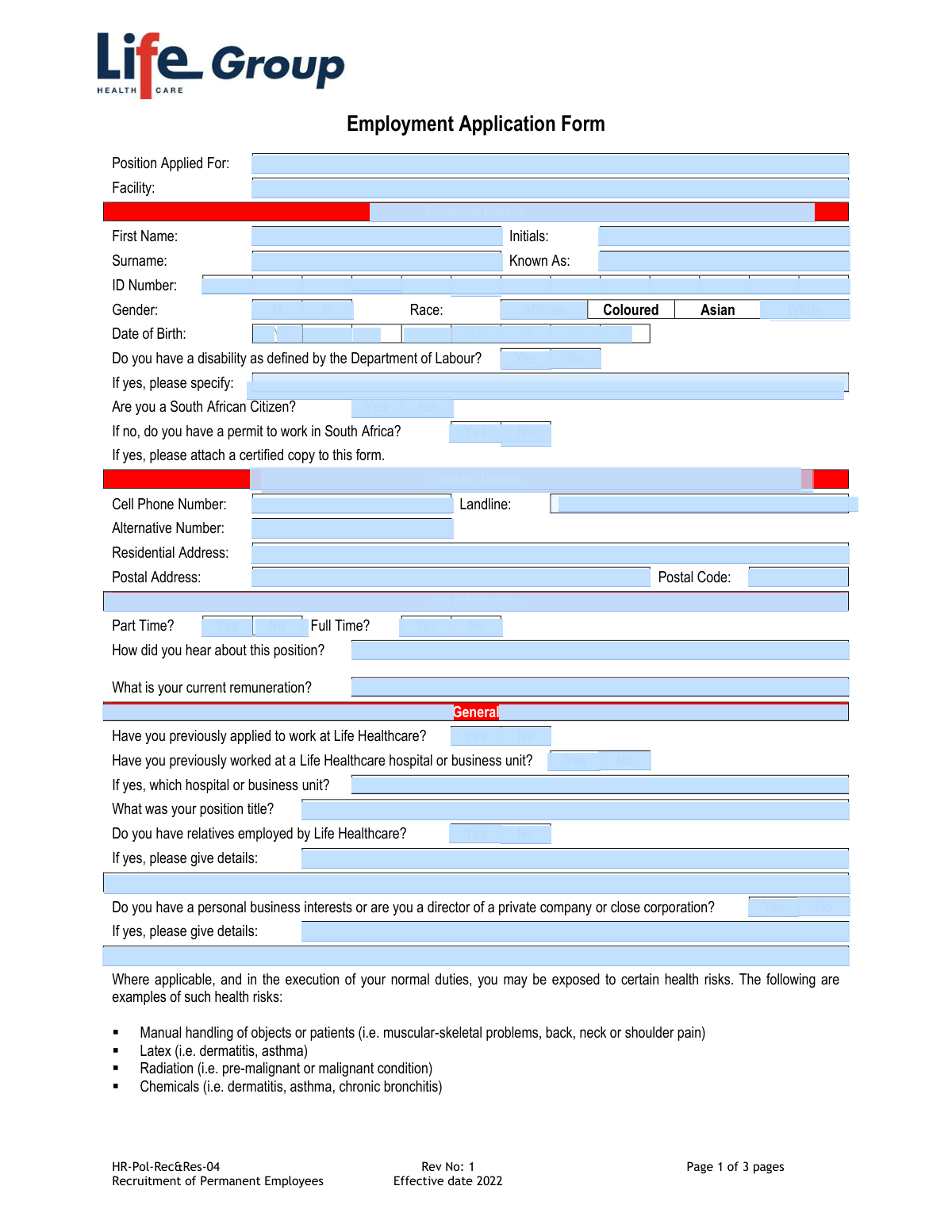
This is Life Healthcare’s official Employment Application Form under policy HR-Pol-Rec&Res-04 for recruiting permanent employees. It gathers key applicant information such as identity and contact details, work eligibility, job preferences, professional registrations, and references. The form also includes required consents and declarations allowing Life Healthcare to process personal information and conduct integrity assessments (e.g., reference, qualification, professional registration, credit/criminal checks). It is important because it forms part of the pre-employment selection process and the applicant’s declaration may be used as a basis for an employment contract.
Our AI automatically handles information lookup, data retrieval, formatting, and form filling.
It takes less than a minute to fill out HR-Pol-Rec&Res-04 using our AI form filling.
Securely upload your data. Information is encrypted in transit and deleted immediately after the form is filled out.

Form specifications

Form name: HR-Pol-Rec&Res-04 Employment Application Form (Recruitment of Permanent Employees)
Number of pages: 3
Filled form examples: Form HR-Pol-Rec&Res-04 Examples
Language: English
Categories: healthcare forms, employment forms
main-image

Instafill Demo: filling out a legal form in seconds

How to Fill Out HR-Pol-Rec&Res-04 Online for Free in 2026

Are you looking to fill out a HR-POL-REC&RES-04 form online quickly and accurately? Instafill.ai offers the #1 AI-powered PDF filling software of 2026, allowing you to complete your HR-POL-REC&RES-04 form in just 37 seconds or less.
Follow these steps to fill out your HR-POL-REC&RES-04 form online using Instafill.ai:
  1. 1 Enter the position applied for and the facility where you are applying.
  2. 2 Complete personal details (names, ID number, gender, race, date of birth), disability disclosure (if applicable), and citizenship/work permit information (attach certified permit copy if required).
  3. 3 Fill in contact details (cell/landline/alternative numbers, residential and postal addresses, postal code).
  4. 4 Provide job-related information (part-time/full-time preference, how you heard about the role, current remuneration) and answer general history questions (prior applications/employment at Life Healthcare, relatives employed, business interests/directorships, and any health risk conditions to disclose).
  5. 5 If applicable, complete professional license/registration details (type, number, body, dates, country issued) and COVID-19 vaccination details (vaccine type and number of doses).
  6. 6 Add 1–3 references with company, role, contact person details, phone numbers, and indicate whether Life Healthcare may contact them.
  7. 7 Review and accept the consent and declaration sections (integrity assessments and processing of personal information), provide any additional suitability information if needed, then sign and date the form (including place/date fields).

Our AI-powered system ensures each field is filled out correctly, reducing errors and saving you time.

Why Choose Instafill.ai for Your Fillable HR-Pol-Rec&Res-04 Form?

Speed

Complete your HR-Pol-Rec&Res-04 in as little as 37 seconds.

Up-to-Date

Always use the latest 2026 HR-Pol-Rec&Res-04 form version.

Cost-effective

No need to hire expensive lawyers.

Accuracy

Our AI performs 10 compliance checks to ensure your form is error-free.

Security

Your personal information is protected with bank-level encryption.

Frequently Asked Questions About Form HR-Pol-Rec&Res-04

This form is used by Life Healthcare to collect information from candidates applying for permanent employment. It supports recruitment, screening, and pre-employment checks.

Anyone applying for a permanent position at Life Healthcare should complete it. You should fill in all sections that apply to you and the role you are applying for.

You must state the exact position you are applying for and the facility (site/hospital/business unit) where the role is based. If you are unsure, use the job advert wording or confirm with the recruiter.

You are asked for your first name, initials, surname, known-as name, ID number, gender, race, and date of birth. These details help identify you and support employment equity and compliance reporting.

You should answer the disability question as it is part of the form. If you select “Yes,” briefly specify the disability as defined by the Department of Labour so the employer can consider reasonable accommodation where applicable.

If you are not a South African citizen, you must indicate whether you have a permit to work in South Africa. If you have a permit, you must attach a certified copy to the form.

Provide your cell phone number, landline (if you have one), an alternative number, and both your residential and postal addresses (including postal code). This ensures the recruiter can reach you and send correspondence if needed.

Tick “Yes” or “No” for each option based on what you are applying for or are available to work. If the job advert specifies one type, match your answer to the advert.

State the source where you found the vacancy, such as the Life Healthcare website, a job board, a referral, an agency, or social media. If someone referred you, include their name if appropriate.

The form asks for your current remuneration, which is typically used for salary benchmarking and offer discussions. If you are unsure what to include, provide your current total package or basic salary and note what it represents.

You must indicate whether you have applied before, worked at any Life Healthcare hospital/business unit before, or have relatives employed there. If you answer “Yes,” provide the requested details (facility/unit, position title, and relative details).

This includes owning a business, having significant outside work interests, or being a director/member of a company or close corporation. It is asked to identify potential conflicts of interest, so provide brief details if applicable.

If you have a condition that could be worsened by job-related risks (e.g., manual handling, latex, radiation, chemicals) or could impact your appointment, you should disclose it in the space provided. Only include information relevant to workplace safety and your ability to perform the role.

If the job requires a professional license/registration (e.g., nursing or other regulated roles), you must answer “Yes” and provide the registration type, number, body, dates, and country issued. If you are not registered or the role does not require it, select “No.”

By signing, you allow Life Healthcare to conduct relevant background checks such as reference, qualification, SANC (if applicable), and possible credit/criminal checks, and to process/store your personal information for recruitment. The form notes that not consenting may affect the ability to proceed with your application.

Compliance HR-Pol-Rec&Res-04
Validation Checks by Instafill.ai

1
Ensures Position Applied For and Facility are provided and not placeholder text
Validate that both 'Position Applied For' and 'Facility' are completed with meaningful values (not blank, 'N/A', or generic placeholders). These fields are required to route the application to the correct hiring workflow and location. If missing or invalid, the submission should be rejected or returned to the applicant for completion before processing.
2
Validates applicant name fields (First Name, Initials, Surname, Known As) for allowed characters and completeness
Check that First Name and Surname are present and contain only valid name characters (letters, spaces, hyphens, apostrophes) and are within reasonable length limits. Initials should be 1–5 alphabetic characters (optionally separated by periods), and 'Known As' may be optional but must follow the same character rules if provided. If validation fails, flag the record to prevent downstream identity checks and reference checks from using malformed names.
3
Validates South African ID Number format and internal consistency with Date of Birth
If an ID Number is provided, validate it matches the South African 13-digit format and passes checksum/structure rules (including valid date segment and citizenship indicator where applicable). Cross-check the ID-encoded birth date against the entered Date of Birth for consistency. If the ID is invalid or conflicts with Date of Birth, block submission or require correction because it impacts background checks and legal compliance.
4
Validates Date of Birth format (YYYYMMDD) and plausible age range
Ensure Date of Birth is entered in the required YYYYMMDD format and represents a real calendar date. Also validate the applicant is within a plausible working-age range (e.g., not in the future, not unreasonably old, and optionally at least the minimum legal working age). If invalid, the form should not proceed because it affects eligibility and identity verification.
5
Ensures single-choice selection for Gender and Race fields
Validate that exactly one option is selected for Gender (M/F) and exactly one option is selected for Race (African/Coloured/Asian/White) if these fields are required for reporting. Prevent multiple selections or no selection when required, and ensure stored values match the allowed set. If the selection is invalid, prompt correction to maintain consistent demographic reporting and avoid data quality issues.
6
Validates disability disclosure logic and required specification when 'Yes' is selected
If 'Do you have a disability as defined by the Department of Labour?' is 'Yes', require the 'If yes, please specify' field to be completed with a non-empty description. If the answer is 'No', ensure the specification field is empty or ignored to avoid contradictory data. If the logic fails, the submission should be flagged because it affects reasonable accommodation planning and compliance reporting.
7
Validates citizenship and work permit dependency, including required attachment indicator
If 'Are you a South African Citizen?' is 'No', then 'Do you have a permit to work in South Africa?' must be answered, and if 'Yes' a certified copy attachment must be indicated/present in the submission metadata. If the applicant is a citizen, the permit question should be optional/ignored and should not contradict the citizenship response. If missing or inconsistent, block or route to manual review because right-to-work is a legal requirement.
8
Validates phone number formats for Cell, Landline, Alternative and enforces at least one reachable number
Validate that phone numbers contain only allowed characters and match expected South African patterns (e.g., 10 digits starting with 0, or +27 international format), and normalize spacing. Require at least one contact number (preferably cell) to be present and valid to enable interview scheduling and reference follow-ups. If all numbers are missing/invalid, reject or request correction due to inability to contact the applicant.
9
Validates Residential Address, Postal Address, and Postal Code format and completeness
Require a Residential Address and validate it is not empty and meets minimum length/structure (e.g., street and suburb/city components where applicable). If a Postal Address is provided, require a Postal Code and validate the Postal Code is a 4-digit South African code (or a configured country-specific rule if international). If address data is incomplete or postal code invalid, flag for correction because it affects onboarding documentation and correspondence.
10
Ensures employment type selection is logically consistent (Part Time vs Full Time)
Validate that the applicant does not select both 'Part Time' and 'Full Time' as 'Yes' simultaneously, and that at least one is selected if the field is required. If both are 'No' or both 'Yes', prompt the applicant to correct the selection. This prevents ambiguity in role matching and remuneration expectations.
11
Validates 'How did you hear about this position?' and 'current remuneration' for format and reasonableness
Ensure the source field is completed (if required) and is not only whitespace, enabling recruitment channel reporting. Validate 'current remuneration' is numeric (allowing currency symbols/commas) and within configured bounds, and optionally require a frequency indicator (monthly/annual) if your system supports it. If invalid, flag for correction because it impacts offer benchmarking and analytics.
12
Validates prior application/employment at Life Healthcare dependencies
If the applicant indicates they previously worked at a Life Healthcare hospital/business unit, require 'which hospital or business unit' and 'position title' to be completed. If they answer 'No', ensure those detail fields are empty or ignored to avoid contradictory records. If dependencies are not met, route to correction/manual review because rehire checks and internal records matching depend on these details.
13
Validates relatives employed and business interest disclosures require details when 'Yes'
If 'Do you have relatives employed by Life Healthcare?' is 'Yes', require a details field (names/relationship/facility if applicable) to be non-empty. Similarly, if 'personal business interests/director' is 'Yes', require details of the entity and nature of interest. If missing, flag as incomplete because conflict-of-interest assessment cannot be performed.
14
Validates professional registration/license section completeness and date logic
If 'Do you have a license or registration to perform the work you are applying for?' is 'Yes', require Registration Type, Registration Number, Registration Body, Country Issued, and Registration Date. Validate date fields are real dates and logically ordered (Registration Date <= Renewal Date <= Expiry Date, where provided), and that Expiry Date is not in the past if the role requires current registration. If invalid, block or escalate because eligibility to practice may be legally mandated.
15
Validates COVID-19 vaccination details when vaccinated is 'Yes'
If 'Have you been vaccinated against COVID-19?' is 'Yes', require Vaccine type and Number of doses received. Validate vaccine type is from an allowed list or meets a free-text minimum quality rule, and doses is a positive integer within a reasonable range (e.g., 1–10). If missing/invalid, flag for correction because it affects workplace health risk management and policy compliance.
16
Validates references completeness, phone formats, and consent to contact references
For each reference entry that is partially filled, require all core fields (Company, Contact Person Name, Contact Phone Number) and validate phone number format. Enforce a minimum number of complete references if your hiring policy requires it (e.g., at least 2), and ensure the 'May Life Healthcare contact the references listed above?' question is answered. If consent is 'No', flag the application for recruiter follow-up because reference checks are part of the integrity assessment process.
17
Validates final declaration fields: Date, Place, and Signature presence and consistency
Require the applicant to provide Date, Place, and Signature for the consent/declaration section, and validate the Date is a real date not in the future. If the form includes both a 'Signature' line and a 'Signature Date' line, ensure they are not contradictory and that at least one complete signature+date pair is present per your form design. If missing, reject submission because the organization may lack legal consent to process personal information and conduct checks.

Common Mistakes in Completing HR-Pol-Rec&Res-04

Leaving the position and facility fields blank or too vague

Applicants often skip “Position Applied For” and “Facility” or write something generic like “Nursing” without specifying the exact role and location. This creates confusion for recruiters, can route the application to the wrong hiring team, and may delay or disqualify the application if the vacancy cannot be matched. Always use the exact job title from the advert and the specific Life Healthcare facility/business unit you are applying to.

Inconsistent personal names across fields (First Name, Initials, Surname, Known As)

People frequently mix legal names and preferred names (e.g., putting a nickname in “First Name” or leaving “Known As” blank when they use a different name daily). This can cause mismatches during background checks, qualification verification, and reference checks, leading to delays or requests for clarification. Enter your legal names exactly as per your ID in the legal name fields, and use “Known As” only for your preferred name if it differs.

Incorrect ID number or date of birth formatting

A common error is typing an ID number with missing digits, transposed numbers, or using spaces, as well as entering the date of birth in the wrong order instead of the required YYYYMMDD format. These mistakes can prevent identity verification and may trigger compliance issues during integrity assessments. Double-check the ID number digit-by-digit and enter the date exactly as requested (YYYYMMDD), matching your official documents.

Not selecting required Yes/No options (citizenship, disability, work permit, part-time/full-time, etc.)

Applicants often leave checkboxes unanswered or mark both options, especially in sections with multiple Yes/No questions. Missing or contradictory selections can make the form incomplete and may stop processing because eligibility (e.g., right to work) cannot be confirmed. Choose exactly one option per question and review the form to ensure every Yes/No item has a single clear response.

Work permit indicated but certified copy not attached

Non–South African citizens sometimes tick that they have a permit but forget to attach a certified copy, or attach an uncertified/expired document. This can halt the recruitment process because the employer cannot confirm legal authorization to work. Attach a clear, certified copy of the valid permit (and ensure certification is recent per typical HR requirements) and confirm the permit’s expiry date is still valid.

Incomplete or unreachable contact details (phone numbers and addresses)

Common issues include missing country/area codes, providing a number that is out of service, leaving the alternative number blank, or entering an incomplete residential/postal address and postal code. Recruiters may be unable to schedule interviews, request documents, or verify information, which can result in missed opportunities. Provide active numbers (cell and alternative), include area/country codes where applicable, and complete both residential and postal addresses with the correct postal code.

Current remuneration entered incorrectly or without context

Applicants often provide a guess, omit whether the amount is monthly/annual, exclude allowances/benefits, or provide a figure in the wrong currency. This can create misunderstandings during offer discussions and may slow down shortlisting if salary alignment cannot be assessed. State the amount clearly with the period (e.g., “R25,000 per month gross”), and note if it includes allowances, overtime, or benefits.

Not disclosing prior applications/employment/relatives/business interests accurately

People sometimes answer “No” to prior employment, relatives employed, or business interests because they think it will harm their chances, or they forget past applications and indirect relationships. Inconsistencies can be discovered during integrity assessments and may be treated as dishonesty, risking disqualification or later disciplinary action. Answer these questions truthfully and provide the requested details (hospital/business unit, position title, relative relationship, company/directorship information).

Skipping the health risk/medical disclosure section or providing unclear information

Applicants may leave the disclosure area blank even when they have a condition that could be worsened by manual handling, latex, radiation, or chemicals, often due to privacy concerns or uncertainty about what is relevant. This can lead to unsafe placement, delayed occupational health clearance, or complications after appointment if accommodations are needed. Disclose relevant conditions in a factual way (without over-sharing), focusing on work impact and any reasonable accommodation needs.

Registration/licensing details missing, outdated, or inconsistent (type, number, body, dates, country)

A frequent mistake is ticking “Yes” for registration but leaving fields incomplete, entering the wrong registration number, or omitting renewal/expiry dates and the issuing country. This can prevent verification (e.g., SANC or other professional body checks) and may disqualify candidates for regulated roles. Provide the exact registration type and number as issued, name the correct registration body, and ensure registration/renewal/expiry dates and country issued are complete and accurate.

COVID-19 vaccination section incomplete or inconsistent with dose/type

Applicants sometimes tick vaccinated but do not specify vaccine type or number of doses, or they list a vaccine type that does not align with the dose count they provide. This can cause follow-up queries and delays, especially if workplace policies require confirmation. If vaccinated, clearly state the vaccine brand (e.g., Janssen/Pfizer) and the total number of doses received, and be prepared to provide supporting proof if requested.

References incomplete, not professional, or no consent to contact

Common problems include missing company names, listing friends/family instead of work-related referees, providing incorrect contact numbers, or selecting “No” to contacting references without explanation. This can block reference checks, which are part of the integrity assessment, and may stall the hiring decision. Provide at least three credible work-related references with full details (company, role, contact person, their position, phone number) and ensure you have their permission and that the employer is allowed to contact them.
Saved over 80 hours a year

“I was never sure if my IRS forms like W-9 were filled correctly. Now, I can complete the forms accurately without any external help.”

Kevin Martin Green

Your data stays secure with advanced protection from Instafill and our subprocessors

Robust compliance program

Transparent business model

You’re not the product. You always know where your data is and what it is processed for.

ISO 27001, HIPAA, and GDPR

Our subprocesses adhere to multiple compliance standards, including but not limited to ISO 27001, HIPAA, and GDPR.

Security & privacy by design

We consider security and privacy from the initial design phase of any new service or functionality. It’s not an afterthought, it’s built-in, including support for two-factor authentication (2FA) to further protect your account.

Fill out HR-Pol-Rec&Res-04 with Instafill.ai

Worried about filling PDFs wrong? Instafill securely fills hr-pol-recres-04-employment-application-form-recru forms, ensuring each field is accurate.