Yes! You can use AI to fill out Motion to Permit Proceeding (by a person not included in Acknowledgment or Court Decision)
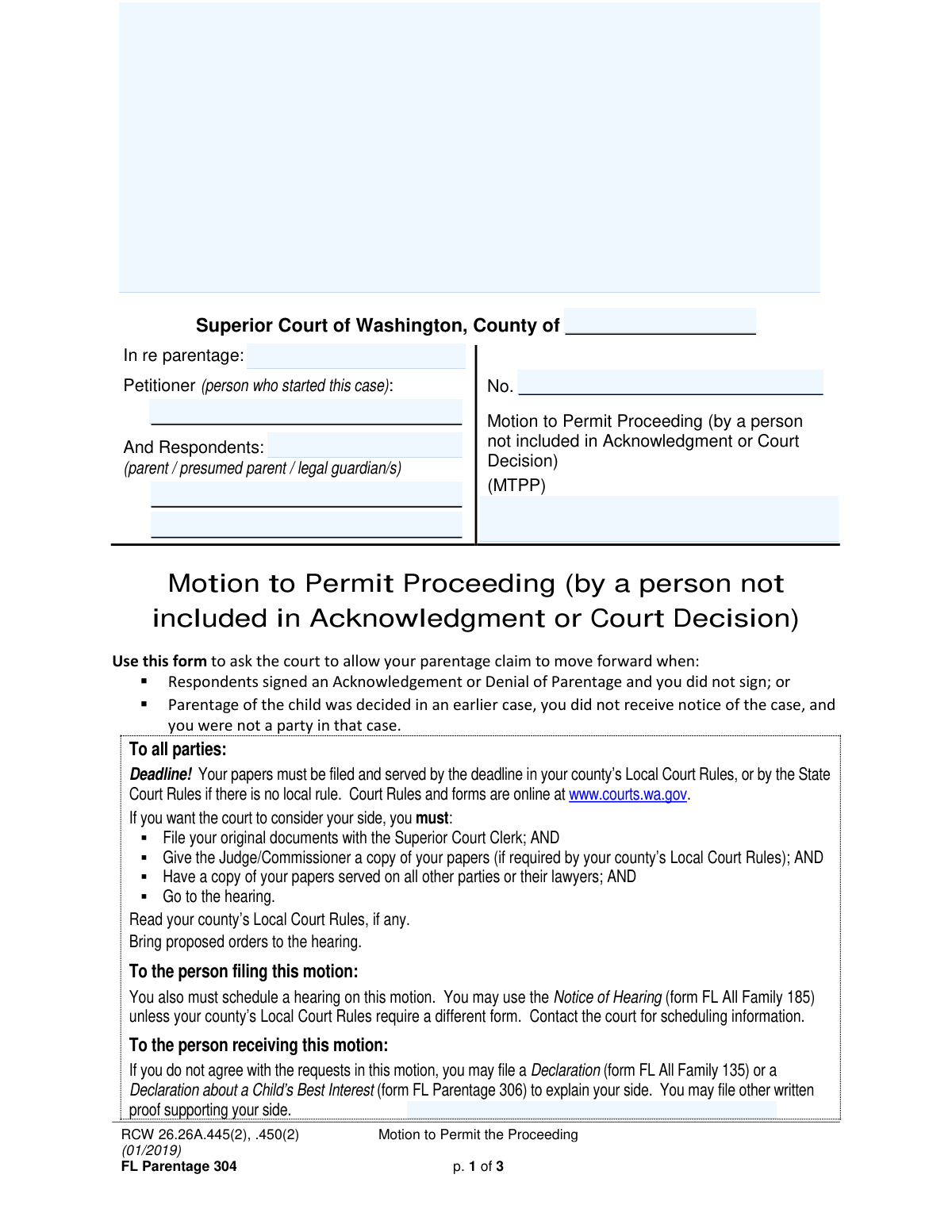
Washington Form FL Parentage 304, also known as the Motion to Permit Proceeding, is a legal document filed in Superior Court to request permission to proceed with a parentage case. It is used by individuals who were not included in a prior Acknowledgment of Parentage or were not a party to a previous court decision that established the child's parentage. This motion is a critical step for asserting one's parental rights when they have been previously overlooked. Today, this form can be filled out quickly and accurately using AI-powered services like Instafill.ai, which can also convert non-fillable PDF versions into interactive fillable forms.
Our AI automatically handles information lookup, data retrieval, formatting, and form filling.
It takes less than a minute to fill out FL Parentage 304 using our AI form filling.
Securely upload your data. Information is encrypted in transit and deleted immediately after the form is filled out.
Form specifications
| Form name: | Motion to Permit Proceeding (by a person not included in Acknowledgment or Court Decision) |
| Number of pages: | 3 |
| Language: | English |
| Categories: | court forms, permit forms, UK court forms |
Instafill Demo: How to fill out PDF forms in seconds with AI
How to Fill Out FL Parentage 304 Online for Free in 2026
Are you looking to fill out a FL PARENTAGE 304 form online quickly and accurately? Instafill.ai offers the #1 AI-powered PDF filling software of 2026, allowing you to complete your FL PARENTAGE 304 form in just 37 seconds or less.
Follow these steps to fill out your FL PARENTAGE 304 form online using Instafill.ai:
- 1 Navigate to Instafill.ai and upload or select the FL Parentage 304 form.
- 2 Enter the case caption information, including the Washington county, case number, and the names of the petitioner and respondents.
- 3 In the 'Request' section, state your name and check the box that applies to your situation: either you didn't sign a previous Acknowledgment/Denial, or you weren't a party to a prior court case on parentage.
- 4 Provide a detailed explanation in the 'Reason for Request' section, outlining why it is in the child's best interest for your parentage case to proceed.
- 5 Indicate any supporting documents you are filing with the motion, such as a Declaration about a Child’s Best Interest (FL Parentage 306) or other declarations.
- 6 Complete the signature block by signing, dating, and printing your name, and provide an address where you agree to accept legal papers for the case.
- 7 Review the entire completed form for accuracy, then download the document to file with the court clerk and serve on all other parties.
Our AI-powered system ensures each field is filled out correctly, reducing errors and saving you time.
Why Choose Instafill.ai for Your Fillable FL Parentage 304 Form?
Speed
Complete your FL Parentage 304 in as little as 37 seconds.
Up-to-Date
Always use the latest 2026 FL Parentage 304 form version.
Cost-effective
No need to hire expensive lawyers.
Accuracy
Our AI performs 10 compliance checks to ensure your form is error-free.
Security
Your personal information is protected with bank-level encryption.
Frequently Asked Questions About Form FL Parentage 304
This form is used to ask the Washington Superior Court to allow your parentage case to move forward if you were not included in a previous Acknowledgment of Parentage or a prior court case that decided the child's parentage.
You should file this form if you are claiming parentage of a child but were not a party to a prior court case about parentage and did not receive notice, or if you did not sign an Acknowledgment or Denial of Parentage that others signed.
Yes, the form states that you must file this motion less than four years after the original Acknowledgment of Parentage was signed or the parentage court order was entered.
You must convince the court that it is in the child's best interest for your parentage case to proceed. You will need to provide reasons and potentially supporting documents to explain this.
You may need to file supporting documents like a 'Declaration about a Child’s Best Interest' (form FL Parentage 306), declarations from other people, or other written proof to strengthen your request.
After completing the form, you must file it with the Superior Court Clerk, serve copies on all other parties, schedule a hearing using a form like FL All Family 185, and attend the scheduled court hearing.
If you disagree with the motion, you should file a response, such as a 'Declaration' (form FL All Family 135), to explain your side to the court. You must file and serve your response by the deadline set by court rules.
In this section, you must clearly explain all the reasons why allowing your parentage case to proceed is beneficial for the child's well-being and overall best interest.
Yes, services like Instafill.ai use AI to accurately auto-fill form fields, which can save you time and help prevent common errors.
You can upload the PDF of the form to a service like Instafill.ai. It will convert the document into an interactive online form that you can easily fill out, save, and download.
If you have a non-fillable PDF, you can use a service like Instafill.ai. It can convert flat PDFs into interactive, fillable forms that you can complete on your computer.
You can choose to have legal papers sent to your lawyer's address or provide an alternate address. This alternate address does not have to be your home address for privacy and safety reasons.
Yes, the form states that you must schedule and attend a hearing for the court to consider your motion. You should also bring any proposed orders with you to the hearing.
Compliance FL Parentage 304
Validation Checks by Instafill.ai
1
Ensures Case Caption is Complete
This check verifies that the 'County', 'Petitioner Name', 'Respondent Name', and 'In Re Parentage Of' fields are all filled out. These fields are essential for identifying the jurisdiction, the parties involved, and the subject of the case. If this information is missing, the court clerk cannot file the document correctly, leading to rejection or delays.
2
Validates Case Number Format
This validation ensures the 'Case Number' field is not empty and, if possible, matches the standard format for the specified county's Superior Court. The case number is the primary identifier that links this motion to the existing parentage case. An incorrect or missing case number will prevent the motion from being associated with the correct court file.
3
Exclusive Request Basis Selection
This check ensures that exactly one of the two checkboxes in Section 1 ('Respondents signed an Acknowledgment...' OR 'Parentage was decided in an earlier court case...') is selected. These options represent mutually exclusive legal grounds for the motion. Failing to select one, or selecting both, makes the request legally ambiguous and will likely result in the motion being denied or returned for correction.
4
Requires Requestor Name
This validation confirms that the 'Requestor Name' field in Section 1 is filled. This field formally identifies the person making the motion to the court. Without this name, the motion lacks a clear moving party, rendering it invalid and un-actionable by the judge.
5
Verifies Best Interest Explanation is Provided
This check ensures the 'Best Interest Explanation' text area is not empty and may enforce a minimum character count. This explanation is the core legal argument for the motion, and its absence leaves the court with no basis to grant the request. An empty or insufficient explanation will almost certainly lead to the motion being denied.
6
Conditional Validation for Declaration Names
This validation rule checks that if the 'Declaration(s) of (name/s)' checkbox is ticked, the corresponding 'Declaration(s) Filer Name(s)' text field is filled. This is important for clearly identifying all supporting evidence being submitted with the motion. If the box is checked but the name is missing, it creates confusion about what documents are part of the filing.
7
Conditional Validation for 'Other Documents' List
This check ensures that if the 'Other documents (list)' checkbox is selected, the 'Other Supporting Documents (List)' text field is not empty. This prevents a filer from indicating they are submitting additional documents without specifying what they are. This rule ensures the court record is clear and complete, avoiding ambiguity about the evidence presented.
8
Signature and Date Presence
This validation verifies that both the 'Signer Signature' and 'Signature Date' fields are completed. A signature is a legal requirement that attests to the truthfulness of the document's contents, and the date establishes when it was signed. A missing signature or date renders the entire motion legally invalid and will be rejected by the court.
9
Validates Signature Date is Not in the Future
This check ensures the 'Signature Date' is a valid calendar date and is not set to a future date. This prevents clerical errors and ensures the document's timeline is accurate as of the time of filing. A future date is illogical and would cause the filing to be rejected for correction.
10
Validates Printed Name and WSBA Number
This check requires the 'Printed Name' field to be filled and, if a WSBA (Washington State Bar Association) number is entered, validates that it follows a numerical format. This identifies the signer and their professional capacity if they are an attorney. An invalid WSBA number could call the signer's legal authority into question.
11
Mandatory and Exclusive Service Address Selection
This validation ensures that the user has selected exactly one of the two service address options: 'Lawyer’s address' or 'the following address'. Providing a valid address for service is a legal requirement to ensure all parties can send and receive documents related to the case. Failure to select an option makes it unclear where legal papers should be sent.
12
Conditional Completion of Lawyer's Service Address
If the 'Lawyer’s address' checkbox is selected, this check verifies that the corresponding street address, city, state, and ZIP code fields are all filled out. A partial address is insufficient for legal service of process. This validation ensures a complete, mailable address is provided, preventing service failures and potential dismissal of the case for procedural errors.
13
Conditional Completion of Alternate Service Address
If the 'Use the following address for service' checkbox is selected, this check verifies that the corresponding street address, city, state, and ZIP code fields are all filled out. This is crucial for ensuring legal documents are sent to the correct location as specified by the filer. An incomplete address will lead to failed service and significant legal complications.
14
Validates Email Address Format
This check verifies that any value entered into the 'Lawyer Service Email' or 'Email Address for Service' fields follows the standard '[email protected]' format. This is important for parties who agree to electronic service. An invalid email address would result in failed delivery of critical legal documents and notices.
Common Mistakes in Completing FL Parentage 304
Filers often enter the wrong case number, misspell names, or list the wrong county in the caption at the top of the form. This happens when referencing memory instead of official documents. An incorrect caption can lead to the court clerk rejecting the motion or filing it in the wrong case, causing critical delays and potentially jeopardizing legal deadlines.
In Section 2, many people write emotional pleas or focus on their own desires rather than providing a factual, child-focused argument for why the case should proceed. The court needs specific facts explaining how establishing parentage serves the child's emotional, physical, and financial well-being. A weak explanation can result in the motion being denied, as it fails to meet the legal standard required by the court.
In Section 1, the filer must check one of two boxes: either they didn't sign an 'Acknowledgment of Parentage' or they weren't a party to a prior court case. People sometimes guess or check the wrong box, which undermines the legal basis of their motion. This error can lead to the motion being dismissed on procedural grounds, forcing the filer to start over. It is crucial to understand your specific legal situation before selecting an option.
Filers may forget to check a box indicating their service address or fail to provide a complete and valid address. This is a critical error because it is the address where all official notices, including hearing dates and orders from the court, will be sent. Missing this information can lead to you not receiving important legal documents, potentially causing you to miss your own hearing and have your motion dismissed.
People often attach declarations or other evidence but forget to check the corresponding boxes in Section 2 or list the documents by name. This creates confusion for the judge and opposing parties, who may not know what evidence to review. Failing to properly list all attachments can result in the court refusing to consider your evidence, significantly weakening your case.
An unsigned or undated motion is legally invalid and will be rejected by the court clerk. This mistake often occurs due to haste when completing the paperwork. A rejected filing can cause you to miss important deadlines for serving the other parties and having your motion heard, requiring you to refile and potentially reschedule the entire process.
Throughout the form, filers may use nicknames, initials, or incomplete legal names for the petitioner, respondents, or the child. Court documents require full, legal names to ensure all parties are correctly identified and records are accurate. Using incorrect names can lead to filing rejections, confusion over party identities, and future difficulties enforcing court orders.
The form explicitly states that the person filing the motion must also schedule a hearing. Many self-represented litigants are unaware of this procedural step and assume the court will automatically schedule it after filing. If no hearing is scheduled, the motion will simply sit in the case file and will never be reviewed or decided by a judge, rendering the entire effort useless.
The form includes the statement 'It has been less than four years since the acknowledgment or parentage order,' which is a critical legal requirement. Filers may overlook this or file the motion after the deadline has passed without providing a legal justification for the delay. Filing outside this window without addressing the timeliness issue will likely lead to the motion being immediately denied by the court.
When a lawyer is involved, filers or their staff may forget to include the lawyer's Washington State Bar Association (WSBA) number or may select the 'lawyer's address' for service without filling in the address details. The WSBA number is required for identification, and a missing service address means no one will receive legal papers. These errors can cause filing delays and serious communication breakdowns in the case.
Saved over 80 hours a year
“I was never sure if my IRS forms like W-9 were filled correctly. Now, I can complete the forms accurately without any external help.”
Kevin Martin Green
Your data stays secure with advanced protection from Instafill and our subprocessors

Robust compliance program
Transparent business model
You’re not the product. You always know where your data is and what it is processed for.
ISO 27001, HIPAA, and GDPR
Our subprocesses adhere to multiple compliance standards, including but not limited to ISO 27001, HIPAA, and GDPR.
Security & privacy by design
We consider security and privacy from the initial design phase of any new service or functionality. It’s not an afterthought, it’s built-in, including support for two-factor authentication (2FA) to further protect your account.
Fill out FL Parentage 304 with Instafill.ai
Worried about filling PDFs wrong? Instafill securely fills motion-to-permit-proceeding-by-a-person-not-included-in-acknowledgment-or-court-decision forms, ensuring each field is accurate.