
Yes! You can use AI to fill out SC-120, Defendant’s Claim and ORDER to Go to Small Claims Court (Small Claims)
Don't type 93 fields by hand. Tell our AI about yourself, or upload a document you already have, and it fills every field in seconds. You check it, then download, print or sign.
The AI does the filling. You just check it.
No typing into boxes, nothing to install.
What this form asks for
The AI fills all of it, from your answers or your documents.
The AI checks your answers before you download
16 checks built for this form, so a wrong date or a missing answer is caught before anyone else sees it.
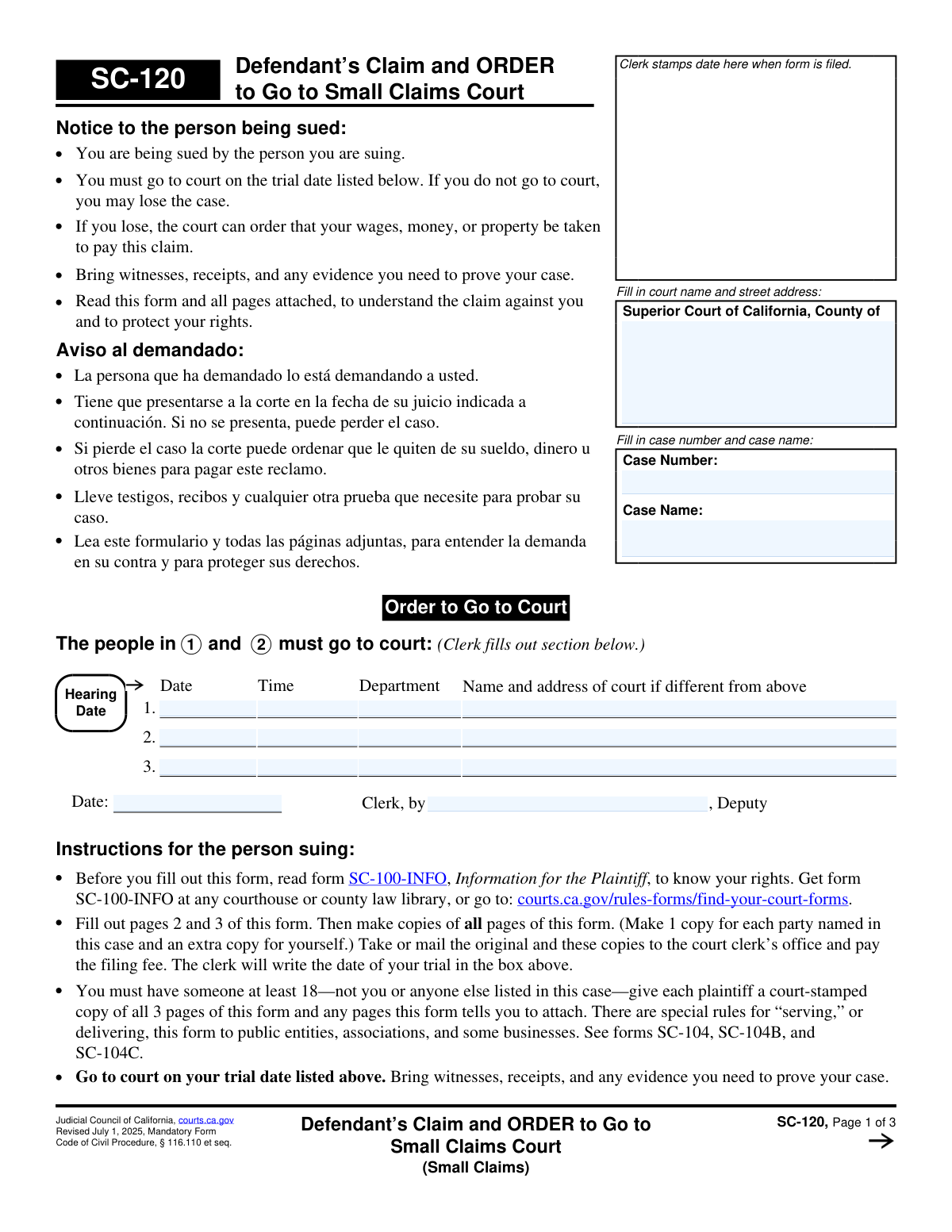
Validates that the Superior Court county name is provided and that the court street address section is completed when required by the filing workflow. This is important because the court location determines venue, filing routing, and the correct clerk/department assignment. If missing or invalid, the submission should be rejected or routed to a manual review queue to prevent misfiled cases.
Checks whether a case number is present only when it should be (e.g., for an existing case) and that it matches the court’s expected format (often alphanumeric with separators). This prevents mismatching the defendant’s claim to the wrong case or creating duplicate records. If the case number is missing when required or malformed, the system should block submission or require correction before filing.
Validates that if the hearing date/time is populated, it is a valid date-time and the department field is present and within allowed values for that courthouse. It also checks that the “Name and address of court if different from above” is completed when the hearing location differs from the main court address. If inconsistent or invalid, the form should be flagged because it can cause improper notice and missed appearances.
Ensures each listed plaintiff has a name and at least one reliable contact method (phone) and a complete service address (street, city, state, ZIP). This is critical for service of process and for the court to identify the parties accurately. If any required identity/address components are missing, the submission should fail validation and prompt the filer to complete the missing fields.
Ensures each defendant listed in section 2 includes a full name and a complete address (street, city, state, ZIP), and validates that a phone number is provided if the form requires it in the implementation. Accurate defendant information is necessary for service and for matching parties to existing court records. If incomplete, the system should prevent filing or require a correction workflow.
Validates that all phone numbers entered follow an acceptable format (e.g., 10-digit US numbers with optional punctuation, and optional extension in a defined pattern). This reduces failed contact attempts and improves data quality for notices and scheduling communications. If a phone number is present but invalid, the system should require correction or allow omission only if phone is not mandatory per business rules.
And 10 more checks
- Address Field Structure and ZIP Code Validation
- Multiple Parties Attachment Requirement (SC-120A) Trigger
- Active Military Duty Disclosure Requires Name
- Fictitious Business Name (DBA) Disclosure Requires SC-103 Attachment
- Claim Amount Must Be Numeric, Positive, and Within Small Claims Limits
- Claim Explanation Completeness (Why Owed + Calculation Narrative)
- Incident Date vs. Date Range Logic (Mutually Exclusive and Ordered)
- Public Entity Claim Prerequisite Date Required When Suing a Public Entity
- Attorney-Client Fee Dispute Arbitration Attachment (SC-101) When Applicable
- Signature, Printed Name, and Date Required for Each Signing Defendant
Let AI fill out your SC-120
No typing. Every field filled in seconds, checked, ready to sign.
How to Fill Out SC-120 Online for Free in 2026
What the AI walks you through.
- Enter the Superior Court county, court address, and the existing small claims case number and case name from the plaintiff’s filing.
- List all plaintiffs (the parties who sued first) with names, phone numbers, and addresses; indicate if there are additional plaintiffs and attach SC-120A if needed, and note any active military duty if applicable.
- List all defendants (the parties filing the defendant’s claim) with names, phone numbers, and addresses; attach SC-120A for additional defendants and attach SC-103 if any defendant is doing business under a fictitious name.
- Complete Item 3 by stating the dollar amount claimed and explaining why the plaintiff owes money, when it happened (date or time period), and how the amount was calculated; attach MC-031 or an extra sheet labeled “SC-120, Item 3” if more space is needed.
- Answer the eligibility and disclosure questions (Items 4–10), including attorney-client fee dispute/arbitration (attach SC-101 if required), public entity claim prerequisites, and limits on number/size of small claims filings.
- Sign and date the declaration under penalty of perjury for each defendant who is filing the claim, then generate copies (one for each party plus one for your records).
- File the original and copies with the court clerk and pay the filing fee (or request a fee waiver if eligible); after the clerk stamps and sets the hearing, arrange for a qualified adult (not a party) to serve each plaintiff with the court-stamped SC-120 and any attachments, then attend the hearing with evidence and witnesses.
Common Mistakes in Completing SC-120
The ones the AI is built to catch.
Leaving court location, case number, or case name blank (Page 1 header)
Mixing up “plaintiff” and “defendant” roles on a Defendant’s Claim (Items 1 and 2)
Providing incomplete party identification (missing full legal names, entity type, or contact info)
Using a P.O. box or mailing address where a street address is required (Items 1 and 2)
Failing to add additional parties correctly (not using SC-120A when there are more than two)
Not addressing fictitious business names (DBA) or failing to attach SC-103 (Item 2 checkbox)
Stating an amount without a clear explanation or calculation (Item 3a and 3c)
Including court costs, filing fees, or service fees in the claimed amount (Item 3c instruction)
Leaving the date/time period vague or inconsistent (Item 3b)
Missing required attachments for special situations (attorney-fee disputes SC-101; public entity claim date)
Forgetting signatures, dates, or second defendant information (declaration section)
Frequently Asked Questions About SC-120
Is it really free for 7 days?
Can I fill other forms too?
How do I cancel?
How does the AI fill out SC-120?
What happens to my information?
How complex is SC-120 to fill out?
What is form SC-120 (Defendant’s Claim and ORDER to Go to Small Claims Court) used for?
Who should fill out SC-120?
Is SC-120 the same as responding to the lawsuit?
Where do I file SC-120 and what happens after I file it?
How many copies do I need to make when filing SC-120?
Do I have to serve the plaintiff with SC-120 after filing?
Can I serve the papers myself?
What information do I need to complete the plaintiff and defendant sections (Items 1 and 2)?
What if a defendant is doing business under a fictitious business name (DBA)?
How do I fill out Item 3 (the amount and explanation of my claim)?
What if I need more space to explain my claim in Item 3?
Do I have to ask the plaintiff to pay me before filing SC-120 (Item 4)?
What if my claim is an attorney-client fee dispute (Item 5)?
What if I am suing a public entity (Item 6)?
What do Items 7, 8, and 10 mean about limits and appeals in small claims?
What if I can’t afford the filing fee or service costs (Item 9)?
Can I request disability accommodations for the hearing?
Get your SC-120 filled out by AI
$0 today. Cancel before Nov 1 and you pay nothing.
Other forms like this one
court forms: Form Summons, Supreme Court of New York, Form SC-100, Plaintiff's Claim and ORDER to Go to Small Claims Court, Form AO 240, Application to Proceed in District Court Without Prepaying Fees or Costs, Form AO 239, Application to Proceed in District Court Without Prepaying Fees or Costs, Affidavit for Service by Publication/Posting (Circuit Court of Cook County, Illinois) (CCG 0013 A/B), Petition for Leave to Proceed In Forma Pauperis (Court of Common Pleas of Lehigh County, Pennsylvania, Civil Division), In Forma Pauperis Affidavit/Petition (AOPC 622A) – Pennsylvania Magisterial District Court, Judicial Council of California Form SC-105, Request for Court Order and Answer (Small Claims), SC-105, Request for Court Order and Answer (Small Claims), Judicial Council of California Form SC-120, Defendant’s Claim and ORDER to Go to Small Claims Court (Small Claims), In Forma Pauperis Affidavit Petition (AOPC 622A) — Pennsylvania Magisterial District Court, Florida Supreme Court Approved Family Law Form 12.901(b)(3), Petition for Dissolution of Marriage with No Dependent or Minor Child(ren) or Property (02/18), Illinois Supreme Court Approved Form E-O 3500.3, Eviction Order, Form P3 (Rule 25-3(2)) — Affidavit of Applicant for Grant of Probate or Grant of Administration with Will Annexed (Short Form) (Supreme Court of British Columbia), Form SC-100, Plaintiff’s Claim and ORDER to Go to Small Claims Court, Designation of Record on Appeal (Civil) (Maricopa County Justice Courts, Arizona) (Form APP 8150-702), FW-003, Order on Court Fee Waiver (Superior Court), Judicial Council of California Form SER-001, Request for Sheriff to Serve Court Papers, FW-003, Order on Court Fee Waiver (Superior Court), Judicial Council of California Form SER-001, Request for Sheriff to Serve Court Papers
small claims forms: Form SC-100, Plaintiff's Claim and ORDER to Go to Small Claims Court, Judicial Council of California Form SC-104, Proof of Service (Small Claims), SC-108, Request to Correct or Cancel Judgment and Answer (Small Claims), Judicial Council of California Form SC-105, Request for Court Order and Answer (Small Claims), Judicial Council of California Form SC-104, Proof of Service (Small Claims), Judicial Council of California Form SC-108, Request to Correct or Cancel Judgment and Answer (Small Claims), SC-105, Request for Court Order and Answer (Small Claims), Judicial Council of California Form SC-120, Defendant’s Claim and ORDER to Go to Small Claims Court (Small Claims), Form SC-100, Plaintiff’s Claim and ORDER to Go to Small Claims Court, Form N161, Appellant’s notice (All appeals except small claims track appeals and appeals to the Family Division of the High Court), Plaintiff's Claim and ORDER to Go to Small Claims Court (SC-100), Form N161, Appellant's Notice (All appeals except small claims track appeals and appeals to the Family Division of the High Court), Form SC-100A, Other Plaintiffs or Defendants (Attachment to Plaintiff's Claim and ORDER to Go to Small Claims Court), Form A, Claim Form, European Small Claims Procedure, Form EJ-001, Abstract of Judgment—Civil and Small Claims, Form SC-109, Authorization to Appear (Small Claims), Form SC-112A, Proof of Service by Mail (Small Claims), Form SC-114, Request to Amend Party Name Before Hearing (Small Claims), Form SC-132, Attorney-Client Fee Dispute (Attachment to Notice of Entry of Judgment), Form SC-152, Order on Request to Postpone Trial (Small Claims)
VA claim forms: Form OWCP-915, Claim for Medical Reimbursement, Form 8862, Information To Claim Certain Credits, Form CA-7, Claim for Compensation, Form CA-5, Claim for Compensation, Form SC-100, Plaintiff's Claim and ORDER to Go to Small Claims Court, Form 20-0995, Decision Review Request: Supplemental Claim, Form 104, List of Creditors 20 Largest Unsecured Claims, Form 941-X (Rev. April 2023), Adjusted Employer’s QUARTERLY Federal Tax Return or Claim for Refund, Judicial Council of California Form SC-104, Proof of Service (Small Claims), Immigration and Refugee Board of Canada (IRB) – Refugee Protection Division (RPD) Basis of Claim Form (for persons claiming refugee protection in Canada) (RPD.02.01), SC-108, Request to Correct or Cancel Judgment and Answer (Small Claims), Judicial Council of California Form SC-105, Request for Court Order and Answer (Small Claims), Judicial Council of California Form SC-104, Proof of Service (Small Claims), Continental American Insurance Company (CAIC) / Aflac Group Critical Illness Claim Form (with Attending Physician’s Statement, HIPAA Authorization to Obtain Information, and Electronic Funds Transaction Authorization), Judicial Council of California Form SC-108, Request to Correct or Cancel Judgment and Answer (Small Claims), SC-105, Request for Court Order and Answer (Small Claims), Judicial Council of California Form SC-120, Defendant’s Claim and ORDER to Go to Small Claims Court (Small Claims), Small Claim and Notice of Small Claim (ORS 46.425) (OJD Official) (Jan 2026), VA Form 21-4138, Statement in Support of Claim, Form SSA-795, Statement of Claimant or Other Person
UK court forms: Form Summons, Supreme Court of New York, Form SC-100, Plaintiff's Claim and ORDER to Go to Small Claims Court, Form AO 240, Application to Proceed in District Court Without Prepaying Fees or Costs, Form AO 239, Application to Proceed in District Court Without Prepaying Fees or Costs, Affidavit for Service by Publication/Posting (Circuit Court of Cook County, Illinois) (CCG 0013 A/B), Petition for Leave to Proceed In Forma Pauperis (Court of Common Pleas of Lehigh County, Pennsylvania, Civil Division), In Forma Pauperis Affidavit/Petition (AOPC 622A) – Pennsylvania Magisterial District Court, Judicial Council of California Form SC-105, Request for Court Order and Answer (Small Claims), SC-105, Request for Court Order and Answer (Small Claims), Judicial Council of California Form SC-120, Defendant’s Claim and ORDER to Go to Small Claims Court (Small Claims), In Forma Pauperis Affidavit Petition (AOPC 622A) — Pennsylvania Magisterial District Court, Florida Supreme Court Approved Family Law Form 12.901(b)(3), Petition for Dissolution of Marriage with No Dependent or Minor Child(ren) or Property (02/18), Illinois Supreme Court Approved Form E-O 3500.3, Eviction Order, Form P3 (Rule 25-3(2)) — Affidavit of Applicant for Grant of Probate or Grant of Administration with Will Annexed (Short Form) (Supreme Court of British Columbia), Form SC-100, Plaintiff’s Claim and ORDER to Go to Small Claims Court, Designation of Record on Appeal (Civil) (Maricopa County Justice Courts, Arizona) (Form APP 8150-702), FW-003, Order on Court Fee Waiver (Superior Court), Judicial Council of California Form SER-001, Request for Sheriff to Serve Court Papers, FW-003, Order on Court Fee Waiver (Superior Court), Judicial Council of California Form SER-001, Request for Sheriff to Serve Court Papers
court claim forms: Form SC-100, Plaintiff's Claim and ORDER to Go to Small Claims Court, Judicial Council of California Form SC-105, Request for Court Order and Answer (Small Claims), SC-105, Request for Court Order and Answer (Small Claims), Judicial Council of California Form SC-120, Defendant’s Claim and ORDER to Go to Small Claims Court (Small Claims), Form SC-100, Plaintiff’s Claim and ORDER to Go to Small Claims Court, Certificate of Service (Civil Court Claim), Form N161, Appellant’s notice (All appeals except small claims track appeals and appeals to the Family Division of the High Court), Plaintiff's Claim and ORDER to Go to Small Claims Court (SC-100), Form N161, Appellant's Notice (All appeals except small claims track appeals and appeals to the Family Division of the High Court), Form SC-100A, Other Plaintiffs or Defendants (Attachment to Plaintiff's Claim and ORDER to Go to Small Claims Court), Form N461: Claim for judicial review, Statement of Small Claim and Notice, Trial Court of Massachusetts, State of Michigan, Form MC 25, Notice of Intent to Escheat Unclaimed Personal Property, Form MC 35, Complaint, Claim and Delivery, Form MC 36, Motion for Possession Pending Judgment, Claim and Delivery, Order of Possession Pending Judgment, Claim and Delivery, Form MC 38, Bond, Claim and Delivery, Form MC 39, Judgment, Claim and Delivery, Form MC 55, Claim of Appeal, Form MC 67, Claim of Interest on Vehicle Seized for Forfeiture
Let AI fill out your SC-120
Your trial starts once a card is added. You pay nothing before Nov 1.
Our AI already knows this form, all 93 fields of it. Skip the typing: tell it about yourself, or upload what you have, and it fills the whole form in seconds.
- AI fills every field on all 3 pages, tables and checkboxes included
- No typing into boxes: answer a few questions, or upload a document you already have, an old copy of this form, a photo of a document
- The AI checks the answers; you review and change anything before you download
- Download the finished PDF, print it, or sign it online
- Encrypted, and never used to train AI
Cancel before Nov 1 and you pay nothing.
A card is needed to start the trial. Cancel in two clicks from your account.
Terms · Privacy