Yes! You can use AI to fill out City of Raleigh Residential Permit Application (Revision 08-20-2025)
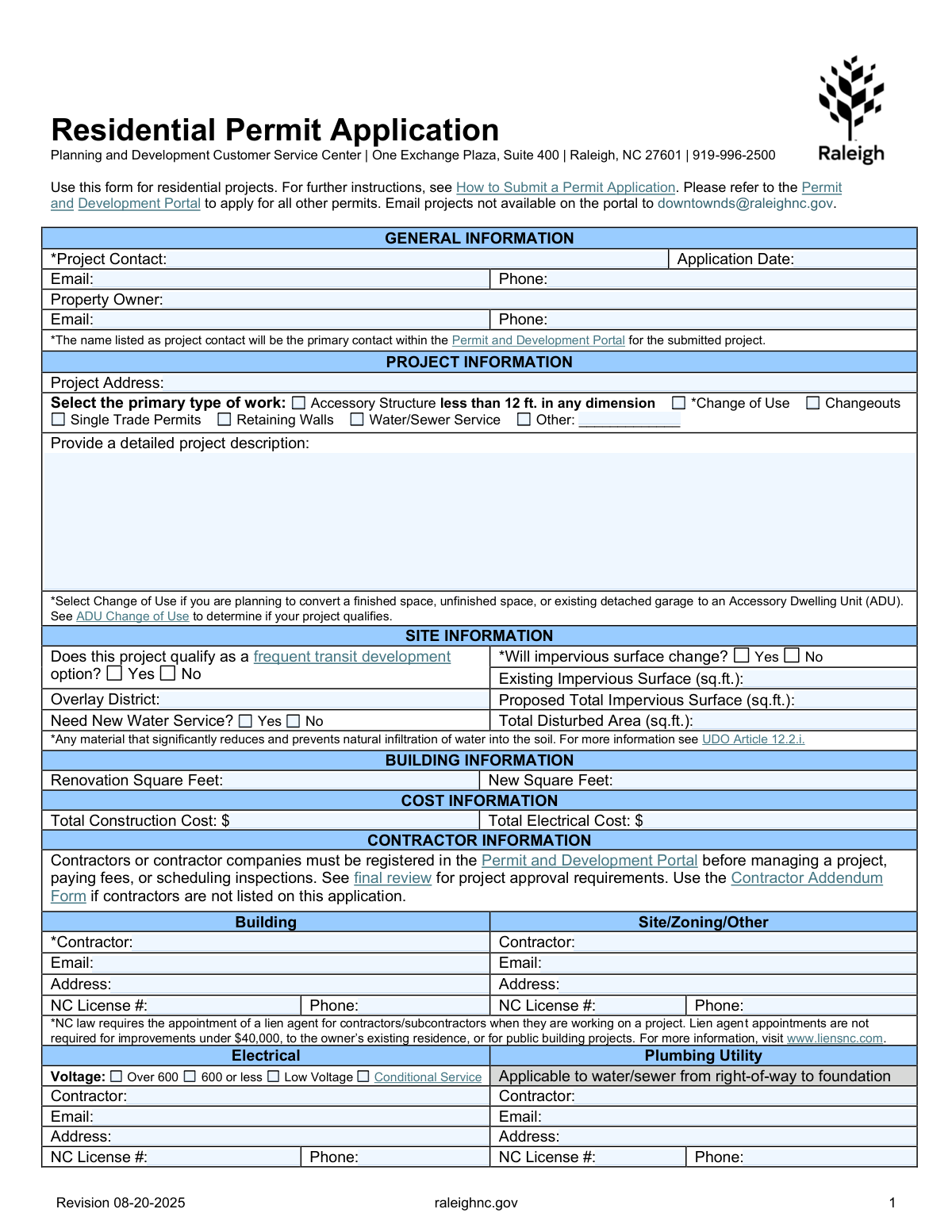
The City of Raleigh Residential Permit Application is an official municipal form used to apply for permits for residential construction and related work (such as accessory structures, change of use, changeouts, single-trade work, retaining walls, and water/sewer service). It collects key information about the project contact and owner, project scope and address, site impacts (including impervious surface and disturbed area), building square footage, estimated costs, and licensed contractor details across trades, plus optional utility meter/stub requests. Submitting accurate information is important because it supports zoning/building review, inspection authorization, and compliance with City of Raleigh and North Carolina legal requirements, and the application may be subject to public records disclosure. Today, this form can be filled out quickly and accurately using AI-powered services like Instafill.ai, which can also convert non-fillable PDF versions into interactive fillable forms.
Our AI automatically handles information lookup, data retrieval, formatting, and form filling.
It takes less than a minute to fill out Raleigh Residential Permit Application using our AI form filling.
Securely upload your data. Information is encrypted in transit and deleted immediately after the form is filled out.
Form specifications
| Form name: | City of Raleigh Residential Permit Application (Revision 08-20-2025) |
| Number of pages: | 2 |
| Language: | English |
| Categories: | building permit forms, Raleigh city forms, residential permit forms, North Carolina forms |
Instafill Demo: filling out a legal form in seconds
How to Fill Out Raleigh Residential Permit Application Online for Free in 2026
Are you looking to fill out a RALEIGH RESIDENTIAL PERMIT APPLICATION form online quickly and accurately? Instafill.ai offers the #1 AI-powered PDF filling software of 2026, allowing you to complete your RALEIGH RESIDENTIAL PERMIT APPLICATION form in just 37 seconds or less.
Follow these steps to fill out your RALEIGH RESIDENTIAL PERMIT APPLICATION form online using Instafill.ai:
- 1 Go to Instafill.ai and upload the City of Raleigh Residential Permit Application PDF (or select it from the form library if available).
- 2 Let the AI detect and map the form fields, then confirm the form version/revision and the jurisdiction (City of Raleigh, NC).
- 3 Enter General Information: project contact details, application date, and property owner contact information.
- 4 Complete Project and Site Information: project address, primary work type, detailed description, transit option eligibility, impervious surface details, overlay district, disturbed area, and new water service needs.
- 5 Fill Building and Cost Information: renovation/new square footage and total construction/electrical cost estimates.
- 6 Add Contractor and Trade Details: building/site contractor info, electrical/plumbing/mechanical contractors, license numbers, voltage/heating/AC details, and changeout questions; include utility meter/stub sections if applicable.
- 7 Review for completeness and consistency, attach any required supporting documents, then e-sign (applicant name/signature/date) and download or submit through the Permit and Development Portal as instructed.
Our AI-powered system ensures each field is filled out correctly, reducing errors and saving you time.
Why Choose Instafill.ai for Your Fillable Raleigh Residential Permit Application Form?
Speed
Complete your Raleigh Residential Permit Application in as little as 37 seconds.
Up-to-Date
Always use the latest 2026 Raleigh Residential Permit Application form version.
Cost-effective
No need to hire expensive lawyers.
Accuracy
Our AI performs 10 compliance checks to ensure your form is error-free.
Security
Your personal information is protected with bank-level encryption.
Frequently Asked Questions About Form Raleigh Residential Permit Application
This form is used to apply for permits for residential projects in Raleigh (e.g., accessory structures, changeouts, retaining walls, water/sewer service, and other residential work). It helps the City collect project, site, contractor, and utility details needed for review and inspections.
List the person who should receive all portal notifications and be the main point of contact for the project. The form notes that the Project Contact becomes the primary contact within the Permit and Development Portal.
Use the Permit and Development Portal for permits that are available there, and only email projects that are not available on the portal to [email protected]. The form also directs you to âHow to Submit a Permit Applicationâ for submission instructions.
Youâll need the Project Contactâs name, application date, email, and phone, plus the Property Ownerâs name, email, and phone. Make sure the contact details are accurate because they are used for official communication.
Select the option that best matches the main scope of your project (e.g., Single Trade Permits, Changeouts, Retaining Walls, Water/Sewer Service). If none fit, choose âOtherâ and clearly describe the work in the blank provided.
Select âChange of Useâ if you are converting a finished space, unfinished space, or an existing detached garage into an Accessory Dwelling Unit (ADU). The form advises reviewing âADU Change of Useâ to confirm whether your project qualifies.
Impervious surface is any material that significantly reduces or prevents water from infiltrating into the soil (the form references UDO Article 12.2.i). If impervious surface will change, answer âYesâ and provide both existing and proposed total impervious surface square footage.
Overlay District refers to any special zoning or regulatory overlay that applies to the property. If you know the overlay name/code for your address, enter it; if youâre unsure, you may need to confirm it through City zoning resources or the project review process.
Provide Renovation Square Feet for areas being remodeled and New Square Feet for any added construction. If your project has no renovation or no new construction, enter the applicable value(s) and leave non-applicable fields blank or as zero, consistent with your submission method.
Enter the overall construction cost for the project in Total Construction Cost, and the portion related specifically to electrical work in Total Electrical Cost. Use realistic totals because fees and review requirements may depend on project valuation.
Yesâcontractors or contractor companies must be registered in the Permit and Development Portal before they can manage a project, pay fees, or schedule inspections. If contractors are not listed on the application, the form instructs you to use the Contractor Addendum Form.
NC law requires appointing a lien agent for contractors/subcontractors on many projects, but it is not required for improvements under $40,000 to the ownerâs existing residence, or for public building projects. The form points to www.liensnc.com for details.
If the work is only an A/C unit or water heater replacement, answer the three changeout questions (same type, same size or smaller, same location). If the scope is replacement-only and you answer âNoâ to any of those questions, the form states that a tier one site plan is required.
This section is for establishing new water or sewer service at a parcel that has not previously been served. Indicate whether it will be a city-installed tap, provide a contact, choose meter type/size and service type (water/sewer/irrigation/split/other), and include the service address.
YesâAI tools can help reduce errors and save time by auto-filling fields from your project details and documents; services like Instafill.ai can auto-fill form fields accurately. To use Instafill.ai, upload the PDF, provide your project/contact/contractor details, review the suggested entries for accuracy, and export the completed form for submission; if the PDF is flat/non-fillable, Instafill.ai can convert it into an interactive fillable form first.
Compliance Raleigh Residential Permit Application
Validation Checks by Instafill.ai
1
Required primary contact fields are present (Project Contact Name/Email/Phone)
Validates that Project Contact Name, Project Contact Email, and Project Contact Phone are all provided because the form states the project contact is the primary portal contact. This ensures the City can send notices, corrections, and approvals to a reachable person. If any are missing, the submission should be rejected or placed in an incomplete status with a request to provide the missing contact details.
2
Application Date format and recency validation
Checks that Application Date is a valid date in an accepted format (e.g., MM/DD/YYYY) and is not an impossible date. It should also be validated as not unreasonably in the future (beyond a small tolerance) to prevent data entry errors that can affect review timelines and recordkeeping. If invalid, the system should block submission and prompt the applicant to correct the date.
3
Email address format validation across all email fields
Validates that every provided email (project contact, property owner, contractors, tap contact, applicant) matches a standard email pattern and does not contain spaces or invalid characters. Correct email formatting is critical because the portal and staff communications rely on email delivery for review comments and approvals. If an email fails validation, the user should be required to correct it before submission (or the specific section should be marked incomplete if optional).
4
Phone number format validation (US/NC) across all phone fields
Ensures all phone numbers (project contact, owner, contractors, tap contact, applicant) contain 10 digits (optionally allowing country code +1) and valid separators, and rejects extensions embedded in the main number field unless explicitly supported. This prevents unreachable contacts and reduces staff time spent correcting contact information. If validation fails, the system should require correction and optionally provide a separate extension field if needed.
5
Project Address completeness and service-area consistency
Checks that Project Address includes at minimum street number, street name, city, and ZIP (and unit/suite when applicable), and that it is within Raleigh, NC (or the Cityâs permitted jurisdiction) when required by the permitting workflow. Address completeness is essential for zoning checks, inspections, and linking to parcel records. If the address is incomplete or outside the allowed jurisdiction, the submission should be stopped or routed to an exception workflow.
6
Exactly one Primary Type of Work selection (or valid multi-select rule)
Validates that the applicant selects the primary type of work in a way consistent with the formâs intent (typically exactly one primary option). If the system allows multiple selections, it should enforce a rule such as 'one primary + optional secondary' and prevent contradictory combinations. If the selection is missing or violates the rule, the application should be flagged as incomplete and the applicant prompted to correct the work type selection.
7
‘Other’ work type requires a non-empty specification
If the Primary Work Type 'Other' is selected, validates that the 'Primary Work Type â Other' text field is populated with a meaningful description (not just punctuation or whitespace). This is important for correct routing to reviewers and determining required submittals. If missing, the system should block submission and request the applicant to specify the work type.
8
Detailed Project Description minimum content validation
Ensures the Detailed Project Description is provided and meets a minimum quality threshold (e.g., minimum character count and not only generic text like 'remodel'). A sufficiently detailed scope is necessary to determine plan requirements, inspections, and applicable codes (e.g., ADU change of use guidance). If the description is too short or empty, the submission should be returned for clarification.
9
Impervious surface change logic and numeric requirements
Validates that exactly one of 'Will impervious surface change? Yes/No' is selected. If 'Yes' is selected, Existing Impervious Surface and Proposed Total Impervious Surface must be provided as non-negative numeric values (sq. ft.), and Proposed should not equal Existing unless the applicant explains why a 'change' was selected. If the logic fails, the system should require correction because stormwater and UDO checks depend on these values.
10
Disturbed area numeric validation and reasonableness check
Checks that Total Disturbed Area (sq. ft.) is a non-negative number and is not unreasonably large relative to typical parcel sizes (optionally cross-checked against parcel area if available). Disturbed area drives erosion control and site plan requirements, so incorrect values can cause compliance issues. If invalid or out of range, the system should flag the entry and require confirmation/correction.
11
Square footage fields numeric validation and dependency on project type
Validates Renovation Square Feet and New Square Feet are numeric, non-negative, and not both blank when the selected work type implies building scope (e.g., change of use, accessory structure, retaining wall may have different expectations). This helps reviewers understand the scale of work and apply correct fees and plan review thresholds. If values are missing when required by the chosen work type, the system should prompt for completion or an explicit '0' where appropriate.
12
Cost fields currency validation and internal consistency
Ensures Total Construction Cost and Total Electrical Cost are valid currency amounts (non-negative, limited to two decimals, no currency symbols if not allowed). It should also enforce that Total Electrical Cost is not greater than Total Construction Cost unless the applicant confirms a special case, because that often indicates data entry error. If validation fails, the system should block submission or require an attestation/correction.
13
Contractor license number format and presence when contractor info is provided
Validates that any provided NC License # fields follow an expected pattern (numeric and/or alphanumeric per NC licensing conventions) and are not obviously invalid (e.g., too short). If a contractor name is entered for a trade section, the corresponding NC License # should be required (unless the workflow explicitly allows 'TBD' with an addendum). If the license is missing/invalid, the system should flag the contractor section and prevent approval routing until corrected.
14
Electrical voltage selection is mutually exclusive and required when electrical contractor is listed
Checks that only one electrical voltage option is selected (Over 600, 600 or less, Low Voltage, Conditional Service) to avoid contradictory service classification. If an Electrical Contractor is provided or the project indicates electrical scope (e.g., Single Trade Permits with electrical), a voltage selection should be required for correct review and inspection setup. If multiple or none are selected when required, the system should require correction.
15
Mechanical ‘Other’ and Heating Type ‘Other’ require specification; AC size numeric validation
If Mechanical Work Includes 'Other' is checked, validates that Mechanical Work - Other (specify) is populated with a meaningful description. If Type of Heating 'Other' is checked, validates that Other Heating Type is provided; additionally validates Air Conditioning Size (tons) is numeric and positive when A/C work is indicated. If these validations fail, the system should prompt for the missing details because equipment type and capacity affect code compliance and inspection requirements.
16
Plumbing/Mechanical changeout tier-one site plan trigger validation
Validates that for changeout-only scopes, the three changeout questions (same type, same size or smaller, same location) are answered consistently (exactly one of Yes/No per question). If any answer is 'No', the system should flag that a tier one site plan is required and either require an attachment indicator or route the application to a workflow step requesting the site plan. If unanswered or inconsistent, the submission should be marked incomplete to prevent incorrect plan review routing.
Common Mistakes in Completing Raleigh Residential Permit Application
Applicants often put the property owner here by default, or list a contractor who wonât actually manage portal messages, even though the form states the Project Contact becomes the primary contact in the Permit and Development Portal. This can cause missed correction notices, delayed responses, and the application being placed on hold. Use the person who will reliably monitor email/portal tasks and respond to City requests, and ensure their email/phone are accurate. AI-powered form filling tools like Instafill.ai can help by flagging missing required contact fields and validating email/phone formats before submission.
People frequently forget the Application Date, enter a future date, or use a nonstandard format that doesnât match what reviewers expect. This can create intake confusion, misfiled submissions, or requests for clarificationâespecially when multiple revisions are exchanged by email. Enter the actual submission date in a clear format (e.g., MM/DD/YYYY) and keep it consistent across any addenda. Instafill.ai can auto-format dates and prevent invalid or future dates from being entered.
A common issue is providing only a street name/number without unit/suite, or omitting Raleigh/ZIP, or using a mailing address instead of the job site address. Address mismatches can delay routing, cause incorrect zoning/overlay checks, and lead to inspection scheduling problems. Enter the full site address exactly as it should appear on the permit (including unit number and ZIP) and verify it matches the Cityâs parcel/address records. Instafill.ai can standardize address formatting and reduce typos by validating components like ZIP and unit fields.
Applicants often choose a general option like âOtherâ or âSingle Trade Permitsâ when the project is actually a Change of Use (notably ADU conversions), or they select âChangeoutsâ for work that includes layout changes or new scope. The wrong selection can trigger the wrong review path, missing required documents (e.g., site plan tiers), and re-submittal requests. Carefully match the primary work type to the projectâs true scope; if converting space to an ADU, select âChange of Useâ and follow the referenced ADU guidance. Instafill.ai can help by prompting follow-up questions based on the selected work type and warning when the description conflicts with the checkbox choice.
Many submissions include short descriptions like âremodel kitchenâ or âreplace HVAC,â without specifying what is being changed, where, and to what extent. Reviewers may be unable to determine plan requirements, impervious impacts, or whether the work is a changeout vs. new installation, leading to correction cycles and delays. Provide a clear scope: what areas are affected, key dimensions/square footage, major materials, and which trades are involved (building/electrical/plumbing/mechanical). Instafill.ai can help by using structured prompts to ensure the description includes the details reviewers typically require.
Applicants often check âWill impervious surface change? Yesâ but leave Existing/Proposed impervious square footage blank, or they check âNoâ even though theyâre adding a patio, driveway, shed pad, or other hard surface. This can cause zoning/stormwater review issues and requests for revised calculations, delaying approval. If impervious will change, provide both existing and proposed totals in square feet and ensure they align with the project description and plans. Instafill.ai can enforce conditional logic (requiring the square-foot fields when âYesâ is selected) and help format numeric entries correctly.
People frequently skip the Overlay District field or enter an informal neighborhood name rather than the applicable overlay code/name. Overlay districts can impose additional rules (design, stormwater, historic, etc.), and missing/incorrect overlay information can lead to incomplete review or later corrections. Look up the propertyâs overlay district using the Cityâs mapping/parcel tools and enter the official overlay designation. Instafill.ai can reduce this error by reminding users to verify overlay information and by keeping entries consistent across revisions.
A common mistake is swapping Renovation Square Feet and New Square Feet, entering âN/Aâ or â1,200 sq ftâ instead of a clean number, or leaving them blank when the scope clearly includes area changes. Incorrect square footage can affect plan review requirements, fee calculations, and inspection expectations. Enter numeric values only (no words/units) and ensure renovation area reflects existing space being altered while new square feet reflects additions. Instafill.ai can auto-strip units, enforce numeric-only input, and flag mismatches between the description and the square footage provided.
Applicants often underestimate, omit, or put placeholders (like $1) to move forward, especially when they donât have final bids. Cost fields are used for fee assessment and sometimes for determining documentation requirements; unrealistic values can trigger follow-up questions or corrections. Provide good-faith totals that reflect labor and materials for the full scope, and separate electrical cost appropriately when electrical work is included. Instafill.ai can help by validating that costs are numeric, nonnegative, and reasonable relative to the selected work types and square footage.
Submissions frequently omit NC License numbers, list the wrong contractor under the wrong trade (e.g., plumber listed as mechanical), or provide a company name that doesnât match the license record. The form also notes contractors must be registered in the Permit and Development Portal; if they arenât, the project canât be managed properly and approval may be delayed. Ensure each trade section lists the correct contractor, complete contact details, and the exact NC license number as issued, and confirm portal registration before submission. Instafill.ai can help by formatting phone numbers, checking for missing license fields, and keeping contractor details consistent across sections.
Applicants often mark âYesâ to all changeout questions without verifying type/size/location, or they leave the questions blank even when the work is only an A/C unit or water heater replacement. The form states that if any answer is âNoâ for replacement-only scopes, a tier one site plan is requiredâincorrect answers can lead to missing required documents or later reclassification of the review. Confirm whether the replacement is truly the same type, same size or smaller, and in the same location, and answer each question accurately. Instafill.ai can guide users through these conditional requirements and warn when answers conflict with the project description.
Saved over 80 hours a year
âI was never sure if my IRS forms like W-9 were filled correctly. Now, I can complete the forms accurately without any external help.â
Kevin Martin Green
Your data stays secure with advanced protection from Instafill and our subprocessors

Robust compliance program
Transparent business model
Youâre not the product. You always know where your data is and what it is processed for.
ISO 27001, HIPAA, and GDPR
Our subprocesses adhere to multiple compliance standards, including but not limited to ISO 27001, HIPAA, and GDPR.
Security & privacy by design
We consider security and privacy from the initial design phase of any new service or functionality. Itâs not an afterthought, itâs built-in, including support for two-factor authentication (2FA) to further protect your account.
Fill out Raleigh Residential Permit Application with Instafill.ai
Worried about filling PDFs wrong? Instafill securely fills city-of-raleigh-residential-permit-application-revision-08-20-2025 forms, ensuring each field is accurate.