
Yes! You can use AI to fill out Application Schedule 1: Designer Information (City of Toronto Building Permit Application)
Don't type 51 fields by hand. Tell our AI about yourself, or upload a document you already have, and it fills every field in seconds. You check it, then download, print or sign.
The AI does the filling. You just check it.
No typing into boxes, nothing to install.
What this form asks for
The AI fills all of it, from your answers or your documents.
The AI checks your answers before you download
15 checks built for this form, so a wrong date or a missing answer is caught before anyone else sees it.
Validates that the project location includes, at minimum, Street Number, Street Name, City/Town, and Postal Code, since these are essential to identify the site and route the application to the correct jurisdiction. Unit/Suite and Lot/Concession should be required when applicable (e.g., multi-tenant buildings or rural properties). If any required address component is missing, the submission should be rejected or flagged as incomplete because the project cannot be reliably located.
Checks that all postal code fields (Project and Contact) match the Canadian postal code pattern (e.g., 'A1A 1A1' with optional space) and contain valid characters (letters excluding D, F, I, O, Q, U in the first position if enforcing strict rules). This prevents undeliverable mail and reduces manual correction. If the format fails, the system should prompt the applicant to correct the postal code before submission.
Validates that 'Plan No./Other Description' is present when the project cannot be uniquely identified by civic address alone (e.g., new subdivisions, vacant lots, or rural lots). This ensures reviewers can match the application to the correct parcel or planning reference. If missing in such cases, the submission should be flagged for follow-up or blocked until a plan/description is provided.
Ensures the individual who reviews and takes responsibility for design activities has a complete identity record: First Name and Last Name are required, and Firm is required when the declaration indicates responsibility on behalf of a registered firm. This is important for accountability and audit trails. If incomplete, the form should not proceed because responsibility cannot be assigned to a specific person/entity.
Validates that the contact mailing address includes Street Number, Street Name, Municipality, Province, and Postal Code, and that Province is a valid Canadian province/territory value. This supports official correspondence and compliance notices. If the address is incomplete or province is invalid, the submission should be rejected or routed to an exception queue for correction.
Checks that Telephone No., Mobile No., and Fax No. (if provided) conform to expected North American numbering formats (e.g., 10 digits with optional country code +1, allowing separators). At least one reachable phone number (telephone or mobile) should be required to enable timely plan review communication. If numbers are malformed or no primary phone is provided, the system should require correction before acceptance.
And 9 more checks
- Email Address Format and Deliverability Check
- Design Activities Selection Required (At Least One Category)
- Design Activities vs. Description of Designer’s Work Consistency
- Designer Declaration Option Exclusivity (Exactly One Declaration Path)
- BCIN Format and Presence Based on Declaration Type
- Exemption Basis Required When Exemption Declaration Selected
- Printed Name Required in Declaration and Matches Contact Person
- Signature Presence and Signature/Date Pairing
- Declaration Date Format and Reasonableness (YYYY-MM-DD)
Let AI fill out your Schedule 1: Designer Information (14-0070)
No typing. Every field filled in seconds, checked, ready to sign.
How to Fill Out Schedule 1: Designer Information (14-0070) Online for Free in 2026
What the AI walks you through.
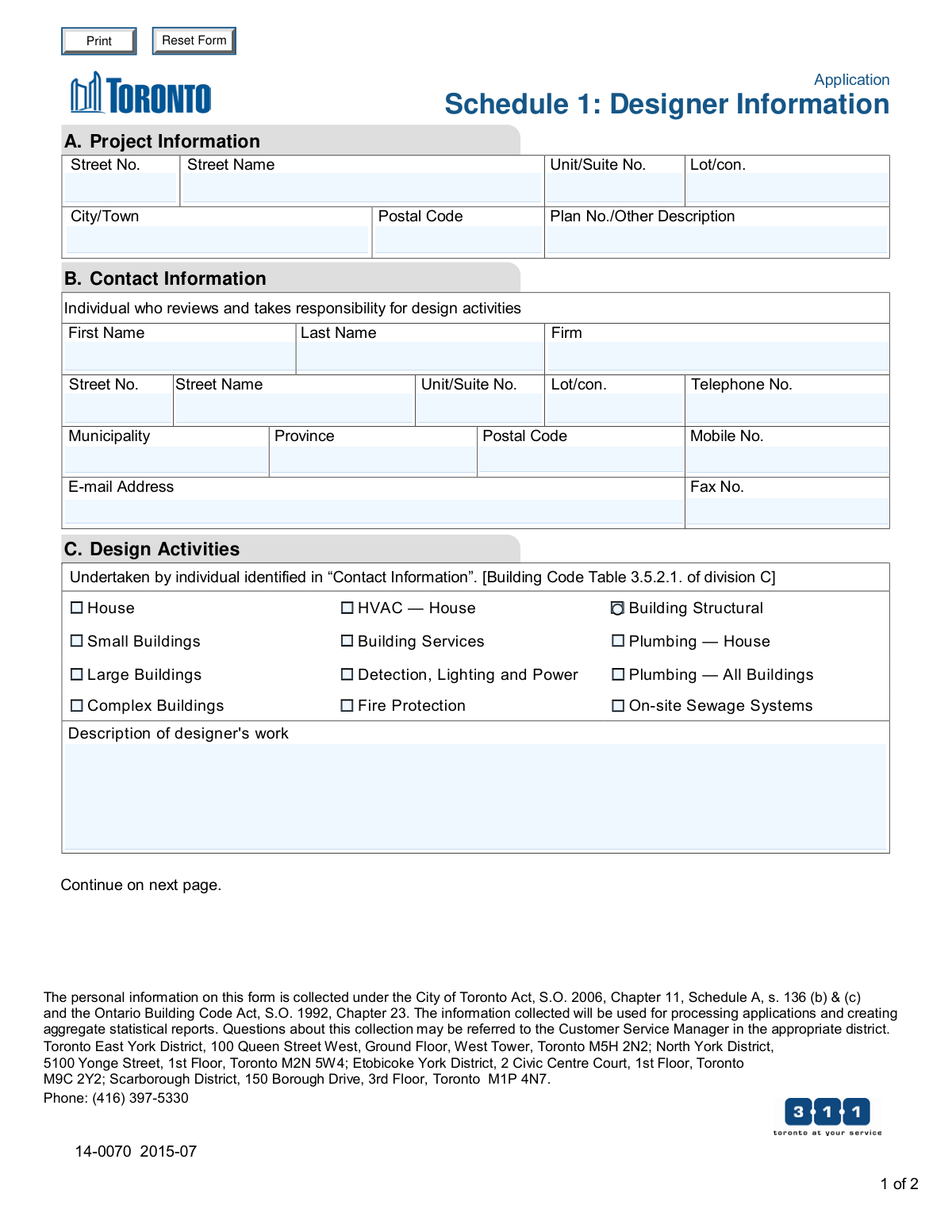
- Enter the project information in Section A (address details, unit/suite, lot/concession, city/town, postal code, and plan/description).
- Complete Section B with the contact information for the individual who reviews and takes responsibility for the design activities (name, firm, address, phone/mobile, email, fax).
- In Section C, select the applicable design activity categories (e.g., House, Small Buildings, Large Buildings, Complex Buildings, HVAC, Structural, Plumbing, Fire Protection, On-site Sewage Systems) and describe the designer’s work.
- Go to Section D (Designer Declaration) and choose the correct declaration option: responsible on behalf of a registered firm, responsible as an “other designer,” or exempt from registration/qualification requirements.
- Provide the required identification details (Individual BCIN and, if applicable, Firm BCIN) and, if claiming an exemption, state the basis for exemption.
- Review the certifications, then sign and date the form and print the declarant’s name (ensuring the submission is made with the firm’s knowledge/consent where applicable).
Common Mistakes in Completing Schedule 1: Designer Information (14-0070)
The ones the AI is built to catch.
Leaving Project Information incomplete (address/lot/plan details)
Mixing up Municipality vs. City/Town fields
Incorrect or inconsistent postal code formatting
Providing the wrong 'responsible individual' in Contact Information
Missing or invalid phone/email details (or using shared inboxes without monitoring)
Selecting the wrong Design Activities categories (or selecting too many)
Leaving 'Description of designer’s work' blank or too vague
Not choosing exactly one option in the Designer Declaration
BCIN errors: missing, transposed digits, or wrong BCIN type (individual vs. firm)
Claiming an exemption without stating a valid 'Basis for exemption'
Signature/date issues (missing signature, wrong date format, or undated declaration)
Completing Schedule 1 when it is not required (or omitting it when it is required)
Frequently Asked Questions About Schedule 1: Designer Information (14-0070)
Is it really free for 7 days?
Can I fill other forms too?
How do I cancel?
How does the AI fill out Schedule 1: Designer Information (14-0070)?
What happens to my information?
How complex is Schedule 1: Designer Information (14-0070) to fill out?
What is “Application Schedule 1: Designer Information” used for?
Who needs to complete Schedule 1?
Do architects or professional engineers need to fill out Schedule 1?
What project information is required in Section A?
Who should be listed in Section B (Contact Information)?
What are “Design Activities” in Section C and how do I choose them?
What should I write in “Description of designer’s work”?
What is a BCIN and where do I enter it?
In Section D, which declaration option should I select?
What does “basis for exemption” mean and when do I fill it in?
Do I need the firm’s consent to submit this schedule?
What signatures and dates are required?
How is my personal information used and who can I contact with privacy questions?
Where do I submit Schedule 1 and how long does it take to process?
Get your Schedule 1: Designer Information (14-0070) filled out by AI
$0 today. Cancel before Nov 1 and you pay nothing.
Other forms like this one
building permit forms: County of Louisa Department of Community Development – New Non-Residential Building Permit Package, Fauquier County Department of Community Development – Building Trades Permit or Amendment to Existing Permit Application (Residential or Commercial), City of Manchester Application for Plan Review and Building Permit
permit application forms: Fauquier County Department of Community Development – Building Trades Permit or Amendment to Existing Permit Application (Residential or Commercial), Application for Mechanical Permit, City of Raleigh Residential Permit Application (Revision 08-20-2025), KC Water Industrial User Wastewater Discharge Permit Application, State of Connecticut Form R-229, Application for a Non-Commercial Learner Permit and/or Driver License, Form D1, Driver License, Permit or Identification Card Transaction Application, City of Manchester Application for Plan Review and Building Permit, Form DEP 4015, Application for Construction Permit, Onsite Sewage Treatment and Disposal System (OSTDS), Form DEP 4015, Application for Construction Permit for an Onsite Sewage Treatment and Disposal System (OSTDS), Form DL-180, Pennsylvania Non-Commercial Learner's Permit Application, International Driving Permit – IDP / Inter-American Driving Permit - IADP Application, Form 478, Application for Alaska Driver License, Permit or Identification Card, City of Fremont Class II, III, IV, and V Special Event Permit Application Form, Form OLE_PH2, Residence Permit Application for the Spouse of a Finnish Citizen
permit forms: County of Louisa Department of Community Development – New Non-Residential Building Permit Package, Fauquier County Department of Community Development – Building Trades Permit or Amendment to Existing Permit Application (Residential or Commercial), Application for Mechanical Permit, Document Checklist for a Study Permit (IMM 5483), City of Raleigh Residential Permit Application (Revision 08-20-2025), KC Water Industrial User Wastewater Discharge Permit Application, State of Connecticut Form R-229, Application for a Non-Commercial Learner Permit and/or Driver License, Form D1, Driver License, Permit or Identification Card Transaction Application, City of Manchester Application for Plan Review and Building Permit, Form DEP 4015, Application for Construction Permit, Onsite Sewage Treatment and Disposal System (OSTDS), Form DEP 4015, Application for Construction Permit for an Onsite Sewage Treatment and Disposal System (OSTDS), Motion to Permit Proceeding (by a person not included in Acknowledgment or Court Decision), Form DL-180, Pennsylvania Non-Commercial Learner's Permit Application, International Driving Permit – IDP / Inter-American Driving Permit - IADP Application, Form 478, Application for Alaska Driver License, Permit or Identification Card, City of Fremont Class II, III, IV, and V Special Event Permit Application Form, AO 88B, Subpoena to Produce Documents, Information, or Objects or to Permit Inspection of Premises in a Civil Action
city permit forms: City of Manchester Application for Plan Review and Building Permit, City of Raleigh Residential Permit Application (Revision 08-20-2025), City of Fremont Class II, III, IV, and V Special Event Permit Application Form
ERM forms: REQUEST FOR OWNERSHIP INFORMATION—ERM-14 FORM, Form I-90, Application to Replace Permanent Resident Card, Form I-485, Application to Register Permanent Residence, Form SS-8, Determination of Worker Status, Form CMS-1763, Request for Termination of Medicare Coverage, Form I-212, Application for Permission to Reapply, Form I-192, Application for Advance Permission to Enter as a Nonimmigrant, Form W-8IMY (Rev. October 2021), Certificate of Foreign Intermediary, Foreign Flow-Through Entity, or Certain U.S. Branches for United States Tax Withholding and Reporting, County of Louisa Department of Community Development – New Non-Residential Building Permit Package, HR-Pol-Rec&Res-04 Employment Application Form (Recruitment of Permanent Employees), Fauquier County Department of Community Development – Building Trades Permit or Amendment to Existing Permit Application (Residential or Commercial), Belastingdienst VPB 075 – Verzoek fiscale eenheid Vennootschapsbelasting (Deel A – Gegevens moedermaatschappij), ROTC Cadet Academic Plan / Degree and Credit Hour Worksheet (Student Identification, Term-by-Term Courses, GPA Summary, and Completion Certification), Health Assessment – Ontario Health atHome (Fixing Long-Term Care Act, 2021) (Form 4768-69E), Health Assessment - Ontario Health atHome (Fixing Long-Term Care Act, 2021) — Form 4768-69E, Washington Single-Family Property Term Lease & Security Deposit Receipt (WA Single-Family Lease) | Revised 10/08/2025, Application for Mechanical Permit, Pennsylvania Department of State — Certificate of Termination (Domestic Limited Liability Company) (15 Pa.C.S. § 8872(f)) (DSCB:15-8872(f)), Document Checklist for a Study Permit (IMM 5483), City of Raleigh Residential Permit Application (Revision 08-20-2025)
Let AI fill out your Schedule 1: Designer Information (14-0070)
Your trial starts once a card is added. You pay nothing before Nov 1.
Our AI already knows this form, all 51 fields of it. Skip the typing: tell it about yourself, or upload what you have, and it fills the whole form in seconds.
- AI fills every field on both pages, checkboxes included
- No typing into boxes: answer a few questions, or upload a document you already have, an old copy of this form, a photo of a document
- The AI checks the answers; you review and change anything before you download
- Download the finished PDF, print it, or sign it online
- Encrypted, and never used to train AI
Cancel before Nov 1 and you pay nothing.
A card is needed to start the trial. Cancel in two clicks from your account.
Terms · Privacy